Physical Address
304 North Cardinal St.
Dorchester Center, MA 02124
Physical Address
304 North Cardinal St.
Dorchester Center, MA 02124

We pick the 9 best Samsung gaming monitors in 2026. From the 24-inch G3 to the 49-inch OLED G9, find the perfect Odyssey display with our comprehensive buying guide.
You sit down to play, and the monitor you chose makes or breaks the session. Samsung’s Odyssey lineup now spans nine distinct models, ranging from a 24-inch FHD speedster to a 49-inch QD-OLED super-ultrawide that costs more than most GPUs. It is easy to get lost in the alphabet soup of G3, G4, G5, G6, G9 and the various panel types (VA, IPS, QD-OLED). Some are curved, some are flat. Some push 360Hz; others top out at 144Hz.
We sorted through all of them to identify which Samsung gaming monitor actually suits which kind of player. The right pick depends on the games you play, the space on your desk, and how seriously you take pixel response versus raw resolution. The best Samsung gaming monitors in 2026 cover every one of those scenarios, and we have a clear winner for each.
Here are our picks, from the most universally capable down to the focused specialist.
TL;DR: The Samsung Odyssey OLED G6 (27" 360Hz) is the one for competitive players who want both speed and image quality. The Samsung Odyssey OLED G5 (27" 180Hz) delivers nearly the same OLED magic at a more attainable tier. The Samsung Odyssey G5 G50F (27" QHD IPS) is the best all-rounder for mixed use. The Samsung Odyssey G3 (24" FHD 180Hz) is the entry-level pick with surprising ergonomics.
| # | Product | Size / Resolution | Refresh Rate | Panel Type | Best For |
|---|---|---|---|---|---|
| 1 | Samsung Odyssey OLED G6 (LS27DG602SNXZA) | 27" QHD (2560×1440) | 360Hz | QD-OLED | Esports and high-refresh OLED lovers |
| 2 | Samsung Odyssey OLED G9 (LS49DG910SNXZA) | 49" Dual QHD (5120×1440) | 144Hz | QD-OLED | Immersive sim racing and productivity |
| 3 | Samsung Odyssey OLED G5 (LS27FG500SNXZA) | 27" QHD (2560×1440) | 180Hz | QD-OLED | Gamers wanting OLED without the extreme speed premium |
| 4 | Samsung Odyssey G9 G95C (LS49CG950ENXZA) | 49" DQHD (5120×1440) | 240Hz | VA (1000R) | High-refresh ultrawide at a lower entry point than OLED |
| 5 | Samsung Odyssey G55C (LS32CG550ENXZA) | 32" QHD (2560×1440) | 165Hz | VA (1000R) | Curved immersion for RPG and open-world players |
| 6 | Samsung Odyssey G5 G50F 32" (LS32FG502ENXZA) | 32" QHD (2560×1440) | 180Hz | IPS | Large flat-screen gaming with wide viewing angles |
| 7 | Samsung Odyssey G5 G50F 27" (LS27FG502ENXZA) | 27" QHD (2560×1440) | 180Hz | IPS | The sweet spot for balanced console/PC gaming |
| 8 | Samsung Odyssey G4 (LS25BG402ENXGO) | 25" FHD (1920×1080) | 240Hz | IPS | Competitive FPS on a smaller, sharper budget |
| 9 | Samsung Odyssey G3 G30D (LS24DG302ENXZA) | 24" FHD (1920×1080) | 180Hz | VA | Entry-level gaming with a fully adjustable stand |
Pros
Cons
Best for
Competitive gamers who want OLED image quality and the highest possible refresh rate in a 27-inch QHD format.
Check current price on Amazon →
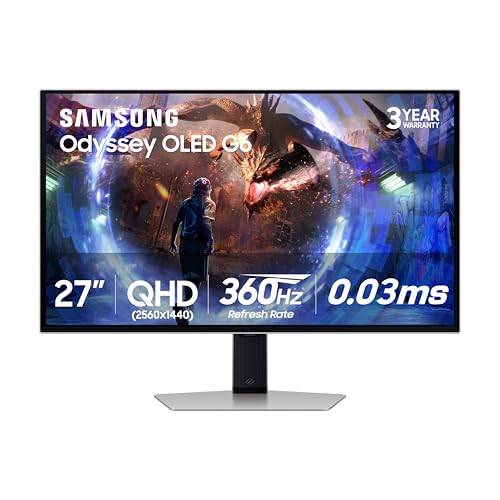
This is the monitor you buy when you refuse to compromise on motion clarity or picture depth. The 360Hz panel is genuinely noticeable coming from a 165Hz or 240Hz display. CS2 and Valorant feel almost telepathic. But unlike typical high-refresh TN or IPS panels, the QD-OLED gives you perfect black levels and a color gamut that covers 99 percent of DCI-P3. The Glare Free coating is a welcome addition for rooms with windows.
Samsung’s burn-in countermeasures are the most comprehensive we have seen on a non-professional OLED monitor. The Dynamic Cooling System uses a pulsating heat pipe to pull heat away from the panel, and the thermal modulation algorithm predicts surface temperatures to dim brightness before damage occurs. Logo and taskbar detection further protect static elements. The monitor also includes a screen saver that kicks in after ten minutes of inactivity. For long-session players, this is the OLED to trust.
The one physical downside is the stand. It lets you adjust height but does not swivel or pivot. You will likely want a VESA arm to get the full range of motion. That aside, the Odyssey OLED G6 is the most impressive Samsung gaming monitor for anyone chasing both speed and spectacle.

Pros
Cons
Best for
Racing sim enthusiasts and productivity power users who want a single screen that replaces two 27-inch QHD displays.
Check current price on Amazon →
The OLED G9 takes the same QD-OLED panel technology from the G6 and stretches it across 49 inches at a 32:9 aspect ratio. In iRacing or Assetto Corsa, the panoramic view is transformative. You see the apex of corners in your peripheral vision without turning your head, and there is no backlight bleed in dark tunnels because the pixels turn off completely. The 144Hz refresh rate is more than enough for cockpit games where frame rates in the 120s are the norm.
Burn-in protection mirrors the G6: thermal modulation, logo detection, and an automatic screen saver. The stand is better equipped here, offering both tilt and height adjustment. If you use the monitor for productivity, Samsung’s Picture-in-Picture lets you run two input sources side by side at their native resolution.
The main trade-off is that 144Hz feels dated if you also play fast-paced shooters. For that, you would pair this with a smaller high-refresh monitor, but that defeats the purpose of a single giant screen. If you prioritize immersion and multitasking over raw frame rates, this is the best Samsung gaming monitor for your setup.

Pros
Cons
Best for
Gamers who want the contrast and color of QD-OLED but do not need 360Hz and want to avoid the top-tier price.
Check current price on Amazon →
The Odyssey OLED G5 shares the same 27-inch QD-OLED panel as the G6 but runs at a lower 180Hz refresh rate and uses a less aggressive cooling system. That matters because the passive thermal modulation still prevents burn-in but may lead to earlier brightness limiting during very long sessions. For most players, though, 180Hz is already faster than what their graphics card can push in demanding titles at QHD.
The color accuracy is Pantone Validated, reproducing over 2,100 colors. SDR content looks excellent out of the box. The Glare Free coating is the same as the G6, so bright-room use is just as comfortable. Input lag is imperceptible.
The biggest hit is the stand. It offers no height adjustment or tilt, so you will want to budget for a VESA arm. That puts the final setup cost closer to the G6. But if you are willing to mount it, the OLED G5 delivers 90 percent of the G6 experience in image quality at a lower price, making it a strong contender among the best Samsung gaming monitors for OLED-curious buyers.

Pros
Cons
Best for
Gamers who want a super-ultrawide with a very high refresh rate and do not need perfect black levels.
Check current price on Amazon →
The G95C is the non-OLED version of the 49-inch Odyssey. It uses a 1000R curved VA panel with a 240Hz refresh rate and DisplayHDR 1000 certification. In practice, that means brighter highlights than the OLED G9 in a well-lit room, but worse black levels (the panel cannot turn off individual pixels). The 240Hz refresh rate is a genuine advantage for shooters played at 5120×1440 resolution if your GPU can keep up.
The 1000R curve is aggressive enough that the edges of the screen feel like they are wrapping toward you. Samsung’s CoreSync lighting projects the on-screen colors onto the wall behind the monitor for additional immersion. Auto Source Switch+ is handy if you swap between a PC and a console.
The big catch is VA black smearing. In dimly lit game scenes, transitions from black to gray can leave a visible trail. It is less bothersome in bright games and at 240Hz, but if you play horror or atmospheric titles, the OLED G9 is worth the jump. The G95C is the best Samsung gaming monitor for ultrawide fans who prioritize raw speed over contrast.

Pros
Cons
Best for
RPG and open-world adventurers who want an immersive curved screen without stepping up to 49 inches.
Check current price on Amazon →
The G55C feels made for games like The Witcher 3, Elden Ring, or Cyberpunk 2077. The 1000R curve and 32-inch size create a genuinely room-filling image. Colors pop nicely with HDR10 support, though the VA panel cannot match OLED highlights. The 165Hz refresh rate is enough to keep camera movement smooth, and QHD means you do not need a top-tier GPU to hit usable frame rates.
Samsung includes Eye Saver Mode for long sessions and a flicker-free backlight to reduce fatigue. The stand only tilts, so consider a desk mount for height adjustment. The coating is described as glare-free, and it works passably in moderate lighting.
The main weakness is visible dark-level smearing. In a game like Metro Exodus, flashlight pans can show a trailing blur behind dark objects. This is a VA trait and not unique to Samsung, but IPS and OLED alternatives handle it better. If you play mostly bright or well-lit games and want a big curve, the G55C is one of the better values among the best Samsung gaming monitors.

Pros
Cons
Best for
Gamers who want a large, flat screen with accurate color for both gaming and content work.
Check current price on Amazon →
This 32-inch version of the G50F is the IPS alternative to the curved VA G55C. The IPS panel gives you reliable color from any angle and crisp 178-degree viewing. If you share your screen with someone on the couch or use it for photo editing, this is the better choice. The 180Hz refresh rate is smooth, and the 1ms Gtg response is true, with no inverse ghosting artifacts.
The adjustable stand is a standout feature in this tier. You can raise the screen high enough for comfortable standing-desk use, rotate it to portrait mode for code or documents, and tilt it to eliminate reflections. Auto Source Switch+ detects when you turn on a laptop or console and jumps to that input automatically.
The 32-inch size at QHD has a pixel density of about 92 PPI, which is less sharp than the 27-inch version's 108 PPI. Text looks a little softer, but in games the difference is minor. The bigger trade-off is mediocre HDR: the panel hits around 350 nits peak, so HDR10 content lacks punch. For standard SDR gaming, this is a very capable screen. It works well as a daily driver for those who want a single large flat monitor.

Pros
Cons
Best for
The one-monitor solution for a gamer who also works or streams from the same desk.
Check current price on Amazon →
The 27-inch G50F is essentially the same monitor as the 32-inch above but with a denser pixel pitch that makes text and game details look sharper. At 2560×1440 on 27 inches, you get 108 PPI, which is close to the standard Retina threshold. For mixed use that includes spreadsheets or reading, this is the better size.
The IPS panel holds color consistency across the screen and does not have the gamma shifts that VA panels show from dead center. The stand is the same fully articulated unit, one of the best in Samsung’s mid-range lineup. Black Equalizer is effective for brightening dark scenes without washing out the rest of the image.
The 180Hz refresh rate pairs well with mid-range GPUs like an RTX 4060 or 7700 XT. You can run most competitive games at high frame rates and still have headroom for QHD. The lack of HDR impact is the main reason to look at the OLED alternatives, but for standard SDR gaming, this is the most balanced option across the entire list. It is our pick for the best Samsung gaming monitor for someone who only wants to buy one screen.

Pros
Cons
Best for
Competitive gamers on a limited budget who prioritize high frame rates over resolution.
Check current price on Amazon →
The Odyssey G4 is the budget performance king. It runs at 240Hz on an FHD IPS panel, which means you can hit those frame rates with a relatively modest GPU. The 25-inch size is compact, but the fully adjustable stand compensates by letting you dial in the perfect position. You can even rotate it to portrait mode.
Ultrawide Game View is a neat trick: it renders the screen at 21:9 with black bars, giving you a wider field of view in supported games. It is not as elegant as a true ultrawide, but it is useful for competitive shooters where peripheral awareness matters.
The panel itself is not going to wow anyone with contrast or brightness. It is a 250-300 nit IPS, adequate for a dim room but washed out in sunlight. The 2022 design also means no USB-C input or Auto Source Switch+. If you only play Overwatch, Fortnite, or Valorant and do not care about HDR or screen real estate, the G4 is the smart pick in the Samsung gaming monitor lineup.

Pros
Cons
Best for
First-time PC gamers or secondary monitors for a multi-screen setup.
Check current price on Amazon →
The G3 G30D is the most affordable option in Samsung’s current Odyssey lineup, but it does not skimp on the stand. It swivels, tilts, pivots, and adjusts height, which is rare at this tier. That alone makes it a much better experience than cheaper monitors with fixed stands.
The VA panel gives deeper blacks than the IPS G4, though viewing angles are narrower. If you sit directly in front of the screen, games look rich and contrasty. The 180Hz refresh rate is fast enough for most casual and competitive play, and the 1ms MPRT rating keeps motion reasonably clean.
Black Equalizer helps in dark games, and Virtual Aim Point overlays a crosshair for games that lack one. The borderless design is handy if you plan to run two or three of these side by side. The main letdown is the FHD resolution: at 24 inches it looks fine, but text and detail are noticeably softer than QHD. For a child's first gaming monitor, a budget build, or a second vertical screen, the G3 offers the most capable stand and solid performance among the best Samsung gaming monitors on a tight setup.
Before you pick one from the list above, it helps to understand the factors that separate a good experience from a frustrating one. Samsung’s Odyssey line covers four main panel types and several size/resolution combinations. Here is what to look for.
The most common question is whether to go 1080p, 1440p, or 4K. For gaming on a 24- or 25-inch monitor, FHD (1920×1080) is still a reasonable choice because the pixel density is about 92 PPI, which hides individual pixels at a normal viewing distance. At 27 inches and above, FHD looks soft and pixelated. QHD (2560×1440) is the sweet spot for 27- and 32-inch screens. It offers 108 to 92 PPI, respectively, which is sharp without demanding a flagship GPU. Dual QHD (5120×1440) is available on the 49-inch models and effectively replaces two 27-inch QHD monitors side by side. 4K (3840×2160) is absent from this lineup; Samsung’s Odyssey monitors focus on high refresh rates over raw resolution.
VA panels deliver high native contrast (around 3000:1) and deep blacks, making them good for dark-room gaming. The trade-off is slower pixel response in dark transitions, which creates a visible black smear in some scenes. IPS panels have lower contrast (1000:1) and some backlight glow in corners, but they offer faster response times, wider viewing angles, and more consistent color across the screen. QD-OLED combines the best of both worlds: perfect black levels, sub-millisecond response, and wide color gamut. The downsides are potential burn-in over many years and higher cost. Samsung’s OLED models all include thermal modulation and static-image detection to protect the panel.
A higher refresh rate reduces motion blur and makes camera movement feel smoother. The practical difference between 144Hz, 180Hz, 240Hz, and 360Hz is real but diminishing. If you play competitive shooters like Valorant or Apex Legends, aim for 240Hz or above. For everything else, 144-180Hz is plenty. Response time is less important than the panel type itself. A 1ms GtG rating on an IPS or OLED monitor means very little ghosting. MPRT (Moving Picture Response Time) ratings are lower and include backlight strobing, which can introduce flicker. Ignore MPRT numbers and look at GtG, or read real-world motion handling tests.
All Odyssey monitors support AMD FreeSync at some tier (FreeSync, FreeSync Premium, or FreeSync Premium Pro). NVIDIA G-Sync compatibility is listed on some models, particularly the G50F IPS monitors and the OLED G9. If you have a NVIDIA GPU, look for explicit G-Sync Compatible certification to ensure no flicker or compatibility issues. AMD users can rely on FreeSync. In practice, most modern FreeSync monitors work with G-Sync over DisplayPort, but validation reduces risk.
A fully ergonomic stand (height, tilt, swivel, pivot) is worth prioritizing if you cannot mount the monitor on an arm. Among the picks, the G50F (both 27 and 32), G4, and G3 all include full adjustment. The OLED G6 and G55C have limited tilt-only or height-only stands. For connectivity, HDMI 2.1 is present on the OLED models, enabling full 4K or high-refresh QHD from consoles like PS5 and Xbox Series X. DisplayPort 1.4 is standard across the lineup. Auto Source Switch+ is a convenient feature on newer models that detects active inputs and switches automatically.
The G3 and G4 are entry-level to mid-range monitors with FHD resolution and high refresh rates (180Hz and 240Hz respectively). The G5 series offers QHD resolution with a choice of curved VA or flat IPS panels at 180Hz. The G6 is a 27-inch QD-OLED with a 360Hz refresh rate. The G9 models are 49-inch super-ultrawide monitors available in VA or OLED versions.
QHD (2560×1440) is widely considered the best resolution for PC gaming in 2026 because it requires less GPU power than 4K while still looking sharp on 27- and 32-inch screens. 4K at high refresh rates needs a very expensive graphics card. For the monitors in this roundup, Samsung focuses on QHD and Dual QHD to maintain high frame rates.
Curved monitors help with immersion by filling your peripheral vision, especially in ultrawide or 32-inch screens. They are most useful for sim racing, flight simulators, and open-world RPGs where you look at the center of the screen for long periods. For competitive shooters or productivity, a flat screen can be easier to judge for straight lines and consistent color.
QD-OLED uses a blue OLED emitter combined with quantum dot layers to produce red and green sub-pixels. That yields higher peak brightness and a wider color gamut than traditional white OLED monitors. Samsung’s QD-OLED panels also include a separate anti-glare coating that reduces reflections without sacrificing contrast.
Yes. All the monitors in this roundup have HDMI inputs. For PS5 and Xbox Series X, the 27-inch G50F and the OLED G6 support 1440p at 120Hz via HDMI 2.1. The 49-inch models are too wide for most console games and will show black bars or a centered image. The 24-inch G3 and 25-inch G4 work well for console gaming at 1080p and 120Hz.
All Odyssey monitors are VESA compatible. The specific pattern varies: most 27- and 32-inch models use 100x100mm, while the 49-inch G9 models use 100x100mm as well. Check the included stands. Many of the smaller G3 and G4 monitors come with fully adjustable stands, so VESA mounting may not be necessary.
Samsung provides a three-year warranty on its Odyssey OLED monitors (G6, G5 OLED, and G9 OLED). Non-OLED Odyssey monitors typically come with one to three years depending on the region and seller. The OLED warranty explicitly covers burn-in for three years in most markets, which is worth confirming with your local Samsung support.
If we had to recommend a single Samsung gaming monitor to the widest range of people, it would be the Odyssey G5 G50F 27-inch. The QHD IPS panel with a fully adjustable stand, 180Hz refresh rate, G-Sync compatibility, and strong build quality covers almost every use case from gaming to work to streaming. It is the most balanced product in the lineup.
For competitive players who want every edge, the Odyssey OLED G6 is the clear winner. The 360Hz QD-OLED panel is the fastest on the market and produces an image that nothing else in this list can touch. It demands more from your GPU and your budget, but for pure gaming performance, it is unmatched.
If you are building a sim racing rig or want a single monitor that replaces two screens, the Odyssey OLED G9 offers the most immersive ultrawide experience with OLED-quality blacks and color.
The best Samsung gaming monitor for you depends on your priorities. Start with the size and resolution that fits your desk and GPU, then choose the panel type that matches the games you play most. Every monitor on this list has a clear job, and picking the right one comes down to knowing where you sit in that spectrum.


