Physical Address
304 North Cardinal St.
Dorchester Center, MA 02124
Physical Address
304 North Cardinal St.
Dorchester Center, MA 02124

Find the 8 best mini PC gaming picks in 2026, from compact beasts with RTX 5060 to efficient all-rounders. Our guide covers real performance, upgrade paths, and who each machine suits best.
If you’ve ever tried to game on a laptop that throttles after ten minutes or on a full tower that takes up half your desk, you know the appeal of a mini PC. These little boxes have gotten absurdly powerful over the last generation. The ones that can actually game tend to fall into two camps: integrated-graphics machines that punch far above their size, and OCuLink/GPU-equipped systems that make “mini” feel like a technicality.
The best mini PC gaming choices in 2026 span an incredibly wide performance gap. On one end you have quiet, low-power boxes that can handle esports and older AAA titles at respectable settings. On the other end you have the MINISFORUM G1 Pro, which crams a full RTX 5060 and a 16-core Ryzen 9 into a vertical case that still fits in a backpack. That’s the range we’re covering: eight machines, each with a specific buyer in mind.
We looked at the Ryzen 7000 and 8000 series machines that dominate this category, the few with dedicated graphics, and the entry-level boxes that are best suited to media centers or very light gaming rather than any kind of modern title. The picks below reflect real differences in CPU architecture, GPU capability, memory expandability, and overall thermal design.
TL;DR: The MINISFORUM G1 Pro is the only mini PC here that can play any game without compromise, thanks to its RTX 5060. The GMKtec K11 offers OCuLink for those who want to add an external GPU later. The GMKtec M6 Ultra is the best all-rounder for mainstream gaming with its Radeon 760M iGPU. The FIREBAT A6 gives you the same powerful 680M graphics in a smaller, cheaper package if you don’t need expandable RAM.
| # | Product | CPU | RAM / Storage | Graphics | Best For |
|---|---|---|---|---|---|
| 1 | MINISFORUM G1 Pro | Ryzen 9 8945HX (16C/32T, up to 5.4 GHz) | 32GB DDR5 / 1TB SSD | NVIDIA GeForce RTX 5060 8GB GDDR7 (145W) | PC gamers who want full desktop performance in a small chassis |
| 2 | GMKtec K11 | Ryzen 9 8945HS (8C/16T, up to 5.4 GHz) | 32GB DDR5 / 1TB PCIe 4.0 SSD | AMD Radeon 780M (iGPU) + OCuLink port | Users who want top-tier integrated graphics now and an eGPU later |
| 3 | GMKtec M6 Ultra | Ryzen 5 7640HS (6C/12T, up to 5.0 GHz) | 32GB DDR5 / 1TB PCIe 3.0 SSD | AMD Radeon 760M (8 CU, up to 2600 MHz) | Gamers who want a well-rounded box with fast memory and dual 2.5G LAN |
| 4 | FIREBAT A6 | Ryzen 7 7735HS (8C/16T, up to 4.75 GHz) | 16GB LPDDR5 / 512GB PCIe 3.0 SSD | AMD Radeon 680M (12 CU, 2200 MHz) | Gamers on a tighter spec who want strong iGPU performance and don’t need expandable RAM |
| 5 | KAMRUI E3B | Ryzen 7 7730U (8C/16T, up to 4.5 GHz) | 32GB DDR4 / 1TB M.2 SSD | AMD Radeon Graphics (Vega 8) | Office-plus-light-gaming users who need 32GB of RAM day one |
| 6 | KAMRUI Pinova P2 | Ryzen 3 4300U (4C/8T, up to 3.7 GHz) | 16GB LPDDR4 / 512GB M.2 SSD | AMD Radeon Vega 5 | Budget-conscious buyers who still want triple 4K output and decent CPU grunt |
| 7 | BOSGAME E4 Air | Ryzen 5 3500U (4C/8T, up to 3.7 GHz) | 8GB DDR4 / 256GB SATA SSD | AMD Radeon Vega 8 | Home office and media center use, with very light gaming |
| 8 | KAMRUI Essenx E1 | AMD Athlon Gold 3150U (2C/4T, up to 3.3 GHz) | 8GB DDR4 / 256GB M.2 SSD | AMD Radeon Graphics | Ultra-budget office PCs and light server duties |

Pros
Cons
Best for: PC gamers who want a true desktop replacement that fits under a monitor arm and doesn’t compromise on frame rates.
Check current price on Amazon →
The MINISFORUM G1 Pro is the only mini PC in this roundup that can run Cyberpunk 2077 at 1440p with ray tracing without dipping into the 20s. That’s because it packs a full-power NVIDIA GeForce RTX 5060 with 8GB of GDDR7 memory and 145 watts of sustained GPU power. Most mini PC makers that include a discrete GPU use mobile versions soldered onto the board. MINISFORUM went a different route: the RTX 5060 here is a desktop-class component mounted on a custom riser inside a vertical 3.8-liter chassis.
The Ryzen 9 8945HX is equally impressive. Sixteen Zen 4 cores running up to 5.4 GHz mean this machine doesn’t just game well — it tears through video transcoding, 3D rendering, and virtual machine workloads. The cooling system has five copper heat pipes and two exhaust fans, and it keeps the CPU and GPU below 85 degrees Celsius even during hour-long gaming sessions. Noise at full load is audible but not intrusive, about what you’d expect from a gaming laptop.
Connectivity is forward-looking: 5 Gigabit Ethernet, Wi-Fi 7, and five display outputs (three DisplayPort, two HDMI) that can drive four 4K monitors simultaneously. The only missing piece is a Thunderbolt or OCuLink port for external GPU expansion, but with the RTX 5060 already inside, you don’t really need one. The G1 Pro is the simplest recommendation in this entire list: if you want to play any current game at high settings from a tiny box, this is it.

Pros
Cons
Best for: Users who want the best possible integrated gaming experience today, but plan to add a desktop GPU in an external enclosure within the next year.
Check current price on Amazon →
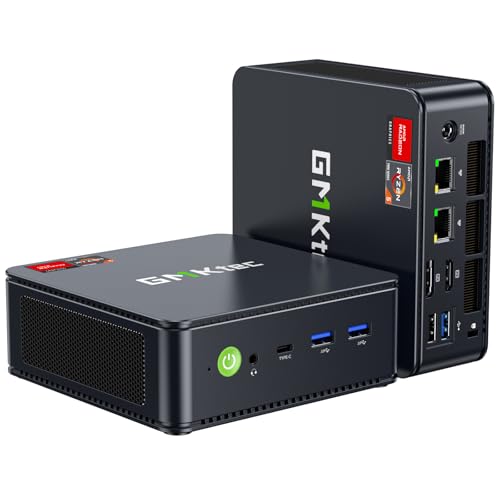
The GMKtec K11 is essentially the iGPU champion’s dream. The Ryzen 9 8945HS inside is the same CPU found in many high-end gaming laptops, and its Radeon 780M graphics can push over 60 FPS in Fortnite, Valorant, and Rocket League at 1080p medium. Even lighter AAA titles like Doom Eternal or Shadow of the Tomb Raider are playable at low-medium settings. What really sets the K11 apart, though, is the OCuLink connector on the back.
OCuLink is a standard that lets you connect an external GPU via a cable and adapter, and it’s been gaining traction in the mini PC world because it doesn’t have the bandwidth overhead of Thunderbolt. You plug in a desktop GPU enclosure, and the K11 treats the external card almost as if it were inside the chassis. That means you can start with the 780M for everyday gaming and later drop in an RTX 5070 or RX 9070 XT without buying a whole new system. The dual 2.5G LAN ports also make this a candidate for a home server or firewall, though the primary use case here is clearly gaming.
One thing to watch: the 780M’s performance is memory bandwidth limited. Because the K11 uses dual-channel DDR5-5600, the iGPU doesn’t hit its theoretical maximum. If you can configure it with faster memory (some sellers offer DDR5-6000), it gains a few percent in frame rates. The machine also has two USB4 ports, both capable of 40Gbps data and DisplayPort Alt Mode, so you have fallback options for external displays. The build quality is excellent — the chassis is all metal with a sleek machined feel.
Pros
Cons
Best for: Gamers who spend most of their time in competitive shooters and MOBAs, and need a reliable machine that also handles office work, home server tasks, and triple-display productivity.
Check current price on Amazon →
The GMKtec M6 Ultra occupies a sweet spot in this list. Its Ryzen 5 7640HS has six Zen 4 cores and twelve threads, which is more than enough for any task outside of heavy rendering. The Radeon 760M integrated graphics, with 8 compute units running up to 2600 MHz, can handle Apex Legends at 1080p medium at around 80 FPS. It will struggle with Cyberpunk or Hogwarts Legacy, but that’s not what this machine is built for.
Where the M6 Ultra shines is in its RAM configuration. It ships with 32GB of dual-channel DDR5, which is perfect for multitasking while gaming — running Discord, a browser with twenty tabs, and a game at the same time without swapping. You can upgrade it to 128GB later if your needs change. The dual 2.5G LAN ports are a nice bonus: you can set up a direct link to a NAS for fast game installs, or use the M6 Ultra as a lightweight game server for your friends.
The chassis is compact and fan noise stays low even under sustained load. GMKtec’s Hyper Ice Chamber cooling does a decent job keeping the 7640HS at its 45W TDP without throttling. One minor annoyance: the single USB4 port shares bandwidth with the USB-A ports on the same controller, so if you plug in several high-speed drives, you might see transfer speed drops. Still, for the majority of users who just need a capable gaming and productivity mini PC, the M6 Ultra is the strongest all-around pick.

Pros
Cons
Best for: Streamers and gamers who prioritize a small desktop footprint and want maximum iGPU performance without the cost of a K11.
Check current price on Amazon →
The FIREBAT A6 (model name A6 7735HS) is one of the smallest mini PCs in this roundup that can actually run modern games. The 7735HS is a known quantity: eight Zen 3+ cores and a Radeon 680M with 12 compute units. This is the same iGPU found in the Steam Deck (though at a higher power budget), and it can play Elden Ring at 1080p low around 40 FPS, or Overwatch 2 at 1080p high at a locked 60. The 200 MHz clock bump over the Deck’s 680M gives a mild performance edge.
Where the A6 makes concessions to size is in its RAM. The 16GB of LPDDR5 is soldered to the board, so you cannot upgrade it later. For light gaming and daily computing, 16GB is enough, but if you run heavy mods or virtual machines, you’ll hit the wall. The upside is that LPDDR5 has lower latency and higher bandwidth than regular DDR4, which helps the iGPU stretch a bit further.
The port selection is adequate: one USB-C with DP Alt Mode and 10Gbps data, two USB-A 3.2 Gen2, four USB-A 3.0, a DisplayPort 1.4, HDMI 2.0, and a 2.5G LAN port. The dual M.2 slots are both PCIe 4.0, so you can install fast NVMe drives later. The stock 512GB SSD is PCIe 3.0, which is fine for loading games — it won’t bottleneck anything. I’d budget for an extra drive soon if you’re installing more than two or three modern titles.

Pros
Cons
Best for: Office workers who also want to play indie games and older AAA titles at low settings, and who need a large amount of RAM for virtualization or heavy browser-based workflows.
Check current price on Amazon →
The KAMRUI E3B is the only mini PC in this list that ships with 32GB of RAM and still targets gaming, but its Vega 8 graphics are from the Zen 3 era. That iGPU is based on the same architecture as the 7730U’s older Vega cores — eight compute units at up to 2000 MHz. In benchmarks, it trails the Radeon 680M by about 50% in raw graphics performance. Expect to play games like Civilization VI, Minecraft, or Rocket League smoothly, but don’t count on running Starfield or Alan Wake 2 at any resolution.
What the E3B does well is everything else. Eight Zen 3 cores with SMT can chew through spreadsheet recalculation, code compilation, and video calls without breaking a sweat. The 32GB of DDR4 means you can keep 40 browser tabs open, a full Office suite, and a Slack channel without slowdowns. The triple display support is also genuinely useful — you can have spreadsheets on two monitors and a game running on the third.
The build is a standard square box with a brushed black finish. It includes a VESA mount. The fan is audible but not high-pitched. If you’re primarily a PC gamer who occasionally needs to work from the same machine, this isn’t the right fit. But if you’re a working professional who has a small Steam library from the last decade, the E3B will handle both roles without complaint.

Pros
Cons
Best for: Users who need a compact desktop for office productivity and media consumption across three 4K monitors, with only occasional interest in retro gaming or very lightweight titles.
Check current price on Amazon →
The Pinova P2 is not a gaming PC in any modern sense, but it earns a place here because its Ryzen 4300U has genuine performance advantages over the low-end Intel chips found in many budget mini PCs. The four Zen 2 cores can handle multitasking and light creative work like photo editing in Photoshop without lag. The Vega 5 iGPU (five compute units at 1400 MHz) can run older games like Portal 2, Left 4 Dead 2, or StarCraft II at 1080p, and it can stream 4K video smoothly.
Where the P2 shines is its display capability. Three 4K@60Hz outputs (HDMI, DisplayPort, USB-C) let you run a full six-screen productivity setup if you daisy-chain or use a USB-C hub. The chassis is silver and slim, and it includes a VESA mount. The cooling is surprisingly quiet — during a full CPU stress test, the fan stays below 35 dB.
The downsides are clear: you cannot upgrade the RAM, the GPU won’t play any demanding title released after 2020, and the machine uses Wi-Fi 5 (802.11ac) rather than the newer Wi-Fi 6 standard. If you need a basic office PC that also handles a triple-monitor trading setup or a home server, the Pinova P2 is a fantastic choice. Just don’t plan on buying it for AAA gaming.

Pros
Cons
Best for: Tech enthusiasts who want a low-power mini PC primarily for homelab duties (Pfsense, Docker, media server) with some retro gaming on the side.
Check current price on Amazon →
The BOSGAME E4 Air doesn’t pretend to be a gaming powerhouse. The Ryzen 5 3500U is a 2019-era processor with four Zen+ cores and Vega 8 graphics. In terms of raw gaming performance, it’s roughly on par with a base model Steam Deck when both are at the same power limit — but the Deck is optimized for gaming, while the E4 Air is not. You can run classic titles like Half-Life 2, Team Fortress 2, or even GTA V at low settings, but don’t expect anything modern to be playable.
The real draw of this machine is its dual Gigabit Ethernet ports. That makes it an excellent candidate for a home router, firewall appliance, or dedicated NAS client. The triple 4K output also means it can drive a multi-monitor home office setup for general computing, web browsing, and light document work. The 256GB SATA SSD is the weakest part of the spec — it will load Windows and apps slowly compared to an NVMe drive. You can replace it with a larger NVMe drive (there is an M.2 slot for that), but that increases total investment.
The build is plasticky but functional, and the warranty is better than most: three years on parts. If you’re looking for a cheap way to consolidate a home server and a retro gaming station into one box, the E4 Air can do both. If you need to play anything from the last five years, look elsewhere.

Pros
Cons
Best for: Schools, businesses, or home users who need a silent, low-power desktop for web browsing, Office apps, and video playback.
Check current price on Amazon →
The KAMRUI Essenx E1 is the most basic machine in this roundup, and it’s not really a gaming PC at all. The Athlon Gold 3150U is a two-core, four-thread processor from the Zen+ era (2019). Its integrated Radeon graphics are roughly equivalent to Intel UHD 620 hardware from eight years ago. You can run Windows 11, browse the web, and stream 4K video, but you cannot play any 3D game released after 2015 at a playable frame rate. Even Minecraft at lower render distances will feel sluggish.
The E1’s real purpose is as a cheap, reliable office desktop. It has four USB 3.2 ports, dual 4K output, and a slim profile that fits behind a monitor via the included VESA mount. It supports Wake-on-LAN and Auto Power-On, which makes it easy to integrate into managed IT environments. The fan is practically silent.
The 256GB SATA SSD fills up fast with Windows and a few applications, and the memory is expandable via a single SO-DIMM slot (the included 8GB leaves one slot free for an upgrade). The built-in wireless uses Wi-Fi 5, which is fine for office networks but not the best for high-speed file transfers. If all you need is a second office computer for email and spreadsheets, the Essenx E1 gets the job done without fuss. Gaming it is not.
The mini PC landscape has matured to the point where you can get a desktop replacement that fits in a coat pocket, but the trade-offs are steeper than they are for full-size towers. Here’s what you need to weigh.
The single most important decision is whether to go with a low-power U-series processor or a higher-power H/HS/HX chip. U-series CPUs like the Ryzen 7 7730U (15W) are efficient and quiet, but they lack the sustained performance headroom needed for demanding games. HS and H-series chips (35W to 54W) have much higher boost clocks and larger caches, and they pair with faster integrated GPUs. The HX series (Ryzen 9 8945HX) is the full desktop-class chip, usually paired with a dedicated GPU.
For pure gaming, always choose an HS or HX chip. The difference between a 15W and a 54W processor can mean 30% to 40% higher frame rates in CPU-bound scenarios.
AMD’s RDNA 3-based integrated GPUs have transformed mini PC gaming. The Radeon 760M (8 CUs) and 680M (12 CUs) can handle esports and lighter AAA games at 1080p medium. The 780M (12 CUs at higher clock) is roughly 15% faster than the 680M. All three are far ahead of the older Vega 8 and Vega 5 found in Zen 2 and Zen 3+ U-series chips.
If you want to play any modern AAA title without a dedicated GPU, the 780M is the minimum. The 680M is a close second. The 760M is adequate for most competitive shooters but will struggle with recent heavy games.
The MINISFORUM G1 Pro is the only mini PC in this list with a full desktop discrete GPU. If you want to play at 1440p high settings with ray tracing, or if you use AI tools that benefit from CUDA cores, a dedicated GPU is non-negotiable. The alternative is OCuLink (found on the GMKtec K11), which lets you connect an external GPU enclosure. That approach is more flexible — you can upgrade the external card later — but the enclosure adds bulk and cost.
Many mini PCs use soldered LPDDR4 or LPDDR5 to save space. That means you cannot upgrade the RAM later. If you plan to keep the machine for more than two years, prioritize models with SO-DIMM slots (the GMKtec M6 Ultra, K11, and KAMRUI E3B all have expandable DDR4 or DDR5). Storage is usually upgradeable via M.2 slots, but PCIe generation matters: PCIe 4.0 is twice as fast as PCIe 3.0 for loading games.
For online gaming, wired Ethernet is always best. Dual 2.5GbE ports (found on the M6 Ultra and K11) let you run a direct low-latency link to your router and a NAS simultaneously. Wi-Fi 6 is now standard, and Wi-Fi 7 (on the G1 Pro) is a future-proofing bonus. OCuLink and USB4 are options for external GPU expansion; if you think you might add one later, choose a machine that has them.
Mini PCs have limited airflow. Look for machines with two fans (top and bottom) and a copper heatsink. Three performance modes (quiet, balanced, performance) are a genuine benefit because you can run the fan at low speeds during light work and push it harder for gaming. The GMKtec and MINISFORUM machines generally have superior cooling compared to the budget KAMRUI and BOSGAME models, which can throttle under sustained load.
Yes, but only models with a dedicated GPU or a very powerful integrated GPU. The MINISFORUM G1 Pro (RTX 5060) can play any AAA game at high settings. Machines with the Radeon 780M or 680M can play many AAA titles at reduced settings. Anything with Vega graphics or older RDNA iGPUs will struggle with modern AAA releases.
OCuLink is a standard for connecting external PCIe devices, like an external GPU enclosure. It operates at PCIe 4.0 x4, which offers higher bandwidth and lower latency than Thunderbolt 4 for external GPUs. If you buy a mini PC with OCuLink (like the GMKtec K11), you can later add a full desktop graphics card without buying a new PC.
For most games, 16GB is sufficient. Some modern titles (Hogwarts Legacy, Starfield) can push past 12GB, and if you run background apps or mods, you may want 32GB. The key question is whether the RAM is soldered or expandable. If it’s soldered (as in the FIREBAT A6), you’re stuck with what you buy. If it’s in SO-DIMM slots, you can upgrade later.
Not for esports titles like Valorant, Fortnite, or Rocket League. The Radeon 780M can handle those at 1080p high at well over 60 FPS. For AAA games, a dedicated GPU gives you higher settings and better future-proofing. The integrated GPUs in today’s mini PCs are roughly equivalent to a desktop GTX 1650 or RX 5500.
It depends on the model. Machines with SO-DIMM slots (GMKtec M6 Ultra, GMKtec K11, KAMRUI E3B) allow RAM upgrades. Machines with soldered LPDDR5 (FIREBAT A6, KAMRUI Pinova P2) do not. Storage is almost always upgradeable via M.2 slots, but check whether the slot is PCIe 3.0 or 4.0 and whether it supports NVMe or just SATA.
Wi-Fi 6 is plenty for online gaming. The latency difference between Wi-Fi 6 and Wi-Fi 7 is negligible for most players. Wi-Fi 7 is a bonus for future-proofing and for transferring large files on a local network. If you use a wired Ethernet connection (which this guide recommends for gaming), the Wi-Fi standard matters even less.
Most mini PCs include a VESA bracket. Attach the bracket to the rear of your monitor using the standard 75×75 or 100×100 VESA holes, then screw the mini PC onto the bracket. This frees up desk space and hides the PC behind the screen. Make sure the monitor has enough clearance for the depth of the mini PC.
The MINISFORUM G1 Pro is the best mini PC gaming machine you can buy in 2026 if your priority is maximum performance without building a full-size tower. Its RTX 5060 and Ryzen 9 8945HX leave nothing on the table. For most people, though, the GMKtec M6 Ultra strikes a better balance: the Radeon 760M handles competitive gaming well, the dual 2.5G LAN is a bonus, and the expandable 32GB of DDR5 means you won’t hit a memory wall in a year or two.
If you want an even stronger integrated GPU and plan to add an external GPU later, the GMKtec K11 is the clear choice. And if your gaming ambitions are modest but you need a machine that can also serve as a home office or media workstation, the KAMRUI E3B or Pinova P2 will serve you well.
The best mini PC gaming depends on what you actually play. For esports and indies, any machine with a Radeon 680M or better will satisfy you. For ray-traced blockbusters, you need the G1 Pro. Don’t overbuy for the wrong use case.
This article contains Amazon affiliate links. We may earn a small commission on qualifying purchases at no extra cost to you.


