Physical Address
304 North Cardinal St.
Dorchester Center, MA 02124
Physical Address
304 North Cardinal St.
Dorchester Center, MA 02124

We round up the 10 best 240Hz monitors in 2026 for every need, from 24-inch esports to 49-inch ultrawide. Find your perfect high-refresh gaming display here.
There's a moment in a competitive match where the difference between a crisp, responsive frame and a blurry stutter is the difference between a win and a respawn screen. At 240Hz, that difference becomes a consistent, fluid advantage. But not all 240Hz monitors are built the same. Some prioritize raw speed and low latency for esports, others push higher resolution and deeper immersion for single-player adventures, and a few try to do both. The market is crowded with panel types, sizes, and price points that don't always match what they promise.
We've sorted through the current landscape to find the 10 best 240Hz monitors in 2026. This list covers the full spectrum: compact 24-inch IPS screens built for twitch shooters, 27-inch QHD panels that blend speed with visual fidelity, curved VA monitors that wrap you in the action, and the enormous 49-inch Odyssey G9 that redefines what a desktop display can be. Whether you play Valorant, Cyberpunk, or a mix of everything, one of these monitors is the one you should actually buy.
TL;DR: The Dell 24 SE2426HG is the one most people should buy for pure competitive gaming: a fast IPS panel with FreeSync Premium and great color at a 23.8-inch size. The AOC Q27G41ZE is the best blend of 1440p resolution and 240Hz speed. The Samsung Odyssey G9 G95C is the ultimate choice for sim racers and immersive gamers who want the biggest, brightest canvas. The SANSUI 27-inch Curved offers an excellent balance of immersion and responsiveness for the cost.
| # | Product | Size / Resolution | Panel / Refresh | Adaptive Sync | Best for |
|---|---|---|---|---|---|
| 1 | Dell 24 SE2426HG | 23.8" FHD 1080p | Fast IPS, 240Hz, 0.5ms | FreeSync Premium, HDMI VRR | Competitive esports at the most popular size |
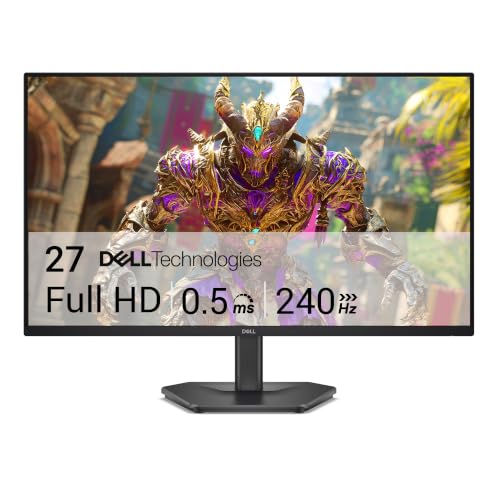
| 2 | Dell 27 SE2726HG | 27" FHD 1080p | Fast IPS, 240Hz, 0.5ms | FreeSync Premium, HDMI VRR | Spacious 1080p for fast-paced play without scaling |
| 3 | AOC Q27G41ZE | 27" QHD 1440p | IPS, 240Hz (OC 260Hz), 0.3ms | Adaptive-Sync, G-Sync Compatible | 1440p gaming without sacrificing refresh rate |
| 4 | ASUS TUF Gaming VG259QM5A | 24.5" FHD 1080p | Fast IPS, 240Hz, 0.3ms | FreeSync Premium, G-Sync Compatible | Ultrafast response with ASUS motion-blur tech |
| 5 | MSI MAG 245F X24 | 24" FHD 1080p | Rapid IPS, 240Hz, 0.5ms | FreeSync Premium | Budget-conscious players who want a trusted gaming brand |
| 6 | Sceptre E255B-FWD240 | 24.5" FHD 1080p | 240Hz, 1ms BR | FreeSync Premium | Dual DisplayPorts and built-in speakers on a budget |
| 7 | Acer Nitro XV272U W2bmiiprx | 27" QHD 1440p | IPS, 240Hz, 0.5ms | FreeSync Premium | Full ergonomic adjustability and HDMI 2.1 on budget 1440p |
| 8 | SANSUI 27" Curved | 27" FHD 1080p | VA, 1500R, 240Hz, 1ms MPRT | FreeSync | Immersive curved 1080p with rich contrast |
| 9 | SANSUI 32" Curved | 32" FHD 1080p | VA, 1500R, 240Hz, 1ms MPRT | FreeSync | Large curved screen for 1080p cinematic play |
| 10 | Samsung Odyssey G9 G95C | 49" DQHD 5120×1440 | VA, 1000R, 240Hz, 1ms | FreeSync Premium Pro | Sim racing and ultrawide immersion at its peak |

Pros
Cons
Best for: Players who want a no-compromise 1080p 240Hz monitor that just works for both PC and console gaming.
Check current price on Amazon →
The Dell SE2426HG is the most straightforward recommendation on this list. It uses Dell's Fast IPS technology to achieve a 0.5ms response time while maintaining 99% sRGB coverage, so you get both speed and decent color straight out of the box. Dell's approach here is measured: no aggressive gaming aesthetics, just a clean black bezel and a stand that does the job. The 23.8-inch size is actually a strength for competitive play because your peripheral vision stays focused on the action without needing to scan the screen.
What sets this monitor apart is how well it handles multiple sources. The two HDMI ports support up to 240Hz over HDMI 2.0, and the DisplayPort 1.4 gives you full bandwidth for PC. FreeSync Premium is the baseline, but Dell also supports HDMI VRR, making it a rare 240Hz monitor that works perfectly with both Xbox Series X and PS5 at 120Hz (though not 240Hz from console). The TÜV 3-star blue light certification is rare at this level; it reduces eye strain without the yellow tint that plagues cheaper filters. The only real hardware compromise is the stand, which only tilts. You'll want a VESA arm or a riser for ideal viewing height, but given the asking price, that's a minor trade.
Pros
Cons
Best for: Gamers who sit a bit farther from their screen or want a larger 1080p display for less demanding titles.
Check current price on Amazon →
The Dell 27 SE2726HG is effectively the same monitor as the SE2426HG but stretched to 27 inches. That brings both pros and cons. On the positive side, the larger screen makes medium-distance viewing more comfortable and adds a bit more immersion for single-player games. The Fast IPS panel retains the same 0.5ms response, 240Hz refresh, and 99% sRGB coverage, so motion clarity remains excellent.
The main concern is pixel density. At 1920×1080 across 27 inches, you get about 81 pixels per inch. That's fine for gaming at typical distances, but desktop text and UI elements won't look as sharp as on a 24-inch 1080p or a 27-inch 1440p monitor. If you use the monitor for productivity or browsing between matches, you'll notice slightly fuzzy fonts. If you're willing to trade that for a bigger canvas in fast games where resolution matters less than frame rate, this is a capable pick. Like its smaller brother, it's best paired with a monitor arm to fix the limited stand ergonomics.

Pros
Cons
Best for: Gamers with a powerful GPU who want to play at 1440p without dropping below 240Hz capability.
Check current price on Amazon →
The AOC Q27G41ZE fills a specific and welcome niche: a 27-inch QHD IPS panel with a genuine 240Hz refresh rate that can be overclocked to 260Hz via DisplayPort. The 0.3ms MPRT response time is among the fastest we see at this resolution, and the IPS panel delivers wide viewing angles and solid color out of the box (though it's not factory-calibrated). What makes this monitor stand out is its flexibility. It supports Adaptive-Sync across both major GPU ecosystems, so neither AMD nor NVIDIA users get left behind with tearing.
The design is typical AOC gaming: a three-sided frameless bezel with red accents, a textured black finish, and a simple tilt stand. For the price, you get a lot of pixel density and speed, but you give up real HDR. The 300-nit brightness and lack of local dimming mean HDR content will look washed out compared to a true HDR monitor. That's fine for competitive play where HDR is rarely used, but if you want both high refresh and HDR, you'll need to spend more. The three-year zero-bright-dot warranty is a real confidence booster: AOC will replace the panel if even one bright pixel appears, which is rare in the industry.

Pros
Cons
Best for: Competitive players who demand the absolute lowest motion blur and are willing to pay for ASUS's advanced motion processing.
Check current price on Amazon →
The ASUS TUF Gaming VG259QM5A is designed for one thing: making motion look as clean as possible. The 0.3ms GtG response is impressive on paper, but the real star is ASUS's Extreme Low Motion Blur Sync (ELMB Sync) technology. Unlike regular ELMB, which disables variable refresh rate, ELMB Sync allows you to run blur reduction and FreeSync/G-Sync at the same time. That means you get near-CRT-like motion clarity without the tearing that normally comes from fixed refresh strobing. In fast-paced titles like Valorant or Overwatch, this translates to targets that stay crisp even during rapid flicks.
The 24.5-inch 1080p Fast IPS panel hits the sweet spot for competitive viewing. The 99% sRGB coverage means colors are accurate enough for most users, though it's not a creator's monitor. ASUS also includes its Gaming AI suite and a DisplayWidget Center that lets you adjust settings with a mouse rather than fumbling with OSD buttons. The main drawback is the stand; for a monitor aimed at serious gamers, you'd expect at least height adjustment. Plan on adding a VESA arm. If your priority is frame clarity above all else, this is the monitor to beat.

Pros
Cons
Best for: Budget-conscious players who want a reputable gaming brand with a reliable IPS panel.
Check current price on Amazon →
MSI's MAG 245F X24 is a no-frills 240Hz monitor that focuses on core performance. The Rapid IPS panel delivers a 0.5ms response time and 240Hz refresh, which is exactly what you need for competitive titles, and the 24-inch size keeps pixel density high for sharp text. MSI includes AI Vision technology, which is essentially a dynamic brightness/contrast adjustment for dark scenes. It works reasonably well for spotting enemies in shadows without washing out the whole image.
Where this monitor cuts corners is connectivity and ergonomics. It has only one HDMI port (plus DisplayPort and a VGA port, which is unusual in 2026). That's fine for a single console and PC, but if you need multiple HDMI sources, you'll need a switcher. The stand only tilts, and the overall build feels a bit plasticky compared to Dell or ASUS offerings. The trade-off is a lower entry point for a brand with solid warranty support. It's a good choice if you mainly play one game and want the basics done right.

Pros
Cons
Best for: Users who need to switch between multiple inputs (PC, console, laptop) and want built-in speakers.
Check current price on Amazon →
Sceptre's E255B-FWD240, part of their 2026 lineup, aims to offer more ports and integrated audio than the competition at a similar starting point. The standout feature is the connectivity: two DisplayPorts and two HDMI ports. That means you can keep a PC, a console, a media streaming device, and a laptop all plugged in at once, which is genuinely useful for multi-platform gamers. The built-in speakers are a bonus too; they won't replace a dedicated sound system, but they're acceptable for casual play or watching videos.
The panel is a 24.5-inch VA with a 240Hz refresh and 1ms Blur Reduction. The VA nature gives it decent contrast, better than IPS for dark scenes, but viewing angles are narrower. The 100% sRGB coverage is welcome, though color accuracy out of the box may need tweaking. The main drawback is that the Blur Reduction feature can introduce some inverse ghosting if overdrive is set too aggressively. Stick to medium overdrive settings for the best balance. At this price, you're getting unusual versatility in ports.

Pros
Cons
Best for: Gamers who prioritize ergonomics and spend hours at their desk, especially those who work and play on the same monitor.
Check current price on Amazon →
The Acer Nitro XV272U W2 is one of the few 240Hz monitors in this roundup with a truly versatile stand. You get tilt, swivel, 360-degree rotation, pivot into portrait mode, and 4.7 inches of height adjustment. That makes it a strong candidate for users who split their time between gaming and productivity, or who want a dual-monitor setup without mismatched viewing angles. The 27-inch IPS panel delivers 2560×1440 resolution with 99% sRGB coverage and DisplayHDR 400, which is enough to give HDR content a bit more punch than standard SDR.
The 240Hz refresh is achieved via DisplayPort 1.4; the HDMI 2.0 ports top out at 144Hz. That's fine for most PC gamers, but if you plan on using HDMI for a high-refresh console, you'll be limited. Response times are rated up to 0.5ms GtG, and real-world performance is good with the right overdrive setting. The built-in 2-watt speakers are there but not great; you'll want headphones or external speakers for any serious gaming. The XV272U W2 is a solid all-rounder that doesn't force you to choose between speed and a comfortable setup.

Pros
Cons
Best for: Gamers who want an immersive curved screen with strong contrast for story-driven games at 1080p.
Check current price on Amazon →
SANSUI's 27-inch curved monitor brings VA panel advantages to the 240Hz market. The 1500R curvature and 4000:1 contrast ratio mean that dark scenes in games like Resident Evil or Cyberpunk look richer than what IPS panels can achieve, with real black depth and minimal backlight bleed. The rated 130% sRGB and 95% DCI-P3 coverage suggests wide color gamut, though real-world accuracy may vary. For immersive single-player games, this monitor can be genuinely pleasing.
The 240Hz refresh and 1ms MPRT response are sufficient for competitive play, but VA panels inherently have slower pixel transitions than IPS, so some dark-level smearing may be noticeable in fast-paced transitions. The FreeSync implementation works fine within its range. The metal stand is a nice touch, but it only tilts. The lack of built-in speakers is less of an issue since most gamers use headsets, but something to note. If you primarily play games with atmospheric visuals and want the richest colors from a VA panel at 1080p, this is a compelling option.

Pros
Cons
Best for: Gamers who sit at a distance (e.g., on a couch or wider desk) and want a large canvas for fast 1080p action.
Check current price on Amazon →
The SANSUI 32-inch curved monitor takes the same VA formula from its 27-inch sibling and scales it up to 32 inches. The 1500R curvature becomes even more pronounced at this size, wrapping into your peripheral vision. For competitive shooters at 1080p, the large screen can make it easier to spot enemies in your periphery, but you'll need to sit at least 3 feet away to avoid seeing individual pixels. The 3500:1 contrast ratio and 125% sRGB coverage are good for a VA panel at this size.
The practical limitation is pixel density: at 69 PPI, text will look fuzzy and fine details won't be sharp. That's acceptable if you're purely gaming, but not ideal for desktop work. The DP 1.4 cable in the box is a nice inclusion, and FreeSync works well. Like the 27-inch model, there are no built-in speakers. The large panel on a tilt-only stand can be tricky to position; a VESA arm is recommended. If you have the desk space and want the biggest 240Hz 1080p screen possible, this fits that niche.

Pros
Cons
Best for: Sim racers, flight simmers, and immersive single-player gamers who want the ultimate ultrawide experience with true HDR.
Check current price on Amazon →
The Samsung Odyssey G9 G95C is a statement monitor. Its 49-inch 32:9 aspect ratio with 1000R curvature matches the natural curvature of human vision, creating an incredibly immersive experience. The 5120×1440 resolution gives you the same vertical pixels as 1440p but double the horizontal space, effectively replacing a dual-monitor setup without the bezel. The 240Hz refresh rate is impressive at this resolution, and the 1ms Gtg response time keeps motion clear.
Where the G9 truly shines is HDR. DisplayHDR 1000 certification and a 1,000,000:1 contrast ratio (thanks to VA panel and quantum dot tech) mean that HDR content actually looks stunning. Bright highlights in games like Forza Horizon or Cyberpunk look punchy, and blacks are deep without blooming. FreeSync Premium Pro smooths out frame rate fluctuations. The CoreSync lighting on the back adds ambient glow that can sync with on-screen colors, which is a nice extra for immersion.
The biggest challenge is hardware requirements. To push 240 fps at 5120×1440 in modern games, you need a top-tier GPU like an RTX 5080 or equivalent. Even then, you'll often settle for lower settings or rely on upscaling. The monitor itself is also physically massive; you'll need a desk at least 60 inches wide and enough space for the deep stand (16.6 inches). The auto source switch feature is a nice convenience for multi-device setups. This is not a monitor for everyone, but for those who want the most immersive 240Hz experience possible, it's unmatched.
Choosing the right 240Hz monitor means balancing several factors that directly affect your gaming experience. The key is to match the monitor's strengths to the games you actually play and the hardware you own.
The most common trade-off is between resolution and frame rate. At 240Hz, 1080p is the standard for competitive gaming because it's easier for GPUs to push high frame rates. A 24-inch 1080p monitor offers around 92 PPI, which is sharp enough for gaming and text. At 27 inches, 1080p drops to about 81 PPI, and at 32 inches, it's 69 PPI. That's fine for gaming at a distance but not for reading fine text or for creative work. 1440p at 27 inches (109 PPI) is significantly sharper, but requires a more powerful GPU to maintain 240 fps in demanding titles. If you play a mix of esports and AAA games and have a mid-range to high-end GPU, 1440p 240Hz is a great sweet spot.
IPS panels (including Fast IPS) offer the best viewing angles and color accuracy, with typical response times of 0.5ms to 1ms. They're ideal for competitive gaming and mixed use. VA panels provide deeper blacks and higher contrast (3000:1 to 4000:1) but often have slower pixel transitions, which can cause dark-level smearing. They're better for immersive single-player games than for fast twitch shooters. TN panels are rare at 240Hz now, but they offer the fastest response times with the worst color and viewing angles. Most current 240Hz monitors use IPS or VA, with IPS being the safer all-rounder.
240Hz means the monitor refreshes the image 240 times per second, which reduces motion blur and input lag compared to 60Hz or 144Hz. Response time (measured in milliseconds) indicates how fast a pixel can change color. Lower is better. Look for 1ms GtG or MPRT as a baseline. Be aware that MPRT (Motion Picture Response Time) is a measurement that includes backlight strobing and is not directly comparable to GtG. Real-world performance can vary with overdrive settings; the best monitors offer multiple overdrive modes without introducing overshoot.
24 to 25 inches is the standard for competitive esports because it fills your field of view without requiring head movement. 27 inches is the go-to for mixed gaming and productivity. 32 inches is large enough that a flat screen may show color shift at the edges; a 1500R or 1800R curvature helps with immersion and reduces glare. The 49-inch Odyssey G9 uses a 1000R curve to match the human eye, but it's a niche for dedicated ultrawide fans. Consider your desk depth and viewing distance before choosing size.
FreeSync Premium and G-Sync Compatible eliminate screen tearing and stuttering when your frame rate varies. For 240Hz monitors, FreeSync Premium adds a requirement for low frame rate compensation (LFC) below the monitor's VRR range. HDMI VRR is a newer standard that works with modern consoles. HDR is a separate consideration: monitors with DisplayHDR 400 or 600 offer basic HDR with limited impact. DisplayHDR 1000 and true local dimming make HDR content look much more impressive, but such monitors are significantly more expensive.
If you play fast-paced competitive games like Valorant, Overwatch, or Apex Legends, the jump from 144Hz to 240Hz is noticeable. Motion feels smoother, tracking targets is easier, and input lag is slightly lower. For slower, single-player games, the difference is less dramatic. You also need a GPU capable of consistently delivering 200+ fps to take full advantage.
Current consoles (Xbox Series X/S and PS5) are capped at 120Hz over HDMI. No console currently supports 240Hz output. However, a 240Hz monitor can run at 120Hz or 60Hz, so buying a 240Hz monitor now is future-proofing for potential next-gen consoles or PC use.
For 240Hz at 1080p, HDMI 2.0 supports 240Hz. For 1440p or higher, you need DisplayPort 1.4 to achieve 240Hz. HDMI 2.1 also supports 1440p 240Hz but is less common on monitors. Always check the specs: many monitors only support 240Hz via DisplayPort, with HDMI limited to 144Hz.
It depends on your viewing distance. At typical desktop distance (2-3 feet), some users notice the lower pixel density and softer text. If you primarily game and don't do text-heavy work, it's acceptable. For productivity or if you're sensitive to clarity, 24-inch 1080p or 27-inch 1440p is better.
GtG (Gray-to-Gray) measures how fast a pixel changes between shades of gray, which corresponds to real-world response time. MPRT (Moving Picture Response Time) includes backlight strobing to reduce perceived motion blur. A low MPRT number can look good, but it may introduce flicker or reduced brightness. GtG is a more standard and reliable metric for comparing monitors.
Curved monitors (1500R to 1800R) can be helpful for immersion in single-player games, but some competitive players dislike them because the curve can distort straight lines and peripheral vision. For fast-paced shooters, most pros prefer flat 24-27 inch screens. It's a personal choice; try before you buy if possible.
The 10 best 240Hz monitors in 2026 cover a wide range of use cases, but a few clear winners stand out. The Dell 24 SE2426HG is the most balanced choice for competitive gaming: it's fast, has good color, works with both PC and consoles, and comes from a brand with solid warranty support. For gamers willing to invest in sharper visuals, the AOC Q27G41ZE blends 1440p resolution with a native 240Hz IPS panel and the rare bonus of a 260Hz overclock and a zero-dead-pixel warranty. If you want the biggest, most immersive 240Hz display money can buy, the Samsung Odyssey G9 G95C delivers a jaw-dropping ultrawide experience with true HDR.
For the reader still undecided: look at what you play most. If it's esports, get the Dell 24 or the ASUS TUF for its motion clarity. If you play a mix and have a strong GPU, go with the AOC. If you want immersion on a budget, the SANSUI 27-inch curved offers great contrast and a 1500R wrap. No matter which you choose, any monitor on this list will transform the way you experience high-frame-rate gaming.
This article contains Amazon affiliate links. We may earn a small commission on qualifying purchases at no extra cost to you.


