Physical Address
304 North Cardinal St.
Dorchester Center, MA 02124
Physical Address
304 North Cardinal St.
Dorchester Center, MA 02124

Best Wi-Fi 6 Routers (November 2026): 10 picks from ASUS and TP-Link, from budget apartment upgrades to 2.5G gaming setups and whole-home mesh networks.

Most Wi-Fi problems blamed on "slow internet" come from a router that does not match the home it serves. A single-unit router rated for 1,500 sq ft struggles in a two-story house, a basic dual-band model clogs when a dozen smart devices join, and a mesh node with no clear wired plan wastes its speed. The Best Wi-Fi 6 Routers depend on four things: how large the space is, how many devices connect at once, how fast the internet plan is, and how much control you want over security and VPN settings.
The short answer: the ASUS RT-AX1800S suits most apartments and small homes that want built-in security without a subscription, the TP-Link Archer AX21 suits buyers who want a straightforward AX1800 router with a VPN server, and the eero 6 suits anyone who prefers app-driven setup and plans to add nodes later. The rest of the list covers larger-home coverage, a 2.5G OpenWrt gaming router, a flexible-mode budget model, older entry-level options and a gigabit-ready mesh unit.
TL;DR: top picks at a glance
- Best overall: the ASUS RT-AX1800S, four external antennas, five Gigabit ports and AiProtection Classic security with no subscription.
- Best for VPN server use: TP-Link Archer AX21, 1,200 Mbps on 5 GHz plus built-in OpenVPN and PPTP VPN server support.
- Best for easy mesh growth: eero 6, 1,500 sq ft per unit, 75+ devices and a built-in Zigbee hub.
- Best for power users: GL.iNet Flint 2, dual 2.5G ports, 4,804 Mbps on 5 GHz and pre-installed OpenWrt.
| # | Product | Best for | Wi-Fi Speed | Coverage | Wired Ports |
|---|---|---|---|---|---|
| 1 | ASUS RT-AX1800S | Secure everyday use | AX1800 class | Not listed | 1 WAN + 4 LAN Gigabit |
| 2 | TP-Link Archer AX21 | VPN server users | 1,200 + 574 Mbps | Not listed | Gigabit (count not listed) |
| 3 | eero 6 | Easy mesh growth | Plans up to 900 Mbps | 1,500 sq ft | Not listed |
| 4 | NETGEAR Nighthawk R6700AX | Small homes | 1.8 Gbps | 1,500 sq ft | 1 WAN + 4 LAN Gigabit |
| 5 | TP-Link Archer AX73 | Larger homes | 5.4 Gbps | 2,000 sq ft | Gigabit + 1 USB 3.0 |
| 6 | GL.iNet Flint 2 | Power users | 6 Gbps | Not listed | Dual 2.5G |
| 7 | Cudy WR3000 | Flexible network modes | 2,402 + 574 Mbps | 1,400 sq ft | 1 WAN + 3 LAN Gigabit |
| 8 | TP-Link Archer AX10 Renewed | Light budget use | 1,201 + 300 Mbps | Not listed | Not listed |
| 9 | TP-Link Archer AX10 OneMesh | OneMesh extender pairing | 1,201 + 300 Mbps | Not listed | 4 Gigabit LAN |
| 10 | eero 6+ | Gigabit plans | Plans up to Gigabit | 1,500 sq ft | Not listed |

Pros:
Cons:
Best for: Apartment and small-home users who want solid built-in security and wired ports without paying for a security plan.
Check current price on Amazon →
The ASUS RT-AX1800S earns the top spot by combining a complete feature set with no recurring requirements. AiProtection Classic, powered by Trend Micro, is built in, and Instant Guard gives a one-click VPN when you are away from home. By contrast, the NETGEAR Nighthawk R6700AX offers Armor only as a 30-day trial before a subscription is needed, and the eero 6+ points to a separate subscription for online security extras.
Its hardware is practical rather than flashy. The dual-core processor, four external antennas and MU-MIMO plus OFDMA support suit a household with phones, laptops, TVs and smart-home gear all active together. The five Gigabit ports match the NETGEAR Nighthawk R6700AX on wired capacity, and AiMesh compatibility gives it a growth path that the TP-Link Archer AX10 Renewed lacks.
It is the wrong choice for larger homes, where the TP-Link Archer AX73 is rated for 2,000 sq ft, and for buyers who want multi-gig wiring or open firmware, where the GL.iNet Flint 2 fits instead.

Pros:
Cons:
Best for: Buyers who want a mainstream AX1800 router with a VPN server for remote access to files or cameras at home.
Check current price on Amazon →
The TP-Link Archer AX21 stands apart through its VPN server support. The ASUS RT-AX1800S emphasises security and a one-click VPN for travel, while the Archer AX21 lets you dial back into the home network over OpenVPN or PPTP. TP-Link also states it has signed the CISA Secure-by-Design pledge, and firmware is managed through the Tether app.
Its split of 1,200 Mbps on 5 GHz and 574 Mbps on 2.4 GHz makes the 5 GHz band the one to use for demanding devices. The 1.1 lb body is heavier than the eero 6 at 0.66 lb, but the four antennas and beamforming target range more directly than the eero's single compact unit does.
It is the wrong pick if you need a stated coverage figure or a clear port count, which the NETGEAR Nighthawk R6700AX provides, or if you want a router that disappears into a mesh system, where the eero 6 is simpler.

Pros:
Cons:
Best for: Households that want a simple, app-managed system they can expand with more eero units later.
Check current price on Amazon →
The eero 6 is the most set-and-forget router here. A 1,500 sq ft radius and 75+ device capacity put it ahead of the NETGEAR Nighthawk R6700AX, which is rated for 20 devices over the same area. The compact 0.66 lb body is also the easiest to place in a living area.
The Zigbee hub is the other differentiator. The ASUS RT-AX1800S and TP-Link Archer AX21 have no stated smart-home hub, while the eero 6 pairs compatible devices straight to Alexa. The eero 6+ adds Thread support to that idea.
It is the wrong choice for wired-heavy desks or gamers who need a defined port layout, where the ASUS RT-AX1800S with its four LAN ports fits better, and for anyone on a plan above 900 Mbps.

Pros:
Cons:
Best for: Apartment and small-home users with a modest device count who want a clear coverage and port specification.
Check current price on Amazon →
The NETGEAR Nighthawk R6700AX is the most clearly specified AX1800 router in the group, and it is also the newest design among the AX1800 models. It states coverage, device count and port layout, which the TP-Link Archer AX21 does not.
NETGEAR itself notes that larger or multi-story homes may suit an Orbi mesh system. If that is your situation, the eero 6 is the listed mesh-first alternative, and the TP-Link Archer AX73 is the better single-router answer for a bigger footprint.

Pros:
Cons:
Best for: Larger homes and heavy households that need the strongest single-router radio on the list.
Check current price on Amazon →
The TP-Link Archer AX73 stretches past the AX1800 group on both speed and range. Six antennas and 4T4R technology give it more radio capability than the four-antenna TP-Link Archer AX21, and its 2,000 sq ft rating exceeds the 1,500 sq ft of the NETGEAR Nighthawk R6700AX.
HomeShield's free tier adds security scans, IoT device identification, basic parental controls and weekly or monthly reports. It is the wrong choice for tight spaces or for 2.5G wiring, where the GL.iNet Flint 2 is the stronger fit.

Pros:
Cons:
Best for: Gamers, VPN users and home-lab owners who want multi-gig ports and open firmware.
Check current price on Amazon →
The GL.iNet Flint 2 is the most capable router here and also the least plug-and-play. Pre-installed OpenWrt, AdGuard Home and support for over a hundred devices put it well beyond the ASUS RT-AX1800S for configurability.
Its 2.5G ports matter if your plan or local network exceeds Gigabit, where the TP-Link Archer AX73 stops at Gigabit class wiring. It is the wrong choice for someone who just wants an app to run the network, where the eero 6 is simpler.

Pros:
Cons:
Best for: Users who need a router that can also work as an access point or WISP client.
Check current price on Amazon →
The Cudy WR3000 sits between the AX1800 group and the AX5400 flagship. Its 2,402 Mbps 5 GHz band is double what the TP-Link Archer AX21 offers, and it weighs just 0.56 lb, the lightest here.
It is the wrong choice for buyers who want multi-gig ports, where the GL.iNet Flint 2 wins, or an established mesh ecosystem, where the eero 6 is better supported.

Pros:
Cons:
Best for: Small households with light usage that want a budget pick.
Check current price on Amazon →
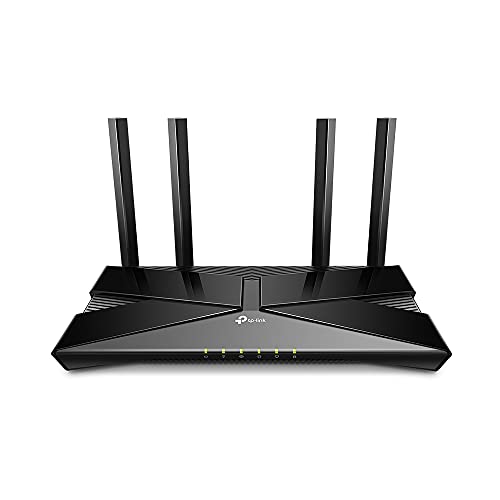
The TP-Link Archer AX10 Renewed is the entry point to Wi-Fi 6 in this list. It matches the 5 GHz speed of the TP-Link Archer AX10 OneMesh but names a faster tri-core processor.
It is the wrong choice for anyone needing mesh expansion, where the eero 6 or TP-Link Archer AX10 OneMesh fit better, or for a household that wants a stated port layout.
Pros:
Cons:
Best for: Small homes that plan to add a TP-Link OneMesh extender later.
Check current price on Amazon →
The TP-Link Archer AX10 OneMesh trades CPU speed for a clearer feature story. Compared with the TP-Link Archer AX10 Renewed, it lists four Gigabit LAN ports and OneMesh compatibility but a slower 900MHz dual-core processor.
It is the wrong choice for larger homes or newer designs, where the NETGEAR Nighthawk R6700AX or TP-Link Archer AX73 are better matched.

Pros:
Cons:
Best for: Gigabit-plan households that want a mesh-ready, app-managed system.
Check current price on Amazon →
The eero 6+ is the upgrade path from the eero 6 for faster plans. It keeps the 1,500 sq ft coverage but adds 160 MHz support and Thread.
It is the wrong choice for buyers who want built-in security without a subscription, where the ASUS RT-AX1800S fits, or for 2.5G wiring, where the GL.iNet Flint 2 is the answer.
The core trade-off is simplicity against control. Mesh-oriented models like the eero 6 and eero 6+ are easy to set up, while the ASUS, TP-Link and GL.iNet models expose more settings, ports and VPN options.
Before choosing, check these project details:
Speed classes range from AX1800 on the ASUS RT-AX1800S and TP-Link Archer AX21 to AX3000 on the Cudy WR3000, AX5400 on the TP-Link Archer AX73 and 6 Gbps on the GL.iNet Flint 2. Speeds are combined across bands, so the 5 GHz figure is the one to compare.
All ten routers are dual band without a 6 GHz radio. If you want that extra band, a wifi 7 router is the next tier up, though Wi-Fi 6 remains well matched to most home plans.
A single router suits a small home, while larger or multi-story spaces benefit from a mesh wifi system. The eero 6 and eero 6+ are built around this idea, and the ASUS RT-AX1800S supports AiMesh.
If you already own a router, wifi extenders and repeaters can fill gaps, and the TP-Link Archer AX10 OneMesh is designed to pair with TP-Link extenders. Extenders are a cheaper fix, but a true mesh handles roaming better.
Wired ports decide how well a router serves desktops, consoles and storage. The ASUS RT-AX1800S and NETGEAR Nighthawk R6700AX offer four Gigabit LAN ports, while the Cudy WR3000 offers three.
Dual 2.5G ports on the GL.iNet Flint 2 make it a natural gaming router for fast wired setups. Processor strength matters for VPN speed and many simultaneous clients.
Built-in security varies. The ASUS RT-AX1800S includes AiProtection Classic without a subscription, while the NETGEAR Armor and eero 6+ extras need separate plans after any trial.
For remote access, the TP-Link Archer AX21 provides OpenVPN and PPTP servers, and the Cudy WR3000 and GL.iNet Flint 2 support WireGuard and OpenVPN. Open firmware on the Flint 2 offers the most control but demands more effort.
Yes, if you have many connected devices, since OFDMA and MU-MIMO improve how a router shares airtime. The ASUS RT-AX1800S and TP-Link Archer AX21 show how even entry-level models add these features. Single-device speed gains depend on your plan and devices.
In most cases yes, because routers like the TP-Link Archer AX21 and Archer AX73 require a separate modem. The NETGEAR Nighthawk R6700AX connects to a modem or gateway by Ethernet, and some combos need bridge mode. Check your internet provider's equipment before buying.
Stated ranges are 1,400 sq ft for the Cudy WR3000, 1,500 sq ft for the NETGEAR Nighthawk R6700AX, eero 6 and eero 6+, and 2,000 sq ft for the TP-Link Archer AX73. Walls and floors reduce real-world range. Larger homes are better served by mesh units such as the eero 6.
The eero 6+ supports plans up to a Gigabit, and the TP-Link Archer AX73 offers higher radio capacity for local traffic. The GL.iNet Flint 2 adds dual 2.5G ports for faster wiring. The eero 6 supports plans up to 900 Mbps, so it is a step below.
Yes, several do. The TP-Link Archer AX21 offers OpenVPN and PPTP servers, the Cudy WR3000 supports WireGuard, OpenVPN, PPTP, L2TP and IPsec, and the GL.iNet Flint 2 is rated for WireGuard at 900 Mbps. The ASUS RT-AX1800S includes Instant Guard for a one-click secure VPN.
The eero 6 includes a Zigbee hub, and the eero 6+ adds Thread. Both connect compatible devices through Alexa. The TP-Link Archer AX21 and Archer AX10 models work with Alexa but do not list a built-in hub.
Best Wi-Fi 6 Routers for most homes start with ASUS RT-AX1800S: it has four external antennas, a dual-core processor, five Gigabit ports and AiProtection Classic with no subscription. Its main weakness is that coverage is not specified and it has no multi-gig port.
For alternatives by use case, the TP-Link Archer AX21 fits VPN server users, the eero 6 fits easy mesh expansion and smart-home hubs, and the NETGEAR Nighthawk R6700AX fits small homes that want a clear 1,500 sq ft and 20-device specification. The TP-Link Archer AX73 is the pick for larger homes at 2,000 sq ft.
The specialist picks are the GL.iNet Flint 2 for dual 2.5G ports and OpenWrt, the Cudy WR3000 for flexible modes, the eero 6+ for gigabit plans, and the two TP-Link Archer AX10 models for light budget use. If you are still undecided, start with the ASUS RT-AX1800S for a single home or the eero 6 if you expect to add nodes.


