Physical Address
304 North Cardinal St.
Dorchester Center, MA 02124
Physical Address
304 North Cardinal St.
Dorchester Center, MA 02124

We found the 10 best 4K Blu Ray Players for every home theater setup, from budget picks to premium Panasonic and Sony models with Dolby Vision and HDR10+.
Streaming services are convenient, but they still compress video and audio to fit through your internet pipe. If you own a high-end 4K TV or projector, the difference between a streamed movie and a pristine 4K Blu-ray disc is not subtle. Discs deliver the full bitrate, the original Dolby Vision or HDR10+ metadata, and lossless audio that streaming platforms rarely offer. The problem? Finding the best 4K Blu Ray players for your budget, your format preferences, and your disc collection.
The right player depends on what you prioritize. Maybe you need Dolby Vision support and don't care about HDR10+. Maybe you own discs from multiple regions and need a region-free machine. Perhaps you just want the most affordable way to play your existing DVD and Blu-ray library on a new 4K TV. This roundup covers all those scenarios. From the reference-grade Panasonic DP-UB820-K to budget-friendly standard Blu-ray players, here are the ten models worth your money.
TL;DR: The Panasonic DP-UB820-K is the best all-around 4K player for videophiles, with superb HDR tone mapping and support for both Dolby Vision and HDR10+. The Sony UBP-X700U is the value champion, packing Dolby Vision and dual HDMI into a sub-$350 package. The Sony BDP-S1700U is the one to buy if you only need standard Blu-ray and DVD playback. And the Dynastar Region Free player is the go-to for collectors with discs from multiple zones.
| # | Product | Key Features | Price | Best For |
|---|---|---|---|---|
| 1 | Panasonic DP-UB820-K | Dolby Vision, HDR10+, HCX Processor, Twin HDMI, Hi-Res Audio | $549.99 | Videophiles who want the best picture possible |
| 2 | Sony UBP-X700U (2025) | Dolby Vision, HDR10, 4K Upscaling, Dual HDMI, Hi-Res Audio | $328.00 | Buyers seeking premium 4K features at a mid-range price |
| 3 | Sony UBP-X700M (2021) | Dolby Vision, HDR10, 4K Upscaling, Dual HDMI, Wi-Fi | $348.00 | Same core features as X700U, older model for streaming-focused users |
| 4 | Panasonic DP-UB420-K | HDR10+, HCX Processor, Twin HDMI, Hi-Res Audio, Alexa | $297.99 | Panasonic picture quality without Dolby Vision |
| 5 | Panasonic DP-UB154P-K | 4K UHD, HDR10+, HDR10, HLG, Hi-Res Audio, Compact | $222.10 | Entry-level 4K playback from a trusted brand |
| 6 | Sony BDP-S1700U (2025) | Full HD 1080p Blu-ray, DVD Upscaling, Quick Start | $114.99 | The best-selling budget player for standard discs |
| 7 | Panasonic DMP-BD84P-K | Full HD Blu-ray, Dolby Digital, USB Playback, Compact | $89.95 | Ultra-budget standard Blu-ray player |
| 8 | DpBlue 4K UHD Player | Dolby Vision, HDR10, Twin HDMI, 3D Support, Region A | $349.00 | 3D Blu-ray fans and collectors needing region A and all-region DVD |
| 9 | Krovatar 4K UHD Player | Dolby Vision, HDR10+, Bluetooth, Aluminum Body, SACD | $366.00 | Wireless headphone users and music lovers |
| 10 | Dynastar Region Free Sony X700M | Region-Free UHD/Blu-ray/DVD, 4K Upscaling, Wi-Fi, 3D | $494.00 | International disc collectors |
Prices are accurate as of publication but change frequently. Check current prices on the linked product pages.
We didn't just list every 4K Blu-ray player on the market. We focused on the factors that actually matter when you sit down to watch a disc.
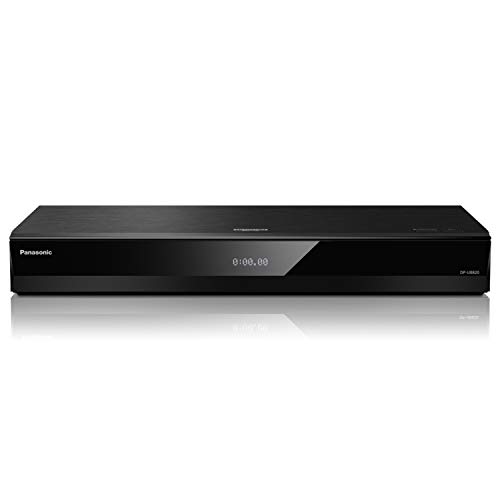
The Panasonic DP-UB820-K is the player that videophiles recommend to each other. It is not cheap, but it does something no other player at any price does as well: it takes imperfect HDR content and makes it look right on your specific display. The secret is Panasonic's HCX (Hollywood Cinema Experience) processor, which applies high-precision chroma processing and dynamic HDR tone mapping that adjusts frame by frame. On a projector or an OLED TV that doesn't track the full 10,000-nit spec of HDR10, this player saves highlights from clipping and keeps shadow detail intact.
It supports all three major HDR formats: Dolby Vision, HDR10+, and HLG. That means no matter which format your disc or stream uses, the UB820 handles it natively. The twin HDMI outputs let you send video directly to your TV and audio to an older AVR that doesn't support 4K passthrough. Hi-Res audio playback goes up to DSD and ALAC formats, making this a viable music player too.
The remote is responsive, the disc tray is quiet, and the build quality inspires confidence at 5.3 pounds. The only real drawback is the price: at $550, it is more than double the cost of the Sony X700U. If your budget allows, however, this is the one that delivers the absolute best picture you can get from a disc.
Pros
Cons
Best for The home theater enthusiast who owns a projector or high-end OLED and wants every last drop of image quality from their discs.
Check current price on Amazon →

Sony's UBP-X700U is the player that does almost everything the Panasonic does for about $220 less. It plays 4K Ultra HD discs, upscales DVDs to near-4K, and supports both Dolby Vision and HDR10. The dual HDMI outputs are present, which is a rarity at this price point. The audio side is covered too: Dolby TrueHD, DTS-HD Master Audio, and even DSD and FLAC playback for music collectors.
The 2025 model refreshes the older X700M with a slimmer profile and an included HDMI cable. Boot times are snappy, and the interface is the same streamlined Sony menu found on their higher-end players. It also handles 3D Blu-rays if you still have a 3D TV.
Where it falls short next to the Panasonic is in HDR tone mapping. The Sony does not dynamically adjust HDR based on your display's capabilities; it outputs the disc as-is, which can lead to clipped highlights on projectors or TVs that don't reach 1,000 nits. If you have a mid-range 4K TV, this won't be a problem. If you have a high-end OLED or projector, the Panasonic handles HDR better.
The build feels a bit lighter than the Panasonic, and the fan noise is audible if you sit close. But for the price, the X700U is a remarkably capable machine.
Pros
Cons
Best for Anyone who wants Dolby Vision and dual HDMI without spending over $500.
Check current price on Amazon →

The Sony UBP-X700M is essentially the predecessor to the X700U. It offers the same core experience: 4K Blu-ray playback, Dolby Vision and HDR10, dual HDMI, and wide format support including SACD and DVD-Audio. The X700M has been a staple recommendation for years, and it remains a solid choice if you can find it at a discount.
The main differences from the X700U are cosmetic and generational. The X700M has a slightly taller chassis and no included HDMI cable in the box (though one is included in our listing). Its Wi-Fi is standard 802.11ac, same as the new model. The 2025 X700U is a minor refresh that doesn't change the core video processing.
If the X700M is available for less than the X700U, it is the better buy. If they are priced similarly, the X700U's newer firmware and slightly faster boot are worth it. Both share the same limitations: no HDR10+ and basic HDR mapping.
Pros
Cons
Best for Shoppers who trust the Sony ecosystem and want a proven 4K player at a potential discount.
Check current price on Amazon →

The Panasonic DP-UB420-K sits between the budget UB154 and the flagship UB820. It keeps the HCX processor and HDR10+ support from the UB820 but drops Dolby Vision. That makes it a targeted choice: if your TV supports HDR10+ (Samsung, some Panasonic and TCL models) but not Dolby Vision, the UB420 gives you the same high-precision chroma processing and dynamic tone mapping without paying for a format you cannot use.
It also has twin HDMI outputs, a feature usually reserved for more expensive players. The audio side is strong, with hi-res support and a dedicated audio output. It works with Alexa and Google Assistant for voice control.
The downside is obvious: no Dolby Vision. If you have a TV that supports both formats, the UB820 or a Sony player is better. The UB420 is also physically larger than the compact Sony players, which might matter in a tight cabinet.
Pros
Cons
Best for Owners of HDR10+ TVs who want Panasonic's superior HDR processing without paying for Dolby Vision they can't use.
Check current price on Amazon →
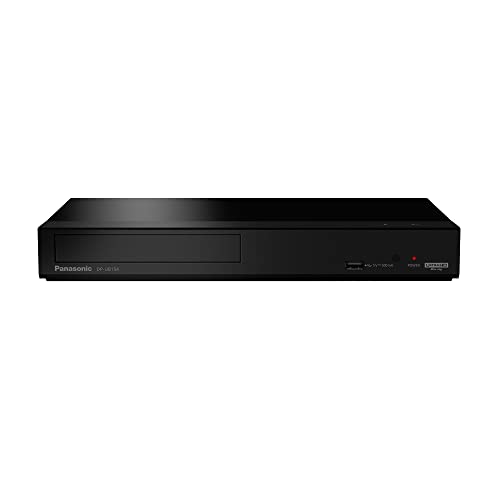
The Panasonic DP-UB154P-K is the cheapest way into Panasonic's 4K ecosystem. It supports HDR10, HDR10+, and HLG, but not Dolby Vision. It has a single HDMI output and omits the twin-output flexibility of its bigger siblings. The HCX processor is not present here; instead, it uses a more basic chipset that still does 4K high-precision chroma processing, but without the dynamic tone mapping that makes the UB820 special.
What you do get is reliable 4K playback, hi-res audio support (DSD, ALAC, FLAC), and a compact chassis that fits in most entertainment centers. The build is lighter at 2.64 pounds, and the tray is a bit noisier than the UB820, but at roughly half the price that's expected.
It also handles a wide range of physical media: 4K UHD, standard Blu-ray, DVD, CD, and SACD. If you are on a tight budget and just want to play 4K discs with HDR10+ or HDR10, this is the one.
Pros
Cons
Best for Budget-conscious buyers who want 4K disc playback and own a TV that supports HDR10+.
Check current price on Amazon →

Not everyone needs 4K. If you still have a large collection of standard Blu-rays and DVDs, or you are connecting to a 1080p TV, the Sony BDP-S1700U is the most popular player on the market for good reason. It is compact, fast, and inexpensive.
It upscales DVDs to near-HD quality, and it boots in under a second with the super quick start mode. The interface is simple and clean. It supports Dolby TrueHD and DTS-HD Master Audio bitstreaming, so you can still get lossless audio from your Blu-ray discs through an AVR.
The catch is that it does not play 4K discs at all. The S1700U is a full-HD player only. That is perfectly fine if you are not ready to jump to 4K, but if you plan to upgrade your TV in the next year, you might prefer to spend a bit more on a 4K-capable player now.
Pros
Cons
Best for Viewers with a 1080p TV or projector who want a fast, reliable Blu-ray player for their existing disc library.
Check current price on Amazon →

The Panasonic DMP-BD84P-K is even cheaper than the Sony S1700U, and it is the lightest player in this roundup at just 1.7 pounds. It plays 1080p Blu-rays and DVDs, upscales DVDs to 1080p, and supports Dolby Digital audio. It also has a USB port for playing media files from external drives, and it supports MKV and MP4 video playback.
The build is basic but functional. The compact size (just under 10 inches wide) makes it one of the few players that fits in narrow shelves. It does not support lossless audio formats like TrueHD or DTS-HD MA, so it is best paired with a soundbar or TV speakers rather than a high-end surround system.
If you just need a player for a secondary TV or a kids' room, the BD84P-K is hard to beat at the price.
Pros
Cons
Best for A bedroom or secondary setup where cost is the primary concern and 4K is not needed.
Check current price on Amazon →

The DpBlue 4K UHD player is a newcomer that packs a surprising feature set for its $349 price. It supports Dolby Vision and HDR10, twin HDMI outputs, and includes both USB 3.0 and USB 2.0 ports. It also plays 3D Blu-rays, which is increasingly rare among new players.
What sets it apart is its media support: not just 4K UHD discs but also 3D Blu-ray, DVD, VCD, CD, and files from USB drives or external HDDs. It also has a LAN port for network streaming. The player is Region A for Blu-ray and all-region for DVD, which is useful for collectors who own standard DVDs from multiple regions.
The build quality is decent: the chassis is all metal, and the tray is quiet. The remote is basic but functional. The main concern is the brand's track record. DpBlue is not as established as Sony or Panasonic, so long-term reliability is less proven. But the features per dollar are strong.
Pros
Cons
Best for 3D Blu-ray collectors and anyone who wants a feature-packed 4K player on a moderate budget.
Check current price on Amazon →

The Krovatar 4K UHD player is one of the few players with built-in Bluetooth, allowing you to connect wireless headphones directly to the player for private listening. That is a killer feature for late-night movie watching without disturbing others. It supports Dolby Vision and HDR10+, along with Dolby Atmos and DTS:X bitstreaming for full object-based audio.
The chassis is made of aluminum alloy, giving it a premium feel that belies its $366 price. It also plays SACD and DVD-Audio, which appeals to audiophiles with high-resolution disc collections. The included Bluetooth remote is a nice touch.
On the downside, it has only a single HDMI output, so you cannot split audio and video to older equipment. The brand is again a smaller player, which might give some buyers pause. But for its combination of Bluetooth, Dolby Vision, and HDR10+, it is a unique option.
Pros
Cons
Best for Anyone who wants to watch 4K movies with Bluetooth headphones at night, or who values high-resolution audio disc playback.
Check current price on Amazon →

The Dynastar region free player is a modified Sony UBP-X700M that has been unlocked to play Blu-ray discs from any region (A, B, and C) and DVDs from any region (0-8). For collectors who import discs, this is the only way to watch your entire library without needing multiple players.
It retains all the features of the standard Sony X700M: 4K UHD playback, Dolby Vision, HDR10, dual HDMI outputs, Wi-Fi, 3D support, and 4K upscaling. It also includes a Dynastar 6FT HDMI cable. The modification is done by the seller before shipping, so it arrives ready to use.
The premium over the standard X700M is significant: about $150 more for the region-free capability. If you only buy US discs, stick with the regular X700M. But if you own Japanese anime, UK TV series, or any region-locked titles, the Dynastar is worth every extra dollar.
Pros
Cons
Best for Serious disc collectors who import titles from multiple regions and need one player that handles everything.
Check current price on Amazon →
Choosing the right 4K Blu-ray player comes down to matching its capabilities to your TV, your sound system, and your disc habits. Here are the factors that matter most.
The video format war is still running. Dolby Vision is the most widely used dynamic HDR format, supported by LG, Sony, TCL, and many other TV brands. HDR10+ is an alternative used primarily by Samsung, plus some Panasonic and TCL models. Both use dynamic metadata that adjusts brightness and color scene by scene, which is a big step up from standard HDR10.
If your TV supports both, a player like the Panasonic UB820 gives you the full set. If your TV supports only one, buy the player that matches it. There is no benefit to paying for Dolby Vision if your TV cannot display it. Conversely, if you own a Samsung QLED, the Panasonic UB420 (HDR10+ only) or the Sony X700U (Dolby Vision only) forces you to choose which format to prioritize.
All 4K players can bitstream Dolby TrueHD and DTS-HD Master Audio to a compatible AVR. For Dolby Atmos and DTS:X, the player must be able to pass the object-based metadata through HDMI. Every player in this roundup does that, except the budget standard-definition models (Sony BDP-S1700U and Panasonic DMP-BD84P-K, which are limited to Dolby Digital).
If you have a multi-channel system, look for dual HDMI outputs. They let you send the video signal to your TV and the raw audio to an older AVR that does not support HDMI 2.0 or HDCP 2.2. This is a feature on the Panasonic UB820, UB420, and both Sony X700 models.
A single HDMI output is fine for modern setups where your AVR can pass 4K HDR video. But if your receiver lacks 4K passthrough or doesn't support HDR, a dual-HDMI player separates the signal: audio goes to the AVR, video goes straight to the TV. This avoids the common problem of a receiver that downconverts HDR to SDR.
If you have a newer AVR (2017 or later), single HDMI is usually sufficient. If your receiver is older, prioritize a player with dual HDMI outputs.
4K UHD discs are theoretically region-free, but many studios still apply region coding to the included standard Blu-ray discs. Regular Blu-rays and DVDs are locked by region code. If you buy discs from multiple countries, you need either a region-free player (like the Dynastar) or a separate player for each region.
For most US buyers, a standard Region A player is enough. But if you import British TV (Region B) or Japanese anime (Region A for Blu-ray, but DVD region 2), the extra cost of a region-free machine saves frustration.
Every 4K player in this list offers some streaming apps, but none are as fast or as full-featured as a dedicated Apple TV 4K or NVIDIA Shield. If you stream most of your content, you might want a player that at least has Netflix, YouTube, and Prime Video in 4K. The Panasonic and Sony models do. The smaller brands (DpBlue, Krovatar) have more limited app stores.
If streaming matters, check that the apps you need are available before buying. Otherwise, use your TV's built-in apps or a separate streaming box.
Streaming services compress video and audio. A 4K Blu-ray disc offers a much higher bitrate, true Dolby Vision or HDR10+ with dynamic metadata, and lossless audio like Dolby TrueHD. If you have a high-end TV and sound system, the improvement is significant. If you have a mid-range TV and watch mostly casual content, streaming may be enough.
Dolby Vision is a dynamic HDR format that adjusts brightness, contrast, and color scene by scene. It produces a more lifelike picture than standard HDR10. You need a TV that supports Dolby Vision to take advantage. Most LG, Sony, and TCL TVs support it. If your TV is Dolby Vision compatible, it is worth getting a player that outputs it.
No. Standard Blu-ray discs are region-locked. Region A discs work on North American players; Region B discs require a Region B player. To play both, you need a region-free player like the Dynastar in this roundup. 4K UHD discs are usually region-free, but check the case.
HDR10 uses static metadata: the same brightness and color settings apply to the entire movie. HDR10+ uses dynamic metadata that changes per scene, similar to Dolby Vision. The difference is noticeable in scenes with both bright and dark areas. HDR10+ is primarily found on Samsung TVs and some Panasonic models.
Yes, if you care about the best possible picture and sound from physical media. Streaming services are convenient, but they cannot match the raw data rate of a disc. Discs also are not dependent on your internet speed. If you are building a dedicated home theater, a 4K Blu-ray player is essential.
Most 4K players can bitstream Dolby Atmos to a compatible AVR or soundbar. They do not decode Atmos internally; they pass the signal through. All players in this roundup that support 4K (except the budget Panasonic UB154) can bitstream Atmos and DTS:X. Check that your audio system supports these formats too.
The Panasonic DP-UB820-K and DP-UB420-K have excellent audio sections with hi-res support and twin HDMI for clean separation. The Sony X700 models also support hi-res audio and dual HDMI. If you play SACD or DVD-Audio, the Sony X700M and X700U, as well as the Krovatar, support those formats.
The Panasonic DP-UB820-K is the best 4K Blu-ray player for anyone who wants the absolute best picture quality their display can deliver. Its HDR tone mapping is unmatched, and it supports both Dolby Vision and HDR10+. If you cannot stretch to $550, the Sony UBP-X700U gives you Dolby Vision and dual HDMI at a price that undercuts the Panasonic by a wide margin.
For HDR10+ TV owners, the Panasonic DP-UB420-K brings the same HCX processor without Dolby Vision. And for collectors with discs from multiple regions, the Dynastar region-free Sony X700M is the only single-box solution that plays everything.
If you are still watching on a 1080p TV, the Sony BDP-S1700U is the most popular standard Blu-ray player for a reason: it is fast, cheap, and reliable. But if there is any chance you will upgrade to a 4K TV in the next couple of years, spend a little more on a 4K-capable model now. Your future self will thank you when you put in your first 4K disc.
This article contains Amazon affiliate links. We may earn a small commission on qualifying purchases at no extra cost to you.


