Physical Address
304 North Cardinal St.
Dorchester Center, MA 02124
Physical Address
304 North Cardinal St.
Dorchester Center, MA 02124

Looking for the best VR headsets for PC? We've rounded up the top 10 VR headset choices for PC gaming, from standalone headsets like Meta Quest 3 to high-end sim rigs like Pimax Crystal Super.
You've finally got a gaming PC with enough horsepower to run VR. Now the real question: which headset actually belongs on your desk? The answer used to be simple — a wired PC VR headset tethered to your tower — but the lines have blurred. Today's best VR headsets for PC include standalone devices that double as wireless systems, mixed-reality goggles that swap between virtual and real worlds, and dedicated sim-racing rigs with eye-tracking and 50 PPD lenses. Some plug into a phone. One is not even a headset at all, but a cable that unlocks PC VR on a Quest. All ten of these picks earn a spot for different reasons.
If you want wireless convenience and a massive game library, the Meta Quest 3 line is the default. If you are building a flight sim cockpit and demand per-eye resolution above 4K, the Pimax Crystal Super is the heavy hitter. For SteamVR diehards on a tighter plan, the renewed Valve Index still delivers superb tracking and audio. And if your "PC VR" means watching movies on a plane from a handheld console, the Goovis G3X Pro does that better than anything else here.
TL;DR: The Meta Quest 3 512GB is the one most people should buy: wireless, sharp, and works with SteamVR over link. The Meta Quest 3S 128GB is the best entry point for newcomers. The Pimax Crystal Super is for sim racers and pilots who need extreme clarity. The Valve Index (Renewed) is for SteamVR loyalists who value tracking and audio above all.
| # | Product | Type | Resolution | Field of View | Best for |
|---|---|---|---|---|---|
| 1 | Meta Quest 3 512GB | Standalone + PC link | 2064×2208 per eye (4K+ Infinite Display) | 110° | The all-around best PC VR headset for most people |
| 2 | Meta Quest 3S 128GB | Standalone + PC link | 1832×1920 per eye | 100° | Best wireless entry-level PC VR |
| 3 | Meta Quest 3S 128GB (Renewed Premium) | Standalone + PC link | 1832×1920 per eye | 100° | Cheapest way into the Quest ecosystem for PC link |
| 4 | Pimax Crystal Super | Wired PC VR (DisplayPort) | 3840×3840 per eye | 140° | Hardcore sim racing and flight sim enthusiasts |
| 5 | Pimax Crystal Light | Wired PC VR (DisplayPort) | 2880×2880 per eye | 120° | Mid-range simmers wanting QLED and local dimming |
| 6 | HTC Vive XR Elite with Deluxe Pack | Standalone + PC VR | 1920×1920 per eye | 110° | Mixed reality development and flexible PC+standalone use |
| 7 | Valve Index (Renewed) | Wired PC VR (SteamVR) | 1600×1440 per eye | 130° | SteamVR fidelity with best-in-class audio and controllers |
| 8 | Goovis G3X Pro | Media viewer (HDMI/USB-C) | 1920×1080 per eye | 53° (simulated 800" screen) | Private cinema for PC, console, phone, and handhelds |
| 9 | INIU VR Link Cable | Accessory | N/A | N/A | Turning a Quest into a wired PC VR headset |
| 10 | Vornetil Universal VR Goggles | Phone-based VR | Depends on phone | ~90° | The cheapest way to try VR with any smartphone |
Choosing among the best VR headsets for PC comes down to a handful of factors that matter more than raw specs alone.
Pros
Cons
Best for The PC gamer who wants one headset for both standalone convenience and SteamVR gaming without a tangle of cables.
Check current price on Amazon →
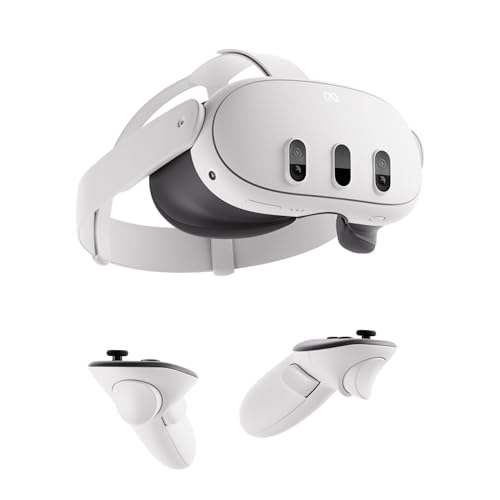
The Meta Quest 3 occupies a sweet spot that no other headset quite hits. It is a standalone device that runs its own massive library of games and apps, but it also connects to a PC over USB or Wi-Fi to play SteamVR titles. The pancake lenses are a genuine leap over the Fresnel lenses of the Quest 2 – the image stays sharp from edge to edge, and the headset itself is thinner and more comfortable. The 512GB model gives you room for a healthy game library without micro-managing storage.
Where the Quest 3 falls short for hardcore PC VR enthusiasts is the lack of a direct DisplayPort connection. Video is compressed over USB or Wi-Fi, which means a slight quality hit compared to a native DP headset. In practice, the compression is excellent at high bitrates (you can push 500 Mbps over a good USB 3 cable), and most people will never notice the difference outside of finely tuned sim racing. For everything else – Half-Life: Alyx, Beat Saber, Skyrim VR – it is the most versatile pick on this list.

Pros
Cons
Best for Newcomers to PC VR who want a low-cost entry point into the Meta ecosystem and can tolerate slightly lower visual clarity.
Check current price on Amazon →
The Meta Quest 3S uses the same processor and memory configuration as its bigger sibling, so performance in games is nearly identical. The tradeoff is a step down in display quality: Fresnel lenses introduce more glare and a smaller area of sharp focus, and the resolution is lower. For someone coming from a Quest 2, the Quest 3S still feels like a meaningful upgrade – the processor alone makes loading times and graphics noticeably better.
For PC VR use, the Quest 3S works with the same Link cable and Air Link as the Quest 3. The lower native resolution actually means less demanding GPU requirements when streaming from a PC, which can be an advantage if your graphics card is a few years old. The 128GB storage is the biggest compromise – you will want to manage your game installs carefully, especially if you also use it standalone.
Pros
Cons
Best for Shoppers who are comfortable with renewed electronics and want to spend less while keeping the same core experience.
Check current price on Amazon →
A renewed Quest 3S works identically to a new one for PC VR. The same Dual RGB cameras, the same processor, the same ability to connect over USB or Wi-Fi. The only difference is that it has been through a refurbishment process with a quality check. For the person who is not bothered by a pristine box and wants to save some cash, this is the same headset with a different backstory.
One thing to keep in mind: if you plan to use this mostly as a PC VR headset, the storage size matters less because games run off your computer. So the 128GB limit is less of a hindrance than it would be for a standalone-only user.

Pros
Cons
Best for Serious sim racers and flight sim pilots who demand the sharpest image and widest view available in a consumer VR headset.
Check current price on Amazon →
The Pimax Crystal Super is not a headset you casually recommend. It is a specialized tool for people who spend hours in iRacing, Assetto Corsa Competizione, DCS World, or Microsoft Flight Simulator and want every pixel to count. The per-eye resolution of 3840×3840 is higher than many 4K monitors, and paired with aspherical lenses the image is sharp from corner to corner. The 140° FOV is the widest on this list outside of dedicated Pimax models, pulling your peripheral vision into the cockpit.
That clarity comes with weight and complexity. At roughly 1.1 kg, the Crystal Super pushes forward on your face. A top strap and well-adjusted counterbalance help, but extended sessions can still be tiring. The inside-out tracking is adequate for seated sims, but if you want room-scale VR you will need to add SteamVR base stations and controllers separately. This headset is for the person who already owns a sim rig, a powerful PC, and knows exactly why they need 50 PPD.

Pros
Cons
Best for Simmers who want near-top-tier clarity and QLED color performance but are not ready to jump to the Super's price point.
Check current price on Amazon →
The Pimax Crystal Light sits one rung below the Super in the Pimax lineup, but it is still an extremely capable sim headset. The QLED panel with local dimming gives it an advantage over LCD-based headsets – blacks are genuinely black, and HDR content pops. The 2880×2880 resolution is more than enough to read small instruments in a cockpit, and the 120Hz refresh rate keeps motion blur to a minimum.
Where the Crystal Light differs from the Super is in field of view (120° vs 140°) and the absence of eye-tracked foveated rendering. For most sims the difference in FOV is minor; you still get a wide view that fills your peripheral vision. The weight is still a factor, but Pimax's ergonomics have improved, and a good head strap helps. If you already have a set of Valve Index controllers and base stations, this headset integrates seamlessly.

Pros
Cons
Best for Developers and enthusiasts who want a lightweight headset for mixed reality prototyping and occasional PC VR gaming.
Check current price on Amazon →
The HTC Vive XR Elite is the most portable VR/XR headset in this roundup. When you detach the battery pack, it shrinks to the size of a pair of sunglasses. For someone who needs to travel with their headset or use it in different rooms, that form factor is a genuine advantage. The Deluxe Pack adds a proper head strap, a face gasket, and temple clips that make it much more comfortable for extended use.
In PC VR mode, the XR Elite connects wirelessly to your computer (a USB tether is also possible) and runs SteamVR games via HTC's streaming software. The image quality is good but not class-leading – the resolution matches the Quest 3S more than the Quest 3. Where the XR Elite stands out is mixed reality: the depth sensor and high-quality passthrough cameras create a seamless blend of real and virtual that feels more polished than Meta's passthrough in some scenarios.

Pros
Cons
Best for SteamVR enthusiasts who prioritize tracking accuracy, audio quality, and refresh rate over raw resolution.
Check current price on Amazon →
The Valve Index was the gold standard for PC VR from 2019 until the Quest 3 came along. It is still beloved for three reasons: the off-ear speakers are unmatched for spatial audio without touching your ears, the 130° FOV feels big and open, and Lighthouse tracking is flawless. If you play competitive shooters like Pavlov or Echo VR, the Index's tracking and high refresh rate give a real edge.
The renewal makes this a more accessible way to get into SteamVR, but you need to accept the lower resolution. Text can be fuzzy on cockpit instruments in sims, and the screen-door effect is obvious compared to any headset with 2K+ per eye. The Index also requires base stations and a wired connection, which means less portability. But for the person who wants the best possible tracking and audio for room-scale VR, and does not mind the wire, the Index remains a compelling choice.

Pros
Cons
Best for Movie lovers, travelers, and handheld gamers who want a private large-screen experience on a plane, in bed, or connected to a PC.
Check current price on Amazon →
The Goovis G3X Pro is not a PC VR headset in the gaming sense – it has no head tracking, no controllers, and it does not run VR apps. What it does is simulate an 800-inch screen at a fixed distance. The twin Micro-OLED panels produce a picture that rivals many home projectors, with deep blacks and vibrant colors. For watching movies, especially 3D Blu-rays, it is easily the best device on this list.
For PC use, you plug it in via USB-C (with a supported adapter) and it acts as a second display. You can use it for productivity on a plane, play flat-screen games on a virtual giant screen, or connect it to a Nintendo Switch or Steam Deck. The diopter adjustment means you can use it without your glasses, which is a major plus for presbyopic users. Just do not expect to play Half-Life: Alyx on it.
Pros
Cons
Best for Anyone who owns a Quest 3 or Quest 3S and wants a reliable, low-latency wired connection to their PC.
Check current price on Amazon →
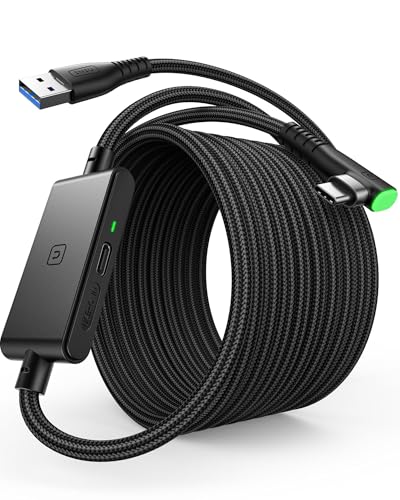
This is the only non-headset product in the roundup, but it deserves a spot because the best PC VR experience with a Quest actually requires a cable. Wireless via Air Link works, but it introduces compression artifacts and a small latency penalty that competitive players and simmers notice. The INIU VR Link Cable solves that with a USB 3.0 connection that stays stable, and the separate charging port is a lifesaver for long sessions – you can keep the headset plugged into power while using the cable, so you never run out of battery.
The 16-foot length is a good balance between reach and tangling. The 90-degree plug fits snugly into the Quest's USB-C port. One caveat: this cable is designed specifically for VR headsets, so do not plan to use it for your phone or tablet.

Pros
Cons
Best for A child or curious adult who wants to try basic 360-degree photos and simple VR apps without any investment in hardware.
Check current price on Amazon →
The Vornetil is not a PC VR headset in any real sense. It is a plastic shell with lenses that holds your phone. You slot in a smartphone, launch a VR app (like YouTube VR or a basic rollercoaster demo), and the phone's gyroscope tracks your head rotation. The experience is rudimentary – no controllers, no positional movement, and the field of view is narrow – but for the absolute bottom end of the spectrum, it does show people what VR feels like.
If you are reading this roundup because you want a proper PC VR experience, skip this one. But if you have a phone and ten minutes of curiosity, the Vornetil is a fine toy. It is included here because the "best VR headset for PC" category now includes even the most frugal entry points.
The decision comes down to what you plan to do most. A few key factors separate the headsets that will make you happy from the ones that will frustrate you.
Inside-out tracking means cameras on the headset watch your hands and the room. It is simple, does not require setup, and works well enough for most games. Every standalone headset (Meta Quest, HTC Vive XR Elite) uses it. The downside: if your hands go behind your back or outside the camera's view, tracking is lost. For sim racing this is a non-issue. For games like Blade & Sorcery where you grab things behind you, it can be annoying.
Base station tracking (Lighthouse) uses two small boxes in the corners of your room that emit infrared light. The headset and controllers have sensors that see the light and calculate position with millimeter precision. The Valve Index and Pimax headsets can use this. It is more accurate, works in the dark, and the controllers never lose track. The catch: you have to mount the base stations on walls or stands and run power to them.
Resolution determines how sharp the image looks. For PC VR, higher is almost always better, but it demands more GPU power. A headset like the Pimax Crystal Super (3840×3840 per eye) needs an RTX 4090 to run well at full resolution. The Quest 3S (1832×1920) is much easier to drive.
Panel type matters for contrast and black levels. QLED with local dimming (Pimax Crystal Light) gives you vibrant colors and deep blacks. Micro-OLED (Goovis G3X Pro) is even better for contrast but is not used in gaming VR headsets yet due to brightness limitations. Standard LCD, which most headsets use, is fine for bright scenes but blacks look gray.
A narrow FOV (around 90°) feels like looking through scuba goggles. A wide FOV (110° or more) helps you feel present in the world. The Pimax Crystal Super's 140° is the widest here, but the Valve Index's 130° is also impressive. The Meta Quest 3 sits at 110°, which is a good balance. For sim racing, wider FOV directly translates to seeing more of the track and mirrors.
The weight of a headset is only half the story. A front-heavy headset like the Pimax Crystal Super can be uncomfortable even at a moderate weight, while a well-balanced headset like the Valve Index feels lighter than its actual mass. Look for headsets with a halo strap or a top strap that takes weight off your face. Replaceable face gaskets are also important if you plan to share the headset or play long sessions.
Most PC VR headsets fall into three camps: DisplayPort (Pimax, Valve Index), USB link (Quest via cable), or wireless streaming (Quest via Wi-Fi, HTC via streaming app). DisplayPort gives the best image quality with no compression. USB link is very good but compresses the video – at high bitrates it is nearly indistinguishable. Wireless is convenient but adds latency and is susceptible to network interference.
If you are a competitive gamer or sim enthusiast, prioritize a DisplayPort headset. If you value freedom of movement and do not mind a small quality tradeoff, a Quest with Link cable or Air Link is a better fit.
Fresnel lenses are common in older headsets (Valve Index, Quest 2). They are cheap but create glare artifacts and have a small area of sharp focus. Pancake lenses, used in the Quest 3, are thinner and have a larger sweet spot with less glare. Aspherical lenses, used in Pimax headsets, offer the best edge-to-edge clarity but are heavier. For PC VR, aspherical or pancake is preferred.
Yes. All Meta Quest headsets support PC VR via a USB Link cable (like the INIU cable on this list) or wirelessly through Air Link or third-party apps like Virtual Desktop. You will need a gaming PC that meets the minimum specs (roughly a GTX 1060 or better). The headset works as a standard VR display for SteamVR games.
Yes. The Pimax Crystal Super's 3840×3840 per eye resolution is equivalent to running two 4K monitors. An RTX 4090 is strongly recommended for full-resolution gaming. Lower-end cards can run the headset at reduced resolution or use dynamic foveated rendering if eye-tracking is available.
Inside-out tracking uses cameras on the headset to track your movement and controllers. It is easy to set up (no external sensors) but has blind spots behind your back. Base station tracking uses infrared boxes mounted in the room, giving full coverage and higher accuracy. Base stations are required for the Valve Index and are optional for Pimax headsets.
You can use it as a second display for flat-screen games, but it is not a VR headset. It has no head tracking and no controller input. It works well for watching movies or playing 2D games on a virtual big screen, but you cannot play VR titles on it.
The INIU cable is designed for Oculus Quest 3, Quest 3S, Quest 2, Quest Pro, and Pico 4. It uses a USB-A to USB-C connection. It does not work with other VR headsets or with non-VR devices like phones or tablets.
A renewed (or refurbished) headset has been returned or used and then inspected, cleaned, and repaired to like-new condition. Renewed Premium typically includes a 1-year warranty from a third party. It can be a good way to save money, but the warranty is not from the original manufacturer, and there may be minor cosmetic wear.
Most PC VR headsets can play 3D movies if you use media player software like Bigscreen or Virtual Desktop. The Goovis G3X Pro is specifically optimized for Blu-ray 3D playback. The Vornetil phone holder can also play 3D videos stored on your phone, though the experience is basic.
If you want one headset that does it all – wireless standalone gaming, media, and PC VR – the Meta Quest 3 512GB is the clear winner. It is the most versatile, the best value when you consider the included software ecosystem, and the pancake lenses make it comfortable to wear. For the same versatility at a lower entry point, the Meta Quest 3S is a smart choice, though you trade resolution and lens quality.
If you live in a sim rig and demand the ultimate clarity, the Pimax Crystal Super is the specialist tool for the job. It is expensive, heavy, and demanding, but no other headset in this roundup puts that many pixels in front of your eyes. For a stepping stone into high-end sim VR, the Pimax Crystal Light gives you QLED color and sharp resolution without the eye-tracking premium.
For SteamVR loyalists who value tracking and audio over raw resolution, the Valve Index (Renewed) still holds up remarkably well. And if your "PC VR" means a private theater on a plane or in bed, the Goovis G3X Pro is the only headset here that truly delivers that experience.
The best VR headset for PC in 2026 depends on what kind of computer you own and what kind of virtual worlds you want to visit. Pick the one that matches your priorities, and you will not regret it.
This article contains Amazon affiliate links. We may earn a small commission on qualifying purchases at no extra cost to you.


