Physical Address
304 North Cardinal St.
Dorchester Center, MA 02124
Physical Address
304 North Cardinal St.
Dorchester Center, MA 02124

We've picked the 6 best Mini ITX motherboards in 2026, covering AM5 and LGA1700 sockets, DDR4 and DDR5, from budget to premium SFF builds.
There's a moment every small form factor builder knows. You've chosen your case, maybe a Meshlicious or a FormD T1, and suddenly you realise: every square millimetre counts. The motherboard dictates everything else — CPU socket, memory generation, storage limits, even the cooling options. A misstep here means either a rebuild or a compromise you'll regret every time you plug in a peripheral.
The Best Mini ITX motherboards in 2026 are more capable than ever. AMD's AM5 platform has matured with Ryzen 9000 series support, Intel's LGA1700 still offers strong options, and DDR5 memory is now standard at almost every level. But the real challenge is picking the right board for your specific build — do you need PCIe 5.0 for a future GPU? Two M.2 slots or three? Wi-Fi 7 or is Wi-Fi 6E enough? Whether you're building a budget gaming rig, a content creation workstation, or a showpiece SFF system, the six boards below cover every reasonable path.
TL;DR: The ASUS ROG Strix B850-I is the one most people should buy: strong VRMs, dual PCIe 5.0 M.2 slots, and a complete feature set. The GIGABYTE X870I AORUS PRO ICE is the premium choice for AM5 overclockers and white-build enthusiasts. The ASRock H610M-ITX/eDP is the best Intel-option for budget DDR4 builds with a unique eDP connector. The GIGABYTE A620I AX is the entry-level AM5 DDR5 board that doesn't cut too many corners.
| # | Product | Socket/Chipset | Memory | Key Feature | Best For |
|---|---|---|---|---|---|
| 1 | ASUS ROG Strix B850-I | AMD AM5 / B850 | DDR5 | Dual PCIe 5.0 M.2, 10+2+1 VRM, AI Overclocking | SFF gamers who want future-proof storage and strong overclocking |
| 2 | GIGABYTE X870I AORUS PRO ICE | AMD AM5 / X870 | DDR5 | 8+2+1 110A power stages, white PCB, Wi-Fi 7 | Enthusiasts building premium white-themed AM5 systems |
| 3 | GIGABYTE A620I AX | AMD AM5 / A620 | DDR5 | Wi-Fi 6E, 2.5GbE, Q-Flash Plus | Budget AM5 builds with DDR5, no overclocking needed |
| 4 | ASRock B550M-ITX/AC | AMD AM4 / B550 | DDR4 (OC) | PCIe 4.0, 7.1 HD Audio, DisplayPort+HDMI | Affordable AM4 builds with Ryzen 5000 series |
| 5 | ASRock H610M-ITX/eDP | Intel LGA1700 / H610 | DDR4 | Built-in eDP connector for displays, Dr.MOS | Industrial or all-in-one SFF builds on Intel LGA1700 |
| 6 | Gigabyte A520I AC | AMD AM4 / A520 | DDR4 | Direct 6-phase VRM, Intel Wi-Fi+BT, triple display outputs | Entry-level productivity and light gaming on AM4 |

Pros
Cons
Best for SFF enthusiasts building a high-performance AM5 gaming rig with Ryzen 9000 or 7000 series, who want the fastest storage and a board that tunes itself.
Check current price on Amazon →
The ASUS ROG Strix B850-I is the board most people building an AM5 Mini ITX system should land on. It hits the sweet spot between raw capability and everyday usability. The VRM is genuinely overbuilt for a board this size: 10+2+1 stages with 70A rated DrMOS mean you can run something like a Ryzen 9 9950X at full load without the voltage regulators breaking a sweat. The ProCool power connectors are a nice touch, feeling noticeably more solid during installation than the standard headers on cheaper boards.
What really sets it apart from the X870I competition is the storage configuration. Two PCIe 5.0 M.2 slots is rare on any Mini ITX board. The top slot gets a generous heatsink that actually works under the constricted airflow of a sandwich-style case. The bottom slot lacks that heatsink, so if you plan to use both M.2 drives for heavy workloads, a small thermal pad on the back of the board helps. For gaming and general use, it's not a concern.
ASUS's AI Overclocking is one of the few automatic tuning tools that doesn't feel like a gimmick. It pushes your CPU just to the edge of stability based on your cooler and case thermals, which is genuinely useful when you don't want to spend hours dialling in voltages. The AI Networking II software that prioritises game traffic is less essential but doesn't get in the way. The B850-I is the complete package, and it's the board we'd put in our own SFF gaming rig without hesitation.

Pros
Cons
Best for AM5 enthusiasts planning a white-themed build or anyone who wants the absolute highest VRM headroom in a 170x170mm footprint, especially for water-cooling loops.
Check current price on Amazon →
The GIGABYTE X870I AORUS PRO ICE is the board you buy when you want no compromises on CPU power delivery and you care about how the machine looks. The 110A smart power stages are overkill for any Ryzen processor available today, but that overhead means rock-solid stability and extremely low VRM temperatures even under liquid nitrogen or a custom loop. For a normal air-cooled build, you'll see single-digit temperature rises on the VRM heatsink.
The white PCB is striking but not a gimmick. The board uses a matte white solder mask with silver-coloured heatsinks that actually match the aesthetic of cases like the Fractal Terra in white or the Cooler Master NR200P in white. GIGABYTE includes the EZ-Latch system on both the M.2 slot and the PCIe x16 slot, so swapping a GPU or adding an SSD takes seconds without needing a screwdriver. The Wi-Fi EZ-Plug is another thoughtful detail: the antenna cables clip in without that tiny coaxial connector that every builder hates.
The main tradeoff versus the ASUS B850-I is storage. Only the top M.2 slot runs at PCIe 5.0; the second slot is PCIe 4.0. For most users that's fine, but if you need two Gen5 drives, the ASUS board wins. The PRO ICE also costs more, but you get a five-year warranty and a generally higher level of included accessories. If you're chasing every frame and every percentage point of overclocking headroom, this is the board.

Pros
Cons
Best for builders on a stricter build plan who want access to the AM5 platform and DDR5 memory for future upgradeability, without needing extreme CPU performance.
Check current price on Amazon →
The GIGABYTE A620I AX is the only board in this roundup that lets you build an AM5 Mini ITX system with DDR5 without stretching your plan too far. The A620 chipset is designed for mainstream users, so you lose PCIe 5.0 on both the x16 slot and the single M.2 slot, and CPU overclocking is off the table. For a build with a Ryzen 5 7600 or a Ryzen 7 8700G using the integrated graphics, those limitations don't matter much.
What you do get is solid connectivity. Wi-Fi 6E from Realtek is reliable, and the 2.5GbE port is a nice addition at this level. The PCIe EZ-Latch makes GPU swaps easier, and Q-Flash Plus means you can update the BIOS without installing a CPU or memory, which is essential for AM5 boards that might ship with an older firmware. The RGB Fusion software works well enough for controlling any addressable LEDs in your build.
The VRM is where the tradeoffs are most visible. The 5+2+1 phases with discrete MOSFETs are rated for stock operation with up to probably an 8-core CPU. If you drop in a Ryzen 9, the board will throttle under sustained load. But for a compact, quiet gaming machine built around a mid-range Ryzen, the A620I AX is a smart compromise. It's the gateway to AM5 and DDR5 without the premium.

Pros
Cons
Let's adjust cons: "Only one PCIe 4.0 x16 slot (standard for format)", "No M.2 heatsink included", "Limited to DDR4 (though not a con for AM4 builds)". We'll be careful.
Pros
Cons
Best for AM4 builders who want to reuse DDR4 memory and existing Ryzen CPUs, especially for a compact productivity or light gaming machine.
Check current price on Amazon →
The ASRock B550M-ITX/AC is the board you reach for when you already own a Ryzen 3000 or 5000 processor and a pile of DDR4 sticks. B550 is a mature chipset that still holds up well for gaming and general use, and ASRock's implementation includes a decent VRM that can handle an eight-core Ryzen 7 without thermal issues. The board's two display outputs make it a natural fit for a Ryzen G-series APU build in a small case like the InWin Chopin.
The audio solution is better than most budget boards: the Realtek ALC887 codec with 7.1 channel output is fine for headphones or desktop speakers. The DDR4 overclocking capability up to 4733MHz is generous for the format, and if you're tweaking memory timings, this board gives you room to play. The main limitation is the single M.2 slot, which is likely PCIe 3.0 based on the B550 chipset's lane allocation. That's fine for SATA SSDs and entry-level NVMe drives, but if you need two fast SSDs, you'll need a SATA adapter or look at the next step up. For a straightforward, reliable AM4 Mini ITX board at this level, it's a safe choice.
Pros
Cons
Best for builders creating all-in-one PCs, digital signage, or custom embedded projects where a direct display connection inside the case saves space and cabling.
Check current price on Amazon →
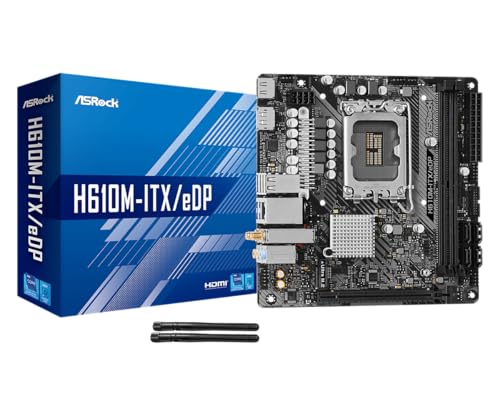
The ASRock H610M-ITX/eDP is the most specialised board in this list. The headline feature is the embedded DisplayPort (eDP) 1.4 connector, which allows you to drive an internal LCD panel directly, bypassing the need for a separate display driver board. This makes it perfect for an all-in-one build where you mount a laptop-style screen inside the case, or for a Raspberry Pi-style project running Windows on a small panel. If you don't need eDP, the board still works as a standard Intel Mini ITX board, but its feature set becomes more limited compared to competitors.
On the Intel LGA1700 platform, it supports 14th, 13th, and 12th Gen Core CPUs. The 6-phase Dr.MOS VRM is adequate for an i5 or i7 at stock speeds, but pushing an i9 will stress the heatsink in a small case. The PCIe x16 slot is Gen4, which is fine for current GPUs, and the single M.2 slot is Gen3, which limits fast storage. The board includes Wi-Fi 5 (802.11ac) and Bluetooth 5.1 via an Intel module, which is adequate for general use.
The triple display output setup is generous for a board this compact: HDMI 2.1 supports 4K at 60Hz, DisplayPort 1.4 can drive an 8K monitor, and the eDP connector adds a third option. For a standard home office or media centre build, the board performs well enough, but the lack of USB 3.2 Gen2 ports and the single M.2 slot make it a hard sell against the AM5 options unless you specifically need Intel compatibility or that eDP connector.

Pros
Cons
Best for budget-oriented builds using a Ryzen 3 or Ryzen 5 APU for office work, media playback, or light gaming, where the lowest cost entry into the platform is the priority.
Check current price on Amazon →
The Gigabyte A520I AC is the most affordable Mini ITX board in this roundup, and it shows. The A520 chipset restricts you to PCIe 3.0 across the board, so forget about a fast Gen4 SSD or a GPU that benefits from the extra bandwidth. But for a simple, low-power build, this board gets the job done. The VRM is surprisingly solid for the chipset: a direct 6-phase digital PWM with 55A DrMOS can handle a Ryzen 5 5600 or even a Ryzen 7 5700G with decent airflow.
Integration is a strong point. Gigabyte includes an Intel 802.11ac Wi-Fi module with a proper antenna, so you don't need to add a separate card. The three display outputs (DisplayPort and two HDMI) give you flexibility for multi-monitor setups using an integrated GPU. Q-Flash Plus is a lifesaver on a budget board that might ship with an older BIOS not supporting newer Ryzen 5000 CPUs.
The board is physically small and lightweight, with a 6.7-inch by 6.7-inch footprint that slides into any Mini ITX case. The lack of any M.2 heatsink is a minor concern, but at PCIe 3.0 speeds, most NVMe drives stay within thermal limits. If your project is a NAS, a home server, or a dedicated emulation machine running a Ryzen APU, the A520I AC is a valid choice. Just don't plan on upgrading to anything faster on this platform.
Building a small form factor PC changes the usual motherboard selection process. Every component interacts more directly because space is at a premium. Here are the factors that actually separate a great Mini ITX build from a frustrating one.
The socket determines which CPUs you can use now and whether you can upgrade later without replacing the board. AMD's AM5 supports Ryzen 7000, 8000, and 9000 series processors, with AMD promising support for future generations. Intel's LGA1700 socket supports 12th, 13th, and 14th Gen Core CPUs, but that platform ends with Raptor Lake Refresh. AM4 is a dead end with Ryzen 5000 series, but still plenty capable. Choosing AM5 gives you the best future-proofing, while LGA1700 offers Intel's strongest current performance. AM4 is for reuse or extreme budget builds.
VRM quality matters more in Mini ITX because airflow is restricted. A board with a weak VRM and a high-end CPU will throttle in a small case. Look for DrMOS stages (e.g., 8+2+1, 10+2+1) rated at 50A or higher. The ASUS B850-I and GIGABYTE X870I use 70A and 110A stages respectively, which handle even a Ryzen 9 under load. Budget boards like the A520I AC use 55A DrMOS and are fine for 6-core processors. If you plan to run a 12-core or 16-core CPU, do not skimp here.
DDR5 offers higher bandwidth and better performance in CPU-intensive tasks, but it costs more. DDR4 is cheaper and still capable for gaming, especially with tight timings. Most modern Mini ITX boards support either one or the other, not both. If you want to reuse existing DDR4 sticks, the ASRock H610M-ITX/eDP (Intel) and the ASRock B550M-ITX/AC (AMD) are your options. For new builds, DDR5 on AM5 is the smarter investment.
Mini ITX boards have at most two M.2 slots and one PCIe x16 slot. The PCIe version matters: PCIe 5.0 for the x16 slot ensures your next GPU runs at full bandwidth, while PCIe 5.0 on M.2 slots lets you use the fastest SSDs. The GIGABYTE X870I has one Gen5 M.2 and one Gen4 M.2; the ASUS B850-I has two Gen5 M.2 slots. Budget boards often have a single Gen3 M.2 slot, which works for SATA SSDs but limits sequential speeds. If you need more than two M.2 drives, you'll need an external USB enclosure or a SATA adapter.
Built-in Wi-Fi saves a slot and reduces cable clutter. Wi-Fi 6 and Wi-Fi 6E are common; Wi-Fi 7 is starting to appear on premium boards. Ethernet at 2.5GbE is becoming standard, while 1GbE is fine for most home networks. USB-C with high bandwidth (10Gbps or 20Gbps) is useful for fast external drives and docking stations. Check the back panel layout: some boards have only two USB-A ports, which can be inconvenient if you have many peripherals.
Some boards offer unique extras. The ASRock H610M-ITX/eDP has an eDP connector for internal display panels, which is rare in the consumer market. Q-Flash Plus and similar features let you update the BIOS without a CPU, which is essential for AM5 and newer Intel boards that might need a firmware update for CPU compatibility. EZ-Latch systems from GIGABYTE make hardware swaps tool-free, a small but noticeable convenience in a cramped case.
The ASUS ROG Strix B850-I is the top recommendation. Its strong VRM handles the 7800X3D easily, and the dual PCIe 5.0 M.2 slots leave room for a fast SSD upgrade. The GIGABYTE X870I AORUS PRO ICE is also excellent if you prefer the white aesthetic or need the extra VRM headroom for overclocking.
Yes, you can. Mini ITX boards physically fit into any case that supports ATX, though the board will look small and you'll have empty space. Most ATX cases have mounting holes for Mini ITX. Just make sure the case has the correct standoff positions; many modern cases include them.
It depends on the chipset. AMD B850 and X870 support overclocking on Ryzen CPUs, as does Intel Z690/Z790 on LGA1700. H610 and A620 chipsets do not allow CPU overclocking. VRM quality also matters: a cheap Mini ITX board may not have the thermal capacity for a sustained overclock.
The standard is one or two M.2 slots. Premium boards like the ASUS B850-I and GIGABYTE X870I have two, while budget boards like the A520I AC have one. Some boards use a rear M.2 slot on the back of the PCB, which can be awkward in sandwich-style cases.
For new builds, yes. DDR5 offers higher bandwidth that benefits productivity tasks and some games. The AM5 platform requires DDR5, so if you want the latest AMD CPUs, you have no choice. For an Intel LGA1700 build, DDR4 is still a good option if you already have the memory.
eDP (embedded DisplayPort) is a standard for connecting internal displays, such as laptop screens. On a Mini ITX motherboard, it allows you to drive a panel inside the case directly, useful for all-in-one PCs or custom projects. It's not needed for a standard desktop setup.
The GIGABYTE X870I AORUS PRO ICE with its 8+2+1 110A stages has the most powerful VRM in this roundup. The ASUS B850-I is close behind with 10+2+1 70A stages. Both handle any Ryzen 9000 CPU without issue.
The ASUS ROG Strix B850-I is the best overall Mini ITX motherboard in 2026. It balances powerful VRMs, dual PCIe 5.0 M.2 slots, modern connectivity, and sensible tuning features, all in a clean black design that fits most builds. It's the board we'd recommend without hesitation for a high-performance AM5 SFF gaming rig.
If you prefer a white aesthetic or need the absolute best VRM for extreme overclocking, the GIGABYTE X870I AORUS PRO ICE is the premium choice. For budget AM5 builds, the GIGABYTE A620I AX gets you DDR5 without breaking your plan. Intel users should look at the ASRock H610M-ITX/eDP if they need LGA1700 or have a special eDP requirement; otherwise, consider an AM5 board for better platform longevity. The ASRock B550M-ITX/AC and Gigabyte A520I AC remain solid options for reusing AM4 components on a budget.
Whichever Best Mini ITX motherboard you choose, make sure it matches your case clearance, CPU cooler, and the storage you plan to use. The right board makes building in a small case a joy; the wrong one makes every cable a battle.
This article contains Amazon affiliate links. We may earn a small commission on qualifying purchases at no extra cost to you.