Physical Address
304 North Cardinal St.
Dorchester Center, MA 02124
Physical Address
304 North Cardinal St.
Dorchester Center, MA 02124

Our picks for the best OLED gaming monitors in 2026: 10 tested options from AOC, LG, ASUS, Samsung, Acer, and Alienware, with prices and buying advice.
OLED gaming monitors went from a luxury novelty to the obvious right answer faster than most people expected. When you sit down in front of one for the first time, the contrast is physically shocking. Blacks are not very dark gray. They are off. That difference changes how games look more than any spec sheet prepares you for, and it explains why so many people who buy one find it impossible to go back to IPS or VA.
The catch is that the best OLED gaming monitors span an enormous range of formats, panel technologies, and price points, and the wrong choice is easy to make. A 49-inch super-ultrawide is transformative for open-world games and a disaster for competitive shooters. A glossy panel looks stunning in a dark room and becomes a mirror the moment afternoon light hits it. QD-OLED and WOLED have meaningfully different brightness and color characteristics that actually matter depending on what you play.
This guide covers ten picks across every major form factor, from budget-accessible 27-inch QHD displays under $400 to a 32-inch 4K flagship that is currently on sale. There is something here for the competitive player who needs every millisecond, the immersion hunter who wants a curved ultrawide, and everyone in between.
TL;DR: The ASUS ROG Swift PG32UCDM is the pick for anyone who wants the best image quality available: 4K resolution on a 32-inch QD-OLED at a price that has never been lower. The AOC Q27GAZDV is the value standout at the 27-inch QHD tier, with a USB hub and full ergonomic adjustability baked in. The LG 27GX704A-B is the brightest 27-inch option with a glossy finish that genuinely earns its premium. The Samsung Odyssey G9 is the pick for anyone who wants to replace two monitors with one enormous ultrawide.
| # | Product | Panel | Size / Res | Refresh | Price | Best For |
|---|---|---|---|---|---|---|
| 1 | ASUS ROG Swift PG32UCDM | QD-OLED | 32" / 4K | 240Hz | $849.00 | Best overall, 4K HDR |
| 2 | LG 27GX704A-B | OLED (Glossy) | 27" / QHD | 240Hz | $459.99 | Brightness, eye comfort |
| 3 | AOC Q27GAZDV | QD-OLED | 27" / QHD | 240Hz | $379.99 | Best value 27" |
| 4 | Acer Predator X27U | QD-OLED | 26.5" / QHD | 240Hz | $369.99 | Connectivity, eSports |
| 5 | AOC Q27GAZD | QD-OLED | 27" / QHD | 240Hz | $369.99 | Affordable QD-OLED entry |
| 6 | ASUS ROG Strix XG27AQDMG | WOLED (Glossy) | 26.5" / QHD | 240Hz | $599.00 | Glossy WOLED, text clarity |
| 7 | LG 27GS93QE | OLED (Anti-Glare) | 27" / QHD | 240Hz | $551.76 | Anti-glare, competitive gaming |
| 8 | Samsung Odyssey G5 G50SF | QD-OLED | 27" / QHD | 180Hz | $442.00 | Pantone-validated color |
| 9 | Alienware AW3425DW | QD-OLED | 34" / WQHD | 240Hz | $799.99 | Ultrawide immersion |
| 10 | Samsung Odyssey G9 G91SD | QD-OLED | 49" / DQHD | 144Hz | $799.99 | Super ultrawide |
Prices fluctuate. Check each link for the current price.
Shopping for the best OLED gaming monitors is not as simple as sorting by size and picking the cheapest QD-OLED panel. The factors that actually separate a satisfying purchase from an expensive regret are more specific than that.

The ASUS ROG Swift PG32UCDM occupies a tier of its own on this list. Every other monitor here runs at 1440p. This one runs at 4K (3840×2160) on a 32-inch QD-OLED panel at 240Hz, which is a combination that did not exist at a reasonable price until recently. There is a limited-time deal active right now that makes the decision easier than it has ever been.
What makes 4K on OLED specifically compelling is that the pixel density at 32 inches produces text and fine detail that is genuinely different from a 27-inch 1440p panel, while the OLED substrate means dark scenes never smear into gray mush the way they do on high-pixel-density IPS displays. The 99% DCI-P3 gamut and true 10-bit color pipeline mean HDR content looks like it was meant to, not like a post-processed approximation. ASUS added a custom heatsink and graphene film to manage panel temperature actively, which is a more serious approach to burn-in prevention than most of the competition offers.
The ROG-specific additions are worth calling out. DisplayWidget Center lets you manage OLED Care settings and swap monitor profiles directly from your desktop without diving into the OSD. The G-SYNC Compatible certification means Adaptive Sync works reliably across the full refresh rate range, not just in favorable conditions. The 90W USB-C port doubles as a laptop dock, which is genuinely useful if your setup includes a laptop in rotation. ASUS also bundles three years of warranty with active replacement and burn-in coverage, which matters more on an OLED display than on any other panel type.
The honest weakness: this is a premium monitor at a premium price, and driving 4K at 240Hz requires a GPU that can actually use the full panel. If you are running an RTX 4070 or below, you may spend a lot of time looking at a beautifully rendered image at 120Hz instead of the full 240Hz the panel supports. The deal makes the math better, but know what GPU you have before buying.
Pros:
Cons:
Best for: PC gamers with a flagship GPU who want the sharpest, most HDR-capable desktop display available and can take advantage of the current sale.
Check current price on Amazon →

The LG 27GX704A-B is the newest and most refined version of LG's UltraGear OLED line at the 27-inch QHD size, and it fixes the most common complaint about OLED monitors: dim full-screen brightness. This panel peaks at 1300 nits, which is high enough to hold up against a well-lit room in a way earlier OLED gaming monitors simply could not. Standard brightness lands at a healthy 275 nits, not the 200-nit baseline that made some earlier OLED displays feel washed out when viewed off-axis or in daylight.
The glossy finish is a deliberate choice by LG here, and it produces more saturated colors and deeper perceived blacks than the matte coatings on competing monitors. Three separate UL certifications (Anti-Glare, Flicker-Free, and Low Blue Light) cover the eye comfort angle, though the glossy label alongside "Anti-Glare" certification takes a moment to reconcile. The glossy coating genuinely reduces the harshest reflections compared to an uncoated glossy panel; it does not eliminate them the way a proper matte surface does.
Connectivity is thorough: dual HDMI 2.1, DisplayPort 1.4, USB 3.2 upstream and two downstream ports. The stand covers the full range of adjustments (swivel, tilt, height, and pivot), and the Hexagon lighting on the back adds a bit of personality to a design that might otherwise be forgettable. NVIDIA G-SYNC Compatible and AMD FreeSync Premium Pro are both certified, so this works cleanly with either GPU brand.
Compared to the older LG 27GS93QE on this list, the 27GX704A-B is brighter, glossier, and newer. It costs less. The only reason to pick the 27GS93QE over it is a genuine preference for the matte anti-glare surface in a bright room.
Pros:
Cons:
Best for: Gamers who play in a controlled-light environment and want the brightest, most vibrant 27-inch OLED available without jumping to 4K.
Check current price on Amazon →
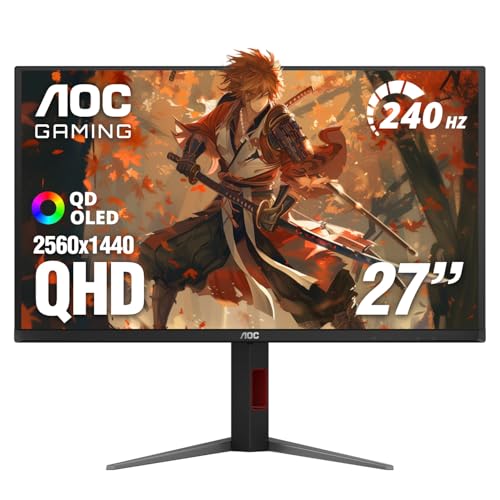
The AOC Q27GAZDV is the monitor on this list that most people asking "what should I actually buy?" should walk away with. It is the most recent AOC QD-OLED release at the 27-inch size, launching in 2026, and AOC clearly learned from the previous version. The panel specs are the same (QD-OLED, 2560×1440, 240Hz, 0.03ms, 147% sRGB, 110% DCI-P3) but the stand now adjusts for height, tilt, swivel, and pivot. A USB 3.2 hub is built into the chassis. HDMI 2.1 is included alongside DisplayPort 1.4. Those additions put this monitor closer to displays that cost significantly more.
The price point for what you get is striking. QD-OLED panels at 240Hz were not cheap even 18 months ago, and this is a current-generation panel with full ergonomic adjustability. The HDR True Black certification means dark scenes genuinely go dark, and the adaptive sync implementation covers G-SYNC Compatible and FreeSync territory so it works with both major GPU platforms.
The Q27GAZDV is the monitor most people who buy the slightly cheaper Q27GAZD (covered below) will wish they had spent an extra ten dollars on. The height-adjustable stand and USB hub alone justify the small price difference.
Pros:
Cons:
Best for: PC and console gamers who want a 27-inch QD-OLED at a fair price and do not want to pay a premium for a brand name.
Check current price on Amazon →

The Acer Predator X27U makes a specific argument: two DisplayPort 1.4 inputs and two HDMI 2.1 inputs, a ZeroFrame bezel design, and a 26.5-inch panel that sits squarely in the field of view Acer explicitly calls "the eSports hallmark size." That port arrangement is genuinely uncommon on a monitor at this price. Most 27-inch gaming displays give you one DisplayPort and one or two HDMI ports. Getting dual DisplayPort outputs means you can run this monitor as the central display in a dual-PC streaming setup, or keep a PC and a console permanently connected at full bandwidth without unplugging anything.
The panel itself is a true 10-bit QD-OLED with 99% DCI-P3 coverage, Delta E<2, and HDR10 support. AMD FreeSync Premium covers the adaptive sync side. At 26.5 inches, the X27U is fractionally smaller than the 27-inch monitors on this list, but the ZeroFrame design makes it feel borderless in a way that stands out in a multi-monitor array.
Image retention refresh runs automatically to handle the static HUD elements that OLED panels are most susceptible to. The full ergonomic stand (tilt, height, pivot, swivel) is present and works smoothly. Acer positions this directly at the tournament-style player who uses it as a primary competitive display and may run a secondary monitor beside it.
Pros:
Cons:
Best for: Competitive players running dual-monitor setups or dual-PC configurations who need more display inputs than the average gaming monitor provides.
Check current price on Amazon →

The AOC Q27GAZD is the monitor to buy if your primary goal is getting onto QD-OLED at the lowest possible price. It matches the panel specs of nearly everything else at this size (2560×1440, 240Hz, 0.03ms, 147.6% sRGB, 110.2% DCI-P3, HDR400 True Black) and comes with Adaptive-Sync for tear-free gameplay. What it gives up relative to the Q27GAZDV is a height-fixed stand with basic tilt and no USB hub.
That is a real trade-off, not a minor one. If you are setting up a fixed desk and your monitor height is already sorted by a VESA arm, the stand limitation costs you nothing. The Q27GAZD is VESA mountable, and running it on an arm actually resolves the ergonomic gap entirely. If you plan to use the included stand as-is, buy the Q27GAZDV instead.
The panel quality itself is indistinguishable from the newer model because it uses the same QD-OLED substrate. Games look spectacular. The color coverage and contrast are not different from monitors that cost twice as much.
Pros:
Cons:
Best for: Budget-focused buyers who plan to use a VESA monitor arm and want QD-OLED quality without the premium of a full-featured stand.
Check current price on Amazon →

The ASUS ROG Strix XG27AQDMG runs a different panel technology than anything else on this list: third-generation WOLED. Most monitors here use QD-OLED, which saturates color more aggressively and generally reaches higher peak brightness. WOLED (White OLED) renders white windows and on-screen text with notably better clarity, and the third-generation version here improves full-white brightness over earlier WOLED panels while maintaining the pixel-perfect blacks that make OLED compelling in the first place.
For someone who splits time between gaming and desktop work, the WOLED characteristic matters. Pure white backgrounds on QD-OLED can take on a very slight cool cast under certain color profiles; WOLED neutralizes that. The glossy finish on this panel is handled through ASUS's specific glass coating, which creates striking color pop while maintaining some glare control.
ASUS's OLED Care package is the most comprehensive on this list: custom heatsink, advanced airflow inside the chassis, ROG-exclusive Anti-flicker technology that addresses the flicker that appears during refresh rate fluctuations in non-120Hz/240Hz content, and a uniform brightness setting that locks luminance consistency across the panel. Three years of warranty with active replacement and burn-in coverage matches the ROG Swift. The bundled three-month Adobe Creative Cloud access is a nice bonus for anyone who uses that suite.
The price is the honest friction point. At $599, it costs meaningfully more than the LG 27GX704A-B, which is brighter and newer. The WOLED panel and the depth of ASUS's burn-in protection system are what you are paying for.
Pros:
Cons:
Best for: Content creators and gamers who spend significant time with desktop applications and want a glossy OLED panel that handles white-background UI as gracefully as dark game scenes.
Check current price on Amazon →

The LG 27GS93QE is the practical answer to a specific question: what do you buy if you want OLED gaming quality but your room has uncontrolled ambient light? The anti-glare, low-reflection OLED surface is the defining choice here. Competitors in this tier went glossy; LG went the other direction and produced a panel that you can use beside a window without the image disappearing into your own reflection.
The trade-off is visible blacks. Anti-glare coatings work by scattering surface light, which slightly elevates perceived black levels. On a VA or IPS panel this is a rounding error on top of mediocre native contrast. On an OLED panel, it still produces blacks that obliterate anything a conventional display can achieve. The 1.5M:1 contrast ratio and VESA DisplayHDR True Black 400 certification hold even through the coating.
Specs match the 27GX704A-B in most meaningful ways: 240Hz, 0.03ms, NVIDIA G-SYNC Compatible, AMD FreeSync Premium Pro, 98.5% DCI-P3, dual HDMI 2.1. The full ergonomic stand is present. LG's 2-year UltraGear OLED warranty covers the panel explicitly, which is worth noting at this price.
It costs more than the newer 27GX704A-B despite being an older model, which is the uncomfortable reality. The anti-glare surface is the justification; nothing else separates them.
Pros:
Cons:
Best for: Gamers in offices or rooms where ambient light control is not feasible and a glossy panel would be genuinely unworkable.
Check current price on Amazon →

The Samsung Odyssey G5 G50SF is the only monitor on this list running at 180Hz rather than 240Hz, and that single spec difference is its biggest weakness in a competitive context. At 27 inches with a QD-OLED panel, 180Hz is still a genuine step up from the 144Hz ceiling most console players are accustomed to, but it sits below every other QHD OLED monitor here.
What Samsung leans into instead is color accuracy. Pantone Validated means this panel is certified to reproduce over 2100 Pantone colors accurately, which is a credential aimed at professionals and creators, not competitive gamers. The QD-OLED substrate with Samsung's OLED Safeguard thermal management system handles burn-in protection through the same logic seen in Samsung's larger monitors. Glare-Free technology addresses reflections without a traditional matte coating, and Auto Source Switch+ makes the G5 genuinely convenient in a multi-device setup.
At its current price, the G5 does not offer a compelling value case against the 240Hz competition. The 60Hz refresh rate reduction represents a real penalty, and the monitors that match its price have both the faster panel and equivalent color quality. If you specifically need Pantone Validated color output and do not want to pay for a more expensive display, this is your pick. Otherwise, the AOC Q27GAZDV costs less and runs faster.
Pros:
Cons:
Best for: Content creators who want a gaming-capable OLED display and prioritize certified color accuracy over peak refresh rate.
Check current price on Amazon →

The Alienware AW3425DW is the monitor for someone who has already ruled out flat 27-inch displays and wants an ultrawide that does not compromise on speed. At 34.2 inches and 3440×1440 resolution, it wraps with a 1800R curve that produces a sense of peripheral immersion flat panels cannot replicate. The QD-OLED panel runs at 240Hz with 0.03ms response time, matching the fastest flat panels on this list while adding the visual envelop of ultrawide.
DCI-P3 99.3% coverage and Delta E<2 color accuracy means the image is not just large; it is accurate. VESA DisplayHDR TrueBlack 400 with 1000 nit peak HDR brightness and infinite contrast ratio places this squarely in the top tier of HDR implementation. The adaptive sync credentials cover NVIDIA G-SYNC Compatible, AMD FreeSync Premium Pro, and VESA AdaptiveSync, which is comprehensive.
The honest conversation about ultrawide at 240Hz is GPU load. Driving 3440×1440 at 240Hz requires meaningfully more GPU headroom than 2560×1440 at the same refresh rate. Budget accordingly, or accept that you will spend some time at 120Hz to 165Hz in demanding titles while the OLED panel absorbs the beauty of lower refresh rates more gracefully than IPS would.
Pros:
Cons:
Best for: Single-player and open-world gamers who want cinematic immersion and have a GPU capable of pushing the resolution at speed.
Check current price on Amazon →

The Samsung Odyssey G9 G91SD is a different category of purchase than everything else on this list. It is 49 inches wide. It runs at Dual QHD (5120×1440) resolution across a 32:9 aspect ratio. It is, functionally, two 27-inch QHD monitors merged into a single curved display with no bezel between them, and the QD-OLED panel means the blacks are absolute and the colors are vivid across the entire sweep of that enormous screen.
The refresh rate is 144Hz with 0.03ms response time, which is slower than the 240Hz competition but still well above what most super-ultrawide monitors have historically offered. G-SYNC Compatible and AMD FreeSync Premium Pro are both present. The 110 pixels per inch density at Dual QHD means detail holds even at 49 inches, which was a genuine concern with earlier super-ultrawide monitors at lower resolution.
Samsung's burn-in protection package here is the most sophisticated on this list, combining three independent systems: a Thermal Modulation System that adjusts brightness based on predicted surface temperature, Logo and Taskbar Detection that auto-dims static screen elements, and a Screen Saver that dims the panel after 10 minutes of inactivity. That level of automated protection matters more on a panel this size running taskbars and game HUDs for long sessions.
Picture-in-Picture works well for the specific use case Samsung targets: a gaming stream running in the main window with a chat window or browser visible in a sub-screen without disrupting the primary display.
The G9 is not for competitive gaming. The 32:9 aspect ratio is either unplayable or actively banned in most competitive titles. It is emphatically for the player who wants to be surrounded by the game world, or for a developer or power user who wants a genuine multi-window desktop without physically managing two monitors.
Pros:
Cons:
Best for: Open-world gamers, simulation enthusiasts, and power users who want total peripheral immersion and are willing to trade refresh rate ceiling and desk space for it.
Check current price on Amazon →
The biggest mistake people make shopping for OLED gaming monitors is assuming that any OLED panel is interchangeable with any other. It is not. Format, panel substrate, and finish all produce meaningfully different experiences.
QD-OLED panels use quantum dot filters to convert OLED light into colored subpixels. They tend to reach higher peak brightness in HDR highlight detail and push more saturated color. Every monitor on this list except the ASUS ROG Strix XG27AQDMG uses QD-OLED. WOLED (White OLED) uses a white OLED layer with color filters on top. The third-generation WOLED in the ROG Strix renders white-background UI and text more cleanly because the white subpixel contributes directly without passing through a color filter. For pure gaming, the difference is small. For mixed productivity and gaming use, it is worth the attention.
Glossy OLED panels (the LG 27GX704A-B, ROG Strix XG27AQDMG) produce deeper perceived blacks and more vivid color because there is no matte coating to scatter light before it reaches your eyes. In a controlled-light environment, they look better. In a room with windows or overhead lighting that the display reflects, they become frustrating quickly. Anti-glare panels (the LG 27GS93QE) trade some perceived contrast depth for usability in bright spaces. Neither approach is universally right. Look at your room, not at the spec sheet.
This is the most practically important factor for most buyers. Driving a 27-inch QHD (1440p) OLED at 240Hz is reasonable for a mid-range GPU. Driving a 32-inch 4K OLED at 240Hz requires a high-end GPU to hit the panel's actual ceiling. The 34-inch ultrawide at 3440×1440 and 240Hz sits between those two. The 49-inch Dual QHD at 144Hz is demanding. An honest way to calibrate: if your GPU can sustain over 165fps average in your most-played titles at the target resolution, the panel will reward you. If not, you are buying display headroom you cannot currently use.
| Panel | Resolution | GPU tier to hit max refresh |
|---|---|---|
| 27" QHD 240Hz | 2560×1440 | RTX 4070 / RX 7800 XT or better |
| 26.5-34" QHD/WQHD 240Hz | 2560×1440 to 3440×1440 | RTX 4070 Ti / RX 7900 XT or better |
| 32" 4K 240Hz | 3840×2160 | RTX 4090 / RX 9070 XT or better |
| 49" DQHD 144Hz | 5120×1440 | RTX 4080 or better |
Every OLED monitor ships with some form of burn-in mitigation, but the implementations vary in sophistication. Pixel shift and periodic refresh cycles are standard across all products here. Samsung's Thermal Modulation System and Logo/Taskbar Detection on the G9 represent the most automated protection. ASUS's custom heatsink approach on the ROG Swift and ROG Strix addresses panel temperature directly. If you play the same game daily with a persistent HUD, look for monitors that include logo/static-content detection specifically.
The 27-inch QHD format is the right choice for most people. It is the format that competitive gaming standardizes around, GPU requirements are manageable, and the field of view sits well at a typical desk distance of 24 to 30 inches. Ultrawide (34-inch) rewards immersive single-player games and multitasking but penalizes competitive FPS use. Super-ultrawide (49-inch) is for a specific kind of player who has the desk space, the GPU, and the preference for peripheral fill over refresh rate ceiling.
For pure gaming, yes, with one important caveat: the contrast difference is not subtle. OLED blacks are absolute zero-light; IPS blacks are dark gray. That gap changes how dark scenes, explosions, and HDR highlight content look in ways that no IPS panel, however bright, can replicate. The caveat is burn-in risk, which is real but manageable with modern protection systems. For mixed gaming and productivity, the answer depends more on how much time you spend looking at static white backgrounds.
They can, over long periods with static content. Modern QD-OLED and WOLED panels come with built-in protection systems that meaningfully reduce the risk: pixel refresh cycles, logo detection, and thermal modulation all help. Samsung, ASUS, and LG all offer explicit burn-in warranty coverage (ASUS offers three years; LG covers two years). For typical gaming use, the risk is low. For a display doubling as a productivity monitor with a persistent taskbar and chat application running all day, adopt the habit of using the screen saver and pixel care functions.
For competitive multiplayer, 240Hz makes a noticeable difference over 144Hz if your GPU can sustain frame rates in that range. The 0.03ms response time of these panels means the image update happens almost instantaneously; whether you perceive 240Hz versus 180Hz comes down to how sensitively trained your eyes are. For single-player games, 120Hz to 144Hz is sufficient for most genres. The Samsung G5's 180Hz sits in an unusual middle ground: better than 144Hz, meaningfully worse than 240Hz in competitive use.
Yes, but check the HDMI version. PS5 and Xbox Series X output 4K at 120Hz or 1440p at 120Hz over HDMI 2.1. Monitors with HDMI 2.1 ports (the LG 27GX704A-B, LG 27GS93QE, AOC Q27GAZDV, Acer Predator X27U) fully support this. Monitors with only HDMI 2.0 will cap at 60Hz at 4K or 144Hz at 1440p. Verify the HDMI version in the product specs before purchasing if console gaming is a priority.
The right answer depends on GPU and viewing distance. At a standard desk setup (24 to 30 inch viewing distance), 27-inch QHD sits at roughly the right angular size for competitive gaming without requiring head movement to track the full screen. The 32-inch 4K ASUS ROG Swift produces sharper pixel density that becomes visible in fine text and detailed game environments, but needs a GPU to match. If you sit closer than 24 inches, the 32-inch 4K becomes even more attractive. If you sit farther than 30 inches, the 27-inch QHD shrinks to the point where the larger panel makes practical sense.
QD-OLED replaces the traditional white OLED substrate's color filters with quantum dot conversion layers. The result is higher peak brightness in colored regions and wider color gamut coverage (up to 147% sRGB in the monitors here) compared to traditional WOLED designs. Most monitors marketed as "OLED gaming monitors" in 2026 use QD-OLED panels from Samsung Display. The exception is WOLED panels from LG Display, which appear here in the ASUS ROG Strix XG27AQDMG specifically.
The best OLED gaming monitors in 2026 cover a wider range of needs than any single recommendation can capture, but the hierarchy is clear. The ASUS ROG Swift PG32UCDM is the best gaming monitor you can buy right now, period. Its 4K QD-OLED at 240Hz is a specification combination that has no real competition, and the limited-time sale makes it more accessible than it has ever been. If 4K is overkill for your GPU or budget, the LG 27GX704A-B is the strongest 27-inch option: brighter than its predecessors, triple-UL-certified, and built around a glossy panel that makes dark game scenes look genuinely spectacular.
For buyers who want QD-OLED quality without paying a premium for brand recognition, the AOC Q27GAZDV is the right call. Its 2026 launch, full ergonomic stand, and USB hub at a sub-$400 price are a combination that the market has not offered until very recently. At the large-format tier, the Alienware AW3425DW is the ultrawide choice for players who want 240Hz with genuine immersion, and the Samsung Odyssey G9 is for the specific buyer who wants to surround themselves entirely.
If you are still undecided, ask yourself one question: do you mostly play competitive multiplayer or immersive single-player games? Competitive players should buy the LG 27GX704A-B or AOC Q27GAZDV and spend the remaining budget on a GPU upgrade. Single-player players should seriously consider the ASUS ROG Swift PG32UCDM or the Alienware AW3425DW because immersion is where the extra money actually goes somewhere.
This article contains Amazon affiliate links. We may earn a small commission on qualifying purchases at no extra cost to you.


