Physical Address
304 North Cardinal St.
Dorchester Center, MA 02124
Physical Address
304 North Cardinal St.
Dorchester Center, MA 02124

Looking for the best LCD monitors? We picked 10 top-selling options across 22 to 32 inches, from budget to gaming, to help you choose the right screen.
A bad monitor is the kind of purchase you feel every day and regret for years. Too small, too dim, the wrong panel type for what you actually do. The market for LCD monitors in 2026 is bigger than ever, and the sheer number of options makes picking one harder than it should be.
The best LCD monitors balance screen size, refresh rate, panel quality, and price in a way that matches how you actually use your computer. That could mean a compact 21-inch for a tight desk, a 27-inch IPS panel for color work, or a 144Hz gaming screen that keeps up with fast-paced titles. The range on this list runs from under $70 to around $150, covering essentially every mainstream use case.
Our picks include monitors from Philips, Dell, Samsung, Acer, and Sceptre. Some are the most consistent sellers in this category right now. Others earn their spot with specific features that make them genuinely better for certain buyers than anything else at the price.
TL;DR: The Philips 241V8LB is the one most people should buy: a frameless 24-inch with a VA panel, 100Hz, and four-year warranty at a price that's hard to argue with. The Dell SE2426H is the best choice if gaming matters, with 144Hz and TUV-certified eye care. The Acer KB272 earns a look for anyone who needs a 27-inch with accurate color.
| # | Product | Size | Panel | Refresh Rate | Price | Best For |
|---|---|---|---|---|---|---|
| 1 | Philips 241V8LB | 24" | VA | 100Hz | $79.99 | Best overall |
| 2 | Dell SE2426H | 24" | IPS | 144Hz | $99.99 | Gaming and color work |
| 3 | Acer KB272 | 27" | IPS | 120Hz | $125.60 | Color-accurate 27" |
| 4 | Samsung S30GD | 24" | IPS | 100Hz | $79.99 | Sleek IPS under $80 |
| 5 | Philips 271V8LB | 27" | VA | 100Hz | $99.99 | Budget 27" |
| 6 | Sceptre E225W 22" | 22" | TN | 144Hz | $67.97 | Budget gaming |
| 7 | Acer KB220Q H2bi | 21.5" | IPS | 100Hz | $79.99 | Compact home office |
| 8 | Philips 221V8LB | 22" | VA | 100Hz | $69.99 | Most affordable VA |
| 9 | Samsung 32" Flat | 32" | VA | 75Hz | $149.99 | Large-format desk |
| 10 | Sceptre E275W 27" | 27" | TN | 100Hz | $94.97 | Value gaming 27" |
Prices change in real time. Check each link for the latest.
Finding the best LCD monitors for this list came down to the factors that actually separate a solid screen from a frustrating one:

The Philips 241V8LB is the most consistent performer on this list for everyday use, and it's the monitor we'd hand to someone who just wants a reliable 24-inch screen without complications. The VA panel is the right call for this price point: you get noticeably deeper blacks than a typical budget IPS, and the contrast holds up when you dim the lights for a movie. The 178-degree viewing angle spec is accurate enough that two people watching from slightly off-center won't get washed-out colors.
At 100Hz with Adaptive-Sync, it handles casual gaming without tearing or major motion blur. It's not a gaming monitor in any serious sense, but someone who plays at a moderate level won't feel shortchanged. The frameless design on three sides looks clean, and it makes a side-by-side dual-monitor setup look nearly seamless. What really sets it apart from cheaper 24-inch options, though, is the four-year advance replacement warranty. In a market where most monitors ship with one-year limited coverage, that's a meaningful commitment.
The HDMI plus VGA connectivity is basic. No DisplayPort means you can't push beyond 60Hz on older systems that lack HDMI 1.4 or better, and there's no USB hub or audio out. The stand is tilt-only. For a primary work monitor on a modern PC, none of that matters much. For a power user who wants flexibility, the Dell below is the better choice.
Pros:
Cons:
Best for: Anyone who wants a reliable, good-looking 24-inch work monitor with above-average contrast and long-term peace of mind.
Check current price on Amazon →
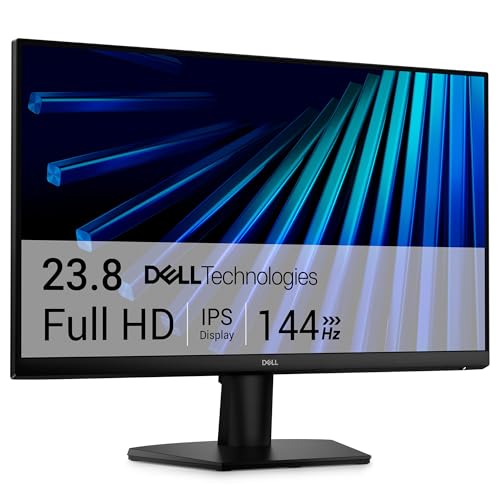
The Dell SE2426H costs $20 more than the Philips 241V8LB, and that premium buys you two things that genuinely matter: a 144Hz IPS panel and TUV Rheinland 3-star eye care certification. For anyone who games even casually or sits in front of the screen for six-plus hours, both of those are worth paying for.
The IPS panel gives you consistent color whether you're sitting centered or off to the side. That's the daily advantage of IPS that the spec sheet undersells: in a shared space, or on a desk where you move around, colors don't shift. The 144Hz at 1ms MPRT is the real differentiator here. It's a fast enough screen for competitive play, and at 24 inches and 1080p the pixel density is solid enough that text and UI look crisp. AMD FreeSync support keeps things smooth across a wide range of frame rates, which matters more in practice than the peak 144Hz number.
The ultra-thin bezels are genuinely slim, which helps if you're considering a dual setup. Dell's build quality at this price tier tends to be consistent, with less flexing in the panel than you get from some budget brands. The two HDMI inputs are a practical addition. The weakness is the stand: tilt only, no height adjustment, and it takes up more desk depth than the Philips.
Pros:
Cons:
Best for: Gamers who want a 24-inch IPS screen under $100, and office workers who spend long hours in front of a display and want proper eye care certification.
Check current price on Amazon →

If you want a 27-inch screen and color accuracy is on your checklist, the Acer KB272 is the one to consider. The IPS panel covers 99% sRGB, which puts it in a different class from the VA-panel 27-inch options at similar prices. For photo editing, graphic work, or any situation where you care that what you see on screen matches what other people will see, that color coverage matters.
At 120Hz with 1ms VRB response time and FreeSync support, it's a more capable gaming screen than its specs initially suggest. The 120Hz ceiling is slightly below the Dell's 144Hz, but in practice the difference is minor unless you're playing at a competitive level. Adaptive-Sync integration keeps frame delivery smooth regardless of what your GPU is pushing. The IPS panel also means wide viewing angles: 178 degrees horizontal, which at 27 inches is more relevant than at 24, since the panel edge is physically further from center.
The HDMI and VGA combination is somewhat limited for a screen at this price. A DisplayPort option would have made sense here. At 27 inches and 1080p the pixel density drops compared to 24-inch alternatives, and fine text at the default size can look slightly soft. If you sit further back from your desk that's fine; if you're close to the screen, it's something to factor in.
Pros:
Cons:
Best for: Designers, photographers, or content creators who want a large IPS screen with accurate color without stretching into premium territory.
Check current price on Amazon →

The Samsung S30GD earns its spot by combining an IPS panel with a price tag that matches the cheaper VA options. If you've been comparing 24-inch monitors and wondering whether IPS is worth it at this budget, Samsung's answer here is essentially yes. The IPS display keeps colors consistent across viewing angles in a way that VA can't fully match, and on a 24-inch screen where multiple people might be watching, that consistency is useful.
Samsung's Game Mode adds a bit of genuine flexibility: you can adjust color and contrast to make dark scenes more legible without messing with the overall image settings. Combined with 100Hz and FreeSync, it handles light gaming without issue. The super-slim profile and ultra-thin bezels look noticeably more modern than older budget monitors, and the lightweight build (5.3 pounds) makes it easy to reposition. At the time of writing this is also carrying a limited-time deal badge, which may bring it below its listed price.
The stand is tilt-only, and the connectivity is basic. There's no DisplayPort, and the included stand doesn't adjust for height.
Pros:
Cons:
Best for: Anyone who wants an IPS monitor's viewing-angle advantage without paying the typical IPS premium.
Check current price on Amazon →

The Philips 271V8LB is the big-screen sibling of our top pick, scaling everything up to 27 inches without a dramatic price increase. The VA panel delivers the same contrast advantage: brighter whites, deeper blacks, and 16.7 million colors that hold up better in varied lighting than a budget IPS. For someone whose primary use is movies, streaming, and general browsing from a few feet back, that's the right trade.
At 27 inches, the frameless design on three sides is more visually impactful than on the 24-inch version. The screen fills more of your peripheral vision, and side-by-side setups look nearly gapless. EasyRead mode is a genuine feature rather than a gimmick at this size; reading long documents on a 27-inch screen where the text is larger naturally makes the paper-like rendering more pleasant. The four-year advance replacement warranty carries over from the 24-inch model, which at $99.99 still represents good long-term value.
The pixel density at 27 inches and 1080p is the one honest limitation. If you sit less than two feet from the screen, individual pixels are visible. This is a monitor built for people who work or watch from a comfortable distance, not someone using it as a close-up development monitor.
Pros:
Cons:
Best for: Someone who wants a large-screen experience for media and general productivity without breaking $100.
Check current price on Amazon →

At $67.97, the Sceptre E225W is the cheapest way to get a 144Hz gaming screen on this list, and it actually justifies that claim. The 2026 edition ships with both HDMI and DisplayPort inputs, built-in speakers, and Blue-Light Shift, which is a surprising package at this price point. The built-in speakers are the kind you'd use when headphones aren't convenient, not the kind you'd choose for music. But for a desk that doesn't have room for external speakers, having them is better than not.
The 22-inch size keeps the pixel density high enough at 1080p that text and fine detail stay reasonably sharp. At 144Hz it keeps up with competitive gaming in titles that don't require high-end GPU power. The nearly bezel-free design makes it a reasonable candidate for a dual-monitor pair, especially given the price. Blue-Light Shift is a software reduction rather than hardware certification, so it shouldn't be compared to TUV Rheinland certification, but it does take the edge off long sessions.
The stand is basic, and Sceptre's build quality has historically felt less solid than Philips or Dell at comparable prices. The panel is a TN type, which means color accuracy and viewing angles are weaker than IPS or VA. If you're directly in front of the screen and primarily gaming, that trade is fine. For any kind of creative or color-sensitive work, look elsewhere.
Pros:
Cons:
Best for: Budget-focused gamers who want 144Hz without spending $100, and who sit directly in front of the screen.
Check current price on Amazon →

The Acer KB220Q H2bi occupies a specific niche: it's the 21.5-inch IPS option for people with tight desks or those setting up a secondary screen. The ZeroFrame design minimizes the physical footprint while maximizing screen real estate within the size, and the IPS panel means anyone glancing at your screen from an angle gets a clear view without color shift.
At 100Hz with 1ms VRB and Adaptive-Sync, it's a capable screen for its size. The 99% sRGB coverage matches the Acer KB272 at a smaller size and lower price, which is meaningful if color fidelity matters even on a smaller screen. HDMI and VGA connectivity covers most modern and legacy connections. The ZeroFrame aesthetic is one of the cleaner designs on the list, which makes it look less like a budget monitor than its price suggests.
The 21.5-inch size is genuinely small compared to the 24 to 27-inch standard, and for a primary screen on a full-time desk it may feel cramped quickly. It's a natural second monitor or a screen for a bedroom workstation where size isn't the priority.
Pros:
Cons:
Best for: A second monitor for a multi-display setup, or a primary screen in a compact workspace where desk real estate is limited.
Check current price on Amazon →

The Philips 221V8LB is the cheapest monitor on this list, and it makes a sensible case for itself. At 22 inches with a VA panel, 100Hz, and Adaptive-Sync, it delivers more than most people expect at this budget. The VA panel is the same advantage it provides on the 24-inch version: contrast that most budget monitors at this price can't match, with 16.7 million colors and wide viewing angles that hold up surprisingly well.
The four-year advance replacement warranty is present here too, which distinguishes it from most competitors at this price. For a spare monitor, a student desk, or a setup that needs to stay under $70, it covers the fundamentals without compromise on the things that actually affect daily use. The HDMI and VGA connectivity is fine for a monitor at this price and size.
If you're weighing this against the 24-inch Philips model, the $10 difference for two more inches of screen is almost certainly worth it for a primary display. The 22-inch size is better suited to secondary or supplementary use.
Pros:
Cons:
Best for: A secondary display, a student desk setup, or anyone who wants a solid VA monitor at the lowest possible price.
Check current price on Amazon →

The Samsung 32-inch Flat Monitor is the only screen on this list big enough to function as a room centerpiece, and at $149.99 it's the most expensive. The three-sided borderless design looks genuinely modern, and the sheer size changes the experience of watching video or gaming in a way that smaller monitors can't replicate.
The 75Hz refresh rate with AMD FreeSync is the honest limitation. For productivity and media, 75Hz is sufficient, and FreeSync keeps gaming smooth at moderate frame rates. But anyone serious about gaming should consider whether the 24-inch Dell at 144Hz would serve them better than this 32-inch screen at 75Hz. These are genuinely different use cases. Where this Samsung shines is as a large, clean display for someone who spends most of their time on documents, video calls, and streaming, and wants the visual presence of a large screen without going to a TV.
Samsung's Game Mode and Eye Saver Mode are well-implemented; the advanced eye care technology reduces visible flicker across the full 32-inch panel, which matters more at this size where your eyes cover more ground. A Prime deal is currently active, which may lower the effective price.
Pros:
Cons:
Best for: Someone who primarily uses their monitor for streaming, video calls, and productivity, and wants the visual impact of a large screen without paying TV prices.
Check current price on Amazon →

The Sceptre E275W makes the most complete case of any monitor on this list at its price: 27 inches, 100Hz, 100% sRGB, built-in speakers, DisplayPort and dual HDMI, AMD FreeSync, VESA compatibility, FPS and RTS game modes, and a Blue-Light Shift filter. That's a lot of feature boxes checked for under $95, and it's currently marked as a limited-time deal.
The 100% sRGB coverage is the spec that jumps out. Most budget monitors at this price, particularly at 27 inches, do not cover the full sRGB gamut. For gaming where you want colors to appear as intended, that full coverage is a real advantage over cut-down panels. The FPS and RTS presets are Sceptre's custom tuning for gaming genres, and they work as advertised for boosting visibility in dark environments.
The built-in speakers follow the same pattern as the 22-inch Sceptre: perfectly functional for games and background audio, not something you'd use for serious music listening. The VESA wall mount option is a nice addition for a gaming setup where desk space matters.
The panel is TN, which means the same trade-offs as the 22-inch Sceptre: color and angle performance below IPS or VA. At 27 inches the viewing angle limitation of TN becomes more noticeable, particularly in the vertical axis. If you sit directly in front at a fixed position, it's manageable. If you share the screen or move around, it's a genuine drawback.
Pros:
Cons:
Best for: Gamers who want a full-featured 27-inch gaming screen with dual HDMI and built-in speakers at the lowest possible price, and who sit directly in front of their monitor.
Check current price on Amazon →
The right LCD monitor depends on three things working together: what you do on it, how far you sit, and what your computer can actually push. Get any one of those wrong and the rest of the specs don't matter.
This is the most consequential choice you'll make, and it's determined before you even look at price.
VA panels have the best contrast ratio of the three. They produce deeper blacks and more vivid color in dark environments, which makes them the natural pick for movies, general media, and gaming in a room where you control the lighting. The trade-off is narrower viewing angles than IPS (though modern VA is much better than it was a few years ago), and some VA panels show a subtle "smearing" in fast dark-to-bright transitions.
IPS panels have the most accurate color and the widest viewing angles. They're the right choice for any work where color accuracy matters (photo editing, graphic design, video work), for multi-monitor setups where you'll be looking at the screen from an angle, and for screens that other people will frequently glance at from the side. The contrast ratio is lower than VA, which means blacks look more like dark grey in dim rooms.
TN panels are the fastest and the cheapest. For competitive gaming at very high frame rates they still have a response-time advantage, but the color accuracy and viewing angle performance are visibly inferior. For most buyers in 2026, TN is only worth accepting when price is the sole constraint.
| Use case | Minimum | Comfortable | Overkill |
|---|---|---|---|
| Office / browsing | 60Hz | 75-100Hz | 144Hz+ |
| Casual gaming | 75Hz | 100-120Hz | 144Hz+ |
| Competitive gaming | 100Hz | 144Hz | 240Hz+ |
| Media / streaming | 60Hz | 75Hz | 100Hz+ |
The jump from 60Hz to 100Hz is noticeable to almost everyone. The jump from 100Hz to 144Hz is meaningful for gaming and barely perceptible for anything else. Higher refresh rates are wasted if your graphics card can't sustain frame rates to match.
At 1080p, the right screen size depends on how far you sit. Closer than 24 inches and pixels become visible on a 27-inch 1080p panel. For most desk setups where you're sitting 24 to 36 inches from the screen, 24 inches at 1080p is the sweet spot for pixel density. At 27 inches and 1080p you'll want to sit a bit further back. At 32 inches and 1080p you should be at least three feet away for the image to look sharp.
If you want a large screen with sharp pixel density at a close viewing distance, a 1440p or 4K panel is the answer, but none of those appear in this price range.
Most modern PCs and laptops use HDMI or DisplayPort. HDMI 1.4 supports 1080p at 120Hz; HDMI 2.0 supports 144Hz and beyond. If you're connecting to an older laptop with VGA output, make sure the monitor includes one. If you're running a dual-monitor setup, confirm you have two separate video outputs on your computer: even a monitor with two HDMI inputs only displays one source at a time.
DisplayPort is generally preferred for gaming monitors because it supports higher refresh rates and has better adaptive sync compatibility, but most people with a single computer connected to a single monitor will never notice the difference.
Flicker-free backlights and blue light reduction are not interchangeable features. Flicker-free eliminates the rapid on-off cycling that causes eye fatigue even when you can't consciously see it, and it matters for anyone spending more than a few hours at a time in front of a screen. Blue light reduction shifts the color temperature of the display and can help with sleep disruption if you use your computer in the evening. TUV Rheinland certification (as on the Dell SE2426H) is a third-party standard that actually tests these properties; self-certified "eye care" features vary significantly in effectiveness.
The Philips 241V8LB is the strongest all-around pick for home office work. Its VA panel handles varied lighting conditions well, the frameless design looks clean, and the four-year advance replacement warranty means you're covered if something goes wrong. For most office tasks, 100Hz is more than sufficient.
It depends on what you're doing. IPS is better for color-sensitive work, multi-monitor setups, and any situation where you view the screen from an angle. VA is better for contrast-heavy use like movies and gaming in dark rooms, and it typically costs less than IPS at the same specifications. For a general-purpose screen, IPS edges it. For media and gaming at night, VA wins.
Not necessarily. 144Hz provides a clear advantage in competitive, fast-paced titles where frame timing and input lag matter. For casual gaming, RPGs, strategy games, or anything you play at a relaxed pace, 100Hz is more than adequate and costs less. The honest answer is that 100Hz feels significantly smoother than 60Hz to almost everyone, while the step from 100Hz to 144Hz is less universally noticeable.
For a desk where you sit 24 to 30 inches from the screen, 24 inches is the practical sweet spot at 1080p. At 27 inches and 1080p you'll want to sit slightly further back to avoid visible pixelation. A 32-inch 1080p monitor is best suited to living room-style distances of three feet or more. If you're tight on desk space, a 21.5 or 22-inch monitor reduces clutter without sacrificing much usable screen area.
On most of the best LCD monitors at this price range, built-in speakers are usable for system sounds, video calls, and casual media but won't satisfy anyone who cares about audio quality. The Sceptre E225W and E275W include them. If your desk setup doesn't have dedicated speakers, built-in is better than nothing. If you have even a basic external speaker or headphones, you won't use the built-ins for anything critical.
Adaptive-Sync (and compatible standards like AMD FreeSync) synchronizes the monitor's refresh rate to the frame rate your GPU is actually outputting, which eliminates the tearing and stuttering that happens when those two numbers don't match. If you game at all, even casually, Adaptive-Sync is worth having. Most of the monitors on this list include it. The benefit is most noticeable when your frame rate varies (which it always does in games) rather than running at a locked rate.
Yes. Advance replacement means Philips ships you a replacement unit before you return the defective one, so you're not without a monitor for the days or weeks a standard mail-in repair takes. For a monitor that sits on a desk you use every day, that turnaround difference is significant. Most monitors at this price ship with one-year limited warranties that require you to mail the unit in and wait.
For the majority of people reading this, the Philips 241V8LB is the best LCD monitor to buy. It hits the right combination of VA panel quality, 100Hz refresh rate, clean frameless design, and long-term warranty coverage at a price that doesn't force compromises. The 24-inch size works for most desks, and the Adaptive-Sync handles light gaming without requiring a dedicated gaming screen.
If gaming is a real priority, the Dell SE2426H is worth the extra $20 for 144Hz and IPS. You give up some contrast depth but gain noticeably smoother motion and TUV-certified eye care that holds up under long sessions. For a larger screen, the Acer KB272 delivers 27 inches with accurate IPS color at a price that undercuts most comparable panels. And if you genuinely need 32 inches, the Samsung 32-inch Flat is the cleanest borderless option in this price range, with the understanding that 75Hz is its ceiling.
If you're still unsure, go with the Philips 241V8LB. It's the monitor that will frustrate you the least over the three to five years you'll be using it.
This article contains Amazon affiliate links. We may earn a small commission on qualifying purchases at no extra cost to you.


