Physical Address
304 North Cardinal St.
Dorchester Center, MA 02124
Physical Address
304 North Cardinal St.
Dorchester Center, MA 02124

Best Split Screen TVs (November 2026): 10 picks from FEELWORLD and KTC, from multiview monitoring to video walls, in-car screens and restaurant menu boards.

Most people who search for a split screen TV expect a television that shows two or four inputs side by side. Most consumer TVs cannot do that natively, and the wrong purchase usually fails in one of two ways. Either you buy a splitter that only duplicates one picture onto two screens, or you buy a screen with a software split that is too small or too dim for the job. The Best Split Screen TVs depend on what is being split: four cameras on one monitor, one image across four TVs, two apps on a car dashboard, or several content zones on a menu board.
The short answer: the FEELWORLD ATEM156 Quad-Split Monitor suits streamers and small production desks, the DEANFINN 2×2 Video Wall Controller suits anyone turning four TVs into one large picture, and the LAMTTO 11-inch CarPlay Screen suits drivers who want maps and video on one dashboard screen. The rest of the list covers a four-input multiviewer, three kinds of mirror-only HDMI splitter, an Android car stereo, a commercial signage display and a portable touchscreen TV.
TL;DR: top picks at a glance
- Best overall: the FEELWORLD ATEM156 Quad-Split Monitor, a 15.6-inch 1080p IPS panel with 4 HDMI inputs and 4 loop outputs.
- Best for video walls: DEANFINN 2×2 Video Wall Controller, which spreads one 4K@30Hz source across 4 TVs with 11 splicing modes.
- Best for in-car use: LAMTTO 11-inch CarPlay Screen, an 11-inch touchscreen with a split-screen mode and an AHD backup camera.
- Best for four sources on one TV: AOGETYO 4×1 HDMI Multiviewer, with 5 viewing modes and 4K@30Hz output.
| # | Product | Best for | Split layout | Resolution | Format |
|---|---|---|---|---|---|
| 1 | FEELWORLD ATEM156 Quad-Split Monitor | Live-stream monitoring | Quad, dual, single, PiP | 1080p panel, 4K30 inputs | 15.6-inch monitor |
| 2 | DEANFINN 2×2 Video Wall Controller | Four-TV video walls | 2×2 wall, 11 modes | 4K@30Hz input | Controller box |
| 3 | LAMTTO 11-inch CarPlay Screen | Dashboard entertainment | Split-screen mode | Not listed | 11-inch car screen |
| 4 | AOGETYO 4×1 HDMI Multiviewer | Four sources, one TV | Full plus 4 split modes | 4K@30Hz | 4-input switcher |
| 5 | TCNEWCL 1×12 HDMI Splitter | Many-screen mirroring | None (mirror only) | 4K@30Hz | 12-output splitter |
| 6 | Haudio 10.1-inch Android Car Stereo | Single DIN upgrades | Split-screen apps | Not listed | 10.1-inch car stereo |
| 7 | KEINONE 55-inch Digital Signage Display | Menu boards | 2-6 content zones | 4K UHD | 55-inch display |
| 8 | NEWCARE 1×2 HDMI Splitter | Two-TV mirroring | None (mirror only) | 4K@30Hz | 2-output splitter |
| 9 | Cyberguys! 4K60 1×2 HDMI Splitter | 4K60 dual mirroring | None (mirror only) | 4K@60Hz | 2-output splitter |
| 10 | KTC MEGAPAD 25-inch Portable TV | Portable touch viewing | Not listed | 1080p | 25-inch portable TV |

Pros:
Cons:
Best for: streamers and small production teams who need to watch four cameras or capture devices at once.
Check current price on Amazon →
The FEELWORLD ATEM156 is the only product here built as a true multiview monitor, which is why it leads. Four HDMI inputs feed a quad split, and each window can also carry a picture-in-picture image. When the quad view is not needed, the screen switches to a dual view or a single full-screen image.
The loop outputs are the detail that separates it from a simple screen. Every input is passed through, so the monitor sits beside an ATEM switcher, OBS rig or eCam Live setup without breaking the feed. The 100mm and 75mm VESA pattern lets you hang it on a stand next to a Stream Deck, and the aluminum body keeps the weight near 3.5 pounds.
Compare it with the AOGETYO 4×1 HDMI Multiviewer, which does a similar four-way split but sends the result to whatever HDMI TV you own. If you want the split on a large living-room screen, the AOGETYO is the better fit. The ATEM156 is the wrong choice there, since 15.6 inches is small for couch viewing. It is also the wrong choice when the source is HDCP-protected, such as many streaming boxes, unless you add a stripping splitter.

Pros:
Cons:
Best for: retail displays, trade-show booths and home setups where four matching TVs should act as one canvas.
Check current price on Amazon →
The DEANFINN controller solves a different problem from every other splitter in this list. Instead of copying one picture to several screens, it cuts one picture into four parts and sends each part to its own TV. The result is a single dynamic image wall, with RS232 control for installations and an IR remote with direct keys for common modes.
Bezel handling matters on a wall like this. The edge mask function and the 180-degree rotation on outputs 1 and 2 in 2×2 mode let you correct for the gaps between screens, which is where cheaper wall setups usually look rough. A separate 3.5mm port feeds speakers or a sound bar, so audio does not depend on the TVs.
If you want the same picture on every TV rather than one stretched image, the TCNEWCL 1×12 HDMI Splitter is the right product. If you want four different sources on one display, choose the AOGETYO 4×1 HDMI Multiviewer instead. The DEANFINN is also not the choice for 4K@60Hz content, since its input stops at 30Hz.
Pros:
Cons:
Best for: drivers on long trips who want navigation and passenger video on one screen.
Check current price on Amazon →
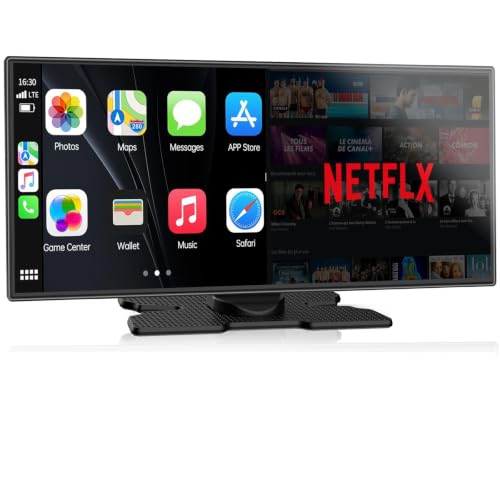
The LAMTTO earns its place as the one pick that delivers a real split screen without extra boxes. The driver can keep a map open while a passenger streams Netflix or YouTube, which suits families on road trips. The dual WiFi bands are meant to keep CarPlay navigation smooth while a second user streams.
The AHD backup camera activates when you shift into reverse and shows dynamic guidelines, so the screen also covers the parking job. The In-Cell touchscreen is slim and responsive, and the 11-inch size is bigger than the 10.1-inch panel on the Haudio 10.1-inch Android Car Stereo.
Choose the Haudio instead if you want a Single DIN head unit with Android 13, 2GB RAM and 32GB storage and an explicit wireless CarPlay and Android Auto feature set. The LAMTTO is the wrong choice if you want a fixed home TV, where the KEINONE 55-inch Digital Signage Display or the KTC MEGAPAD 25-inch Portable TV is more suitable.

Pros:
Cons:
Best for: desk workers and gamers who want several sources on one existing TV.
Check current price on Amazon →
The AOGETYO is the nearest thing in this list to a split screen button for any HDMI display. In full-screen mode the audio follows the active source, and in the split modes you choose which source's audio plays through the sound switch.
Its output can go to any HDMI screen, including a gaming TV, which makes it handy for watching a console and a PC feed together. The 4K@30Hz limit means it is a monitoring tool for several sources, not a way to play competitive games at high frame rates. For a dedicated broadcast monitor with loop-through outputs, the FEELWORLD ATEM156 Quad-Split Monitor is the stronger choice.

Pros:
Cons:
Best for: TV stores, trade shows and sports venues that need one feed on many screens.
Check current price on Amazon →
The TCNEWCL splitter does not split a picture at all. It duplicates it, so it belongs here only for readers who need many screens showing the same content. For a showroom wall or a sports night, that is exactly the job, and the 12-output design avoids chaining smaller splitters.
If you want one large image across several TVs, the DEANFINN 2×2 Video Wall Controller is the product to buy. For a home with only two screens, the NEWCARE 1×2 HDMI Splitter is simpler and includes its own input cable.

Pros:
Cons:
Best for: drivers replacing a Single DIN head unit who want wireless CarPlay and app multitasking.
Check current price on Amazon →
The Haudio is a head-unit replacement, not an add-on screen, so it suits a driver ready to remove the old radio. The floating design and portrait option make it flexible on dashboards where a fixed landscape display would be awkward.
Against the LAMTTO 11-inch CarPlay Screen, the Haudio is more explicit about wireless CarPlay and Android Auto and includes more of the stereo functions. The LAMTTO has a larger screen and a passenger-streaming focus. The Haudio is the wrong choice if you want a no-fuss install, because dash fit and adapters need checking first.

Pros:
Cons:
Best for: restaurants and shops that need a bright, always-on screen with several content zones.
Check current price on Amazon →
The KEINONE is the only large screen here with a built-in split. Its layouts divide the display into two to six zones, and the Android 14 system supports Google Play apps. Where a consumer smart TV is tuned for evening viewing, this panel is tuned for brightness and continuous operation, at 55 inches and 1000 nits.
It is the wrong choice for a dim living room, where that brightness is wasted. For a four-screen wall instead, use the DEANFINN 2×2 Video Wall Controller with TVs you already own.

Pros:
Cons:
Best for: a console or streaming box feeding two TVs in different rooms.
Check current price on Amazon →
The NEWCARE is a simple mirror. Both displays get the same picture, and the built-in cable shortens the cable list. That makes it easy to place behind a cabinet.
If you need 4K at 60Hz on both screens, the Cyberguys! 4K60 1×2 HDMI Splitter is the better fit, since NEWCARE caps 4K at 30Hz. It is the wrong choice for anyone wanting separate content on two screens.

Pros:
Cons:
Best for: classrooms, conference rooms and sports bars mirroring one 4K source to two displays.
Check current price on Amazon →
The Cyberguys! splitter is the better pick of the two-output models for modern 4K sources. Compared with the NEWCARE 1×2 HDMI Splitter, it doubles the 4K frame rate to 60Hz, but you supply your own input cable.
The product itself says it is not for extended or split-screen use. If you want different images, choose the AOGETYO 4×1 HDMI Multiviewer or a dedicated monitor setup.

Pros:
Cons:
Best for: campers and travelers who want a large, battery-powered touchscreen with streaming apps.
Check current price on Amazon →
The KTC MEGAPAD is last because the split-screen feature is not specified. Its strength is mobility. A touch screen TV that runs on a battery with Google Play access is a different proposition from a fixed display, and the 8MP camera and four speakers cover video calls.
If you need a split layout, pick the KEINONE 55-inch Digital Signage Display for fixed installs or the LAMTTO 11-inch CarPlay Screen for vehicles.
The core trade-off is where the split happens. Hardware multiviewers and wall controllers split in a box and work with any display, while software splits live inside Android screens and depend on app support. Mirror-only splitters sit outside the trade-off because they duplicate rather than divide.
Before choosing, check these project details:
A hardware multiview takes several inputs and combines them before the picture reaches the display. The FEELWORLD ATEM156 Quad-Split Monitor does it inside a monitor, and the AOGETYO 4×1 HDMI Multiviewer does it in a small box for any TV. Both keep the sources as live video.
A software split is limited to what the operating system allows. The KEINONE 55-inch Digital Signage Display, Haudio 10.1-inch Android Car Stereo and LAMTTO 11-inch CarPlay Screen split apps or content zones on an Android system. That suits menus and maps, but not live camera feeds.
Mirroring sends one identical picture to several screens. The NEWCARE 1×2 HDMI Splitter, Cyberguys! 4K60 1×2 HDMI Splitter and TCNEWCL 1×12 HDMI Splitter all work this way, and none can show different content on each output.
If you want independent content on two displays, a double screen monitor setup driven by a computer is the correct approach, not a splitter. A wall controller such as the DEANFINN 2×2 Video Wall Controller is a third option, cutting one image into four parts.
Most boxes here top out at 4K@30Hz, including the AOGETYO, TCNEWCL, NEWCARE and DEANFINN. The Cyberguys! is the exception at 4K@60Hz. For movies and presentations 30Hz is acceptable, but fast gameplay will look less smooth.
HDCP can also block a signal. The ATEM156 explicitly needs a splitter to strip HDCP from protected sources. Check this before connecting a streaming box.
A vehicle screen needs fitment checks. The Haudio may need a dash kit, wire harness adapter and antenna adapter, and its Single DIN design suits some cars better than others.
Fixed commercial screens need mounting and brightness. The KEINONE offers a bracket and 1000 nits. For off-grid use, the KTC MEGAPAD 25-inch Portable TV carries its own 5000mAh battery, which no other product here does.
Most regular TVs show only one input at a time, or a small picture-in-picture window. A multiviewer such as the AOGETYO 4×1 HDMI Multiviewer adds a real four-way split to any HDMI TV. Android-based screens such as the KEINONE 55-inch Digital Signage Display split content in software.
An HDMI splitter copies one source to several screens, as the NEWCARE and Cyberguys! models do. A multiviewer combines several sources onto one screen, as the AOGETYO does. They solve opposite problems.
Use a video wall controller such as the DEANFINN 2×2 Video Wall Controller. It takes one HDMI or DVI input and sends one quarter of the image to each of four HDMI outputs. Its edge mask and rotation functions help align the bezels.
No, a splitter shows the same image on both outputs. Both the NEWCARE 1×2 HDMI Splitter and the Cyberguys! 4K60 1×2 HDMI Splitter state they do not support extended display. For different content, use separate sources or a multiviewer.
The LAMTTO 11-inch CarPlay Screen and the Haudio 10.1-inch Android Car Stereo both offer a split-screen mode. The LAMTTO focuses on passenger streaming over a hotspot, and the Haudio is a full Single DIN head unit. Check dash fitment before buying either.
For presentations, signage and video it is fine. For fast games it is limiting, and the Cyberguys! 4K60 1×2 HDMI Splitter is the only 4K@60Hz model in this list. The AOGETYO and TCNEWCL both cap at 30Hz.
Best Split Screen TVs for most buyers start with FEELWORLD ATEM156 Quad-Split Monitor: a 15.6-inch 1080p IPS panel, four HDMI inputs with four loop outputs, and flexible quad, dual and single layouts. Its main weakness is size and brightness, at 250 cd/m², and HDCP sources need an extra splitter.
For other uses, the DEANFINN 2×2 Video Wall Controller is the pick for turning four TVs into one picture, and the AOGETYO 4×1 HDMI Multiviewer is the pick for four sources on a TV you already own. In a vehicle, the LAMTTO 11-inch CarPlay Screen suits passenger streaming, while the Haudio 10.1-inch Android Car Stereo suits a full head-unit swap.
The specialist picks are the KEINONE 55-inch Digital Signage Display for menu boards with 2 to 6 content zones, the KTC MEGAPAD 25-inch Portable TV for battery-powered viewing, and the TCNEWCL, NEWCARE and Cyberguys! splitters for mirroring one source to many screens. If you are still undecided, first decide whether you need to divide a picture or copy it, then match the product to that answer.


