Physical Address
304 North Cardinal St.
Dorchester Center, MA 02124
Physical Address
304 North Cardinal St.
Dorchester Center, MA 02124

Find the best 5G routers for home, travel, and business. Our top 10 picks include cellular routers, Wi-Fi 7 hotspots, and budget options for fast, reliable internet.
There is nothing more frustrating than paying for high-speed internet and watching a video buffer for the tenth time in a row. Whether you live in a rural area with limited wired options, hit the road in an RV every other month, or just want to future-proof your home network for 4K streaming and online gaming, the router you choose makes all the difference. The market for the best 5G routers has split into two distinct camps: cellular gateways that plug into SIM cards and portable mobile hotspots that double as travel companions. We sorted through the current crop to find the ten that actually deliver on their promises, from heavy-duty industrial units to pocket-sized devices that let you work from a campsite. Below you will find the strongest all-around picks, a few niche standouts, and honest warnings about where each falls short.
TL;DR: The GL.iNet GL-X3000 (Spitz AX) is the one most people should buy: fast Wi-Fi 6, dual-SIM failover, and full OpenWrt customization. For travel, the GL.iNet MUDI 7 packs a built-in battery, a touchscreen, and tri-band Wi-Fi 7. The Cudy P5 offers the fastest cellular speeds on paper with its Qualcomm SDX62 modem. The TP-Link Archer AX21 is the budget choice if you only need a wired broadband router with Wi-Fi 6.
| # | Product | 5G Cellular? | Wi-Fi Standard | SIM Slots | Price | Best for |
|---|---|---|---|---|---|---|
| 1 | GL.iNet GL-X3000 (Spitz AX) | Yes | Wi-Fi 6 | Dual SIM | $379.99 | Rural/remote home or RV, heavy VPN use |
| 2 | GL.iNet GL-XE3000 (Puli AX) | Yes | Wi-Fi 6 | Dual SIM | $409.99 | Office/events needing battery backup |
| 3 | Cudy P5 (5G NR CPE Router) | Yes | Wi-Fi 6 | Dual SIM | $449.99 | Power users who want the fastest cellular link |
| 4 | Teltonika RUTM50 Industrial Router | Yes | Wi-Fi 5 | Dual SIM | $598.00 | Industrial sites, remote monitoring, harsh environments |
| 5 | NETGEAR Nighthawk M7 Mobile Hotspot | Yes | Wi-Fi 7 | eSIM + SIM | $499.98 | International travel, up to 32 devices |
| 6 | GL.iNet MUDI 7 (GL-E5800) Travel Router | Yes | Wi-Fi 7 (tri-band) | eSIM + dual SIM | $419.99 | On-the-go livestreaming, hotel coworking |
| 7 | Max 5G Dream Router (Ubiquiti) | Yes | Wi-Fi 7 | Unknown | $599.95 | All-in-one network controller with 5G |
| 8 | TP-Link Archer AX21 V5 | No | Wi-Fi 6 | None | $51.99 | Budget home router for wired broadband |
| 9 | TP-Link Archer BE230 | No | Wi-Fi 7 (dual-band) | None | $87.00 | Future-proofing a home with fast fiber |
| 10 | NETGEAR Nighthawk RS140 | No | Wi-Fi 7 (dual-band) | None | $158.00 | Entry-level Wi-Fi 7 with 2.5G port |
Prices are accurate as of the time of writing but change regularly.
We focused on what actually matters when you are shopping for a router that carries a "5G" label. The criteria we used are the same ones that separate a reliable, long-term purchase from a regret-laden box in a closet.

The GL-X3000, nicknamed Spitz AX, is the router that nails the balance between power, flexibility, and price. It runs on OpenWrt-based firmware, which sounds intimidating but actually gives you a no-code admin panel for tweaking failover priorities, VPN tunnels, and even installing plugins from a library of five thousand options. That level of control is rare at this price point.
What makes it our top pick for most people is the combination of dual SIM slots with automatic failover and six detachable antennas. If you live in a rural area where cable internet stops at the county line, you can pop in a T-Mobile or AT&T SIM and get service where a fixed wireless plan might not reach. The Wi-Fi 6 radio delivers real-world speeds that handle multiple 4K streams and video calls without breaking a sweat.
The biggest trade-off is size. At eight inches long and nearly three tall, it is not something you want to toss in a bag. The VPN speeds (150 Mbps OpenVPN, 300 Mbps WireGuard) are serviceable but not class-leading. And the eSIM support requires a proprietary physical card sold separately, which feels like an awkward half-step.
Pros:
Cons:
Best for: Rural homeowners, RV travelers, and remote workers who need a permanently installed cellular gateway that can be tuned and secured to their exact needs.
Check current price on Amazon →

Where the Spitz AX is a stationary gateway, the Puli AX takes the same core and adds a 6400 mAh battery that can keep a small office online for up to eight hours after the power goes out. That built-in battery is the single feature that sets it apart. It means your point-of-sale system at a farmers market, your registration kiosk at a conference, or your home office during a blackout stays connected without a UPS.
The same OpenWrt foundation and dual SIM slots are here. You get the same handy detachable antennas for improving signal in spotty areas. The Puli AX is physically more compact than the Spitz AX, though still not really pocketable.
There is a catch: the battery adds weight and the charger takes a while to top up. The Wi-Fi 6 speeds are identical to the Spitz AX, which means the VPN throughput is the same modest 150–300 Mbps. If you do not need the battery, save $30 and buy the Spitz instead.
Pros:
Cons:
Best for: Pop-up retail booths, mobile offices, trade shows, and anyone who wants a 5G router that keeps working when the power flickers.
Check current price on Amazon →

If raw cellular download speed is your priority, the Cudy P5 is the router to beat. It uses Qualcomm’s Snapdragon SDX62 modem, the same silicon found in many premium 5G phones, and it supports both NSA and SA architectures to deliver peak rates up to 3.4 Gbps on 5G. In the real world that translates to faster large file downloads and smoother video calls than most other routers in this list can manage.
The dual SIM failover works as expected, and the router includes a surprising number of VPN protocols: PPTP, L2TP, OpenVPN, WireGuard, IPsec, and Zerotier. The wire-level management extends to band lock, which lets you pin the router to a specific 5G frequency if you are troubleshooting interference.
The downsides are real, though. The firmware is not as polished or plugin-rich as GL.iNet’s OpenWrt. The user interface feels a generation old. And the price of $450 puts it in a tough spot when the GL.iNet Spitz costs less and offers the same 5G speeds for most users. Only a very speed-hungry household or one with a fringe signal that benefits from the SDX62’s sensitivity will feel the premium is worth it.
Pros:
Cons:
Best for: Users on the edge of 5G coverage who need every dB of signal gain, or heavy downloaders who want to saturate a multi-gigabit cellular connection.
Check current price on Amazon →

The RUTM50 is not a pretty router, and it does not try to be. It is a compact metal box designed to be bolted into a cabinet at a remote monitoring station, a solar-powered weather sensor array, or an oil field data logger. Its strength is its ability to survive extreme temperatures, handle constant vibration, and maintain a cellular connection through dual SIM failover without any human intervention.
Wi-Fi 5 instead of Wi-Fi 6 is a reasonable trade-off in an industrial context where most clients connect over Ethernet anyway. The router comes with multiple Gigabit ports, OpenVPN/IPsec/WireGuard support, and full compatibility with Teltonika’s Remote Management System (RMS). If you manage a fleet of these devices, you can push firmware updates and configuration changes from a central dashboard.
The price is high for what is essentially a Wi-Fi 5 device, and the configuration interface is deep but not beginner-friendly. For a home user, this is overkill in both cost and complexity.
Pros:
Cons:
Best for: Remote infrastructure, industrial automation, and any deployment where the router needs to run for years without being touched.
Check current price on Amazon →

The Nighthawk M7 is a purpose-built mobile hotspot that does one thing extremely well: give you fast, secure internet anywhere you go. It uses an eSIM or physical SIM, and with NETGEAR’s own eSIM data plans you can connect in 140 countries without hunting for a local carrier. The device supports Wi-Fi 7, which is overkill for most hotel rooms but ensures that your laptop, tablet, and phone can all get a strong signal even in a crowded vicinity.
Battery life is a solid ten hours, and it can serve up to 32 devices simultaneously. That makes it a favorite for group trips or remote team meetings in a coffee shop. The USB-C port supports direct tethering if Wi-Fi gets crowded.
The main drawback is price. At $500, the M7 costs more than some full-featured cellular home routers. It also lacks Ethernet ports out of the box (you need a separate adapter), and the physical design feels a bit plasticky for a near-premium price.
Pros:
Cons:
Best for: International business travelers, digital nomads, and content creators who need reliable data without roaming charges.
Check current price on Amazon →

The MUDI 7 is GL.iNet’s answer to the Nighthawk M7, and it goes further in several ways. It packs a 2.8-inch color touchscreen that lets you switch SIM profiles, toggle VPNs, and share QR codes for Wi-Fi access without ever opening an app. That is a genuine convenience when you are rushing through an airport lounge.
Inside you get a Qualcomm X72 modem, tri-band Wi-Fi 7 (2.4, 5, and 6 GHz), a 2.5G Ethernet port, and a 10 Gbps USB-C port. The battery lasts 13.5 hours, and 30W PD fast charging refills it in about 1.3 hours. For livestreamers, the MUDI 7 can act as a bonded connection hub, aggregating cellular, Wi-Fi repeater, and Ethernet into one seamless link.
Its weaknesses are similar to the Nighthawk: it is expensive for a travel gadget, and the physical eSIM card situation is still a bit awkward (you need to buy a separate GL.iNet eSIM card for easy profile switching, though you can load your own eSIM profile). The touchscreen is responsive but small.
Pros:
Cons:
Best for: Traveling content creators, livestreamers, and anyone who wants a battery-powered 5G router that is also a full-featured home router in a pinch.
Check current price on Amazon →
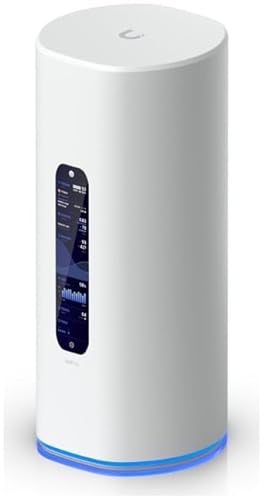
Ubiquiti’s Dream Router line has always been about combining a router, switch, and security gateway into one box, and the Max 5G adds a cellular modem to the mix. It runs UniFi, Ubiquiti’s network management platform, which is powerful enough for advanced users but may feel overbearing for someone who just wants to plug in a SIM and go.
The hardware is impressive: four 2.5 GbE ports, one 10 G SFP+ port, a PoE port, and an SD card slot for storage. Wi-Fi 7 is built in, and the whole system draws only 15 watts while covering a medium-sized home or office.
The trade-off is that everything Ubiquiti does requires some buy-in to their ecosystem. If you do not already use UniFi controllers or switches, you are paying for integration you may never use. The price of $600 also places it well above the competition for pure cellular routing.
Pros:
Cons:
Best for: Tech enthusiasts and small businesses already invested in Unifi equipment who want a single device that does everything.
Check current price on Amazon →

The Archer AX21 is not a 5G cellular router. It is a standard dual-band Wi-Fi 6 router that connects to a cable or fiber modem. But it earns a place on this list because it is the best-selling computer router on Amazon for a reason: it delivers solid coverage for a typical apartment or small house at a price that will not make you wince.
Setup is simple through the Tether app, and the four high-gain antennas provide good range for a device in this class. It supports OFDMA for better handling of multiple devices and has a VPN server built in. The latest revision (V5) also incorporates TP-Link’s security pledge.
Limitations include a single 1 Gbps WAN port, which will bottleneck any connection faster than gigabit. The plastic build feels light, and there is no USB port or multi-gig LAN.
Pros:
Cons:
Best for: Budget-conscious households with a wired broadband connection who want decent Wi-Fi 6 without any cellular features.
Check current price on Amazon →

If you are upgrading to fiber with multi-gig speeds and want to take advantage of Wi-Fi 7 without spending a fortune, the Archer BE230 is a sensible choice. It delivers BE3600 class Wi-Fi 7 on the 5 GHz and 2.4 GHz bands (no 6 GHz, so strictly dual-band) and includes two 2.5 Gbps ports, which is enough to connect a fast PC and leave headroom for the internet.
Performance is good for the price. The 2.0 GHz quad-core processor handles 60 devices, and the range covers about 2,000 square feet. You also get EasyMesh support, so adding a range extender is seamless.
Wi-Fi 7 features like Multi-Link Operation and 4K-QAM are technically present, but the real-world difference from a good Wi-Fi 6 router may be modest until you own many Wi-Fi 7 clients. The 5 GHz band is capped at 2882 Mbps, which is comparable to high-end Wi-Fi 6.
Pros:
Cons:
Best for: Home users who want to future-proof their network for upcoming Wi-Fi 7 devices and already have a fast wired internet plan.
Check current price on Amazon →

The RS140 is NETGEAR’s budget-friendly Wi-Fi 7 router, designed for apartments or small homes up to 2,250 square feet. It has a smaller footprint than many previous-generation Nighthawks, but it still packs 5.0 Gbps wireless speed and a 2.5 Gbps internet port. The BE5000 class rating suggests it handles 80 devices without choking.
For a pure Wi-Fi router, the RS140 is a solid value. It lacks cellular capability, but if you already have cable or fiber, you get Wi-Fi 7 at a price that undercuts most competitors. The free expert support is a nice touch.
On the downside, the antenna array is internal, so you cannot upgrade it for better coverage in a difficult layout. And the 2.5G port is the only multi-gig port; the LAN side is limited to gigabit, which could become a bottleneck if you have fast NAS storage.
Pros:
Cons:
Best for: Urban apartment dwellers who want the latest Wi-Fi standard on a modest budget and do not need cellular failover.
Check current price on Amazon →
Before you buy, you need to decide whether you actually need a cellular 5G router or a standard wired router that supports Wi-Fi 6 or 7. The term “5G router” is used loosely; sellers sometimes slap it on a box that only means “works with 5 GHz Wi-Fi.” The real distinction is whether the router has a built-in cellular modem that accepts a SIM card. That capability determines everything else.
A cellular 5G router (sometimes called a 5G CPE) replaces the need for a cable or fiber modem. You insert a SIM from a carrier like T-Mobile, AT&T, or Verizon, and the router turns the cellular signal into Wi-Fi. These are ideal for rural areas, RVs, temporary offices, or as a backup connection in case your wired internet fails. A standard broadband router (like the TP-Link Archer AX21 or NETGEAR RS140) requires a separate modem and does not connect to cellular networks at all. If your home already has fast cable or fiber, buying a cellular router is wasteful.
Wi-Fi 7 is the latest standard, but it is still early. For most households in 2026, Wi-Fi 6 is plenty fast enough for streaming, gaming, and video calls. Wi-Fi 7 brings Multi-Link Operation (MLO), which lets a device connect over multiple bands simultaneously for lower latency, and wider 320 MHz channels that boost peak speed. However, you need Wi-Fi 7 clients (like a new laptop or flagship phone) to see the benefit. If you are on a budget, a solid Wi-Fi 6 router will serve you well for years. If you plan to keep the router for five years, Wi-Fi 7 may be worth the premium.
Dual SIM slots are a killer feature for reliability. They let you keep a primary SIM from your home ISP and a backup from a different carrier. If the primary network goes down, the router switches automatically to the secondary SIM. Some routers (like the MUDI 7 and Nighthawk M7) also support eSIM, which means you can buy data plans digitally and switch profiles without touching a physical card. For travelers, an eSIM-compatible router simplifies staying connected abroad.
If you work remotely or want to access your home network while traveling, look for a router with good VPN performance. WireGuard is now the standard for speed; OpenVPN is more compatible but slower. Routers that advertise 700 Mbps WireGuard throughput (like the MUDI 7) will not bottleneck your connection. A good firewall and automatic firmware updates are non-negotiable for any device connected to the internet 24/7.
Battery life matters only for mobile hotspots. The Nighthawk M7 offers 10 hours; the MUDI 7 gives 13.5 hours. If you plan to use the router as a stationary gateway, skip the battery and save money. For camping, events, or backup power, a built-in battery is essential.
If you have a reliable cable or fiber internet connection, you do not need a cellular router. A standard Wi-Fi 6 or Wi-Fi 7 router will be cheaper. If your only option is a cellular hotspot, you live in an area with poor wired infrastructure, or you want a portable internet source, then a 5G cellular router is the right tool.
Not always. Some routers are certified for specific carriers (like the GL.iNet Spitz AX for T-Mobile and AT&T). Others are unlocked but may not support all frequency bands. Check the router’s specifications against your carrier’s 5G bands before buying. Unlocked models generally work with T-Mobile and AT&T, while Verizon compatibility varies.
Dual SIM failover means the router can hold two SIM cards and automatically switch to the backup if the primary network loses connectivity. If you cannot afford any downtime (remote work, security cameras, or business point-of-sale), it is worth paying extra for that feature. If occasional outages are acceptable, a single SIM router is fine.
Only if you already own Wi-Fi 7 clients or plan to buy them soon. The cellular connection speed (often 1-2 Gbps in practice) will be the bottleneck, not the Wi-Fi. Wi-Fi 6 is still more than adequate for most uses. Wi-Fi 7’s real advantage is lower latency in crowded environments, which matters for gaming and video calls.
A mobile hotspot is battery-powered, pocket-sized, and designed to create a temporary Wi-Fi network while you travel. A stationary 5G router is bigger, often has external antennas, and is meant to be plugged in permanently at a home or office. Stationary models usually have better VPN features, more LAN ports, and higher data throughput.
Yes, if you have good cellular coverage from a carrier that offers unlimited data plans. Many people in rural areas use a 5G router as their primary internet connection. Just be careful with data caps: some carriers throttle after a certain amount of data, which makes heavy streaming or gaming impractical.
No, most do not. You need to buy a data-only SIM or an eSIM plan from a carrier. Some travel routers offer built-in eSIM plans for purchase (like NETGEAR and GL.iNet), but those are optional.
The best 5G router for most people is the GL.iNet GL-X3000 (Spitz AX). It offers a rare combination of dual SIM failover, full OpenWrt customization, and certified carrier support at a price that leaves room for a good antenna upgrade. If you need something portable, the GL.iNet MUDI 7 is the superior travel companion because of its touchscreen, battery, and tri-band Wi-Fi 7. For the cheapest entry into reliable home Wi-Fi, the TP-Link Archer AX21 delivers day-to-day performance that belies its bargain price.
For the traveler who prioritizes global coverage and ease of use, the NETGEAR Nighthawk M7 is a polished hotspot that works in 140 countries. And if you run a small business that cannot tolerate downtime, the GL.iNet Puli AX puts a battery-backed line of defense between your operations and the next power cut.
No single router is perfect for everyone. The best 5G routers on this list each serve a specific use case, and the right one for you depends on whether you need cellular, how much mobility matters, and how many devices you plan to connect. Our top picks cover the spectrum from a budget wired router to a flagship cellular gateway. Pick the one that matches your situation, and you will have fast, frustration-free internet for years to come.
This article contains Amazon affiliate links. We may earn a small commission on qualifying purchases at no extra cost to you.


