Physical Address
304 North Cardinal St.
Dorchester Center, MA 02124
Physical Address
304 North Cardinal St.
Dorchester Center, MA 02124

We've found the 9 best DDR5 RAM 32GB kits for gaming and productivity. From CL30 latency to 6400MHz speeds, find the ideal upgrade for your desktop or laptop.
You’ve built a new PC with a 14th-gen Intel or Ryzen 7000 series chip, and now it’s time to feed it the fast DDR5 it craves. But the RAM aisle is a minefield of speeds, timings, and form factors. Do you prioritize a blistering 6400MHz or tighter CL30 latency? Do you need RGB, or is a bare heat sink fine? We sorted through the current crop of 32GB kits (2x16GB) to find the nine best DDR5 RAM 32GB options, covering everything from low-latency gaming beasts to laptop SODIMM upgrades. Whether you’re chasing frame rates, rendering times, or just a stable daily driver, there’s a kit here that fits.
TL;DR: The Acer Predator Pallas II delivers the sharpest CL30 latency for gaming, the Corsair Vengeance 6400MHz offers the highest out-of-the-box speed, and the G.SKILL Flare X5 is the go-to kit for AMD EXPO builds. For laptops, the Crucial 32GB SODIMM is the only real option in this roundup.
| # | Product | Speed | Latency | Format | Price | Best for |
|---|---|---|---|---|---|---|
| 1 | Acer Predator Pallas II | 6000MHz | CL30 | DIMM | $419.99 | Competitive gaming and low-latency workloads |
| 2 | Corsair Vengeance DDR5 (6400MHz) | 6400MHz | CL36-48-48-104 | DIMM | $439.99 | Enthusiasts wanting maximum bandwidth |
| 3 | G.SKILL Flare X5 | 6000MHz | CL36-36-36-96 | DIMM | $449.99 | AMD Ryzen 7000/8000 builders |
| 4 | Corsair Vengeance RGB (Black) | 6000MHz | CL36-44-44-96 | DIMM | $439.99 | Builders who want iCUE-controlled RGB |
| 5 | Corsair Vengeance DDR5 (6000MHz Grey) | 6000MHz | CL36-44-44-96 | DIMM | $414.99 | Clean, no-RGB builds on a budget |
| 6 | Corsair Vengeance RGB RS (Gray) | 6000MHz | CL36-44-44-96 | DIMM | $430.60 | Dual-platform (Intel/AMD) with RGB |
| 7 | Lexar Thor Z Series RGB | 6000MHz | CL38 | DIMM | $399.99 | Value-focused RGB build |
| 8 | Corsair Vengeance RGB (White) | 6000MHz | CL36-44-44-96 | DIMM | $430.35 | All-white PC builds |
| 9 | Crucial 32GB SODIMM | 5600MHz | CL46 | SODIMM | $370.02 | Laptop DDR5 upgrades |
Prices are as of the time of writing and may fluctuate.
Here’s what we looked for when sorting through the dozens of DDR5 32GB kits available.

This kit is the one you buy if frame rates matter more than flash. The Predator Pallas II runs at 6000MHz with a taught CL30 latency, which is about as tight as you’ll get in a mainstream 32GB kit without moving to expensive binned dies. In practice, that means lower access times in games like Starfield or Cyberpunk 2077, where every nanosecond helps. Acer uses hand-selected ICs from original manufacturers, so the chips on these sticks tend to overclock well if you want to push beyond 6000MHz.
The build quality feels substantial. The matte black heat spreader is thick and has a subtle brushed finish that doesn’t scream “gamer.” RGB is absent, which is a plus if you prefer a stealthy look. It supports both Intel XMP 3.0 and AMD EXPO, so it plays nicely with any modern platform.
Pros:
Cons:
Best for: Gamers and enthusiasts who want the lowest latency 32GB kit at a sensible price.
Check current price on Amazon →

If you need raw memory bandwidth for things like video editing or 3D rendering, this Corsair kit runs at 6400MHz, the highest speed in the roundup. The trade-off is looser timings: CL36-48-48-104. In most games that extra 400MHz doesn’t beat the Predator’s CL30, but in bandwidth-heavy workloads (compression, ray tracing scenes with large assets), the extra throughput shows up.
The Vengeance line keeps things simple. No RGB, low-profile heat spreader (only 0.28 inches tall), and onboard voltage regulation for stable overclocking through iCUE. It supports both Intel XMP 3.0 and AMD EXPO, though Corsair only lists official compatibility with AMD X670 and Intel 700 series boards, so check your motherboard’s QVL before buying.
Pros:
Cons:
Best for: Content creators and power users who need maximum memory bandwidth and have a compatible motherboard.
Check current price on Amazon →

The Flare X5 has become the de facto recommendation for anyone building a Ryzen 7000 or 8000 series machine. It’s tuned specifically for AMD EXPO, though it also includes Intel XMP 3.0 profiles. The timings are tighter than the competing Corsair kits at the same speed: CL36-36-36-96 versus CL36-44-44-96. That symmetry in the sub-timings can translate to slightly better performance on Ryzen’s memory controller.
G.SKILL uses a low-profile matte black heat spreader that stays below most CPU cooler overhangs. There’s no RGB. The kit is available in 6000MHz CL30 variants too, but that version costs more. At this price point, the CL36 offers excellent value for AMD builders who don’t need the absolute lowest latency.
Pros:
Cons:
Best for: AMD Ryzen 7000/8000 builders who want a reliable, well-tuned kit out of the box.
Check current price on Amazon →

This is the kit you see in half the gaming PC builds on the internet, and for good reason. Corsair’s Vengeance RGB hits the 6000MHz CL36 sweet spot, includes ten individually addressable LEDs per module, and integrates cleanly with iCUE for lighting profiles. The panoramic light bar looks good from any angle, and the black PCB with aluminum heat spreader blends into most color schemes.
The onboard voltage regulation is a nice touch for overclockers. Instead of relying on the motherboard’s VDD/VDDQ setup, the RAM handles its own power delivery, which often yields more stable higher frequencies. Corsair ships it with Intel XMP 3.0 profiles, and the product page notes it’s optimized for Intel boards, though it will run at JEDEC speeds on AMD.
Pros:
Cons:
Best for: Intel builders who want customizable RGB and don’t need EXPO.
Check current price on Amazon →
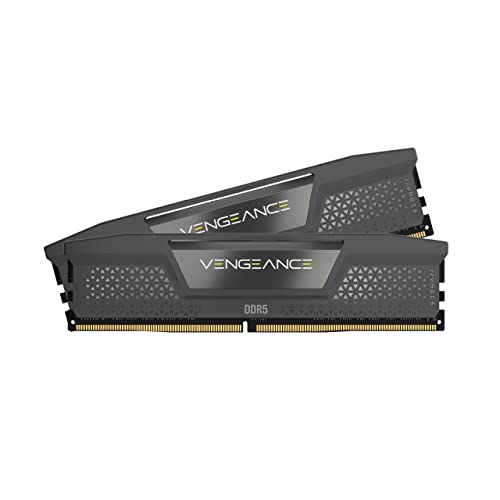
If you don’t need lights and want to save a few dollars, the non-RGB Vengeance in grey is the sensible choice. Same core performance as the RGB version: 6000MHz CL36-44-44-96, 1.35V, Intel XMP 3.0 and AMD EXPO support. The compact form factor (0.3 inches tall) clears even the chunkiest air coolers, making it a favorite for ITX builds or dual-fan tower coolers.
This kit also includes onboard voltage regulation and can be fine-tuned in iCUE. The grey heat spreader is understated, which is exactly what some people want. It’s the cheapest desktop DDR5 32GB kit in this lineup, and for a straightforward upgrade, it’s hard to beat.
Pros:
Cons:
Best for: Budget-conscious builders who need reliable DDR5 without paying for lights.
Check current price on Amazon →

The “RS” suffix here means this kit ships with both AMD EXPO and Intel XMP profiles, unlike the standard Vengeance RGB which is Intel-only. It’s the same hardware otherwise: 6000MHz CL36, ten-zone RGB, onboard voltage regulation, and iCUE support. The gray heat spreader with a subtle silver stripe is a bit more muted than the black version.
If you’re building on AMD but still want the Corsair RGB ecosystem, this is the version to get. It officially supports AMD 600 and 800 series boards as well as Intel 700 and 800 series. The height is identical to the other Corsair RGB kits at 1.77 inches, so check your cooler clearance.
Pros:
Cons:
Best for: AMD builders who want iCUE-controlled RGB without switching platforms.
Check current price on Amazon →
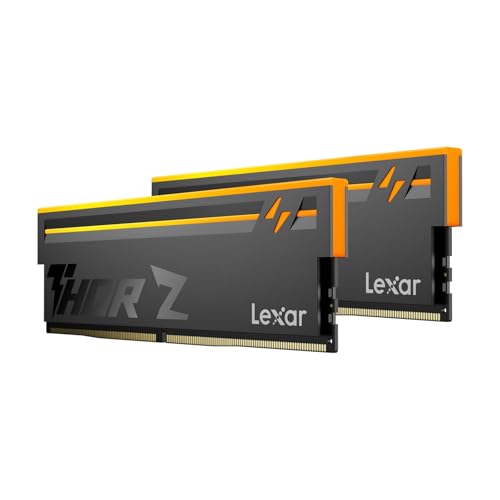
Lexar’s Thor Z Series brings the bling without breaking the bank. It runs at 6000MHz with CL38 latency, which is a step looser than the Corsair and G.SKILL kits, but in everyday use you’re unlikely to feel the difference. Where this kit stands out is the anodized aluminum heat spreader with a sandblasted finish and a bold Thor-themed design. The RGB is brighter than many first-gen DDR5 sticks, and it’s compatible with major motherboard lighting software.
The kit includes on-die ECC and a Power Management IC for stability. It supports both Intel XMP 3.0 and AMD EXPO, so it works in any DDR5 board. At $399.99 it’s the most affordable RGB option in the roundup, making it a strong candidate for builders who want the look but are on a tighter budget.
Pros:
Cons:
Best for: Gamers on a budget who want RGB and don’t mind giving up a little latency.
Check current price on Amazon →

This is the exact same kit as number four, but in white. If you’re building an all-white PC (white case, white motherboard, white cooler), you need RAM that doesn’t stick out like a sore thumb. Corsair offers the Vengeance RGB in a clean white finish with silver heat spreaders. The RGB lighting is the same ten-zone, and the specs are identical: 6000MHz CL36, Intel XMP 3.0, onboard voltage regulation.
The white version costs a few dollars less than the black one in most listings, which is rare for an alternative color. It’s a good deal if the color scheme matters.
Pros:
Cons:
Best for: White PC builders who want everything matched.
Check current price on Amazon →

This is the only laptop DDR5 kit in the roundup, and for anyone with a modern gaming laptop or high-performance workstation, it’s the upgrade path. The Crucial SODIMM kit runs at 5600MHz (or downclocks to 5200/4800 depending on the platform) with CL46 timings. That sounds slow next to desktop kits, but it’s the standard speed for DDR5 laptops, and Crucial is a Micron brand with rock-solid compatibility.
It supports both Intel XMP 3.0 and AMD EXPO, which is unusual for SODIMMs. It works with 12th-gen Intel Core and Ryzen 7000 series laptops. The kit is available in a single 32GB (2x16GB) pack, and installation is straightforward if your laptop has accessible SODIMM slots.
Pros:
Cons:
Best for: Owners of DDR5-compatible gaming laptops or mobile workstations who need more RAM.
Check current price on Amazon →
What should you prioritize when shopping for a 32GB DDR5 kit? The answer depends on your CPU, motherboard, and what you actually do with your PC. Here are the factors that separate a good buy from a frustrating one.
DDR5 speeds range from 4800MHz (JEDEC default) up to 6400MHz and beyond for enthusiast kits. But raw frequency isn’t everything. The latency, expressed as CL (CAS latency), tells you how many clock cycles the memory needs to access a column of data. Lower CL means less delay. For example, a 6000MHz CL30 kit has a true latency of 10 nanoseconds, while a 6000MHz CL36 kit is 12 nanoseconds. In CPU-bound games, that two-nanosecond difference can lift 1% lows by several percent.
For most users, 6000MHz CL30 is the sweet spot. Going to 6400MHz often requires looser timings (CL36 or higher) that erase the bandwidth advantage in gaming. For workloads like 3D rendering or scientific computing, the extra bandwidth of 6400MHz can help, but only if the system memory controller can handle it.
All modern DDR5 kits include overclocking profiles, but they differ by platform. Intel’s XMP 3.0 has been standard for years. AMD introduced EXPO with the Ryzen 7000 series. Most kits now support both, but some are optimized for one. If you buy an Intel-optimized kit like the standard Corsair Vengeance RGB and install it on an AMD board, it will run at the JEDEC speed (typically 4800MHz) unless you manually tune the timings. For an AMD build, a kit with EXPO support (like the G.SKILL Flare X5 or Corsair Vengeance RGB RS) will hit its rated speed with a single click.
Desktop motherboards use 288-pin DIMMs; laptops and some mini PCs use 262-pin SODIMMs. The two are not interchangeable. If you’re building a desktop, buy DIMMs. For a laptop upgrade, you need SODIMMs (the Crucial kit in this roundup is the only one). Some high-end laptops have soldered RAM, so always check before buying.
DDR5 runs hotter than DDR4 due to higher voltages (1.35V versus 1.2V). All kits come with aluminum heat spreaders, but their height varies. Tall spreaders can conflict with large air coolers like the Noctua NH-D15. Low-profile kits (under 1.5 inches) are safer. RGB modules add height: the Corsair Vengeance RGB is 1.77 inches, while the non-RGB version is only 0.3 inches. If you have a large CPU cooler, stick to low-profile options or ensure you have enough clearance.
All the kits here are 2x16GB dual-channel kits. Dual-channel is essential for performance; a single stick cuts memory bandwidth in half. 32GB is enough for gaming, streaming, and most productivity work. 64GB is overkill for gaming but useful for heavy video editing or virtual machines. If you think you might need 64GB later, buy a 2x16GB kit now and leave two slots free for a future upgrade, but be aware that mixing RAM kits is risky.
CL30 has a lower CAS latency, meaning the memory responds faster to requests. In games, CL30 can give 3-5% higher FPS in CPU-limited scenarios compared to CL36. For most productivity tasks, the difference is negligible. CL30 kits typically cost more.
No. DDR5 and DDR4 use different physical key notches and voltages. They are not compatible. You need a motherboard with DDR5 slots, which are found on Intel 600/700/800 series and AMD AM5 boards.
16GB is still enough for most games and daily use, but 32GB is becoming the new standard for heavy multitasking, streaming, and AAA titles like Star Citizen or Flight Simulator. If you ever run out of memory, your PC will stutter. 32GB gives you headroom for at least the next few years.
RGB can cost $20-40 more. If you have a glass side panel and want to sync lighting with your other components, go for it. If your case has no window or you prefer a clean blackout look, skip it and save the money.
For Ryzen 7000/8000, 6000MHz is the safe spot because that’s where the memory controller (FCLK) runs 1:1. Jumping to 6400MHz often forces a 2:1 ratio that increases latency and can kill any performance gain. On Intel, 6400MHz works more often, but you need to check your motherboard’s QVL. In most games, 6000MHz CL30 beats 6400MHz CL36.
Not recommended. Mixing kits from different batches, even from the same brand, can cause instability, crashes, and prevents XMP/EXPO from working. Always buy a matched kit.
On-die ECC corrects single-bit errors inside the DRAM chip itself. It’s a standard feature of DDR5 and improves reliability. It is not the same as system-level ECC (registered RAM) and doesn’t require a server motherboard. It’s a nice safety net but not something you need to specifically seek out.
The best DDR5 RAM 32GB kit for most people is the Acer Predator Pallas II. Its CL30 latency and 6000MHz speed deliver the best gaming performance without jumping to exotic speeds that may not stabilize. If you need more bandwidth for creative work, the Corsair Vengeance 6400MHz is a strong choice. For AMD builders, the G.SKILL Flare X5 is tuned perfectly for EXPO. And for laptop upgrades, the Crucial SODIMM is your only real option here.
No matter which kit you choose, 32GB of DDR5 is a meaningful upgrade that will keep your system feeling fast for years. Buy the kit that fits your platform and your use case, and you’ll be set.
This article contains Amazon affiliate links. We may earn a small commission on qualifying purchases at no extra cost to you.


