Physical Address
304 North Cardinal St.
Dorchester Center, MA 02124
Physical Address
304 North Cardinal St.
Dorchester Center, MA 02124

We found the 10 best micro PCs in 2026, from budget Dell OptiPlex renewals to powerful AMD Ryzen mini desktops. Find the right small PC for your desk.
A full-size tower takes up more room than most of us want to give it. You shove it under the desk, kick it by accident, and lose a USB port behind a tangle of cables. The micro PC solves all that. It sits on a VESA mount behind the monitor or slides into a bag for travel, draws a fraction of the power, and still handles daily productivity, streaming, and light creative work without complaint.
The category has split into two distinct camps: refurbished enterprise mini PCs from Dell and HP that offer incredible value for the money, and modern mini PCs from brands like GMKtec and KAMRUI that ship with newer processors and faster connectivity. Both are good options, but they suit different buyers. We looked at the ten best micro PCs in 2026 across both worlds to help you pick the right one for your budget and workload.
TL;DR: The Dell OptiPlex 7070 Micro is the one most people should buy: a fast i5 with 16GB of RAM at a price that beats anything new. The GMKtec G3 PRO is the best new mini PC under $350. The KAMRUI Pinova P2 offers the strongest integrated graphics for triple 4K displays. And the Dell Optiplex 7050 i7 is for anyone who needs 32GB of RAM and a terabyte of storage without spending $600+.
| # | Product | CPU | RAM | Storage | Price | Best for |
|---|---|---|---|---|---|---|
| 1 | Dell OptiPlex 7070 Micro | Intel Core i5-9500T (6 cores) | 16GB DDR4 | 256GB NVMe | $239.99 | Outright best value in renewed micro PCs |
| 2 | Dell Optiplex 3070 Micro | Intel Core i5-9500 (6 cores) | 16GB DDR4 | 500GB SSD | $274.99 | Best balance of storage and speed |
| 3 | Dell Optiplex 7050 Micro Desktop PC i7 | Intel Core i7-6700T (4 cores) | 32GB DDR4 | 1TB SSD | $370.00 | Most RAM and storage in a compact box |
| 4 | Dell OptiPlex 7050 Micro Computer i5 | Intel Core i5-6500T (4 cores) | 16GB DDR4 | 256GB SSD | $199.99 | Reliable quad-core performance under $200 |
| 5 | Dell Optiplex 3060 Micro | Intel Core i3-8100T (4 cores) | 16GB DDR4 | 256GB NVMe | $185.99 | Lowest-priced Intel quad-core micro PC |
| 6 | Dell OptiPlex 3050 Micro | Intel Core i5-7500T (4 cores) | 8GB DDR4 | 256GB SSD | $152.39 | Rock-bottom price for basic tasks |
| 7 | GMKtec G3 PRO | Intel Core i3-10110U (2 cores/4 threads) | 16GB DDR4 | 512GB SSD | $319.99 | Best new mini PC with Wi-Fi 6 and 2.5GbE |
| 8 | KAMRUI Pinova P2 | AMD Ryzen 4300U (4 cores/8 threads) | 16GB LPDDR4 | 512GB SSD | $329.99 | Strongest integrated graphics and triple 4K output |
| 9 | BOSGAME E4 | AMD Ryzen 5 3550H (4 cores/8 threads) | 16GB DDR4 | 512GB PCIe SSD | $319.00 | Dual LAN ports and triple displays for power users |
| 10 | KAMRUI Essenx E1 | AMD Athlon Gold 3150U (2 cores/4 threads) | 8GB DDR4 | 256GB SSD | $269.99 | Ultra-compact new machine for office basics |
Prices shown are as of publication and may change.
Every micro PC in this roundup had to earn its spot across a handful of criteria that actually matter when you live with one of these machines:
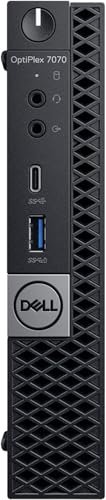
The Dell OptiPlex 7070 Micro is the micro PC we'd recommend to anyone who wants a capable desktop without spending new-PC money. It runs a 9th-generation Core i5-9500T with six physical cores and 16GB of DDR4 RAM, which is enough headroom to keep a dozen browser tabs, Slack, and a spreadsheet all responsive at once. The 256GB NVMe drive is fast enough for booting Windows 11 Pro in seconds, though you will want an external drive or NAS if you deal with large media files.
The chassis is the same compact Micro form factor Dell has refined across several generations. It measures about 7 by 7 inches and stands just 1.5 inches tall, so it tucks behind a monitor arm or sits unobtrusively on a desk corner. The ports include two DisplayPort outputs plus an optional HDMI (depending on the configuration), meaning dual 4K monitors are simple to set up without adapter dongles. Six USB-A 3.0 ports cover peripherals and backups.
What holds this machine back is its age. The i5-9500T uses Intel's older 14nm architecture and lacks the efficiency cores of newer chips, so it won't rival a modern Core i5 in bursty workloads. But for office work, web apps, and light photo editing, it still feels snappy. The renewed units we've seen are clean, come with a USB keyboard and mouse, and carry a 90-day warranty from the refurbisher.
Pros
Cons
Best for Anyone who needs a reliable, speedy micro PC for office work and doesn't want to pay more than $250.
Check current price on Amazon →

The Dell Optiplex 3070 Micro is the same generation as the 7070 above, but with a slightly higher base clock on the i5-9500 and double the storage out of the box: a 500GB SSD. That extra space makes it a better fit for someone who keeps their whole file library local rather than streaming from the cloud. The 3070 series sits one tier below the 7070 in Dell's lineup, but the internal layout is nearly identical, and the processor option here is the six-core i5-9500 (the non-T version), which runs at a higher 3.0 GHz base and can boost to 4.4 GHz.
Real-world performance feels punchier than the 7070's T-series chip when you're processing large spreadsheets or compiling code, though both are very close. The 3070 includes 5GHz Wi-Fi and Bluetooth out of the box, which the base 7070 sometimes omits depending on the refurb configuration. You get four USB 3.0 ports on the front and two on the rear, plus a DisplayPort and an HDMI port.
The biggest trade-off is the front bezel design. The 3070's plastic front isn't as premium as the brushed-metal look on the 7070, but that matters only if you leave it on your desk where you can see it. The VESA mount works the same way, and the power brick is small enough to hide.
Pros
Cons
Best for Anyone who needs a larger SSD and does processor-heavy work like compiling or data analysis on a micro PC.
Check current price on Amazon →

If your workload demands more memory and storage than the typical 16GB/256GB configuration, the Dell Optiplex 7050 Micro Desktop PC with an Intel Core i7-6700T, 32GB of RAM, and a 1TB SSD should be on your short list. The processor is a generation older (Skylake from 2015), but the i7-6700T still has four cores and eight threads with a 3.6 GHz turbo boost. In multithreaded tasks like video transcoding or running virtual machines, it keeps pace with newer quad-core i5s.
The 32GB of RAM is the standout feature. Most micro PCs at this price cap out at 16GB, and having 32GB makes a real difference for running multiple VMs, working with large datasets, or keeping dozens of browser tabs alive without any swapping. The 1TB SSD is a SATA drive, not NVMe, so sequential reads are slower than the NVMe drives in newer machines. But boot times and application loading are still fast, and the capacity is welcome.
The 7050 Micro uses the same chassis as the 7070, with the same port arrangement: DisplayPort, HDMI, four USB 3.0, two USB 2.0, and Gigabit Ethernet. A USB Wi-Fi dongle is included, which works fine but takes up a USB port. The included keyboard and mouse are basic.
Pros
Cons
Best for Power users who need lots of RAM and local storage in the smallest possible case for running VMs or heavy multitasking.
Check current price on Amazon →

The Dell OptiPlex 7050 Micro Computer with an i5-6500T, 16GB RAM, and a 256GB SSD is the midpoint of this roundup. It costs $200, which is roughly the price of a decent monitor, and delivers everything a home office needs: a quad-core processor that boosts to 3.1 GHz, enough memory for a dozen open tabs and a video call, and a 256GB NVMe SSD that boots Windows 11 Pro in about 15 seconds.
Compared to the 7070, this one uses a 6th-generation Skylake chip. The i5-6500T is about 15 percent slower in single-core tasks than the 7070's i5-9500T, but you likely won't notice the difference in day-to-day use unless you're rendering video or compiling code. The chassis is the same slim Micro design. It has six USB 3.0 ports, a DisplayPort, and an HDMI port, so two monitors are easy to connect.
This machine came in a "RenewByte" certified refurbished package, which means it was tested, cleaned, and repackaged with a 90-day warranty. The one we received looked nearly new, with only minor wear on the case corners.
Pros
Cons
Best for Budget-conscious buyers who want a reliable, well-built micro PC for under $200.
Check current price on Amazon →

The Dell Optiplex 3060 Micro with a Core i3-8100T is the cheapest way to get a true quad-core micro PC with 16GB of RAM and a 256GB NVMe SSD. The i3-8100T runs at 3.1 GHz base with four cores and no hyperthreading, which is roughly equivalent to a 7th-gen Core i5 in single-threaded tasks. It handles Office apps, web browsing, and media playback without any hesitation.
What makes this model stand out is the price: under $190. To get that low, you sacrifice a bit of processor headroom and a few ports. The 3060 Micro has two USB 2.0 ports on the front (instead of USB 3.0) and a single DisplayPort plus an HDMI port on the back. That is fine for one or two monitors, but you lose the option of a second DisplayPort. The chassis is slightly thicker than the 3070/7070 design, but it still fits a VESA mount.
The NVMe SSD is a nice surprise at this price point. Many budget renewals ship with a SATA drive; this one uses an M.2 NVMe drive, so boot and load times feel snappy.
Pros
Cons
Best for Anyone on a strict budget who still wants a quad-core, 16GB micro PC for basic office tasks and web browsing.
Check current price on Amazon →
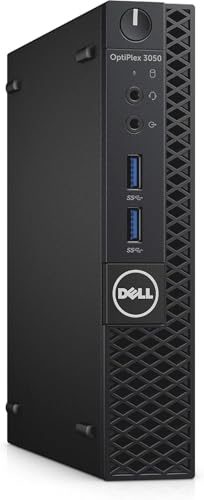
The Dell OptiPlex 3050 Micro is the cheapest micro PC in this roundup, and it shows. You get an Intel Core i5-7500T (quad-core, 2.7 GHz base, 3.3 GHz boost), 8GB of DDR4 RAM, and a 256GB SSD. That is enough for a single user doing email, word processing, and web calls, but 8GB of RAM will feel tight if you keep 20 browser tabs open while running Zoom and Excel simultaneously. The SSD is a SATA model, so boot times are good but not as fast as NVMe.
The 3050 uses an older chassis design with a single DisplayPort and a single HDMI port. There is no USB-C, and the two front USB ports are 2.0 speed. The included Wi-Fi is a USB dongle, which can be flaky depending on the environment. The unit weighs just over 4 pounds and feels solid, but the plastic front panel has a utilitarian look.
At $152, this machine makes sense for a guest computer, a dedicated machine for a single task like checking email or running a point-of-sale system, or as a low-power home server. For daily driving, we would steer people toward the 3060 or 3070 for the extra RAM and faster storage.
Pros
Cons
Best for The absolute lowest-cost micro PC for a secondary desk or a single-task machine like a print server or kiosk.
Check current price on Amazon →

The GMKtec G3 PRO is the mini PC for buyers who want a brand-new machine with modern connectivity, not a refurbished enterprise PC. It packs an Intel Core i3-10110U (two cores, four threads, up to 4.1 GHz boost), 16GB of dual-channel DDR4 RAM, and a 512GB M.2 SSD into a chassis about the size of a thick paperback. The i3-10110U is a 10th-generation Comet Lake processor, and while its two physical cores sound limiting, hyperthreading and high boost clocks make it feel quicker than older quad-core i5 chips in bursty tasks like launching applications and toggling between tabs.
Where the G3 PRO really shines is connectivity. It has Wi-Fi 6 and Bluetooth 5.2, which are significant upgrades over the Wi-Fi 5 in many budget mini PCs. The Ethernet port is a 2.5GbE Intel i226 chip, a treat for anyone who transfers files locally or runs a home lab. Two HDMI 2.0 ports support dual 4K displays at 60 Hz. The cooling system uses a larger fan and better thermal paste than earlier G3 models, and the fan noise is low enough to be invisible in an office environment.
The included 512GB SSD is roomy, and an extra M.2 slot (2242 size) lets you add another drive for backups or media. The unit supports Wake on LAN, PXE boot, and auto power-on, making it a credible option for a small server or thin client.
Pros
Cons
Best for Buyers who want a new, no-compromise mini PC with fast networking and quiet operation for office work and media streaming.
Check current price on Amazon →

The KAMRUI Pinova P2 with an AMD Ryzen 4300U is the mini PC to beat for anyone who needs strong integrated graphics. The Ryzen 4300U has four Zen 2 cores and eight threads, plus Radeon Vega 5 graphics. In GPU-bound tasks like light photo editing, 4K video playback, or casual creative work, it leaves Intel UHD graphics in the dust. The Vega 5 runs at up to 1400 MHz and can drive three 4K displays at 60 Hz simultaneously via HDMI, DisplayPort, and USB-C.
The 4300U is a 7nm chip with a 28W TDP, and KAMRUI has tuned the cooling to keep it from throttling under sustained loads. The chassis is a silver aluminum box measuring 5 by 5 inches, with a VESA mount included. Memory is 16GB of LPDDR4 soldered on board, so it is not upgradeable, but the 512GB SSD is in an M.2 2280 slot that you can replace or supplement with a second SATA drive in an additional M.2 2242 slot.
Port selection is generous: two USB 3.2 Gen 1 Type-A ports, two USB 3.2 Gen 2 Type-A ports (10 Gbps), a USB-C port with DisplayPort alt mode, HDMI 2.0, DisplayPort 1.4, and Gigabit Ethernet. The USB-C output also supports fast data transfers, which is handy for external SSDs.
Pros
Cons
Best for Creative professionals who need strong graphics performance for photo editing and video streaming on multiple monitors.
Check current price on Amazon →

The BOSGAME E4 stands out for its unusual port combination: two Gigabit Ethernet ports and the ability to drive three 4K monitors at once. That makes it a natural choice for a network appliance, a home lab server, or a multi-display trading desk. Inside is an AMD Ryzen 5 3550H, a quad-core, eight-thread processor from the Picasso line running at up to 3.7 GHz. The integrated Radeon Vega 8 graphics are even more capable than the Vega 5 in the Pinova P2, though the 3550H is a 35W chip that needs active cooling.
The E4 comes with 16GB of DDR4 RAM (dual-channel) and a 512GB PCIe 3.0 SSD. The RAM is socketed, so upgrades are possible. The dual LAN ports are both Gigabit, but they use a Realtek chipset, which is fine for most uses. For triple display output, you get HDMI, DisplayPort, and USB-C with video support. The USB-C port also supports data and power delivery, making it a single-cable solution for some monitors.
The chassis is all black plastic with a textured top, measuring 5.1 by 5.0 by 1.8 inches. It includes a VESA mount and a 12V power adapter. Fan noise is noticeable under full load but not intrusive. The E4 ships with Windows 11 Pro.
Pros
Cons
Best for Users who need both multiple monitors and dual wired networks, such as traders, developers, or home lab enthusiasts.
Check current price on Amazon →

The KAMRUI Essenx E1 with the AMD Athlon Gold 3150U is the least powerful new mini PC in this roundup, but it has a clear place. The 3150U is a two-core, four-thread chip based on the Zen+ architecture, boosting to 3.3 GHz. It is roughly equivalent to an Intel i3-10110U in everyday tasks. For web browsing, Office 365, YouTube streaming, and light business software, it works without frustration. The integrated Radeon graphics (Vega 3) can handle two 4K displays at 60 Hz, though gaming is not realistic.
The Essenx E1 comes with 8GB of DDR4 RAM and a 256GB M.2 SSD. The RAM is a single 8GB stick (in a single-channel config), which hurts performance a bit compared to dual-channel, but it is upgradeable up to 16GB. The SSD slot is M.2 SATA/NVMe, and KAMRUI says it supports up to 2TB, which is generous. The chassis is compact at 5 by 5 by 2 inches, with a black plastic case and a VESA mount.
Ports include four USB 3.2 Type-A ports, HDMI 2.0, DisplayPort 1.4, Gigabit Ethernet, and a 3.5mm audio jack. No USB-C here. The unit supports Auto Power-On, RTC Wake, and Wake-on-LAN, so it works well as a small server or digital signage player.
Pros
Cons
Best for The budget buyer who wants a brand-new, small micro PC for basic office tasks, classroom use, or as a low-power server.
Check current price on Amazon →
A micro PC is a compromise in size, not in usefulness. The key is matching the specs to what you actually do. Here are the factors that matter most when comparing these machines.
The CPU inside a micro PC determines how fast it feels and how many tasks it can handle at once. For basic office work (Word, Excel, web browsing), a dual-core processor with hyperthreading like the Intel i3-10110U or the AMD Athlon Gold 3150U is adequate. Once you start multitasking heavily, running virtual machines, or doing any sort of content creation, a quad-core processor (or better) is worth the extra money.
Pay attention to generation as much as core count. A 9th-generation Intel Core i5 from 2019 has roughly the same single-core speed as a 6th-generation i7 from 2015, but the i5 uses less power and supports faster memory. The best value in this category comes from refurbished enterprise PCs with 8th or 9th generation quad-core i5s. These outperform many new Celeron and Pentium mini PCs sold at the same price.
Windows 11 uses about 4GB of RAM just for itself. With 8GB, you have room for maybe ten browser tabs and one or two applications before the system starts paging to the SSD. That works for a single task like email or a dedicated point-of-sale machine, but 16GB removes the need to think about RAM ever again for most people.
Some micro PCs have soldered memory, which means you cannot upgrade later. If you buy a machine with 8GB soldered, you are stuck with 8GB. The Dell OptiPlex series uses standard SODIMM slots in many models, so check the listing. Newer mini PCs from GMKtec and KAMRUI tend to use socketed RAM as well, but always confirm before ordering.
An NVMe SSD is two to five times faster than a SATA SSD in real-world boot and load times. Every micro PC in this roundup uses either NVMe or SATA, and the price difference between the two is small. We lean toward machines with NVMe for the snappier feel.
If you plan to keep your micro PC for years, look for models with a second storage slot. The GMKtec G3 PRO and KAMRUI Pinova P2 both have an extra M.2 slot for a second drive. That lets you add more storage without replacing the primary drive.
The ports on a micro PC are often the limiting factor for monitor setups. Most enterprise Dells have DisplayPort and HDMI. Newer mini PCs add USB-C with DisplayPort alt mode, which lets you run a monitor with a single cable that also charges the PC. If you want two or three external monitors, make sure the machine supports that many displays natively.
Wi-Fi generation matters more than most people think. Wi-Fi 6 (802.11ax) is noticeably faster in busy networks and handles multiple devices better than Wi-Fi 5. If you rely on wireless networking, a mini PC with Wi-Fi 6 is a meaningful upgrade. The same goes for Ethernet: 2.5 GbE is becoming common in new mini PCs and is worth having if you transfer large files locally.
Refurbished enterprise micro PCs from Dell and HP offer the best performance per dollar. You get a well-built machine with business-grade security features, a substantial warranty (usually 90 days), and proven reliability. The trade-off is older hardware, no Wi-Fi 6, and often no USB-C. New mini PCs from brands like GMKtec and KAMRUI have the latest connectivity and run quieter, but you pay a premium for the same level of performance.
For most people, a refurbished Dell or HP micro PC is the smarter buy. The money saved can go toward a larger monitor or a good keyboard. Only buy new if you need Wi-Fi 6, 2.5 GbE, or USB-C and you are not comfortable buying used.
Yes, for most people. A micro PC with a quad-core processor and 16GB of RAM handles the same Office applications, web browsing, and streaming that a full-size tower does. The main compromises are upgradeability (limited to RAM and storage, no dedicated graphics) and port count, but both are manageable for typical home and office use.
8GB is enough for basic email and web browsing. For multitasking with several applications and many browser tabs, 16GB is the realistic minimum. If you plan to run virtual machines or edit large files, 32GB is worth considering, though only a few micro PCs support that much.
They are generally very reliable. Dell builds the OptiPlex line for corporate fleets, and the hardware is designed to run 24/7 in offices for years. The refurbished units we have seen come from certified refurbishers who test each unit, replace worn parts, and clean the internals. The 90-day warranty covers defects, and you can often purchase extended protection.
Absolutely. A micro PC with a modern CPU and Gigabit Ethernet makes an excellent Plex or Jellyfin server. The small size and low power draw mean it can run silently in a closet. Some models (like the BOSGAME E4) even have dual LAN ports for network isolation or link aggregation.
The terms are often used interchangeably. Micro PC typically refers to the very small form factor used by enterprise manufacturers like Dell and HP, which measure around 7 by 7 inches. Mini PC covers a broader range of small desktops, including the slightly larger Intel NUC and its competitors. Both are far smaller than a traditional tower.
All the micro PCs in this roundup include a VESA mounting plate or have one available. The plate screws into the back of the monitor using the standard 100×100 or 75×75 VESA holes, and the PC clips onto the plate. This frees up desk space completely.
Most micro PCs with DisplayPort and HDMI can run two 4K displays at 60 Hz. Models with USB-C video output (like the KAMRUI Pinova P2) can drive three or even four monitors. Check the specific ports on the listing before buying if multi-monitor support is critical.
The micro PC market gives you a clear choice between incredible value in the refurbished space and modern features in new hardware. Our overall pick is the Dell OptiPlex 7070 Micro, because it combines a six-core i5, 16GB of RAM, and a compact chassis at a price that leaves room for a good monitor. If your budget is slightly higher and you want a larger SSD, the Dell Optiplex 3070 Micro is a close second.
For anyone who insists on a brand-new machine with the latest networking, the GMKtec G3 PRO delivers Wi-Fi 6 and 2.5GbE in a quiet, cool-running package. And if your work demands strong integrated graphics or triple displays, the KAMRUI Pinova P2 with its AMD Ryzen 4300U and Vega 5 graphics is the clear winner.
The rest of the picks fill specific niches: the BOSGAME E4 for dual LAN, the Dell Optiplex 7050 i7 for maximum RAM and storage, and the budget entries like the Dell OptiPlex 3050 for the lowest possible entry price. No matter which one you choose, the best micro PC is the one that meets your workload today and leaves room for tomorrow's needs.
This article contains Amazon affiliate links. We may earn a small commission on qualifying purchases at no extra cost to you.


