Physical Address
304 North Cardinal St.
Dorchester Center, MA 02124
Physical Address
304 North Cardinal St.
Dorchester Center, MA 02124

Find the best used laptops in 2026 for every budget, from budget Chromebooks under $100 to high-performance Dell Latitudes. Our top 10 picks cover all needs.
A used laptop is a gamble. The keyboard may be worn, the battery may have seen better days, and the processor could be three generations behind. But the payoff is real: you can get a former business-class machine for the price of a cheap new netbook, and the performance difference between a four-year-old Latitude and a brand-new budget laptop is often night and day. The trick is knowing which ones are actually worth buying.
We sorted through the current crop of renewed and closeout machines to find the 10 best used laptops in 2026. The lineup spans everything from an under-$70 Chromebook perfect for a grade-schooler to a carbon-fiber Dell with an 11th-gen Core i7 that can handle serious productivity work. Between those two poles are solid all-rounders, budget Windows options, and a few surprises. Here is how they stack up.
TL;DR: The Dell Latitude 7420 is the best performance pick for professionals who need modern power. The Dell Latitude 5420 is the best all-around used laptop for most people. The HP Chromebook 11A G8 is the cheapest option for basic browsing and kids.
| # | Product | Key Specs | Price | Best For |
|---|---|---|---|---|
| 1 | Dell Latitude 7420 | Core i7-1165G7, 16GB RAM, 512GB SSD, 14" FHD | $357.00 | Power users and professionals |
| 2 | Dell Latitude 5420 | Core i5-1145G7, 16GB RAM, 256GB SSD, 14" FHD | $263.63 | Best all-around value |
| 3 | Dell Latitude 5400 (16GB) | Core i5-8365U, 16GB RAM, 256GB SSD, 14" HD | $216.49 | Budget multitasker |
| 4 | Dell Latitude 5400 (8GB) | Core i5-8365U, 8GB RAM, 256GB SSD, 14" FHD | $201.99 | Budget Windows laptop |
| 5 | Dell Latitude 7490 | Core i5-8350U, 8GB RAM, 256GB SSD, 14" FHD | $193.50 | Cheap reliable workhorse |
| 6 | Samsung Galaxy Chromebook Go | Celeron N4500, 4GB RAM, 64GB eMMC, 14" HD | $176.00 | Student Chromebook |
| 7 | HP 14 HD Laptop (Renewed) | Celeron, 4GB RAM, 64GB SSD, 14" HD | $216.98 | Absolute basic Windows use |
| 8 | Phatom 15.6 FHD Laptop | Pentium Gold, 4GB RAM, 128GB SSD, 15.6" FHD | $219.99 | Large screen on a budget |
| 9 | Dell Chromebook 11 3100 | Celeron N4020, 4GB RAM, 16GB eMMC, 11.6" HD | $74.00 | Ultra-cheap Chromebook |
| 10 | HP Chromebook 11A G8 | AMD A4-9120C, 4GB RAM, 32GB eMMC, 11.6" HD | $69.00 | Cheapest laptop in the list |
Prices change in real time.
Before you buy a used laptop, these are the factors that separate a good deal from a bad one:

The Latitude 7420 is the most powerful refurbished laptop in this bunch, and it is not close. The 11th-gen Core i7-1165G7 paired with 16GB of RAM and a 512GB NVMe SSD gives it the muscle to handle heavy multitasking, light video editing, and even some development work without breaking a sweat. The carbon fiber chassis keeps it surprisingly light at 2.66 pounds for a 14-inch business laptop, so it travels as well as a premium ultrabook.
The FHD anti-glare display is perfectly fine for indoor work. The backlit keyboard is a welcome touch in dim environments. Wi-Fi 6 and Thunderbolt 4 make it feel modern. The price is the highest here, but you are getting near-new performance for roughly a third of what a new Latitude 7000 series would cost.
Pros
Cons
Best for: Professionals and power users who need modern performance on a used laptop budget.
Check current price on Amazon →

The Latitude 5420 hits the sweet spot. It has an 11th-gen Core i5-1145G7, 16GB of RAM, and a 256GB SSD, which is enough performance and storage for most people. The 14-inch FHD screen is crisp and the build quality is classic Latitude: solid, serviceable, and reliable. It weighs about three pounds, which is portable enough for a daily commute or moving between rooms.
This is the laptop we would recommend to the widest audience. Students, remote workers, and anyone who needs a dependable Windows machine for a few years will find the 5420 has the right balance of power, memory, and price. It does not have a touchscreen, but that is rare in this price range anyway.
Pros
Cons
Best for: Students, remote workers, and anyone wanting a dependable used laptop without overspending.
Check current price on Amazon →

This Latitude 5400 is the same chassis as the 8GB version below, but it ships with 16GB of RAM. That extra memory makes a real difference for anyone who keeps a dozen browser tabs open while running office apps. The Core i5-8365U is a Whiskey Lake chip from 2019, but it still handles typical workloads smoothly. The 256GB SSD is adequate.
The catch is the display. This particular listing has an HD (1366×768) panel, not FHD. That is a notable step down in sharpness. If you can live with a slightly fuzzy screen, the performance per dollar here is excellent.
Pros
Cons
Best for: Budget-conscious users who need 16GB of RAM and do not prioritize screen resolution.
Check current price on Amazon →
This 8GB version of the Latitude 5400 is the entry-level workhorse. It has the same processor, a 256GB SSD, and a 14-inch FHD display, which is a meaningful upgrade over the HD panel on the 16GB version. The price is lower too.
8GB of RAM is the minimum we would recommend for Windows 11. It is fine for word processing, web browsing, and streaming, but you will feel the pinch if you try to run heavy spreadsheets or multiple apps simultaneously. For the price, it is hard to argue with.
Pros
Cons
Best for: Students on a tight budget who need a functional Windows laptop.
Check current price on Amazon →

The Latitude 7490 is a slightly older design, but it has a few tricks up its sleeve. It uses a Core i5-8350U (Kaby Lake R), 8GB of RAM, a 256GB SSD, and a rare inclusion here: a Thunderbolt 3 port. That gives you fast external storage and display options. The 14-inch FHD anti-glare screen is a pleasure to work on for long hours.
The main drawback is the CPU generation. The i5-8350U is from 2017, so its performance and efficiency are behind the newer chips. Battery life will be shorter, and the integrated graphics are weaker. But for under $200, this is a fully capable machine for basic office tasks and web use.
Pros
Cons
Best for: Users who need a cheap Windows laptop for basic productivity and have a small budget.
Check current price on Amazon →

This Samsung is a new Chromebook, not refurbished, and it shows in the clean design and MIL-STD-810G durability rating. The Celeron N4500 processor and 4GB of RAM are enough for ChromeOS, though you will feel the limit with many tabs open. The 64GB eMMC storage is tight but workable with cloud storage. The battery is rated for 12 hours, which outlasts every other laptop on this list.
The Chromebook Go is best for someone who does everything in a browser. Google Docs, streaming, email, and video calls run fine. It is light, thin, and the silver finish looks more expensive than it is.
Pros
Cons
Best for: Students who live in the cloud and need portability and battery life.
Check current price on Amazon →

This HP is a basic Windows laptop with a Celeron processor, 4GB of RAM, and a 64GB SSD. The price is very low for a Windows machine, and the Dale Blue color is a nice change from black or gray. Performance is strictly for minimal tasks. Expect slow boot times, sluggish app launches, and frustration if you try to run more than a few applications at once.
The 14-inch HD display is okay for the price but not sharp. The 64GB SSD fills up quickly after Windows and a few apps. This is a laptop for someone who needs the absolute minimum and cannot stretch their budget even a little further.
Pros
Cons
Best for: Budget shoppers who need a Windows laptop for extremely light tasks and cannot stretch their budget.
Check current price on Amazon →
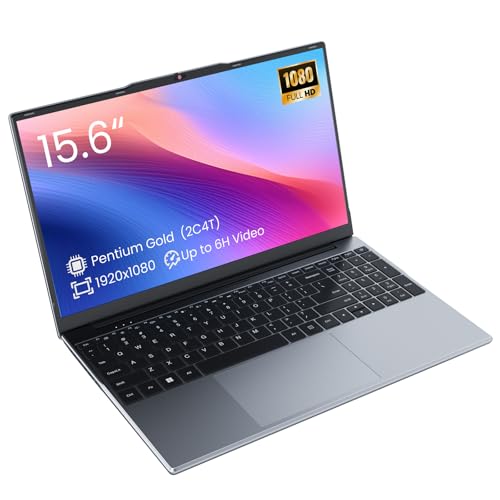
The Phatom is a new, no-name brand laptop that puts everything into the display. The 15.6-inch 1080p IPS panel is genuinely good for the price, with wide viewing angles and decent colors. The Pentium Gold processor is a step above Celeron, but it is still a low-end chip. With 4GB of DDR3L RAM and a 128GB SSD, it handles basic tasks without drama, but multitasking will slow it down.
Battery life is a weak point. The 38.5Wh battery is rated for about four hours of video playback, which is poor by modern standards. Build quality is unknown, and you are taking a chance on a brand with little track record. The large screen and low price may be worth the risk for someone with a very tight budget who needs a big display.
Pros
Cons
Best for: Users who prioritize screen size over everything else and have a very limited budget.
Check current price on Amazon →

This refurbished Chromebook from Dell's education line is built to survive drops and spills. It has a Celeron N4020, 4GB of RAM, and only 16GB of eMMC storage. The 11.6-inch screen is small, but it is fine for a child's laptop or a secondary device that lives in a backpack. The rugged design includes reinforced ports and a spill-resistant keyboard.
The storage is the main limitation. With only 16GB, you cannot install many apps locally. ChromeOS manages this by relying on cloud storage, but it still feels restrictive. Performance is slow, but for $74 it is hard to complain.
Pros
Cons
Best for: Young students or as a cheap backup Chromebook for simple tasks.
Check current price on Amazon →

The HP Chromebook 11A G8 is the least expensive laptop on the list at $69. It has an AMD A4-9120C processor, 4GB of RAM, and 32GB of eMMC storage. That is double the storage of the Dell Chromebook above, which makes it a slightly better value. The build is rugged, designed for classroom use. The 11.6-inch HD display and ChromeOS make it functional for web browsing, Google Classroom, and video calls.
Performance is about what you expect at this price. It is slow, and you cannot multitask heavily. But as a first laptop for a young child or a guest device for quick browsing, it works.
Pros
Cons
Best for: The absolute cheapest Chromebook option, especially for kids.
Check current price on Amazon →
When you buy a used laptop, you are trading newness for value. The key is knowing which trade-offs are worth it. Here are the factors that matter most.
The processor is the heart of the laptop. For Windows machines, we recommend Intel 8th-gen (2017) or newer, or AMD Ryzen 3000 series or newer. Older chips like 7th-gen or 6th-gen are slower and less efficient. They also lack support for Windows 11 on some models. For Chromebooks, any Intel Celeron or AMD A-series from the last few years will do, but avoid the very low-end Atoms.
RAM is the second most important spec. For Windows 11, 8GB is the bare minimum for a decent experience. 4GB is only viable for ChromeOS or extremely light Windows use. 16GB is ideal for multitasking and future-proofing. Most used business laptops can be upgraded, so check if the RAM is soldered or socketed.
You want an SSD, not a hard drive. A laptop with an SSD will feel much faster in everyday use than one with an HDD, even if the processor is older. For storage size, 128GB is tight for Windows after updates and apps. 256GB is the comfortable minimum. 512GB is great if you store files locally. Chromebooks can get by with 32GB or 64GB if you use cloud storage.
The screen is what you look at all day. A 1080p (FHD) panel is noticeably sharper than a 1366×768 (HD) panel, especially on a 14-inch or larger laptop. Business laptops often have matte anti-glare screens, which are better for productivity than glossy ones. Check the listed resolution carefully, because many budget used laptops still ship with HD panels.
Battery health is the biggest unknown with used laptops. A laptop that was used heavily for three years may have a battery that holds only half its original charge. Some refurbishers replace the battery; some do not. If the listing does not mention battery health, ask. Budget for a replacement battery if you plan to use the laptop unplugged.
Renewed and refurbished laptops should be tested, cleaned, and have a fresh OS install. Look for listings that mention a warranty (90 days is common). Avoid laptops that look excessively scratched or show signs of liquid damage. Stick with reputable sellers who specialize in refurbished electronics.
For Windows 11, 8GB is the minimum. For ChromeOS, 4GB is fine. If you multitask heavily, 16GB is worth the upgrade.
Yes, from reputable sellers. Look for a 90-day warranty, a clean OS install, and a description that says the laptop has been tested. Avoid listing with vague condition claims.
For Windows, Intel Core i5 8th-gen or newer, or AMD Ryzen 5 3000 series or newer. For Chromebooks, Intel Celeron N4000 series or AMD A4/A6 is adequate.
If you only use a browser and Google apps, a Chromebook is simpler and cheaper. If you need desktop software like Microsoft Office, Adobe apps, or specific Windows programs, get a Windows laptop.
On Windows, you can run a battery report in the command prompt. On ChromeOS, use the built-in health check in settings. If the seller has not provided a battery report, request one before buying.
Renewed items are pre-owned products that have been inspected, tested, and cleaned to work like new. They often come with a warranty, but the condition can vary between sellers. Stick with those who have high ratings.
With proper care, a used business laptop can last two to four more years. Consumer laptops may last less. The biggest factors are battery replacement and whether the CPU is still adequate for your needs.
The best used laptops in 2026 span a wide range of budgets and use cases. For most people, the Dell Latitude 5420 is the smartest buy. It offers modern performance, 16GB of RAM, and a solid build for around $260. If you need more power, the Dell Latitude 7420 is the pick for professionals who can justify the higher price. On the extreme budget end, the HP Chromebook 11A G8 is a capable little machine for less than $70.
No single laptop is perfect for everyone, but the choices here are clear. Think about what you will actually do with the machine, then match that to the processor, RAM, and screen quality in the list. A used laptop bought smartly can run for years.
This article contains Amazon affiliate links. We may earn a small commission on qualifying purchases at no extra cost to you.


