Physical Address
304 North Cardinal St.
Dorchester Center, MA 02124
Physical Address
304 North Cardinal St.
Dorchester Center, MA 02124

We've rounded up the 10 best Epson DTF printers for t-shirt printing, from budget-friendly A4 setups to professional wide-format machines. Find your perfect direct-to-film printer today.
Direct-to-film printing has turned the custom apparel world on its head. You can now print a full-color design, dust it with powder, heat-press it onto a cotton t-shirt, and have it done in minutes with no pretreatment. The catch is that the printer market is a minefield of rebranded conversions, unclear specs, and wildly different price points. Most of the reputable DTF printers on the market today use Epson printheads at their core, which is why the phrase "Epson DTF printer" gets thrown around for everything from a converted home photo printer to a purpose-built production machine with a white ink circulation system. We have picked through ten of the most common options to find the ones actually worth your money.
The list spans pure Epson OEM printers you can convert yourself, fully built DTF machines from third-party brands, and one dedicated sublimation printer that overlaps with the DTF workflow. Some are A4 size and fine for a side hustle; others are A3+ with roll feeders that belong in a full-time shop. Prices start under $500 and climb past $3,000. Here is exactly where each one fits.
TL;DR: The Epson EcoTank Photo ET-8550 is the best foundation for a high-quality DIY DTF conversion, with six-color output up to 13×19 inches. The KOMHOW R1390 offers the best all-in-one A3 DTF experience for a startup. The Lancelot M1630 Pro bundle is the speed king for a busy shop. The Epson SureColor F170 is the wrong printer for DTF but a great sublimation option if you're comparing workflows.
| # | Product | Print Size | Key Feature | Price | Best for |
|---|---|---|---|---|---|
| 1 | Epson EcoTank Photo ET-8550 | Up to 13" x 19" | 6-color Claria ET inks, supertank | $679.80 | DIY DTF conversion with wide-format output |
| 2 | KOMHOW R1390 DTF Printer | A3 (13") | White ink circulation, oven included | $1,748.00 | First dedicated DTF printer for small business |
| 3 | Lancelot Auto-Maintenance M1630 Pro DTF Bundle | A3+ | Roll feeder, laptop included, auto-clean | $3,299.00 | High-volume production with minimal downtime |
| 4 | Epson SureColor F170 Dye-Sublimation Printer | 8.5" x 11" | OEM sublimation, compact, PrecisionCore | $399.99 | Hobbyists who want genuine Epson sub ink |
| 5 | Super-Tank DTF T-Shirt Printer | A4 | Built-in scanner/copier, easy fill | $458.00 | Budget-conscious beginner wanting an all-in-one conversion |
| 6 | WJTZXY A3+ XP600 DTF Printer | A3+ (13") | XP600 printhead, shaking dryer, 5x500ml ink | $2,800.00 | Users wanting fast speed and a complete starter kit |
| 7 | DXZ 2026 A4 DTF Printer | A4 (8.27") | Roll feeder, white stirring, 2-year ink supply | $1,698.00 | Long-term budget with included ink replenishment |
| 8 | Carbcolords DTF Printer A4 | A4 | XP600 printhead, integrated ink tank, compact | $1,699.00 | Space-constrained workspaces needing fast A4 duty |
| 9 | PUNEHOD R1390 DTF Printer with Oven | A3 (13") | Detachable reel, white ink circulation, full package | $1,799.00 | Those wanting A3 width with roll film capability |
| 10 | Epson EcoTank ET-15000 | Up to 13" x 19" | All-in-one, fax, wireless, borderless | $559.98 | Multipurpose office printer that can be converted for DTF |
Prices and availability are subject to change. Check current listings for the most up-to-date price.
Printhead matters more than anything. The Epson XP600 is the gold standard for aftermarket DTF conversions because it was designed for high-speed, high-resolution printing on wide media. L1800 and L805 printheads are slower but cheaper to replace. The newer PrecisionCore chips in the ET-8550 and F170 offer better droplet control but have fewer third-party ink options.
White ink circulation is the difference between a headache and a workflow. DTF printers that recirculate white ink (agitating it to prevent pigment settling) run reliably for weeks. Those without it require daily manual shaking and frequent nozzle cleaning. Every printer on our list that calls itself a "DTF printer" has some form of white ink system. Pure Epson printers do not come with one, so you must add an external circulator if you convert them.
Media width dictates your product range. A4 gives you standard t-shirt front prints up to roughly 8 by 10 inches. A3 opens up back prints, oversized designs, and multi-panel layouts. A3+ and 13" printers let you do everything a typical shop needs. Wide-format is a genuine productivity step.
Bundle value varies enormously. Many third-party DTF printers ship with an oven, inks, powder, and film. A few even throw in a laptop. That can save you hundreds in setup costs, but the quality of those consumables matters. We favored bundles that include known-quantity items and clear support paths.
After-sales support is the hidden variable. A DTF printer is a niche product sold mostly by small brands. The ones that offer setup guidance, online tutorials, and responsive engineering teams are worth the premium. Printers sold by generic storefronts with no support are a gamble we flag clearly.
Fabric compatibility is mostly solved by DTF. Any printer on this list can print on cotton, polyester, blends, and even leather. The question is how consistent the white layer comes out and how well the adhesive powder bonds. Machines with good white ink handling produce brighter, more durable transfers.

The ET-8550 is not a DTF printer out of the box. It is an Epson wide-format photo printer designed for lab-quality prints with Claria ET Premium 6-color inks. But if you want to build your own DTF setup with maximum control, this is the base to start from. The printhead delivers sharp text and smooth gradients that translate beautifully into transfers, and the 13×19 inch platen means you can print full-size t-shirt backs or multi-up panels in one pass.
What sets the ET-8550 apart from the other pure Epson options on this list is the combination of printhead precision and the supertank economics. Each replacement set of ink bottles prints up to 6,200 color pages, which is leagues cheaper than cartridge-based systems. When you add an aftermarket white ink circulation kit and a roll feeder, you end up with a DTF printer that costs about the same as a dedicated third-party machine but uses genuine Epson hardware with worldwide parts availability. The downside is that the conversion is not trivial. You need to source compatible DTF inks, install a circulator, and calibrate the software yourself. That is fine for a hobbyist who enjoys tinkering. For someone who just wants to plug in and print, the pre-built options below are smarter.
Pros: Cartridge-free printing saves money on color inks, high-accuracy printhead with six colors, prints up to 13×19 inches borderless, built-in scanner/copier adds versatility, Epson parts and support are easy to find.
Cons: Requires full DTF conversion (circulator, ink, film) out of pocket, no white ink circulation included, no oven or powder in the box, software workflow is photo-focused, not DTF-ready.
Best for: A technically inclined user who wants to build a custom DTF system using authentic Epson hardware and prefers to buy consumables a la carte.
Check current price on Amazon →
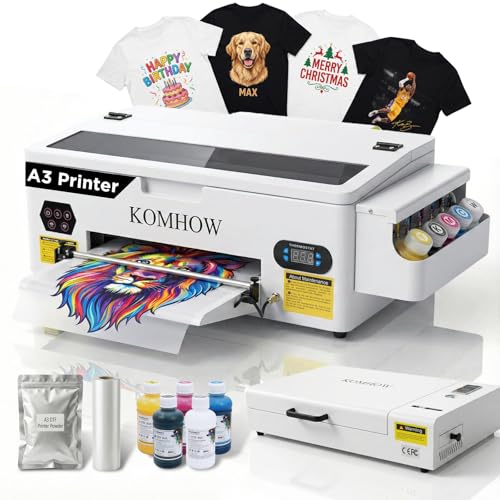
The KOMHOW R1390 is a fully assembled DTF printer designed around the R1390 (a converted Epson Stylus Photo 1390) with a white ink circulation system, a curing oven, and enough supplies to go from unboxing to your first transfer without buying anything extra. This is the kind of package that makes sense for someone who has never run a DTF machine before. The white ink system recirculates, mixes, and self-cleans, which dramatically cuts down on the daily maintenance that drives DTF beginners crazy.
Print quality is good for a third-party conversion. The 1390 printhead produces 5760×1440 dpi output, and the colors lay down with good saturation on the film. The included oven is a mid-size A3 unit that heats evenly and fits most standard transfers. The real selling point is the guided setup support. KOMHOW walks you through the first print step by step, and ongoing technical help is available via WhatsApp and email. That peace of mind matters when you are investing nearly $1,800 into a printer that relies on specific drivers and RIP software. It is not as fast as the XP600-based machines below, but for a first DTF printer or a low-volume side business, the pace is fine. Expect to print about 10 to 15 shirts per hour once you have a rhythm.
Pros: Complete starter package with printer, oven, inks, film, and powder, white ink circulation and self-cleaning reduce clogging, guided setup and ongoing support, good print resolution for detailed designs, works on cotton, polyester, blends, and leather.
Cons: Slower than XP600-based printers for high-volume work, R1390 printhead is older technology, RIP software is Windows only, build quality is decent but not industrial.
Best for: A small apparel startup or independent creator who wants a no-guesswork DTF package and values support over maximum speed.
Check current price on Amazon →

The Lancelot M1630 Pro is the heaviest hitter in this roundup. It uses a larger printhead architecture that the company claims runs at double the speed of L1800 and R1390 based printers. More importantly, it includes a roll feeder with an auto-cut system, a laptop preloaded with the necessary drivers and software, and a maintenance toolkit. This bundle is designed for throughput. You load a roll of film, hit print, and the machine cuts each transfer to length automatically. That saves minutes per order and removes the single biggest bottleneck in manual DTF workflows.
The "Holiday Mode" auto-cleaning feature is a genuine timesaver. It prevents nozzle clogs during idle periods, which means you can leave the printer overnight or over a weekend and come back to a machine that is ready to go. The white ink circulation system is built into the film path and keeps the white pigment flowing without manual agitation. Lancelot also provides an upgraded film feeding system that handles both sheets and rolls without jamming, a common failure point on cheaper conversions. The cost is steep, but when you add up the printer, oven, laptop, and consumables, the value is there for a shop that needs to push out dozens of transfers daily. The physical footprint is large, and the machine weighs over 167 pounds, so plan your workspace accordingly.
Pros: Double printing speed over many competitors, auto-cut roll feeder saves labor, preloaded laptop included, Holiday Mode prevents clogs during downtime, upgraded film path reduces jams, comprehensive after-sales team.
Cons: Very heavy and large (167+ pounds), expensive upfront cost, software is Windows only, requires a dedicated table or stand, some reported complexity in initial setup despite "plug-and-play" claims.
Best for: An established garment decoration business that prints multiple orders per day and wants to minimize manual intervention.
Check current price on Amazon →

The SureColor F170 is not a DTF printer. It is an 8.5×11 inch dye-sublimation printer, and it uses genuine Epson sublimation inks certified by ECO PASSPORT. It belongs on this list because many people shopping for a DTF printer also consider sublimation, and the F170 is the best compact OEM entry for that workflow. If you print on polyester, hard goods like mugs or phone cases, or any substrate that requires sublimation transfer, this is the machine to buy instead of an Epson converted for DTF. The PrecisionCore printhead delivers outstanding image clarity, and the closed paper tray keeps dust away from the media.
Where the F170 falls short for DTF is the format size and the ink type. Sublimation ink does not work with the adhesive powder process in the same way pigment DTF inks do. You cannot use the F170 for DTF transfers on cotton shirts without a different ink set and a lot of experimentation. But if you run a small craft business that primarily does polyester apparel and hard goods, this is a more reliable and better-supported option than any third-party DTF conversion. The price is reasonable for an OEM printer. Epson authorized partners stand behind it, so you have genuine warranty and support.
Pros: Genuine Epson OEM product with full manufacturer support, PrecisionCore printhead for excellent quality, compact size fits small studios, includes full set of Epson sublimation inks, ECO PASSPORT certified for safe textile use.
Cons: Maximum print size is only 8.5×11 inches, not a DTF printer (sublimation only), slow for high-volume production, ink is proprietary sublimation, not universal DTF pigment.
Best for: A crafter or small business owner focused on polyester apparel and hard substrates who values OEM reliability and does not need DTF cotton capabilities.
Check current price on Amazon →

The Super-Tank DTF printer sits at the budget end of this category. It is an A4 conversion machine that comes with a set of DTF inks (CMYK + white), a powder pack, and a built-in scanner and copier. The all-in-one format is unusual for a DTF printer. Most dedicated machines strip out the scanner to keep costs down. Here, you get the ability to copy documents and scan designs directly, which can be handy for a shop that does on-demand reproduction of existing artwork.
The trade-offs are real at this price. The generic brand means support is thinner than with more established names. The ink volume is limited to starter packs, and the built-in white ink system, if it has one, may be basic. This printer works for someone who wants to dip a toe into DTF without a major investment. Print an occasional batch of shirts, learn the process, and then upgrade once orders justify it. The build quality is not going to survive daily commercial use, but for a side hustle or family business running a few jobs per week, it gets the job done. The scanner is a nice bonus that the competition lacks.
Pros: Very low entry cost for a complete DTF setup, built-in scanner and copier add office functionality, easy filling for the super-tank inks, includes DTF powder and film, compact A4 footprint.
Cons: Generic brand with limited customer support, A4 size restricts print dimensions, white ink system may be basic (check listing), consumable quality is unknown, not suitable for high-volume use.
Best for: A hobbyist or very small operator who wants to test DTF printing with minimal upfront risk and appreciates having a scanner built in.
Check current price on Amazon →

The WJTZXY printer uses an XP600 single head, which is the go-to printhead for aftermarket DTF machines that promise speed. The manufacturer claims it is double the speed of L1800 and R1390 based printers, and that tracks with what the XP600 is capable of. This bundle includes the printer, a shaking dryer machine, five 500ml bottles of DTF ink (CMYK plus white), one kilogram of hot melt powder, a roll of film, and the RIIN RIP software. It is a complete package that ships from a US warehouse in New Jersey, so you are not waiting weeks on international freight.
The shaking dryer is a separate unit that vibrates the powder onto the wet ink and then melts it. This is a common workflow, but the shaking mechanism here seems more robust than the tumbler dryers that come with some budget printers. The company is a factory direct seller, which means they can provide replacement parts and technical help over time. They specifically mention that they want to avoid the "buy four printers before finding the right one" scenario, which speaks to their confidence in the hardware. The ink set is generous, though the brand is less known than some competitors. For a shop that needs A3+ capacity and speed without jumping to the $3,000+ level, this is a strong middle option.
Pros: XP600 printhead delivers fast printing, shaking dryer is included and appears well built, five 500ml ink bottles provide good starting volume, shipped from US warehouse for faster delivery, factory direct support and parts availability.
Cons: Brand recognition is low, RIIN software may have a learning curve, no laptop included, shaking dryer adds to floor space requirements, some reported complexity in initial nozzle alignment.
Best for: A growing t-shirt business that needs A3+ output and fast cycle times but wants to stay under $3,000 for the complete setup.
Check current price on Amazon →

The DXZ 2026 A4 DTF printer comes with an unusual proposition: a two-year supply of ink. You get five 250ml bottles with the printer, and then every two months the company sends you a new set for only the cost of shipping. That reduces the long-term consumable cost significantly and removes the headache of reordering. The machine itself is built around an XP600 printhead and includes a white ink mixing system, a semi-automatic cleaning system, and a roll feeder that handles both sheets and rolls up to 8.27 inches wide. The built-in cutter saves film by cutting each transfer to length.
Speed is the main selling point alongside the ink plan. The XP600 printhead at 2800×1400 dpi provides crisp details and good color saturation. The DXZ also touts a 100% transfer rate, which is ambitious but achievable with proper calibration. The color scheme is a bright blue that stands out in a sea of white and gray machines. The one-year warranty on non-consumable parts and six months on the printhead is standard for this category. The after-sales team responds within 24 hours, which is better than many generic brands. The biggest drawback is the A4 width. If you want to print larger than a standard chest print, this machine will not do it.
Pros: Two-year ink supply included (new bottles every 2 months), XP600 printhead for fast speed, roll feeder with auto-cutter, white ink mixing system for consistent output, 24-hour technical support response.
Cons: A4 format limits maximum transfer size, ink plan may have shipping costs that add up over time, brand is relatively new, no oven included in the base package (check listing), smaller ink bottle size (250ml) means more frequent changes.
Best for: A budget-conscious DTF beginner who wants predictable consumable costs and mainly prints standard t-shirt fronts.
Check current price on Amazon →

The Carbcolords DTF printer is another A4 machine built around the XP600 printhead, but it stands out for its space-saving design. The integrated ink tank keeps the footprint small, and the overall dimensions are compact at roughly 14 by 16 inches. For a DTF printer, that is tiny. You can set it up on a standard desk and still have room for the oven and powder station. It includes a white ink mixing system designed to prevent settling, and the bundle comes with an oven, six 250ml ink bottles, a roll of film, and DTF powder.
Carbcolords claims a 200% increase in printing speed compared to conventional DTF printers, which seems consistent with other XP600 machines but is still an improvement over older printheads. The print quality is sharp, with good color vibrance and crisp patterns that resist fading over time. The integrated ink tank is easier to refill than some external bottle systems and looks cleaner. The main concern is that the brand does not have a long track record, and the A4 size will limit growth. If you are confident your orders will stay small, this is a fine choice. The price is identical to the DXZ above, so the decision comes down to the ink plan (DXZ) versus the compact form factor (Carbcolords).
Pros: Very compact footprint for a DTF printer, XP600 printhead for fast speed and crisp output, white ink mixing system keeps white pigment flowing, includes oven and consumables, easy-to-fill integrated ink tank.
Cons: A4 width only, brand is relatively new with limited support community, ink bottle size is 250ml instead of 500ml, no roll feeder in the standard bundle, not suitable for medium-to-high volume.
Best for: A home-based DTF startup with limited space who wants a fast, reliable A4 machine and is comfortable with a newer brand.
Check current price on Amazon →

The PUNEHOD R1390 is another R1390-based DTF printer, but it differentiates itself with a detachable reel design that can handle PET film rolls up to 100 meters long. Most A3 printers in this price range require you to cut film manually. This one has a built-in cutting device that streamlines the workflow. The white ink circulation system includes stirring and automatic cleaning, aiming to minimize the clogs that plague white pigment ink. The bundle is comprehensive: the printer, an A3 oven, 100 meters of PET film, six 250ml ink bottles, 500g of powder, and RIP software.
One notable detail in the listing is that the company has discontinued including a white USB drive due to virus concerns, and directs buyers to their website for drivers. That is an honest admission and suggests they are attentive to customer feedback. The printer prints on a wide range of fabrics including hats, jeans, shoes, and bags. The after-sales support team provides online setup and installation help. The blue color scheme matches the DXZ but the build quality feels marginally sturdier. The main downside is the slower R1390 printhead compared to XP600, but the larger A3 format and roll feeder make it a better choice if you need bigger transfers than A4 can provide.
Pros: Detachable reel supports 100m film rolls with built-in cutter, A3 (13") print width for oversized designs, white ink circulation and stirring reduce clogs, comprehensive package with oven and 100m of film, responsive after-sales support with online setup.
Cons: R1390 printhead is slower than XP600 alternatives, included ink bottles are 250ml (not 500ml), no laptop or tablet included, RIP software is Windows only, physical size is larger than A4 machines.
Best for: A small business that frequently prints large A3 transfers and wants a roll feeder to save time, without moving to a higher-priced XP600 system.
Check current price on Amazon →

The Epson EcoTank ET-15000 is a wide-format all-in-one printer that prints up to 13×19 inches. It includes a scanner, copier, fax, Ethernet, and wireless connectivity. Like the ET-8550, it is not a DTF printer out of the box. But it is one of the most popular foundations for DTF conversion among users who need a printer that also functions as an office machine. The supertank system gives you thousands of pages per ink set, and the wireless printing means you can send transfers from a phone or tablet.
The ET-15000 uses a four-color CMYK ink system, which means you will need to add white ink externally if you want to print on dark garments. The printhead is not the same high-accuracy PrecisionCore used in the ET-8550, but it still produces solid results for most t-shirt designs. The built-in scanner and copier are more useful for a general office than a dedicated apparel shop, but if your business also needs to print flyers, scan contracts, or fax documents, this one machine can do both. The price is lower than the ET-8550, but you lose the photo-specific color gamut and the ability to use OEM six-color inks. For a dual-purpose printer that pulls DTF duty, it works well. For a pure DTF machine, the dedicated options above will give you fewer frustrations.
Pros: Prints up to 13×19 inches, supertank saves on ink costs, built-in scanner, copier, fax, and Ethernet, wireless printing from mobile devices, low per-page cost for color documents.
Cons: Not a DTF printer (needs conversion with white ink circulation), four-color CMYK only (no photo black or gray), slower than dedicated DTF machines, conversion voids Epson warranty, complex setup for DTF workflow.
Best for: A small business that needs one printer for both office tasks and DTF transfers, and is willing to add an aftermarket white ink system.
Check current price on Amazon →
The term "Epson DTF printer" covers two types of machines: genuine Epson printers that you modify with third-party ink and hardware, and fully built DTF printers from other brands that use Epson printheads internally. The right choice depends on your technical comfort, budget, and production volume. Here are the factors that matter most.
The printhead is the heart of any DTF machine. Epson makes several families. The XP600 is the most popular for aftermarket DTF printers. It is a six-channel printhead designed for speed and high resolution (up to 5760×1440 dpi). Machines using it, like the WJTZXY, DXZ, and Carbcolords, typically print 30 to 50% faster than those using the older R1390/L1800/L805 printheads. The R1390 is based on the Epson Stylus Photo 1390 and offers good quality but at a slower pace. The PrecisionCore chip in modern Epson printers like the ET-8550 is excellent for droplet control but is more proprietary, meaning third-party ink compatibility is hit or miss. For a pure DTF machine, an XP600 is the safe bet. For a DIY conversion, the PrecisionCore printer you pick will determine the ink path complexity.
White ink is thicker and heavier than color ink. If it sits still, the pigment settles and clogs the printhead. Every dedicated DTF printer on this list includes some form of circulation system that agitates the white ink continuously. The KOMHOW, Lancelot, WJTZXY, DXZ, Carbcolords, and PUNEHOD all have built-in mixing or circulation. The Super-Tank generic machine likely has a basic version. The Epson OEM printers (ET-8550, ET-15000, F170) have no white ink system at all. If you convert one, you must buy an external white ink circulation kit (often $100-200) and install it. This is not difficult but adds another point of potential failure. For a hassle-free experience, choose a printer with white ink circulation already integrated.
A4 (8.27 x 11.7 inches) printers are compact and cheap, but they limit maximum transfer size to roughly 8 by 10 inches after margins. That is fine for standard t-shirt fronts but not for back prints, hoodies, or oversized designs. A3 (11.7 x 16.5 inches) and A3+ (13 x 19 inches) printers let you print larger and often include roll feeders. Roll feeders save time because you do not need to load individual sheets. The SD deals with up to 100m rolls. The Lancelot has an auto-cut system that trims each transfer. If you plan to sell shirts regularly, spend the extra money for at least A3 with a roll feeder. The productivity gain is immediate.
A "bundle" that includes an oven, starter inks, powder, and film can save you $300 to $500 in initial purchases. But not all consumables are equal. The cheapest bundles may include off-brand inks that clog faster or powder that does not melt evenly. Look for bundles that list the ink brand or the film specifications. The KOMHOW and Lancelot bundles are comprehensive and use known commodities. The DXZ two-year ink plan is compelling if you trust the ink quality. The Super-Tank and Carbcolords bundles are more basic but still functional for getting started. If consumable quality is uncertain, budget for a replacement set of known-good inks right away so you have a baseline.
DTF printers from smaller brands vary wildly in support quality. The best ones offer setup guidance, troubleshooting via WhatsApp or email, and replacement parts shipped quickly. The KOMHOW, Lancelot, and PUNEHOD all mention dedicated support teams. The WJTZXY is factory direct and provides parts. The generic Super-Tank has no such guarantee. Epson OEM printers have the strongest support network in the industry. If you run a business and cannot afford downtime, a converted Epson may be safer because you can find replacement parts and repair shops anywhere. But the conversion itself is not supported by Epson, so you are on your own for the custom ink path.
Every DTF printer on this list can print on cotton, polyester, cotton-poly blends, leather, and most fabrics that can withstand heat press temperatures. The difference is in the white ink opacity and the powder melt quality. Machines with better white ink systems (Lancelot, KOMHOW, WJTZXY) produce brighter colors on dark fabrics. The Epson conversion printers can match that quality with careful calibration. Dye-sublimation (F170) is a completely different process that only works on polyester or polymer-coated hard goods. If you need to print on cotton, do not buy a sublimation printer. Stick with DTF pigment ink.
Technically yes, but only printers that accept pigment ink and have a continuous ink system or can be converted to one. Consumer cartridge-based Epson printers are harder to convert because the cartridges are chipped and refillable options are limited. The best Epson printers for DTF conversion are the EcoTank models (like the ET-8550 and ET-15000) because they have large ink tanks that are easy to fill with third-party DTF ink. Even then, you must add a white ink circulation system. The WorkForce and Expression lines are not recommended due to lower printhead durability and smaller ink capacities.
A converted Epson printer starts as a standard document or photo printer and is modified by the user or a third party to accept pigment DTF inks. It retains the original printhead and mechanics. A dedicated DTF printer, like the KOMHOW or Lancelot, is built from the ground up with DTF features: white ink circulation, roll feeders, upgraded film paths, and often a curing oven. Dedicated machines are more reliable out of the box and require less daily maintenance. Converted printers are cheaper and use genuine Epson hardware, but the conversion adds complexity and risk of clogging if not done correctly.
With proper maintenance, pigment DTF ink can last several weeks in the printer. White ink is the most sensitive and may separate in as little as a few days if not circulated regularly. Most dedicated DTF printers with white ink circulation systems can sit idle for 24-48 hours without issues. For longer idle periods, you should run a cleaning cycle or store the printer with the printhead capped and filled with cleaning solution. The two-year ink supply from DXZ assumes you are printing regularly enough to use the ink within that timeframe.
Yes. DTF transfers require a heat press to melt the adhesive powder and bond the design to the fabric. A standard swing-away or clamshell heat press works fine. The printer itself only produces the film. The oven cures the powder, and then the heat press applies it to the garment. Some bundles include a heat press, but many do not. Check before buying. If you do not already have a heat press, factor that cost into your budget.
Most DTF printers come with proprietary RIP software that converts your design files into the proper printer commands and manages ink layering (especially the white ink layer). Common ones include Maintop, RIIN, and Cadlink. Some third-party conversions use standard Epson printer drivers, but you will still need a RIP to handle the white underbase correctly. All software mentioned on this list is Windows only. Mac users will need to run a virtual machine or use a dedicated Windows computer for DTF printing.
Yes. DTF is one of the few methods that prints on dark fabrics without pretreatment. The printer lays down a white ink underbase, then the color layers on top. The white ink opacity is critical for vibrant results on black or navy shirts. Printers with good white ink circulation (like the Lancelot or KOMHOW) produce brighter whites. The white layer may need to be printed twice on very dense fabrics for maximum opacity.
The Lancelot M1630 Pro is the strongest option in this roundup for volume. It has the fastest printhead, an auto-cut roll feeder, and a preloaded laptop to minimize setup time. It is expensive but designed to run all day. The WJTZXY XP600 is a close second for about $500 less, though it lacks the roll feeder and auto-cut. For a high-volume shop with a bigger budget, look beyond this list at larger format industrial DTF systems like the DTF Pro or Colman, which start above $5,000.
The best Epson DTF printer for most people is the KOMHOW R1390 if you want a turnkey, low-hassle start in DTF printing. It comes with everything you need, has decent support, and prints at a good size for standard t-shirt work. If you are more technically inclined and want the flexibility of genuine Epson hardware, the Epson EcoTank Photo ET-8550 gives you a wider print area and better color gamut, but you will need to source a conversion kit and learn the setup. For a high-output shop, the Lancelot M1630 Pro is worth the premium for its speed and automation features.
If your budget is tight, the Super-Tank DTF printer is the cheapest entry point, but prepare for a lower ceiling on volume and potentially frustrating support. For sublimation work, stick with the Epson SureColor F170 and do not try to convert it. The DXZ and Carbcolords units are solid A4 choices if the two-year ink plan or small footprint matter to you.
No matter which one you pick, the most important investment you can make is in learning proper white ink maintenance and RIP software settings. A printer is only as good as the person dialing it in. Start with small runs, dial in your workflow, and scale from there.
This article contains Amazon affiliate links. We may earn a small commission on qualifying purchases at no extra cost to you.


