Physical Address
304 North Cardinal St.
Dorchester Center, MA 02124
Physical Address
304 North Cardinal St.
Dorchester Center, MA 02124

We've rounded up the 10 best stand up desk converters for 2026, from compact risers to extra-wide dual-monitor workstations. Find the right fit for your home office.
You feel it around 2 p.m.: the ache in your lower back, the stiffness in your shoulders, the creeping urge to just stand up and stretch. But if you're tethered to a fixed-height desk, standing means abandoning your keyboard or crouching awkwardly over your monitor. A stand up desk converter solves that problem without making you replace your entire desk. It sits on your existing surface, lifts your screens and keyboard in one smooth motion, and lets you switch between sitting and standing whenever you need.
The market is crowded with options, and most of them look alike at first glance. But the differences in lift mechanism, surface width, weight capacity, and build quality matter a lot once you live with one. We've looked at ten of the most popular models — from compact single-platform risers to extra-wide converters that hold two monitors and a laptop — to help you find the best stand up desk converter for your setup. Some are built for stability with a heavy steel frame, others prioritize quick assembly and a low-profile look. We'll walk you through the strengths and trade-offs of each.
TL;DR: The VIVO 32-inch K Series is our top pick for most people: it's the best all-around converter with a wide surface, solid gas lift, and a well-designed keyboard tray. The FLEXISPOT 36-inch stands out for its unique mechanical spring mechanism that won't lose pressure over time. The VIVO 36-inch V Series is the choice for anyone who needs extra depth and stability for larger monitors. The FITUEYES 32-inch is a strong budget-friendly alternative with similar specs.
| # | Product | Width | Weight Capacity | Converter Weight | Lift Type | Best For |
|---|---|---|---|---|---|---|
| 1 | VIVO 32 inch K Series DESK-V000K | 31.5" | 33 lbs | 26 lbs | Dual gas spring | The best all-around converter for dual monitors |
| 2 | FLEXISPOT 36" Desk Riser | 36" | 33 lbs | 34.5 lbs | Mechanical spring | Long-term reliability without gas leak worries |
| 3 | VIVO 36 inch V Series DESK-V000V | 36" | 33 lbs | 38.7 lbs | Dual pneumatic spring | Deep surface for large monitors and extra gear |
| 4 | FITUEYES 32" FSD308001WB | 31.5" | 33 lbs | 27 lbs | Dual gas spring | A solid, affordable dual-monitor riser |
| 5 | FITUEYES 36" SD309101WB | 36" | 33 lbs | 29.6 lbs | Dual gas spring | Extra width for dual monitors and accessories |
| 6 | VIVO 28" DESK-V028S | 27.6" | 28.6 lbs | 25.3 lbs | Pneumatic spring | Compact desks and smaller monitor setups |
| 7 | VIVO 32" DESK-V000S | 31.5" | 26 lbs | 25.1 lbs | Pneumatic spring | A straightforward 32-inch riser with a lighter touch |
| 8 | VIVO 29" Single Top DESK-V000U | 29.3" | 22 lbs | 22.3 lbs | Single gas spring | Minimalist setups with a single monitor or laptop |
| 9 | VIVO 42" K Series DESK-V042KB | 42" | 33 lbs | — | Dual gas spring | Spacious dual-monitor workstations with extra room |
| 10 | TechOrbits 32" Particle Board | 32" | 33 lbs | — | Pneumatic lift | A lower-cost option with a lightweight build |
Note: Weight not listed for models where product dimensions were incomplete.

Pros
Cons
Best for: Anyone who wants a versatile, well-engineered converter that handles dual monitors without fuss.
Check current price on Amazon →
The VIVO 32-inch K Series strikes a balance that few converters manage. Its 31.5-inch top platform is wide enough for two 24-inch monitors side by side, and the keyboard tray stretches the same width — a rarity at this size. Most converters force you to mouse above the keyboard tray or use a cramped surface. Here, you can keep your keyboard centered and your mouse to the side without wrestling with the edge. The dual gas springs lift the platform with a smooth, controlled motion. A simple touch handle releases or locks the height anywhere in the 15.5-inch range. The steel frame feels solid, and the unit sits flush against your desk without sliding around. Assembly takes about five minutes: screw in the keyboard tray brackets and you're done. The only real trade-off is weight — at 26 pounds, this isn't something you'll relocate often. But for a permanent sit-stand upgrade, that heft contributes to the stability you want at standing height. VIVO backs it with a three-year warranty, which inspires more confidence than the typical one-year coverage.

Pros
Cons
Best for: Buyers who plan to keep the converter for years and want a mechanism that doesn't degrade.
Check current price on Amazon →
Every gas spring converter on this list will eventually lose some lifting force — it's the nature of compressed gas. FLEXISPOT sidesteps that entirely with a mechanical spring system. A coiled steel spring provides the lift, and there's no seal to fail. That alone makes this 36-inch converter interesting, especially if you plan to use it daily for half a decade. The lift itself is smooth and requires about the same effort as a dual gas spring. The 36-inch platform gives you generous real estate: you can place a laptop on one side and a monitor on the other, or run a pair of 27-inch monitors if your desk depth allows. The keyboard tray is 36 inches wide as well, so your mouse pad can live alongside your keyboard. The steel frame uses thickened square tubes, which cut down on flex. It's not quite as rock-solid as the VIVO V Series at full height, but it's close enough that you won't notice unless you're actively typing while standing. The trade-off is weight — this is one of the heaviest converters here, which makes it a permanent fixture. But that heft also means less vibration transfer from typing.

Pros
Cons
Best for: Anyone with deep monitors or an ultrawide who needs a stable, spacious work surface.
Check current price on Amazon →
The VIVO V Series is the largest and most substantial converter in the lineup — not the widest (that's the 42-inch model), but the deepest. At 22 inches of depth, it can handle a 27-inch iMac or a curved ultrawide monitor that would overhang narrower platforms. The dual pneumatic springs lift the heavy steel frame with a smooth, even motion, and the simple touch lock holds firmly at any height between 6.7 and 16.9 inches. What sets the V Series apart is stability. The wide, low-profile base distributes weight evenly, and the steel frame doesn't flex even when you lean on the keyboard tray. This is the converter to pick if you can't stand wobble. The keyboard tray is still wide enough for a full keyboard and mouse, though at 25 inches it's not as expansive as the K Series's full-width tray. Assembly takes a bit longer than the K Series — you'll need to attach the feet and the tray — but the instructions are clear. At 39 pounds, this is a piece of furniture you place and leave, not something you'll move between rooms.

Pros
Cons
Best for: Users on a traditional desk looking for an affordable entry into standing without sacrificing monitor space.
Check current price on Amazon →
The FITUEYES 32-inch converter is often compared to the VIVO K Series, and for good reason: the dimensions are nearly identical, and the dual gas spring mechanism works the same way. The top platform holds two monitors without crowding, and the lift is smooth enough that you won't spill your coffee. The height range extends to nearly 20 inches, which accommodates taller users better than some competitors that max out at 17 inches. The biggest difference is in the keyboard tray. FITUEYES's tray is narrower and shallower than VIVO's, measuring about 25 inches wide and 10.5 inches deep in the center. You can fit a keyboard and mouse, but a full-size mechanical keyboard with a numpad might feel tight. The build quality is decent for the weight class — the steel frame feels sturdy, though there's a bit more wobble at the top of the range compared to the heavier VIVO units. If your priority is a straightforward dual-monitor converter that doesn't cost much and gets the job done, this is a strong candidate.

Pros
Cons
Best for: Users who want to keep a laptop open alongside a pair of monitors, or anyone who prefers a wide expanse without needing deep surface.
Check current price on Amazon →
FITUEYES's larger model stretches the top surface to 36 inches, which gives you just enough room to slide a laptop next to a dual-monitor setup. The extra width is useful if you work with a reference document on one screen and a layout on the other, and you want your laptop as a third display. The gas springs handle the extra width without complaint, and the height range matches its 32-inch sibling. The keyboard tray, however, remains the same size as the 32-inch model's — it doesn't scale up. That means you can't spread a full-size keyboard and mouse each on their own side without overlapping. If you need a tray that matches the top width, the VIVO 42-inch or the FLEXISPOT 36-inch offer better proportions. The FITUEYES 36-inch is still a capable converter, especially if your priority is the top surface real estate for screens rather than the keyboard tray.

Pros
Cons
Best for: People with limited desk space who still want a standing option for dual small monitors or a single large one.
Check current price on Amazon →
VIVO's 28-inch converter is the smallest of their lineup, designed for desks where a 32-inch model would overhang or crowd your workspace. The top surface is still large enough for two 21.5-inch monitors or a single 27-inch one, and the 28.6-pound capacity covers most standard setups. The pneumatic spring lifts the platform smoothly, and the locking mechanism is the same reliable simple touch used across the VIVO range. The keyboard tray syncs with the main platform, so you get full use of the height range. The trade-off is the tray size — it's narrower than the 32-inch K Series, so you'll need to be mindful of keyboard width. The minimum height of 4.9 inches might feel slightly elevated for some seated postures, but it's within normal ergonomic range. This is a good choice if your desk measures less than 50 inches across and you don't want a converter that dominates the surface.

Pros
Cons
Best for: Users with lighter monitors who want a straightforward, no-frills converter from a trusted brand.
Check current price on Amazon →
The VIVO DESK-V000S is essentially the base model of their 32-inch converter. It shares the same top surface dimensions as the popular K Series but uses a single pneumatic spring instead of dual gas springs, which reduces the weight capacity to 26 pounds. That's still enough for two typical 24-inch monitors (which weigh around 10-12 pounds each), but it rules out heavy hardware like an iMac or a 34-inch ultrawide. The lift is smooth and the locking mechanism works well, but the lower capacity means the spring feels softer — you have to be careful not to overload it. The keyboard tray is also smaller than the K Series: less width and less depth. If you're on a budget and don't need the higher capacity, this model is a reliable option, but the K Series is worth the upgrade for the extra headroom and better tray.

Pros
Cons
Best for: Someone who wants the simplest possible standing solution — just place it on your desk and go.
Check current price on Amazon →
The VIVO Single Top is almost aggressively simple. It's a single platform that sits on your desk and lifts straight up via a gas spring. There's no keyboard tray — your keyboard stays on the desk below the platform, and the platform holds just your monitor and perhaps a laptop. That means you lose the ergonomic benefit of having your keyboard at standing height with your monitor. You'll still need to reach up to the keyboard, which defeats some of the purpose. However, if you already have a keyboard tray or if you primarily use a laptop on a stand, this could work. The big advantage is that it comes completely preassembled. You pull it out of the box, set it on your desk, and it's ready. The low profile and single platform design make it visually unobtrusive. It's also the lightest converter here, so you can move it between desks if needed. This is a niche product, but for the right setup it's a no-fuss solution.

Pros
Cons
Best for: Power users with three monitors or a massive ultrawide who need the widest converter available.
Check current price on Amazon →
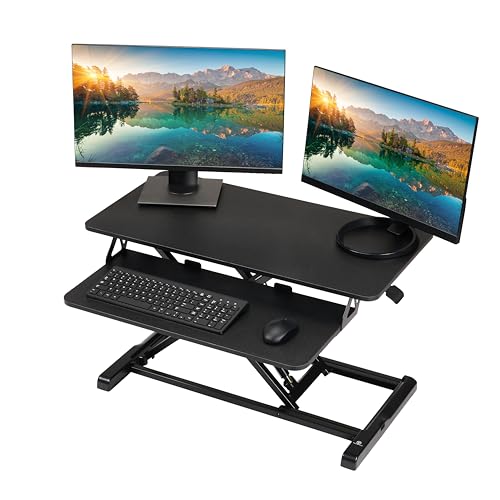
The VIVO 42-inch K Series is the king of width. It's designed for people who have outgrown dual monitors and need space for three screens, or a single 49-inch ultrawide. The top surface is 42 inches across, and the keyboard tray mirrors that width, giving your arms room to stretch. The dual gas springs lift the 33-pound load without drama, and the simple touch lock holds the platform firmly at any height between 4.5 and 20 inches. This converter is essentially a full desk in itself — it will dominate any smaller desk. You need at least a 60-inch desk to use it comfortably, and you'll want a sturdy base because the converter itself is substantial. The keyboard tray has a cutout for the lift mechanism that reduces depth to 10.2 inches in the center, so deep keyboards may need to sit toward the edges. If you need this much space, there's not much else on the market that competes.
Pros
Cons
Best for: Someone who needs a wide converter and wants to keep the initial investment low, as long as they don't plan to move it frequently.
Check current price on Amazon →
TechOrbits takes a different approach to cost savings: particle board instead of a full steel frame. The top platform is particle board with a steel lift mechanism, which keeps weight down but introduces some flex. The top surface is still wide (32 inches) and supports 33 pounds, so it can handle dual monitors. The pneumatic lift works reliably, and the height range is generous. The keyboard tray is smaller than the competition's, and the particle board can chip if you bang a monitor foot against the edge. Over time, the board may not hold up as well as steel under constant lifting and lowering. But for a secondary office or a first-time converter buyer, it's a functional choice that provides the core experience without a heavy commitment.
The right converter depends on your desk size, monitor setup, and how often you switch between sitting and standing. Here are the factors that matter most.
Almost every converter uses either a gas spring (pneumatic) or a mechanical spring. Gas springs are smooth and quiet, but they can lose pressure over years of use — especially if they're cycled frequently. Dual gas springs (two cylinders) provide more even lifting and higher weight capacity. Mechanical springs, like the one in the FLEXISPOT, last longer because there's no seal to fail, but they may have a fixed tension that can't be adjusted for lighter loads. For most people, a dual gas spring converter is the right call — you get smooth operation and plenty of capacity. If you plan to keep the converter for five-plus years, a mechanical spring is worth considering.
Width determines how many monitors fit. A 32-inch converter holds two 24-inch monitors side by side. A 36-inch converter can fit two 27-inch monitors or a laptop beside a monitor. Depth matters too: most converters are 15-16 inches deep, which is fine for standard monitors on their stands. If you have a deep monitor base or a laptop stand, look for 22-inch depth (like the VIVO V Series). Measure your monitors and your desk before buying. The converter should sit on the desk with at least 6 inches of clearance on each side for stability.
Check the weight of your monitors plus any laptop. Most converters handle 33 pounds, which covers two typical LCD monitors. If you use an iMac, a heavy ultrawide, or a gaming monitor with a thick stand, you may need the higher capacity models. The VIVO V Series and K Series both support 33 pounds. The single-platform models support less — around 22 pounds — so they're best for a single lightweight monitor or a laptop on a stand.
The keyboard tray is where converters often cut corners. A good tray is wide enough for a full-size keyboard and mouse side by side (at least 30 inches wide). The tray should also have enough depth for a keyboard plus a wrist rest — at least 11 inches. Some trays have a cutout for the lift mechanism that reduces depth in the center. If you use a mechanical keyboard with a numpad, that cutout can be annoying. The VIVO K Series trays are among the best: full width and good depth.
A converter that wobbles at standing height is frustrating. Stability comes from three things: base width, overall weight, and frame rigidity. Heavier converters (35+ pounds) generally wobble less. Wide bases that extend to the edges of the platform help too. Steel frames are more rigid than aluminum or particle board. Read the specs: a 38-pound converter will be more stable than a 25-pound one of the same dimensions.
Most converters arrive partially assembled; you attach the keyboard tray with a few bolts. A few (like the VIVO Single Top) come fully assembled. Consider whether you're willing to spend 15 minutes setting it up. Also look at the height adjustment mechanism: a simple touch handle that releases and locks is ideal. Some converters require squeezing two handles simultaneously, which is harder.
Most converters require a desk that's at least 40 inches wide and 24 inches deep. The converter sits on top, so you need room for its base plus space for your keyboard and mouse on the original desk surface or on the converter's tray. Check the dimensions of the converter (including its base) and compare to your desk top. If your desk is narrower than 40 inches, look for a compact model like the VIVO 28-inch.
You can, but it's usually unnecessary. Standing desks already adjust height. Adding a converter on top of a standing desk gives you an even higher standing position, which can be useful if you're very tall or if you want to temporarily raise just your monitors while leaving your keyboard lower. Most people don't need both.
Weight capacities range from 22 to 33 pounds on the top surface. This includes your monitor(s) and any laptop. The keyboard tray usually has a lower capacity, often 4-5 pounds. Check the combined weight of your gear before buying. Heavy or large monitors may push the limit.
For most users, a dual gas spring is the best balance of smoothness and capacity. Mechanical springs last longer but may feel stiffer. Gas springs can eventually lose pressure, but reputable brands offer multi-year warranties. If you plan to use the converter daily for more than five years, a mechanical spring is worth the premium.
Most converters require attaching the keyboard tray with a few screws. A few models (VIVO Single Top) come fully assembled. Assembly typically takes 5-15 minutes with the included tools. If you want zero setup, choose the VIVO 29-inch Single Top or a similar pre-assembled model.
Yes, if the converter's top surface is wide enough. A 32-inch converter can fit two 24-inch monitors side by side. For two 27-inch monitors, choose a 36-inch or 42-inch model. Also check the weight: two 27-inch monitors with stands can weigh up to 30 pounds, so make sure the converter's capacity covers that.
Converters typically have a height range of 4 to 20 inches. The right height depends on your desk height and your body. When standing, your elbows should be at a 90-degree angle when typing on the keyboard tray, and your eyes should be level with the top of the monitor (or slightly below). Most converters adjust in 1-inch increments, so you can dial in the fit.
The VIVO 32-inch K Series is the stand up desk converter most people should buy: it offers a wide surface, a generous keyboard tray, smooth dual gas spring lift, and reliable stability in a package that's easy to assemble. The FLEXISPOT 36-inch is the better long-term bet if you worry about gas spring degradation, thanks to its mechanical spring, while the VIVO 36-inch V Series is the one to get if you need a deep surface for large monitors and you prioritize rock-solid stability over everything else. For smaller desks, the VIVO 28-inch delivers the same proven lift in a footprint that doesn't overwhelm your space.
If you're still unsure, start by measuring your desk and your monitors. Then look at the keyboard tray design — that's where most converters compromise, and it's where the VIVO K Series wins. Pair that with a dual gas spring and a weight capacity that covers your gear, and you'll have a converter that makes the sitting-to-standing transition feel effortless.
This article contains Amazon affiliate links. We may earn a small commission on qualifying purchases at no extra cost to you.


