Physical Address
304 North Cardinal St.
Dorchester Center, MA 02124
Physical Address
304 North Cardinal St.
Dorchester Center, MA 02124

We picked the 10 best dive computers for every type of diver, from beginner-friendly wrist models to tech-ready full-color displays with trimix support.
Every diver reaches the point where a dive computer stops being a luxury and starts feeling like the most important piece of gear you own. A bottom timer with a depth needle is fine for the first few dozen dives, but once you start tracking nitrogen loading, managing multiple gas switches, or just want to stop doing mental math at 30 metres, a proper computer is the difference between a relaxing dive and an anxious one.
The problem is that the market is now flooded with options: wrist-mounted consoles, watch-style models you can wear to the surface, high-end units with colour screens and Bluetooth logging, and basic no-fuss computers that just show depth and no-deco time. The best dive computers in 2026 span everything from a $200 Cressi that fits any beginner to a $600 Garmin that doubles as a fitness tracker. Here is our pick of the ten models that actually earn a spot in your dive bag.
TL;DR: The Shearwater Peregrine is the one most recreational divers should buy: a brilliant display and the industry-standard algorithm. The Garmin Descent G2 is the best watch-style computer if you want health tracking and AMOLED clarity. The Cressi Leonardo 2.0 is the easiest to learn on and comes in three colours. The Suunto Zoop Novo is the rugged no-fuss choice for rental fleets and rough handling.
| # | Product | Display | Dive Modes | Algorithm | Battery Life | Best For |
|---|---|---|---|---|---|---|
| 1 | Shearwater Peregrine | 2.2" colour LCD | Air, Nitrox, Gauge, Deco | Buhlmann ZH-L16C + GF | ~30 h (medium brightness) | The best all-round recreational dive computer |
| 2 | Garmin Descent G2 | 1.2" AMOLED | Rec, Advanced, Tech, Freedive, Pool | Multi-algorithm (Garmin Elevate) | 27 h dive, 10 days smartwatch | A daily-wear smartwatch that dives |
| 3 | Garmin Descent X30 | 2.4" colour | Single-/multi-gas incl. trimix | Garmin | 30 h | Rugged, large-screen tech diving with surface GPS |
| 4 | Suunto D5 | Colour | Air, Nitrox, Gauge, Freedive | Suunto RGBM | ~10 days standby | A sleek computer with wireless tank pressure |
| 5 | Suunto Zoop Novo | Segmented LCD | Air, Nitrox, Gauge, Freedom mode | Suunto RGBM | User-replaceable battery (approx. 2 years) | Toughest basic computer for rental or heavy use |
| 6 | Mares Puck Pro Ultra | High-contrast LCD | Air, Nitrox (21-50%) | Buhlmann ZH-L16C + GF | ~100 dives (CR2450) | Nitrox-ready wrist computer with Bluetooth |
| 7 | Mares Puck Pro EZ | High-contrast LCD | Air, Nitrox (21-50%) | Buhlmann ZH-L16C + GF | ~100 dives (replaceable) | A simplified Puck Pro for easy log transfers |
| 8 | Cressi Leonardo 2.0 (White/Black) | Backlit LCD | Air, Nitrox, Gauge | Cressi RGBM | CR2430 (approx. 2 years) | The most beginner-friendly dive computer available |
| 9 | Cressi Leonardo 2.0 (Black/Yellow) | Backlit LCD | Air, Nitrox, Gauge | Cressi RGBM | CR2430 (approx. 2 years) | Same great computer in a high-vis colour |
| 10 | Cressi Leonardo 2.0 (Black/Blue) | Backlit LCD | Air, Nitrox, Gauge | Cressi RGBM | CR2430 (approx. 2 years) | A smart colour choice for new divers |
Display readability. A dive computer is useless if you can't read it at 20 metres in murky water. We prioritised models with high-contrast LCDs or bright colour screens that stay legible through a mask and in low light.
Dive algorithm and conservatism. The decompression algorithm is the brain of the machine. We looked for computers using proven models (Buhlmann ZH-L16C, Suunto RGBM, Garmin's custom algorithms) that let you adjust conservatism to match your risk tolerance.
Gas support and modes. Not every diver needs trimix, but a recreational computer should handle Nitrox up to 50% and offer at least Air, Nitrox, and Gauge modes. We favoured units that don't lock you into a single gas profile.
Battery life and charging. A computer that dies mid-trip is a paperweight. We considered user-replaceable batteries (great for travel) versus rechargeable ones (better for daily use), and how many dives you get per charge.
Build quality and button feel. You operate a dive computer with gloved hands in current. We looked for metal buttons with positive click feedback, robust housings rated for 100 metres or more, and strap systems that don't break.
Logging and connectivity. Bluetooth or USB transfer to a phone or desktop makes dive log management painless. We gave preference to models with easy sync, though a few analogue-style computers skip connectivity entirely (and that's fine for some divers).

Pros
Cons
Best for: Recreational divers who want a computer that will serve them from Open Water through to advanced Nitrox and decompression diving.
Check current price on Amazon →
The Shearwater Peregrine is the most talked-about recreational dive computer of the last few years, and for good reason. It uses the same Buhlmann ZH-L16C algorithm with gradient factors that you find in Shearwater's tech-diving computers (the Petrel, the Perdix), but in a smaller, more affordable package that doesn't sacrifice display quality. The screen is huge for its class: a 2.2-inch colour LCD that you can read from any angle. The two-button interface takes about one dive to learn, and after that you can switch modes, change gradient factors, and scroll through data pages without looking at the manual.
What the Peregrine doesn't do is connect to anything wirelessly. There is no Bluetooth, no smartphone app, no air integration. You get a USB cable and a desktop app for downloading logs. Some divers prefer that simplicity. Others will miss the convenience of syncing to a phone after a dive trip. The battery is rechargeable and lasts about 30 hours of dive time at medium brightness, which works out to roughly three full days of diving between charges. The wireless charging cradle is a nice touch, keeping the charging port clean and dry.
The Peregrine handles single-gas Nitrox up to 100% O2 and has a gauge mode. It does not support multi-gas or trimix, but for the recreational diver who wants a computer that will take them through advanced Nitrox with decompression stops, it is a near-perfect tool. The build quality is typical Shearwater: the buttons are 316 stainless steel, the housing is tough, and the interface feels deliberate and well-considered. If you are buying one computer for the next five years of recreational diving, this is the one.

Pros
Cons
Best for: Divers who want one device for everyday life and diving, and who are comfortable with a smartwatch interface.
Check current price on Amazon →
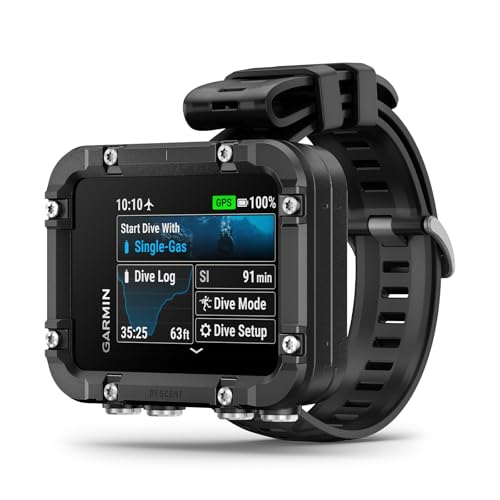
The Garmin Descent G2 is a genuine attempt to combine a dive computer with a modern smartwatch, and it mostly works. The AMOLED display is gorgeous: 1.2 inches of bright, saturated colour that looks like a phone screen. Above water it serves as a full featured smartwatch with notifications, health tracking, and contactless payments. Below water, the touchscreen locks and you use four leakproof buttons to navigate dive mode. The dive modes are comprehensive: single gas, multi-gas up to five gases, trimix, CCR, gauge, freediving, and pool apnea. You can mark entry and exit points with multi-GNSS, download dive logs to the Garmin Dive app, and even get a "dive readiness" score based on your sleep, stress, and recent exercise.
The trade-off for all that functionality is battery life. In dive mode you get about 27 hours, which is enough for a few days of diving but less than the Shearwater Peregrine or a Mares Puck Pro. In smartwatch mode it lasts up to 10 days. The watch is also physically smaller than many dedicated dive computers, which means the screen, while beautiful, is not as large as the Peregrine's or the Descent X30's. The buttons are small and can be fiddly with thick gloves, though they are easy enough to press with a bare finger.
The Descent G2 stands out because it is the only dive computer on this list that you can wear to a dinner or a gym class without looking like you just stepped off a dive boat. If you want a device that does everything and you are willing to accept the shorter dive battery life, it is an impressive piece of engineering. The use of recycled ocean-bound plastics is a commendable touch, and the sapphire lens is genuinely scratch resistant.
Pros
Cons
Best for: Technical divers who need a large, glove-friendly computer with trimix capability and surface navigation.
Check current price on Amazon →
The Garmin Descent X30 is a purpose-built technical diving tool that puts a massive 2.4-inch colour display in a rugged housing. The buttons are large and deliberately placed so you can orient them on top of the housing with the flip-screen mode, which makes operation easy when the computer is mounted on a wrist slate or hose. It handles single-gas, multi-gas, and trimix diving, and the NDL Aware feature is genuinely useful: it shows you how moving to a shallower depth extends your no-decompression limit in real time, encouraging you to make the most of your bottom time.
The surface GPS is a nice bonus. You can mark entry and exit points before you splash, and then navigate back to them after the drift. The 3-axis digital compass works well underwater, and the temperature sensor helps you find the thermocline. The housing and bezel are made with recycled ocean-bound plastics, which is a good thing for the environment but does mean the X30 feels less weighty than an all-metal computer like a Shearwater Perdix. The battery life of 30 hours is sufficient for a week of tech diving, and the screen is bright enough to read in any light.
The Descent X30 is not a watch you would wear on the surface every day; it is a serious diving instrument. For the tech diver who wants a clear, large display and doesn't mind the bulk, it competes directly with the Shearwater Perdix AI and the Suunto Eon Steel. The button layout is excellent, and the software is intuitive for a Garmin product. If you are moving into decompression and trimix diving and want a computer that will handle it all, this is a strong contender.

Pros
Cons
Best for: Divers who want a sleek, watch-style computer with wireless air integration and a modern colour interface.
Check current price on Amazon →
The Suunto D5 is a stylish wrist computer that brings a colour touchscreen and wireless tank pressure integration to a package that looks more like a smartwatch than a dive tool. The display is crisp and bright, and the interface uses a combination of touch (above water) and three buttons (underwater). The vibration alarm is a standout feature: it buzzes strongly on your wrist, so you never miss a deco stop or a safety warning even when the current is noisy.
Wireless tank pressure is optional (you need the separate Suunto Tank POD), but when paired it gives you real-time air consumption on the screen, along with remaining bottom time. This is a feature that most watch-style computers sacrifice, and it makes the D5 feel more like a full dive console. The exchangeable straps are a nice touch for divers who also wear the computer as a daily watch. The 100-metre water resistance means you can take it freediving without worry.
The catch is the battery. In dive mode the D5 lasts about a day and a half of typical diving before needing a charge. In standby mode it lasts around 10 days, which is fine for a trip but not for someone who wants to wear it all month without charging. The Suunto RGBM algorithm is more conservative than Buhlmann, which some divers find frustrating because it cuts into bottom time. Others appreciate the extra safety margin. If you want a good-looking computer with air integration and don't mind charging more often, the D5 is a solid choice.
Pros
Cons
Best for: New divers, dive schools, and anyone who wants a bombproof computer that does the basics without fuss.
Check current price on Amazon →
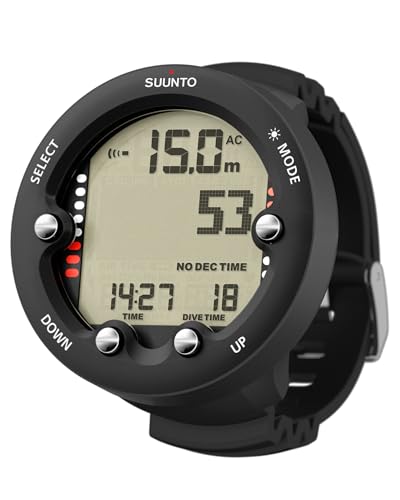
The Suunto Zoop Novo is the dive computer that refuses to die. It is the model you see strapped to rental BCDs in every dive shop in the world, and for good reason: it is simple, tough, and cheap enough to replace if it gets lost overboard. The display is a basic segmented LCD with a backlight, and the three buttons are large enough to operate with thick neoprene gloves. The interface is logical: you can switch between Air, Nitrox, Gauge, and Freedom modes (which allows the user to bypass the algorithm entirely) with a few presses.
The Zoop Novo handles Nitrox up to 50% and gives you a CNS oxygen toxicity indicator. It does not adjust conservatism; the Suunto RGBM algorithm is fixed, and it is conservative. That means you will have shorter no-deco times than with a Buhlmann computer, but the margin of safety is wide. For a new diver who hasn't yet built a deep understanding of decompression theory, that extra caution is not a bad thing.
The lack of connectivity is the main drawback. There is no Bluetooth, no USB, no app. You log your dives by hand or you don't log them at all. The battery is a common CR2450 that you can replace yourself with no special tools. If you want a computer that just works, needs no charging cables, and can survive a drop onto rocks or a forgotten day in a hot car, the Zoop Novo is the one. The best dive computers for beginners often come down to the Zoop Novo and the Cressi Leonardo, and the Suunto is the tougher of the two.

Pros
Cons
Best for: Nitrox divers who want a simple, modern computer with Bluetooth logging and the best recreational algorithm.
Check current price on Amazon →
The Mares Puck Pro Ultra is a straightforward wrist computer that gets the important things right. It uses the Buhlmann ZH-L16C algorithm with dual gradient factors, which is the same algorithm that tech divers trust, and it lets you adjust the gradient factors through the menu. That means you can make the computer more or less conservative to match your training and risk profile. The screen is a high-contrast LCD that is easy to read in the murkiest water, and the backlight is bright enough for night dives.
Bluetooth connectivity sets the Puck Pro Ultra apart from its predecessor and from many competitors in this tier. You pair it with the Mares app and your dive logs transfer automatically after each dive. The battery is a CR2450 coin cell that lasts up to 100 dives, and you can change it yourself with a standard tool. This is a huge advantage over rechargeable computers when you are on a liveaboard or a remote trip with no power outlets.
The single-button interface is the weak point. Navigating through the menus requires repeated presses and a bit of patience. Once you are in dive mode, the button controls are fine, but setting up the computer before a dive takes longer than it should. Still, for a compact, reliable Nitrox computer with excellent algorithm support, the Puck Pro Ultra is a strong choice. It is very similar to the Puck Pro EZ below, but the Ultra has a slightly different colour scheme and the same core features.

Pros
Cons
Best for: Divers who like the Puck Pro Ultra design but want a different colour option.
Check current price on Amazon →
The Mares Puck Pro EZ is essentially the same computer as the Puck Pro Ultra in a navy housing. It has the same algorithm, the same Bluetooth connectivity, the same single-button interface, and the same replaceable battery. The screen is the same high-contrast LCD that Mares does well. If you read the features list for the Puck Pro Ultra, you have read everything that applies here.
The "EZ" in the name is a bit misleading. The interface is not noticeably easier than any other single-button computer; it still requires long presses and short presses to navigate the menu. But for a diver who wants a Nitrox-capable computer with Buhlmann algorithm and automatic log syncing, this is a very capable tool. The navy colour is a nice change from the ubiquitous black, and the build quality is typical Mares: plastic but solid.
If you are choosing between the Puck Pro Ultra and the Puck Pro EZ, the decision comes down to colour preference. Both are excellent for recreational divers who want the algorithm that the tech divers use, and both are simple enough to use on a week-long trip without reading the manual twice. The battery life is a genuine advantage over the rechargeable computers; you can pack two spare CR2450s and never worry about charging cables.
Pros
Cons
Best for: Any new diver who wants the cheapest, easiest-to-use computer that still gives real dive data and Nitrox support.
Check current price on Amazon →
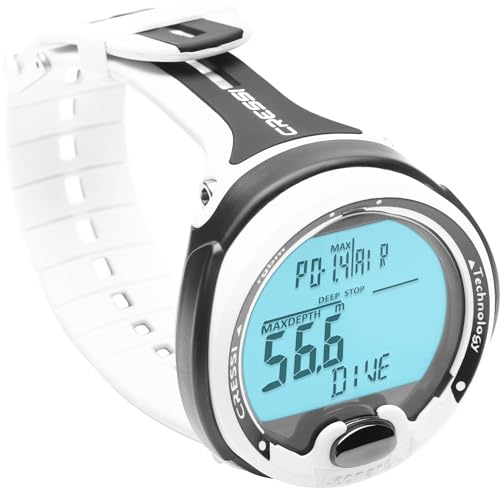
The Cressi Leonardo 2.0 is the dive computer that probably taught more divers how to use a computer than any other model. The single-button interface is genuinely intuitive: you press to cycle through modes and hold to confirm. Within five minutes of taking it out of the box, a complete beginner can set it to Air mode and go diving. The display is a simple backlit LCD that shows depth, time, no-deco time, and temperature. It is not pretty, but it is clear.
Nitrox support is adjustable from 21% to 50% O2, and you can set the partial pressure limit between 1.2 and 1.6 bar. The CNS oxygen toxicity indicator is a bar graph on the screen, which is a nice safety touch for a computer at this level. Three levels of conservatism (low, medium, high) let the diver decide how much margin they want. The computer also has a deep stop option, which is a rare feature on entry-level models.
The weaknesses are the lack of connectivity and the dated display. There is no way to download logs; you have to write them down or use a third-party tool. The screen is small and the numbers are not as large as on a Suunto Zoop Novo. The housing is plastic and feels lightweight, but it has survived tens of thousands of rental dives over the years. For the new diver who just wants a computer that works without any fuss, the Leonardo 2.0 remains the standard. The white and black version is the most popular colour and the one you see most often in dive shops.

Pros
Cons
Best for: New divers who want the Leonardo 2.0 but prefer a high-vis yellow accent.
Check current price on Amazon →
Everything said about the white/black Cressi Leonardo 2.0 applies here. The computer is the same unit with a different colour scheme. The black body with yellow accents is more visible on the wrist, which can be useful in low-visibility water or when you are trying to find your computer in a crowded dive locker. The yellow also makes it easier for a dive buddy or instructor to see your display from a distance.
The yellow model is perhaps slightly more popular with instructors who want their students to have a computer that stands out during training. Otherwise, the performance is identical. If you are buying a Leonardo 2.0, the colour choice is cosmetic. The black/yellow version is a good pick if you like a bit more visibility.
Pros
Cons
Best for: New divers who like the Leonardo 2.0 and prefer a blue accent.
Check current price on Amazon →
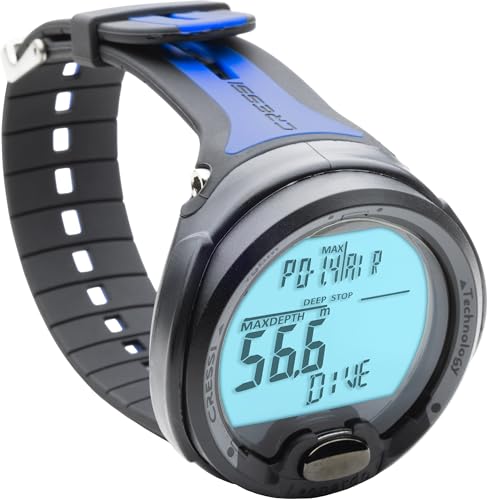
The third colour variant of the Cressi Leonardo 2.0 is the black/blue model. It shares the same hardware, the same single-button interface, the same three conservatism levels, and the same CR2430 battery. The blue accents give it a slightly sportier look than the black/yellow model, and it is a good match for divers who wear blue gear.
If you are choosing between the three Leonardo 2.0 colours, pick the one that appeals to you visually. The computer itself is identical. The white/black is the most classic, the black/yellow is the most visible, and the black/blue is the most understated. All three are excellent choices for a first dive computer.
Choosing a dive computer comes down to a few critical factors that affect how you dive, how you log your dives, and how much you interact with the device.
The display is the part of the computer you will look at every 30 seconds during a dive. A large, high-contrast screen with bright backlighting makes a huge difference in low-visibility conditions and at depth where light fades. Colour screens (like the Shearwater Peregrine and Garmin Descent X30) make data easier to parse at a glance because you can colour-code alerts and deco stops. Monochrome segmented LCDs (like the Cressi Leonardo and Suunto Zoop) are simpler and more power-efficient but harder to read in murky water or at night. If you dive in clear tropical water, a monochrome screen is fine. If you dive in lakes, quarries, or cold water, invest in a high-contrast colour display.
The algorithm calculates your tissue nitrogen loading and decompression obligations. The two most common families are Buhlmann ZH-L16C (used by Shearwater, Mares, and many tech computers) and Suunto RGBM (used by Suunto and others). Buhlmann is generally less conservative and gives more bottom time, but it relies on the user to set gradient factors. Suunto RGBM is more protective, especially on repetitive dives, which some divers prefer for safety. Many computers now allow you to adjust conservatism: you can make a Buhlmann computer as conservative as you want by tightening gradient factors, or you can run a Suunto in Free mode to bypass the algorithm entirely. For recreational diving, any algorithm is fine. For technical diving, Buhlmann with gradient factors is the industry standard.
Consider the type of diving you plan to do. A recreational computer that handles air and Nitrox (21-50%) covers 90% of recreational diving. If you plan to do decompression diving, you need a computer that supports multi-gas (at least two gases) and preferably trimix. Models like the Garmin Descent X30 and the Garmin Descent G2 support technical modes. The Shearwater Peregrine supports single-gas Nitrox and decompression stops, but not multiple gases. The Cressi Leonardo and Suunto Zoop are recreational only. Buy for the diving you will do in the next two years, not the diving you might do in five years, but if you are close to tech training, future-proof with a Buhlmann computer.
Battery life can be measured in hours of dive time or in months of standby. User-replaceable batteries (CR2430, CR2450) are a major advantage for travelers: you can carry a spare and never worry about finding a charging cable. The Mares Puck Pro Ultra and Cressi Leonardo use replaceable cells that last 100 dives or more. Rechargeable computers (Shearwater Peregrine, Garmin Descent G2, Suunto D5) need to be charged every few days of diving, but they offer more power for colour displays and Bluetooth. For liveaboards, a computer that lasts the whole trip on one charge is ideal; for daily training, a replaceable battery is more convenient.
Most modern dive computers sync with a smartphone app via Bluetooth. This makes logbook management almost effortless: the computer uploads profiles after each dive, and you can annotate them on your phone. The Mares Puck Pro Ultra and Suunto D5 do this well. The Shearwater Peregrine uses a USB cable to a PC, which is less convenient but still works. The Cressi Leonardo and Suunto Zoop Novo have no connectivity at all; you log dives manually. If you are a diver who writes notes on a slate, no logging is fine. If you want a detailed digital logbook, choose a connected computer.
Wrist computers (worn like a watch) are the most popular today. They keep your hands free and are easy to use with a console backup. Watch-style computers (like the Garmin Descent G2 and Suunto D5) look like regular watches and double as everyday wear. Console computers (like the Garmin Descent X30) are larger and often mounted on a hose or wrist slate; they give you the biggest screens and the most data fields. The form factor is personal: wrist models are the norm for recreational diving, while consoles remain common in tech diving. If you want to wear your computer to the surface, the watch style is the way to go.
The Cressi Leonardo 2.0 is the most beginner-friendly model thanks to its single-button interface, adjustable conservatism, and clear display. The Suunto Zoop Novo is a close second, being even tougher but with a slightly more complex menu. Both are affordable, reliable, and sold in most dive shops around the world.
If you plan to dive with enriched air (Nitrox), then yes, you need a computer that can be set to the correct oxygen percentage. All the computers on this list support Nitrox up to at least 50%. Even if you only dive air today, having Nitrox capability gives you the flexibility to take a Nitrox class without buying new gear.
It depends on your diving style. Replaceable batteries (like the CR2450 in the Mares Puck Pro Ultra) are great for travelers and liveaboard trips because you can carry spares. Rechargeable batteries (like the Shearwater Peregrine) are better for frequent local divers who never want to buy a new battery. Rechargeable computers also support brighter screens and Bluetooth, but they require a charging cable and a power source.
The Suunto Zoop Novo is physically larger and tougher, with a reputation for surviving rental abuse. The Cressi Leonardo 2.0 has a simpler single-button interface and a slightly better display layout. Both are recreational-only, monochrome, and lack Bluetooth. The Suunto uses the more conservative RGBM algorithm; the Cressi uses its own RGBM variant that is only slightly less conservative. Choose the Zoop Novo for ruggedness, the Leonardo for interface simplicity.
Some watch-style computers, like the Garmin Descent G2, support technical modes including multi-gas, trimix, and CCR. The Suunto D5 is recreational only. If you plan to do decompression diving, look for a computer that explicitly supports multiple gases and gradient factor adjustments. The Garmin Descent X30 and Shearwater Peregrine are better suited for tech diving than most watch-style options.
There is no fixed lifespan, but you should replace a dive computer when it no longer meets your diving needs (e.g., you need trimix support), when the battery no longer holds a charge (for rechargeable models), or when the display becomes unreadable. Many divers get five to ten years out of a well-maintained computer. The battery in replaceable models should be changed per the manufacturer's schedule, typically every one to two years.
The Garmin Descent G2 and Suunto D5 both have freediving modes that track depth and time, with audible alarms for surface intervals. Dedicated freediving computers often have more features like apnoea timers and depth graphs, but for recreational freediving, a good scuba computer with a freedive mode works fine.
The best dive computers in 2026 cover a wide range, but the Shearwater Peregrine stands out as the one that most recreational divers will be happiest with. It has the algorithm that professionals trust, a display that is easy to read in any condition, and an interface that disappears after the first dive. For divers who want a smartwatch they can wear every day, the Garmin Descent G2 packs an incredible amount of technology into a watch body without compromising on the dive features that matter. And for the diver on a budget or the dive shop looking for a fleet computer, the Cressi Leonardo 2.0 remains the gold standard for simplicity.
If you are still unsure, think about the next level of diving you want to pursue. If you plan to stay recreational, the Peregrine or the Mares Puck Pro Ultra will serve you for years. If you think you might go technical, the Garmin Descent X30 or the Peregrine with its Buhlmann algorithm are better choices. And if you just want something that works, buy the Cressi Leonardo and go diving.
This article contains Amazon affiliate links. We may earn a small commission on qualifying purchases at no extra cost to you.


