Physical Address
304 North Cardinal St.
Dorchester Center, MA 02124
Physical Address
304 North Cardinal St.
Dorchester Center, MA 02124

Our review team picks the 10 best ONVIF cameras for 2026, including Wi-Fi, PoE, and PTZ models for every use case from baby monitoring to full property surveillance.
You finally decide to build a proper security system. You buy a camera from one brand, an NVR from another, and a doorbell from a third. Then you discover nothing talks to anything else. That is the problem ONVIF solves. This open standard lets cameras, recorders, and software from different manufacturers work together seamlessly. Without it, you are locked into one ecosystem and stuck replacing everything whenever you want to upgrade.
The 10 best ONVIF cameras below cover the full range: indoor pan/tilt models for keeping an eye on pets and babies, weatherproof wired cameras for outdoor coverage, and powerful PTZ domes that can zoom in on a license plate from across a parking lot. We have Wi-Fi cameras that install in minutes and PoE cameras that run on a single cable. Every one of them speaks ONVIF, so you can mix and match brands without headaches. Here is the breakdown.
TL;DR: The Tapo C120 is the best all-rounder for most homes: sharp 2K video, color night vision, and free AI detection. The Amcrest IP8M-T2599EW-AI-V3 delivers true 4K resolution for critical outdoor spots. The Tapo C510W is the best outdoor pan/tilt Wi-Fi camera with auto tracking. The Reolink E1 Pro offers 3K indoor clarity with baby-cry detection. For heavy-duty zoom, the Jennov 4K POE PTZ with 20X optical zoom is the one.
| # | Product | Resolution | Night Vision | Field of View | Best for |
|---|---|---|---|---|---|
| 1 | Tapo C120 | 2K QHD (4MP) | Color night vision (Starlight + spotlights) | 105° (estimated) | The one most people should buy first: indoor/outdoor, magnetic mount, free AI |
| 2 | Tapo C210P2 | 2K HD | IR up to 30 ft | 360° pan, 114° tilt | Monitoring two rooms at once with pan/tilt |
| 3 | Anpviz 5MP PoE | 5MP (2880×1620) | Smart dual light (IR + warm light) up to 98 ft | 110° wide | Budget-friendly all-metal turret for NVR systems |
| 4 | Amcrest UltraHD 4K | 4K (8MP) | IR up to 98 ft | 125° super-wide | Maximum detail for driveways and wide outdoor areas |
| 5 | Tapo C121 | 2K QHD (4MP) | Starlight color + invisible IR | Similar to C120 | A black weatherproof alternative to the C120 |
| 6 | Tapo C510W | 2K (2304×1296) | Color night vision + IR up to 98 ft | 360° pan, 130° tilt | Outdoor pan/tilt with auto tracking and motion tracking |
| 7 | Reolink E1 Pro | 3K (5MP) | Enhanced F1.6 aperture night vision | 360° pan, tilt | Indoor baby and pet monitoring with AI cry detection |
| 8 | Luovisee Triple-Lens | 2K (per lens) | Color night vision + spotlights | 355° pan, 90° tilt | Auto zoom tracking using three lenses |
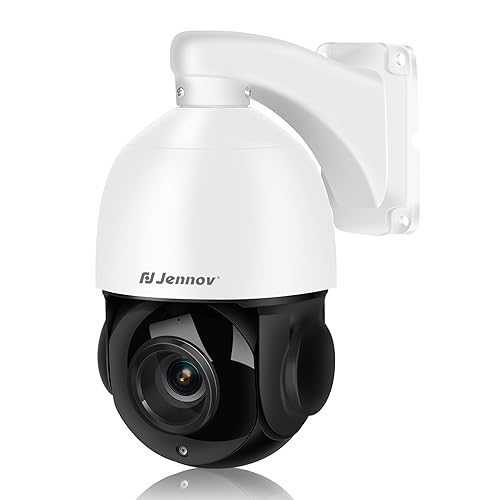
| 9 | Jennov 4K POE PTZ | 4K (8MP) | 320 ft IR night vision | 360° pan, 90° tilt | Long-range 20X optical zoom for large properties |
| 10 | Tapo C110 | 2K HD | IR up to 30 ft | Fixed wide angle | Simple indoor monitoring on a tight budget |
We looked at what actually matters when you are building an ONVIF-based security system. Here are the criteria that drove our selections.

Pros
Cons
Best for Anyone who wants one camera that does it all: indoor baby monitoring, outdoor porch surveillance, or pet watching, all with free AI alerts.
Check current price on Amazon →
The Tapo C120 earned a 2024 PCMag Editors’ Choice award, and it is easy to see why. It packs 2K QHD resolution, full-color night vision, and person/pet/vehicle detection into a body small enough to hold in your palm. The magnetic base is a genuinely useful touch: you can stick it to a metal railing, a fridge, or a filing cabinet in seconds without drilling. The IP66 rating means rain and dust won’t bother it, so you can move it from the nursery to the backyard without thinking twice.
The Starlight night vision is the standout feature here. Most cameras in this class switch to black-and-white IR at night. The C120 uses a large-aperture sensor and two adjustable spotlights to produce bright color video even in near-darkness. If you prefer stealth, you can switch to invisible IR (no red glow) and still get usable black-and-white footage up to 30 feet. The free AI detection is refreshingly rare – no monthly fees to know whether the motion outside is a person or a stray cat. The only real miss is the lack of dual-band Wi-Fi; if your 2.4 GHz band is crowded, you might see occasional buffering. For most people, though, the C120 is the one ONVIF camera to start with.

Pros
Cons
Best for Parents or pet owners who need to watch two rooms at once – nursery and living room, for example – with pan/tilt flexibility.
Check current price on Amazon →
The C210P2 is essentially a two-pack of the popular Tapo C210, and it solves the problem of covering multiple indoor spaces without buying separate cameras. Each camera delivers 2K video and can pan a full 360 degrees horizontally, so you can scan an entire room from a single corner mount. The baby crying detection is a genuine differentiator: it sends a push notification specifically for crying sounds, not just generic noise. That matters more than you might think when you are trying to nap while the monitor is in the next room.
The built-in siren and two-way audio let you talk to a pet or a delivery person, but the camera is strictly indoor-rated. You cannot put it under an eave or on a covered porch. The IR night vision works fine up to 30 feet, but it is black-and-white only – no spotlights here. If color night vision matters to you, the C120 or C510W are better choices. But for a two-room indoor setup, this pack is hard to beat for simplicity and value. Both cameras support ONVIF, so you can record to a compatible NVR if you later expand your system.

Pros
Cons
Best for Anyone building a PoE NVR system on a budget who needs a rugged outdoor camera with solid night vision and no monthly fees.
Check current price on Amazon →
The Anpviz 5MP is a no-frills workhorse. The full metal housing and 4000V lightning protection make it physically tougher than most plastic Wi-Fi cameras in its range. It is designed to be paired with an ONVIF-compliant NVR, not used as a standalone gadget. That means no app, no cloud subscriptions, no fuss – just a steady stream of video over PoE to your recorder. The smart dual light system automatically switches between IR (black-and-white) and warm white LEDs (color) depending on ambient light, so you get color footage when someone approaches without blinding them with a floodlight.
The 110-degree field of view is wide enough for most driveways and backyards. H.265 encoding keeps the bitrate manageable, which matters if you are recording 24/7 to an NVR. The biggest limitation is the lack of any audio output or two-way communication; you get a built-in mic for one-way listening, but you cannot talk through it. Also, the AI human detection is just that – human only. It ignores vehicles and animals, which is fine for some setups but a limitation if you want car alerts. For a straightforward, reliable PoE camera that respects the ONVIF standard, this is one of the best values.

Pros
Cons
Best for Someone who needs maximum detail for identifying faces or license plates in a fixed outdoor location, with the reliability of a wired PoE connection.
Check current price on Amazon →
Amcrest has been a reliable name in IP cameras for years, and the IP8M-T2599EW-AI-V3 is their current 4K turret flagship. The 8-megapixel sensor delivers true 4K at 15 fps or 3840×2160 at 25 fps, and the 125-degree field of view is noticeably wider than the typical 100-110 degrees. That extra width means you can cover a full driveway or a large patio with a single camera instead of two. The IP67 rating is one step above the more common IP66 – it is fully dust-tight and can handle being hosed down.
Night vision is handled by powerful IR LEDs that reach 98 feet in total darkness. The images are grayscale but exceptionally clear, and the H.265+ compression (an Amcrest enhancement) reduces bandwidth by roughly 50% compared to standard H.265. That makes a big difference when recording multiple 4K streams to an NVR. On the downside, there is no speaker for two-way talk – you get a built-in mic for ambient listening, but you cannot respond to someone. And at 1.1 pounds, this turret is hefty; you will want to use the included mounting template and maybe a junction box for a clean install. If 4K clarity is your priority and you have a PoE infrastructure, this is the camera to trust.

Pros
Cons
Best for Those who want the C120’s core capabilities in a smaller, black housing (less conspicuous) for outdoor or indoor use.
Check current price on Amazon →
The Tapo C121 is essentially the C120’s sibling with a few tweaks. It shares the same 2K QHD sensor, Starlight color night vision, and free AI detection for people, pets, and vehicles. The main differences are the color (black vs. white) and a slightly more compact body – the C121 is about 2.65 inches long versus the C120’s 3 inches. It also has an IP66 rating and a magnetic base, so you can attach it to ferrous surfaces easily.
The performance is largely identical: crisp daytime video, excellent low-light color, and reliable notifications with no subscription. The invisible IR mode is a nice touch if you want to monitor without a visible red glow. The two-way audio also sounds clearer than what you get on some cheaper cameras. The downsides are the same as the C120: no 5 GHz Wi-Fi and no pan/tilt. But if you want a weatherproof ONVIF camera that blends into darker exterior trim or black fixtures, the C121 is a perfect match. It also works with the same Tapo app and ecosystem, so mixing it with a C120 is seamless.

Pros
Cons
Best for Monitoring a large backyard, patio, or driveway where you need to actively track movement and zoom in on details remotely.
Check current price on Amazon →
The C510W is the outdoor pan/tilt camera that Tapo fans have been waiting for. It rotates a full 360 degrees horizontally and 130 degrees vertically, and when it detects a person, it locks on and follows them automatically. That tracking is surprisingly smooth – not the jerky, overshooting motion you sometimes see. The 2K sensor delivers clear video even when you zoom in digitally, and the combination of spotlights and long-range IR (98 feet) means color night vision is usable across most residential properties.
The built-in siren and customizable audio alarm let you scare off intruders without investing in a separate alarm system. You can record your own message – “You are being recorded, leave now” – and trigger it from the app. The physical privacy mode is a thoughtful touch: the camera body rotates so the lens is blocked by the housing, giving you absolute certainty that it is not recording. The main trade-off is the lack of PoE. The C510W needs a power outlet, so you have to plan your placement around where you can plug it in. Wi-Fi reliance also means signal strength matters. But for an outdoor pan/tilt camera that does not require running Ethernet, this is the best option.

Pros
Cons
Best for A nursery or living room where you want higher-than-1080p detail for recognizing faces and expressions, plus automatic tracking of a crawling baby or wandering pet.
Check current price on Amazon →
The Reolink E1 Pro is a step up from the typical 2K indoor pan/tilt cameras. Its 5MP sensor delivers 3K resolution, and the F1.6 aperture lets in more light, so nighttime footage is cleaner even without a spotlight. The pan/tilt range covers a full 360 degrees horizontally, and the auto tracking function follows movement smoothly. The standout feature for parents is the baby crying detection: it sends a specific alert for crying sounds, not just generic noise. That pairs well with the two-way audio, which lets you soothe a fussy baby from another room.
Dual-band Wi-Fi (2.4 and 5 GHz) gives you flexibility to use the less congested 5 GHz band, which helps with streaming the higher 3K resolution. The Bluetooth-assisted setup is fast – you scan a QR code and the app finds the camera in seconds. ONVIF support means you can record to a Reolink NVR or any compatible NVR/NAS, which is important if you later expand beyond a standalone app. The main shortcoming is night vision: it is IR-based and black-and-white only. If you need color at night indoors, the Tapo C120 (indoor/outdoor) is better. But for pure indoor pan/tilt with excellent resolution and smart alerts, the E1 Pro is our pick.

Pros
Cons
Best for Someone who wants a single camera that can both watch a wide area and zoom in on details automatically without a separate PTZ unit.
Check current price on Amazon →
The Luovisee triple-lens takes an unusual approach to home security. Instead of one lens that tries to do everything, it uses a fixed wide-angle lens to keep the whole scene in view and a second PTZ lens that zooms and tracks when it detects a person. The idea is that you never miss the big picture while still getting a close-up of the action. In practice, the auto tracking works reasonably well: when someone walks into the yard, the PTZ lens locks on and follows them while zooming in. The camera claims 10X zoom, but that is a combination of optical and digital – real optical zoom is limited, so at maximum zoom you are looking at a cropped digital image.
The 355-degree pan and 90-degree tilt give good coverage, and the color night vision with adjustable spotlights is decent. Custom alarm ringtones let you record your own warning, which is a nice touch. The bigger concern is brand longevity – Luovisee is not a household name like Tapo or Amcrest. If you are comfortable with a smaller brand, this camera offers features (dual views, auto zoom tracking) that you would otherwise have to pay significantly more for. It also supports ONVIF, so you can integrate it with an existing NVR. Just be prepared for a less polished app experience.
Pros
Cons
Best for Large properties, parking lots, or farms where you need to identify details like license plates or faces from hundreds of feet away.
Check current price on Amazon →
The Jennov 4K POE PTZ is a serious piece of hardware. The 20X optical zoom is not a gimmick – the 4.7-94mm motorized lens lets you read a license plate from across a parking lot or identify a person at the end of a long driveway. The 320 feet of IR night vision is the longest of any camera here, and it produces usable black-and-white video at those distances. With PoE, a single Ethernet cable powers the camera and carries data, which makes installation cleaner than running separate power.
The camera supports up to 8 patrol routes with 16 preset positions each, so you can program it to sweep your property automatically. Human detection triggers auto tracking, and the PTZ motor is fast enough to keep up with a walking person. The trade-off is that this camera needs an ONVIF-compliant PoE NVR to operate – there is no app for direct mobile viewing. You access it through your NVR’s client software or a Windows app. That makes it less convenient for casual users, but perfect for someone who already has an NVR and wants serious zoom capability. The build is metal and IP66-rated, so it will survive years outdoors.

Pros
Cons
Best for A simple, reliable indoor camera for keeping an eye on a single room – a baby’s nursery, a living room with pets, or an entryway – without spending more than necessary.
Check current price on Amazon →
The Tapo C110 is the entry point to the Tapo ecosystem, and it gives you almost everything the pricier indoor models do. The 2K resolution is crisp, the free AI detection (person, motion, baby crying) works reliably, and the two-way audio with siren is loud enough to deter a casual intruder. Night vision is standard IR black-and-white, fine for a dark room. Setup takes about a minute with the Tapo app.
What you give up is any movement capability – the lens is fixed, so you have to aim it carefully during installation. It also lacks the pan/tilt of the C210 or the color night vision of the C120. But for a dedicated spot like a crib corner or a pet bed, it is more than enough. The device sharing lets two people (say, both parents) view the feed simultaneously on their phones. And because it runs ONVIF, you can later add it to a larger NVR system if you outgrow the standalone app. It is the sensible, no-regrets choice for indoor monitoring.
Before you pick a specific model, understand the factors that separate a good ONVIF camera from a frustrating one. These are the specs and trade-offs that actually affect your daily use.
ONVIF has multiple profiles. Profile S is the basic standard for streaming video and PTZ control. Profile G adds recording and storage features. Profile T is the modern replacement, offering higher resolutions and faster streaming. Most consumer cameras support Profile S; many also support Profile G. If you plan to use third-party software like Blue Iris or a Synology NAS, verify that both the camera and your recorder support the same profiles. A camera that says “ONVIF compatible” but does not mention profiles might only work with its own app. Stick with models that explicitly list Profile S or T support.
PoE cameras run on a single Ethernet cable that carries both power and data. This gives you a rock-solid connection, no signal dropouts, and the ability to run cables through walls or underground. The downside: you need a PoE switch or injector, and running cables can be tricky if your house is not pre-wired. Wi-Fi cameras are easier to install – just plug them into an outlet and connect to your network. But they are susceptible to interference, and your Wi-Fi router might not reach the far corner of your yard. For critical outdoor coverage, PoE is more reliable. For quick indoor setups, Wi-Fi is fine.
More megapixels are not always better. A 4K camera (8MP) captures much more detail than a 2K camera (4MP), but it also requires more bandwidth and storage. In H.265+ formats, the difference is manageable, but your NVR or microSD card will fill up faster. Also, sensor size matters: a larger 1/2.7-inch sensor in a 4K camera will outperform a tiny 1/3-inch sensor in a 5MP camera in low light. Look at the sensor size in the specifications, not just the megapixel count.
Traditional IR night vision uses infrared LEDs to illuminate the scene in black-and-white. It is reliable, silent, and works in complete darkness. Color night vision uses white spotlights or a sensitive “Starlight” sensor to capture color footage with very little ambient light. Color night vision is better for identifying clothing or car colors, but the spotlights can be annoying (and may attract bugs). Some cameras offer a hybrid mode: IR until motion is detected, then switch on spotlights. Consider where you place the camera and whether a bright light at night is acceptable.
PTZ cameras can cover a much larger area than fixed ones. The key spec is the rotation range: 360 degrees horizontal and at least 90 degrees vertical is standard. Optical zoom is far more useful than digital zoom because it does not lose resolution. For auto tracking, look for cameras that list “motion tracking” or “auto tracking” specifically – some PTZ cameras require manual control. Also check whether the tracking returns to a home position after the subject leaves. For large areas, patrol modes that cycle through preset positions are valuable.
ONVIF is an open industry standard that lets security cameras and recording devices from different manufacturers communicate. If you want to mix brands – say, a Lorex NVR with Amcrest cameras – you need ONVIF compatibility. If you plan to stick with a single brand’s full ecosystem, you may not need it, but using ONVIF devices gives you freedom to switch your NVR or add third-party cameras later.
No. The NVR must also support ONVIF (usually Profile S or G). Most modern NVRs from major brands like Amcrest, Reolink, Dahua, Hikvision, and Lorex are ONVIF compliant, but older or proprietary systems may not be. Always check both devices’ specifications before buying.
No. Many consumer Wi-Fi cameras, especially from brands that rely on their own cloud subscriptions, do not implement ONVIF. They only work with their own apps. Look for the ONVIF logo or explicit mention in the product description. The Tapo series and Reolink E1 Pro are examples of Wi-Fi cameras that do support ONVIF.
Profile S is the older standard for video streaming, audio, and PTZ control. Profile T is the newer, more capable standard that supports higher resolutions (up to 4K and beyond), faster frame rates, and improved backlight compensation. A Profile T camera paired with a Profile T NVR gives the best performance. Most cameras sold today support both.
Yes, if your NAS has a Surveillance Station (Synology) or QVR Pro (QNAP) license. Both platforms support ONVIF cameras. You need to add the camera by its IP address and ONVIF credentials. This is a great way to get professional-grade recording without buying a dedicated NVR.
The default credentials are usually “admin” as the username and a password you set during initial setup. Some cameras ship with a blank password or “123456”. Check the manual. You can also find the ONVIF credentials in the camera’s web interface or app settings (often under “Network” or “Advanced”).
Yes, ONVIF Profile S includes audio streaming. However, two-way talk depends on the camera hardware. Most ONVIF cameras with a built-in microphone and speaker can support two-way communication through the NVR or software client. Some cameras only provide one-way audio (record only). Check the camera’s feature list for “two-way audio” or “audio output”.
The Tapo C120 is the best ONVIF camera for the widest range of people. It is weatherproof, sharp, has free AI detection, and its magnetic mount makes installation a one-minute job. If you need 4K detail for a critical outdoor view, the Amcrest IP8M-T2599EW-AI-V3 is the one. For indoor pan/tilt with baby cry alerts, get the Reolink E1 Pro. And if you need to zoom across a large property, the Jennov 4K POE PTZ with 20X optical zoom is the heavy hitter.
The common thread is that all of these cameras speak ONVIF, so you are not locked into any single vendor. You can start with one or two, add more later, and choose whatever NVR or software fits your needs. That flexibility is the whole point. If you are still unsure, start with the C120 – it is the camera we would recommend to our own families.
This article contains Amazon affiliate links. We may earn a small commission on qualifying purchases at no extra cost to you.