Physical Address
304 North Cardinal St.
Dorchester Center, MA 02124
Physical Address
304 North Cardinal St.
Dorchester Center, MA 02124

We picked the 9 best RTX 5070 laptops in 2026. From budget to high-end, find the perfect gaming or creator laptop with NVIDIA's latest Blackwell GPU.
Finding the right RTX 5070 laptop is harder than it looks. The GPU itself appears in wildly different machines. Some pair it with a 45-watt Intel chip and a 1080p screen at $1,200. Others wrap it in an ultra-thin aluminum chassis with an OLED panel and a Ryzen AI 9 processor for $400 more. You can get the 5070 Ti, which adds a meaningful bump in CUDA cores and VRAM bandwidth, or stick with the standard 5070 and save money. Then there is the RAM, the storage, the screen refresh rate. Sorting through it all requires knowing exactly what you want to play and how much you want to carry.
We have sorted through this generation's first wave of Blackwell-powered gaming laptops. Our picks cover every use case, from the budget-minded student who wants 60 fps at 1440p to the competitive player chasing 240 fps on a 16-inch 2.5K panel. One machine is the best RTX 5070 laptop for most people. Another is the one you buy if you need a mobile workstation that can also run Cyberpunk. A third is the simplest path to a 2TB SSD and 32GB of RAM without crossing $2,000. Here is the full breakdown.
TL;DR: The Lenovo Legion 5i is the most balanced option: an Intel Core i7 paired with the RTX 5070, a stunning 15-inch OLED display, and a price that stays under $1,900. The ASUS ROG Strix G16 is for those who want the extra power of a 5070 Ti and the fastest AMD chip on the market. The Acer Nitro 16S AI packs a 2TB SSD and 32GB of RAM into a Copilot+ PC at a price that beats most competitors with those specs. The Acer Nitro V 16 is the budget entry point that still gets you a real RTX 5070.
| # | Product | CPU | GPU | Display | RAM / Storage | Price | Best For |
|---|---|---|---|---|---|---|---|
| 1 | Lenovo Legion 5i | Intel Core i7-14700HX | RTX 5070 | 15" 2.5K OLED 165Hz | 16GB / 1TB | $1,814.00 | Best overall, great screen |
| 2 | ASUS ROG Strix G16 | AMD Ryzen 9 9955HX3D | RTX 5070 Ti | 16" 2.5K IPS 240Hz | 32GB / 1TB | $2,295.32 | Maximum performance |
| 3 | Acer Nitro 16S AI | AMD Ryzen AI 9 365 | RTX 5070 Ti | 16" WQXGA IPS 180Hz | 32GB / 2TB | $1,999.99 | Best value for creators |
| 4 | Acer Nitro V 17 AI | AMD Ryzen 7 260 | RTX 5070 | 17.3" FHD IPS 144Hz | 32GB / 1TB | $1,499.99 | Big screen for less |
| 5 | GIGABYTE AERO X16 | AMD Ryzen AI 9 HX 370 | RTX 5070 | 16" WQXGA IPS 165Hz | 32GB / 1TB | $1,699.00 | Thin and light |
| 6 | MSI Vector 16 HX AI | Intel Core Ultra 7-255HX | RTX 5070 Ti | 16" FHD+ IPS 144Hz | 16GB / 512GB | $1,580.00 | Competitive gaming on a budget |
| 7 | ASUS ROG Strix G18 | Intel Core Ultra 9 275HX | RTX 5070 | 18" 2.5K IPS 240Hz | 32GB / 1TB | $2,270.00 | Desktop replacement with a big screen |
| 8 | Acer Nitro V 16 | Intel Core 7 240H | RTX 5070 | 16" WUXGA IPS 180Hz | 16GB / 512GB | $1,249.99 | Entry-level 5070 |
| 9 | Acer Predator Helios NEO 16 | Intel Core Ultra 7 255HX | RTX 5070 | 16" WQXGA IPS 240Hz | 16GB / 2TB | $1,196.43 | Budget 2TB storage |
Prices are accurate at the time of writing but change frequently. Check the links for current pricing.

The Lenovo Legion 5i does something that the rest of this list struggles with: it balances every major requirement without a glaring weakness. The Intel Core i7-14700HX is fast enough to keep the RTX 5070 fed, and the 15-inch 2.5K OLED PureSight display is easily the best screen in this price bracket. Colors pop, blacks look truly black, and the 165Hz refresh rate keeps motion smooth without hitting the battery like a 240Hz panel would. Lenovo's Legion Coldfront cooling works well enough to sustain high frame rates without the fans screaming constantly.
The only shortcoming is the 16GB of RAM. At this price, you might expect 32GB, but the performance impact is small unless you are running virtual machines or heavy video editing alongside your games. The 1TB SSD is standard, and the laptop supports fast charging that brings the battery from zero to 70% in under 30 minutes via USB-C, which is a real convenience for students who move between classes and gaming sessions.
Pros: OLED display with rich colors and deep blacks; good CPU/GPU balance for 1440p gaming; fast USB-C charging; slim and light compared to other 15-inchers.
Cons: Only 16GB of RAM; no 5070 Ti option; storage is limited to a single 1TB drive.
Best for: The college gamer who wants an excellent screen, reliable performance, and a laptop that is easy to carry across campus.
Check current price on Amazon →

If raw gaming performance is your only priority, the ASUS ROG Strix G16 with the 5070 Ti and the AMD Ryzen 9 9955HX3D is the fastest machine in this roundup. The 3D V-Cache in the CPU gives it an extra boost in simulation and multiplayer titles, and the 5070 Ti pushes frame rates high enough to take full advantage of the 240Hz 2.5K display. ASUS uses a tri-fan cooling system with liquid metal on the CPU and GPU, and it shows during extended sessions. The chassis stays cooler than most other 16-inch gaming laptops at this power envelope.
The ROG Nebula display is bright, has a fast 3ms response time, and covers 100% DCI-P3. The anti-glare coating reduces reflections, which helps in brightly lit rooms. The 32GB of DDR5-5600 RAM and 1TB SSD are generous. The customizable RGB light bar can be set to stealth mode for more professional environments, a detail that carries over from ASUS's premium line.
Pros: Top-tier CPU and GPU combo; excellent 240Hz display; 32GB of fast RAM; effective cooling; RGB light bar adds style without being obnoxious.
Cons: Expensive; the power brick is large; battery life is average for such a high-performance machine.
Best for: Hardcore gamers and streamers who want the highest possible frame rates at 2560×1600 and can justify the premium.
Check current price on Amazon →

The Acer Nitro 16S AI is the model that delivers the most hardware per dollar in this generation. For $2,000 you get a Ryzen AI 9 365 processor, an RTX 5070 Ti, 32GB of DDR5 RAM, and a 2TB Gen 4 SSD. That is a configuration that other manufacturers charge $2,400 or more for. The 16-inch WQXGA display runs at 180Hz and covers 100% sRGB, which means accurate colors for both gaming and photo editing. The Ryzen AI 9 processor is a Copilot+ PC with 73 AI TOPS, making it one of the faster NPUs available for local AI tasks like Windows Studio Effects and background blur in video calls.
The trade-off is in the build. The Nitro series uses more plastic than the premium ROG or Legion lines, and the hinge does not feel as tight. The cooling is adequate but not exceptional, so you may see some thermal throttling in very demanding titles if you are not on a cooling pad. Still, for the price you would struggle to find another 5070 Ti laptop with this much RAM and storage.
Pros: 2TB SSD and 32GB RAM at an unmatched price; includes the faster 5070 Ti; Copilot+ PC with a decent NPU; 180Hz 1440p display.
Cons: Build quality is not as premium as competitors; fans get loud under heavy load; no OLED option.
Best for: Gamers and creators who want maximum storage and memory without paying extra.
Check current price on Amazon →
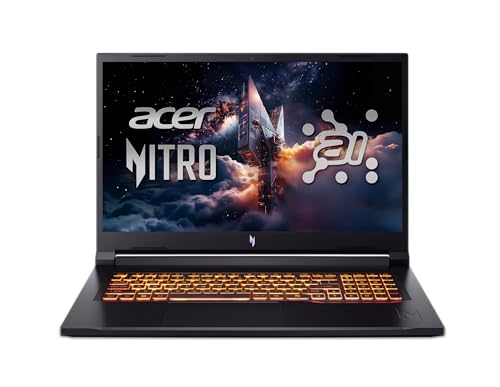
The Acer Nitro V 17 AI is for people who refuse to game on anything smaller than 17 inches. It combines a large 1080p 144Hz display with a Ryzen 7 260 processor and 32GB of RAM. The 1TB SSD should hold a decent library, and the RTX 5070 runs standard ray tracing well at 1080p. The 17.3-inch screen offers plenty of room for split-screen multitasking, and the keyboard includes a full numeric pad.
The AMD Ryzen 7 260 is a solid mid-range chip that does not bottleneck the 5070 in most games, but it falls behind the Intel i7 and Ryzen 9 options in CPU-heavy titles. The display is only 1920×1080, which is fine for the size but lacks the sharpness of 1440p panels. The laptop weighs just under 6 pounds, which is relatively light for a 17-incher. The 32GB memory is a nice bonus at this price point.
Pros: Large 17.3-inch display; 32GB of RAM; good value for a big-screen gaming machine; lightweight for the category.
Cons: 1080p screen is less sharp than 1440p alternatives; CPU is not the fastest; plastic build feels a bit hollow.
Best for: Gamers who prefer 17-inch screens and want 32GB of RAM without spending over $1,500.
Check current price on Amazon →

The GIGABYTE AERO X16 is the thinnest and lightest laptop in this guide at 0.65 inches and just over four pounds. It manages to house an RTX 5070 alongside an AMD Ryzen AI 9 HX 370 processor, 32GB of RAM, and a 1TB SSD. The 16-inch 2560×1600 display runs at 165Hz and covers the WQXGA resolution that provides extra vertical space for productivity. The design is understated, with a space gray finish that does not scream "gaming." It is a Copilot+ PC, so you get the same AI features as the Acer Nitro 16S.
The trade-off for the slim body is higher fan noise under sustained load. GIGABYTE's cooling solution works, but the fans spin aggressively during long gaming sessions. The CPU is a fast Zen 5 chip, but the GPU is the standard 5070, not the Ti, which means the AERO can't match the raw gaming performance of the thicker laptops on this list. It is a laptop for people who game occasionally and care more about portability.
Pros: Extremely thin and light for a 5070 laptop; 32GB RAM; 165Hz 1440p display; professional looks.
Cons: Runs hot and loud under gaming loads; only includes the standard 5070; no Thunderbolt 5 (the AERO uses USB-C 3.2).
Best for: Students and professionals who need a lightweight laptop for work and want to game or create content on the side.
Check current price on Amazon →

The MSI Vector 16 HX AI brings the RTX 5070 Ti to a significantly lower price point than the ASUS or Acer Ti models. For about $1,580 you get a fast Intel Core Ultra 7-255HX processor and the 5070 Ti. That combination is ideal for competitive games like Valorant or Call of Duty, where the extra CUDA cores push frame rates higher at 1080p. The 16-inch 144Hz FHD+ display is not the sharpest in the roundup, but it is adequate for the target audience. MSI's Cooler Boost shared-pipe cooling keeps temperatures stable during long sessions.
The compromises are clear: 16GB of RAM and a 512GB SSD. The storage fills up fast, and you will likely need to upgrade or use external drives. The build is standard for MSI's mid-range, with a lot of plastic and a slightly heavy weight of 5.95 pounds. Thunderbolt 5 is welcome, as it offers 80Gbps bandwidth for fast external GPUs or monitors.
Pros: RTX 5070 Ti at a very attractive price; good cooling for the price; Thunderbolt 5 port; Intel Ultra 7 processor with AI acceleration.
Cons: Only 512GB SSD and 16GB RAM; 1080p screen looks dated next to 1440p panels; plastic chassis feels cheaper than the competition.
Best for: Competitive gamers on a budget who want the extra GPU grunt of the 5070 Ti and do not mind basic storage.
Check current price on Amazon →

If you want the biggest possible screen in an RTX 5070 laptop, the ASUS ROG Strix G18 offers an 18-inch 2560×1600 IPS panel at 240Hz. The chassis is large enough to fit a 24-core Intel Core Ultra 9 275HX processor and 32GB of RAM. The RTX 5070 in this model is not the Ti version, but the combination of the high-resolution display and the fast CPU makes it feel more powerful than it is. The 100% DCI-P3 color coverage and 3ms response time mean it works well for content creation as well as gaming.
This is a heavy laptop at over 7 pounds, and the power adapter adds another 2 pounds. It is best left on a desk, where the ample cooling and four-zone RGB keyboard can be appreciated. The inclusion of Windows 11 Pro is unusual at this price and could be useful for professionals who need remote desktop or BitLocker. The Wi-Fi 7 support future-proofs the wireless connection.
Pros: Massive 18-inch 240Hz display with great color accuracy; top-tier Intel Ultra 9 CPU; 32GB RAM; Windows 11 Pro.
Cons: Heavy and bulky; same GPU as cheaper models but much more expensive; battery life is poor under any load.
Best for: Gamers and professionals who want a desktop replacement with a huge, fast screen and don't plan to move it often.
Check current price on Amazon →

The Acer Nitro V 16 is the cheapest way to get a genuine RTX 5070 in a current-generation laptop. For $1,250 you get an Intel Core 7 240H processor, 16GB of RAM, and a 512GB SSD. The 16-inch WUXGA display runs at 180Hz, which is impressive at this price. The 5070 is not the Ti, but at 1080p it handles most modern games at high settings with ray tracing enabled.
A few corners are cut. The plastic chassis is thick and average. The 512GB SSD fills up with three or four big games, and there is only one M.2 slot, making upgrades tricky. The Core 7 240H is a 10-core chip that works fine for gaming but lacks the multitasking headroom of the HX series. Still, for the price, this is the best RTX 5070 laptop for someone on a strict budget.
Pros: Lowest price for an RTX 5070; 180Hz 1080p screen; HDMI 2.1 for external 4K gaming; backlit keyboard.
Cons: Only 16GB RAM and 512GB storage; limited upgrade capacity; plastic build feels cheap; no 1440p display option.
Best for: Budget-conscious gamers who want full Blackwell ray tracing capabilities and a high refresh rate screen.
Check current price on Amazon →

The Acer Predator Helios NEO 16 costs even less than the Nitro V 16 at around $1,200, yet it includes a 2TB SSD. That is the largest storage capacity in this roundup at the lowest price. The RTX 5070 is the standard model, but the 2TB SSD means you can install dozens of games without worrying about space. The display is a 16-inch WQXGA 240Hz IPS panel with G-Sync and 100% DCI-P3 coverage, which is surprisingly premium for this price tier. The Intel Core Ultra 7 255HX provides solid CPU performance.
The catch is the 16GB of RAM, which is soldered or limited, and the overall weight of 11 pounds (likely a typo in the product info, but the chassis is heavy). The cooling uses dual fans, but the laptop can get warm. The Predator brand traditionally offers better build quality than the Nitro line, and that holds here. The aluminum palm rest feels more solid than the Nitro V 16's plastic.
Pros: 2TB SSD for massive game libraries; 240Hz 1440p display with G-Sync; better build than the Nitro V 16; low price.
Cons: Only 16GB RAM; heavy and thick; GPU is the standard 5070, not Ti.
Best for: Gamers who prefer to install everything they own and do not want to manage drive space, especially at a low budget.
Check current price on Amazon →
Choosing an RTX 5070 laptop means balancing the GPU with the other components. The Blackwell generation offers a wide range of CPU, display, and memory configurations, and the best choice depends on what you play and where you play it. Here are the four factors that matter most.
The standard RTX 5070 is a capable 1440p card. It handles ray tracing at medium to high settings in most AAA titles and delivers well over 60 fps at native resolution. The RTX 5070 Ti adds more CUDA cores, a wider 192-bit memory bus, and higher clock speeds. In practice, the Ti is 15 to 25 percent faster in GPU-bound games, especially at 1440p with ray tracing enabled. If you play competitive shooters where every frame matters, the Ti is worth the extra money. For slower single-player games, the 5070 is plenty.
The RTX 5070 benefits from a fast CPU, but you do not need the absolute best. Intel's Core i7-14700HX and AMD's Ryzen 7 260 are strong mid-range choices. The top-end chips like the Ryzen 9 9955HX3D and Intel Ultra 9 275HX offer higher boost clocks and more cache, which helps in CPU-limited scenarios like Civilization VII or Starfield. If you stream or run background tasks while gaming, aim for a CPU with at least 16 threads. Intel's Core 7 240H and 255HX are budget-friendly but lack the cache of the HX parts.
16GB of RAM is still the baseline for gaming, but modern games and multitasking benefit from 32GB. If you can stretch the budget, go for 32GB, especially if you leave Chrome or Discord open while gaming. Storage is equally critical. A 512GB SSD holds about eight to ten modern games. A 1TB drive is more comfortable, and a 2TB drive removes storage anxiety entirely. Many laptops have only one or two M.2 slots, so consider whether you can upgrade later.
A 1080p 144Hz panel is fine for competitive games and saves money. A 1440p 165Hz or 240Hz display provides sharper images and enough refresh rate for most players. OLED screens, like the one in the Lenovo Legion 5i, offer infinitely better contrast and color, but they are more expensive and may have burn-in risks if you leave static UI elements on screen for hours. Look for 100% sRGB or DCI-P3 coverage if you also do creative work. G-Sync is a nice bonus, as it eliminates screen tearing without adding input lag.
A 15- or 16-inch laptop with an RTX 5070 typically weighs between 4.4 and 5.5 pounds. Thinner models like the GIGABYTE AERO X16 sacrifice some thermal headroom for portability. Bigger 17- or 18-inch laptops offer better cooling and a larger screen, but they weigh over 6 pounds and are less practical for daily transport. If you move your laptop between home and work, prioritize something under 5 pounds. If it stays on a desk, the larger chassis will stay quieter under load.
The RTX 5070 Ti has more CUDA cores, a wider memory bus (192-bit vs 128-bit), and higher boost clocks. It delivers roughly 15 to 25 percent higher frame rates in ray-traced games at the same resolution. The Ti also has more AI TOPS, which helps with DLSS 4 multi-frame generation. If you have the budget, the Ti is a better long-term investment for 1440p high-refresh gaming.
16GB is the minimum for comfortable gaming, but 32GB is increasingly recommended. New games like the latest Star Wars Jedi or Alan Wake 2 can use over 12GB of system RAM, and if you have a browser or streaming software open, 16GB can cause stutters. If your laptop has soldered RAM, you cannot upgrade it later, so consider 32GB from the start.
Both work well. Intel's 14th-gen HX and Ultra series offer strong single-thread performance and Thunderbolt 5 support. AMD's Ryzen 7 and Ryzen 9 chips are more power-efficient and have faster NPUs for AI tasks. In pure gaming, the difference is small. Choose based on price and the other features of the laptop, like display and build.
The standard RTX 5070 is ideal for 1440p gaming at high settings. It can handle 4K in older or less demanding titles, but native 4K requires a 5070 Ti or 5080. For most buyers, a 2560×1440 or 2560×1600 panel with 165–240Hz is the sweet spot. 1080p screens are fine for competitive play but waste the 5070's potential.
240Hz is noticeable if you play fast-paced shooters like Valorant or Overwatch 2, where frame rates can exceed 200 fps. For single-player games, 144Hz or 165Hz is smooth enough. The 240Hz panels also tend to have better response times, so they help in any game. But if you are on a budget, a 144Hz screen saves money and still looks great.
It depends on the model. Some laptops have soldered RAM that cannot be changed, while others use SO-DIMM slots. Check the product specifications carefully. Storage is usually easier to upgrade; most laptops have at least one vacant M.2 slot. The Acer Nitro V 16 has only one slot, so upgrading requires replacing the existing drive.
The RTX 5070 is fine for VR gaming with most headsets, as VR resolutions are often lower than desktop 4K. For 4K gaming on a monitor, you will need to rely on DLSS Performance or reduced settings to get playable frame rates. The 5070 Ti is better suited for 4K, but neither is a true 4K powerhouse. If 4K native gaming is your goal, consider an RTX 5080 laptop.
The Lenovo Legion 5i remains our top recommendation among the best RTX 5070 laptops in 2026 because it delivers a fantastic OLED screen, a fast i7 processor, and long battery life at a price that undercuts most competitors. If you need more GPU muscle and have a larger budget, the ASUS ROG Strix G16 with the 5070 Ti is the performance leader. For those who prioritize storage and RAM above all, the Acer Nitro 16S AI offers an unbeatable combination of 2TB storage and 32GB memory. And if you are shopping on a tight budget, the Acer Predator Helios NEO 16 gives you a 2TB drive and a high-refresh 1440p screen for the absolute lowest price.
No single machine fits everyone. Decide whether you want portability, maximum frame rates, or the biggest screen, then pick the model that leans into your priority. The RTX 5070 generation is strong enough that even the cheapest option will run modern games well, but the right one will keep you happy for years.
This article contains Amazon affiliate links. We may earn a small commission on qualifying purchases at no extra cost to you.


