Physical Address
304 North Cardinal St.
Dorchester Center, MA 02124
Physical Address
304 North Cardinal St.
Dorchester Center, MA 02124

The 10 best sticker machines in 2026 for crafters, small businesses, and kids. From all-in-one color printers to budget mini makers, find your ideal pick.
You have a photo you want to turn into a sticker, a small business shipping labels in bulk, or a kid who wants to print a "dragon eating a taco" on demand. A sticker machine turns that impulse into a physical object in seconds. But the category is split: high-end color printers that cut around your designs automatically, thermal shipping label printers that double as plain-paper sticker makers, and tiny Bluetooth pods that spit out monochrome prints from your phone. Over the past few weeks, we looked at ten of the most popular models across every niche. The Liene PixCut S1 is the one that does the most, but the right choice depends on whether you need color, speed, or something a child can use without a screen.
TL;DR: The Liene PixCut S1 is our top pick for color stickers with automatic cutting. The MUNBYN 130B and Phomemo 241BT are the best shipping label printers that also handle sticker labels. The Xyron Create-a-Sticker is the simplest manual option for crafters. The Stickerbox AI is the best screen-free sticker maker for kids, while the XenGro AHM2 is a budget mini printer for journaling and notes.
| # | Product | Print Method | Max Width | Key Feature | Price | Best For |
|---|---|---|---|---|---|---|
| 1 | Liene PixCut S1 | Thermal dye-sublimation (color) | ~4" | Print and cut in one step | $279.99 | Serious DIY crafters and small business |
| 2 | Liene PixCut S1 Inspire Kit | Thermal dye-sublimation (color) | ~4" | Includes 180 sheets of paper | $346.99 | High-volume color sticker makers |
| 3 | Xyron Create-a-Sticker 5" | Adhesive laminating (no print) | 5" | Non-electric, mess-free | $33.82 | Scrapbooking and simple stickers |
| 4 | MUNBYN 130B Pink | Thermal (monochrome) | 4.3" | 72 pages/min, Bluetooth | $79.99 | Small business shipping and labels |
| 5 | MUNBYN 130B Purple | Thermal (monochrome) | 4.3" | Same as pink in purple | $79.99 | Small business shipping and labels |
| 6 | Phomemo 241BT Pink | Thermal (monochrome) | 4.6" | 150 mm/s, wireless | $69.99 | Budget-conscious small business |
| 7 | Stickerbox AI | Thermal (monochrome) | ~2" | Voice-activated, kid-safe | $129.99 | Kids ages 5+ for screen-free play |
| 8 | XenGro AHM2 | Thermal (monochrome) | 2" | Ultraportable, $19.99 | $19.99 | Students and journaling on a budget |
| 9 | Hello Blink Sticker Maker | Thermal (monochrome) | ~2" | Includes tape rolls, no ink | $27.97 | Kids ages 8+ for DIY crafts |
| 10 | NADAIIN D20 | Thermal (monochrome) | 2" | Cheapest, 3 rolls included | $15.99 | Absolute budget and kids' gifts |
Prices and availability are accurate as of publication but change in real time.

The Liene PixCut S1 is the only machine in this roundup that prints in full color and then cuts out the shape of your image automatically. It uses thermal dye-sublimation to produce 300 DPI prints with 16.7 million colors, then an AI-driven blade traces the edge of the subject for a professional finish. The process takes about two minutes from phone to finished sticker. The four-layer lamination happens during printing, so stickers come out waterproof and scratch-resistant without extra steps.
The app, Liene Photo, gives you access to more than 40,000 free images and 2,000 templates. You can turn a selfie into an anime character, a fantasy hero, or a holiday illustration with AI style transfer. Everything is free, no subscription required. The S1 ships with 18 photo sheets and 18 sticker sheets, which is enough to get started but not enough for heavy use. The downsides are the price (the highest on this list) and the machine's footprint. It is 11 inches wide and weighs over 6 pounds, so it is a dedicated desktop tool.
Pros
Cons
Best for: Serious crafters, small business sticker sellers, and anyone who wants quick, durable, full-color custom stickers with professional edges.
Check current price on Amazon →
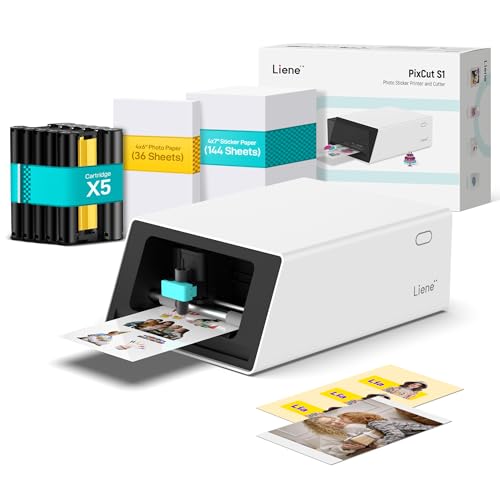
This is the same Liene PixCut S1 machine, but the bundle includes 36 photo papers and 144 sticker papers, for a total of 180 sheets. If you know you will make a lot of stickers, the Inspire Kit saves you from buying paper separately. The machine itself is identical in every way: 300 DPI dye-sublimation, automatic cutting, AI extraction, the free app. The extra paper makes the upfront cost sting a little less per sticker, especially if you have a small business or a long craft project queue.
The difference is purely the paper count. The base kit has 36 sheets total. The Inspire Kit has 180. That is five times the paper for about $67 more, which works out to roughly 37 cents more per sheet versus buying separately. It is a sensible upgrade if you plan to use the machine regularly. If you are only dabbling, the base kit and a pack of replacement paper later makes more sense.
Pros
Cons
Best for: Existing Liene PixCut S1 buyers who know they will consume paper quickly, or first-time buyers who want a full supply out of the box.
Check current price on Amazon →

The Xyron Create-a-Sticker does not print. It uses a crank and an adhesive cartridge to turn any flat item into a sticker. Feed in a photo, a piece of ribbon, craft foam, or a magazine clipping, turn the knob, and peel off a sticker with permanent adhesive on the back. There is no warm-up, no cool-down, no ink, and no electricity.
This machine is popular in scrapbooking and classroom settings because it is mess-free and safe for young children. The acid-free adhesive is safe for photos. At 5 inches wide, it handles most common craft materials. The pre-loaded cartridge gives a 5 inch by 10 foot roll of adhesive, and refills are available in permanent or repositionable options. The main limitation is that you need a source image already cut or shaped; it does not create designs for you. And because it uses adhesive, it only adds a sticker backing, not a protective top layer.
Pros
Cons
Best for: Scrapbookers, teachers, and crafters who want to sticker existing images without dealing with wet glue or spray adhesive.
Check current price on Amazon →

The MUNBYN 130B is a thermal label printer designed for shipping, but it can print any kind of sticker label within its width range (1.57 to 4.3 inches). It uses thermal direct technology so you never need ink or toner. The print speed is 72 pages per minute for 4×6 labels, which means it rips through a stack of shipping labels faster than any inkjet. The 203 DPI resolution is adequate for barcodes, text, and simple graphics.
Setup is straightforward: download the MUNBYN Print app for iOS or Android and connect via Bluetooth. For desktop, you use a Google Chrome web app. The printer works with FedEx, UPS, USPS, Amazon, Shopify, Etsy, and eBay. The app includes over 3,500 design elements and 2,000 templates, so you can create custom labels for branding, pricing, or home organization. The main tradeoff is that it only prints in monochrome. For full-color stickers, you need a different machine. And the printer is optimized for thermal labels; third-party paper can cause issues. MUNBYN recommends its own label rolls.
Pros
Cons
Best for: Small business owners who need to print shipping labels and also want to make custom sticker labels for branding or packaging.
Check current price on Amazon →

Everything we said about the pink MUNBYN 130B applies here: same hardware, same speed, same app, same price. The only difference is the color. The purple option gives you a more muted look than the bright pink, and both are available from the same listing. If you run a home office or a boutique that wants a certain aesthetic, this matters.
Pros
Cons
Best for: Anyone who prefers purple over pink but wants the same reliable shipping and label printer.
Check current price on Amazon →

The Phomemo 241BT is a direct competitor to the MUNBYN 130B, coming in at $10 less. It prints at 150 mm/s (slightly slower than the MUNBYN's theoretical 72 ppm, but still fast). It supports label widths from 1 to 4.6 inches and works with the same major shipping platforms. The app is called Labelife, available for iOS and Android via Bluetooth, and for desktop via USB driver.
The print quality is 203 DPI, which is standard for thermal label printers. It handles barcodes and text cleanly. Like MUNBYN, Phomemo recommends its own thermal paper for best results. The printer is also pink, which may appeal to buyers looking for color personality. The 241BT has been around longer and has a solid support team with live chat and phone. One advantage over the MUNBYN: it supports some color thermal paper options (sold separately). But out of the box, it prints black only. The Phomemo is a hair smaller and lighter, though still a desktop unit.
Pros
Cons
Best for: Small business owners on a tighter budget who need a Bluetooth label printer that can also do occasional color stickers with special paper.
Check current price on Amazon →

The Stickerbox AI is a tiny cube that children operate entirely by voice. They press a button and say what they want, for example "a dragon eating a taco." The machine uses AI to generate an image, prints it in black and white on thermal paper, and the child can color it with the included pencils. There is no screen, no app, no Wi-Fi. It is KidSAFE certified and COPPA compliant, and the company says it only listens when the button is pressed and never stores audio.
The thermal print is monochrome and small (about 2 inches wide), but that is enough for sticker-sized creations. The kit includes three rolls of BPA/BPS-free thermal paper and eight colored pencils. The sticker paper has a peelable backing. This is not a machine for detailed color printing, but the experience is more about imagination and offline play. The price is $129.99, which is steep compared to other mini thermal printers, but the voice AI and safety certifications justify the cost for parents who want a controlled, creative tool.
Pros
Cons
Best for: Parents of children ages 5 and up who want a screen-free creative toy that turns their child's wild ideas into physical stickers.
Check current price on Amazon →

The XenGro AHM2 is the cheapest fully functional Bluetooth sticker printer on this list at $19.99. It is tiny (3.3 x 3.1 x 1.4 inches) and weighs 0.26 pounds so it fits in a pocket. It uses thermal printing with 203 DPI resolution, producing black and white prints on 2-inch-wide paper. The included 3 rolls of sticker paper have a serrated cutter built into the printer body.
The app, Funnyprinter, includes OCR text recognition, templates, and editable elements. You can print study notes, to-do lists, photos, or labels. The battery is rechargeable and lasts about a month with light use. The print quality is fine for text and simple graphics, but don't expect high detail. The XenGro is a little slow and the app is basic, but at this price point it is a fantastic entry point for kids or students who want to make stickers without any commitment.
Pros
Cons
Best for: Students, journal keepers, and anyone who wants to dip their toe into sticker making without spending much money.
Check current price on Amazon →

Hello Blink's Sticker Maker is a compact thermal printer aimed at children aged 8 and up. It connects via Bluetooth to a phone and prints black and white stickers from the app. The kit includes sticker tape rolls so you can start making stickers immediately. There is no ink to replace.
The design is small and colorful, and the machine is lightweight enough to carry in a backpack. The app provides a library of templates and stamps. The print size is small (roughly 2 inches). The price is $27.97, right in the middle of the mini printer range. It is more expensive than the XenGro but less than the Stickerbox. The simple appeal is that it works immediately, no setup beyond pairing. The main drawback is the same as other thermal minis: no color, and the stickers are very small. The company does not specify print resolution, but based on size and thermal technology, it is around 203 DPI or lower.
Pros
Cons
Best for: Kids ages 8 and up who want to make stickers from photos or designs on their phone without a complex app.
Check current price on Amazon →

The NADAIIN D20 is the cheapest sticker machine in the roundup at $15.99. It is a green, pocket-sized thermal printer with Bluetooth that uses the NADA PRINT app. It includes 3 rolls of paper and produces black and white prints on 2-inch-wide paper. The battery is rechargeable and the machine claims a one-month standby.
The quality is what you expect at this price. The prints are grainy and the app is basic, but it works. For kids who just want to print cartoonish stamps, stickers, or notes, it is fine. The D20 is identical in concept to dozens of other unbranded mini printers sold on Amazon. The difference here is the integrated design and the inclusion of 3 rolls. If you are looking for the cheapest way to make a sticker today, this is it. Do not expect reliability or high image quality.
Pros
Cons
Best for: A novelty gift for a child or a one-time project where the lowest possible cost matters above all else.
Check current price on Amazon →
The sticker machine market splits into three camps: full-color print-and-cut systems, monochrome thermal label printers, and manual adhesive-only tools. Your choice depends on what kind of stickers you want to make and how much finishing work you are willing to do.
If your stickers need to look like a photo, you need a color printer. The Liene PixCut S1 is essentially the only mainstream option in this category that also cuts around the shape. The alternative is to print on an inkjet or laser printer, cut manually, and then run the result through a manual adhesive machine like the Xyron. That route gives you color but adds steps.
Monochrome thermal printers dominate the budget half of the roundup. They are cheap to run (no ink, paper only), fast, and easy to use. But they only produce black and white images. Some support colored thermal paper, but the color is uniform across the whole print (e.g. pink or blue paper) and the detail stays monochrome. If you want variety, buy a color thermal paper roll, but know that you cannot print a watermelon green or a sky blue in the same sticker.
The Liene S1 does everything: it prints the design, applies a laminated coating, and cuts along the outline. The result is a ready-to-peel sticker. Every other machine requires you to either cut your image out with scissors or use a separate die cutter (like a Cricut or Silhouette) to get shaped stickers. The Xyron only adds adhesive backing; you must provide the image cut out beforehand. The thermal printers print a rectangular label that you peel off as-is. If you need shaped stickers, either buy the Liene or get a separate cutting machine.
Mini thermal printers like the XenGro, Hello Blink, and NADAIIN are tiny and battery powered. You can use them in a cafe or on a bus. The Liene, MUNBYN, and Phomemo need a power outlet and a desk. The Xyron needs no power at all but is not truly pocketable. Think about where you will create most of your stickers.
All the thermal printers in this roundup connect via Bluetooth to a smartphone app. The app varies in quality. Liene's app is polished and generous with free content. MUNBYN's and Phomemo's apps are functional for label design. The mini printer apps (NADA PRINT, Funnyprinter, Labelife) are basic but get the job done. The Stickerbox has no app at all; it is self-contained with voice input. If you prefer to design on a laptop, check that the printer offers a desktop driver or web app. The MUNBYN and Phomemo support Chrome web editing. The Liene has a desktop app. The mini printers are phone-only.
The Liene produces waterproof, scratch-resistant stickers thanks to lamination during printing. The thermal printers produce stickers that are water-sensitive unless you use special synthetic thermal paper. The Xyron stickers have no lamination; the adhesive is covered by a release liner but the top is unprotected. If you need stickers that can survive a water bottle or a laptop back, the Liene is the best choice. Otherwise, generic thermal paper is cheap but prone to fading in sunlight and smudging if wet.
Yes, but only with a color printer like the Liene PixCut S1. Thermal printers produce black and white prints only. If you want photo-realistic stickers, the Liene is your only option in this roundup.
Most of these machines work with a phone via Bluetooth. The Liene, MUNBYN, Phomemo, and all mini printers have apps for iOS and Android. The Xyron needs no computer or phone at all. Only the shipping label printers also offer desktop drivers.
The Stickerbox AI is designed for children as young as 5 and is KidSAFE certified. The Xyron is also child-safe because it has no electricity and uses non-toxic adhesive. The mini thermal printers (XenGro, Hello Blink, NADAIIN) are safe for ages 8 and up under supervision. The Liene and shipping printers have internal blades and hot print heads, so they are better for adult use.
Thermal printers have the lowest ongoing cost because they use no ink or toner. The price per sticker is basically the cost of paper, which can be as low as a few cents per sheet for thermal rolls. The Liene uses special thermal dye-sublimation paper that costs more per sheet, often 50 cents to $1 depending on the bundle.
The Liene PixCut S1 cuts around your design automatically. Otherwise, you can cut by hand with scissors or a craft knife. Another option is to use a manual die cutting machine like a Cricut, but that is a separate investment.
Only the Liene PixCut S1 produces waterproof stickers because it laminates the print during the process. Thermal paper stickers are water sensitive. You can buy synthetic thermal paper that is more water resistant, but it costs more and still may not survive a soak.
Standard thermal printers are monochrome. Some, like the Phomemo, support colored thermal paper, but the color is a solid background, not a full-color image. The Phomemo 241BT claims compatibility with color thermal paper, but results are limited to single-color prints on colored paper.
The Liene PixCut S1 is the best sticker machine for anyone who wants professional-looking, full-color shaped stickers without additional tools. It costs more upfront, but the print and cut quality is unmatched in this price range. If you run a small business shipping packages every day, the MUNBYN or Phomemo are the smart choices for speed and economy. For kids, the Stickerbox AI offers a unique screen-free experience that encourages imagination, while the XenGro AHM2 is the best value for a first sticker printer under $20.
If you are still undecided, think about your first three sticker projects. If they involve photographs or logos in color, buy the Liene. If they are shipping labels or address stickers, buy the MUNBYN or Phomemo. If they are for a child who wants to say "cat with sunglasses" and have a sticker appear, buy the Stickerbox. Each machine serves a different corner of the same desire: to turn an idea into something you can peel and stick.
This article contains Amazon affiliate links. We may earn a small commission on qualifying purchases at no extra cost to you.


