Physical Address
304 North Cardinal St.
Dorchester Center, MA 02124
Physical Address
304 North Cardinal St.
Dorchester Center, MA 02124

We've found the 10 best Toughbooks for 2026, from the bulletproof CF-31 to the modern FZ-55. Whether you need a 2-in-1 or a semi-rugged workhorse, our picks cover every use case.
You work in conditions that would kill a regular laptop in an afternoon. Rain, dust, drops from a truck bed, vibration from heavy machinery, or glare so bright you can barely see the screen. That is what a Toughbook is built for, and Panasonic has spent decades refining the formula. The hard part isn't finding a rugged laptop — it's picking among the many generations and configurations still in circulation.
The best Toughbooks in 2026 come in two main flavors: the fully rugged tanks (the CF-31 and CF-33 families) and the semi-rugged workhorses (the CF-54 and FZ-55 lines). Within each there are older and newer processors, touch and non-touch screens, and various memory and storage configurations. This guide walks you through ten options, from the most modern convertible to the cheapest way into a fully rugged machine, and tells you exactly who each one is for.
TL;DR: The Panasonic ToughBook FZ-55 MK1 (16GB) is the one most people should buy: modern, well-connected, and MIL-STD-810H rugged. The Panasonic Toughbook 33 MK2 is the most advanced convertible with a 10th-gen processor and built-in barcode reader. The Toughbook Panasonic CF-31 MK5 Black Edition is the ultra-rugged classic for extreme field work. The Panasonic Toughbook CF-54 MK3 strikes a great balance for semi-rugged office-to-field use.
| # | Product | Processor | RAM / Storage | Display | Best for |
|---|---|---|---|---|---|
| 1 | Panasonic ToughBook FZ-55 MK1 16GB | Intel Core i7-8665U vPro | 16GB / 512GB SSD | 14" FHD Touch (1000 nit) | The best overall Toughbook for most professionals |
| 2 | Panasonic Toughbook FZ-55 MK1 32GB/1TB | Intel Core i7-8665U vPro | 32GB / 1TB SSD | 14" FHD Touch (1000 nit) | Power users who need max memory and storage |
| 3 | Panasonic Toughbook 33 MK2 | Intel Core i5-10310U vPro | 16GB / 512GB SSD | 12" QHD Touch (1200 nit) | Most modern convertible with barcode scanner |
| 4 | Panasonic Toughbook FZ-55 MK1 Non-Touch 32GB | Intel Core i5-8365U vPro | 32GB / 1TB SSD | 14" HD Non-Touch (1366×768) | Long battery and high storage without touchscreen premium |
| 5 | Panasonic Toughbook CF-33 MK1 w/ Barcode Reader | Intel Core i5-7300U | 16GB / 512GB SSD | 12" QHD Touch + Digitizer (1200 nit) | Field workers who need a detachable tablet and barcode scanning |
| 6 | Panasonic Toughbook CF-33 MK1 Standard Tablet | Intel Core i5-7300U | 16GB / 256GB SSD | 12" QHD Touch + Digitizer (1200 nit) | Versatile 2-in-1 users who want premium keyboard |
| 7 | Panasonic Toughbook CF-54 MK3 i5-7300U 16GB | Intel Core i5-7300U vPro | 16GB / 512GB SSD | 14" HD Anti-Glare (1366×768) | Semi-rugged workhorse with solid performance |
| 8 | Panasonic Toughbook CF-54 MK3 FHD Touch 8GB | Intel Core i5-7300U vPro | 8GB / 256GB SSD | 14" FHD Touch (1000 nit) | Entry-level semi-rugged with touch and DVD drive |
| 9 | Toughbook Panasonic CF-31 MK5 Black Edition | Intel Core i5-5300U | 16GB / 1TB SSD | 13.1" XGA Touch (1200 nit) | Ultra-rugged work in extreme conditions |
| 10 | Panasonic Toughbook 31 CF-31 MK5 Linux Ubuntu | Intel Core i5-5300U | 8GB / 256GB SSD | 13.1" XGA Touch (1200 nit) | Linux-friendly rugged laptop for developers & diagnostics |

Pros
Cons
Best for: Field technicians, utility workers, and public safety professionals who need a reliable, modern rugged laptop that can handle rain, dust, and drops without breaking the bank.
Check current price on Amazon →
The FZ-55 MK1 is Panasonic's most popular semi-rugged design, and for good reason. It hits the sweet spot of modern performance (8th-gen Core i7 vPro), a bright 14-inch touchscreen, and enough ruggedness for most outdoor jobs. The 1000-nit display is bright enough that you can work in full sunlight without cupping your hands around the screen, something cheaper semi-rugged laptops can't match.
The chassis feels solid but not absurdly heavy. At 4.9 pounds it won't break your shoulder on a long walk around a job site, and the carry handle on the rear (a classic Toughbook feature) makes one-handed transport easy. The keyboard is spill-resistant and comfortable for long typing sessions, and the touchpad is responsive even with slightly dirty fingers.
Where this FZ-55 really shines is connectivity. You get USB-C with fast charging, two USB-A ports, HDMI, and a full Gigabit Ethernet port — no dongles needed. The 4G LTE keeps you online in places where Wi-Fi doesn't reach. The only real compromise is that the semi-rugged build means it's not designed for total immersion or the most extreme drops; if you work on an oil rig or in a combat environment, you'll want a fully rugged CF-31 or CF-33 instead.

Pros
Cons
Best for: Data-heavy fieldwork — GIS analysts, engineers running diagnostic software, or anyone who needs to juggle multiple virtual machines in the field.
Check current price on Amazon →
This is the FZ-55 MK1 turned up to eleven. The same chassis, screen, and ports, but with double the RAM and a terabyte of fast SSD storage. For professionals who run large data sets, multiple diagnostic tools, or a VM for legacy applications, those extra 16GB of RAM make a noticeable difference. The 1TB SSD gives you room for offline maps, software libraries, and years of reports.
The i7-8665U with vPro is still a capable processor — it boosts to 4.8GHz and handles single-threaded tasks quickly. But if you are choosing between this and the CF-33 MK2 (which has a 10th-gen i5), the newer architecture of the 33 MK2 will edge ahead in multi-threaded workloads while sipping less power. Pick this FZ-55 if you need the larger 14-inch screen and don't want to give up the semi-rugged portability. It is the best Toughbook for number-crunching field work.

Pros
Cons
Best for: Logistics managers, first responders, and field service teams who need a rugged 2-in-1 with modern performance and built-in scanning.
Check current price on Amazon →
The CF-33 MK2 is the newest and most advanced Toughbook in this roundup. It replaces the 7th-gen processors of the MK1 with a 10th-gen Core i5 that offers a noticeable jump in performance and efficiency. The 12-inch QHD screen is crisp at 2160 x 1440 and blindingly bright at 1200 nits — you can read it on a sunny truck dashboard without squinting.
The detachable design is genuinely useful. Pop the screen off the keyboard base and you have a fully rugged tablet that you can hold in one hand while scanning barcodes with the other. The built-in barcode reader is a huge time-saver for inventory work. The keyboard base adds a full set of ports including VGA, serial, and three USB-A ports, so you can connect to legacy industrial equipment without adapters.
The main downsides are weight and the lack of a bundled stylus. At over 6 pounds with the keyboard attached, it is a heavier rig than the FZ-55. And if you plan to use the digitizer for signatures or forms, you will need to buy a stylus separately. Still, for anyone who needs a modern, fully rugged convertible with every field-friendly feature imaginable, this is the one to get.

Pros
Cons
Best for: Fleet managers, warehouse coordinators, or any field worker who needs maximum storage and memory but rarely uses touch input.
Check current price on Amazon →
Not every field job requires a touchscreen. If you are working primarily with spreadsheets, email, and cloud apps, the extra battery life from a non-touch panel is a real benefit. This FZ-55 MK1 trades the bright 1000-nit touchscreen for a more modest 1366×768 HD display, but it packs 32GB of RAM and a 1TB SSD. For number-crunching and file storage, that is a winning combination.
The processor is an Intel Core i5-8365U vPro — slightly lower clocked than the i7 in the other FZ-55 models, but still a solid 8th-gen chip with vPro manageability. In everyday use the difference between an i5 and i7 in this generation is small, especially when both have 32GB of RAM backing them up. The port selection matches the touch version: USB-C, two USB-A, HDMI, and Ethernet.
The real trade-off is screen quality. The HD resolution is fine for text but feels dated if you are used to Full HD. And the brightness is not specified, so it is likely well below 1000 nits, meaning you will struggle in direct sunlight. Use this pick if you work mostly indoors or in a vehicle and need the extra RAM and storage more than you need a premium display.
Pros
Cons
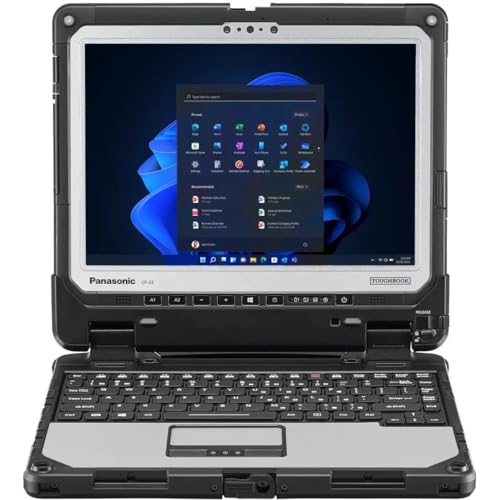
Best for: Warehouse workers, inventory auditors, and field service technicians who scan barcodes all day and need a fully rugged tablet that doubles as a laptop.
Check current price on Amazon →
The CF-33 MK1 is a proven workhorse in industries where you need to scan barcodes, capture signatures, and stay connected in dusty, wet environments. The built-in barcode reader is integrated into the tablet portion, so you don't need to carry a separate scanner. The 12-inch QHD screen is sharp and bright enough for outdoor use, and the digitizer lets you use a stylus for signatures or forms.
The detachable design is the CF-33's biggest strength. You can carry the tablet (3.4 pounds) around a warehouse for hours, use the barcode reader with one hand, and then dock it into the keyboard base for heavy typing at a desk. The keyboard base includes legacy ports like serial and VGA that connect to older warehouse equipment.
The processor is a 7th-gen Core i5-7300U, which does the job for scanning and data entry but will struggle with heavy multitasking or modern software. Also, the product notes that Windows updates require a fresh install, so set aside time for that. If your workflow is scanning-heavy and you can live with an older processor, this is a great value option.

Pros
Cons
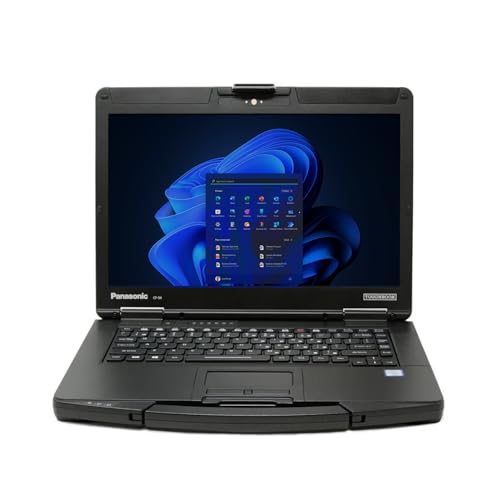
Best for: Field supervisors, military personnel, and anyone who needs a fully rugged 2-in-1 without the added bulk of a barcode scanner.
Check current price on Amazon →
This is the same CF-33 MK1 chassis as the barcode version, but without the scanner hardware. That saves a small amount of weight and leaves you with a clean tablet face. The QHD display is the same — 2160 x 1440 resolution, 1200 nits brightness, and a gloved-multi-touch digitizer. It is excellent for outdoor mapping, reading PDFs, or using touch-heavy field apps.
The premium keyboard base is a highlight. It feels more substantial than the CF-33's standard keyboard, with better key travel and a wider wrist rest. It also adds a serial port and VGA, which are necessary for connecting to industrial machinery and older GPS units. The combination of tablet lightness and full keyboard connectivity makes this the most versatile 2-in-1 on the list.
The main drawback is storage: 256GB fills up quickly if you work with large maps or databases. Consider an external SSD or cloud storage. Also, the 7th-gen processor is dated; if your budget allows, spend a bit more on the CF-33 MK2 for a much newer chip.
Pros
Cons
Best for: Automotive diagnostics, field sales, and office-to-warehouse workers who need a rugged laptop that does not break the bank.
Check current price on Amazon →
The CF-54 MK3 has been Panasonic's semi-rugged staple for years, and this configuration — 16GB RAM, 512GB SSD, Core i5-7300U — is the sweet spot for most field workers. It is not as overbuilt as the fully rugged models, but it handles the real-world bumps, small spills, and dusty conditions that office laptops cannot survive.
The anti-glare HD screen is a practical choice for in-vehicle use. It cuts reflections much better than a glossy panel, and the 14-inch size gives you plenty of workspace. The backlit keyboard is comfortable and spill-resistant. The 1080p webcam with dual microphones is good for video calls, though the i5-7300U may struggle a bit with Teams or Zoom under heavy load.
What sets the CF-54 apart from the FZ-55 is its price point and DVD drive option (available on the next variant). It is a proven platform that thousands of field techs rely on. The 7th-gen processor shows its age in benchmarks, but for basic productivity, diagnostic software, and web browsing, it is still perfectly capable.
Pros
Cons
Best for: Entry-level field workers who prioritize a bright touchscreen and DVD drive over raw performance.
Check current price on Amazon →
This CF-54 MK3 pulls a clever trick: it offers the 1000-nit FHD touchscreen that makes the FZ-55 so desirable, but at a lower system cost because it ships with 8GB RAM and a 256GB SSD. If most of your work is in a single web app or a lightweight diagnostic tool, 8GB is enough. But if you need to run multiple apps, maps, and a browser with many tabs, you will feel the pinch.
The included DVD drive is a rare feature in modern rugged laptops. If your field software ships on a disc or you need to burn backups on site, that drive is a lifesaver. The smartcard reader adds security for government or finance field work.
The biggest reason to pick this over the 16GB version is if you absolutely need the bright touchscreen and have a tight budget. Otherwise, the 16GB CF-54 or the FZ-55 are better investments for long-term usability.

Pros
Cons
Best for: Anyone who works in the toughest environments — oil rigs, firefighting, military, construction — and needs a laptop that will survive things no other laptop can.
Check current price on Amazon →
The CF-31 is the Toughbook that built the reputation. It is absurdly overbuilt. The magnesium alloy chassis can take a six-foot drop onto concrete, survive a rainstorm, and keep running in temperatures from -20°F to 140°F. This Black Edition adds a darker color scheme that hides grime better than the standard silver.
The trade-offs are severe by modern standards. The 5th-gen Core i5-5300U is nearly a decade old. It will boot Windows 11 Pro (using a workaround) and run basic productivity apps, but do not expect to multitask smoothly or run modern web apps with many tabs. The XGA resolution at 13.1 inches is not ideal for detailed software interfaces.
But if you need a computer that can survive being dropped off a ladder or driven over by a truck, the CF-31 is the only answer. The 16GB RAM and 1TB SSD help compensate for the old processor, and the native serial port means no finicky USB adapters for industrial equipment. This is a specialized tool for extreme conditions, not a daily driver.

Pros
Cons
Best for: Linux sysadmins, network engineers, and developers who need a rugged field laptop for scripting, diagnostics, and remote server management.
Check current price on Amazon →
Finding a preinstalled Linux Toughbook is rare, and this CF-31 MK5 running Ubuntu is a gem for the right buyer. It gives you a fully rugged field machine without the overhead of Windows, and Ubuntu is stable, secure, and bloat-free. The 1200-nit touchscreen and 4G LTE mean you can code from a sunny field or a truck cabin.
Performance is the bottleneck. The i5-5300U and 8GB RAM are fine for SSH sessions, writing scripts, or running lightweight network tools, but if you need to compile large codebases or run Docker containers, you will hit a wall quickly. The 256GB SSD is also tight for a modern Linux development environment.
This is a niche pick. If you need a rugged Windows machine, get the Black Edition instead. But if you have ever had to dual-boot or remove bloatware from a field laptop, the appeal of a fresh Ubuntu install on a bulletproof chassis is real.
Before you pick a Toughbook, you need to weigh ruggedness against performance and portability. The most rugged models (CF-31) are heavy and slow, while the lighter semi-rugged models (FZ-55) are faster but less durable. Here's how to decide.
Panasonic uses two main certifications: MIL-STD-810 (G or H) for environmental resistance, and IP (Ingress Protection) for dust and water. MIL-STD-810G covers drops from up to 4 feet, vibration, and temperature extremes. The newer 810H standard has more stringent tests for drops and shock. IP ratings: IP53 means protected against dust and light rain; IP65 means dust-tight and resistant to water jets. For outdoor field work in any weather, aim for IP65. For occasional splashes and dusty warehouses, IP53 is enough.
The Toughbook lineup spans processors from 5th-gen (CF-31) to 10th-gen (CF-33 MK2). Newer generations offer higher clock speeds, better integrated graphics, and much lower power consumption. The 8th-gen Core i7 in the FZ-55 is a good baseline for productivity. The 10th-gen i5 in the CF-33 MK2 is roughly equal in single-threaded performance and faster in multi-threaded tasks. Skip anything with 5th-gen or 7th-gen chips unless your workload is very light (basic data entry, serial terminal, simple diagnostics).
If you work outside, display brightness is critical. A standard laptop screen at 300-400 nits is unusable in sunlight. Look for 1000 nits or more. The CF-33 and CF-31 top out at 1200 nits. Touch support with glove-friendly multi-touch is standard on most models, but a digitizer (for use with a stylus) is only on the CF-33 and some CF-31 variants. Non-touch screens save battery and cost but may not work with field apps designed for touch input.
Fully rugged clamshells (CF-31) weigh 8-10 pounds and are best for vehicle mounting or short walks. Semi-rugged laptops (FZ-55, CF-54) weigh 4-5 pounds and are easier to carry around a site. 2-in-1 models (CF-33) split the difference: the tablet portion is 3-4 pounds, and you add the keyboard base when you need it. If you move between truck and worksite constantly, a 2-in-1 is hard to beat.
Field work often requires legacy ports. The CF-31 and CF-33 include RS-232 serial and VGA, while the FZ-55 and CF-54 offer more modern USB-C and HDMI. Check your equipment. Many diagnostic tools still use serial. Also consider 4G LTE — integrated cellular is far more convenient than dongles. Wi-Fi 6 and Bluetooth 5.1 (on the CF-33 MK2) offer faster and more reliable connections.
Windows 11 Pro is standard on most models, but some older Toughbooks may need a workaround for installation. The CF-31 MK5 with Ubuntu is a niche find for developers. If you need Microsoft Office, field service apps, or Windows-only diagnostic software, stick with Windows. Linux users will appreciate the rare preinstalled option.
Many Toughbooks have user-accessible panels for RAM and drive upgrades. The FZ-55 and CF-54 allow easy access to the M.2 SSD and RAM slots. The CF-33 and CF-31 are more difficult to open but still upgradable in some configurations. Check the service manual for your specific model before ordering parts.
Semi-rugged models like the FZ-55 and CF-54 have reinforced chassis, spill-resistant keyboards, and MIL-STD-810 certification, but are not sealed against submersion or extreme drops. Fully rugged models like the CF-31 and CF-33 are IP65 rated (dust-tight and resistant to water jets) and can survive 4-6 foot drops. Semi-rugged is lighter and faster; fully rugged is heavier and tougher.
No. Only fully rugged models with an IP65 or higher rating are protected against water jets. Semi-rugged models like the FZ-55 have IP53, which means they can handle light rain but not hose-down cleaning or immersion. No Toughbook is submersible, but the CF-31 and CF-33 can survive being sprayed with a hose.
Windows 11 Pro is preinstalled on most of the models listed here, even those with 5th-gen and 7th-gen processors. Microsoft requires 8th-gen processors or newer for official support, so older models may not receive future Windows 11 feature updates. Check the seller's listing for details. Some older Toughbooks may need a workaround installation.
Renewed Toughbooks have been professionally inspected, tested, and refurbished to work like new. They typically come with a one-year warranty. The units in this roundup are listed as "New" by the sellers but are likely renewed stock. They offer substantial savings compared to buying new from Panasonic.
The CF-54 MK3 is a popular choice for automotive diagnostics because it is semi-rugged (enough for a garage), has a native serial port (via optional cable or dock), and supports multiple monitors. The FZ-55 is also a good option if you prefer a newer processor and USB-C. Avoid the CF-31 unless you need extreme durability; its slow processor makes modern diagnostic software frustrating.
Battery life varies by model. The FZ-55 and CF-54 typically run 6-8 hours on a standard battery with moderate use. The CF-31 and CF-33 have smaller batteries and older processors, so expect 4-6 hours. All models support hot-swappable batteries or can be used with a vehicle docking station for continuous power.
The best Toughbook for most people is the Panasonic ToughBook FZ-55 MK1 (16GB). It combines a modern 8th-gen Core i7, a bright 14-inch touchscreen, MIL-STD-810H durability, and enough ports to connect to anything. The semi-rugged build is just what a field technician or utility worker needs without the weight penalty of a fully rugged tank.
If you need something more extreme, the Toughbook Panasonic CF-31 MK5 Black Edition is the hardest laptop you can buy, period. It is slow and heavy, but it will survive when everything else dies. For a convertible that balances ruggedness with performance, the Panasonic Toughbook 33 MK2 offers the newest processor and a built-in barcode reader.
If you are still unsure, think about where you will use it most. Inside a truck for eight hours a day? The FZ-55 is the clearest pick. Out in the pouring rain on an oil rig? The CF-31. Scanning barcodes in a dusty warehouse all shift? The CF-33 MK1 with the barcode reader. Each Toughbook on this list has a job it does best — pick the one that matches yours.
This article contains Amazon affiliate links. We may earn a small commission on qualifying purchases at no extra cost to you.


