Physical Address
304 North Cardinal St.
Dorchester Center, MA 02124
Physical Address
304 North Cardinal St.
Dorchester Center, MA 02124

Looking for the best AOC monitors? We cover 10 top picks for 2026, from $68 budget screens to a stunning QD OLED gaming panel. Find your match here.
AOC has a strange position in the monitor market. The brand sits comfortably between the ultra-budget options you'd find at a discount warehouse and the premium gaming displays that cost more than a console. The result is a lineup that's genuinely useful across a wide range of buyers, but also one where the differences between models can be subtle enough to trip up anyone who doesn't know what to look for.
The best AOC monitors in 2026 span a wider range than most people expect: 22-inch office panels under $70, 27-inch QHD IPS screens with 240Hz refresh rates under $170, and a full QD OLED flagship that competes with displays costing twice as much. Whether you're building a first PC setup, upgrading a console gaming rig, or want a proper flat panel without spending LG OLED money, there's an AOC on this list that fits.
Below, you'll find ten picks organized by use case, from the overall best value to the premium panel that's genuinely hard to argue against at its price.
TL;DR: The AOC Q27G41ZE is the one most people should buy: QHD IPS with 240Hz for under $170. The AOC Q27GAZD is the premium QD OLED for serious gamers who want the best image quality available at this size. The AOC 27G4H is the smartest mid-range pick with a proper height-adjustable stand. The AOC 22B35HM23 covers anyone who just needs a clean, compact monitor that won't break the bank.
| # | Product | Panel / Size | Refresh | Resolution | Price | Best For |
|---|---|---|---|---|---|---|
| 1 | AOC Q27G41ZE | IPS / 27" | 240Hz | 2560×1440 | $169.99 | Best overall |
| 2 | AOC Q27GAZD | QD OLED / 27" | 240Hz | 2560×1440 | $369.99 | Premium gaming |
| 3 | AOC 27G4H | IPS / 27" | 200Hz | 1920×1080 | $109.99 | Mid-range with ergonomics |
| 4 | AOC C27G4ZH | VA Curved / 27" | 280Hz | 1920×1080 | $169.99 | Fast curved gaming |
| 5 | AOC 24G42HE | IPS / 24" | 200Hz | 1920×1080 | $109.51 | 24" gaming pick |
| 6 | AOC C32G2ZE | VA Curved / 32" | 240Hz | 1920×1080 | $199.99 | Big screen budget gaming |
| 7 | AOC CQ32G4VE | VA Curved / 32" | 180Hz | 2560×1440 | $199.99 | 32" QHD console + PC |
| 8 | AOC 24B35H3 | IPS / 24" | 120Hz | 1920×1080 | $80.49 | Budget 24" desk monitor |
| 9 | AOC 27B35H3 | IPS / 27" | 120Hz | 1920×1080 | $99.99 | Budget 27" all-rounder |
| 10 | AOC 22B35HM23 | IPS / 22" | 120Hz | 1920×1080 | $68.99 | Smallest and cheapest |
Prices update in real time and may differ from what's shown here.

The AOC Q27G41ZE is the easiest recommendation on this list. You're getting a 27-inch IPS panel at 2560×1440 with a 240Hz refresh rate and 0.3ms MPRT response time, all for the price of a mid-range FHD gaming monitor from a year ago. That combination is genuinely difficult to beat right now.
The IPS panel means you won't get the deep blacks of a VA or OLED, but the trade-off is wide viewing angles and consistent color accuracy across the screen, which matters on a 27-inch display where you're not always centered. The 300-nit brightness and 1000:1 contrast ratio are about what you'd expect from a mainstream IPS, so this isn't a panel for a bright room next to a window. In more controlled lighting it looks sharp and punchy. The sRGB coverage is solid, and Shadow Control (AOC's shadow-detail booster) gives a practical advantage in dark game environments without washing out brighter areas.
At 240Hz, the panel runs natively via DisplayPort 1.4; through HDMI 2.0 you'll top out at 144Hz. The G-Sync Compatible certification means it plays nicely with NVIDIA cards without needing a separate module. Connectivity is practical: two HDMI 2.0 ports plus a DisplayPort, which makes switching between a PC and a console less annoying than setups that only include one HDMI. The three-sided frameless design keeps the bezels thin. AOC's three-year zero-bright-dot warranty is meaningful on a monitor at this price, where a pixel defect would otherwise be a headache to fight with a company.
Pros:
Cons:
Best for: PC gamers who want the biggest step up from a 1080p 144Hz monitor without paying flagship prices.
Check current price on Amazon →

The AOC Q27GAZD is not for everyone. It costs more than twice the Q27G41ZE above, and that price gap is real. But the QD OLED panel it uses is in a different category entirely, and if you're spending serious time at your desk, it shows.
Quantum Dot OLED combines the per-pixel brightness control of OLED (which means true black, not "dark grey") with the color volume boost of quantum dot filters. The result: 147.6% sRGB and 110.2% DCI-P3 color coverage that you can actually see, not just measure. The HDR400 True Black certification is meaningful here in a way it isn't on regular LCD panels, because the monitor can actually achieve the contrast the spec implies. Dark scenes in games look fundamentally different on a QD OLED than on any IPS or VA in this lineup. Shadows have depth, and bright highlights don't bleed into them.
The 0.03ms GtG response time is among the fastest you'll find at any price. At 240Hz the motion clarity is genuinely exceptional. G-Sync Compatible certification handles the variable refresh side. The one concern with any OLED you use at a desk is burn-in potential from static elements like taskbars or HUD elements that stay in the same screen position for thousands of hours. AOC doesn't offer a zero-bright-dot warranty on this model, which is worth factoring in. This is best treated as a gaming-first display where you're running varied content, not a productivity screen with a static layout running eight hours a day.
Pros:
Cons:
Best for: Dedicated PC gamers who want the best image quality available in a 27-inch QHD panel and game across varied content rather than staring at one app all day.
Check current price on Amazon →

The AOC 27G4H gives up 40Hz compared to the Q27G41ZE at the top of the list, drops to 1080p resolution, and costs considerably less. What it adds is something the pricier model doesn't offer: a stand that actually adjusts. Height, swivel, tilt, and pivot are all here, which makes this the pick for anyone setting up a workstation where posture and viewing angle matter alongside gaming performance.
At 27 inches with 1920×1080 resolution, pixel density is the honest weakness. Text in browsers and productivity apps is noticeably softer than the QHD models. If you split time evenly between gaming and work, that trade-off will register. But for a gaming-first setup where you're primarily running fast-paced titles rather than reading text all day, the 200Hz refresh and 1ms MPRT deliver smooth, responsive motion that's hard to fault at this price.
The 121% sRGB coverage is genuinely good for the category, and the three-sided frameless design works well in multi-monitor setups. HDR10 support is present, though as with any edge-lit LCD, the practical HDR experience is limited. AOC's zero-bright-dot warranty covers the 27G4H for three years. The pivot function (portrait mode rotation) is a useful bonus for developers or anyone who reads long documents.
Pros:
Cons:
Best for: Gamers who also spend time on work tasks and need a properly adjustable stand without paying premium prices.
Check current price on Amazon →

The AOC C27G4ZH leads this list in raw refresh rate: 280Hz via DisplayPort, 240Hz via HDMI. On a VA panel with 1500R curvature, it's built specifically for competitive gaming where response speed and screen wrap both matter.
VA panels land between IPS and OLED in terms of contrast. The 1500R curvature on a 27-inch screen is noticeable, wrapping the image around your peripheral vision in a way a flat panel doesn't. Whether you find that immersive or slightly disorienting depends on how close you sit. At a typical 60-70cm desk distance, it works well. Any closer and the curve becomes aggressive.
The 0.3ms MPRT is competitive with the best IPS panels on this list, and AMD FreeSync Premium handles variable refresh with Low Framerate Compensation, which matters when your frame rate dips below the VRR floor. The adjustability here is solid, covering height, swivel, and tilt alongside VESA compatibility. That's a meaningful upgrade over monitors that only tilt. The VA panel does have a minor limitation: off-axis viewing angles are narrower than IPS, so if multiple people watch from the sides it's less ideal.
Pros:
Cons:
Best for: Competitive PC gamers who want the highest refresh rate on this list in a curved format and game primarily with AMD GPUs.
Check current price on Amazon →
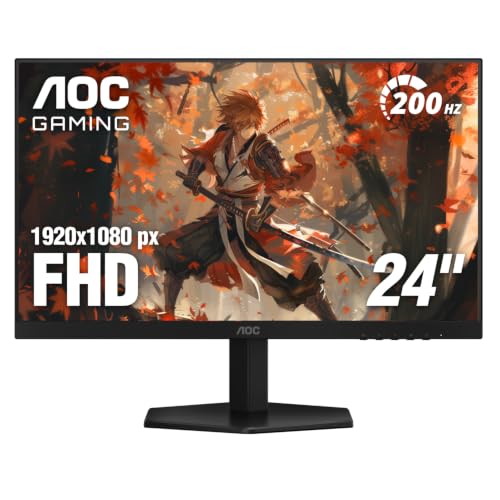
The AOC 24G42HE makes the strongest case for sticking with 24 inches if you sit close to your screen. At 23.8 inches with 1920×1080, the pixel density is meaningfully better than a 27-inch FHD panel. Text is sharper, and the panel feels tighter. Combine that with a 200Hz refresh rate and 1ms MPRT on an IPS panel, and this is a serious gaming monitor that earns its place.
The 116% sRGB color coverage is solid. The three-sided frameless design is clean, and the monitor works well as part of a dual or triple setup. Console gaming is explicitly supported, with HDMI 2.0 for up to 120Hz on current-gen consoles. AOC's three-year zero-bright-dot warranty is included here as well.
The stand is tilt-only, which is the same limitation as several others in this lineup. If ergonomics matter to you, pair it with a VESA arm. The 24G42HE is newer than the 24B35H3 budget pick below it, and the jump from 120Hz to 200Hz plus an IPS panel with proper Adaptive-Sync makes it worth the extra cost for anyone gaming seriously.
Pros:
Cons:
Best for: PC and console gamers who sit close to their screens and prefer the sharper pixel density of a 24-inch display over a larger panel at the same resolution.
Check current price on Amazon →

The AOC C32G2ZE offers something none of the other panels in this lineup do: 32 inches of screen at a price that undercuts most comparable curved monitors. The 1500R VA panel curves noticeably at this size, and the immersion factor in racing games, RPGs, or anything with a wide field of view is real.
At 1080p on a 32-inch panel, pixel density is the elephant in the room. Sitting at a normal desk distance, individual pixels are visible in areas with fine detail. It's not distracting during fast-paced gaming, but if you read text, browse, or look at detailed textures in slow-paced games, the lower density shows. The 240Hz refresh rate and 0.5ms MPRT are strong specs for a curved panel at this price. AMD FreeSync Premium with Low Framerate Compensation keeps the frame rate handling smooth even when it drops below the VRR floor. Xbox, PS5, and Switch connectivity is called out in AOC's features, and the HDMI and DisplayPort connectivity backs that up.
The three-sided frameless design is clean. If you're building a media/gaming setup and want screen presence without spending flagship money, this is a straightforward recommendation for that use case.
Pros:
Cons:
Best for: Budget-conscious gamers who want the biggest screen possible for immersive single-player or console gaming and aren't doing heavy productivity work on the same monitor.
Check current price on Amazon →

Where the C32G2ZE above trades resolution for raw speed, the AOC CQ32G4VE goes the other direction: QHD at 32 inches, which is the format where that resolution starts to make the most sense. At 2560×1440 on a 31.5-inch VA panel, the pixel density is comfortable, and the 1500R curve at this size is genuinely wrap-around.
The 180Hz refresh rate is the trade-off versus the FHD curved model above. For console gaming that's irrelevant (most consoles max at 120Hz for now), and for PC gaming it's still well above the threshold where frame rate stops being the limiting factor in most game genres. The 80,000,000:1 SmartContrast ratio is a marketing figure, but the underlying VA contrast is real: blacks are notably deeper than any IPS panel in this lineup.
Connectivity is generous: two DisplayPort 1.4 and two HDMI 2.0 ports, which means you can keep a PC and two consoles connected simultaneously. For a shared gaming monitor in a living room or den setup, that's a practical advantage. AOC backs it with a three-year zero-bright-dot warranty plus a year of accidental damage coverage, which is the strongest warranty package on this list.
Pros:
Cons:
Best for: PC and console gamers who want a 32-inch QHD curved display that handles multiple sources, with a warranty that actually covers accidents.
Check current price on Amazon →

The AOC 24B35H3 is the no-nonsense option for anyone who needs a clean 24-inch IPS display without gaming-specific features inflating the price. At 120Hz with Adaptive Sync, 100% sRGB color coverage, and an IPS panel at this size, the core display quality is solid. It connects via VGA or HDMI, covers a 3.5mm audio out, and includes a tilt-adjustable stand with VESA mounting compatibility.
This is not a monitor with ambitions beyond its role. The 120Hz refresh over HDMI is enough for casual gaming and benefits noticeably over the 60Hz panels that used to fill this price bracket. Flicker-Free and Low Blue Light filtering are included for long office days. The eco-friendly power design is a minor but genuine benefit for a monitor that might run all day every day.
Where it falls short relative to the 24G42HE is in refresh rate ceiling and the lack of DisplayPort. If you're gaming seriously, the 24G42HE's 200Hz IPS with proper gaming features is worth the upgrade. But if the primary use is work with occasional light gaming, the 24B35H3 is a clean and capable panel at a price that's hard to argue with.
Pros:
Cons:
Best for: First-time monitor buyers, students, or remote workers who want a clean 24-inch IPS display for everyday use and don't need high refresh rate gaming features.
Check current price on Amazon →

The AOC 27B35H3 is 27 inches of IPS display at under $100, which is a legitimate value for anyone who wants screen real estate without paying gaming monitor prices. The 120Hz refresh rate with Adaptive Sync is the key upgrade over older 60Hz panels in this price bracket. For casual gaming, that difference in smoothness is noticeable even if 200Hz esports performance isn't the goal.
The 100.1% sRGB coverage keeps colors accurate and punchy for everyday use. At 13W in eco mode, the power draw is minimal. Flicker-Free and Low Blue Light filtering make it tolerable for long work sessions. The 27-inch size is the right compromise between screen presence and pixel density at 1080p resolution: still softer than a QHD panel of the same size, but less of an issue at 27 inches for work than for close-up reading.
The comparison with the 24B35H3 is essentially a size question. Both share the same panel tier, feature set, and price structure. The 27B35H3 gives you 3 more inches of screen for about $20 more. VGA plus HDMI connectivity, tilt-only stand, VESA compatibility: the spec list is nearly identical.
Pros:
Cons:
Best for: Anyone who wants a large, clean IPS screen for mixed work and casual gaming without spending gaming monitor prices.
Check current price on Amazon →

The AOC 22B35HM23 is the smallest and least expensive monitor on this list. At 21.5 inches viewable and 1920×1080, the pixel density is the highest of any FHD display in this lineup. Text is genuinely sharp at this size, which is an underrated benefit for a monitor in this price tier.
At 120Hz via HDMI with Adaptive Sync, the core gaming capability mirrors the 24B35H3 above. The difference is the screen size and the weight: under 4.5 pounds means it's easy to move around, and the compact footprint fits desks where a 27-inch panel simply wouldn't. Flicker-Free and Low Blue Light are present. Power consumption in eco mode is only 13W.
This is not a monitor for someone who sits far from their desk or uses spreadsheets across wide horizontal layouts. At 22 inches you feel the size when multi-tasking. But as a secondary monitor, a dedicated gaming screen in a small space, or a first monitor for a tight budget and small desk, it's a clean, capable display with no major weaknesses for what it costs.
Pros:
Cons:
Best for: Buyers on a tight budget who need a compact, sharp secondary monitor or a first display for a small desk setup.
Check current price on Amazon →
The right AOC monitor depends on how you weight four things: resolution, refresh rate, panel type, and ergonomics. Getting one of those wrong for your use case is the most common way to end up with a monitor that technically works but feels like a compromise.
IPS panels give you consistent color accuracy across wide viewing angles. If someone sits to the side of your screen, the image stays accurate. IPS is the default choice for mixed-use setups: good enough for gaming, genuinely good for color-sensitive work.
VA panels offer better native contrast, which means deeper blacks in dark gaming environments and more dramatic visuals in movies. The trade-off is narrower viewing angles and, on some VA panels, a smearing artifact in fast dark-to-light transitions called "black smear." At the refresh rates AOC's VA monitors run (240Hz and 280Hz), this is less visible than it used to be, but it hasn't fully disappeared.
QD OLED is the top tier. Every pixel generates its own light, so black is absolute black, not a backlit approximation. Color volume is extraordinary. The caveat is burn-in risk for static screen elements over years of use, and the higher upfront cost.
| Screen size | FHD (1920×1080) | QHD (2560×1440) |
|---|---|---|
| 22-24 inch | Sharp enough for most | Unnecessary for this size |
| 27 inch | Noticeably soft for text | The right match |
| 32 inch | Low density, gaming only | Acceptable for mixed use |
If you're buying a 27-inch monitor primarily for productivity and reading, QHD is the right call. If you're gaming in dark environments where text sharpness matters less than frame rate, FHD at 27 inches saves money.
A 240Hz monitor delivers its best results when your GPU can actually push 200+ frames per second in the games you play. In competitive shooters with modest graphics settings, that's achievable on mid-range hardware. In demanding open-world or AAA titles at QHD, you may spend most of your time in the 80-144fps range, where the jump from 144Hz to 240Hz is less impactful than the jump from 60Hz to 144Hz was.
For console gaming: the current PS5 and Xbox Series X max at 120Hz in supported titles. Any 120Hz or higher panel covers you; the extra refresh above that goes unused from a console.
Tilt-only stands are a budget compromise that AOC applies to most of its sub-$150 lineup. If you spend six or more hours a day at your desk, a proper height-adjustable stand (like the one on the 27G4H) makes a meaningful difference in long-session comfort. The alternative is a VESA arm, which any of these monitors can accept given their 100x100mm VESA compatibility.
AOC's three-year zero-bright-dot guarantee is available on several models in this lineup and is worth prioritizing if you're buying a monitor you expect to use for years. A single dead bright pixel on a dark background can be maddening. The CQ32G4VE adds accidental damage coverage for the first year, making it the strongest warranty package of the group.
Yes, across several price tiers. AOC's gaming-focused lineup covers 200Hz to 280Hz refresh rates with IPS and VA panels and proper Adaptive-Sync support for both AMD and NVIDIA GPUs. The Q27G41ZE at 240Hz QHD and the Q27GAZD with its QD OLED panel are particularly competitive with monitors from brands that cost significantly more.
IPS panels offer better viewing angles and more consistent color accuracy across the screen. VA panels deliver deeper native contrast (better black levels) but narrower off-axis viewing angles and a potential smearing artifact in fast transitions. For competitive gaming and multi-person viewing, IPS is typically the better choice. For immersive single-player gaming in a dark room, VA's contrast can feel more cinematic.
Yes. The console-compatible models include HDMI 2.0 ports that support 120Hz output from current-gen consoles in supported titles. The 24G42HE, 27G4H, C32G2ZE, and CQ32G4VE all explicitly support console gaming, and most others with HDMI 2.0 work fine as well.
For dedicated gaming in a controlled lighting environment, yes. The Q27GAZD's QD OLED panel offers black levels and color volume that no IPS or VA can approach. For a mixed work-and-gaming monitor where you're running static apps (spreadsheets, terminals, browsers) for long hours, the burn-in risk and price premium make a high-quality IPS like the Q27G41ZE the smarter long-term investment.
It guarantees that if any pixel on the panel is permanently lit (bright), AOC will replace the monitor at no cost during the warranty period. A standard warranty only covers a panel if it exceeds a certain number of pixel defects. Zero-bright-dot covers even a single defective pixel. The models on this list that include it: Q27G41ZE, 27G4H, 24G42HE, and CQ32G4VE.
Check your GPU's average frame rate in the games you play most, at the resolution of the monitor you're considering. If you're consistently hitting 180-220fps in your games, a 240Hz panel will show a clear improvement over 144Hz. If you're averaging 80-110fps in demanding titles at QHD, the step from 144Hz to 240Hz will matter less than choosing a QHD panel over FHD.
The 22B35HM23, 24B35H3, and 27B35H3 are all 100% sRGB IPS panels with Flicker-Free and Low Blue Light filtering. For standard office work, video calls, and casual media, they perform well above what their prices suggest. The main limitation is stand adjustability: tilt-only stands on all three means ergonomic setup depends on desk height and chair height, or a VESA arm.
For most people looking at the best AOC monitors right now, the AOC Q27G41ZE is where the search should end. QHD resolution at 27 inches, 240Hz refresh on an IPS panel, three-year zero-bright-dot warranty, and a price point that was barely achievable on a 1080p panel two years ago. It's the clearest value in the entire lineup.
Step up to the AOC Q27GAZD if you play demanding titles in a darkened room and want a QD OLED panel that will outperform anything else on this list in terms of image quality. It costs more, but the display technology is in a genuinely different tier. For the 32-inch format with multi-source connectivity and the strongest warranty package, the AOC CQ32G4VE QHD curved VA is the right call for shared PC and console setups.
If the budget is tighter, the AOC 27G4H is the best argument for $110: a properly ergonomic stand, 200Hz IPS, and the zero-bright-dot warranty in a mid-range package. Anyone who still hasn't decided: go with the Q27G41ZE. The jump to QHD at 240Hz for the price is the most clear-cut upgrade available from AOC at the moment, and it'll stay relevant for several years.
This article contains Amazon affiliate links. We may earn a small commission on qualifying purchases at no extra cost to you.


