Physical Address
304 North Cardinal St.
Dorchester Center, MA 02124
Physical Address
304 North Cardinal St.
Dorchester Center, MA 02124

Looking for the best MSI monitors? We tested 10 picks from budget FHD to flagship QD-OLED. Find the right screen for gaming, work, or both.
Choosing a monitor from MSI's lineup is harder than it sounds. The brand now spans everything from $70 office screens to $830 quantum-dot OLED panels, and the model names (MAG, MPG, PRO) don't tell you much at a glance. Get it wrong and you either overspend on specs your GPU can't use, or you buy a 60Hz office hand-me-down when you needed something that could actually keep up with a fast-paced shooter.
The best MSI monitors share a few things in common: solid build quality for the price, real adaptive sync that works without drama, and a consistent approach to eye-care certification that makes marathon sessions more bearable. What separates the good picks from the filler is how well each one targets a specific use case. A 360Hz QD-OLED is wasted on someone who plays turn-based RPGs; a 120Hz IPS is a perfectly sensible daily driver for someone who mostly browses and writes.
Our picks here cover the full range: budget-friendly 22-inch and 24-inch FHD panels for everyday use, fast 200Hz and 240Hz mid-tier gaming monitors, a 34-inch ultrawide for immersive work, and two QD-OLED flagships that represent the best image quality MSI currently makes.
TL;DR: The MSI MPG 271QRX QD-OLED is the one most competitive gamers should buy: 360Hz refresh and genuine OLED picture quality in a 27-inch package. The MSI PRO MP243L E14 is the budget standout and the most popular option in the lineup. The MSI MPG 321URX QD-OLED is the premium 4K choice for players who want the full OLED experience at 32 inches. The MSI MAG 346CQ is the ultrawide to grab if you need wide-format productivity at a reasonable price.
| # | Product | Panel / Resolution | Refresh Rate | Price | Best for |
|---|---|---|---|---|---|
| 1 | MSI MPG 271QRX QD-OLED | QD-OLED / QHD | 360Hz | $599.99 | Competitive gaming |
| 2 | MSI MPG 321URX QD-OLED | QD-OLED / 4K | 240Hz | $829.99 | 4K gaming and content |
| 3 | MSI PRO MP243L E14 | IPS / FHD | 144Hz | $74.00 | Best value 24-inch |
| 4 | MSI MAG 274CF X24 | VA / FHD | 240Hz | $139.99 | Budget 240Hz 27-inch |
| 5 | MSI MAG 242F | IPS / FHD | 200Hz | $99.99 | Mid-tier 24-inch gaming |
| 6 | MSI PRO MP243W E14 | IPS / FHD | 144Hz | $84.99 | White desk setup |
| 7 | MSI PRO MP251W E2 | IPS / FHD | 120Hz | $99.99 | Office and hybrid work |
| 8 | MSI MAG 245F X24 | IPS / FHD | 240Hz | $114.99 | Budget 240Hz 24-inch |
| 9 | MSI MAG 346CQ | VA / UWQHD | 180Hz | $286.99 | Ultrawide gaming/work |
| 10 | MSI PRO MP225 E12VL | IPS / FHD | 120Hz | $69.99 | Entry-level / small desk |
Prices fluctuate. Check the links for current Amazon pricing.
Narrowing down the best MSI monitors from the current lineup meant weighing a few specific things:

The MSI MPG 271QRX QD-OLED is a 27-inch, 2560×1440 panel running at 360Hz with a 0.03ms GtG response time, and those numbers represent a genuinely different class of display from anything else in this roundup. QD-OLED means every pixel produces its own light and shuts off completely in dark scenes. The result is blacks that are actually black, not dark grey, and highlight contrast that LCD panels of any kind cannot replicate. Combined with VESA DisplayHDR True Black 400 certification and DCI-P3 color accuracy at Delta E under 2, this is one of the most visually capable monitors MSI makes at 27 inches.
The 360Hz figure matters most if you play at a competitive level in titles like CS2, Valorant, or Apex. At that cadence, motion clarity is objectively cleaner and input lag is reduced to the point where reaction-based play becomes fractionally easier. For everyone else, the real gain is that 360Hz at QHD gives a noticeably smoother feel to everything, not just games. Scrolling, dragging windows, fast cursor movement, all of it benefits. The OLED Care 2.0 system actively manages burn-in risk through pixel shifting and screen transitions, which addresses the main legitimate concern people have about OLED longevity. KVM support means this can sit between a gaming PC and a work laptop without requiring a separate switch, and Console Mode adds HDMI 2.1 bandwidth for 4K input from a PlayStation or Xbox if you want to run it dual-purpose.
The stand is fully adjustable: height, tilt, swivel, and pivot. That covers most desk situations without reaching for a VESA arm, though the arm option is there if needed. The MSI Gaming Intelligence App handles per-game display profiles, which is a minor luxury but a useful one for people who switch frequently between a moody open-world title and a flat-lit competitive shooter.
Pros:
Cons:
Best for: Competitive gamers running a mid-to-high-end GPU who want the fastest, sharpest 27-inch panel MSI makes, and are willing to pay for it.
Check current price on Amazon →

The MSI MPG 321URX QD-OLED takes the same QD-OLED panel technology as the 271QRX and scales it up to 32 inches at 3840×2160. The result is a display that sits in a completely different use-case bracket: where the 271QRX is built for speed, the 321URX is built for fidelity. At 4K on a 32-inch screen, pixel density is high enough that individual pixels are invisible at any normal viewing distance, and the OLED substrate means every one of those 8.3 million pixels switches off completely in dark areas. The effect in HDR content, games and films both, is something you can't unsee once you've experienced it.
240Hz at 4K demands serious GPU muscle. An RTX 4080 or 4090 can push native 4K at high refresh rates in less demanding titles; in AAA games with ray tracing, DLSS or FSR becomes the realistic path to fluid motion. That's not a knock on the monitor, it's just physics, and it's worth being clear-eyed about before spending this much. The 90W USB-C power delivery is a practical bonus: a single cable running from a laptop handles both display signal and charging, which declutters the desk meaningfully. HDMI 2.1, DisplayPort 1.4a, and USB-C display ports give you full connectivity flexibility for whatever sources you're running.
OLED Care 2.0 is present here as well, along with the MSI Gaming Intelligence AI system for automated picture adjustment per game. The 4-way adjustable stand (height, tilt, swivel, pivot) and Mystic Light RGB on the back are the kind of premium-tier additions that feel appropriate at this price point rather than tacked on. At 27.2 pounds, this isn't a monitor you'll be repositioning often, but the stand handles the ergonomics well enough that most people won't need a VESA arm.
Pros:
Cons:
Best for: 4K gaming on a high-end rig, or a content creator who wants OLED visual quality at a large desktop size and can use the USB-C as a single-cable laptop connection.
Check current price on Amazon →

The MSI PRO MP243L E14 is the most popular MSI monitor available right now, and it's not hard to see why. At 24 inches with a 1920×1080 IPS panel running at 144Hz, it covers the sweet spot that the majority of PC users actually need without padding the price with features that most setups can't take advantage of. The IPS panel delivers 178-degree viewing angles in both directions, which makes a practical difference at a shared desk or in any setup where the monitor isn't positioned dead-center.
The 144Hz figure is meaningful here. The jump from 60Hz to 144Hz is perceptible immediately, even in non-gaming tasks; the jump from 144Hz to 240Hz is much more subtle and matters primarily in competitive gaming. For the person who plays games occasionally and spends most of their time in a browser, productivity apps, or streaming, 144Hz is genuinely all the refresh rate they'll ever notice. FreeSync support eliminates tearing across the entire operating range. The Eye-Q Check tool is a small but thoughtful addition: it runs a quick vision assessment and gives display calibration suggestions based on the results, something you don't find on screens at this price.
TUV Rheinland certification covers both flicker-free operation and low blue light, which matters more than it might seem. The ~200Hz flicker that standard monitors produce is invisible but physiologically real; eliminating it noticeably reduces eye fatigue over a long session. HDMI 2.0 with HDMI-CEC and a VGA port cover both current and legacy hardware without adapters. The 4-side slim bezel keeps the footprint tight if you're running a multi-monitor setup.
Pros:
Cons:
Best for: Students, first-time PC builders, or office users who want a clean, fast, well-certified 24-inch display without paying for specs they'll never need.
Check current price on Amazon →

The MSI MAG 274CF X24 takes a different panel approach than most of MSI's lineup at this size: it uses a Rapid VA rather than an IPS. VA panels offer higher contrast ratios than IPS, which translates into noticeably darker blacks in a dimly lit gaming environment. The trade-off is that off-angle color accuracy drops faster than on an IPS, and VA panels can exhibit corner-glow in full-screen dark content, though MSI's Rapid VA spec tightens the response time to 0.5ms (GtG minimum) to reduce ghosting, which was traditionally VA's biggest weakness.
At 240Hz and 27 inches, this is the largest and fastest non-OLED monitor in this roundup below the $200 mark. AMD FreeSync Premium (not just plain FreeSync) includes LFC support, which keeps adaptive sync working smoothly even when framerate drops significantly below the monitor's ceiling. AI Vision, present here as on MSI's other gaming-tier panels, applies real-time scene analysis to shadow areas and dark game environments, lifting detail that the base panel might otherwise crush. The result is genuinely useful in heavily shadowed games; it's not a gimmick.
The Less Blue Light software reduction tool complements the hardware well, though this monitor lacks the TUV Rheinland certification of the PRO-series panels. Worth noting if you're choosing between this and the MP243L for eye-care reasons. What the MAG 274CF X24 does offer that the PRO panels don't is the larger screen real estate at 27 inches without jumping to 4K or QHD resolution demands on the GPU. A mid-range graphics card can push 240fps at 1080p; that's the point.
Pros:
Cons:
Best for: Gamers who want a 27-inch 240Hz gaming display at a budget price and primarily play in a controlled lighting environment where VA contrast works in their favor.
Check current price on Amazon →
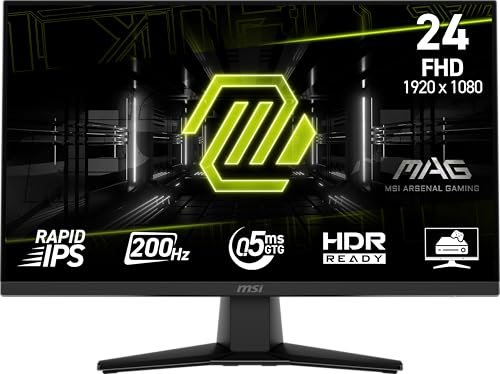
The MSI MAG 242F occupies a useful middle ground: it's a 24-inch Rapid IPS panel at 200Hz with a 0.5ms GtG response time, sitting between the 144Hz PRO-series monitors and the 240Hz MAG gaming panels in both price and capability. What makes it stand out within the MSI lineup is the combination of a height-adjustable stand and a built-in speaker, both absent on the cheaper 24-inch options. That's more of a practical consideration than a gaming spec, but it's the kind of thing that determines whether the monitor actually works as a standalone setup or requires additional peripherals from day one.
200Hz is a genuine refresh-rate improvement over 144Hz (unlike the more marginal 200Hz-to-240Hz step), and the Rapid IPS panel keeps colors accurate at wide angles while meeting gaming-grade pixel response specs. FreeSync Premium is present, providing LFC support for smoother adaptive sync at lower framerates. AI Vision's scene enhancement and Less Blue Light software tools are included, carrying this panel's feature set in line with the rest of the MAG gaming tier rather than the entry-level PRO monitors.
The height-adjustable stand is the practical differentiator here. Tilt-only stands require a separate monitor arm to achieve proper ergonomic positioning for all-day use; having height adjustment built in keeps the total cost of a functional setup lower. DisplayPort and HDMI ports both appear, giving full connectivity options. For someone stepping up from a basic 24-inch screen and wanting IPS color accuracy at a faster refresh rate without jumping to 240Hz pricing, this is a natural fit.
Pros:
Cons:
Best for: Someone building a clean, self-contained 24-inch gaming and work station who wants IPS color, real ergonomic adjustment, and a faster refresh rate than budget panels offer.
Check current price on Amazon →

The MSI PRO MP243W E14 is functionally identical to the PRO MP243L E14 in spec sheet terms: 24-inch FHD IPS, 144Hz, Adaptive-Sync, TUV Rheinland certified, with Eye-Q Check, VESA mounting, and a 4-side slim bezel. The difference is the color: this one ships in white. That sounds trivial until you're trying to build a clean, minimal desk setup where every black-and-gunmetal gaming peripheral ruins the aesthetic.
White monitors have become genuinely hard to find at this price point without compromising on refresh rate or panel quality. The MP243W E14 offers neither of those compromises. Same 144Hz IPS spec, same adaptive sync implementation, same eye-care certification. DisplayPort 1.2a appears here in addition to HDMI 1.4b, which gives an additional clean signal path versus the HDMI-only options in the PRO lineup.
The build quality holds up to what you'd expect from the PRO series: lighter bezels on four sides, a clean back panel in white, nothing that looks out of place in a tidy workspace. If you want the look of a premium white monitor without the price of a premium white monitor, this is the way to get it.
Pros:
Cons:
Best for: Anyone building an all-white desk setup who doesn't want to sacrifice refresh rate or panel quality to get the right color.
Check current price on Amazon →

The MSI PRO MP251W E2 is 24.5 inches rather than 24, which gives it slightly more vertical screen area than the other 24-inch panels without requiring a jump to a larger desk footprint. It runs at 120Hz with Adaptive-Sync and an IPS panel, and it ships in white. The feature set leans toward productivity and long-duration work rather than competitive gaming. TUV Rheinland certification covers both flicker-free operation and low blue light. Eye-Q Check is present for vision self-assessment. A built-in speaker removes the need for external audio.
The 120Hz ceiling is the most meaningful differentiator from the MP243L E14, and whether that matters depends entirely on your use case. For office work, video calls, document editing, and casual gaming, 120Hz is smooth and completely sufficient. For anyone who plays fast FPS games seriously, the 144Hz PRO panels are worth the slight extra outlay. The 24.5-inch panel gives a bit more breathing room on a crowded desktop without the weight or footprint jump of a 27-inch screen.
DisplayPort and HDMI and VGA all appear here, which gives this monitor the widest connectivity range of any panel in this roundup. The VGA port matters for older workstation PCs and some video conferencing hardware that still uses legacy analog output. VESA 100x100mm compatibility is included, as expected. The Adaptive-Sync implementation here is labeled generically rather than FreeSync Premium, which means LFC support is not guaranteed; worth keeping in mind if you're pairing this with a weaker GPU.
Pros:
Cons:
Best for: Hybrid workers or office users who spend long hours at a screen and want a clean white monitor with strong eye-care specs, comfortable 24.5-inch real estate, and connectivity for both new and legacy equipment.
Check current price on Amazon →

The MSI MAG 245F X24 is a 24-inch Rapid IPS panel at 240Hz with a 0.5ms GtG response time. On paper, that reads like a better specification than the PRO MP243L at the same screen size, because 240Hz is numerically higher than 144Hz. In practice, the choice between them depends on what matters to you.
The MAG 245F X24 gives you a faster refresh rate for competitive gaming, and the Rapid IPS panel keeps colors accurate from wide angles. FreeSync Premium provides LFC support. AI Vision shadow enhancement and Less Blue Light software tools are present. What it doesn't give you relative to the PRO series is TUV Rheinland eye-care certification, and it costs more than the 144Hz PRO panel. The 240Hz advantage is real if you play fast shooters where frame rates reliably reach that ceiling; it's much less meaningful for everything else.
The VGA port keeps legacy compatibility intact, and HDMI handles modern connections. The stand is tilt-only here, same as on most 24-inch monitors in this lineup. Given the positioning relative to the MAG 274CF X24 (which gives you 240Hz at 27 inches for similar money) and the PRO MP243L (which gives you a certified eye-care panel at 144Hz for less), the MAG 245F X24 is the right choice for someone who specifically wants 240Hz at 24 inches with IPS color accuracy.
Pros:
Cons:
Best for: Budget-conscious gamers who specifically want 240Hz at 24 inches with IPS panel accuracy rather than the VA alternative at 27 inches.
Check current price on Amazon →

The MSI MAG 346CQ is the only ultrawide in this roundup. At 34 inches and 3440×1440 (UWQHD), it offers a canvas that is genuinely different from anything a standard 16:9 panel can replicate. Spreadsheets with dozens of columns visible simultaneously, timeline editing in video software, racing games that fill peripheral vision: these are the scenarios where ultrawide earns its floor space. The curved VA panel (1500R curvature implied by the CQ designation) wraps the edges toward your peripheral view rather than leaving the sides feeling flat and distant.
180Hz is the refresh rate, which splits the difference between the 144Hz productivity tier and the 240Hz gaming tier. It's fast enough that everyday motion looks smooth, and competitive gaming is playable without the hardcap frustration of 60Hz or 75Hz. The 1ms MPRT response time is aggressive for a VA panel. FreeSync Premium covers tearing prevention across the adaptive sync range. AI Vision handles dark scene enhancement, and the Less Blue Light software complements longer work sessions.
The height-adjustable stand earns extra credit here. Large curved monitors are particularly awkward when the stand only tilts, because the weight and footprint make repositioning difficult. Height adjustment built in at this size is a meaningful convenience. Built-in speakers round out what is effectively a complete workstation display without reaching for additional hardware. HDMI and DisplayPort connections handle both console and PC sources. At 18 pounds, this is a sturdy screen that stays where you put it.
Pros:
Cons:
Best for: Content creators, developers, or simulation gamers who want the immersive width of an ultrawide with enough refresh rate for casual gaming, all from a single complete display.
Check current price on Amazon →

The MSI PRO MP225 E12VL is the smallest and least expensive monitor in this roundup: a 22-inch FHD IPS panel at 120Hz with Adaptive-Sync. The screen dimensions are worth noting: at 21.45 inches actual size with a 4000:1 contrast ratio (higher than typical IPS), this uses a VA panel substrate despite MSI's labeling. That high contrast ratio is the practical distinguisher from standard IPS displays; dark backgrounds and shadow detail are more convincing than what most budget IPS screens manage.
120Hz is the refresh rate, which is meaningfully smoother than 60Hz for everyday computing. Adaptive-Sync (FreeSync compatible) works across the range. HDMI 1.4b handles Full HD at 120Hz; VGA covers legacy connections. The built-in accessory slot is a minor organizational touch that keeps the desk tidier for compatible MSI accessories. TUV Rheinland certification covers flicker-free and low blue light. Eye-Q Check is present for vision assessment.
This monitor makes sense in two specific contexts: a secondary display where the primary screen is something larger and faster, or a first-time setup where budget is the binding constraint and 24-inch pricing is out of reach. At 22 inches, the footprint is genuinely small, which helps in cramped spaces. The image quality is solid for the price tier; the 4000:1 contrast ratio stands out in a market segment usually dominated by flat, washed-out budget panels.
Pros:
Cons:
Best for: Anyone working in a constrained space who needs a well-certified, no-frills secondary or primary display at the lowest possible entry price in MSI's current lineup.
Check current price on Amazon →
MSI organizes its monitor lineup into tiers, and understanding which tier fits your actual use is the fastest path to the right choice.
Panel type determines more about real-world image quality than any other single spec. VA panels (used in the MAG 274CF X24 and MAG 346CQ) produce higher contrast ratios than IPS, which means richer blacks and more visible shadow detail, but they suffer from color shift at off-angles and historically worse motion handling. MSI's Rapid VA spec tightens the response time considerably.
IPS panels (most of the PRO series and several MAG monitors) deliver accurate, consistent color from wide viewing angles and more natural tonal transitions. They're the workhorses of the lineup: better for multi-person viewing, color-sensitive work, and setups where lighting conditions vary. Contrast ratios are lower than VA.
QD-OLED panels (the MPG 271QRX and MPG 321URX) are in a different league. True per-pixel illumination means black levels that LCD panels cannot approach, instantaneous response times, and color volume that covers DCI-P3 at near-perfect accuracy. The trade-offs are burn-in risk (manageable with OLED Care 2.0, but real) and a significant price premium. For most buyers, IPS is the correct choice. QD-OLED is for the buyer for whom image quality is the priority above everything else.
The jump from 60Hz to 120/144Hz is the most impactful refresh rate upgrade you can make. Motion is smoother, cursor tracking feels more precise, and even non-gaming tasks like scrolling benefit noticeably. This upgrade is worth it for almost everyone.
The jump from 144Hz to 200/240Hz is real but more situational. Competitive gaming in titles where your GPU can push frame rates above 200fps will show a perceptible improvement in motion clarity and input lag. For everything else, including casual gaming, productivity, and media, the difference is subtle.
360Hz (the MPG 271QRX) is for high-level competitive play. If you play CS2 or Valorant at a tournament level, or simply want the absolute sharpest motion clarity money can buy, it's worth the premium. For anyone else, 144Hz or 240Hz is a more sensible endpoint.
Not all FreeSync is equal. MSI's PRO-series panels use plain Adaptive-Sync or FreeSync without the Premium designation. FreeSync Premium (present on the MAG gaming panels and the MPG QD-OLED monitors) adds Low Framerate Compensation (LFC), which keeps adaptive sync active even when the frame rate drops significantly below the monitor's refresh rate ceiling. This matters most if your GPU is on the weaker side and dips below 60fps in demanding titles. If your frame rate stays comfortably above half the monitor's maximum refresh rate, plain FreeSync works fine. If it doesn't, Premium's LFC keeps the experience tear-free where plain FreeSync would fail.
MSI's budget PRO panels ship with tilt-only stands. That's a meaningful limitation for a monitor you'll use all day: seated posture depends on monitor height, and tilt alone doesn't compensate for a desk that's too high or too low. If you plan to keep the factory stand, check whether height adjustment is included. The MAG 242F and MAG 346CQ both include height adjustment; the PRO-series budget panels do not. All monitors reviewed here include VESA 100x100mm compatibility, so a monitor arm is always an option if the stock stand falls short.
TUV Rheinland certification for Flicker Free and Low Blue Light is the reliable third-party credential in this space. MSI's PRO-series panels carry it; the MAG gaming panels rely on software-only tools (Less Blue Light and AI Vision) without the same hardware-level certification. For someone spending eight or more hours daily at a screen, the certified panels (PRO series) are worth prioritizing. MSI's Eye-Q Check feature, available across the newer PRO models, adds a practical vision assessment tool on top. It's a small feature, but one that's easy to actually use.
MSI's monitor lineup is split by use case. PRO is the productivity and office-oriented tier, emphasizing eye-care certification, cleaner aesthetics, and solid all-round performance. MAG (MSI Arsenal Gaming) is the mid-tier gaming line with faster refresh rates, FreeSync Premium, and gaming-tuned features like AI Vision. MPG (MSI Performance Gaming) is the flagship gaming tier, where the QD-OLED panels live alongside the highest refresh rates and most complete feature sets.
For casual gaming, the honest answer is usually no. The perceptible difference between 144Hz and 240Hz requires both a GPU that can push framerates above 200fps and games where that frame rate is achievable. In slower-paced games or on mid-range hardware, you won't notice the gap. The 144Hz PRO-series panels are a better use of money for most buyers.
Yes. MSI's FreeSync and Adaptive-Sync monitors are compatible with NVIDIA GPUs that support G-Sync Compatible certification, which covers most current-generation NVIDIA cards. The MPG QD-OLED panels are certified G-Sync Compatible, giving them explicit NVIDIA approval. The FreeSync Premium MAG panels work reliably with NVIDIA cards in practice, though they're not formally G-Sync certified.
OLED burn-in is a real and legitimate concern for static UI elements: taskbars, browser chrome, and fixed HUD elements in games. MSI's OLED Care 2.0 system mitigates this through pixel shifting, logo detection, and automatic screen-saver triggers. For most gaming and productivity use, burn-in risk is manageable with default settings. For users who run a static overlay or taskbar for years without variation, some retention risk remains. VA and IPS panels have no burn-in risk at all, which is worth factoring in if your use pattern involves a lot of static content.
Several of them work very well as dual-purpose screens. The PRO MP243L E14 and PRO MP251W E2 are designed with long-duration productivity in mind: TUV Rheinland eye-care certification, Eye-Q Check, and clean aesthetics. The MAG 346CQ ultrawide is a strong candidate for developers and content creators who benefit from the wider format. Even the MPG QD-OLED panels, while primarily gaming-focused, make excellent creative workstation monitors given their color accuracy. The competitive 360Hz MAG panels are the least natural fit for pure office use, though they function fine.
Entry-level PRO models include HDMI and VGA for maximum compatibility. Mid-tier MAG gaming panels add DisplayPort. The MPG QD-OLED flagships include HDMI 2.1, DisplayPort 1.4a, and USB-C with video and power delivery. USB-C is notably absent from the budget tier; if single-cable laptop connectivity matters, budget up to the MPG 321URX or check for a specific USB-C port in the product listing before buying.
The best MSI monitors in 2026 fall into two distinct groups: the QD-OLED flagships that represent what's genuinely possible in a gaming display right now, and the IPS and VA mid-range panels that cover the majority of real-world needs at sensible prices.
For most buyers, the MSI PRO MP243L E14 is where to start. It's the most popular option in the lineup for good reason: 144Hz IPS with proper eye-care certification at a price that doesn't require justification. If you want to step up in screen size without spending on resolution, the MSI MAG 274CF X24 delivers 240Hz at 27 inches on a high-contrast VA panel for a modest premium. The MSI MAG 346CQ is the right call for anyone who spends serious time in creative or productivity workflows and wants a format that fundamentally changes how much you can see at once.
At the top of the lineup, the MSI MPG 271QRX QD-OLED is the best MSI monitor for competitive gamers who want to eliminate the argument about whether their display is limiting them. The MSI MPG 321URX QD-OLED earns its place for 4K gaming and creative professionals who want OLED quality at desktop scale. If you're still undecided between a budget 144Hz panel and a mid-tier 240Hz option, consider whether your GPU can actually push enough frames to make the jump meaningful before spending the difference.
This article contains Amazon affiliate links. We may earn a small commission on qualifying purchases at no extra cost to you.


