Physical Address
304 North Cardinal St.
Dorchester Center, MA 02124
Physical Address
304 North Cardinal St.
Dorchester Center, MA 02124

Looking for the best Acer monitors? We cover 10 top picks from budget 22-inch panels to 27-inch QHD gaming displays with up to 240Hz refresh.
Buying a monitor should be straightforward, but Acer makes it complicated by selling nearly identical-looking panels at very different performance levels. The model codes are opaque, the spec differences are subtle, and a $30 gap between two 27-inch screens can mean the difference between a VA panel you'll tolerate and an IPS display you'll actually enjoy. The best Acer monitors are genuinely excellent value. The worst are fine, but only if you know exactly what you're buying.
The lineup below covers the full range: budget 21.5-inch screens for tight desks, midrange 24-inch IPS panels that work equally well for spreadsheets and casual gaming, and 27-inch QHD displays with refresh rates high enough for competitive play. We've included the best Acer monitors at every price tier so you can match the right screen to what you actually do.
Whether you're outfitting a home office on a strict budget, upgrading to a sharper gaming display, or hunting for a second screen for a dual-monitor setup, there's a clear answer here. The comparison table below shows all ten side by side.
TL;DR: The Acer KB272 is the strongest all-around pick for most people: 27 inches of IPS clarity at a price that's hard to argue with. The Nitro KG271U steps up to QHD and 180Hz for serious gaming. The KB220Q H2bi is the pick for tight spaces or strict budgets. The Nitro XV272U tops the list for competitive gamers who need 240Hz and can't compromise.
| # | Product | Size / Resolution | Refresh Rate | Panel | Price | Best For |
|---|---|---|---|---|---|---|
| 1 | Acer KB272 27" FHD IPS | 27" / 1080p | 120Hz | IPS | $125.60 | Best overall |
| 2 | Acer Nitro KG271U 27" QHD | 27" / 1440p | 180Hz | IPS | $179.99 | Best QHD gaming |
| 3 | Acer Nitro XV272U 27" WQHD | 27" / 1440p | 240Hz | IPS | $179.99 | Best competitive gaming |
| 4 | Acer KB242Y 23.8" IPS | 23.8" / 1080p | 120Hz | IPS | $129.99 | Best 24" all-rounder |
| 5 | Acer Nitro KG241Y 23.8" VA | 23.8" / 1080p | 165Hz | VA | $109.99 | Best budget gaming |
| 6 | Acer Nitro XV271U 27" WQHD | 27" / 1440p | 180Hz | IPS | $169.99 | Best 27" QHD value |
| 7 | Acer SB242Y 23.8" Ultra-Thin | 23.8" / 1080p | 100Hz | IPS | $98.93 | Best for clean desks |
| 8 | Acer KA242Y G0bi 23.8" IPS | 23.8" / 1080p | 120Hz | IPS | $81.99 | Best budget 24" |
| 9 | Acer KB220Q H2bi 21.5" | 21.5" / 1080p | 100Hz | IPS | $79.99 | Best for tight spaces |
| 10 | Acer SB273 G0bi 27" IPS | 27" / 1080p | 120Hz | IPS | $109.99 | Best budget 27" |
Prices change frequently. Check the links for current pricing.
Narrowing down the best Acer monitors in 2026 comes down to more than raw specs. Here's what we weighed:

The Acer KB272 hits the target that most buyers are actually aiming for: a full 27-inch IPS screen with a 120Hz refresh rate and 99% sRGB color coverage at a price that doesn't require justification. It's the most purchased display in this roundup for good reason.
The IPS panel matters here more than the refresh rate. The KB272 covers 99% sRGB, which means color-accurate work for anyone doing light creative tasks alongside everyday browsing and video. Viewing angles stay consistent at 178 degrees, so the picture doesn't shift when you lean back or share your screen with someone sitting at an angle. The 1ms VRB response time and Adaptive-Sync (FreeSync compatible) keep things smooth enough for casual gaming without any tearing. For competitive shooters, the Nitro KG241Y's 165Hz VA panel is a better choice, but the KB272 handles everything else with ease.
The stand is minimal: tilt only, no height adjustment. That's the honest limitation at this price point. If your desk height is fixed and you're fine with a VESA arm for fine-tuning, the tradeoff is worthwhile. Connections are HDMI and VGA, which is straightforward for most setups.
Pros:
Cons:
Best for: Anyone who wants a large, color-accurate IPS screen for daily work, media, and occasional gaming without paying for QHD.
Check current price on Amazon →

The Acer Nitro KG271U is the most complete gaming monitor on this list. At 27 inches with a 2560×1440 IPS panel, a 180Hz refresh rate, and a 0.5ms GTG response time, it covers all the bases without the price premium of the XV272U's 240Hz ceiling.
The jump from 1080p to QHD at 27 inches is not subtle. Text is sharper, fine details in games look genuinely better, and the panel's DCI-P3 95% color coverage means it doubles as a solid display for creative work. The 180Hz refresh is high enough that the vast majority of games won't saturate it, and AMD FreeSync keeps things tear-free in the range below. The HDR10 support is a nice extra, though it's not the deep, zone-dimming HDR of a high-end TV; it adds a touch more pop in HDR-enabled content rather than a transformative experience.
The port loadout is practical: one DisplayPort 1.2 and two HDMI 2.0. That's enough to keep a gaming PC and a console connected simultaneously. At 180Hz over DisplayPort, this is the configuration you want.
Pros:
Cons:
Best for: Gamers who have graduated from 1080p and want a monitor that handles both competitive play and productivity without compromise.
Check current price on Amazon →

The Acer Nitro XV272U is the ceiling of this collection, and its spec sheet shows it. A 27-inch WQHD IPS panel running at 240Hz via DisplayPort, a 0.5ms GTG response, AMD FreeSync Premium, and an ergonomic stand that adjusts height, swivels 360 degrees, and pivots makes this a monitor you buy with a five-year horizon in mind.
At 240Hz, you're crossing from "noticeably smooth" into "the cursor feels directly attached to your hand" territory. For shooters like Valorant, CS2, or Apex, the motion clarity advantage is real and measurable. The IPS panel holds 99% sRGB coverage, so it's not sacrificing color accuracy for speed. DisplayHDR 400 certification puts it a level above basic HDR10.
The stand is what separates this from a budget gaming monitor more than any spec: with full height adjustment, 360-degree swivel, and portrait pivot, you can dial in an ergonomically correct position without an aftermarket arm. The audio output port and two built-in 2-watt speakers are basic, but they're there if you need them.
One flag: at 240Hz you need a graphics card capable of pushing those frames in the games you play. If your GPU tops out at 100-120fps in your main title, the XV272U's ceiling is wasted. The KG271U at 180Hz is the smarter buy in that situation.
Pros:
Cons:
Best for: Competitive gamers who need the highest frame rate available and want a single monitor that pulls double duty as a proper workstation display.
Check current price on Amazon →

The Acer KB242Y lands at an interesting intersection: 23.8 inches of IPS, a 120Hz refresh rate, 99% sRGB, and a zero-frame design, all at a price that sits firmly in the "impulse purchase" category compared to most other displays with this spec combination.
At this size, 1080p resolution is genuinely sharp. Text stays crisp at a normal viewing distance, and the IPS panel's 178-degree viewing angles keep colors consistent regardless of where you're sitting. The zero-frame design is worth calling out specifically because it makes dual-monitor setups look cleaner than they have any right to at this price point. The gap between two KB242Y panels side by side is almost imperceptible.
Compared to the newer KA242Y G0bi, this monitor is slightly thicker but has an established track record. Both share the same core specs. The KB242Y has the edge on user feedback accumulated over a longer run, while the KA242Y is newer and marginally cheaper. Either works.
Pros:
Cons:
Best for: Home office users who want a fast, color-accurate 24-inch screen and may add a second monitor down the line.
Check current price on Amazon →

The Acer Nitro KG241Y is the one gaming-focused monitor in this group that prioritizes refresh rate above color accuracy, and that's the right tradeoff for its audience. A VA panel at 165Hz with AMD FreeSync Premium and HDR Ready support covers every checkbox for a budget gaming setup.
The VA panel does what VA panels do well: darker blacks and better contrast than the IPS options in this roundup. For gaming in a room with controllable ambient light, that contrast depth is genuinely pleasant. At 165Hz, the Nitro KG241Y clears the 144Hz threshold that competitive gaming monitors historically target, and AMD FreeSync Premium adds low-framerate compensation to keep things smooth when frame rates drop in demanding scenes.
The tradeoff is color accuracy. The NTSC 72% gamut spec is narrower than the 99% sRGB on the IPS picks. For pure gaming, it's irrelevant. For anyone who also edits photos or does color-sensitive design work on the same screen, this is not the right tool. The port loadout is good: one DisplayPort 1.2 and two HDMI 2.0, so you can run 165Hz over DisplayPort while keeping an HDMI port free for another device.
Pros:
Cons:
Best for: Budget-conscious gamers who want the highest refresh rate available under $120 and prioritize frame rate over color accuracy.
Check current price on Amazon →

The Acer Nitro XV271U is in a narrow gap between the KG271U and the XV272U: same 27-inch QHD IPS panel, same 180Hz ceiling, DCI-P3 95%, 0.5ms GTG response. The key difference is the ergonomic stand, which gives you the same height adjustment, 360-degree swivel, and pivot capability as the XV272U, but at a slightly lower price and with an older DisplayPort 1.2 rather than 1.4.
In practice, DisplayPort 1.2 handles 2560×1440 at 180Hz without difficulty, so the port difference rarely matters unless you're running extremely demanding future hardware. Built-in 2-watt speakers and an audio output port round out the connectivity. The XV271U ships with both a DisplayPort and an HDMI cable, which is a small but appreciated detail.
Where it falls short of the XV272U is the 180Hz ceiling rather than 240Hz. If you're planning to pair this with a midrange GPU, that 60Hz difference is unlikely to be noticeable in your actual game library. If you're targeting triple-digit framerates in fast esports titles with a high-end GPU, pay the small premium for the XV272U instead.
Pros:
Cons:
Best for: People who want a full-feature ergonomic QHD gaming monitor and don't need the extra 60Hz the XV272U offers.
Check current price on Amazon →

The Acer SB242Y H1bi is the slimmest display in this roundup, built for desks where how the monitor looks is part of the criteria. At under 6 pounds, it's light enough that repositioning it takes no effort, and the concentric-circle base pattern is the kind of design detail that's easy to dismiss in a spec sheet but noticeable every day in use.
The IPS panel offers 178-degree viewing angles and solid color output for a display in this tier. The 100Hz refresh rate is adequate for everything except fast gaming. The response time is 4ms GTG rather than the 1ms VRB found on other Acer models here, which places the SB242Y squarely in the productivity-first camp. Scrolling and video are smooth; twitch shooting is not the target use case.
The ultraslim chassis comes with a size constraint on the port array: HDMI and VGA only. No DisplayPort. For home or office use where you're connecting a single PC, that's fine. For people juggling multiple inputs or planning to push high refresh rates from a powerful GPU, the KB242Y or KG241Y is a better fit.
Pros:
Cons:
Best for: Home office workers and desk-conscious buyers who want a slim 24-inch IPS screen that looks good sitting on a clean workspace.
Check current price on Amazon →
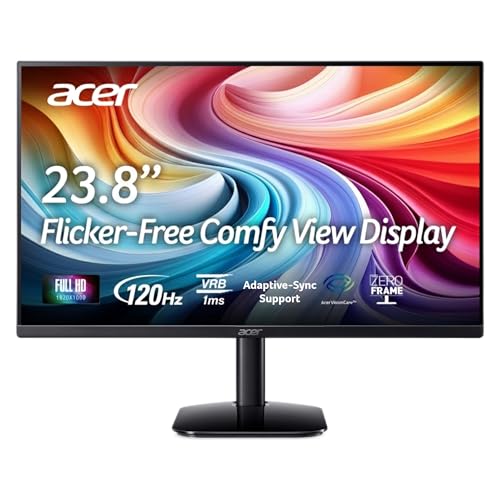
The Acer KA242Y G0bi is the newest 24-inch entry in this collection and the sharpest budget option at this size. A 23.8-inch IPS panel with 120Hz, 99% sRGB, Adaptive-Sync, a 1ms VRB response time, and VESA compliance for under $85 is a strong package.
Compared to the KB242Y reviewed above, the KA242Y is functionally nearly identical but priced lower at this writing. The refresh rate and panel type match; the VESA footprint (100x100mm) is the same. Where the KB242Y has the longer sales history, the KA242Y is the newer production model and includes a pixel pitch of 0.275mm, which is standard at this size. An HDMI cable is included in the box.
The tilt range of -5 to 25 degrees is slightly more generous than some competing models in this range. The stand is still tilt-only, which is expected here, and VESA compatibility means you can add an arm without buying a new monitor.
Pros:
Cons:
Best for: First-time monitor buyers or anyone setting up a second screen who wants the full IPS 120Hz experience at the lowest possible price.
Check current price on Amazon →

The Acer KB220Q H2bi is the 21.5-inch option here, and its purpose is clear: maximum screen per dollar for setups where desk space is genuinely constrained. The ZeroFrame design minimizes the footprint, the panel is IPS with 99% sRGB and Adaptive-Sync, and 100Hz gives it a real edge over older 60Hz monitors at this size.
At 21.5 inches, the 1920×1080 resolution looks sharp because the pixel density is actually higher than on a 27-inch 1080p panel. Text is crisp, icons are tight, and the smaller footprint pairs well with laptop setups where the external display supplements rather than dominates. The ZeroFrame design allows two of these to sit side by side with minimal visual gap, which makes the KB220Q an appealing secondary panel for a dual-monitor configuration anchored by a larger primary screen.
For the money, this is hard to fault. The limitation is simply size: if you have the desk space for a 24-inch or 27-inch monitor, one of the larger options on this list will deliver more value.
Pros:
Cons:
Best for: Laptop users who want a compact external display, buyers with limited desk space, or anyone setting up a low-cost secondary monitor.
Check current price on Amazon →

The Acer SB273 G0bi gets you 27 inches of IPS display at a price closer to what most 24-inch monitors cost. The 120Hz refresh, 1ms VRB response, 99% sRGB coverage, and Adaptive-Sync support match the KB272's core specs. The ultraslim SB chassis makes it lighter and thinner, which is part of what justifies its positioning.
The honest limitation is resolution: at 27 inches, 1080p is noticeably softer than 1440p at the same size. If you sit more than an arm's length from the screen, the pixel density of 1080p at 27 inches is just acceptable. Up close at normal viewing distances, particularly for text-heavy work, the softness becomes harder to ignore. The KB272 covered earlier has essentially the same resolution and refresh at a lower price, which puts the SB273 in a narrower niche.
Where it earns its place is for buyers who specifically want the slimmer SB chassis design and its lighter weight (10 lbs) in a 27-inch format. Paired with a VESA arm, the thin body disappears into the mount and the result looks genuinely clean.
Pros:
Cons:
Best for: Buyers who want the biggest screen size at the most accessible price and prioritize physical size over resolution sharpness.
Check current price on Amazon →
The right Acer monitor depends almost entirely on how you weight screen size, resolution, and refresh rate against each other, because those three specs control the price more than anything else.
All but one monitor in this guide uses an IPS panel. IPS is the right default: accurate colors, consistent viewing angles at 178 degrees, and no dramatic color shift when you move your head. The exception here is the Nitro KG241Y, which uses a VA panel. VA panels produce deeper blacks and better contrast than IPS, which is an advantage in a dark gaming room where the monitor is the primary light source. The cost is narrower viewing angles and some backlight bleed at the edges. For productivity and multi-person viewing, IPS. For gaming in a dark space where contrast depth matters more than color precision, VA is worth considering.
This is the decision most buyers get wrong. At 24 inches, 1080p is still sharp at normal viewing distances. At 27 inches, the same resolution spreads across a larger area and the softness becomes apparent, especially for text. If you're buying a 27-inch monitor for regular work use, stepping up to QHD (2560×1440) is worth the cost difference. The jump from the KB272 (1080p, 27") to the KG271U (1440p, 27") costs roughly $55 more and delivers a noticeably sharper image. If budget forces 1080p at 27 inches, sit slightly further from the screen than you would with a 24-inch panel.
| Refresh Rate | Best Matched Use Case |
|---|---|
| 100Hz | Office work, browsing, light media consumption |
| 120Hz | General use, casual gaming, smooth scrolling |
| 165Hz | Serious gaming where frame-rate margins matter |
| 180Hz | High-performance gaming with QHD at this price |
| 240Hz | Competitive gaming where every millisecond counts |
Buying above 120Hz makes the most sense when your GPU can actually saturate the panel. A mid-range GPU hitting 90-120fps in your main game doesn't benefit from a 240Hz display. AMD FreeSync (and its variants) help here: they let the monitor sync to whatever frame rate your GPU produces, eliminating tearing even below the panel's maximum.
Most monitors in this roundup offer tilt-only stands. That's the trade-off at budget price points. For a dedicated workspace where you sit at the same height every day, tilt-only is workable. For shared desks, standing desk setups, or setups where portrait orientation matters, the Nitro XV272U and XV271U offer full height adjustment, swivel, and pivot on their ergostands without requiring an aftermarket arm. If you already own a quality monitor arm, VESA compatibility (100x100mm on every monitor in this list) removes the stand ergonomics question entirely.
HDMI 2.0 handles 2560×1440 at up to 144Hz or 1920×1080 at higher rates. For anything above 144Hz at QHD, you need DisplayPort. The budget monitors here use HDMI and VGA, which is fine for single-PC setups at standard refresh rates. The gaming-focused Nitro models include DisplayPort specifically to support their higher refresh ceilings. If you're buying a 165Hz or 180Hz monitor, verify that you're connecting it via DisplayPort rather than HDMI to get the full rated speed.
For most home office setups, the Acer KB272 is the strongest choice: 27 inches of IPS, 99% sRGB for accurate color on documents and design work, and a 120Hz panel that makes scrolling through long documents noticeably more comfortable than 60Hz. If desk space is limited, the KB242Y at 23.8 inches has the same core specs in a smaller footprint.
Yes, specifically the VA and IPS panels with higher refresh rates. The Nitro KG241Y at 165Hz is the budget gaming pick. The Nitro KG271U and XV272U step up to QHD and 180-240Hz for more demanding setups. All Nitro monitors include AMD FreeSync support, which prevents screen tearing when frame rates fluctuate below the panel's maximum.
For casual gaming and media, yes. For productivity work involving text-heavy applications, 1080p at 27 inches has lower pixel density than most people prefer. If your primary use is spreadsheets, code editing, or document work, QHD (2560×1440) is a meaningful upgrade at 27 inches and the Nitro KG271U or XV271U provide it without a dramatic price jump.
Standard Adaptive-Sync (FreeSync compatible) synchronizes the monitor's refresh rate with your GPU's output to eliminate tearing. AMD FreeSync Premium adds a requirement for low-framerate compensation (LFC), which kicks in when frame rates drop below the monitor's minimum supported sync range. FreeSync Premium keeps the image smooth even during the most demanding game scenes. The Nitro KG241Y uses FreeSync Premium; the budget IPS monitors use standard Adaptive-Sync.
Yes. Acer's Adaptive-Sync implementation is compatible with NVIDIA G-Sync Compatible mode on supported cards. The Nitro KG241Y is explicitly AMD FreeSync Premium certified, but it also functions in adaptive sync mode with NVIDIA GPUs that support G-Sync Compatible. Check NVIDIA's list of G-Sync Compatible monitors for specific certification status.
All ten monitors in this roundup support VESA 100x100mm mounting. If you're considering a monitor arm or wall mount, any of these panels will work. An aftermarket arm is especially worthwhile for the budget monitors that have tilt-only stands, since it adds height adjustment and cable management without replacing the display.
Any of the zero-frame models work well side by side because the thin bezels minimize the visual gap between screens. The KB220Q H2bi at 21.5 inches is a common secondary panel choice when a smaller screen supplements a primary 27-inch display. Two KB242Y or KA242Y panels at 23.8 inches create a symmetrical dual setup with an almost seamless border between them.
The best Acer monitors in 2026 span a wide enough range that the right pick depends almost entirely on how you plan to use the screen. For most buyers, the Acer KB272 is the answer: a 27-inch IPS panel with 120Hz and 99% sRGB at a price that makes the decision easy. It's the most popular option in this category for a reason.
Gamers who want QHD should look at the Nitro KG271U first. The 180Hz ceiling, DCI-P3 95% coverage, and sharp 1440p resolution at 27 inches make it the most versatile display in the collection for anyone who games and creates. The Nitro XV272U sits above it for competitive players who specifically need 240Hz and full ergonomic stand adjustability. If budget is the primary constraint, the KA242Y G0bi delivers the core IPS 24-inch experience at the lowest cost in the lineup.
If you're genuinely unsure which to choose: go with the KB272 if 27 inches is the size you want, and the KA242Y G0bi if you'd rather stay at 24 inches and keep costs low. Both are strong purchases with no meaningful weaknesses for the price.
This article contains Amazon affiliate links. We may earn a small commission on qualifying purchases at no extra cost to you.


