Physical Address
304 North Cardinal St.
Dorchester Center, MA 02124
Physical Address
304 North Cardinal St.
Dorchester Center, MA 02124

Looking for the best Acer gaming monitors? We cover 9 top picks from budget 1080p to QD-OLED, so you can find the right screen for your setup.
Acer has quietly become one of the most consistent monitor brands for PC gamers who want real performance without paying flagship prices. The problem is there are a lot of Nitro models, and the naming scheme does not exactly help you tell them apart. A 27-inch QHD IPS panel with 180Hz and a 27-inch QHD IPS panel with 240Hz look identical in a spec table until you notice one costs $10 more and changes the entire calculus on buying the cheaper one. Meanwhile, Acer's Predator line sits in the background with a QD-OLED option that makes everything else look dim in comparison, literally.
The best Acer gaming monitors span a wide range of real use cases. At the budget end, you can get a solid 1080p IPS panel with a fast refresh rate for under $100. In the middle, 27-inch QHD panels hit the sweet spot between resolution and GPU demand. At the top, the Predator X27U brings quantum dot OLED to a price that still undercuts most competitors with the same panel technology. This guide covers all nine current picks so you can match the right monitor to your GPU, your game type, and your budget.
TL;DR: The Acer Nitro KG271U N3bmiipx is the best all-around pick for most gamers: 27-inch QHD IPS at 180Hz for a price that leaves room in the budget. The Acer Nitro XV272U W2bmiiprx steps up to 240Hz at the same price point for anyone running a capable GPU. The Acer Predator X27U is the one to get if you want QD-OLED and you're ready to spend for it. The Acer Nitro KG241Y M3biip is the sharpest budget option under $100.
| # | Product | Panel | Size | Resolution | Refresh Rate | Price | Best For |
|---|---|---|---|---|---|---|---|
| 1 | Acer Nitro KG271U N3bmiipx | IPS | 27" | 2560×1440 | 180Hz | $179.99 | Best overall |
| 2 | Acer Nitro XV272U W2bmiiprx | IPS | 27" | 2560×1440 | 240Hz | $179.99 | Competitive gaming |
| 3 | Acer Nitro XV271U M3bmiiprx | IPS | 27" | 2560×1440 | 180Hz | $169.99 | Budget QHD |
| 4 | Acer Nitro EDA270U Pbmiipx | VA | 27" | 2560×1440 | 180Hz | $199.99 | Curved immersion |
| 5 | Acer Nitro KG271 X1biip | IPS | 27" | 1920×1080 | 200Hz | $183.79 | 27" on a tight GPU |
| 6 | Acer Predator X27U W1bmiipprx | QD-OLED | 26.5" | 2560×1440 | 240Hz | $369.99 | Premium experience |
| 7 | Acer Nitro KG241Y Sbiip | VA | 23.8" | 1920×1080 | 165Hz | $109.99 | Budget VA gaming |
| 8 | Acer Nitro KG251Q X3biip | IPS | 24.5" | 1920×1080 | 200Hz | $99.99 | Fast 1080p under $100 |
| 9 | Acer Nitro KG241Y M3biip | IPS | 23.8" | 1920×1080 | 180Hz | $89.99 | Cheapest IPS option |
Prices change frequently. Check the link for the current Amazon price.
The best Acer gaming monitors for this list were chosen around the factors that actually determine whether a gaming monitor works well for real people, not just in a spec sheet comparison.

The Acer Nitro KG271U N3bmiipx is the monitor most people in this category end up buying, and it earns that position honestly. The 27-inch QHD IPS panel at 180Hz covers the majority of what gamers need without overcomplicating the decision. At 2560×1440, text is sharp, game environments have real depth, and you're not staring at pixel edges the way 1080p at 27 inches sometimes forces you to. The IPS panel keeps colors honest from any viewing angle, which matters if you're not always seated perfectly centered.
The 180Hz refresh rate via DisplayPort handles competitive titles without any visible judder, and AMD FreeSync Premium keeps the frame curve smooth even when your GPU dips. Response time is listed at up to 0.5ms GTG, which is fast enough for all but the most frame-obsessed esports players. Color coverage hits DCI-P3 95%, which puts this squarely in the territory of a monitor you could also use for light photo work without flinching. The zero-frame design keeps the footprint compact and makes multi-monitor setups cleaner.
Where it falls short: tilt is the only ergonomic adjustment you get. No height, no swivel, no pivot. If your desk height is fixed, that can be a real annoyance. A monitor arm fixes it, but it means spending more. The stand also occupies a fair amount of desk depth. For a monitor sitting at this price point, a full ergostand would have been a better call.
Pros:
Cons:
Best for: Gamers who want the best all-round monitor in the Acer Nitro line without pushing into premium pricing, particularly those pairing it with a mid-range GPU targeting 1440p.
Check current price on Amazon →

At identical pricing to the KG271U above, the Acer Nitro XV272U W2bmiiprx gives you 240Hz via DisplayPort instead of 180Hz, and a full ergostand in place of the tilt-only base. That combination makes this the more capable monitor for the same money, which is why it earns its place as the competitive gaming pick.
The 240Hz rate matters most in fast-twitch games where frame timing affects your reaction window. Titles like Valorant, CS2, or Apex Legends genuinely benefit from the difference between 180Hz and 240Hz if your GPU can sustain the frames. The panel is the same QHD IPS technology, covering sRGB 99% and carrying DisplayHDR 400 certification, which adds contrast range beyond a standard SDR monitor. The ergostand adjusts for height (4.7 inches of range), swivels 360 degrees, and pivots plus or minus 90 degrees for portrait mode. That flexibility is something you notice on day two, not day one, but it compounds over time.
One honest caveat: HDMI 2.0 ports cap out at 144Hz on this monitor. If your GPU or console only has HDMI output, you won't hit the full 240Hz. DisplayPort 1.4 is the only path to the top refresh rate. The built-in 2-watt speakers are better than nothing but not much more than that. This monitor also ships with both DisplayPort and HDMI cables, which is a small but appreciated touch.
Pros:
Cons:
Best for: Competitive PC gamers with a capable GPU (RTX 4070 class or higher) who want 240Hz at 1440p without stepping up to Predator pricing.
Check current price on Amazon →

The Acer Nitro XV271U M3bmiiprx is the less-talked-about QHD 27-inch option in this lineup, but it makes a credible argument when you look closely. You get a 27-inch WQHD IPS panel at 180Hz with DCI-P3 95% color coverage and a full ergostand, and it comes in about $10 cheaper than the KG271U above.
The ergostand here matches the XV272U: 4.7 inches of height adjustment, 360-degree swivel, plus or minus 90-degree pivot. The 180Hz refresh rate (via DisplayPort; HDMI caps at 144Hz) is plenty for most genres. Color accuracy at DCI-P3 95% puts it in the same league as the KG271U for photo and video work on the side. Two built-in 2-watt speakers and an audio out port round out the package.
What makes the XV271U slightly less compelling than the KG271U at nearly the same price is that the KG271U is a newer release and carries stronger real-world demand. The XV271U is the right call if you find it on sale, or if the full ergostand is a priority over having the freshest version of the same spec.
Pros:
Cons:
Best for: Desk setups where monitor height and swivel adjustment are non-negotiable, paired with a mid-range GPU targeting 1440p at 144 to 180Hz.
Check current price on Amazon →

The Acer Nitro EDA270U Pbmiipx is the only curved panel in this roundup, and it earns its place for anyone who has ever gamed on a curved screen and found it harder to go back than they expected. The 1500R curve radius on a 27-inch WQHD panel is a moderate bend, noticeable without being dramatic, and it places the screen edges closer to your peripheral vision without the exaggeration of a 1000R ultra-wide.
The VA panel is the meaningful difference from every other 27-inch option here. VA technology delivers stronger native contrast ratios than IPS. In darker game environments, like horror titles, space games, or noir-aesthetic shooters, the blacks look genuinely dark rather than the washed-out grey that IPS panels show in dim conditions. The trade-off is viewing angle sensitivity: VA panels lose some color accuracy when viewed from the side, which matters less for a single-user gaming setup than it would for shared viewing. Response time is rated at 1ms VRB, which is the motion-blur-reduction mode rather than true pixel response, so the raw panel speed is slower than the IPS options above. Fast-moving competitive titles at 180Hz show this difference slightly.
The built-in 2-watt stereo speakers and an audio out port cover basic needs. The stand tilts from minus 5 to plus 20 degrees but does not offer height or swivel adjustment. For a monitor at this price, an ergostand or at minimum a height-adjustable stand would have been more appropriate.
Pros:
Cons:
Best for: Single-player gamers who prefer the wrap-around feel of a curved screen and prioritize deep blacks over the razor-sharp response of a flat IPS panel.
Check current price on Amazon →

The Acer Nitro KG271 X1biip sits in an unusual spot. It's a 27-inch IPS panel at 1080p running 200Hz, and the obvious question is why you'd pick 1080p at 27 inches when a QHD panel is right there. The answer is GPU load. A 1080p 200Hz target asks about a third less from your graphics card than 1440p at the same frame rate. Older cards, mid-range current-gen GPUs, and console users who connect via HDMI all benefit from the lower resolution ceiling.
The panel is IPS with 99% sRGB coverage, AMD FreeSync Premium, and a 0.5ms GTG response time. At 200Hz, the motion clarity on a responsive IPS panel is real and visible compared to a standard 60 or 144Hz screen. The zero-frame design keeps it looking sharp on a desk. The stand is tilt-only, which is a recurring theme at this price tier in Acer's lineup.
Pixel density at 27 inches and 1080p is 82 PPI, noticeably lower than the QHD models above at 109 PPI. Up close at a normal desk distance, individual pixels are visible in fine text. If you game from two feet back in a large room this matters less; if you also do web browsing and document work, you'll feel the difference. The monitor is clearly aimed at gaming primarily, not productivity.
Pros:
Cons:
Best for: Gamers on mid-range GPUs (RTX 3060 class or equivalent) who want a 27-inch screen with fast refresh but don't want to push the card to hit high 1440p frame rates.
Check current price on Amazon →

The Acer Predator X27U W1bmiipprx is a different category of monitor from everything else on this list. The 26.5-inch quantum dot OLED panel is not a spec upgrade over IPS. It is a fundamentally different viewing experience, and the gap is wide enough that it's hard to go back once you've spent an evening in front of it.
QD-OLED delivers per-pixel lighting with true 10-bit color depth, which means blacks are actual black and highlights are genuinely bright at the same moment on screen. The DCI-P3 99% color gamut and Delta E under 2 put color accuracy in a tier that IPS panels at three times the price of the cheaper Nitros cannot match. The 240Hz refresh at 0.03ms response time makes this a serious esports display as well as a showcase panel for cinematic single-player games. Two DisplayPort 1.4 and two HDMI 2.1 ports give you flexibility for PC plus console or dual-PC setups.
The full ergostand handles height, tilt, swivel, and pivot. The ZeroFrame design removes the bezel. Image retention protection is built in, which addresses the one real weakness of OLED technology: extended static elements like HUDs and taskbars can leave ghost images without it. At 26.5 inches, the panel is slightly smaller than the 27-inch IPS models above, but it fills more of your visual attention at a normal desk distance because of the contrast and brightness response.
At the price, the honest question is: does this outperform a comparable QD-OLED from another brand? For most PC gamers, the Predator X27U competes well on specs alone without any brand loyalty required. If you're in the market for a QD-OLED gaming monitor under $400, this deserves serious consideration against any alternative.
Pros:
Cons:
Best for: Gamers who want the best-looking monitor Acer makes and are willing to pay for the QD-OLED panel, particularly those who play visually rich single-player titles alongside competitive multiplayer.
Check current price on Amazon →

The Acer Nitro KG241Y Sbiip is the VA option at the budget end of this lineup, and it fills a specific niche. The 23.8-inch VA panel at 165Hz delivers stronger contrast than any of the 1080p IPS panels in this group. If you game in a room that isn't perfectly darkened and the deep blacks of a VA panel matter to you, this is the budget pick that gets you there.
VA at 165Hz is a reasonable gaming spec. The 1ms VRB response time applies to the motion blur reduction mode rather than raw pixel transition speed, so ghosting is present on fast motion at a level that pure IPS avoids. It's not disqualifying for most game types, but it's a real trade-off versus the IPS alternatives. The panel covers NTSC 72%, which puts it below sRGB 99% in color accuracy terms. HDR Ready certification is essentially cosmetic at this end of the monitor market.
At 23.8 inches and 1080p, pixel density is 92 PPI, which is noticeably sharper than the 27-inch 1080p options in this lineup. The stand tilts from minus 5 to plus 15 degrees. Connectivity is DisplayPort 1.2 and dual HDMI 2.0 with a cable included. VESA 100x100mm mounting is supported.
Pros:
Cons:
Best for: Budget gamers who prioritize contrast depth over raw speed, or those who frequently play in varied lighting conditions where deep blacks make a visible difference.
Check current price on Amazon →

The Acer Nitro KG251Q X3biip is the fastest 1080p monitor in this lineup at 200Hz, and it sits at the budget end of the pricing range. That combination of IPS panel, 200Hz refresh, and 0.5ms response time makes it one of the most straightforward arguments for spending less and getting more where raw motion performance is concerned.
At 24.5 inches and 1080p, you get 90 PPI, slightly better than the 27-inch 1080p options and close to the 23.8-inch panels. AMD FreeSync Premium keeps frames locked. The zero-frame design and IPS panel make this a clean, accurate display. The 200Hz rate over DisplayPort 1.2 means a mid-range GPU can sustain a full-refresh experience in less demanding competitive titles without much effort.
The practical trade-off for the price is the stand: tilt only, with no height or swivel adjustment. At this tier that's expected, and a VESA-compatible arm works with the 100x100mm mounting pattern if you need more flexibility.
Pros:
Cons:
Best for: Competitive gamers on a hard budget who want the fastest IPS panel they can buy without spending over $100.
Check current price on Amazon →
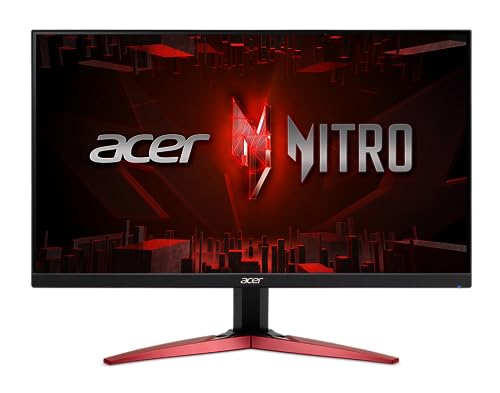
The Acer Nitro KG241Y M3biip is the cheapest monitor in this group and the one that makes the clearest argument that you don't have to spend much to get a genuinely good gaming panel. At 23.8 inches, IPS, 180Hz, 99% sRGB, and 0.5ms GTG response time, the spec sheet would be respectable at twice the price.
The jump from the VA KG241Y Sbiip to this IPS model is the right move for anyone who values color accuracy and motion clarity over deep blacks. Ghosting is minimal, colors read accurately within sRGB, and HDR10 support means it can receive an HDR signal even if it won't render it to DisplayHDR 400 standards. The zero-frame design keeps it looking modern. Connectivity is DisplayPort 1.2 and dual HDMI 2.0, with a cable included.
The same stand limitation applies here as everywhere else at this price point: tilt-only, no height adjustment. For a dedicated gaming desk where the monitor height is set once and left, this matters less. Anyone who moves the monitor around or shares a desk should budget for a mount.
Pros:
Cons:
Best for: First-time gaming monitor buyers or secondary setup users who want a fast, color-accurate IPS panel at the lowest reasonable price point.
Check current price on Amazon →
Acer's gaming monitor lineup is wide enough that the choice between two models at the same price can genuinely matter. These are the factors worth thinking through before you commit.
IPS panels deliver better color accuracy, wider viewing angles, and faster pixel response. VA panels trade those traits for notably stronger contrast ratios. In practical terms, this means IPS handles motion more cleanly in fast-paced games, while VA makes dark scenes look genuinely dark rather than grey.
For competitive multiplayer, IPS is the clearer choice. For single-player titles with atmospheric lighting (horror games, space exploration, RPGs), VA's contrast advantage becomes visible and appreciated. Most of the monitors in this lineup are IPS, which reflects the market's preference for general-purpose gaming use.
QHD (2560×1440) is the right target for most modern gaming setups with a current-generation GPU. It offers a substantial visual upgrade over 1080p at 27 inches, where the pixel density difference is obvious in everyday use. The catch is that maintaining high frame rates at QHD requires a capable card. An RTX 3060 or RX 6600 can hit 144Hz in many titles at 1440p; sustaining 180 or 240Hz in demanding games requires something closer to an RTX 4070 or RX 7800 XT.
1080p monitors still make sense when your GPU is older or mid-range, or when you're playing games that favor high frame rates over visual fidelity. At 23.8 or 24.5 inches, 1080p pixel density is acceptable; at 27 inches, it starts to show.
| Refresh Rate | What It Suits |
|---|---|
| 144 to 165Hz | General gaming; noticeable improvement over 60Hz for any genre |
| 180Hz | Competitive play and fast single-player; visible improvement over 165Hz in motion-heavy games |
| 200Hz | Strong competitive spec; requires a GPU that can sustain the frames |
| 240Hz | Esports and competitive priority; best when paired with a high-end GPU at 1080p or mid-high at 1440p |
The refresh rate on the box is the ceiling, not the typical operating point. A 240Hz monitor running at 120fps because your GPU can't push more is no different from a 144Hz monitor at the same 120fps. Match the refresh rate to what your GPU can actually deliver.
Tilt-only stands are the default at the budget and mid tiers in Acer's Nitro line. The XV272U and XV271U are notable exceptions with full ergostands. If monitor height and angle matter to you (and they matter more than most people realize until they develop neck strain), either pick one of the full-ergostand models or budget an additional $25 to $40 for a VESA monitor arm. Every Acer monitor in this guide supports VESA mounting.
All monitors in this lineup support AMD FreeSync Premium. Most limit HDMI ports to 144Hz maximum, with full refresh rate available only via DisplayPort. If you're connecting from a PlayStation 5 or Xbox Series X, HDMI 2.1 support on the Predator X27U is the only option here that handles 4K 120Hz from consoles. For pure PC gaming via DisplayPort, any model in this lineup works at its rated refresh rate.
The Acer Nitro KG271U N3bmiipx and XV272U W2bmiiprx both land at or under $180 and cover the core of what most gamers need: 27-inch QHD IPS panels with fast refresh rates and AMD FreeSync Premium. The XV272U adds 240Hz and a full ergostand; the KG271U has newer availability and slightly stronger DCI-P3 color coverage. Either one is a strong choice in this price range.
Nitro is Acer's performance-value line, covering IPS and VA panels from 1080p to QHD at prices most gamers can justify. Predator is the premium line, with the X27U in this group bringing QD-OLED, higher build quality, and a full port suite at a significantly higher price. Predator is better on paper in every measurable spec; Nitro is better value for the majority of gaming setups.
Yes. AMD FreeSync Premium on this monitor is compatible with Nvidia GPUs through Nvidia's G-Sync Compatible certification process. Variable refresh rate will function over DisplayPort with a G-Sync Compatible Nvidia card without any extra settings change required.
Both are 27-inch QHD IPS panels at 180Hz with full ergostands and DCI-P3 95% color coverage. The XV272U is the newer model, carries DisplayHDR 400 certification, supports 240Hz via DisplayPort 1.4, and includes sRGB 99% coverage. If both are similarly priced, the XV272U is the cleaner buy. If the XV271U is on sale at a meaningful discount, it remains a capable monitor for the same use cases.
Most Acer Nitro monitors use HDMI 2.0, which supports 1080p at 120Hz or 1440p at lower frame rates from current-gen consoles. The Predator X27U is the only monitor in this group with HDMI 2.1, enabling higher bandwidth for consoles targeting 120Hz at QHD. For PS5 or Xbox Series X gaming at the highest performance the console supports, the X27U is the right pick in this lineup.
The EDA270U Pbmiipx curved model, the XV272U, and the XV271U all include 2-watt stereo speakers. The rest of the lineup either omits speakers entirely or routes audio through a 3.5mm output jack only. At 2 watts, these speakers serve as a fallback rather than a primary audio solution; a headset or external speakers will deliver meaningfully better sound.
The Predator X27U leads with DCI-P3 99% and Delta E under 2, making it the genuine dual-use pick for photographers and video editors. Among the Nitro line, the KG271U N3bmiipx and XV271U M3bmiiprx both cover DCI-P3 95%, which is adequate for most color-critical applications short of professional production work. Any of these three will serve a hybrid gaming and creative workflow well.
The best Acer gaming monitors in this lineup spread across a wider range than a quick spec comparison suggests. The Acer Nitro KG271U N3bmiipx remains the pick most people should start with: a 27-inch QHD IPS panel with AMD FreeSync Premium, 180Hz, and DCI-P3 95% coverage at a price that does not require justification. For anyone with a GPU that can push 240Hz at 1440p, the XV272U W2bmiiprx is worth the nearly identical price for the refresh rate bump and the full ergostand.
The Predator X27U deserves its own category. QD-OLED at this price point, with 240Hz and a full port selection, is a strong argument if you're ready to spend at that tier. Budget buyers have three credible IPS options below $110, with the KG241Y M3biip at $89.99 being the most value-dense panel in the group.
If you're still undecided on which of the best Acer gaming monitors to pick, match the resolution to your GPU first, then let the refresh rate and stand ergonomics break the tie from there.
This article contains Amazon affiliate links. We may earn a small commission on qualifying purchases at no extra cost to you.


