Physical Address
304 North Cardinal St.
Dorchester Center, MA 02124
Physical Address
304 North Cardinal St.
Dorchester Center, MA 02124

Looking for the best computer monitors in 2026? We've tested 9 top picks from Dell, Samsung, Philips, and more to help you choose the right screen.
Choosing a monitor is one of the most consequential purchases you'll make for a desk setup, and it's one of the easiest to get wrong. Buy too small and you'll resent every spreadsheet. Buy the wrong panel type and you'll notice the color shift every time you tilt your head. Go cheap on refresh rate and the smoothness you didn't know you were missing will haunt you the first time you sit at someone else's screen.
The best computer monitors in 2026 cover a wide range: from no-fuss 22-inch budget options under $70, to 27-inch all-rounders that work for both office tasks and casual gaming, to a 34-inch ultrawide that makes running two windows side-by-side feel like cheating. This list covers the full spread, with picks from Dell, Samsung, Philips, Sceptre, and Amazon Basics.
Whether you need a second monitor to extend your laptop, a dedicated gaming display on a tight budget, or a wide-format screen for creative work, one of these nine picks fits the job.
TL;DR: The Dell SE2426H is the smartest all-around buy at this price tier: 144Hz, IPS panel, TUV-certified eye care, and a proper 1ms response time. The Philips 241V8LB is the one most people end up with for good reason: great VA contrast, near-frameless design, and a price that's hard to argue with. The Samsung ViewFinity S50GC is the ultrawide to buy if you want to replace two monitors with one.
| # | Product | Size | Panel | Refresh Rate | Price | Best For |
|---|---|---|---|---|---|---|
| 1 | Dell SE2426H | 23.8" | IPS | 144Hz | $99.99 | Best overall |
| 2 | Philips 241V8LB | 23.8" | VA | 100Hz | $79.99 | Best value 24" |
| 3 | Samsung S30GD 24" | 24" | IPS | 100Hz | $79.99 | IPS at a budget price |
| 4 | Philips 271V8LB | 27" | VA | 100Hz | $99.99 | Budget 27" pick |
| 5 | Samsung 32" LS32B304 | 32" | — | 75Hz | $149.99 | Large desk screen |
| 6 | Samsung ViewFinity S50GC | 34" | — | 100Hz | $208.99 | Ultrawide multitasking |
| 7 | Philips 221V8LB | 21.5" | VA | 100Hz | $69.99 | Compact second screen |
| 8 | Sceptre E225W-FW144 | 22" | — | 144Hz | $67.97 | Budget gaming monitor |
| 9 | Amazon Basics 27" IPS | 27" | IPS | 75Hz | $99.97 | Affordable 27" IPS |
Prices change frequently. Check the links for current pricing.
Not every spec on a monitor product page tells you something useful. These are the factors that actually matter:
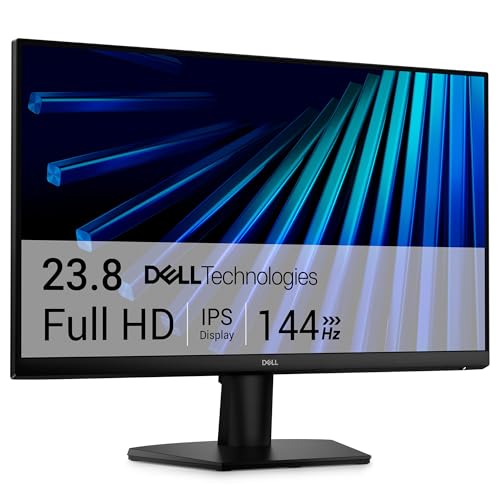
The Dell SE2426H is the pick most people should start with. At 23.8 inches with a 144Hz IPS panel and a 1ms MPRT response time, it sits at the intersection of everything a general-purpose monitor should do well. The IPS panel means color accuracy holds up whether you're staring straight on or from an angle across the desk, which matters more than most buyers expect until they've used a monitor with poor off-axis performance.
That 144Hz refresh rate is the real standout at this price point. Most monitors in this tier cap at 100Hz; the Dell gives you 44 more frames per second of headroom, which shows up in smoother cursor movement, more fluid video, and a noticeably better feel in any game that can push the frame rate. Pair that with AMD FreeSync support and you eliminate the tearing that plagues fixed-rate panels during fast motion.
Dell also earned TUV Rheinland 3-star certification here for eye comfort, covering both blue light reduction and flicker-free operation. That's not a marketing checkbox. It means a third-party lab signed off on the eye-comfort claims. The ultra-thin bezels and dual HDMI inputs round out a spec sheet that punches well above what you'd expect for the price. If you're building a clean two-monitor setup, two of these line up almost seamlessly. The one thing it's missing: no built-in speakers, so plan accordingly.
Pros:
Cons:
Best for: Anyone who wants one monitor for both work and gaming and doesn't want to compromise on either.
Check current price on Amazon →

The Philips 241V8LB is consistently one of the most-bought monitors in this size class, and the reasons are straightforward. At 23.8 inches with a VA panel, 100Hz refresh rate, and a near-frameless three-sided design, it covers everything a desk worker or casual viewer needs without asking you to spend extra for features you won't use.
The VA panel is the key distinction from an IPS screen. Blacks look genuinely black, not dark gray, and the 16.7 million color reproduction with high contrast gives video content a richness that flat IPS panels at this price tier can't always match. The 178/178 degree viewing angle is better than older VA designs, though color accuracy still shifts a bit further off-axis than IPS. If you sit directly in front of it, you won't notice.
The virtually bezel-free three-sided design makes this an obvious candidate for multi-monitor setups. Two or three of these side-by-side create an almost seamless panoramic view without the thick plastic borders you used to accept on budget monitors. Philips also includes their EasyRead mode, which boosts contrast and reduces blue light for document-heavy work. The four-year advance replacement warranty is worth calling out: if something goes wrong, Philips ships a replacement before you return the defective unit. That's a rare commitment at this price.
Pros:
Cons:
Best for: Office workers and students who want a clean, reliable 24-inch monitor at a genuinely low price, especially in a two-monitor arrangement.
Check current price on Amazon →

The Samsung S30GD makes a specific case: IPS panel color accuracy at the same price as most VA monitors in this size. That trade-off is real. You're giving up the deeper contrast you'd get from a VA screen, but gaining consistent, wide-angle color that looks the same from every seat at the desk.
Samsung's Game Mode is a practical addition that lets you quickly optimize contrast for spotting details in darker game scenes, but it's just as useful for video editors or anyone working with images who wants a one-touch preset. The 100Hz refresh rate and blue-light reduction cover the basics. What separates this from the Philips 241V8LB nearby in price is purely the panel type: choose the Samsung if consistent off-axis color is more important to you than contrast depth.
The design is genuinely slim, with ultra-thin bezels that keep the visual footprint small. At 5.29 pounds, it's also notably lighter than most monitors in this size class, which matters if you're regularly repositioning your setup or using a lighter monitor arm.
Pros:
Cons:
Best for: Buyers who prioritize color accuracy and off-axis viewing over high contrast, especially those who share a screen with others nearby.
Check current price on Amazon →

The Philips 271V8LB solves one problem cleanly: getting a 27-inch screen without spending premium-tier money. The jump from 24 to 27 inches is a meaningful productivity upgrade, especially if you work with multiple windows open at once or just want video content to feel more cinematic. At 27 inches, you're covering more of your natural field of view, and the three-sided frameless design maximizes the visible panel area.
Everything said about the Philips 241V8LB above applies here, scaled up. The same VA panel technology delivers that high-contrast look that makes video and photography pop. The same EasyRead mode reduces fatigue on long document sessions. The same four-year advance replacement warranty backs the purchase. Where the 27-inch version diverges is in how the panel size interacts with the Full HD resolution. At 1920×1080 on a 27-inch screen, pixel density drops compared to a 24-inch at the same resolution. If you sit close to your monitor, you may notice the image looks softer than you'd like, particularly with small text. From a normal viewing distance of 24 to 30 inches, it's fine for most users.
The 178/178 degree viewing angle and 100Hz refresh rate hold up well for the price. This is the pick for someone who knows they want 27 inches, doesn't need the higher refresh rate of the Dell, and wants to keep the cost as low as possible.
Pros:
Cons:
Best for: Budget-conscious buyers stepping up to 27 inches for the first time who primarily do office work, browsing, and video streaming.
Check current price on Amazon →

The Samsung LS32B304 is the answer when 27 inches still feels like you're squinting. At 32 inches, content fills your field of view in a way that smaller monitors simply can't. Spreadsheets stay legible at a comfortable font size without scrolling as much. Video feels like an event rather than background noise. And a 32-inch borderless display in a multi-monitor setup creates a genuinely panoramic workspace.
The three-sided borderless design is particularly well-executed here. Samsung's engineering on the bezel brings the display edges close enough together that two of these side-by-side look nearly seamless. AMD FreeSync syncs the monitor's refresh rate to your graphics card's output, eliminating tearing during video and games. The 75Hz refresh rate is the one trade-off at this size: it's enough for smooth general use and video, but serious gamers will want a higher refresh rate monitor instead.
The Eye Saver Mode and Flicker Free technology cover extended use sessions, and the Game Mode brings out shadow detail in darker gaming scenes. This is a mid-tier buy that sits in a genuinely useful gap between entry-level 27-inch monitors and premium curved screens.
Pros:
Cons:
Best for: Workers who spend long hours on spreadsheets, documents, or split-screen multitasking, and want screen real estate without paying ultrawide prices.
Check current price on Amazon →

The Samsung ViewFinity S50GC is a different category of monitor. At 34 inches with a 21:9 Ultra WQHD aspect ratio, it replaces a two-monitor setup on a single screen and adds resolution that makes that extra width actually usable. Ultra WQHD (3440×1440, though Samsung lists this as Ultra WQHD in the product description) provides enough horizontal resolution that splitting the screen into two side-by-side windows gives each one space comparable to a full 1080p monitor.
HDR10 support is meaningful here in a way it isn't on smaller 1080p screens. With over a billion displayable colors compared to the 16.7 million you get from standard SDR technology, content that was mastered in HDR actually looks different on this monitor. Darker scenes have more shadow detail. Bright highlights punch harder. The ambient light sensor adjusts screen brightness automatically based on your room lighting, which sounds minor but noticeably reduces fatigue over a long workday.
The PBP (Picture by Picture) and PIP (Picture in Picture) modes let you connect two sources simultaneously and view them at the same time, which matters for anyone who switches regularly between a laptop and a desktop, or monitors a second system while working on the primary one. At 100Hz with AMD FreeSync, it handles gaming competently too. The static contrast ratio of 3000:1 is strong, and the virtually bezel-free design means dual-monitor users who switch to this screen won't miss the extra monitor as much as they expect.
At this price tier, the S50GC is one of the most practical ways to spend money on a monitor upgrade. The jump from a standard 24-inch screen to this ultrawide changes how work feels at a desk in a way that a 27-inch or 32-inch replacement generally doesn't.
Pros:
Cons:
Best for: Power users, content creators, and anyone tired of managing cable clutter from a two-monitor setup who wants one wide, high-resolution screen to handle everything.
Check current price on Amazon →

The Philips 221V8LB occupies a specific niche: a compact, budget-priced second monitor or a primary screen for a small desk. At 21.5 inches viewable, it takes up less desk real estate than a 24-inch while delivering the same 100Hz refresh rate and VA panel performance. The addition of Adaptive-Sync is a meaningful upgrade over the 241V8LB in that regard: if you're using this as a secondary gaming display or a streaming screen, tearing is eliminated without spending more.
The 178/178 degree viewing angle and 16.7 million colors from the VA panel punch above what you'd expect at this size and price. Philips includes the same four-year advance replacement warranty on the 221V8LB as on the larger models, which provides solid peace of mind for a monitor this affordable.
There's nothing flashy about this monitor. It does what a clean, well-built budget display should do, quietly and reliably. For students on a tight budget, small home office setups, or anyone adding a second screen to an existing desk, it's hard to beat.
Pros:
Cons:
Best for: Students, home office users, or anyone adding a small, reliable second monitor to an existing setup.
Check current price on Amazon →

The Sceptre E225W-FW144 makes a direct pitch to budget gamers: 144Hz for under $70. That refresh rate at that price is the single reason to consider this monitor, and it's a genuinely good reason. Fast-paced games feel fundamentally different at 144Hz compared to 60Hz or even 100Hz. If you have a GPU capable of pushing frame rates into the 100-plus range and you're playing on a 60Hz screen, you're leaving most of that performance on the floor.
Sceptre also includes built-in speakers, which stands out in a category where even monitors costing twice as much often skip them. They're not going to compete with dedicated audio, but for voice calls, casual YouTube viewing, or gaming when headphones aren't convenient, having speakers built in is genuinely useful on a budget setup.
The Blue-Light Shift technology and minimal bezel design cover the practical bases. The near-frameless screen pairs well with a second monitor. Both HDMI and DisplayPort are present, which matters: DisplayPort handles 144Hz without the bandwidth limitations that HDMI can create at higher refresh rates.
The trade-off is that Sceptre monitors aren't as well-engineered as Dell or Samsung equivalents, and the stand feels less stable. For a secondary gaming display or a bedroom monitor, that's acceptable. For a primary productivity screen you'll stare at for eight hours a day, the Dell SE2426H spends a bit more for noticeably better build quality.
Pros:
Cons:
Best for: PC gamers on a strict budget who want 144Hz and can live with a less polished build than name-brand alternatives.
Check current price on Amazon →

The Amazon Basics 27-inch IPS Monitor does something none of the other 27-inch monitors on this list do: it includes an adjustable stand, built-in speakers, and a USB-friendly port lineup, at a price that undercuts most branded alternatives at this screen size.
The IPS panel delivers accurate, wide-angle color reproduction, the same fundamental advantage you get with the Dell and Samsung IPS options. At 75Hz, it's not a gaming monitor, but it covers anything productivity and multimedia related without issue. The adjustable stand (tilts -5 to 20 degrees) is a practical bonus since most monitors at this price offer only basic tilt adjustments. VESA compatibility means you can still put it on an arm if you prefer. The Energy Star certification reflects efficient power consumption for a 27-inch screen.
What you're trading for the low price is refresh rate and some build prestige. The AOC-sourced panel technology is competent but not exciting. The speakers are functional, not impressive. Still, for a home office monitor where the primary goals are a large, accurate, color-consistent screen with basic audio built in, this covers a lot of ground.
Pros:
Cons:
Best for: Home and office users who want a 27-inch IPS screen with speakers and an adjustable stand without paying a premium for brand name.
Check current price on Amazon →
The right monitor depends less on specs and more on how you plan to use your desk. Here's how to actually weigh the choices.
IPS and VA panels dominate this price tier, and the choice between them is real. IPS panels give you consistent, accurate color no matter where you're sitting relative to the screen. That matters if you share your screen with someone sitting beside you, if you do any color-sensitive work (photo editing, design), or if you just hate the color shift you get from older monitors when you tilt your head. VA panels trade some of that off-axis accuracy for significantly higher contrast ratios, which means deeper blacks and more vivid color in video content, especially in a dim room. For most office and productivity work, either is fine. For video and media consumption, VA panels often look richer. For color accuracy and multi-user setups, IPS is the cleaner choice.
60Hz was the standard for years and it's perfectly acceptable for email, documents, and web browsing. The jump to 100Hz or 144Hz changes two things: motion clarity during video and scrolling, and gaming performance. At 144Hz, mouse cursor movement looks smoother, high-speed video looks less blurry, and any game that can push 100-plus frames per second becomes noticeably more responsive. If you're buying a monitor for gaming or you care about the feel of a fast UI, 100Hz is the minimum worth targeting. 144Hz is better if you have the GPU to back it up.
A 24-inch screen at 1920×1080 gives you about 92 pixels per inch, which looks sharp at a normal desk viewing distance. At 27 inches, the same resolution drops to around 81 pixels per inch, which is still fine from 24 to 30 inches away. At 32 inches, Full HD starts to look soft up close. If screen size is a priority, match it with resolution: consider whether the pixel density at your viewing distance will bother you. Ultrawides at 3440×1440 maintain good sharpness across their wider area, which is part of what makes them feel premium.
HDMI 1.4 and 2.0 handle most situations. If you're running a gaming PC and want 144Hz at 1080p, confirm the monitor's HDMI version supports it, or use DisplayPort instead, which handles higher bandwidth more reliably. VGA appears on budget monitors for legacy connectivity with older hardware. USB-C inputs are rare at this price tier but show up on more expensive monitors for single-cable laptop connections. Most buyers need HDMI, possibly DisplayPort, and that's it.
If you sit in front of a monitor for six or more hours a day, flicker-free backlight and blue light reduction move from nice-to-have to actually worth prioritizing. Flicker-free backlights eliminate the imperceptible cycling that older PWM-dimmed screens used to cause, which contributes to headache and eye fatigue during long sessions. Blue light filters reduce the higher-energy light wavelengths that interfere with sleep quality if you're working in the evening. TUV Rheinland certification (present on the Dell SE2426H) means a third party has verified the claims rather than the brand just labeling it so.
24 inches is the most practical all-around size for a single-monitor desk setup. It gives you enough screen real estate to work comfortably with multiple windows, looks sharp at 1080p from a normal viewing distance, and fits on most desks without dominating the space. Step up to 27 inches if you regularly use two windows side-by-side or if you sit farther from your screen than average.
144Hz is meaningfully better for fast-paced gaming, particularly in first-person shooters, racing games, or any genre where frame rate translates directly to reaction time. 100Hz is a significant improvement over 60Hz and handles most gaming well. If you're on a tight budget and your GPU can't consistently push above 100 frames per second anyway, 100Hz is fine. If gaming performance is a priority and your hardware can support higher frame rates, the Sceptre E225W-FW144 or Dell SE2426H make 144Hz accessible without a big price jump.
Only if your desk setup doesn't have any other audio solution. Built-in monitor speakers are generally adequate for voice calls and background audio but fall short for music, movies, or any situation where audio quality matters. The Sceptre E225W and Amazon Basics 27-inch both include them. If you already have desktop speakers or use headphones, built-in speakers are irrelevant to your decision.
IPS panels deliver consistent color accuracy across wide viewing angles (up to 178 degrees), making them the better choice for shared screens or color-sensitive work. VA panels have higher contrast ratios, producing deeper blacks and more vivid colors in video content, particularly in dim rooms. VA screens can show some color shift if you look at them from a steep angle. Neither is universally better; the right choice depends on your use case and viewing environment.
It depends on how demanding your work is. Full HD at 27 inches is usable for casual photo editing, but the lower pixel density means fine details look less crisp than they would on a higher-resolution screen. For professional color work, a 27-inch or larger monitor with a QHD (2560×1440) or 4K resolution panel and wide color gamut coverage (such as 99% sRGB or DCI-P3) is a better investment. None of the monitors on this list were selected for professional color work at that level.
For most desk setups, yes. An ultrawide replaces cable clutter, avoids the bezel gap between two separate screens, and uses a single display connection. The Samsung ViewFinity S50GC 34-inch offers PBP (Picture by Picture) mode that lets you use it as two logical screens simultaneously, each receiving input from a different source. The trade-off: ultrawides typically cost more than an equivalent pair of budget monitors, and not every application handles ultrawide aspect ratios as cleanly as a standard 16:9 display.
VESA compatibility means the back of the monitor has a standard pattern of mounting holes (most commonly 100x100mm) that accepts aftermarket monitor arms, wall mounts, and stands. If you plan to use the monitor on an arm rather than the included stand, confirm it's VESA compatible and check the mounting pattern size. The Philips V-line monitors and Amazon Basics 27-inch listed here are all VESA compatible.
The best computer monitors in 2026 come down to a few clear choices depending on what you're optimizing for. The Dell SE2426H is the pick for most buyers: 144Hz, IPS panel, TUV-certified eye comfort, and dual HDMI at a price that doesn't ask you to compromise. If the Dell is more than you need, the Philips 241V8LB delivers excellent VA contrast and a near-frameless design at a lower cost. For anyone stepping up to 27 inches on a budget, the Philips 271V8LB gets you there without the premium. The Samsung LS32B304 covers the desk workers who want more horizontal room without going full ultrawide.
At the top of the range, the Samsung ViewFinity S50GC 34-inch ultrawide is the single best monitor upgrade for someone currently running two separate screens. The productivity gain from consolidating onto one wide, high-resolution display is immediate and hard to give back once you've tried it.
If you're still undecided, consider what you spend the most time doing: work that demands color accuracy points to any IPS panel on this list, video and media consumption favors the VA panels from Philips, and gaming pushes you toward the Dell or the Sceptre. Buy the one that matches your primary use, not the one with the highest spec number.
This article contains Amazon affiliate links. We may earn a small commission on qualifying purchases at no extra cost to you.


