Physical Address
304 North Cardinal St.
Dorchester Center, MA 02124
Physical Address
304 North Cardinal St.
Dorchester Center, MA 02124

From premium digital notebooks like the Kindle Scribe and reMarkable to budget LCD doodle boards and classic legal pads, these are the 10 best writing tablets in 2026 for every need.
The term “writing tablet” covers a lot of ground. For some people, it means a digital canvas that feels like paper but saves everything to the cloud. For others, it’s a simple pad of lined paper that never needs charging and costs almost nothing. Both are valid, and both have their place. The best writing tablets in 2026 span that entire spectrum, from the $680 Kindle Scribe Colorsoft down to a six-dollar pack of legal pads. We’ve sorted through the options to help you find the one that matches how you actually write, whether that’s on a screen with a stylus or on paper with a pen.
This list covers digital tablets for serious note-takers and readers, LCD doodle boards for kids, and traditional paper pads for anyone who still prefers ink and perforation. Along the way, we’ll point out what makes each one worth considering and where they fall short. If you already know what you need, jump to the comparison table at a glance.
TL;DR: The Amazon Kindle Scribe Colorsoft is the most versatile digital notebook for reading, writing, and organizing notes. The reMarkable Paper Pro offers the best paper-like writing experience with a color display. For traditionalists, the Amazon Basics Wide Ruled Pads are the classic choice for everyday note-taking. And the TQU 4-Pack LCD Tablet is the best value for keeping kids entertained without burning through reams of paper.
| # | Product | Type | Key Spec | Price | Best for |
|---|---|---|---|---|---|
| 1 | Amazon Kindle Scribe Colorsoft 64GB | Digital E-Ink | 11" color display, includes Premium Pen | $679.99 | Serious readers and note-takers who want one device for books and handwritten notes |
| 2 | reMarkable Paper Pro Bundle | Digital E-Ink | 11.8" color display, Marker Plus with eraser | $679.00 | Writers and sketchers who want the closest feel to real paper |
| 3 | Ksequ LCD Writing Tablet for Adults | Digital LCD | 10.5" double-sided full screen | $24.28 | Adults who need a quick, reusable scratch pad for the office or home |
| 4 | TQU 4 Pack LCD Writing Tablet | Digital LCD | 8.5" per tablet, 4 colors | $8.99 | Families with multiple kids or classrooms that need a bulk set of doodle boards |
| 5 | Bravokids 10 Inch LCD Writing Tablet | Digital LCD | 10" colorful screen, pink | $15.99 | Toddlers and preschoolers getting their first digital drawing tool |
| 6 | Genialba 2 Pack LCD Writing Tablet | Digital LCD | 8.5" per tablet, pink & blue | $6.99 | Budget-conscious parents who want one for each child (or one to share) |
| 7 | Amazon Basics Wide Ruled White 12-Pack | Paper Pad | 8.5" x 11.75", wide ruled, 50 sheets each | $11.91 | Students and professionals who go through pads quickly and want a reliable bulk buy |
| 8 | Amazon Basics Wide Ruled Canary 12-Pack | Paper Pad | 8.5" x 11.75", wide ruled, canary color, 50 sheets each | $13.37 | People who prefer colored paper for easier reading or separating subjects |
| 9 | Roneky 3 Pack White Legal Pads | Paper Pad | 8.5" x 11", wide ruled, 30 sheets per pad, double-sided | $7.99 | Writers who need a smaller stack of pads with double-sided printing to save paper |
| 10 | AILZFEI 5×8 Small Note Pads | Paper Pad | 5" x 8", college ruled, 5 pads, multicolor | $6.89 | On-the-go note-takers who want compact, colorful pads for lists and quick notes |
Prices and availability are accurate as of the time of writing but may change in real time. Check the links for current pricing.
When evaluating these writing tablets, we focused on the factors that matter most in real use, not on spec sheets. Here is what guided our picks:

The Kindle Scribe has been a compelling hybrid of e-reader and digital notebook for a few years now. The Colorsoft version takes it to another level by adding a color display that is genuinely easy on the eyes. This is not a tablet that fights for your attention with notifications and apps. It is a focused tool for reading and writing, and it is the most practical single device on this list if you do both regularly.
The 11-inch screen is large enough to write comfortably without feeling like you are carrying a laptop. The textured surface provides resistance that the reMarkable matches but that most LCD tablets do not even attempt. The included Premium Pen requires no charging, which is a small relief that becomes a big one after you have used styluses that die mid-sentence. Writing feels instant, with no distracting flashes as the screen updates. The built-in notebook organizes your notes with folders and tags, and the AI features let you search handwritten content by keyword even if your handwriting is sloppy. You can also import documents from Google Drive or OneDrive, mark them up, and export notes to OneNote. This integration with cloud services is what sets the Scribe apart from the reMarkable for many office workers.
But the real win is the library. You have access to the entire Kindle store, and you can write directly inside books. Active Canvas makes space for your notes as you scribble in the margins, which feels like a small magic trick the first few times you use it. The battery lasts for weeks, so you do not build that anxiety of needing to charge every night.
Pros:
Cons:
Best for: People who read a lot of Kindle books and want to take handwritten notes alongside their reading, with seamless cloud backup.
Check current price on Amazon →
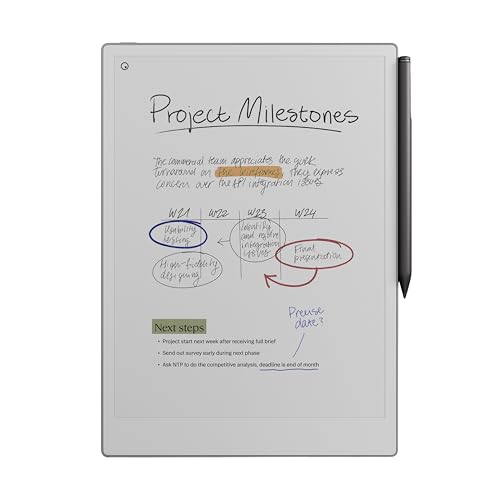
If your primary use case is writing and sketching, and you care more about the tactile experience than about library access or app integration, the reMarkable Paper Pro is the one to beat. The company has been refining its approach for years, and this model finally brings color to the display while keeping the friction that made earlier generations feel like actual paper.
The 11.8-inch Canvas Color display is larger than the Kindle Scribe’s, and that extra space matters when you are laying out a page diagram or taking notes in a meeting. The Marker Plus pen has a built-in eraser on the back, which is a small convenience that feels natural the moment you use it. You flip the pen over, erase, and keep writing. The bundle includes six spare tips and a USB-C cable. Every element of the package is designed around the writing experience, not around distracting you with features you will never use.
Where the reMarkable falls short for some buyers is the ecosystem. You can organize notes with folders and tags, write on PDFs, convert handwriting to text, and export to cloud services. But you cannot access the Kindle store or other major book platforms natively. It is a paper replacement, not a media consumption device. If you already use a dedicated e-reader and want a tool strictly for writing, that separation works in its favor. If you want one device to do both, the Kindle Scribe is a better fit.
The reading light is adjustable, so you can work in low light without eye strain. The display reflects natural light and has low glare, which is easier on the eyes than a phone or laptop screen.
Pros:
Cons:
Best for: Dedicated writers, sketchers, and note-takers who want the most authentic analog experience in a digital package and do not need a bookstore.
Check current price on Amazon →

Not everyone needs a $680 device to take notes. Sometimes you just want a surface to scribble a grocery list, work through a math problem, or leave a message for a roommate. The Ksequ LCD writing tablet is a digital notepad aimed at adults, and its defining feature is a double-sided full screen. That is unusual for this category and gives you effectively twice the writing area in a package that is only 0.2 inches thick and weighs 6.8 ounces.
The screen is pressure-sensitive, so lines get thicker when you press harder. The one-click clear button wipes the screen instantly. There is a lock switch to prevent accidental erasure. The tablet can be written on tens of thousands of times, which makes it far more economical than paper over the long term.
There is a catch, and the manufacturer is upfront about it. The screen brightness is poor in weak light. If you are in a dimly lit room, the handwriting is hard to see clearly. The company warns buyers directly in the product description: “Its brightness is very poor in weak light. If you mind, please don’t buy it.” That kind of honesty is rare, and it matters. This tablet is best used in a well-lit office, kitchen, or classroom. In a dark corner of a coffee shop, you will struggle.
The size (11.5 inch overall dimensions with a 10.5 inch writing area) is large enough for comfortable note-taking but slim enough to slide into a laptop sleeve. It comes with a stylus that attaches to the side.
Pros:
Cons:
Best for: Adults who want a slim, reusable scratch pad for the office, home, or classroom where lighting is reliable, and who do not need color.
Check current price on Amazon →

If you have more than one child, or run a classroom, buying individual LCD tablets adds up fast. The TQU 4 Pack solves that by giving you four 8.5-inch tablets in a single package for less than nine dollars. That is roughly $2.25 per tablet. At that price, the tablets are effectively disposable if one breaks, though they are tough enough to survive typical kid use.
Each tablet uses pressure-sensitive technology to create lines of different thicknesses. The screen is colorful, which children find more engaging than the monochrome displays on some competitor models. There is an erase button on the front and a lock switch to save the screen. The stylus attaches to the board with a snug fit and does not come loose easily.
The tablets are built for travel. They are lightweight and do not require charging (they run on a button cell battery that is replaceable). You can toss them in a bag for a restaurant, car ride, or airplane. They are also a mess-free alternative to crayons and markers. The company says the screen uses flexible liquid crystal technology that is brighter and clearer than older LCD tablets.
Pros:
Cons:
Best for: Families with multiple children ages 3 to 8, or preschool teachers who need a bulk set of doodle boards for the classroom.
Check current price on Amazon →

The Bravokids tablet is a step up in screen size from the 8.5-inch models, offering a 10-inch colorful LCD display. The larger writing area gives younger children more room to draw and practice letters without feeling cramped. The screen has no blue light or glare, so it is safe for extended play.
The build quality is better than what you might expect at this price point. The plastic casing is durable and has rounded corners. It is shock-resistant enough to survive drops from a table. The tablet weighs only 150 grams, which is light enough for a three-year-old to hold easily.
One thoughtful detail is the screw-secured battery door, which makes it harder for small children to access the button cell. The tablet works with any hard object, not just the included stylus, so kids can draw with their fingernails or a blunt plastic toy. The erase button clears the screen instantly, and the lock switch can save the artwork.
This tablet is clearly aimed at the 3 to 8 age range. The bright pink color might limit appeal for boys, but the functionality is unisex. The package includes a stylus, but no other accessories.
Pros:
Cons:
Best for: Preschoolers and young children who need a larger canvas for drawing and first letters, especially if they are prone to dropping things.
Check current price on Amazon →

The Genialba 2 Pack is the direct alternative to the TQU 4 Pack for families who do not need four tablets. You get two 8.5-inch colorful tablets, one pink and one blue, for around seven dollars. The per-unit cost is still very low, and the two-pack format works well for households with two children or for giving one as a gift and keeping one at home.
The features are standard for this category: pressure-sensitive screen, one-click erase, lock key, and a built-in battery that lasts for about six months of moderate use. The company claims the tablet supports over 100,000 rewrites. The stylus attaches to the tablet, and you can also draw with your finger or any blunt object.
The tablets are waterproof and anti-fall, so they survive the occasional spill. The colorful display produces a rainbow effect that kids find exciting, though the colors are not adjustable. The screen size is adequate for doodling and learning, but older children might prefer the larger 10-inch Bravokids tablet.
One consideration: at this price point, the plastic feels a bit cheaper than the Bravokids. It is still durable enough for typical use, but you can feel the difference. The lock switch works, but it is a small slider that might be fiddly for very young children.
Pros:
Cons:
Best for: Budget-conscious parents who want two separate tablets for two children, especially if they travel and need a mess-free activity.
Check current price on Amazon →

Sometimes the right tool is paper. The Amazon Basics White Wide Ruled Pads are the default choice for anyone who needs a large stack of professional-looking notepads that work with any pen. This 12-pack gives you 600 sheets total (50 sheets per pad). The paper is 16-pound weight, which is lighter than some premium pads but sufficient for everyday use with ballpoint pens. Fountain pen users might see some show-through, but for most office and school writing, it is fine.
The pads are letter size (8.5 x 11.75 inches including the binding). The wide ruling (11/32 inch spacing) gives you large lines that are easy to read and write on, especially if you have big handwriting. There is a left-side margin and a title space for organizing notes. The perforated top lets you tear off sheets cleanly. The chipboard backing provides a firm surface when you are writing without a desk.
Compared to the Canary version, this white pad is a bit less expensive and works in any context. It is the standard for a reason.
Pros:
Cons:
Best for: Students, office workers, and anyone who burns through legal pads and wants a reliable, low-cost bulk supply.
Check current price on Amazon →

The Canary version is identical to the White pack in every dimension and count, but the paper is a warm yellow color. That may sound like a minor difference, but colored paper actually reduces eye strain for some readers and helps separate subjects when you use different colors for different classes or projects. The paper weight is slightly lighter at 15 pounds, but still adequate for typical ballpoint and gel pens.
The canary color also hides smudges better than white. If you tend to rest your hand on the page, the yellow paper stays looking cleaner longer. The binding, perforation, and chipboard backing are the same as the white version. You get 12 pads with 50 sheets each, for a total of 600 sheets.
The only real downside is the price – the canary version is a dollar or two more than the white, which might not matter for the added visual organization it provides.
Pros:
Cons:
Best for: Students or professionals who want to color-code their notes or prefer a yellow background for reading comfort.
Check current price on Amazon →

The Roneky legal pads stand out because they are printed on both sides. Most legal pads are single-sided, which wastes half the paper. With double-sided printing, you get the equivalent of 60 pages per pad from 30 sheets. The paper is 70gsm, thicker than the Amazon Basics pads, and it resists ink bleeding well. The ruled lines are standard wide ruling (11/32 inch, 9mm spacing) with a double red margin line on the left.
The pads are letter size (8.5 x 11 inches), slightly shorter than the Amazon Basics pads but still a standard size. The perforation at the top is clean and does not leave ragged edges. The cardboard backing is sturdy enough to write on your lap.
The main limitation is the small count: only three pads in a pack, with 30 sheets each. If you are a heavy note-taker, you will run through these quickly. The price reflects that – it is about $8 for the set, which is reasonable per pad but more expensive per sheet than the Amazon Basics bulk option.
Pros:
Cons:
Best for: Writers who want double-sided pads to save paper and prefer a thicker sheet that can handle multiple pens without ghosting.
Check current price on Amazon →

The smallest item on this list, the AILZFEI notepads are designed for portability. Each pad measures 5 by 8 inches, which fits easily in a pocket, purse, or backpack side pocket. You get five pads in a pack, each with 30 sheets of 80gsm paper. The paper is thick and smooth, and it resists ink bleeding well. The ruling is college ruled (narrower spacing than wide ruled), which suits smaller handwriting.
The pads come in five bright colors, which makes them easy to separate by subject or mood. The perforation along the top lets you tear out sheets cleanly. The cardboard backing is sturdy enough for writing on the go.
These are not a replacement for a full-size legal pad, but they are excellent for quick notes, to-do lists, restaurant order pads, or brainstorming in a notebook you can slip into a jacket. The pack price is low, so you can buy several sets.
Pros:
Cons:
Best for: Journalers, list-makers, and professionals who need a pad they can carry everywhere and want color-coded organization.
Check current price on Amazon →
The first decision you have to make is whether you want a digital tablet or a paper pad. That choice determines everything else: how much you spend, how you store your notes, and how the writing feels. If you are on the fence, here are the specific factors to weigh.
Digital writing tablets give you infinite paper, cloud sync, and searchable notes. But they cost more, need occasional charging (some more than others), and the writing feel is a simulation of paper, not the real thing. For high-end E-Ink devices like the Kindle Scribe and reMarkable, the simulation is excellent. The surface texture provides enough drag to feel like a fountain pen on good paper. For LCD tablets, the feel is more like a marker on a dry-erase board – functional but less satisfying.
Paper pads are cheap, require no setup, and work with any pen you already own. The tactile experience is the real thing. The downside is that your notes are physical: they take up space, can be lost, and cannot be searched without manual effort. If you are a student or professional who needs to keep every note for years, a digital tablet probably pays for itself in reduced paper costs and easier organization.
If you go digital, pay close attention to the surface. The reMarkable Paper Pro uses a proprietary surface that feels remarkably close to paper, with the right amount of friction. The Kindle Scribe is similar, though slightly smoother. LCD tablets have a hard plastic surface that is smooth and sometimes slippery. They are fine for quick notes or children's doodling, but if you are going to write for hours every day, a premium E-Ink device justifies its higher price.
For paper pads, look at the paper weight. 70gsm and above handles most pens without bleeding. 80gsm is even better. Lighter paper (15-16 pound, about 60gsm) is fine for ballpoints but shows through with gel ink or thin markers.
Digital tablets range from 8.5 inches (most kids' LCD tablets) to 11.8 inches (reMarkable). The larger the screen, the less you have to scroll or zoom to review notes, but the heavier the device. The Kindle Scribe weighs 400 grams and is 5.4mm thin, which is impressive for an 11-inch device. The reMarkable is similar in weight. LCD tablets are lighter (150 grams or so) but smaller. If you plan to carry a digital notebook everywhere, consider the weight and thickness – and whether it fits in the bag you already use.
Paper pads come in sizes from 5×8 inches up to full legal (8.5×14). The 5×8 AILZFEI pads are the most portable. The Amazon Basics 8.5×11.75 pads are more suited for desk use, though the chipboard backing makes them functional without a table.
LCD tablets can be rewritten tens of thousands of times. The Ksequ tablet claims 50,000 to 100,000 uses. The kids' tablets have similar numbers. Over the lifetime of the device, the cost per use falls to fractions of a cent. That is the environmental and economic argument for going digital.
Paper pads are a recurring expense. A 12-pack of Amazon Basics pads costs about $12 and gives you 600 sheets. If you go through a pad per week, that is $12 every two weeks. Over a year, that adds up to over $300. If you take a lot of notes, a digital tablet pays for itself within a year or two.
High-end E-Ink tablets offer handwriting recognition, note search, cloud sync, and AI tools. The Kindle Scribe can summarize your notes and answer questions about them. It also integrates with Kindle books, Google Drive, and OneDrive. The reMarkable has similar features but a more walled-off ecosystem. If you need to share notes across devices or search your handwritten jottings six months later, these features are essential.
LCD tablets have no such features. They are basically digital slates. If you need to save something, you either leave the screen locked or take a photo. They are ideal for temporary notes and children's play, but not for reference.
Most LCD writing tablets work with any hard object, including a fingernail, a pen cap, or the included stylus. They do not require a capacitive or active stylus because the screen responds to pressure on the flexible surface. But the user experience is best with the included stylus, which is shaped like a pen tip.
Both the Kindle Scribe and reMarkable have no orientation bias – you can rotate them 180 degrees and the display adjusts. The writing surface is uniform, so there is no smudging or ink flow issue. Left-handed writers will have a good experience on both, though the palm rejection on the Kindle Scribe works well because the screen does not register touch from resting hands.
Yes, the reMarkable Paper Pro can export notebooks to Google Drive and Microsoft OneDrive, as well as send them via email as PDFs. It also supports direct cloud sync to reMarkable's own cloud service, which is included for a limited time and then requires a subscription.
The button cell batteries in kids' LCD tablets typically last between three and six months of regular use. They are not rechargeable, but they are easily replaceable by turning a small screw. Some tablets like the Genialba claim up to 100,000 rewrites, which should last years for most children.
Wide ruled paper has line spacing of 11/32 inch (about 8.7mm). College ruled has spacing of 9/32 inch (about 7.1mm). Wide ruled is better for young children who write large letters, or for adults who prefer more generous space per line. College ruled fits more lines per page and is standard for high school and college courses.
The Kindle Scribe's screen is made of glass with a textured finish to simulate paper. It is scratch-resistant but not scratch-proof. Many users do not use a screen protector, but if you plan to carry it loose in a bag with keys or coins, a protection layer can prevent surface damage. The included Premium Pen has a tip that is softer than a traditional stylus, so it will not scratch the screen on its own.
Not natively. Both the Kindle Scribe and reMarkable are dedicated reading and writing devices. They do not mirror your computer screen or function as an external display. There are third-party apps that can stream your PC screen to an E-Ink tablet, but the experience is not smooth due to the slow refresh rate of E-Ink.
The best writing tablet in 2026 depends entirely on how you write. For the most versatile digital experience that combines reading, note-taking, and deep ecosystem integration, the Amazon Kindle Scribe Colorsoft is our top pick. It is expensive, but it replaces both a paper notebook and a dedicated e-reader. For the purest writing experience that comes closest to real paper, the reMarkable Paper Pro is the winner, especially for artists and note-takers who do not need a bookstore.
On the budget side, the Ksequ LCD Writing Tablet for Adults is a strong choice for a reusable scratch pad if your lighting is good. For families, the TQU 4 Pack offers unbeatable value for multiple children, while the Bravokids 10 Inch is the best single kids' tablet for larger doodles.
And for those who still love the feel of real paper, the Amazon Basics Wide Ruled Pads in both white and canary are the most cost-effective bulk buys, with the Roneky double-sided pads and AILZFEI compact pads offering specialized alternatives.
If you are torn between digital and paper, consider this: if you take a lot of notes that you need to keep and search, go digital. If you just need something to write on and want the lowest cost and simplest experience, paper pads are still hard to beat.
This article contains Amazon affiliate links. We may earn a small commission on qualifying purchases at no extra cost to you.


