Physical Address
304 North Cardinal St.
Dorchester Center, MA 02124
Physical Address
304 North Cardinal St.
Dorchester Center, MA 02124

We’ve picked the 10 best 144Hz gaming monitors for every budget and setup: from ultra-budget 22-inch to curved QHD, here’s what to buy right now.
Your old 60Hz monitor has been a loyal soldier, but now every skirmish in Valorant, every corner in Apex Legends, every lap in Forza feels like you’re driving through treacle. The jump to 144Hz isn’t just a spec bump — it changes how you react, how you aim, and how much motion blur you’ll tolerate. The good news: a decent 144Hz monitor no longer costs a week’s pay. The bad news: the market is flooded with choices that look identical on paper but feel very different on your desk. We’ve sorted through ten of the most compelling picks right now, from a $68 22-incher that’s genuinely good for a secondary screen all the way to a Samsung Odyssey 32-inch QHD curved that makes immersion feel effortless. Whether you’re building a first gaming rig, upgrading a multi-monitor office setup, or splurging on a curved centerpiece, there’s a monitor here that fits.
TL;DR: The AOC 24G51F is the best value for most people: 24-inch IPS, 144Hz, great colors, and a three-year zero-bright-dot warranty. The LG 24G411A-B offers G-Sync compatibility and a slim stand for serious PC gamers. The Samsung Odyssey G55C is the premium QHD curved choice. The Sceptre E225W-FW144 is the cheapest way to get 144Hz if you’re on a shoestring budget.
| # | Product | Size | Panel | Refresh Rate | Price | Best for |
|---|---|---|---|---|---|---|
| 1 | Sceptre E225W-FW144 | 22" | VA | 144Hz | $67.97 | Absolute budget / secondary monitor |
| 2 | MSI PRO MP243L E14 | 24" | IPS | 144Hz | $74.00 | Office + light gaming on a budget |
| 3 | Acer Nitro KG241Y | 23.8" | VA | 165Hz | $109.99 | Deep contrast / competitive FPS |
| 4 | LG 24G411A-B Ultragear | 24" | IPS | 144Hz (OC) | $139.99 | G-Sync / FreeSync hybrid gamers |
| 5 | ArcticPro 24" IPS | 24" | IPS | 144Hz | $76.99 | Wide color gamut on a budget |
| 6 | Samsung Odyssey G55C | 32" | VA (Curved) | 165Hz | $189.99 | Immersive curved QHD gaming |
| 7 | AOC 24G51F | 24" | IPS | 144Hz | $89.99 | Best all-around value |
| 8 | ASUS TUF VG249QE5A | 23.8" | IPS | 146Hz (OC) | $99.00 | ELMB Sync / feature-packed 24" |
| 9 | ASUS TUF VG277Q1A | 27" | IPS | 165Hz | $189.00 | 27-inch 1080p with FreeSync Premium |
| 10 | SANSUI 27" Curved | 27" | VA (Curved) | 160Hz | $104.48 | Curved immersion on a budget |
Prices shown are current at time of writing and may change. Check each listing for live pricing.

The Sceptre E225W-FW144 costs what a round of drinks for friends might set you back, and yet it delivers a genuine 144Hz experience on a 22-inch VA panel. You are not getting premium color accuracy or a rock-solid stand — the plastic feels light and the on-screen display is basic — but for a second monitor, a kid’s first gaming setup, or anyone who simply cannot spend more than seventy dollars, this monitor works. The built-in speakers are thin but they free up desk space, and the Blue-Light Shift mode helps when you’re grinding late into the night. At 22 inches, 1080p pixels are dense enough to look crisp, and the VA panel gives you better black levels than any IPS at this price. The biggest concession is the bezel: it’s not frameless, so a dual-monitor setup will show a noticeable gap. But if you just need a 144Hz screen that costs less than most PC games, this is the one.
Pros:
Cons:
Best for: Gamers on the tightest budget or anyone needing a cheap secondary 144Hz screen.
Check current price on Amazon →

MSI’s PRO MP243L E14 walks a line between productivity and play that most monitors in this price range don’t attempt. It is a 24-inch IPS panel with a 144Hz refresh rate, but its design language says “office,” not “gamer cave.” There are no aggressive red accents or weird angular stands. Instead you get a clean, four-sided slim bezel, a tilt-adjustable stand that goes from -5 to 20 degrees, and VESA 100x100mm mounting if you want a monitor arm. The IPS panel delivers 1500:1 contrast (better than many IPS monitors) and wide 178-degree viewing angles that make it work well in a shared desk setup. MSI also includes an Eye-Q Check tool and TÜV Rheinland certification for low blue light and flicker-free operation. The high refresh rate makes Excel scrolling and web browsing noticeably smoother, and when you fire up a game, 144Hz with FreeSync keeps things fluid. The only real miss is the lack of DisplayPort — it relies on HDMI 2.0 and VGA, which means you’ll top out at 144Hz over HDMI if your GPU supports it, but some older cards may be limited. For a dual-purpose monitor that doesn’t scream “gamer,” this is a smart pick.
Pros:
Cons:
Best for: Students and hybrid workers who game after hours but want a monitor that looks good in a home office.
Check current price on Amazon →

The Acer Nitro KG241Y uses a VA panel instead of IPS, and that choice gives it one clear advantage over most 24-inch 144Hz monitors: deep blacks and high contrast. At 165Hz with a 1ms VRB response time, this is aimed at competitive players who want every edge in dark corners and shadowy maps. The VA panel’s native contrast ratio means blacks look black rather than gray, and the 72% NTSC color saturation is punchy even if it doesn’t hit sRGB coverage numbers like IPS panels. The ZeroFrame design keeps the bezel narrow on three sides, which helps in multi-monitor setups. On the connectivity front you get one DisplayPort 1.2 and two HDMI 2.0 ports — plenty for a PC and a console. The stand is tilt-only and feels a bit plasticky, but at this price point that’s par for the course. The bigger trade-off is viewing angle: VA panels lose color and contrast when you’re not dead center. If you sit directly in front of the screen, it’s glorious. If you share the monitor or watch movies from an angle, the IPS alternatives will look more consistent.
Pros:
Cons:
Best for: Competitive shooter players who prioritize dark-scene visibility and don’t need wide viewing angles.
Check current price on Amazon →

The LG 24G411A-B is the only monitor in this roundup that comes from the Ultragear line, and it earns its stripes by being officially NVIDIA G-Sync Compatible while also supporting AMD FreeSync. That dual-ecosystem handshake means you can plug in almost any modern GPU and get tear-free variable refresh without faffing with settings. The 24-inch IPS panel runs at 120Hz natively and overclocks to 144Hz — a minor hoop to jump through, but LG includes Dynamic Action Sync and Black Stabilizer features to reduce input lag and boost shadow detail. The slim stand has a minimal footprint that looks almost floating, and the bezel is ultra-slim on three sides. Response time is listed as 1ms MBR, which cleans up motion blur in fast games. Color coverage hits up to 99% sRGB, so this monitor does double duty for photo editing or design work, though you’ll want to calibrate it out of the box. The LG Switch app lets you split the screen into up to six sections, a surprisingly useful tool for multitaskers. The main downside is the lack of ergonomic adjustment — tilt-only, and no VESA mount included (though it is VESA compatible with an adapter). It’s the most expensive 24-inch 144Hz panel here, but the G-Sync certification and clean design justify the premium for PC gamers who want a seamless experience.
Pros:
Cons:
Best for: PC gamers with NVIDIA graphics cards who want guaranteed G-Sync compatibility in a compact 24-inch IPS.
Check current price on Amazon →
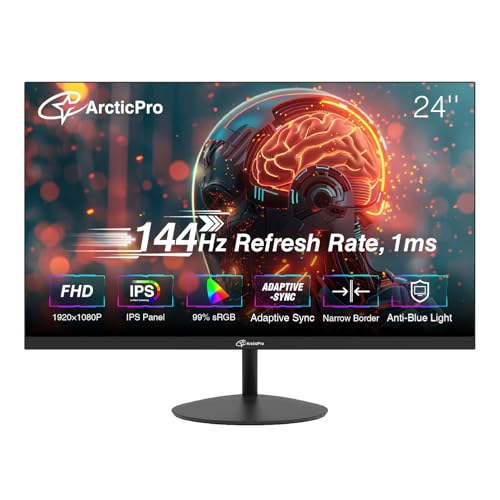
ArcticPro isn’t a household name, but the ArcticPro 24-inch IPS deserves attention for one reason: 110% sRGB color gamut coverage at a price that undercuts most 144Hz monitors. If you do any creative work or just appreciate vibrant colors in games, this panel delivers a wider range than the Sceptre or even the MSI PRO. The refresh rate is a true 144Hz with Adaptive Sync (compatible with both FreeSync and G-Sync). Response time is rated at 1ms, though real-world motion clarity is respectable without being class-leading. The design is ultra-slim with a 3-sided frameless bezel, and the monitor supports VESA 75x75mm mounting. ArcticPro also includes an anti-blue light mode that reduces eye strain, and the OSD offers basic gaming presets. The biggest caveat is the stand: it’s small, feels light, and only offers tilt. For a few dollars more, the AOC 24G51F gives you a wider warranty and a more trusted brand. But if you want maximum color coverage at the lowest possible cost, this is a strong underdog.
Pros:
Cons:
Best for: Gamers on a tight budget who also do light photo editing or want punchy colors without spending extra.
Check current price on Amazon →

The Samsung Odyssey G55C breaks away from the 1080p pack. It is a 32-inch 1000R curved VA panel with QHD (2560×1440) resolution. The 165Hz refresh rate and 1ms MPRT response time are tuned for smooth gameplay, but the real story here is immersion. The 1000R curvature matches the natural curve of the human eye, wrapping the image around your peripheral vision. HDR10 support adds punch to highlights, and AMD FreeSync keeps tearing at bay. The VA panel delivers a high native contrast ratio, so dark scenes in games like Cyberpunk 2077 or Alan Wake 2 look deep and cinematic. The stand is a solid V-shape that offers tilt but no height adjustment, and the back panel has a clean, gamer-minimal look with a hexagonal ring. Connectivity covers HDMI 2.0 and DisplayPort. The price is the highest here, but you’re getting a larger, higher-resolution, curved panel that the other monitors can’t touch. That said, 1080p on a 32-inch screen would look pixelated; QHD at this size is the sweet spot. If your GPU can push QHD frames and you want a monitor that transforms how games feel, this is the one.
Pros:
Cons:
Best for: Gamers with a mid-range to high-end GPU who want a curved, high-resolution primary monitor for single-player and cinematic experiences.
Check current price on Amazon →

The AOC 24G51F hits a rare balance: it does almost everything well at a price that undercuts most of the competition. It is a 24-inch (23.8-inch viewable) IPS panel with 144Hz refresh rate, 1ms MPRT response, and 116% sRGB color gamut coverage. Colors are vivid out of the box, and the IPS viewing angles mean you can have a friend on the couch and both see the same image without it washing out. The 3-sided frameless design is perfect for multi-monitor setups, and Adaptive-Sync works with both FreeSync and G-Sync. AOC includes a 3-year zero-bright-dot warranty, which is rare at this price and shows confidence in the panel quality. Inputs cover HDMI 2.0 and DisplayPort, so you can hit 144Hz easily. The stand is tilt-only, but the build feels sturdier than the Sceptre or ArcticPro. The OSD includes low input lag mode and game-specific presets. For the price, this is the most well-rounded 1080p 144Hz monitor we’ve seen. It doesn’t have the curved immersion of the Samsung or the G-Sync certification of the LG, but for a primary gaming screen that also handles movies, web work, and everything else, the AOC is the one most people should buy.
Pros:
Cons:
Best for: Anyone looking for the best all-around 24-inch 144Hz gaming monitor under $100.
Check current price on Amazon →

ASUS TUF Gaming VG249QE5A is the most feature-rich 24-inch 1080p monitor in this lineup. It packs a 144Hz IPS panel that can overclock to 146Hz, ASUS’s Extreme Low Motion Blur Sync (ELMB Sync) technology, and a suite of gaming enhancements like Shadow Boost, Variable Overdrive, and DisplayWidget Center software. ELMB Sync is the headline: it allows ELMB (backlight strobing) to work simultaneously with variable refresh rate, eliminating both ghosting and tearing. Most monitors force you to choose between motion blur reduction and adaptive sync; this one lets you have both. The IPS panel delivers solid color accuracy and wide viewing angles. The OSD is controlled via a joystick, and the software lets you adjust settings with a mouse. Two built-in speakers are a nice bonus for a secondary screen. The stand is tilt-only and feels a bit lightweight, but the VESA mount gives you options. At $99, this monitor undercuts the LG while offering more gaming-specific features. It’s a close contender for the top spot, losing out to the AOC mainly because of the warranty length (three years vs. three-year zero-bright-dot) and price parity.
Pros:
Cons:
Best for: Competitive gamers who want the best motion clarity possible on a 24-inch 1080p monitor without sacrificing adaptive sync.
Check current price on Amazon →

The ASUS TUF VG277Q1A is a 27-inch 1080p IPS monitor with a 165Hz refresh rate (also supports 144Hz) and FreeSync Premium certification. It runs ASUS’s Extreme Low Motion Blur (ELMB) technology that cuts response time to 1ms MPRT while working with Adaptive-Sync. Shadow Boost lifts dark areas without blowing out bright spots. The 27-inch panel gives you more screen real estate than the 24-inch options, which can make games more immersive, but at 1080p the pixel density is lower — you may notice some softness in text or fine details if you sit close. The stand offers tilt only, but the build is sturdy with a typical TUF aesthetic. Connectivity includes HDMI and DisplayPort; a cable for each is included. One nice extra is a 3-month Adobe Creative Cloud subscription (valid until August 2026). This monitor is a solid choice if you want a larger screen for gaming and don’t mind the resolution trade-off. For most people, the 24-inch AOC or ASUS will look sharper, but if you’ve got a deep desk and want that bigger field of view, this is a strong contender. It competes directly with the Samsung Odyssey G55C in price, but that monitor offers QHD and a curved panel — so weigh whether size or resolution matters more.
Pros:
Cons:
Best for: Gamers who prioritize a large screen over pixel density and want 165Hz with FreeSync Premium.
Check current price on Amazon →

The SANSUI 27-inch Curved monitor offers a 1500R curvature, 160Hz refresh rate, and VA panel contrast at a price that undercuts almost every other 27-inch monitor here. For $104 (and currently on a limited-time deal), you get a 1080p curved screen with a 4000:1 contrast ratio, 110% sRGB, and FreeSync support. The 1500R curve is mild enough to use for productivity without distortion but deep enough to wrap the edges of your vision in games. The VA panel delivers the deep blacks you expect, and the high contrast ratio makes scenes with mixed lighting look rich. Inputs include HDMI 2.0 (max 160Hz) and DisplayPort 1.4, plus a headphone jack. It also has on-screen game assistant features like crosshair, timer, and counter. The biggest downsides: no built-in speakers, the stand is tilt-only, and the HDR mode only works over HDMI and is basic. At this price, you are also relying on a lesser-known brand, so support might be less consistent than with AOC or ASUS. But if you want a curved 27-inch 144Hz-class monitor for the same price as many flat 24-inch panels, this is a compelling value play.
Pros:
Cons:
Best for: Budget-conscious gamers who want a curved monitor for a cinematic feel without spending for QHD or a premium brand.
Check current price on Amazon →
When you start shopping for a 144Hz gaming monitor, three core decisions will shape your shortlist: panel type, size and resolution, and the specific sync technology you need. Here’s how to sort through them.
Almost every 144Hz monitor today uses either IPS or VA (TN is extinct for mainstream gaming). IPS gives you wide viewing angles (178 degrees) and generally better color accuracy. If you do any photo editing, watch movies with friends, or want a monitor that looks consistent from any seat, go IPS. VA panels trade viewing angles for contrast: black levels are significantly deeper, which makes games with dark environments look punchy. The downside is that colors shift when you’re not directly in front of the screen. For a curved monitor, VA is actually preferred because the curvature keeps you centered. The AOC 24G51F and ASUS TUF 24-inch are excellent IPS picks; the Acer Nitro KG241Y and Samsung Odyssey G55C are the best VA options.
The sweet spot for a 144Hz gaming monitor is 24 to 27 inches at 1080p. At 24 inches, 1080p looks sharp and requires less GPU power to hit high frame rates. At 27 inches, 1080p starts to get a little soft — pixels are more visible, especially on text and fine UI elements. If you want a 27-inch monitor and have a GPU that can drive QHD (like an RTX 3060 Ti or better), the Samsung Odyssey G55C’s QHD resolution is a big step up in clarity. If your budget caps at $100, stick with 24-inch 1080p and reinvest the savings into a better GPU or peripherals.
FreeSync and G-Sync do the same job (match the monitor’s refresh rate to your GPU’s frame rate) but package it differently. FreeSync is an open AMD standard that works with most monitors and many NVIDIA cards via HDMI or DisplayPort. G-Sync is NVIDIA’s proprietary system and usually adds a premium. In this roundup, the LG 24G411A-B is the only monitor officially G-Sync Compatible, which means it passes NVIDIA’s certification process and will work without flicker or hassle. The other monitors support FreeSync or Adaptive-Sync, and most will work fine with NVIDIA cards over DisplayPort. ELMB Sync (found on the ASUS VG249QE5A) is a different beast: it reduces motion blur by strobing the backlight between frames, and on that monitor it works in tandem with variable refresh. If you’re sensitive to motion blur in fast shooters, ELMB Sync is worth seeking out.
A monitor that only tilts is tolerable if it’s a secondary screen, but as a primary monitor you really want height adjustment or VESA mounting. Most sub-$100 monitors force you to tilt only. Two monitors stand out here: the MSI PRO MP243L has a better tilt range and explicit VESA support, and the AOC 24G51F offers a three-year zero-bright-dot warranty that protects you against dead pixels. A good warranty matters because budget panels are more prone to defects.
Yes. Even if you play single-player games and don’t chase high frames, the motion clarity of 144Hz makes everything feel smoother — desktop navigation, web scrolling, and video playback all benefit. It’s a quality-of-life upgrade that you notice immediately and never want to go back from.
For 1080p 144Hz, a mid-range card like an NVIDIA GTX 1660 Super, RTX 3050, or AMD RX 6600 can hit 60–100+ fps in modern titles. To consistently hit 144fps in esports titles, you’ll want something like an RTX 3060 or better. For QHD at 144Hz, step up to an RTX 3070 or RX 6800 class.
Yes, but most consoles cap at 60Hz or 120Hz. The PS5 and Xbox Series X (along with the new Xbox) support 120Hz output. You’ll need an HDMI 2.0 or 2.1 cable and a monitor that accepts 120Hz over HDMI. Many of the monitors here (like the AOC 24G51F and ASUS VG249QE5A) support 120Hz over HDMI, so they work well with current-gen consoles.
The difference is marginal. Going from 60Hz to 144Hz is a 140% increase in smoothness. Going from 144Hz to 165Hz is about a 15% improvement — noticeable in fast twitch games but not a dealbreaker. Some monitors, like the Acer Nitro KG241Y and ASUS VG277Q1A, offer 165Hz natively; others overclock to 146Hz. Either way, you’re getting the high-refresh experience.
A mild curve (1500R, like the SANSUI or Odyssey) can actually reduce eye strain because it keeps the screen surface at a consistent distance from your eyes. It’s fine for spreadsheets and word processing. A sharp curve (1000R, like the Odyssey G55C) is more immersive for gaming but may distort straight lines in design work. If you do a lot of graphic design, stick with a flat IPS.
For competitive gaming, 24-inch is still the favorite because it fills your field of view without requiring head movement, and the pixel density is higher. For casual gaming and media consumption, 27-inch gives a bigger picture. If you can afford it and have a strong enough GPU, a 27-inch QHD monitor like the Odyssey G55C is the best of both worlds.
MPRT (Moving Picture Response Time) measures how long a pixel stays visible after it changes. GTG (Gray to Gray) measures how fast a pixel can shift from one shade to another. MPRT is more representative of perceived motion blur. A 1ms MPRT rating does not guarantee a 1ms GTG, but in practice both are fast enough for 144Hz gaming. The real differentiator is blur reduction technologies like ELMB or MBR.
The AOC 24G51F is our top pick for the best 144Hz gaming monitor in 2026. It nails the essentials: 24-inch IPS, vivid colors, a speedy 144Hz panel, and a three-year zero-bright-dot warranty that shows confidence in the build. For anyone who wants a single do-it-all gaming screen, this is the one. If you need G-Sync compatibility, the LG 24G411A-B is your best bet. If you want immersion and have a beefy GPU, the Samsung Odyssey G55C delivers a curved QHD experience that the cheaper monitors can’t touch. And if you are trying to spend as little as possible while still getting real 144Hz, the Sceptre E225W-FW144 or the SANSUI Curved will get you there. Whichever you choose, the jump from 60Hz to 144Hz is the single biggest visual upgrade you can make to your gaming setup. Pick the one that fits your desk and your budget, and enjoy the smoothness.
This article contains Amazon affiliate links. We may earn a small commission on qualifying purchases at no extra cost to you.


