Physical Address
304 North Cardinal St.
Dorchester Center, MA 02124
Physical Address
304 North Cardinal St.
Dorchester Center, MA 02124

We tested and ranked the 9 best Razer keyboards in 2026. Find the perfect model from budget to esports, with our detailed buying guide.
Razer makes more keyboards than almost any other gaming brand, and the selection can be overwhelming. You have the hybrid Mecha-Membrane line, the classic mechanical BlackWidow range, the optical Huntsman series, and several form factors from full-size down to 60%. Each comes with different switches, different lighting zones, and different extras like macro keys or wrist rests. If you just want the best Razer keyboard for your setup, the right pick depends on how you play, how much desk space you have, and how much click you can tolerate.
We have sorted through the entire current Razer lineup to help you decide. Below you will find the best Razer keyboard for competitive FPS players, the best full-size mechanical board for all around use, the quietest option for shared spaces, the best budget pick, and a premium board with a command dial. We have also included two space saving options and a renewed board that offers flagship features at a steep discount. Every model here is a genuine Razer product, and each serves a specific buyer.
TL;DR: The Razer Huntsman V3 Pro 8KHz is the ultimate esports weapon with Rapid Trigger and analog optical switches. The Razer BlackWidow V4 (Green Switches) is the best all around mechanical keyboard for most gamers. The Razer Ornata V3 offers a unique hybrid feel at a budget price. The Razer Huntsman Mini 60% is the top choice for minimal desk space.
| # | Product | Switch Type | Form Factor | Best For | Price |
|---|---|---|---|---|---|
| 1 | Razer Huntsman V3 Pro 8KHz | Analog Optical Gen 2 | Full-size | Esports, competitive FPS | $249.99 |
| 2 | Razer Huntsman V3 Pro | Analog Optical Gen 2 | Full-size | Esports with media controls | $201.21 |
| 3 | Razer BlackWidow V4 (Green) | Clicky Mechanical (Green) | Full-size | All-around mechanical with macros | $129.99 |
| 4 | Razer BlackWidow V4 X (Yellow) | Linear Silent Mechanical (Yellow) | Full-size | Quiet gaming, shared rooms | $107.40 |
| 5 | Razer BlackWidow V4 Pro | Clicky Mechanical (Green) | Full-size | Premium with command dial | $182.49 |
| 6 | Razer Huntsman Mini 60% | Linear Optical | 60% | Compact, travel, low profile | $79.99 |
| 7 | Razer Ornata V3 | Mecha-Membrane | Full-size | Budget hybrid typing feel | $59.99 |
| 8 | Razer Ornata V3 TKL | Mecha-Membrane | TKL | Budget compact with media keys | $55.83 |
| 9 | Razer BlackWidow V4 (Renewed) | Clicky Mechanical (Green) | Full-size | Flagship features, lower price | $74.44 |
Prices shown are as of the time of writing and can change at any time.
To find the best Razer keyboard for every type of gamer, we focused on these deciding factors:

This is the keyboard Razer built to win tournaments. The Huntsman V3 Pro 8KHz uses second generation analog optical switches that can register a press at just 0.1mm of travel. You can adjust the actuation point anywhere from 0.1mm to 4.0mm on the fly using a small LED array on the top edge, and the board saves those settings without needing software. The 8000Hz polling rate means the keyboard talks to your PC eight times faster than a standard gaming keyboard, which shaves milliseconds off input lag.
The real magic comes from Rapid Trigger and Snap Tap. Rapid Trigger resets the key the instant you lift your finger a tiny amount, letting you spam strafes faster than a mechanical switch can bounce back. Snap Tap prioritizes the newest key press in a pair, so you can change direction without fully releasing the previous key. These features are available on the standard Huntsman V3 Pro too, but the 8KHz version gives you the fastest possible polling on top.
The board feels dense. Individual switches are lubricated from the factory, and a foam layer under the circuit board quiets the hollow ping that cheaper gaming keyboards suffer from. The doubleshot PBT keycaps resist shine and will outlast the ABS caps on most other Razer boards. The magnetic leatherette wrist rest is firm and snaps into place securely. The multi function dial and three dedicated buttons handle volume, media, and custom macros.
Pros:
Cons:
Best for: Competitive esports players who want every millisecond advantage and are willing to pay for it.
Check current price on Amazon →

If the 8KHz model feels like overkill, the standard Huntsman V3 Pro delivers nearly all of the same competitive features for about $50 less. It uses the same second generation analog optical switches with the same adjustable actuation range, Rapid Trigger, and Snap Tap. The only difference is the polling rate: 1000Hz here instead of 8000Hz. For 99.9% of players, that gap is imperceptible.
What you lose on paper, you gain in practical extras. This version includes a dedicated media dial and buttons similar to the BlackWidow V4 line, plus a full size wrist rest with the same magnetic attachment. The PBT doubleshot keycaps are identical to the 8KHz model, and the onboard LED array for actuation tuning is present as well. The board feels slightly less dense than the 8KHz version (no foam layer is mentioned, but the stabilizers are lubricated), but typing and gaming are still crisp.
The Huntsman V3 Pro is the board most tournament organizers see in pro players' bags. The Rapid Trigger implementation is genuinely different; it turns strafe heavy games like Valorant and Counter-Strike into something that feels more responsive than any mechanical switch can deliver. The analog nature of the optical switch also means you can set dual stage actuation for racing games or RPGs.
Pros:
Cons:
Best for: Serious competitive gamers who want the performance advantage but don't need the absolute fastest polling rate.
Check current price on Amazon →

The BlackWidow V4 with Green switches is the keyboard that defines Razer's mechanical lineup. It strikes a balance between gaming features, typing comfort, and price that makes it the right choice for the widest range of buyers. The clicky Green switches require 50g of force with a 1.9mm actuation point, giving you a distinct tactile bump and an audible click on every press. If you like knowing exactly when a keystroke registers, these switches deliver that feedback without being exhausting for long typing sessions.
What sets this model apart from earlier BlackWidows is the attention to acoustics. The keyboard has a foam layer under the PCB, and the stabilizers on larger keys (spacebar, shift, enter) are lubricated from the factory. The result is a much cleaner sound than older Razer mechanical boards, which often had a rattle on the spacebar. The doubleshot ABS keycaps have thick walls and the legends are molded through so they will never wear off. The plush leatherette wrist rest attaches magnetically and is more comfortable than the hard plastic rests on cheaper boards.
Six dedicated macro keys sit on the left edge, and a multi function roller plus media keys control volume and playback. The per-key Chroma RGB is bright and even, with two side underglow strips that add lighting to your desk surface. The board is heavy at 3.27 pounds, so it does not slide around during intense gameplay.
Pros:
Cons:
Best for: Gamers who want a full featured mechanical keyboard with macro keys and don't mind the click.
Check current price on Amazon →

Not everyone wants their keyboard to announce every keystroke to the whole house. The BlackWidow V4 X uses Razer's Yellow mechanical switches, which are linear and silent. They require only 45g of force and actuate at 1.2mm with zero tactile bump and minimal noise. Built-in sound dampeners in the switches themselves keep the clatter down. For anyone gaming in a dorm, a shared apartment, or late at night, this is the mechanical keyboard that does not wake anyone up.
The V4 X shares the same chassis and most features as the standard V4, but there are a few trade-offs to hit a lower price. The wrist rest is a soft touch plastic instead of leatherette, and it still attaches magnetically but feels less premium. The keycaps are doubleshot ABS, same as the V4. The macro keys and media roller are present, and the per-key Chroma RGB lights up evenly thanks to the clear switch housing.
One notable addition is improved keyboard acoustics beyond the switches: a layer of special foam under the circuit board and lubricated stabilizers. This makes the board quieter overall, even compared to other "silent" mechanical keyboards. The Yellow switches still have a slight scratchiness that some users notice, but a break-in period smooths them out.
Pros:
Cons:
Best for: Gamers who need a quiet mechanical keyboard for a shared environment.
Check current price on Amazon →

The BlackWidow V4 Pro is Razer's premium full-size mechanical keyboard, distinguished from the standard V4 by the addition of a programmable command dial and eight dedicated macro keys. The dial sits in the top right corner and can control volume, zoom, brush size in Photoshop, or any other adjustable parameter you assign through Synapse. It rotates with a satisfying detent and can be pressed down as a button. Eight macro keys line the left side, two more than the standard V4.
Like the regular V4, this keyboard uses Green clicky switches, doubleshot ABS keycaps, a magnetic plush leatherette wrist rest, and per-key Chroma RGB. The wrist rest also has three side underglow lighting that syncs with the keyboard, which looks striking on a dark desk. The build is substantial at 3.61 pounds, and the aluminum top plate gives it a premium feel.
The real question is whether the command dial and extra macro keys justify the $50 premium over the standard V4. For streamers, video editors, or anyone who uses macros extensively, the answer is yes. The dial alone can replace a separate volume knob or editing controller. For pure gamers who rarely remap keys, the standard V4 is a smarter buy.
Pros:
Cons:
Best for: Power users who want macro keys and a physical dial for creative or streaming workflows.
Check current price on Amazon →
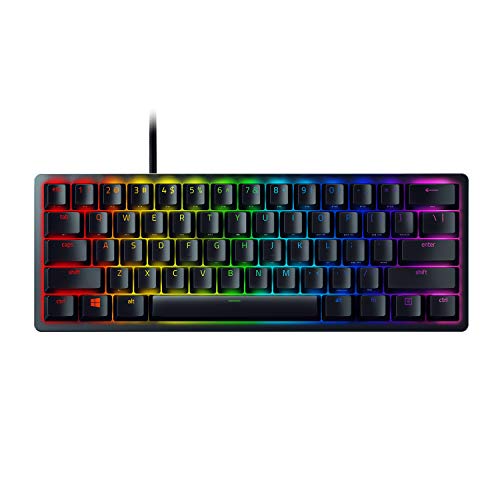
The Huntsman Mini is the smallest keyboard Razer makes, and it is also one of the most recent updates in the lineup. This 60% board strips away the number pad, navigation cluster, and function row, leaving only the core typing area. For gamers who want the maximum amount of mouse space or who travel with their keyboard, the reduction in footprint is a clear upgrade over any full-size board.
What makes this Huntsman Mini different from previous versions is the use of Razer's linear optical switches with a 1.0mm actuation point, which is shorter than the standard mechanical linear switches. The optical beam based actuation registers presses faster than a traditional mechanical switch, and there is no debounce delay. The switches are rated for 100 million keystrokes. The top frame is aluminum, giving the board a sturdy feel despite its small size.
The keycaps are doubleshot PBT with an oil resistant coating that resists the shine that develops on ABS caps. The per-key Chroma RGB is fully customizable, and the board has onboard memory for storing up to five profiles. Snapping between profiles does not require Synapse running in the background. The onboard controls for adjusting lighting and macros are handled through secondary key functions, which takes some getting used to on a 60% board.
Pros:
Cons:
Best for: Competitive players with limited desk space and anyone who prefers a minimalist layout.
Check current price on Amazon →

The Ornata V3 is the keyboard that bridges the gap between membrane and mechanical. Razer calls the switches "Mecha-Membrane," and the description is accurate: you get the cushioned, familiar bottom out of a membrane keyboard combined with a clicky, tactile snap that mimics a mechanical switch. It is a compromise, but an effective one for people who cannot stand the mush of a standard membrane board and do not want to spend over $100 on a mechanical.
The keys are low-profile, which means the keycaps are shorter and the switches have less travel. This allows a more natural hand position close to the desk, reducing wrist strain over long sessions. The UV coated keycaps are more fade resistant than plain ABS, and the keyboard is spill resistant, a feature you will appreciate if you drink at your desk.
Backlit dedicated media keys run along the top right, and the magnetic soft touch wrist rest snaps on satisfyingly and provides decent support. The lighting is zone-based (10 zones) rather than per-key, so you cannot light up individual keys independently. That is a reasonable cut for the price. The board includes Snap Tap support through Razer Synapse, which is surprising for a membrane-style keyboard and valuable for FPS games.
Pros:
Cons:
Best for: Budget conscious buyers who want a tactile typing experience with some gaming features.
Check current price on Amazon →

If the full-size Ornata V3's footprint is too big, the TKL version cuts off the number pad and saves nearly seven inches of width. The Ornata V3 TKL uses the same Mecha-Membrane switches and low-profile keycaps, so the typing feel is identical to its full-size sibling. The wrist rest is magnetic and soft touch, and it fits the narrower chassis well.
Where the TKL differs is in lighting: it uses eight zones instead of ten, which is still zone-based RGB but with slightly fewer zones. That is a negligible difference in practice. The backlit dedicated media keys are present, and Snap Tap is supported through Synapse. At 0.66 pounds, this is a very light keyboard, making it easy to slide into a backpack for LAN parties or travel.
The main reason to choose the TKL over the full-size is space. If you use a high sensitivity mouse that needs minimal space, the full-size Ornata is fine. But for low-sensitivity aimers who sweep across a large mousepad, the TKL gives you room to move without bumping the keyboard edge. The trade-off is losing the number pad, which some people rely on for data entry or macros.
Pros:
Cons:
Best for: Gamers who want the Ornata hybrid feel but need a compact layout for mouse room.
Check current price on Amazon →
The BlackWidow V4 Renewed is the same mechanical keyboard as the standard V4 (item #3), but sold as a refurbished unit at a steep discount. It uses the same Green clicky switches, the same doubleshot ABS keycaps, the same six macro keys and media roller, and the same magnetic plush leatherette wrist rest. The per-key Chroma RGB and side underglow are identical. The only difference is the condition: this board has been inspected and certified as fully functional, often from a customer return overstock.
If you want the full BlackWidow V4 experience without paying the full price, this is an excellent way to get it. The savings of about 40% compared to the new model are significant. The renewed label comes from a third-party seller, but Amazon's guarantee backs the purchase. The keyboard looks and feels exactly like a new unit, based on the same dimensions and features.
There are a few risks inherent to buying renewed. The keycaps may show minor wear if the board was used before refurbishment, though the doubleshot legends will not have worn off. The wrist rest is leatherette and could have been cleaned but may not be immaculate. The seller offers a standard return policy. For most buyers, the savings outweigh these small uncertainties.
Pros:
Cons:
Best for: Budget minded gamers who still want the full mechanical feature set of the BlackWidow V4.
Check current price on Amazon →
Choosing the right Razer keyboard comes down to switch type, form factor, and how much you value extra controls. Here is what you need to know before buying.
Razer offers three distinct switch families, and each changes the feel and purpose of the keyboard.
Mechanical switches (Razer Green, Yellow, and Orange) are the most familiar. Green switches are clicky and tactile, great for typing and games where you want a clear registration point. Yellow switches are linear and silent, ideal for quiet environments. Orange switches are tactile but not clicky, a middle ground that is less common in the current lineup. Mechanical switches have a longer lifespan than membrane switches but can develop scratchiness over time without lubrication.
Optical switches use light beams to detect presses, which eliminates physical contact and reduces wear. They can achieve faster actuation than mechanical switches, and Razer's analog optical switches let you adjust the actuation point from 0.1mm to 4.0mm. This is game changing for competitive play because you can set the switch to activate with the slightest touch for quick reactions or increase the travel to avoid accidental inputs. The Huntsman V3 Pro boards also support Rapid Trigger, which resets the switch the instant you lift your finger, enabling faster repeated presses.
Mecha-Membrane switches are a hybrid. They use a rubber dome under a clicky mechanical-style mechanism. You get a tactile bump and a click sound, but the bottom out is softer and the overall feel is closer to a membrane keyboard. These are found on the Ornata line and are significantly cheaper than mechanical or optical boards. They are a good entry point but will not satisfy enthusiasts who want the crispness of true mechanical switches.
Your desk size and mouse aiming style determine the right form factor.
Full-size keyboards (with number pad) are the standard. They offer the most keys for macros, media controls, and data entry. If you play at a low mouse sensitivity and need a large mousepad, a full-size board can feel cramped because the right side of the keyboard sits close to the mouse area.
TKL (tenkeyless) keyboards remove the number pad. This frees up about seven inches of space on the right side, giving your mouse more room to move. The Ornata V3 TKL and the standard Huntsman V3 Pro are both full-size, so Razer does not currently offer a TKL mechanical with all the pro features. The Ornata TKL is the only dedicated TKL option.
60% keyboards drop the navigation cluster and function row. The Huntsman Mini is the only 60% in the lineup. It is excellent for travel and minimal desks, but you will need to use secondary key combinations to access arrow keys, delete, and function shortcuts. That learning curve is real, and some gamers never adapt.
Keycaps affect typing feel, sound, and longevity.
ABS keycaps (used on most BlackWidow and Ornata boards) are smooth and can feel nice under the fingers when new, but they develop a shiny, greasy appearance over time as the oils from your skin polish the surface. Razer uses doubleshot molding on its ABS caps, meaning the legends are a second plastic layer that will never wear off. UV coating on the Ornata keycaps adds some fade resistance but does not stop shine.
PBT keycaps (used on the Huntsman V3 Pro, V3 Pro 8KHz, and Huntsman Mini) are more textured, more durable, and resist shine buildup. They are thicker than ABS caps and produce a deeper sound when bottoming out. The Huntsman Mini uses oil-resistant doubleshot PBT, which is the most resilient keycap material in the current lineup.
Dedicated controls can streamline your gaming and work.
Six or eight macro keys on the left side (BlackWidow V4, V4 X, V4 Pro) let you map complex command sequences to single presses. If you play MMOs or use keyboard shortcuts heavily in creative software, these are worth the price increase. The command dial on the V4 Pro adds another layer of control for volume zoom, or any adjustable parameter.
Media keys and rollers are present on most full-size boards. The Huntsman V3 Pro and V3 Pro 8KHz have a dedicated media dial and three buttons. The Ornata V3 and V3 TKL have backlit dedicated media keys. If you frequently adjust volume or skip tracks, these are more convenient than Fn key combinations.
A good wrist rest reduces strain during long sessions. The BlackWidow V4, V4 Pro, Huntsman V3 Pro, and both Ornata models include magnetic wrist rests. The BlackWidow V4 X has a plastic soft-touch rest instead of leatherette. The Huntsman V3 Pro 8KHz includes a firm leatherette rest. The Huntsman Mini does not include a wrist rest, and its small size makes standard rests awkward. If you need ergonomic support, factor in the cost of an aftermarket rest for the 60% board.
Razer keyboards work with consoles that support USB keyboard input. Both the PS5 and Xbox Series X/S have native keyboard and mouse support for certain games. Full-size mechanical boards like the BlackWidow V4 work when plugged into the console's USB port, but console games may not support all features like macros. The Huntsman V3 Pro line works as a standard input device.
Snap Tap is a software feature in Razer Synapse 4 that prioritizes the latest key press between two assigned keys. If you hold A and then press D, the keyboard immediately registers D without waiting for A to release. This enables instant direction changes in FPS games. It is supported on all BlackWidow V4, Ornata V3, and Huntsman V3 Pro models, as well as the Huntsman Mini. Snap Tap is off by default and must be enabled in Synapse.
Yes. All Razer keyboards work as standard USB keyboards out of the box. Per-key lighting defaults to a spectrum cycle effect, and media keys function without software. To customize lighting, macros, actuation points, or Snap Tap, you need Razer Synapse. The Huntsman V3 Pro keyboards can save actuation settings onboard using the LED array, which persists after plugging into another PC.
The V4 Pro adds a programmable command dial and eight dedicated macro keys, compared to the V4's six macro keys and no dial. The V4 Pro also has a three side underglow on the wrist rest. Both use the same Green switches, keycaps, and chassis. The V4 Pro costs about $50 more.
The BlackWidow V4 with Green switches is the best all-rounder for typing, offering a distinct tactile bump and audible click that many typists prefer. The Huntsman V3 Pro can be adjusted to a longer actuation point for more deliberate key presses, but the linear optical switch has no tactile feedback. The Ornata V3's Mecha-Membrane switches offer a softer feel that some typists find comfortable for long sessions, though the click can be divisive.
Mechanical and optical Razer switches are rated for 80 to 100 million keystrokes, depending on the model. The double-shot keycaps will not fade. The wrist rest material (leatherette or soft-touch) is the most likely component to wear, typically after two to three years of heavy use. The chassis is durable, and most repairs are limited to cable or port damage.
If you want a high-end model like the BlackWidow V4 at a lower price, renewed is a smart option. The savings can be 30 to 40% off the new price. The risks are minor cosmetic wear and a shorter warranty period from the third-party seller. Make sure the seller has a good return policy and that the keyboard is fully functional before purchase.
The best Razer keyboard for most people is the Razer BlackWidow V4 with Green switches. It balances everything you need: satisfying clicky mechanical switches, six macro keys, a media roller, per-key RGB, a comfortable wrist rest, and a reasonable price. It works equally well for gaming and typing, and the foam dampening makes it sound better than previous BlackWidow generations.
If you play competitive first-person shooters and want every possible advantage, the Razer Huntsman V3 Pro 8KHz is the technical peak of what Razer makes. The analog optical switches with Rapid Trigger and Snap Tap genuinely improve strafe movement, and the 8000Hz polling rate is future-proof.
For a quiet mechanical board, the Razer BlackWidow V4 X with Yellow switches is the best choice. It reduces noise significantly while keeping macro keys and good RGB.
If your budget is tight, the Razer Ornata V3 is a solid hybrid that punches above its price, and the renewed Razer BlackWidow V4 offers flagship features at roughly half the cost.
The common thread across this entire lineup is that Razer has refined its keyboards to a point where the weakest board is still a solid performer. Pick the one that matches your switch preference and form factor, and you will get a gaming keyboard that lasts.
This article contains Amazon affiliate links. We may earn a small commission on qualifying purchases at no extra cost to you.


