Physical Address
304 North Cardinal St.
Dorchester Center, MA 02124
Physical Address
304 North Cardinal St.
Dorchester Center, MA 02124

Best Quad Monitor Setups (November 2026): 10 picks from WALI and VIVO, from ultrawide trading rigs to freestanding desk stands for four screens at once.

Most four-screen desks fail for mechanical reasons, not visual ones. A mount rated for 17.6 lbs per arm sags under a heavier panel, a clamp built for thin desktops will not grip a thick slab, and a bracket sized for 27-inch screens cannot hold a 49-inch ultrawide. The Best Quad Monitor Setups depend on three things: the size and weight of the screens you already own, the layout you want (a flat row, two stacked pairs, or one wide panel above three), and the desk the stand has to bolt to.
The short answer: the WALI M004S Stacked Quad Mount is the most broadly useful stacked arm set for standard 13-27 inch screens at 22 lbs per arm. The VIVO V104G Quad Ultrawide Mount suits anyone who wants a 49-inch ultrawide on top of three regular screens. The VIVO V400CU Dual Pole Mount is the pick for two big ultrawides with a pair of portrait screens at the sides. The rest of the list covers pneumatic arms, gas-spring arms, telescoping arms for flush-to-wall setups and a freestanding stand for desks you cannot clamp to.
TL;DR: top picks at a glance
- Best overall: the WALI M004S Stacked Quad Mount, with 22 lbs per arm, 360° rotation and a 51.2-inch maximum extension.
- Best for one ultrawide plus three screens: VIVO V104G Quad Ultrawide Mount, with a 69.8-inch span and a top bracket for screens up to 49 inches.
- Best for two ultrawides: VIVO V400CU Dual Pole Mount, with two 49-inch center brackets rated for 59.4 lbs each.
- Best for desks you cannot clamp: VIVO V004F Freestanding Stand, with a 15.25 x 11 inch padded base and no drilling or clamping.
| # | Product | Best for | Screen sizes | Max load per screen | Mounting |
|---|---|---|---|---|---|
| 1 | WALI M004S Stacked Quad Mount | Standard screens | 13-27 in | 22 lbs | C-clamp or grommet |
| 2 | VIVO V104G Quad Ultrawide Mount | One top ultrawide | 24-28 in plus one 24-49 in | 19.8 lbs (44 lbs top) | Clamp or grommet |
| 3 | VIVO V400CU Dual Pole Mount | Two ultrawides | Up to 49 in center, 38 in sides | 59.4 lbs center, 17.6 lbs sides | Two C-clamps |
| 4 | VIVO V400G Pneumatic Quad Mount | Smooth side arms | 17-32 in | 17.6 lbs | C-clamp |
| 5 | PUTORSEN Gas Spring Quad Mount | Trading rigs | 49 in top, 27 in lower | 44 lbs top, 15.4 lbs lower | Clamp or grommet |
| 6 | monTEK Quad Monitor Stand | Heavier 32-inch screens | 17-32 in | 22 lbs | Clamp or grommet |
| 7 | MOUNTUP Quad Monitor Stand | Thick or holed desks | 17-32 in | 17.6 lbs | Clamp or grommet |
| 8 | HUANUO Quad Mount with Larger Base | Stable fixed layouts | 13-32 in | 22 lbs | Not listed |
| 9 | VIVO TS38C-4 Telescoping Mount | Flush wall ultrawides | Up to 38 in | 17.6 lbs | Clamp or grommet |
| 10 | VIVO V004F Freestanding Stand | No-clamp desks | 13-30 in | 17.6 lbs | Freestanding base |

Pros:
Cons:
Best for: Anyone running four standard 24-27 inch monitors who wants a conventional stacked arrangement with generous desk-thickness tolerance.
Check current price on Amazon →
The WALI M004S Stacked Quad Mount earns the top spot by being the least fussy option here. Its 22 lbs per arm matches the monTEK and HUANUO ratings, and its 51.2-inch extension gives room to pull screens toward you or push them back. The steel frame is described as stable during movement and adjustment, which matters on a stand carrying four displays. It also comes in a Black (Glass Free Stand) version if you prefer a different base style.
Where it falls short is size. At 27 inches maximum, it cannot take the 32-inch panels that the monTEK Quad Monitor Stand and MOUNTUP Quad Monitor Stand accept. If you want an ultrawide anywhere in the layout, the VIVO V104G Quad Ultrawide Mount is the better fit.
For readers deciding between a four-screen arm and a smaller build, the layout logic is similar to a triple monitor setup, only with one more panel to balance and a stand that has to carry the extra weight.

Pros:
Cons:
Best for: Gamers and traders who want one big ultrawide above three conventional monitors on a single stand.
Check current price on Amazon →
The VIVO V104G Quad Ultrawide Mount differs from the WALI by mixing arm types. Two fixed arms hold the lower center brackets, while two mechanical arms handle height changes through spring tension rather than bolt loosening. The top bracket is the real feature: a 24-49 inch ultrawide with a 44 lbs flat-panel rating gives it a capacity that the PUTORSEN Gas Spring Quad Mount only matches on its upper bracket.
The weak point is the desk. A 1.77-inch clamp limit is tight compared with the 3.62 inches on the WALI, so check your desktop before buying. If you own a thick slab desk and no ultrawide, the WALI or the VIVO V400G Pneumatic Quad Mount is the safer choice.
Builders who are still weighing a quad layout against something simpler may find the 4 monitor setup comparison useful for how screen placement changes between grid and row layouts.

Pros:
Cons:
Best for: Professionals with two large ultrawides and two portrait screens who need a sturdy, wall-hugging frame.
Check current price on Amazon →
The VIVO V400CU Dual Pole Mount is built for a different job than the rest of the list. Rather than stacking four regular screens, it puts two big ultrawides side by side at the center and flanks them with vertical monitors. The 200×200 mm VESA support is another point of difference, since most of the other mounts stop at 100×100 mm.
It is the wrong choice for a small desk or for standard 24-27 inch monitors, where the WALI M004S Stacked Quad Mount wastes less space. For a layout of portrait screens specifically, the principles in this vertical monitor setup guide apply to the side brackets here.

Pros:
Cons:
Best for: Users with 27-32 inch monitors who want effortless height adjustment on at least two screens.
Check current price on Amazon →
The VIVO V400G Pneumatic Quad Mount trades a small amount of load capacity for smoother motion. Its side arms move through counterbalanced springs, so repositioning is a one-hand job. The center brackets stay fixed, which keeps the build simpler and holds the middle screens steady.
If all four of your monitors are heavy, the monTEK Quad Monitor Stand gives 22 lbs per screen. If you want more spring-assisted flexibility on top, the VIVO V104G Quad Ultrawide Mount adds mechanical arms and a larger top bracket.
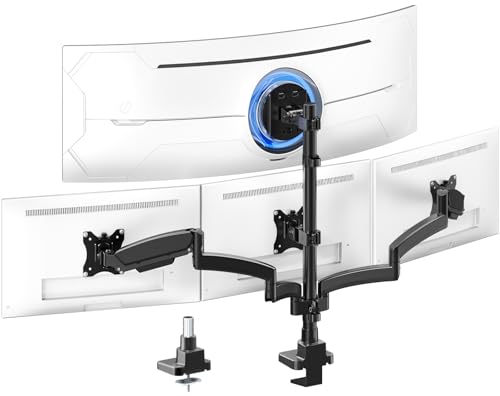
Pros:
Cons:
Best for: Traders and multitaskers who want a 49-inch ultrawide above three lighter screens.
Check current price on Amazon →
The PUTORSEN Gas Spring Quad Mount targets the same layout as the VIVO V104G Quad Ultrawide Mount but swaps in a gas spring and a modular arm. The removable segment is useful on shallow desks where a full-length arm would push screens too far forward.
It is not the right pick for heavy lower monitors. At 15.4 lbs per arm, a pair of 32-inch screens may push the limit, and the monTEK Quad Monitor Stand with 22 lbs per arm is the safer choice for that case.

Pros:
Cons:
Best for: Users with four 27-32 inch monitors in the 22 lbs range who want a conventional stacked mount.
Check current price on Amazon →
The monTEK Quad Monitor Stand is the simplest answer for heavier 32-inch panels. It matches the WALI M004S Stacked Quad Mount on load per arm while stretching the size limit by 5 inches. Setup is described as taking around 20 minutes.
Missing specs hold it back. Without published desk-thickness or reach figures, it is harder to verify against a particular desk than the WALI.

Pros:
Cons:
Best for: Buyers who need a standard quad stand with flexible desk fit and wide tilt.
Check current price on Amazon →
The MOUNTUP Quad Monitor Stand is a competent alternative when the desk is the constraint rather than the screens. Its 0.39-3.15 inch clamp range is close to the WALI's, and it adds a published grommet hole diameter.
For heavier screens, step up to the monTEK Quad Monitor Stand. For ultrawide setups, the VIVO V104G Quad Ultrawide Mount is the better fit.

Pros:
Cons:
Best for: Fixed-position quad desks, such as monitoring or dispatch stations, where stability matters more than frequent repositioning.
Check current price on Amazon →
The HUANUO Quad Mount with Larger Base is aimed at set-and-forget layouts. The reinforced pole and base suit long-term fixed angles, but the height adjustment is clumsier than on the MOUNTUP Quad Monitor Stand because an arm must be unscrewed to pass the connector.
If you plan to adjust screens regularly, the WALI M004S Stacked Quad Mount or VIVO V400G Pneumatic Quad Mount is more convenient.

Pros:
Cons:
Best for: Users with four mid-sized ultrawides who want a clean, flush layout.
Check current price on Amazon →
The VIVO TS38C-4 Telescoping Mount is the only option here that offers up to 38 inches in every position. That makes it a middle path between the 27-inch WALI and the 49-inch top brackets of the VIVO V104G.
Check the weight of each screen first. A pair of heavy 38-inch ultrawides will exceed 17.6 lbs, and the VIVO V400CU Dual Pole Mount is the stronger choice.

Pros:
Cons:
Best for: Renters and desks with glass, stone or hollow tops that cannot take a clamp.
Check current price on Amazon →
The VIVO V004F Freestanding Stand is the exception to the clamp-based mounts on the list. It sits on the desk and holds four screens within its center of gravity, which suits non-standard surfaces. Compared with the MOUNTUP Quad Monitor Stand, it gives up desk space and reach for installation freedom.
Anyone who can clamp should look at the WALI or monTEK instead. Readers moving up from a smaller layout can compare against a quad monitor guide to see how stand footprint and desk depth change with each added screen.
The core trade-off in a four-screen build is capacity against flexibility. Stands that carry large ultrawides use heavier poles and wider spans, while lighter stacked arms are easier to place but limit screen size and weight. Choose the stand for your heaviest screen and your thickest desk first, then refine for layout.
Before choosing, check these project details:
Standard stacked mounts such as the WALI M004S Stacked Quad Mount, monTEK Quad Monitor Stand and MOUNTUP Quad Monitor Stand suit four monitors of 27 or 32 inches. They mount two over two, or in a flexible grid, and give the widest range of angles.
Ultrawide-focused designs change the layout. The VIVO V104G Quad Ultrawide Mount and PUTORSEN Gas Spring Quad Mount put one wide panel on top of three smaller ones, while the VIVO V400CU Dual Pole Mount uses two center ultrawides. Many users coming from a triple monitor desk add the fourth screen above, because it avoids widening the setup beyond the desk.
Per-arm ratings range from 15.4 lbs on the PUTORSEN lower arms to 22 lbs on the WALI, monTEK and HUANUO. Always weigh your monitor with its stand removed, and leave some margin for adjustments.
Arm type affects how easily screens move. The VIVO V400G Pneumatic Quad Mount uses springs on its side arms, the VIVO V104G has two mechanical arms, and the PUTORSEN uses a gas spring. Fixed or standard arms, such as those on the HUANUO Quad Mount with Larger Base, are simpler and suit layouts you will not change often.
Clamp tolerance is a hard limit. The WALI handles 0.2-3.62 inches, the MOUNTUP 0.39-3.15 inches, and the VIVO V104G only up to 1.77 inches. Grommet bases need a hole and a desktop thick enough to seat the plate.
If a desk cannot be clamped, the VIVO V004F Freestanding Stand sits on a 15.25 x 11 inch base. It works best when screens stay close to the pole, and VIVO advises against pulling them far forward or backward unless the stand is bolted down.
Reach decides how close screens can sit. The WALI extends up to 51.2 inches, the PUTORSEN has a 52-inch gas spring extension, and the VIVO TS38C-4 Telescoping Mount expands its arms to sit flush against the wall. Pole height matters for stacked layouts, with the HUANUO listing a 34.25-inch pole.
Cable management is built into most stands. Four monitors can produce a lot of cabling, so look for clips on both the arms and the pole, as on the VIVO V104G and V004F. A portrait screen at the side may also suit a vertical monitor setup approach, which affects how much cable slack you need.
The WALI M004S Stacked Quad Mount suits most desks, with 22 lbs per arm and a clamp range up to 3.62 inches. It handles 13-27 inch screens in flexible stacked layouts. For 32-inch screens, the monTEK Quad Monitor Stand offers the same load rating.
Yes, but only specific models can. The VIVO V104G Quad Ultrawide Mount supports a 24-49 inch top screen up to 44 lbs flat, and the PUTORSEN Gas Spring Quad Mount does the same. The VIVO V400CU Dual Pole Mount takes two 49-inch screens at up to 59.4 lbs each.
Not necessarily, but the desk must tolerate the clamp or grommet range. The WALI clamps to 3.62 inches and the MOUNTUP to 3.15 inches, while the VIVO V104G is limited to 1.77 inches. If your desk cannot take a clamp at all, the VIVO V004F Freestanding Stand sits on a padded base.
The VIVO V400G Pneumatic Quad Mount uses pneumatic springs on its two side arms. The VIVO V104G Quad Ultrawide Mount has two mechanical spring arms with up to 14.5 inches of height adjustment. The PUTORSEN uses a gas spring with a 52-inch extension.
Most stands here accept 75×75 mm or 100×100 mm VESA patterns. The VIVO V400CU Dual Pole Mount is the exception, supporting up to 200×200 mm. Confirm your monitor's pattern before buying, since a mismatch means an adapter.
It varies widely. The PUTORSEN lower arms hold 15.4 lbs, the VIVO V400G, VIVO TS38C-4 and MOUNTUP hold 17.6 lbs, and the WALI, monTEK and HUANUO hold 22 lbs. The VIVO V400CU center brackets reach 59.4 lbs on flat screens.
Best Quad Monitor Setups for most buyers start with WALI M004S Stacked Quad Mount: it holds four 13-27 inch screens at 22 lbs per arm, extends up to 51.2 inches and clamps to desks up to 3.62 inches thick. Its main weakness is the 27-inch ceiling, which excludes larger monitors and any ultrawide.
For alternatives by use case, the VIVO V104G Quad Ultrawide Mount is the choice for a 49-inch ultrawide over three screens, while the VIVO V400CU Dual Pole Mount covers two big ultrawides with 59.4 lbs center brackets. The monTEK Quad Monitor Stand is best for four 32-inch panels at 22 lbs each, and the VIVO V400G Pneumatic Quad Mount adds smooth spring-assisted side arms.
The specialist picks fill narrower gaps. The PUTORSEN Gas Spring Quad Mount suits trading desks with a heavy ultrawide on top, the VIVO TS38C-4 Telescoping Mount keeps 38-inch ultrawides flush to the wall, and the HUANUO Quad Mount with Larger Base favors fixed, stable layouts. The MOUNTUP Quad Monitor Stand suits varied desks, and the VIVO V004F Freestanding Stand is the answer when you cannot clamp. If you are still undecided, weigh your heaviest monitor and measure your desk thickness first, then choose the stand whose limits clear both with room to spare.


