Physical Address
304 North Cardinal St.
Dorchester Center, MA 02124
Physical Address
304 North Cardinal St.
Dorchester Center, MA 02124

We found the 10 best 4 monitor setups for 2026, including gas-spring arms, freestanding stands, and budget picks for trading, coding, and ultrawide command centers.
Getting four monitors to sit level, stay stable, and line up seamlessly is one of the more frustrating desk projects you can tackle. The stock stands take up a square foot each, no two models match in height, and the wobble from a cheap arm can drive you crazy during a tight deadline. A proper 4 monitor setup solves all of that. Whether you are stacking two over two for trading, running three horizontals with one portrait for coding, or hanging an ultrawide over three smaller screens, the right mount turns a mess of mismatched stands into a clean, adjustable workstation. Here are the ten best 4 monitor setups on the market right now.
The picks range from professional-grade pneumatic arms for heavy 49-inch ultrawides to budget pole-mounted stands that cost less than a single cheap monitor. We have included freestanding models for desks that cannot take a clamp or grommet, gas-spring arms for touch-free height adjustment, and ultra-heavy-duty options for the biggest screens. Read on for the full breakdown, or jump to the comparison table if you already know what you need.
TL;DR: The VIVO STAND-V400G is the all-around best, with pneumatic adjustment that makes repositioning effortless. The PUTORSEN Quad Ultrawide handles a 49-inch monitor on top with three smaller screens below, a rare and useful layout. The VIVO STAND-V400D is the brute-force option for four chunky ultrawides up to 44 pounds each. And the WALI M004S nails the value sweet spot with a sturdy steel frame and massive 51-inch arm extension.
| # | Product | Max Screen Size | Weight per Arm | Mounting Options | Price | Best for |
|---|---|---|---|---|---|---|
| 1 | VIVO STAND-V400G | 32" | 17.6 lbs | C-clamp | $149.99 | Everyday all-around performance |
| 2 | PUTORSEN Quad Ultrawide | 49" top / 27" lower | 44 lbs top / 15.4 lbs lower | C-clamp, grommet | $128.99 | Ultrawide + three monocle monitors |
| 3 | VIVO STAND-V400D | 49" (one) / 38" (three) | 44 lbs each | C-clamp | $249.99 | Four heavy ultrawide screens |
| 4 | WALI M004S | 27" | 22 lbs | C-clamp, grommet | $99.99 | Best value with wide reach |
| 5 | WALI GMF004 Freestanding | 27" | 22 lbs | Glass base (freestanding) | $71.23 | Desks without clamp/grommet |
| 6 | PUTORSEN Quad Stand | 32" | 19.8 lbs | C-clamp, grommet | $39.99 | Tall pole height adjustment |
| 7 | WALI M004 | 27" | 22 lbs | C-clamp, grommet | $43.99 | Budget long-proven design |
| 8 | MOUNTUP Quad | 32" | 17.6 lbs | C-clamp, grommet | $44.99 | Budget with wider screen support |
| 9 | MOUNT PRO Quad | 32" | 17.6 lbs | C-clamp, grommet | $44.98 | Lowest price for quad mounting |
| 10 | Pholiten Quad Arm | 32" | 22 lbs (stated) | C-clamp, grommet | $89.99 | Gas-spring budget with tilt |
Prices and availability checked at time of writing and may change.
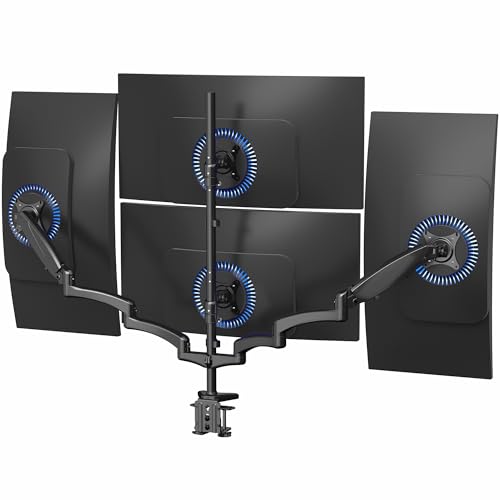
This is the first quad mount we have used that actually feels like a premium product rather than a compromise. The VIVO STAND-V400G uses pneumatic gas springs on the dual side arms, which means you can raise or lower those two screens with one hand and they stay exactly where you put them. The two fixed center brackets are not spring-assisted, but they can still tilt, swivel, and rotate 360 degrees. The whole unit supports screens up to 32 inches and 17.6 pounds per arm, which covers most standard 27- and 32-inch monitors comfortably.
What sets this apart from cheaper pole mounts is the range of motion. The pneumatic arms swing from +90 to -90 degrees of tilt, 180 degrees of swivel, and full rotation. That kind of articulation matters when you want one screen in portrait mode or need to angle a side monitor toward a second desk. The steel and aluminum construction feels solid, and the C-clamp grips desktops up to 3.25 inches thick. Assembly is straightforward with labeled hardware.
If there is a downside, it is the weight limit. At 17.6 pounds per arm, you cannot mount a chunky 32-inch gaming monitor or a heavy ultrawide on the pneumatic arms. For those loads, you will need the more expensive VIVO STAND-V400D. But for the vast majority of office setups, day trading stations, or coding rigs using lightweight or standard monitors, this mount delivers the best balance of adjustability and ease of use we have seen in a quad arm.
Pros:
Cons:
Best for: Traders, developers, and office workers who want gas-spring convenience for their two most-adjusted screens and a solid, stable platform for two more.
Check current price on Amazon →
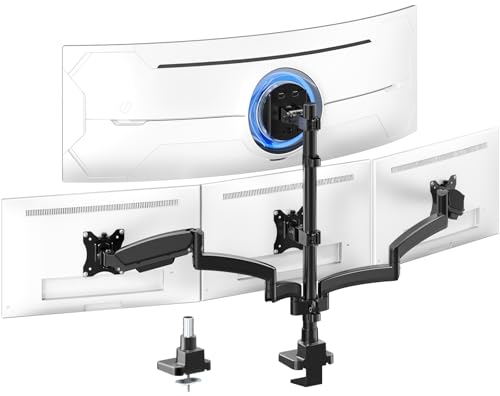
Most quad mounts assume you are running four monitors of roughly equal size. But if your workflow revolves around a massive 49-inch ultrawide, you have a different problem: how do you fit three secondary screens around it without blocking the view? The PUTORSEN Quad Mount solves this with a dedicated top bracket that handles curved and flat ultrawides up to 49 inches and 44 pounds (30.8 pounds for curved), while three independent lower arms hold monitors up to 27 inches each. That is a rare and very useful layout for financial trading desks, video editing, or any task where a super-ultrawide timeline lives above supporting monitors.
The secret is a beefy steel frame paired with a gas spring on the top section. The center bracket tilts +50/-20 degrees, which is generous enough to angle a curved ultrawide downward for a more natural sightline. The lower arms tilt +/-35 degrees, and all four brackets rotate 360 degrees. The three-section arm design reduces sag by distributing weight evenly, and you can remove one segment to pull the arm closer to the pole if your desk is shallow.
The trade-off is that the lower arms top out at 15.4 pounds each. That is fine for standard 27-inch office monitors, but you cannot put a heavy 32-inch screen on the bottom. Additionally, the desk thickness limit for the clamp and grommet is 0.39 to 1.77 inches, which may not work on thick sit-stand desk tops. For the target audience of ultrawide owners who want a clean, stacked look, this is the only mount we have found that does it properly without custom fabrication.
Pros:
Cons:
Best for: Traders, video editors, and power users running a large ultrawide primary display with three secondary monitors in a stacked layout.
Check current price on Amazon →

When you need to mount four 38-inch ultrawides or a mix that includes a 49-inch screen plus three others, the VIVO STAND-V400D is the mount to beat. Each arm supports 5.5 to 44 pounds, and the entire structure is cast aluminum with high-capacity tilt joints that do not sag under heavy loads. The clamp base handles desktops up to 2 inches thick, which is less than some other mounts, but the trade-off is a rock-solid grip that does not shift.
The standout feature here is the pneumatic height adjustment on every arm. Unlike the STAND-V400G which only has gas springs on two arms, this model gives you gas springs for all four. That is a big deal when you are dealing with 30-plus-pound monitors. You can set each screen at a different height with just a hand press. The arm articulation includes +55 to -25 degrees of tilt, 180-degree swivel, and 360-degree rotation. The VESA plates are detachable for easier installation, which you will appreciate when manually lifting a 44-pound monitor into position.
The cost is high. At $249.99, it is the most expensive mount in this roundup by a good margin. And the 2-inch clamp limit means it will not fit some sit-stand desks with thicker tops. But if you are running a high-end setup with multiple ultrawides, skimping on the mount is a recipe for droop and disaster. This is the mount that handles that without complaint.
Pros:
Cons:
Best for: Professionals with four heavy ultrawide monitors (such as 38-inch or 49-inch screens) who need independent pneumatic adjustment for each display.
Check current price on Amazon →

WALI is a well-known name in the monitor mount space, and the M004S updates their classic quad design with a few important improvements. The biggest difference is the reach: each arm extends up to 51.2 inches from the pole, which is significantly more than the standard 30-to-40-inch range you see on most quad mounts. That extra extension is a lifesaver if you have a wide desk or need to position a screen far to the side for a secondary workflow.
The weight capacity is 22 pounds per arm, which outpaces many competitors at this price point. Combined with the 27-inch screen size limit, that means you can mount almost any monitor in that size class, including heavier gaming monitors that push 20-plus pounds. The tilt range is +/-35 degrees, swivel is +/-90 degrees, and rotation is 360 degrees. The mounting options include both a C-clamp for desk edges 0.2 to 3.62 inches thick and a grommet base for desks 0.39 to 2.56 inches thick. That is a wide range that covers most modern desks.
The steel frame provides good stability, though with arms extended fully you may notice some vibration on a lightweight desk. The cable management runs along the arms, which keeps things tidy. The trade-off for the long reach is that the arms use friction hinges rather than gas springs, so you need to tighten bolts to maintain position. It is not as fluid as a pneumatic system, but it is reliable and holds position once set. For $99.99, this is the most versatile quad mount for standard 27-inch monitors.
Pros:
Cons:
Best for: Users with wide desks who need to place monitors far from the center pole, or anyone wanting high weight capacity at a reasonable price.
Check current price on Amazon →

If your desk has a thick edge, glass top, or construction that makes it impossible to use a C-clamp or grommet, the WALI GMF004 is the solution. It uses a heavy glass base that sits on top of the desk, supporting four arms up to 27 inches and 22 pounds each. No drilling, no clamping, no risk of cracking a glass surface.
The design limits the arm movement compared to clamped mounts. The arms only swivel forward, which WALI says reduces the risk of tipping. You will not be able to spin a monitor around behind the pole, but for a front-facing quad layout, that is not a problem. The mounting plates can slide left and right along the arms, which helps align screens of different bezel widths horizontally. The weight of the glass base keeps the whole thing stable as long as you do not lean heavily on one side.
The downsides are that it takes up desk real estate. The glass base occupies a significant footprint, so you lose some surface area. And despite the 22-pound per-arm rating, the freestanding design feels less secure than a clamped mount if you bump the desk. It also lacks cable management beyond basic clips. For a dorm room, rental apartment, or glass desk where drilling is not an option, this is the best quad mount for 4 monitor setup that does not involve permanent modification.
Pros:
Cons:
Best for: Anyone who cannot use a C-clamp or grommet mount, such as glass desk owners or renters who cannot modify furniture.
Check current price on Amazon →

Most budget quad stands use a short pole that limits stacking to two tall screens side by side. The PUTORSEN Quad Stand changes that with a 31.7-inch pole, one of the tallest we have seen at this price. That extra height allows a true 2-over-2 layout with plenty of clearance between rows, or a 3+1 configuration where one monitor sits higher than the rest. It supports screens from 17 to 32 inches, each up to 19.8 pounds, which covers most non-ultrawide monitors well.
The arms use friction hinges with a tilt range of -45 to +45 degrees, swivel of +/-90 degrees, and 360-degree rotation. The VESA plates are tool-free, which speeds up installation. The desk clamp fits surfaces 0.39 to 3.3 inches thick, while the grommet mounts handle 0.39 to 1.57 inches. The cable clips are basic but functional.
The main complaint is that the arms feel light-duty compared to the WALI or VIVO options. The steel tubing is thinner, and the articulation joints are not as smooth. At this price point, that is expected. The PUTORSEN is a solid entry-level quad mount for someone who wants the height flexibility of a long pole without spending over $100. For lightweight 24-inch monitors in a home office, it does the job without fuss.
Pros:
Cons:
Best for: Budget-conscious buyers who need a tall pole for 2-over-2 stacking of lightweight to medium monitors.
Check current price on Amazon →
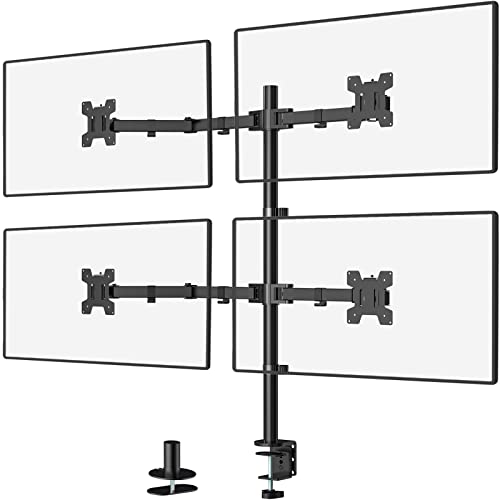
Before the M004S and its extended arms, the WALI M004 was the go-to quad mount for many budget-minded buyers. It is still available and still a good option if you do not need the extra reach. It supports monitors up to 27 inches with 22 pounds per arm, same as the newer version, and uses a two-stage locking system with a 4-inch C-clamp or a 3-inch grommet base.
The arms tilt +/-90 degrees, swivel +/-90 degrees, and rotate 360 degrees. The height pole is 31.5 inches, which gives decent clearance for stacking. The mounting plates are detachable and height-adjustable on the arms. The steel frame is the same core construction as the M004S, just without the longer arms. This means it is slightly more compact and potentially more stable when all four monitors are positioned close to the pole.
The big downside is that the arms are shorter, maxing out around 30 inches of extension. For a typical 60-inch desk, that is usually enough, but if you have an 80-inch desk and want screens way out to the edges, the M004 will not reach. The cable management is also older style, using plastic clips rather than integrated channels. At $43.99, it is a proven design that has been around for years and is reliable for the basics.
Pros:
Cons:
Best for: Those who want the reliable WALI build quality at the lowest possible price and do not need long arm reach.
Check current price on Amazon →

The MOUNTUP Quad Stand matches the price point of the cheapest options but adds support for 32-inch monitors, which the PUTORSEN and WALI M004 do not officially list (though the PUTORSEN claims 32 inches at 19.8 pounds, and the MOUNTUP also says 32 inches at 17.6 pounds). Each arm holds up to 17.6 pounds, and the stand uses a C-clamp or grommet base with a desk thickness range of 0.39 to 3.15 inches.
The adjustability is decent: 360-degree rotation, +/-90 degrees tilt, and 180-degree swivel. The height adjusts along the center pole, which is a standard height for quad stands. The VESA plates are quick-release, which helps with installation. The cable management clips keep wires organized.
Where the MOUNTUP falls short is the build quality feel. The steel is thinner and the articulation joints can feel loose if not tightened fully. The weight limit of 17.6 pounds means many 32-inch monitors are too heavy; you are really looking at 27-inch or smaller screens for this mount. It is fine for a secondary setup or for lightweight screens, but for a main workstation where you will be making frequent adjustments, one of the mid-range options is a better investment.
Pros:
Cons:
Best for: Budget builders using lightweight 24-27 inch monitors who need 32-inch compatibility term as a future-proofing measure.
Check current price on Amazon →

At $44.98, the MOUNT PRO is the cheapest quad mount in this roundup, often going on sale for even less. It supports monitors from 13 to 32 inches with a 17.6-pound per arm limit and uses a C-clamp or grommet base. The pole is 31.7 inches tall, the same height as the PUTORSEN, allowing for stacked layouts.
The arm articulation includes +/-90 degrees tilt, 180-degree swivel, and 360-degree rotation. The cable management uses clips. The assembly is straightforward with labeled parts.
The compromises become clear when you handle it. The metal is thinner and the arms are more prone to sag under heavier monitors. The weight limit of 17.6 pounds is optimistic for a 32-inch screen; realistically, this mount works best with 24-inch or smaller monitors. The clamp mechanism feels less robust compared to the WALI or VIVO offerings. For a secondary setup, a dorm room, or a temporary workstation, the price is hard to beat, but for daily professional use, we suggest spending a little more.
Pros:
Cons:
Best for: Extremely tight budgets or temporary setups where the monitors are small and lightweight (17-24 inches).
Check current price on Amazon →

Most gas-spring quad mounts cost over $100, but the Pholiten Quad Arm breaks that barrier at $89.99. It uses gas springs for height adjustment on all four arms, similar to the VIVO STAND-V400D but at less than half the price. It supports monitors up to 32 inches and 22 pounds per arm (based on the product description, though the spec says 10kg/22lbs). That weight capacity matches the WALI mounts and beats the 17.6-pound limit on many budget arms.
The articulation includes +/-80 degrees tilt, +/-90 degrees swivel, and 360-degree rotation. The VESA plates are detachable, and mounting uses either a C-clamp or grommet base with a desk thickness range that is not specified but typical for the category. The cable management uses clips on the arms.
The catch is that the build quality is not on the same level as VIVO or even WALI. The gas springs can be inconsistent, with some arms feeling different in resistance. The tilt range is generous but the joints can feel a bit loose. It is early in the product lifecycle (it appears to be a newer model), so long-term reliability is unknown. For the price, it is a compelling option if you want gas-spring convenience without spending $150 or more, but we would reserve judgment on durability.
Pros:
Cons:
Best for: Users who want the ease of gas-spring height adjustment on a budget, but are willing to accept potential build compromises.
Check current price on Amazon →
Choosing a quad mount is about balancing weight capacity, adjustability, desk compatibility, and budget. The best 4 monitor setup for you depends on the size and weight of your monitors, how much you move them, and what your desk surface allows. Here are the key factors to consider.
The single most important spec is the maximum weight each arm can support. A mount that says "supports up to 32 inches" is meaningless if the actual weight limit is 17.6 pounds. Many 27-inch monitors weigh 10 to 15 pounds, but 32-inch screens and gaming monitors can push 20 to 30 pounds. Check your monitor's weight with the stand removed (usually listed on the specs page) and add a margin of safety. For heavy monitors, look for mounts rated 20 pounds or more per arm. The VIVO STAND-V400D at 44 pounds per arm is in a different league from the 17.6-pound budget arms.
Gas-spring arms use pressurized cylinders to counterbalance the monitor's weight. You can raise or lower a screen with a light touch and it floats in place. Friction-hinge arms rely on tightened bolts or springs that hold the monitor through friction. They are cheaper and simpler, but adjusting them is a two-hand job, and they can drift over time as bolts loosen. If you adjust your monitor position multiple times a day, gas springs are worth the premium. If you set it once and never touch it, friction hinges save money.
C-clamps are the most common, gripping the back edge of your desk. They require a flat edge and enough clearance for the clamp jaw. Grommet mounts use a hole in the desk surface, ideal for desks with cable management holes. Freestanding mounts like the WALI GMF004 sit on the desk surface with a weighted base, no clamping needed. Each has trade-offs: clamps are most stable, grommets look cleaner, freestanding sacrifices desk space but works on any surface. Make sure the mount's clamp range fits your desk thickness.
All mounts in this roundup support 75x75mm and 100x100mm VESA patterns. The maximum screen size is less important than weight capacity. A 32-inch monitor that weighs 12 pounds is fine on a 17.6-pound arm, but a 32-inch gaming monitor at 25 pounds is not. Some mounts, like the PUTORSEN Ultrawide, are specifically designed for unusual sizes. Measure your monitors' VESA hole spacing and total weight before buying.
Not all mounts offer the same degrees of tilt, swivel, and rotation. If you need portrait mode, ensure 360-degree rotation. If your desk is placed against a wall, look for mounts with enough tilt to angle screens without hitting the wall. The VIVO STAND-V400D's +55/-25 degree tilt is more generous than the basic +/-35 degrees of many budget arms. Also consider how far the arms extend. Longer arms are needed for wide desks, but they introduce more leverage and potential wobble.
Steel and cast aluminum frames resist twisting and sagging better than tubular steel with plastic joints. The thickness of the pole and the quality of the clamp matter. A wobbling mount is distracting and can damage monitor alignment. Higher-priced mounts usually have thicker metal, smoother articulation, and better paint finishes. You do not have to spend $250 to get good stability, but the $40 mounts will flex more under heavy screens.
Most quad mounts use a standard VESA pattern of 75x75mm or 100x100mm. Measure the distance between the four mounting holes on the back of your monitor. If the holes are 75 or 100mm apart (horizontally and vertically), the mount will fit. Weight is the other factor: make sure the per-arm limit exceeds your monitor's weight.
Yes, but you need to pay attention to weight distribution. The lighter monitors should go on the arms with lower weight capacity, or ensure all arms have the same rating. The overall balance of the mount matters with heavily unequal sizes.
If you adjust your screens often, yes. Gas springs let you change height with one hand and hold position precisely. For a static setup that you calibrate once and leave, a friction-hinge mount saves money and works fine.
Only if the mount explicitly supports curved screens. The weight of a curved monitor is often higher than a flat screen of the same size. The PUTORSEN Quad Ultrawide is one of the few that specifically lists curved monitor weights (30.8 pounds for a 49-inch curved).
Yes. The mount uses one small base (or clamp) instead of four separate stands that each take up a square foot. You also gain under-monitor space for keyboards, notebooks, or other items.
Most mounts take 20 to 40 minutes for one person. The hardest part is lifting the monitors onto the VESA plates while tightening the screws. Some mounts have detachable plates that you attach to the monitor first, then clip onto the arm, making installation much easier.
Many mounts specify the maximum desk thickness. If your desk exceeds that, you may need a grommet mount (if you have a hole) or a freestanding mount like the WALI GMF004. Alternatively, you can use a desk edge extender or shorter clamp.
After reviewing ten of the best 4 monitor setups available in 2026, the VIVO STAND-V400G stands out as the mount most people should buy. Its combination of pneumatic gas springs on the side arms, solid steel and aluminum construction, 32-inch compatibility, and $149.99 price hits the sweet spot of features and cost. For ultrawide users, the PUTORSEN Quad Ultrawide is a unique and well-engineered solution that supports a 49-inch monitor above three smaller screens. The heavy-duty VIVO STAND-V400D is the choice for professionals running multiple large ultrawides, offering 44-pound capacity on every arm. And for budget buyers, the WALI M004S provides 22-pound capacity and an exceptional 51-inch reach at $99.99.
The best 4 monitor setup ultimately comes down to the weight and size of your screens, how often you move them, and what your desk allows. The VIVO STAND-V400G covers the broadest range of scenarios. If your monitors are on the heavier side or you need gas springs on all four arms, step up to the $250 VIVO STAND-V400D. And if you are just getting started on a tight budget, the WALI M004S or even the original WALI M004 will serve you well for years.
This article contains Amazon affiliate links. We may earn a small commission on qualifying purchases at no extra cost to you.


