Physical Address
304 North Cardinal St.
Dorchester Center, MA 02124
Physical Address
304 North Cardinal St.
Dorchester Center, MA 02124

Looking for the best 4K webcams? We've rounded up 10 top picks from Logitech, EMEET, Acer, AOC, and more to help you find the perfect camera for video calls, streaming, and recording.
You've finally got that 4K monitor, your desk is clean, your lighting is dialed in. Then you join a video call and the person on the other end sees a grainy, pixelated face. That's the moment you realize your webcam is the weak link. A good 4K webcam fixes that instantly, making you look sharp in meetings, streams, or virtual hangouts. We've sorted through the current market to find the best 4K webcams for every use case and budget. Whether you need a discreet camera for remote work, a streaming rig with AI tracking, or just something that won't make you look like a 1990s security camera, there's a pick here for you.
TL;DR: The Logitech MX Brio is our top overall pick for its exceptional sensor and smart features. The EMEET C960 is the value champion. For streamers, the EMEET S600 delivers smooth 60fps, and the Acer 4K Webcam stands out for its premium metal build.
| # | Product | Key Specs | Price | Best for |
|---|---|---|---|---|
| 1 | Logitech MX Brio | 4K 30fps, 1080p 60fps, AI-enhanced, dual beamforming mics, Show Mode | $169.99 | Professionals needing the ultimate image quality |
| 2 | Logitech Brio | 4K 30fps, RightLight 3, adjustable FOV 65-90°, IR Windows Hello | $164.50 | Business users who want Windows Hello and flexible framing |
| 3 | EMEET C960 | 4K UHD CMOS, PDAF, dual omni mics, 73° FOV | $49.99 | Budget buyers who want true 4K with autofocus |
| 4 | EMEET S600 | Sony 1/2.55" sensor, PDAF, 1080p 60fps, adjustable FOV | $59.49 | Streamers needing smooth 60fps and good color |
| 5 | EMEET NOVA | 4K UHD CMOS, PDAF, dual omni mics, 73° FOV, USB-A | $47.49 | Business pros who want a reliable, no-fuss webcam |
| 6 | EMEET PIXY | Dual-camera PTZ, AI tracking, Sony sensor, 3 mics, gesture control | $89.99 | Creators who move on camera and want auto tracking |
| 7 | Acer 4K Webcam | Sony 1/2" sensor, PDAF, all-metal unibody, magnetic privacy cover | $59.98 | Users who value build quality and low-light performance |
| 8 | AOC 4K Webcam | 4K, 99° FOV, 360° swivel, noise-reducing mic, USB-C/A adapter | $27.99 | Group calls or desk demos needing a wide view |
| 9 | Philips 4K Webcam | 4K, built-in mic, physical privacy shutter, plug-and-play | $28.99 | Budget users who need a simple, easy-to-use camera |
| 10 | Lavsoul Tiny Webcam | 4K 30fps / 1080p 60fps, PDAF, dual noise-canceling mics, 80° FOV | $24.99 | Minimalist setups where small size is critical |
Prices are as of the time of writing and can change. Check the links for the most current pricing.
Choosing a 4K webcam isn't just about resolution. Here are the factors that separate a good webcam from a mediocre one.

Logitech's MX Brio is the new king of the webcam world. Its sensor has 70% larger pixels than the previous Brio, and you can see it. In dim rooms, where older cameras turn grainy and muddy, the MX Brio retains texture and detail. The AI-enhanced auto-exposure and white balance adapt instantly to changes in lighting, so you don't go dark when you turn your head toward a window. The dual beamforming microphones are among the best we've heard built into a webcam, and the AI noise reduction is aggressive but natural.
The Show Mode is a genuine productivity booster. Tilt the camera down and it automatically flips the image, letting you share documents, whiteboards, or physical objects on your desk without any software gymnastics. It works with the Nintendo Switch 2's new GameChat mode too, which is a nice bonus for hybrid streamers. At 1080p 60fps, the motion is smooth for anything short of professional streaming. The only real downside is the price. At $170, it's more than some people pay for an entire monitor arm. But if video quality is your top priority, this is the one.
Check current price on Amazon →

The Logitech Brio has been a fixture on best-of lists for years, and it still holds up. Its killer feature is the adjustable field of view. You can switch between 65 degrees (a tight head-and-shoulders shot), 78 degrees (a standard desk view), and 90 degrees (a wide room view) using the Logitech Options software or a button on the camera. That flexibility is rare at this price. The RightLight 3 technology does a solid job balancing exposure, though it's not as sophisticated as the MX Brio's AI system.
Windows Hello support via the built-in IR sensor is a secure and fast way to log in. The dual omnidirectional microphones capture clear audio up to about four feet, with good noise cancellation for background chatter. The attachable privacy shutter flips up and down easily. The image quality is very good for 4K meetings, but in very low light the older sensor shows its age, introducing noise that the MX Brio sidesteps. It also lacks 1080p 60fps, which matters more for streaming than for calls.
Check current price on Amazon →

The EMEET C960 is the webcam that proves you don't need to spend hundreds for great 4K. Its genuine CMOS sensor delivers true 4K resolution (not the upscaled nonsense some cheap cameras use) with phase detection autofocus that locks onto your face in a fraction of a second. The dual omnidirectional microphones capture natural audio up to about eight feet, and while they aren't as refined as Logitech's beamforming mics, they are more than adequate for home offices and classrooms.
The 73-degree field of view is a bit narrow if you want to show a whiteboard or include a coworker, but for solo desk work it's ideal. The camera defaults to 1080p out of the box. You need to switch to 4K using the built-in software or an app like PotPlayer or OBS. That's a minor inconvenience for the price. The build is all plastic, but the mount feels secure and the privacy cover slides firmly. The EMEETLINK software lets you tweak exposure and color balance, though it's not as polished as Logitech's suite.
Check current price on Amazon →

The EMEET S600 is built for people who care about how they look on stream. Its Sony 1/2.55-inch sensor produces noticeably better color and dynamic range than the C960. The 1080p at 60 frames per second is a must for smooth motion in gaming or product demonstrations. The PDAF autofocus is snappy and stays locked even when you lean in to adjust a piece of gear. At 4K, you're capped at 30fps with a fixed 73-degree field of view. Switch to 1080p and you can adjust the FOV between 40 and 73 degrees via software, which is handy for tight headshots or wider studio shots.
The microphones are good but not exceptional. They filter background noise well enough for a quiet streaming setup, but if you have mechanical keyboard clicks or a loud fan, you will want a dedicated microphone. The built-in privacy cover is integrated into the lens housing, so it never gets lost. The EMEETLINK software offers more granular control than the C960, including separate mic gain and noise cancellation toggles.
Check current price on Amazon →

The EMEET NOVA is a refined version of the C960, aimed squarely at corporate users. It shares the same 73-degree FOV and PDAF autofocus, but the design is more subdued and professional. The mic array captures clear audio up to about eight feet, and the auto light correction handles window glare and backlighting well for a budget camera. The USB-A connection is a convenience for older laptops and docking stations.
The NOVA's autofocus has a fixed range of about 7.9 to 118 inches, which covers most desk setups but means you can't manually focus for close-up macro shots. The EMEETLINK software lets you adjust brightness, contrast, and saturation, plus a backlight compensation mode that helps in tricky lighting. It does not support facial tracking or adjustable FOV, so don't buy it expecting PTZ or wide group shots. For one-on-one meetings and small conference rooms, it performs reliably day after day.
Check current price on Amazon →

The EMEET PIXY is the most innovative webcam we've seen. It uses two cameras: one for 4K imaging and one dedicated AI camera that detects your face to assist autofocus and exposure. The result is autofocus that locks on in 0.2 seconds, compared to the roughly 1.1 seconds of conventional webcams. The PTZ motor provides 310 degrees of pan and 180 degrees of tilt, tracking you as you move around the room. The gesture control works well. Hold an open palm centered in the frame for two seconds, and the camera starts tracking you. It's great for fitness instructors, dancers, or anyone presenting with movement.
The triple-mic array offers three modes: Live Mode filters steady fan or AC noise, Noise Canceling Mode blocks sudden sounds like keyboard clicks or door slams, and Original Sound Mode captures full ambient audio for music. The EMEET STUDIO software includes preset positions for quick angle changes, a whiteboard mode that auto-detects a board, and an AIGC feature to generate shot lists. The PIXY is also compatible with the Nintendo Switch 2's camera mode. The only catch is the price, which sits above $80, and the need for a USB 3.0 connection to unlock full 4K tracking. With USB 2.0, you'll get 1080p tracking.
Check current price on Amazon →

The Acer 4K webcam feels like a premium gadget from the moment you touch it. The CNC-machined aluminum body is cool to the touch and exceptionally rigid. The included magnetic privacy cover is one of the best we've seen. It snaps into place with twelve magnets and doesn't wobble. The Sony 1/2-inch sensor is physically larger than the sensors in most competitors, giving it a real advantage in low light. Text and fine details stay sharp while cheaper cameras turn mushy.
The PDAF autofocus is fast and silent. The dual digital microphones pick up voice clearly from up to 2.5 meters and do a good job filtering keyboard clicks. The camera connects via USB-C, and Acer includes a thoughtful note that the sensor is genuine Sony, not a recycled component. At 57 grams, it's light and portable. The only area where it falls short is the lack of 1080p 60fps support. For business meetings and general use, that's not a dealbreaker, but streamers should look at the EMEET S600 or PIXY.
Check current price on Amazon →

If you need to show more than your face, the AOC 4K webcam has the widest field of view on this list at 99 degrees. That's enough to fit three people comfortably around a desk or to demonstrate a whole whiteboard without moving the camera. The 360-degree swivel and 180-degree tilt make it easy to point exactly where you need. The included USB-C and USB-A adapter ensures it works with any modern laptop or older desktop.
The image quality is decent for the price but not outstanding. Colors are a bit less accurate than the EMEET or Acer cameras, and the autofocus is contrast-based, which means it can hunt briefly when you change position. The built-in mic picks up your voice clearly in quiet rooms but struggles in noisy environments. The auto light correction helps a little but isn't as effective as the Logitech systems. For the money, though, the wide FOV alone makes it a great pick for anyone who needs to share a space on camera.
Check current price on Amazon →
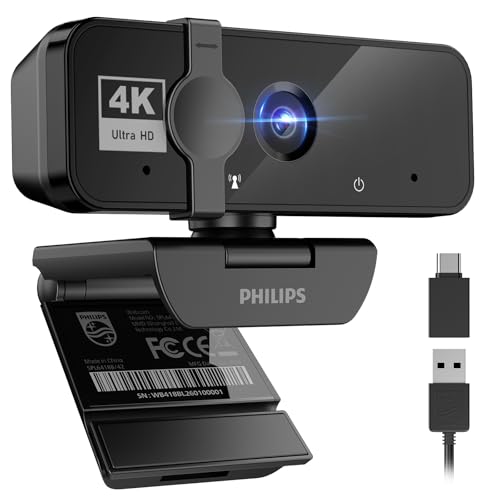
The Philips 4K webcam is about as straightforward as it gets. Plug it in, and within seconds you're looking at a reasonably sharp 4K image. The physical privacy shutter slides easily to block the lens. The built-in microphone captures your voice clearly for standard calls. The build is all plastic, but the clip is sturdy and grips even thick bezels.
The video is acceptable for daily Zoom meetings and virtual classes, but it doesn't match the sharpness or color fidelity of cameras with Sony sensors or PDAF. In low light, the image gets noisy quickly. The lack of autofocus is the biggest omission. You get a fixed focus that is set at a distance, so if you lean in close, you'll go blurry. If you're on a tight budget and just need a functional 4K webcam for occasional use, it works. But anyone who wants reliable autofocus or good low-light performance should spend a bit more on the EMEET C960 or Lavsoul.
Check current price on Amazon →

The Lavsoul Tiny is deceptively small. It's about the size of a pair of earbuds, but it packs PDAF autofocus, 1080p 60fps, and a wide f/1.78 aperture lens. The wide aperture lets in more light, which helps in dim rooms. The dual noise-canceling microphones do a better job than many budget webcams, filtering out constant background hum and sudden noises like tablet taps. The 80-degree field of view is a sweet spot for solo desk work.
The build is mostly plastic, and the mount feels a bit flimsy compared to the Acer or Logitech cameras. The software is minimal. If you need 60fps for smooth motion on a tight budget, this is the only webcam under $30 that offers it. Just be aware that the 4K resolution here is a nice bonus for still frames. For moving video, many users will stick with the 1080p 60fps mode.
Check current price on Amazon →
A 4K webcam can transform your video presence, but not all 4K cameras are created equal. Here are the factors you should weigh before buying.
The sensor is the heart of the camera. Larger sensors capture more light, which means less noise and better dynamic range. The best consumer webcams use Sony sensors like the 1/2.55-inch or 1/2-inch type. Cheaper models use smaller CMOS sensors that struggle in anything less than perfect light. If you work in a dim home office or near a window with backlight, prioritize a Sony sensor or a camera with large pixels like the Logitech MX Brio.
Phase Detection Auto Focus (PDAF) is faster and more precise than the older contrast-based autofocus. PDAF can track movement smoothly, while contrast AF often hunts back and forth before locking. If you gesture or lean in during calls, PDAF is worth paying extra for. The Logitech Brio and MX Brio use contrast AF (but they are fast enough to compensate). Most EMEET models and the Acer use PDAF.
Field of view (FOV) determines how much of the scene the camera captures. A narrow FOV (around 65-73 degrees) is best for a tight head-and-shoulders framing that keeps you the focus. A medium FOV (78-90 degrees) is standard for a desk view. A wide FOV (90-99 degrees) can show your whole workspace or include multiple people, but it may distort your face if you sit too close. The Logitech Brio is unique in offering adjustable FOV presets. The AOC is the widest at 99 degrees.
Built-in microphones vary widely. Dual omnidirectional mics with noise cancellation are the baseline for good audio. Beamforming mics (like in the Logitech MX Brio) are even better at isolating your voice from room echoes and keyboard clicks. If you record in a busy environment, look for a camera with dedicated noise cancellation modes, like the EMEET PIXY's triple-mic array. For quiet home offices, even the simpler mics in budget webcams will suffice.
A physical privacy shutter is a must for security. Some cameras have a built-in sliding shutter (like the EMEET S600), others use an attachable cover (Logitech Brio) or a magnetic snap-on (Acer). The mount should also be sturdy. A 360-degree swivel and tilt are nice to have. The EMEET PIXY's PTZ motor adds automation but is overkill for static desk setups.
Dedicated software unlocks features like manual exposure, white balance, zoom, and preset angles. Logitech's Options+ and EMEETLINK are the most mature. The Acer and Lavsoul offer basic controls at best. Also check compatibility with your OS and apps. All the cameras here work with Windows, macOS, and major platforms like Zoom, Teams, and Google Meet. But some features (like Windows Hello) require specific support.
For most video call apps, the image is compressed and downscaled anyway, so 1080p is often sufficient. However, a 4K sensor gives you sharper 1080p video (through downsampling) and better low-light performance, since the higher resolution sensor usually has larger pixels. If you record videos or stream to platforms that accept 4K input, it's worth it.
4K at 30fps is better for static shots and fine detail. 1080p at 60fps is smoother for motion, which matters for streaming, fitness demonstrations, or any content where you move around a lot. Some webcams (like the EMEET S600 and Lavsoul Tiny) let you switch modes depending on your needs.
Yes, if you move around during calls. PDAF locks on faster and doesn't hunt or blur like contrast-based autofocus. If you sit perfectly still in a fixed position, contrast AF works fine. But for presenters, streamers, or anyone who gestures, PDAF is a significant upgrade.
Yes, but the older computer's processor may struggle to encode 4K video smoothly, especially during live calls. Most webcams default to 1080p for this reason. Check that your computer meets the minimum requirements (usually a 7th generation Intel Core i5 or equivalent). USB 2.0 ports can handle 1080p but may limit 4K frame rates.
For solo streaming, a 73-80 degree FOV is ideal to keep you as the focal point. For business meetings with multiple participants or the need to show a whiteboard, 90-99 degrees is better. The Logitech Brio's adjustable FOV is the most versatile solution across both scenarios.
If you work from a home office with distractions, noise cancellation is very helpful. The Logitech MX Brio and EMEET PIXY have the best mic systems in this roundup. For quiet spaces, even a single built-in microphone works fine.
Yes. All the webcams listed here are plug-and-play with major conferencing apps. Just make sure to set the camera as your default video source in the app's settings. Some advanced features like background effects or touch-up may require the webcam's own software to be installed.
The Logitech MX Brio is the best 4K webcam overall for its stellar image quality, smart AI features, and useful Show Mode. If you want a premium camera without the top-tier price, the Logitech Brio offers excellent flexibility with its adjustable FOV and Windows Hello support. For the best value, the EMEET C960 delivers true 4K and PDAF for under $50. Streamers should head straight to the EMEET S600 or the EMEET PIXY if they need AI-powered tracking. The Acer 4K Webcam is the one to buy if build quality and low-light performance matter most. Whichever you choose, make sure it fits your room's lighting, your field of view needs, and your tolerance for fiddling with settings. The best 4K webcam is the one you'll use every day without thinking about it.
This article contains Amazon affiliate links. We may earn a small commission on qualifying purchases at no extra cost to you.


