Physical Address
304 North Cardinal St.
Dorchester Center, MA 02124
Physical Address
304 North Cardinal St.
Dorchester Center, MA 02124

We've rounded up the 10 best fiber laser engravers for metal, jewelry, and more in 2026. From the xTool F1 Ultra to the LaserPecker LP2, find your ideal machine.
Engraving metal permanently used to mean sending parts out to a service or investing in a workshop-scale machine. The fiber laser engraver changed that. These desktop devices can etch serial numbers onto steel, colorize stainless steel tumblers, and cut thin brass sheets, all with the push of a button. But the market has split into dual-laser hybrids, dedicated MOPA units, and portable options, and the differences matter. Here are the 10 best fiber laser engravers in 2026, covering everything from a two-pound handheld to a 60-watt industrial workhorse.
Some machines blend fiber and diode lasers to handle both metals and organics. Others go all-in on pure fiber power for deep engraving and metal cutting. A few even fit in a backpack. We've sorted through the current lineup to find the models that deliver real productivity, consistent results, and sensible upgrade paths.
TL;DR: The xTool F1 Ultra is the most versatile dual-laser machine for small businesses. The xTool F2 Ultra Single delivers over 100 consistent colors on metal. The GWEIKE G2 Max offers the deepest engraving for heavy-duty work. And the LaserPecker LP2 is the most affordable way to get started with fiber engraving on coated metals.
| # | Product | Laser Type | Power | Max Work Area | Best for | Price |
|---|---|---|---|---|---|---|
| 1 | xTool F1 Ultra | 20W Fiber + 20W Diode | 20W + 20W | 220 x 220 mm (expandable with conveyor) | Mixed-material shops, 3D embossing | $2,899.00 |
| 2 | xTool F2 Ultra Single | 60W MOPA Fiber | 60W | 8.7 x 8.7 in (expandable) | Color metal engraving, batch production | $4,499.00 |
| 3 | xTool F2 Ultra Dual | 60W MOPA Fiber + 40W Diode | 60W + 40W | 8.7 x 8.7 in (expandable) | All-in-one for every material | $5,599.00 |
| 4 | GWEIKE G2 Max | 50W Fiber | 50W | 150 x 150 mm | Deep engraving, metal cutting | $2,499.00 |
| 5 | GWEIKE G2 Pro | 30W Fiber | 30W | 110 x 110 mm | Portable deep engraving | $1,599.00 |
| 6 | Mr.Carve S4-30W | 30W Fiber | 30W | Interchangeable 110 & 200 mm lenses | Interchangeable lens versatility | $1,699.99 |
| 7 | Monport 60W Fiber | 60W Fiber | 60W | 150 x 150 mm | Standalone 60W value | $2,087.99 |
| 8 | xTool F2 | 5W IR + 15W Diode | 5W + 15W | Compact desktop with camera | On-site personalization | $1,349.00 |
| 9 | LaserPecker LP2 | 1.6W Diode (fiber-like for coated metals) | 1.6W | 4 x 4 in (with roller extension) | Budget entry, portability | $699.00 |
| 10 | xTool S1 40W | 40W Diode | 40W | 23.93 x 15.16 in | Large-area projects, tumblers | $1,649.00 |
Prices shown are as of listing and may change over time.
These are the factors that separate a great fiber laser engraver from a frustrating one:

The xTool F1 Ultra is the one machine that genuinely does nearly everything. It packs a 20W fiber laser for metals and a 20W diode laser for wood, acrylic, and leather, all in a single enclosed desktop unit. The fiber side etches gold, silver, copper, and stainless steel in seconds. The diode side cuts up to 15 mm of wood and 12 mm of black acrylic. That combination alone makes it the most versatile pick on this list for a small workshop that takes on mixed-material orders.
What really sets it apart is the 16MP smart camera and the Auto Streamline system. You can place an assortment of irregular objects on the bed (or on the optional auto conveyor), and the machine automatically recognizes each shape, positions the engraving, and runs through the batch without you touching anything. That kind of workflow is normally reserved for much larger production gear. The 3D embossing mode is also better than you'd expect from a 20W fiber: multi-level reliefs on metal come out clean, though depth takes multiple passes.
The 220 x 220 mm work area is the largest of any desktop fiber engraver, and it expands to 220 x 500 mm with the conveyor. But the conveyor is sold separately, which adds to the already steep price. The enclosure is fully sealed with a smoke extraction fan and a fire alarm, so it's safe enough for a retail store or craft fair booth.
Pros
Cons
Best for A small business that engraves both metal and non-metal items daily, or a maker who wants one machine for everything.
Check current price on Amazon →

If your work centers on metal and you need color – real, repeatable color on stainless steel, titanium, brass – the xTool F2 Ultra Single is the top contender. This is a pure 60W MOPA fiber laser, no diode side. MOPA (Master Oscillator Power Amplifier) allows you to tune the pulse width, which is what creates the vibrant colors without dyes or paints. xTool claims over 100 consistent colors, and the pre-set color files make it simple: you pick a color matrix, click, and the machine applies the right settings. No endless calibration runs.
The dual 48MP cameras give 0.2 mm positioning accuracy, which is 60 percent better than single-camera systems. The AI can auto-detect material and suggest parameters, which saves time on the first job of a new metal type. Speed tops out at 15,000 mm/s, and the company says 3D embossing jobs take 80 percent less time than on a 20W fiber. That is a believable claim given the power difference.
The work area is 8.7 x 8.7 inches, expandable to 8.7 x 19.7 inches with an optional conveyor. For a MOPA laser at this price, that space is reasonable. It also does thin metal cutting (up to 2 mm) and deep engraving, plus black marking on aluminum and even some laser cleaning. But the single laser means you cannot cut wood or acrylic – for that you need the dual version or a separate diode machine.
Pros
Cons
Best for A metals-focused workshop that needs high-quality color marking on stainless steel, titanium, and brass for jewelry, signage, or industrial parts.
Check current price on Amazon →

The xTool F2 Ultra Dual takes everything great about the Single version and adds a 40W diode laser on top. That means you get the full color metal capability of the MOPA fiber plus the ability to cut 23 mm wood and 20 mm acrylic with the diode. It is the most capable desktop laser engraver on the market in 2026, and it costs accordingly.
The dual laser heads share the same galvanometer system, so switching between materials is seamless within the software. You can do a color metal job on a titanium flask in the morning and a deep wood cut in the afternoon without touching the hardware. The 48MP cameras, AI material detection, and Auto Streamline conveyor support carry over from the Single version. Speed is identical at 15,000 mm/s.
For a business that wants one machine to handle every order type, this is the answer. But the price tag of $5,599 puts it in semi-industrial territory. It also weighs more than the Single and takes up the same desk space. If you do not need the diode for organics, save the money and get the Single. If you do need both, there is no substitute.
Pros
Cons
Best for A full-time laser engraving business that wants zero limitations on material types and can justify the premium.
Check current price on Amazon →

The GWEIKE G2 Max is built for depth. With a 50W fiber laser running at 1064 nm, it can sink impressions into steel, brass, and titanium that are noticeably deeper than what 20W or 30W machines achieve in the same number of passes. The galvanometer hits 15,000 mm/s and holds 0.001 mm accuracy, which is genuine industrial tolerance.
What makes the G2 Max interesting is its 90-plus color engraving capability on stainless steel, achieved through pulse manipulation similar to MOPA but on a standard Q-switched fiber. The colors are not as broad or as consistent as a true MOPA, but for most jewelry and dog tag work they are more than sufficient. The 150 x 150 mm work area is good for a 50W machine, and the electric lift column is a rare convenience – you adjust focus with a button rather than cranking a knob.
The G2 Max is also detachable. You can pull the laser head off its stand and use it as a handheld engraver for large objects that cannot fit on the bed. The dual red-light preview system makes alignment fast. It supports LightBurn and its own GLaser software over Wi-Fi or USB. The enclosure is Class 4, so protective glasses are required, but the protective cover and emergency stop are included.
Pros
Cons
Best for A workshop that specializes in deep metal engraving for tools, molds, or industrial tags, and wants the option of handheld operation.
Check current price on Amazon →

The GWEIKE G2 Pro is essentially the little brother of the G2 Max. It shares the same detachable design, dual red-light alignment, and galvanometer speed of 15,000 mm/s, but its 30W laser limits deep engraving speed and color range. It can still mark all metals and produce over 90 colors on stainless steel, though the consistency drops at the edges of the color spectrum.
Where the G2 Pro shines is portability. The head detaches cleanly and weighs far less than the Max, making it genuinely practical to take to a job site or engrave a bicycle frame that cannot fit in a standard bed. The work area is 110 x 110 mm, which is tight for batches but fine for one-off dog tags, rings, and small plaques.
The 30W power is sufficient for marking serial numbers, logos, and QR codes on steel, and for light deep engraving. If you regularly do deep 3D carving, step up to the 50W Max. But for on-site personalization and repair shops that need to mark parts, the G2 Pro hits a sweet spot of capability and affordability. It supports LightBurn and GLaser and comes with a protective cover, emergency stop, and glasses.
Pros
Cons
Best for A mobile engraver or repair service that needs a portable fiber laser for small metal parts and occasional large-object work.
Check current price on Amazon →

The Mr.Carve S4-30W takes a different approach to work area: it comes with two interchangeable lenses, a 110 mm and a 200 mm. The 110 mm gives you a smaller, more intense spot for deep engraving and relief work. The 200 mm lens paired with the included extension column opens up a larger engraving area for big parts. That is rare at this price point.
The laser is a standard 30W Q-switched fiber. It achieves 0.01 mm precision and includes an upgraded chip that the company claims boosts engraving speed by 50 percent and extends lifespan to 10,000 hours. The dual red-dot alignment is simple: focus when both dots meet or overlap. It is compatible with LightBurn, which is a big plus, and the included USB drive has software and manuals.
Build quality feels solid for a machine in the $1,700 range. The side ventilation keeps internal temps under control. Multiple rotary attachments are available separately for rings, cups, and mugs, making the S4 adaptable for jewelry and promotional product shops. The biggest downside is that the 30W power limits deep engraving speed – it works, but you will wait longer than on a 50W or 60W machine. Also, the software bundled on the USB is basic; most users will want LightBurn.
Pros
Cons
Best for A jeweler or customizer who wants one machine that can handle small deep engravings and larger area marking without buying a second unit.
Check current price on Amazon →

The Monport 60W Fiber Laser Engraver is a no-nonsense 60W Q-switched fiber machine aimed at shops that want serious power without the premium of an xTool. It marks all metals and can handle deep engraving and even thin metal cutting. The 150 x 150 mm work area is standard for this class, and the company custom-tuned the F-theta lens to avoid edge distortion, a common complaint on cheaper fiber units.
Speed is listed at 10,000 mm/s, slightly slower than the xTool and GWEIKE galvos, but still fast for most marking jobs. The red dot pointer helps with positioning. Monport includes a free USB drive with backup software (BSLcad and LightBurn trial), though the software is functional. The claimed laser lifespan of 100,000 hours is optimistic for a Q-switched unit, but it should last many years under normal use.
The biggest appeal is the price: $2,087.99 for a 60W fiber is hard to beat. You give up the polished software experience, AI cameras, and dual-laser options of the high-end xTool machines, but if you need raw fiber power for metal marking and deep engraving, the Monport delivers. The enclosure is small and lightweight, though you need to provide your own fume extraction.
Pros
Cons
Best for A metals workshop that needs 60W fiber power on a tighter budget and can handle the extras like fume extraction and third-party software.
Check current price on Amazon →
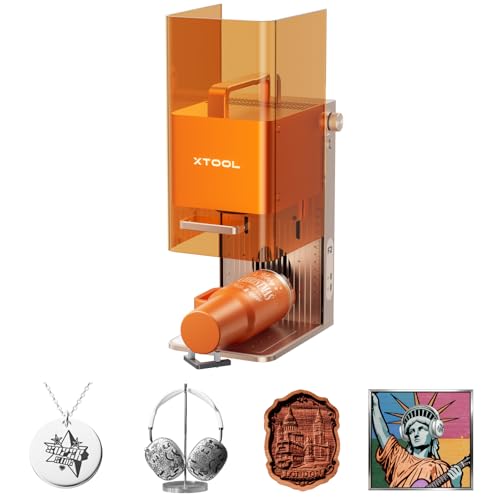
The xTool F2 is the lightweight surprise on this list. Weighing only 4.6 kg, it is the most portable desktop machine that still includes a fiber-like laser for metal marking. The 5W IR laser produces dark, deep marks on all metals and can achieve some color marking. The 15W diode side handles 3D embossing on wood and cuts through thicker organic materials. The trade-off is that neither source is as powerful as the full-size xTool machines, so speed and depth are limited.
What makes the F2 special is the built-in 50MP camera that gives 0.1 mm alignment accuracy. You place small items like rings or phone cases on the bed, the camera visualizes the workspace, and you can position designs precisely. Engraving a credit-card-sized piece takes about three seconds. The machine is ready to use out of the box with fully assembled packaging.
The enclosed design with built-in fan (optional purifier) makes it safe for indoor use at a pop-up market or retail counter. The Slide Extension accessory turns it into a batch processor for items like coasters. But the 5W IR laser is best for marking, not deep engraving. If you need to do heavy metal work, this is not the tool. For light on-site personalization – engraving names on pens, flasks, keychains – it is nearly perfect.
Pros
Cons
Best for A craft fair vendor or retail shop that does on-the-spot personalization on metal and non-metal items and needs portability.
Check current price on Amazon →

The LaserPecker LP2 is the most affordable machine here, and it is also the most limited for metal work. It uses a 1.6W diode laser, not a true fiber laser, so it can only engrave coated or painted metals and brushed stainless steel. Bare shiny metals, gold, and silver will not absorb the beam. That is a critical limitation. If your primary material is raw metal, skip the LP2. If you work mostly on wood, leather, and coated metal tumblers, it is a capable little machine.
The included SpinTrack roller adds 360-degree cylindrical engraving for tumblers, bottles, and pens. The galvo system is slower than fiber units (max speed around 1,417 inches per minute) but acceptable for small runs. The laser unit detaches from the stand and can be used handheld, which is handy for engraving assembled objects. It connects via USB or Wi-Fi to smartphone or PC.
The LP2 is a decent starting point for someone exploring laser engraving on a tight budget. It comes with safety glasses, power adapter, and a conical protective cover. But the limitations on metals are real. For $699, it is a fair value for a mixed-material hobbyist, but a business that needs to mark bare metal should look at the xTool F2 or a dedicated fiber unit.
Pros
Cons
Best for A hobbyist or small business that engraves primarily wood, leather, and coated metal items like tumblers, and wants the cheapest possible entry into galvo engraving.
Check current price on Amazon →

The xTool S1 is the odd one out on this list: it is a pure 40W diode laser, not a fiber laser. It cannot engrave bare metals at all (only coated or anodized). But it earns a place because its huge 23.93 x 15.16 inch bed handles projects that no desktop fiber can touch. Door signs, large acrylic panels, and batch runs of up to 119 dog tags are one-click jobs on the S1. It also cuts 18 mm cherry wood in a single pass – something no fiber in this roundup can do.
The S1 uses xTool's patented Pin-point Positioning for 3D engraving on curved surfaces, and the AutoPassthrough technology lets you work on objects up to 118 inches long. The rotary bundle is included, so tumbler engraving is ready out of the box. Safety is Class 1: the fully enclosed cover filters 99 percent of laser light, so no goggles needed, and the smoke extraction system keeps the air clean.
For a business that needs large-format cutting and engraving on non-metal materials, the S1 is fantastic. It is also xTool's easiest machine to start with – the software has over 400 material presets and AI design generation. But if you need to mark bare steel or gold, you still need a fiber laser. The S1 is a complementary tool, not a replacement.
Pros
Cons
Best for A shop that does large-format acrylic and wood projects, tumblers, and signage, and already has or plans to get a separate fiber laser for metal.
Check current price on Amazon →
The right fiber laser engraver depends on three things: the materials you work with most, the depth and color quality you need, and how much space you have. Here is what to look for.
Power is measured in watts and directly affects engraving speed and depth capability. For marking serial numbers, logos, and QR codes on metal, 20W to 30W is enough. For deep engraving, cutting thin metal, or 3D relief work, 50W or 60W cuts the job time significantly. MOPA (Master Oscillator Power Amplifier) fiber lasers add the ability to change pulse width, which unlocks color marking on stainless steel and titanium. Standard Q-switched fiber lasers can produce some color but with less consistency. Diode lasers (455–450 nm) are cheaper and good for wood, acrylic, and coated metals, but they cannot mark bare shiny metals.
The engraving field size determines the maximum single-piece you can process. Typical desktop fiber bed sizes range from 4 x 4 inches up to 8.7 x 8.7 inches. Many machines offer an optional conveyor or slide extension for longer items. Interchangeable lenses are another approach: a shorter lens (110 mm) gives higher resolution and deeper engraving, while a longer lens (200 mm) covers a larger area. If you do batch production, a larger fixed bed or conveyor support is more efficient than repositioning manually.
Fiber lasers use galvanometer mirrors to steer the beam, which is much faster than gantry systems. Look for speeds of 10,000 mm/s or higher for productive batch work. The accuracy (spot size) should be 0.05 mm or better for fine details. The galvanometer quality matters more for consistent results across the entire work area than the raw speed number.
LightBurn is the gold standard for laser control, offering vector editing, array tools, and rotary support. Some manufacturers also provide proprietary software with AI features like material detection, design generation, and presets. If you value a guided experience, xTool Creative Space is strong. If you need advanced control, LightBurn compatibility is essential. Check that the machine connects via USB and Wi-Fi for convenience.
Class 1 safety rated machines are fully enclosed and filter out all laser light and fumes, making them safe for home or retail use without goggles. Class 4 machines emit an open beam and require protective eyewear and often a closed-off area. For any indoor workshop, a Class 1 enclosure with a built-in fan and optional external filter is the safer, more comfortable choice. Also check for an emergency stop button, lid-open sensor, and flame detection.
Some fiber lasers, like the GWEIKE G2 series and the LaserPecker LP2, have detachable laser heads that can be used handheld for engraving large objects that will not fit on the bed. This is a major advantage for repair shops, on-site service, or engraving items like bicycle frames, tools, or sculptures. Portable units are typically lighter and smaller but often have lower power and smaller work areas.
Yes, a pure fiber laser (1064 nm) can engrave all common metals: gold, silver, copper, brass, steel, stainless steel, titanium, and aluminum. It works by creating a localized oxidation or ablation on the surface. Diode lasers, by contrast, cannot engrave bare shiny metals because the beam reflects off the surface.
MOPA stands for Master Oscillator Power Amplifier. Unlike a standard fiber laser, a MOPA can adjust the pulse width, which lets you change how the energy interacts with the metal. This allows for color engraving on stainless steel and titanium, as well as better marking on certain plastics. You need MOPA if you want to produce colored logos or images on metal. If you only need black or gray marks, a standard Q-switched fiber is sufficient and usually cheaper.
Depth depends on power and number of passes. A 20W fiber can achieve around 0.1 to 0.2 mm deep in a few passes. A 50W or 60W fiber can reach 0.5 mm or more with multiple passes, and can cut through thin metal sheets (0.2 to 2 mm depending on material and power). True deep engraving for molds or stamps is best left to higher-wattage machines with a dedicated deep-engraving profile.
Fiber lasers are Class 4 devices when open, meaning the beam can cause eye damage and burn skin instantly. Most desktop units come with an enclosure that filters the laser light, making them Class 1 when closed. If you buy a machine without a full enclosure, you must wear protective glasses rated for 1064 nm and keep the area clear. For home use, a fully enclosed model like the xTool F1 Ultra or xTool S1 is strongly recommended.
A standard fiber laser cannot cut wood or acrylic effectively because the 1064 nm wavelength passes through most organics and clear plastics without being absorbed. That is why many machines pair a fiber laser with a diode laser (like the xTool F1 Ultra or F2 Ultra Dual). If you need to cut both metal and wood, a dual-laser machine is the only desktop option.
The most popular software for fiber lasers is LightBurn, which supports vector design, image processing, and serial numbering. Many manufacturers also offer free proprietary software (xTool Creative Space, GLaser, Monport BSLcad) that is easier for beginners but less customizable. Most fiber lasers accept standard file formats like SVG, DXF, PNG, and JPG.
A typical Q-switched fiber laser has a lifespan of 50,000 to 100,000 hours of continuous use. MOPA lasers are similar. In practice, that translates to many years of daily operation. The laser diode itself is the most likely component to degrade over time, but replacement modules are available for many brands. Proper cooling and clean power delivery extend the lifespan.
The best fiber laser engraver for you depends on your primary materials and budget. The xTool F1 Ultra is the most versatile all-around machine: its dual laser sources handle metals and organics, the camera system enables automated batch work, and the 220 mm bed is the largest on a desktop fiber. For pure metal color engraving, the xTool F2 Ultra Single is unmatched, producing over 100 consistent colors on stainless steel. If deep engraving and metal cutting are your priority, the GWEIKE G2 Max delivers industrial depth at a reasonable price. And if you need a portable machine for on-site marking, the xTool F2 strikes a clever balance of IR and diode lasers in a 4.6 kg package.
For budget-conscious buyers, the LaserPecker LP2 is a functional entry point for mixed materials, but be realistic about its metal limitations. The Monport 60W gives you raw fiber power without the frills, ideal for shops that already have software and ventilation. The xTool S1 is a brilliant large-format diode machine for non-metal projects, but it is a companion to a fiber laser, not a substitute for one.
If you are still uncertain, start with the xTool F1 Ultra. It covers the widest range of jobs, grows with an auto conveyor, and has the software support to keep you productive. That is the one we would buy for a solo engraving business or maker space.
This article contains Amazon affiliate links. We may earn a small commission on qualifying purchases at no extra cost to you.


