Physical Address
304 North Cardinal St.
Dorchester Center, MA 02124
Physical Address
304 North Cardinal St.
Dorchester Center, MA 02124

We reviewed the best portable WiFi routers and hotspots for travelers in 2026. From budget travel routers to global LTE hotspots, find the perfect device for your trip.
You land in a hotel room with a single Ethernet jack or a captive portal that only lets one device online. Or you are in an Airbnb with Wi-Fi so slow you can’t join a video call. The fix is a portable Wi-Fi router: a pocket-sized device that turns a single wired or wireless connection into a private, secure network for all your gadgets. Some models even use cellular data to create an internet connection where there is no Wi-Fi at all. We looked at the 8 best portable Wi-Fi for travel in 2026, covering everything from sub-40-dollar nano routers to a cellular hotspot that works in 120-plus countries.
TL;DR: The GL.iNet Beryl AX (GL-MT3000) is the best travel router for most people: fast Wi-Fi 6, dual gigabit ports, and excellent VPN performance at a fair price. The TP-Link Roam 6 TL-WR1502X is the best value for budget buyers. The GL.iNet Slate 7 (GL-BE3600) is the future-proof choice with Wi-Fi 7 and a touchscreen. If you need internet where there is no Wi-Fi, the FREEBOT SE Pro gives you 10GB of US cellular data out of the box with no SIM card.
| # | Product | Wi-Fi | Ports | Best for | Price |
|---|---|---|---|---|---|
| 1 | GL.iNet Beryl AX (GL-MT3000) | Wi-Fi 6 AX3000 | 2.5G WAN + 1G LAN, USB 3.0 | VPN-heavy travelers and power users | $98.99 |
| 2 | TP-Link Roam 6 AX1500 (TL-WR1502X) | Wi-Fi 6 AX1500 | 1× Gigabit LAN/WAN, USB-C power | Budget-friendly all-around travel | $38.00 |
| 3 | TP-Link Roam 6 AX1500 (TL-WR1512X) | Wi-Fi 6 AX1500 | 2× Gigabit LAN/WAN, USB-C 3.0 | Secure remote work with VPN | $49.99 |
| 4 | GL.iNet Slate 7 (GL-BE3600) | Wi-Fi 7 BE3600 | Dual 2.5G, USB 3.0, touchscreen | Early adopters wanting Wi-Fi 7 | $169.99 |
| 5 | GL.iNet Opal (GL-SFT1200) | Wi-Fi 5 AC1200 | 2× Gigabit LAN + 1× Gigabit WAN | Budget-conscious VPN users | $39.99 |
| 6 | TP-Link AC750 Nano (TL-WR902AC) | Wi-Fi 5 AC750 | 1× Fast Ethernet (100Mbps), USB 2.0 | Ultra-compact, bare-bones travel | $35.70 |
| 7 | RoamWiFi 4G LTE Hotspot | 4G LTE (cat unspecified) | N/A (no Ethernet) | International travel, no SIM hassle | $105.00 |
| 8 | FREEBOT SE Pro | 4G LTE (up to 150 Mbps) | N/A (no Ethernet) | US travel with generous preloaded data | $69.99 |
Prices are as of publication and change in real time.

The GL.iNet Beryl AX has been the quiet champion of the portable router world for a couple of years now, and the 2026 model still nails the balance of performance, size, and price. It runs OpenWrt 21.02 firmware, which means you get a Linux-level routing platform with thousands of plugins available, yet GL.iNet wraps it in a clean admin panel that doesn’t require a networking degree. Setup is genuinely fast: plug in, connect to the router’s Wi-Fi, and choose your mode from the web interface or the Tether-like app.
What makes the Beryl AX stand out from cheaper alternatives is the 2.5G multi-gigabit WAN port. Most travel routers top out at 1 Gbps, but this one can handle a wired hotel Ethernet connection at full speed, then distribute that over Wi-Fi 6 with room to spare. The dual-band Wi-Fi 6 delivers up to 2402 Mbps on 5 GHz and 574 Mbps on 2.4 GHz. In practice, video calls, large file uploads, and 4K streaming all feel local even when you are sharing a connection with three other devices.
The VPN performance is the real differentiator. OpenVPN throughput peaks at around 150 Mbps, while WireGuard can push 300 Mbps. The physical toggle switch lets you enable or disable your chosen VPN client (or AdGuard Home) without logging into the admin panel. That is a convenience that the TP-Link Roam 6 models lack.
The Beryl AX is not the cheapest option, but it is the most capable for anyone who travels frequently for work or needs reliable VPN encryption across all devices. The only real disappointment is the lack of a captive portal one-tap login; you still have to log in manually through the admin panel, though that is the case for most OpenWrt-based routers.
Pros
Cons
Best for: Frequent business travelers or remote workers who need a VPN-secured connection that keeps up with their home network speeds.
Check current price on Amazon →

TP-Link’s Roam 6 line splits into two models, and the TL-WR1502X is the one that gives you Wi-Fi 6 at a price that rivals older Wi-Fi 5 travel routers. For 38 dollars (often less during deals), you get AX1500 speeds, a compact design that fits in a coin pocket, and USB-C power that works with any power bank. The catch is that it does not support OpenWrt, and it lacks a dedicated LAN port. There is a single Gigabit port that functions as WAN/LAN, which means you can either plug in to Ethernet for internet or connect a wired device, but not both at once.
That limitation matters if you need to share a wired hotel Ethernet connection with both your laptop and your phone at the same time. For most travelers, the Wi-Fi is the point anyway. The Roam 6 handles multi-mode operation through the Tether app, including router mode (for Ethernet or USB tethering from a phone), hotspot mode (to repeat a public Wi-Fi network), and AP/RE/Client modes. The captive portal bypass works well: log in once on the Tether app, and all your devices get through.
TP-Link has also added a “durable design” claim, and the build feels solid. The router weighs under 0.35 pounds and is small enough that you can leave it plugged in behind a nightstand without noticing it. The USB-C power input is a huge plus; you can run it off a laptop’s USB port or a battery bank, which is great for camping or places with limited outlets.
The WR1502X does not support OpenVPN or WireGuard out of the box, which is the main difference from its more expensive sibling, the WR1512X. If VPN is essential, spend the extra 12 dollars on that model. If you just want a fast, portable Wi-Fi 6 router for surfing and streaming, the WR1502X is the best deal.
Pros
Cons
Best for: Travelers on a budget who need modern Wi-Fi 6 speeds but do not require a VPN-router combo.
Check current price on Amazon →

The TL-WR1512X is the WR1502X with the missing features added back. It has two Gigabit ports (one WAN/LAN, one dedicated LAN), support for OpenVPN and WireGuard, and a USB 3.0 port. The physical design is nearly identical: same footprint, same USB-C power, same compact black case. But the extra Ethernet port makes a real difference if you need to plug in a wired device like a laptop or game console while still maintaining the wired internet connection.
TP-Link has improved the captive portal handling on this model. You log in once via the Tether app, and the router remembers the session for all connected devices. That is a small but meaningful time saver when you are hopping between hotel networks. The VPN support is pre-configured for 30-plus providers, and you can toggle it on from the app. WireGuard speeds are not listed, but based on the hardware, you can expect around 200-300 Mbps, which is plenty for video calls and streaming.
The one notable omission is OpenWrt support. TP-Link explicitly states that these Roam 6 models are not OpenWrt compatible. For most users that is fine, but power users who want to install custom packages or tweak network settings will prefer the GL.iNet alternatives. The Tether app is polished and does everything the average person needs: guest network, parental controls, firmware updates.
At 50 dollars, this is the sweet spot for travelers who need VPN, two ports, and Wi-Fi 6. It costs about 12 dollars more than the base Roam 6 but delivers a lot more flexibility. The only reason to skip it is if you want the OpenWrt ecosystem of the Beryl AX, or if you absolutely need the 2.5G WAN port.
Pros
Cons
Best for: Travelers who need both wired and wireless connections and want VPN without the complexity of OpenWrt.
Check current price on Amazon →

The GL.iNet Slate 7 is the first travel router we have seen with a built-in touchscreen. It is a small LCD (around 1.5 inches) that lets you see network status, toggle VPN on and off, and scan QR codes to join Wi-Fi networks without the admin panel. It sounds like a gimmick, but in practice it solves one of the biggest frustrations with travel routers: fumbling for your phone or laptop to log into a captive portal. You just look at the screen, scan the QR, and you are online.
Under the hood, this is a Wi-Fi 7 router with dual 2.5G Ethernet ports and a USB 3.0 port. Wi-Fi 7 is still in its early days (most hotels don’t have that kind of backbone), but having a 2.5G wired path means you can max out your hotel’s wired internet without the router becoming the bottleneck. The Slate 7 runs OpenWrt 23.05 with 512MB of storage, so there is plenty of room for custom plugins. VPN throughput is impressive: up to 540 Mbps over WireGuard, and 100 Mbps over OpenVPN.
The downside is the price. At 170 dollars, this costs more than double the Beryl AX. The touchscreen is neat, but it is not essential. The Slate 7 is also slightly larger and heavier (0.66 pounds) than the competition. For most travelers, the Beryl AX or even the TP-Link Roam 6 models will suffice. This one is for early adopters who want the absolute fastest hardware, or for people who frequently need to set up their router in a rush (the touchscreen really does speed that up).
Pros
Cons
Best for: Tech enthusiasts or early adopters who want the fastest portable router money can buy and appreciate the touchscreen.
Check current price on Amazon →

The GL.iNet Opal (GL-SFT1200) is the budget entry into the GL.iNet family, but it does not cut corners on the features that matter. It has three Gigabit ports (two LAN, one WAN), runs OpenWrt, and supports OpenVPN and WireGuard with a physical toggle switch. The Wi-Fi is AC1200 (Wi-Fi 5), which is perfectly fine for most travel tasks: email, web browsing, video calls, even 4K streaming if your upstream connection can handle it. The Opal is not going to saturate a gigabit internet line, but that is rarely a concern in hotels.
The design is a bit different from other pocket routers. The Opal has two retractable antennas that you flip up for better signal. They help with wall penetration in hotel rooms, but they also make the router slightly less pocket-friendly. It is still small (4.6 × 3.3 × 1.2 inches with antennas down), and it weighs 0.66 pounds. The antennas are a trade-off: better range, bulkier shape.
Setup is typical GL.iNet: plug in, open the admin panel (or use the app), choose your mode. The captive portal handling requires a manual login through the web interface, which is not as smooth as TP-Link’s app. But once you are set up, the Opal is rock solid. The VPN toggle switch is a nice touch; you can assign it to enable WireGuard or OpenVPN without logging in.
The Opal does not support USB tethering from a phone, which is a limitation. If you want to use a phone’s mobile data as a WAN source, you need a router with USB support (like the Beryl AX). The Opal is strictly for repeating or bridging existing Wi-Fi or Ethernet. For the price (around 40 dollars), it is a strong choice for travelers who want OpenWrt and VPN but don’t need the speed of Wi-Fi 6.
Pros
Cons
Best for: Budget-minded travelers who want OpenWrt customization and VPN without paying for Wi-Fi 6.
Check current price on Amazon →

The TP-Link AC750 Nano (TL-WR902AC) has been on the market since 2017, and it is still here for a reason: it is genuinely tiny. At 2.6 × 2.9 inches and less than an inch thick, it fits in the palm of your hand and weighs almost nothing. The AC750 dual-band Wi-Fi (300 Mbps on 2.4 GHz, 433 Mbps on 5 GHz) is enough for casual browsing and email, but starts to choke if you try to stream 4K or handle multiple video calls simultaneously.
The Nano has a single 10/100 Fast Ethernet port, not Gigabit. That is the biggest limitation. Wired hotel connections often exceed 100 Mbps, and this router will cap them. There is also a USB 2.0 port, but it is only for power pass-through (the router powers itself from a USB adapter). You cannot use it for tethering or storage.
The multi-mode switch is mechanical: you slide it to choose between router, hotspot, access point, range extender, and client modes. That is actually more convenient than digging through an app for most people. Just slide and go. Power comes from a Micro USB port, which is a bit dated (most newer devices are USB-C), but you can still use any phone charger or laptop port.
The Nano is the cheapest option in this roundup, and it shows in the slower Ethernet and older Wi-Fi standard. If your travel internet needs are minimal — checking maps, reading news, sending messages — it works. If you need to do real work, one of the Wi-Fi 6 routers will save you time and frustration.
Pros
Cons
Best for: Ultra-light travelers who only need occasional internet access and want the smallest possible device.
Check current price on Amazon →

The RoamWiFi 4G LTE Hotspot is the first of two cellular hotspots in this list, and it is built for people who travel internationally and do not want to juggle SIM cards. It works in 170-plus countries by automatically connecting to local carriers through the RoamWiFi cloud platform. No SIM is required; you just turn it on and it connects. The device comes with 1GB of US data valid for 30 days (covering the US, Canada, and Mexico). After that, you buy additional data top-ups through the app.
The hardware itself is compact (roughly 5 × 1 × 0.6 inches) and light. It supports up to 10 connected devices at once, which is generous. Battery life is listed as “long” but not specified in hours, which is a bit vague. The 4G LTE speeds are fine for messaging, social media, and moderate browsing, but don’t expect to stream 4K video or use heavy work applications reliably. The router has no Ethernet ports, so it is a pure Wi-Fi bridge between the cellular network and your devices.
The big selling point is the global simplicity: no contract, no SIM, single billing from the app. But the 1GB of included data is very stingy. You will likely need to buy a top-up within a few days if you use data normally. The pricing of data packs is not listed here, but standalone cellular hotspots are usually more expensive per GB than using a local SIM in a phone or a travel router that tethers.
This hotspot makes sense for short trips where you just want to keep your phone and laptop online without a carrier negotiation. For longer stays or heavy data use, the FREEBOT SE Pro or a multi-country SIM plan may be better value.
Pros
Cons
Best for: Short international trips where convenience (no SIM) matters more than data volume.
Check current price on Amazon →
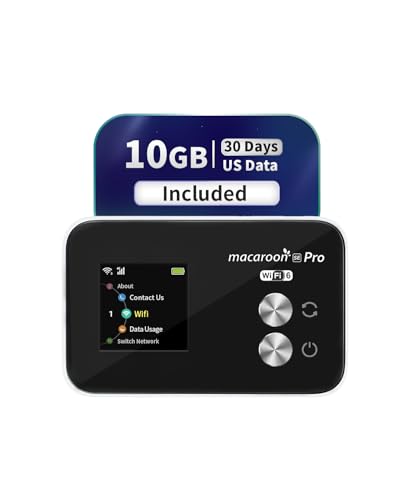
The FREEBOT SE Pro is the cellular hotspot that comes with a meaningful amount of data: 10GB valid for 30 days in the US. That is ten times what the RoamWiFi offers, and it costs less at 70 dollars. The SE Pro also covers 120-plus countries globally, with the ability to buy additional data by day, region, or GB through the app. It supports up to 8 devices simultaneously, which is slightly fewer than the RoamWiFi but still enough for a typical family or small group.
Battery life is a clear advantage. The SE Pro has a 3000mAh battery rated for 12-plus hours of continuous use. In real-world terms, you can leave it on all day while exploring, charge it overnight, and never worry about it dying mid-afternoon. The form factor is compact and pocketable, with no external antennas.
Like the RoamWiFi, this is a pure hotspot with no Ethernet and no ability to repeat an existing Wi-Fi signal. It is strictly for creating a Wi-Fi network from cellular data. The LTE download speed is advertised at up to 150 Mbps, which is solid for a hotspot at this price. Video calls and HD streaming are comfortable, though you will hit that 10GB cap in a week or two if you stream heavily.
The main drawback is that the initial 10GB data is US-only. If you travel internationally right away, you will need to purchase a separate plan from the app. The app itself is functional but not polished; some users report that data usage tracking can be slow to update. The one-year hardware warranty is a nice reassurance.
Pros
Cons
Best for: US residents traveling domestically who want a generous data allotment without a carrier contract.
Check current price on Amazon →
The best portable Wi-Fi for travel depends on where you are going, how many devices you carry, and whether you need to stay connected for work or just for Google Maps. Here are the factors that separate a good travel router from a frustrating one.
A travel router must be small enough to drop into a daypack or carry-on without thinking about it. The TP-Link AC750 Nano is the smallest, while the GL.iNet Opal with its antennas is the bulkiest. USB-C power is becoming standard, and that is a good thing: you can run most modern routers off a laptop USB port or a power bank. The older TP-Link Nano uses Micro USB, which still works but means an extra cable. For cellular hotspots, battery life is equally important. The FREEBOT SE Pro gives you 12-plus hours; the RoamWiFi’s battery life is less clear.
Wi-Fi 6 (802.11ax) is the practical sweet spot now. It handles multiple devices efficiently and offers real-world throughput increases over Wi-Fi 5, especially in crowded environments like hotel lobbies. Wi-Fi 7 is arriving, but hotel internet backbones rarely exceed 1 Gbps, so the main benefit of Wi-Fi 7 routers like the Slate 7 is the multi-gig wired port. If you mostly browse and stream on one or two devices, Wi-Fi 5 (the Opal and Nano) still works, but you will notice the difference when uploading large files or joining video calls.
If you ever connect to public Wi-Fi for work, a VPN router encrypts all traffic from every connected device without installing software on each one. OpenVPN and WireGuard are the standards. WireGuard is faster, so aim for a router that can push at least 200 Mbps over WireGuard. The GL.iNet routers and the TP-Link WR1512X offer this. The budget WR1502X and the Nano lack VPN entirely. A physical toggle switch to instantly enable/disable the VPN (present on the Beryl AX, Beryl AX, and Opal) is a convenience worth extra money.
Most travel routers support at least four modes: router (wired to wired), hotspot (repeat a public Wi-Fi), access point (extend an existing network), and client (connect a wired device via Wi-Fi). The crucial test is captive portals. Hotels and airports require you to log in through a web page. The best routers let you complete that login once on your phone and then share the authenticated connection across all devices. TP-Link’s Tether app does this cleanly. GL.iNet’s routers require you to log in through the browser, which works but is one extra step.
If you are staying in hotels, Airbnbs, or friends’ places that have Wi-Fi, a travel router (no SIM) is all you need. If you are camping, road-tripping in remote areas, or hopping between countries and want to avoid SIM hunting, a cellular hotspot makes sense. Hotspots are more expensive upfront and have ongoing data costs, but they give you internet where none exists. The RoamWiFi covers 170+ countries without a SIM; the FREEBOT starts with 10GB in the US.
A travel router connects to an existing internet source (wired Ethernet or an existing Wi-Fi network) and creates a new private Wi-Fi network for your devices. A portable hotspot has a built-in cellular modem and uses a SIM card or eSIM to connect directly to the mobile network, generating internet where no Wi-Fi exists. Some devices, like the RoamWiFi and FREEBOT, are hotspots without any Ethernet ports.
Yes. Most travel routers can handle captive portals. You connect the router to the hotel’s Wi-Fi (in hotspot or repeater mode), then open the router’s admin page from your phone or computer to complete the hotel login. Some routers, like the TP-Link Roam 6 models, let you do this entirely from the Tether app, which is more convenient. After you log in once, all your devices stay connected.
No, not for the typical travel router that repeats Wi-Fi or uses Ethernet. Cellular hotspots do require cellular data, but many models (RoamWiFi, FREEBOT) have embedded eSIMs and come with preloaded data so you do not need to insert a physical SIM card.
It depends on the ship. Many cruise ships offer paid Wi-Fi per device, and a travel router can let you pay for a single connection and share it across all your devices. However, some cruise lines block VPN traffic and may restrict the use of personal routers. Check the cruise line’s policy before your trip. The GL.iNet routers with VPN are good for bypassing simple port blocks, but no router can override a network that explicitly bans personal access points.
Most travel routers support 20 to 60 connected devices, but real-world throughput drops with each active user. The TP-Link Roam 6 models claim up to 60 devices. The GL.iNet Beryl AX can handle 30-40 devices comfortably. Cellular hotspots typically support 8 to 10 devices. For a family of four, any of these is fine.
The GL.iNet Beryl AX and Slate 7 have the best VPN hardware, with WireGuard speeds of 300 Mbps and 540 Mbps respectively. The TP-Link Roam 6 WR1512X also supports OpenVPN and WireGuard but does not run OpenWrt, so you cannot customize the VPN setup as deeply. For pure VPN throughput, the Slate 7 wins, but the Beryl AX offers the best balance of price and performance.
Yes, if the router has a USB-C or Micro USB power input. All the routers on this list except the cellular hotspots (which have built-in batteries) run on external USB power. The TP-Link and GL.iNet routers all accept 5V/3A over USB-C, which any standard power bank can provide.
The best portable Wi-Fi for travel in 2026 is the GL.iNet Beryl AX (GL-MT3000). It combines Wi-Fi 6, a 2.5G WAN port, excellent VPN performance, and a physical toggle switch in a package that costs under 100 dollars. For budget buyers, the TP-Link Roam 6 TL-WR1502X gives you Wi-Fi 6 at a price that undercuts most Wi-Fi 5 alternatives. If you need VPN and two Ethernet ports, the TP-Link Roam 6 TL-WR1512X is the smart upgrade. For travelers who want the absolute latest hardware and a touchscreen, the GL.iNet Slate 7 is a luxurious option, but it is overkill for most.
If your travels take you places without Wi-Fi, the FREEBOT SE Pro is the best cellular hotspot for US trips, with 10GB of preloaded data and strong battery life. The RoamWiFi hotspot is better for international globetrotters who value 170-country coverage over data volume.
The best portable Wi-Fi for travel is the one that matches your specific trip: a router for wired or Wi-Fi repeat, a hotspot for cellular independence. Pick the form factor and data plan that fit, and you will never suffer through a hotel’s single-device Wi-Fi again.
This article contains Amazon affiliate links. We may earn a small commission on qualifying purchases at no extra cost to you.


