Physical Address
304 North Cardinal St.
Dorchester Center, MA 02124
Physical Address
304 North Cardinal St.
Dorchester Center, MA 02124

Our picks for the 8 best B550 motherboards in 2026 cover everything from compact mATX builds to feature-packed ATX gaming boards with PCIe 4.0 and WiFi 6E.
Building a Ryzen 5000 rig means choosing the right foundation. The B550 chipset strikes a sweet spot: it gives you PCIe 4.0 for the fastest GPUs and SSDs, proper VRMs for overclocking, and modern connectivity like WiFi 6 and 2.5Gb LAN, all without the premium of an X570 board. But the difference between a good B550 and a mediocre one shows up the moment you push the CPU hard or plug in a second M.2 drive.
We sorted through the current B550 lineup to find the best B550 motherboards in 2026 for different needs. Whether you're building a compact mATX rig, a pure gaming machine, or a workstation that stays stable under sustained load, there's a board here that gets the details right. Our picks range from the no-compromise MSI PRO B550M-VC WiFi to the enthusiast-grade MSI MAG B550 Tomahawk MAX WiFi, covering ATX and micro-ATX, Wi-Fi 6E and wired-only, with varying VRM heft and expansion options.
TL;DR: The MSI PRO B550M-VC WiFi is the one most people should buy: it offers the best combination of features, build quality, and connectivity. The ASUS ROG Strix B550-F Gaming WiFi II is the pick for gamers who want aggressive looks and the strongest VRM on this list. The MSI MAG B550 Tomahawk MAX WiFi is the heavy-duty choice for enthusiasts who plan to overclock and use multiple expansion cards.
| # | Product | Form Factor | Key Features | Best for |
|---|---|---|---|---|
| 1 | MSI PRO B550M-VC WiFi | mATX | Wi-Fi 6E, PCIe 4.0, dual M.2, 2.5Gb LAN, BIOS Flashback | Most builders – the well-rounded mATX all-rounder |
| 2 | ASUS ROG Strix B550-F Gaming WiFi II | ATX | 12+2 power stages, Wi-Fi 6E, 2.5Gb LAN, dual M.2, USB-C, Aura Sync | Gamers and overclockers who want premium VRMs and looks |
| 3 | ASUS TUF Gaming B550-PLUS WiFi II | ATX | 8+2 DrMOS, Wi-Fi 6, 2.5Gb LAN, dual M.2, HDMI 2.1, BIOS Flashback | Builders wanting a rugged, MIL-spec ATX board with solid networking |
| 4 | GIGABYTE B550 Eagle WIFI6 | ATX | 10+3 power phases, Wi-Fi 6, PCIe 4.0, dual M.2, USB-C, EZ-Latch | Gamers who want a newer, feature-rich board with a cleaner build experience |
| 5 | ASRock B550 Phantom Gaming 4 AC | ATX | 8 power phases, PCIe 4.0, dual M.2 (1x PCIe 4.0), AC Wi-Fi, HDMI | Budget builders on a strict build, needing a functional ATX board |
| 6 | MSI B550M PRO-VDH WiFi | mATX | PCIe 4.0, Wi-Fi, dual M.2, Flash BIOS button, 7W/mk thermal pads | Compact builds where you still need Wi-Fi and a BIOS flashback button |
| 7 | ASUS Prime B550-PLUS AC-HES | ATX | Wi-Fi 5, 8+1 DrMOS, dual M.2, front USB-C, Aura Sync, CEC Tier II | Home-office or media builds needing a stable, well-connected ATX board |
| 8 | MSI MAG B550 Tomahawk MAX WiFi | ATX | 2.5Gb LAN, Wi-Fi 6E, extended heatsink, dual M.2, 7W/mk pads, Flash BIOS | Enthusiasts doing serious overclocking with a Ryzen 9 and a high-end GPU |
Choosing the best B550 motherboard comes down to a few key factors that matter in real builds.
Pros
Cons
Best for: The vast majority of builders who want a modern, feature-complete motherboard that doesn't cost a fortune and works in both small and mid-tower cases.
Check current price on Amazon →
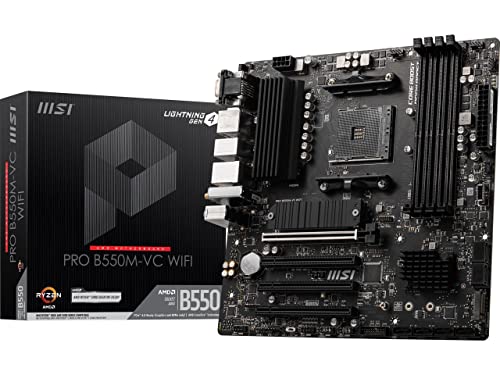
This is the board we'd recommend to anyone who asks "which B550 should I buy?" without a specific niche. The PRO B550M-VC WiFi packs almost everything you need: Wi-Fi 6E, a solid VRM with a real heatsink, two M.2 slots (one PCIe 4.0), and that crucial BIOS Flashback button that lets you install a Ryzen 5000 chip right out of the box without worrying about BIOS version.
What makes it stand out from the cheaper mATX options is the 7W/mk thermal pad on the VRM and the additional choke thermal pads. Under a sustained all-core load on a Ryzen 7 5800X, the VRM stays cool enough that you won't lose boost clocks. The 2oz thickened copper PCB helps with both thermal and electrical stability.
The trade-offs are minor. Only two DIMM slots means you need to buy the right capacity upfront (32GB in two sticks is fine). The rear I/O gives you USB 3.2 Gen 2 but no Type-C, and the Ethernet is still gigabit. For most home users, though, gigabit LAN is plenty unless you regularly transfer huge files over a local network. This board is the definition of "just the right balance."

Pros
Cons
Best for: Gamers who want the most robust VRM and networking combo in an ATX board, plus premium audio and RGB control.
Check current price on Amazon →
The ROG Strix B550-F Gaming WiFi II is the board you buy when you want the best possible power delivery and you're willing to pay for it. The 12+2 power stage design is overkill for a Ryzen 5, but it means a Ryzen 9 5950X will stay stable under PBO and manual overclocking without the VRM breaking a sweat. The ProCool II power connector helps with stability.
Networking is a highlight: Intel 2.5Gb Ethernet combined with Wi-Fi 6E means you're set for future internet speeds and low-latency wireless. The audio solution uses a Realtek ALC1220 codec with Savitech amplifier, which drives high-impedance headphones better than most onboard audio.
The board's BIOS has all the overclocking tools an enthusiast could want, from precise voltage control to memory timing adjustment. The dual M.2 slots both get thermal guards, and the second slot runs at PCIe 3.0 (not 4.0). That's fine for most storage needs. The lack of a BIOS Flashback button (it uses USB BIOS Flashback via a specific port) is a minor nitpick, but it works once you find the right USB port. The styling is typical ROG aggressive, with a large plastic cover over the I/O area that looks good but makes screwdriver access a little tight.

Pros
Cons
Best for: Builders who want a tough, tested ATX board with modern networking and a reliable VRM, without the ROG price premium.
Check current price on Amazon →
The TUF Gaming series has earned a reputation for robust components and sensible cooling, and this WiFi II revision brings it up to date. The 8+2 DrMOS stages are plenty for any Ryzen 5 or 7, and the VRM heatsink, while not as massive as the Strix, still does the job efficiently thanks to good airflow design on most ATX cases.
The 2.5Gb LAN and Wi-Fi 6 combination is excellent for online gaming and streaming. The inclusion of HDMI 2.1 means you can use the integrated graphics of a Ryzen 5000G chip for a budget build and still get 4K output. BIOS Flashback is present, which is always welcome.
Where the TUF board cuts corners is in the M.2 heatsink department: only the primary slot gets a proper cover. The secondary slot runs at PCIe 3.0 and lacks a heatsink, so a fast NVMe drive will need one aftermarket. The RGB implementation is fine, with one addressable Gen 2 header. For a straightforward gaming rig that you just want to work for years, this is a solid choice.

Pros
Cons
Best for: Builders who want a newer board (2024 release) with PCIe EZ-Latch and pre-installed I/O shield, and don't need 2.5Gb LAN.
Check current price on Amazon →
The GIGABYTE B550 Eagle WIFI6 is a newer entrant to the B550 party, and it brings some thoughtful touches that make building easier. The PCIe EZ-Latch mechanism on the primary x16 slot is a small detail that makes removing a graphics card much less fiddly than the standard clip. The pre-installed I/O shield saves you a frustrating step.
The 10+3 phase VRM is actually stronger than the TUF's 8+2 in terms of total phases, and with digital control it handles a Ryzen 7 5800X without issue. The thermal pads are 5W/mk, which is adequate but not class-leading. The memory support includes AMD EXPO, which is helpful if you're using EXPO memory kits.
Connectivity is solid: Wi-Fi 6, USB-C on both back and front panels, and dual M.2 slots (one PCIe 4.0). The lack of 2.5Gb LAN is the biggest miss here; at this level, gigabit feels a generation behind. The ALC897 audio codec is functional but not as crisp as the ALC1200 found on pricier boards. For a clean, modern build that prioritises convenience, this board is a strong contender.

Pros
Cons
Best for: Budget-conscious builders who need an ATX board and can work with a single M.2 slot and Wi-Fi 5.
Check current price on Amazon →
The ASRock B550 Phantom Gaming 4 AC is the most affordable full-size ATX B550 board you'll find. It gets the basics right: eight power phases with a decent heatsink, PCIe 4.0 for the GPU, and four DIMM slots. But the cost savings are evident.
The biggest compromise is storage expansion: there's a single M.2 slot, and it's PCIe 4.0. If you need two NVMe SSDs without using a PCIe adapter, this board won't work for you. The Wi-Fi is only AC (Wi-Fi 5), which is fine for basic use but lags behind the AX boards on this list. The audio uses the ALC887 codec, which is entry-level.
That said, if your build is a simple gaming or office machine with one M.2 drive and a GPU, and you don't need the latest wireless, this board will do the job. The BIOS is ASRock's typical UEFI, which is laid out well and includes overclocking options. The Phantom Gaming design with red accents isn't for everyone, but it's functional. For a strict budget ATX build, this board is a legitimate option, but we'd recommend spending a bit more for the MSI PRO-VDH if you can.

Pros
Cons
Best for: Compact mATX builders who need the peace of mind of a CPU-less BIOS flash and dual M.2 storage.
Check current price on Amazon →
The MSI B550M PRO-VDH WiFi is the little brother to the PRO B550M-VC. It shares many qualities: a solid VRM with good thermal pads, dual M.2 (one PCIe 4.0), and the critically useful Flash BIOS button. It supports Ryzen 5000 after a BIOS update, but the button makes that painless.
The PRO-VDH uses a slightly older VRM controller than the -VC, but still offers Core Boost technology for stable power delivery. In practice, it handles a Ryzen 5 or 7 without issues. The mATX form factor is great for compact cases like the Cooler Master NR400 or Fractal Design Define Mini.
The main downgrades from the -VC are the Wi-Fi (AC, not AX) and the lack of a second heatsink on the second M.2 slot. The audio uses the ALC892 codec, which is adequate but not as detailed as the ALC1200. The rear I/O is basic, with no USB-C. Still, for a board that costs a bit less, the PRO-VDH is a reliable workhorse for smaller builds that don't need the latest wireless standards.

Pros
Cons
Best for: Home and office builds where Wi-Fi 5 and gigabit LAN are sufficient, and you want ASUS reliability with easy RGB integration.
Check current price on Amazon →
The ASUS Prime B550-PLUS AC-HES is a refresh of the Prime B550-Plus, adding Wi-Fi 5 (AC) and HES branding (Home Office and Energy Saving). It's built around the proven 8+1 DrMOS power design, which is sufficient for Ryzen 5 and 7 chips. The board includes ASUS's 5X Protection III with LANGuard, overvoltage protection, and SafeSlot Core.
Connectivity is where this board shows its age: Wi-Fi 5 and gigabit Ethernet aren't future-proof, but they work fine for most home internet connections. The dual M.2 slots (one PCIe 4.0) are welcome, and the front USB-C header is a nice touch for modern cases. The CEC Tier II readiness is a niche but potentially cost-saving feature for commercial environments.
The Prime lacks a BIOS Flashback button, so you'll need a compatible CPU to update the BIOS if you buy a board with older firmware. That's a real inconvenience for those pairing it with a new-in-box Ryzen 5000 chip. The audio solution is the ALC887, which is adequate for casual use. This board is best suited for a media server, office PC, or a secondary build where the latest connectivity isn't critical.

Pros
Cons
Best for: Enthusiasts overclocking a Ryzen 9 5950X or 5900X who want a board that won't throttle and includes all the modern networking standards.
Check current price on Amazon →
The MSI MAG B550 Tomahawk MAX WiFi is the board you buy when you want the best B550 has to offer without moving to X570. The extended heatsink design covers not just the VRMs but has additional choke thermal pads, keeping the entire power delivery system cool. The 2oz thickened copper PCB helps with both thermal distribution and signal integrity at high speeds.
This board handles a Ryzen 9 5950X at stock and with PBO enabled without breaking a sweat. The 2.5Gb LAN and Wi-Fi 6E networking are top-tier for fast transfers and lag-free gaming. The audio is handled by a Realtek ALC1200 codec with dedicated amplifier, which provides clean sound for gaming headsets.
The Tomahawk MAX adds a few welcome touches: the extended M.2 Shield Frozr covers both slots, the BIOS Flashback button is clearly labeled, and the PCIe slots are steel-reinforced. The main disappointments are the lack of a front USB-C header (you get USB-C on the rear I/O but not for the front panel) and the board's weight, which feels solid but can make alignment in the case a bit fiddly. If you're building a high-end Ryzen 5000 rig and you want maximum stability and overclocking headroom, this is the B550 to get.
The B550 chipset sits between the budget B450 and the high-end X570. It gives you PCIe 4.0 for the GPU and one M.2 slot, decent VRMs for overclocking, and modern I/O without the active chipset fan that X570 requires. Here's what to consider when picking the right board for your build.
The voltage regulator module (VRM) determines how clean and ample power reaches the CPU. For a Ryzen 5 5600X or 5600G, even a 4+2 phase design with a basic heatsink can suffice. But for a Ryzen 7 5800X or 5900X, you want at least 8+2 phases with a decent heatsink. The 12+2 design on the ASUS ROG Strix B550-F is overkill but ensures no throttling even under aggressive PBO. The MSI Tomahawk's extended heatsink keeps temperatures low even during long rendering sessions.
Look for boards with digital PWM controllers and high-quality chokes and capacitors. The thermal pad material matters too: 7W/mk pads like those on MSI boards conduct heat significantly better than the 5W/mk pads found on cheaper boards.
All B550 boards have a PCIe 4.0 x16 slot for the GPU and at least one M.2 slot that runs at PCIe 4.0 x4. That second M.2 slot, if present, often runs at PCIe 3.0 x4. That's perfectly fine for most NVMe drives, as even high-end PCIe 3.0 SSDs are faster than what most applications need.
If you plan to use two fast NVMe SSDs, make sure the board has two M.2 slots. Some budget boards like the ASRock Phantom Gaming 4 AC have only one M.2 slot, which means you'll need a SATA drive or a PCIe adapter for the second drive. For most builders, a single 1TB or 2TB PCIe 4.0 SSD is enough, so dual slots aren't essential.
Wi-Fi standards have moved quickly. Wi-Fi 6 (802.11ax) is now the baseline for good wireless speed and lower latency. Wi-Fi 6E adds the 6GHz band, which is less congested and offers slightly lower latency. For online gaming and fast file transfers over Wi-Fi, Wi-Fi 6E is the best option, but Wi-Fi 6 is still excellent.
Wired Ethernet matters too. Gigabit LAN (1GbE) is still fine for most internet connections, but if you transfer large files between computers on your local network, 2.5Gb LAN can cut transfer times significantly. The ASUS ROG Strix and MSI Tomahawk both include 2.5Gb LAN.
ATX boards offer more expansion slots (typically 2-3 PCIe x16 and 2-3 PCIe x1) and more headers. They're the standard for mid-tower and full-tower cases. mATX boards are shorter and fit in smaller, lighter cases, but sacrifice some expansion slots and often have fewer M.2 slots or SATA ports.
If you're building a compact gaming rig or a workstation that needs only one GPU and one extra card (like a capture card), mATX is a great space-saver. The MSI PRO B550M-VC and PRO-VDH WiFi are excellent mATX options.
A BIOS Flashback or USB Flashback button is a huge convenience if you're building with a newer Ryzen 5000 CPU on an older board that may not have the required BIOS. It lets you update the BIOS with just a power supply and USB drive. ASRock boards often lack this feature, while most MSI and ASUS boards include it.
The BIOS interface itself matters: MSI's Click BIOS 5 and ASUS's UEFI are both well-organized, with easy access to overclocking, fan control, and memory timings. GIGABYTE's BIOS has improved but can still be less intuitive.
Many B550 boards from before 2021 need a BIOS update to work with Ryzen 5000 chips. Newer revs and boards manufactured after mid-2021 usually have the update. Look for a BIOS Flashback button if you can't guarantee a recent BIOS version.
B550 has PCIe 4.0 for the GPU and one M.2, while X570 has PCIe 4.0 for everything. X570 also has more chipset lanes and generally better connectivity, but its chipset fan can be noisy. B550 is fanless and enough for most users.
Yes, for new builds. B550 gives you PCIe 4.0, better VRMs, and usually more modern networking and audio. B450 is only worth considering if you can get it significantly cheaper and don't need PCIe 4.0.
B550 can support two GPUs in x8/x4 or similar configurations, but only the primary slot runs at PCIe 4.0. For most users, a single GPU is the smart choice.
Yes, B550 officially supports Ryzen 4000 G-Series (Renoir) and 5000 G-Series APUs. The HDMI ports on these boards typically work for integrated graphics output.
Absolutely. B550 includes full overclocking controls for CPU, memory, and voltage. Most B550 boards can handle a moderate overclock on a Ryzen 5 or 7, with high-end boards managing a Ryzen 9.
Yes. B550 is an excellent gaming platform, offering the same CPU performance as X570 for gaming, with no real-world difference. It supports high-speed DDR4, PCIe 4.0 GPUs, and fast NVMe storage.
The B550 chipset still holds its own in 2026 for anyone building a Ryzen AM4 system. The MSI PRO B550M-VC WiFi is our top overall pick because it delivers the features most people need (Wi-Fi 6E, dual M.2, reliable VRM) in a compact, easy-to-build mATX format. For gamers who want the best VRM and aggressive looks, the ASUS ROG Strix B550-F Gaming WiFi II is the clear choice. And for enthusiasts who plan to push a Ryzen 9 to its limits, the MSI MAG B550 Tomahawk MAX WiFi offers the cooling and connectivity to match.
If you're building on a strict budget, the ASRock B550 Phantom Gaming 4 AC will get you an ATX board with PCIe 4.0, but be ready to accept single M.2 and Wi-Fi 5. The best B550 motherboards in 2026 cover every build type, and there's no wrong pick among our top three for most buyers. Decide on your form factor, network needs, and whether you need a BIOS Flashback button, and you'll find the right board here.
This article contains Amazon affiliate links. We may earn a small commission on qualifying purchases at no extra cost to you.


