Physical Address
304 North Cardinal St.
Dorchester Center, MA 02124
Physical Address
304 North Cardinal St.
Dorchester Center, MA 02124

These are the 10 best AM5 CPUs for a 2026 build, from the gaming-dominating 9800X3D to the capable 7600X. Find your ideal Ryzen processor here.
The moment you decide to build a PC on AMD's Socket AM5, you face a choice that barely existed two generations ago: do you prioritize raw core count, the per-clock efficiency of Zen 5, or the stacked-L3 magic of the X3D chips? The Ryzen lineup has grown so wide that picking the wrong processor means leaving real performance on the table, whether you are chasing 200 FPS in an esports title or waiting for a render to finish.
The best AM5 CPUs in 2026 span everything from a six-core Zen 5 starter chip that punches well above its weight to a sixteen-core 3D V-Cache monster that does not force you to choose between gaming and workstation work. We have broken them down into ten distinct picks. The Ryzen 7 9800X3D is the obvious choice for anyone building a pure gaming rig. The Ryzen 9 9950X3D is the flagship hybrid that handles video editing and 4K gaming on the same machine without compromise. The Ryzen 5 9600X gives you a modern Zen 5 path into the platform at a sensible entry point. And the Ryzen 7 7800X3D, while a generation old, remains an incredibly capable gaming chip if you can find a good deal.
TL;DR: The Ryzen 7 9800X3D is the one most gamers should buy: unmatched gaming frame rates with Zen 5 and the latest 3D V-Cache. The Ryzen 9 9950X3D is the hybrid flagship for those who game and create on the same build. The Ryzen 5 9600X is the smartest entry point into the AM5 platform for a balanced daily driver. The Ryzen 7 7800X3D is the previous-gen gaming legend that still holds its own.
| # | Product | Cores / Threads | Boost Clock | L3 Cache | Architecture | Best For |
|---|---|---|---|---|---|---|
| 1 | Ryzen 7 9800X3D | 8C / 16T | 5.2 GHz | 96 MB | Zen 5 | Pure gaming with no compromises |
| 2 | Ryzen 9 9950X3D | 16C | 5.7 GHz | 144 MB (est.) | Zen 5 | Gaming plus heavy workstation loads |
| 3 | Ryzen 7 7800X3D | 8C / 16T | 4.2 GHz (base) | 96 MB | Zen 4 | Last-gen gaming favorite with serious legs |
| 4 | Ryzen 9 9900X | 12C / 24T | 5.6 GHz | 76 MB | Zen 5 | High-core productivity with solid gaming |
| 5 | Ryzen 9 7900X | 12C / 24T | 4.7 GHz (base) | 64 MB | Zen 4 | Proven multi-core workhorse |
| 6 | Ryzen 7 9700X | 8C / 16T | 5.5 GHz | 40 MB | Zen 5 | Balanced all-rounder for mixed use |
| 7 | Ryzen 7 7700X | 8C / 16T | 5.4 GHz | 80 MB (total) | Zen 4 | Reliable mid-range eight-core |
| 8 | Ryzen 5 9600X | 6C / 12T | 5.4 GHz | 38 MB | Zen 5 | Entry-level Zen 5 with modern efficiency |
| 9 | Ryzen 5 7600X3D | 6C / 12T | 4.1 GHz (base) | 96 MB | Zen 4 | Six-core gaming sleeper with V-Cache |
| 10 | Ryzen 5 7600X | 6C / 12T | 5.3 GHz | 38 MB | Zen 4 | Dependable foundation for an AM5 build |
Pros
Cons
Best for: Gamers who want the highest possible frame rates in simulation, strategy, and open-world titles without worrying about core count for productivity.
Check current price on Amazon →
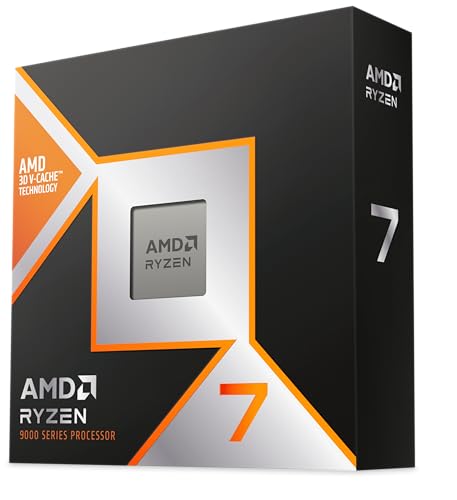
The Ryzen 7 9800X3D is the processor everyone building a gaming PC in 2026 should measure against. AMD took the Zen 5 architecture and paired it with the latest generation of 3D V-Cache, and the result is a chip that pulls ahead of its predecessor the 7800X3D by a meaningful margin in almost every gaming benchmark. The cache redesign this time around also improved thermal conductivity, which means the 9800X3D can sustain its boost clocks longer under gaming loads without needing an exotic cooling setup.
What strikes you first is how consistently fast it feels across different game genres. In titles that hammer the memory subsystem, like simulators and grand strategy games, the 96 MB of L3 cache dramatically reduces latency and smooths out frame time spikes. You do not need to pair it with ultra-fast DDR5 to see the benefit, either. The cache does the heavy lifting. The trade-off is that the 5.2 GHz peak boost is lower than what the 9700X can reach, so in lightly threaded productivity tasks that rely purely on clock speed, the non-X3D chip has a slight edge. But for anyone building a dedicated gaming rig, the 9800X3D is the obvious first pick.

Pros
Cons
Best for: Enthusiasts who run a single machine for both high-refresh-rate gaming and multi-threaded creation work like video editing, 3D rendering, or code compilation.
Check current price on Amazon →
If the 9800X3D is the gaming specialist, the Ryzen 9 9950X3D is the generalist who refuses to accept a performance penalty in any category. You get the full Zen 5 core count of sixteen, boosted to 5.7 GHz, combined with second-generation 3D V-Cache technology that gives gaming workloads the same low-latency advantage the 9800X3D enjoys. The result is a chip that can render a 4K video project overnight and then push 200 FPS in a competitive shooter the next morning without you having to switch profiles or compromise on settings.
The 9950X3D is physically imposing. It draws enough power under a full all-core load that a 240 mm liquid cooler feels marginal, and a high-end 360 mm AIO or a large air tower is the smart choice for sustained workloads. But if your workflow genuinely uses all sixteen cores, the performance is transformative compared to anything with fewer threads. The integrated Radeon Graphics controller on the die provides a basic display output for troubleshooting and non-gaming use, though you will of course pair it with a discrete GPU. This is the processor for someone who buys the best once and wants it to handle everything for the next several years.

Pros
Cons
Best for: Gamers who want near-flagship gaming performance and are comfortable with the previous generation of architecture to save on the overall platform cost.
Check current price on Amazon →
The Ryzen 7 7800X3D was the gaming darling of the Zen 4 generation, and it has not become a slow processor just because the 9800X3D exists. In many games, especially those that are GPU-bound at higher resolutions, the 7800X3D delivers frame rates that are indistinguishable from its successor. The 96 MB of 3D V-Cache does the same latency-killing job it always did, and the Zen 4 cores still clock high enough to keep modern GPUs fed.
Where the 7800X3D shows its age is in mixed workloads. If you stream while gaming or do occasional video encoding, the Zen 5 chips pull decisively ahead. The 7800X3D also has a more conservative thermal ceiling. AMD set Tjmax at 89 degrees Celsius, and the chip will downclock if you push it with a heavy all-core load on a low-end cooler. But installed properly with a decent air cooler or a 240 mm AIO, it runs quietly and stays cool during long gaming sessions. For a pure gaming build where you do not need the latest architecture, this remains a deeply capable choice.
Pros
Cons
Best for: Users who need twelve cores for productivity work like compiling, rendering, or virtualization but still want strong gaming performance on the side.
Check current price on Amazon →
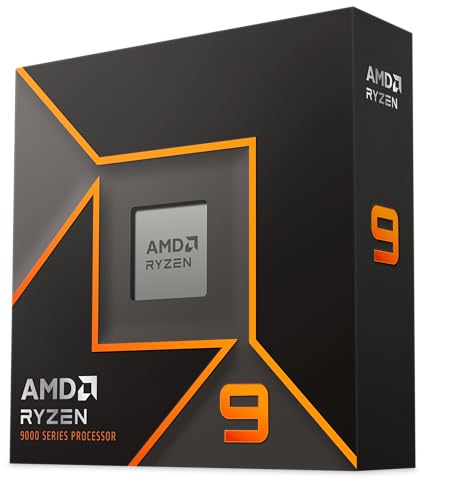
The Ryzen 9 9900X is the Zen 5 mid-point between the eight-core chips and the sixteen-core 9950X3D. Twelve cores at 5.6 GHz boost represents a substantial upgrade over the previous-gen 7900X in both single-threaded and multi-threaded workloads. The Zen 5 IPC uplift is immediately noticeable in day-to-day tasks. Applications feel snappier, compile times drop, and the processor handles heavy multitasking without breaking a sweat.
Gaming performance is strong but not class-leading. The 9900X does not have 3D V-Cache, so in titles that depend on large L3 caches, the 7800X3D and 9800X3D outperform it. But if you routinely run workloads that use all twelve cores, the overall system throughput of the 9900X makes it a more versatile daily driver than an eight-core X3D chip. It also runs cooler than the 9950X3D, meaning a high-end air cooler or a 240 mm AIO is sufficient for most use cases. This is the sensible high-core option for someone who does real work and also games.

Pros
Cons
Best for: Users who need twelve cores for productivity work and want a proven, stable platform that has been on the market long enough for BIOS support to be fully mature.
Check current price on Amazon →
The Ryzen 9 7900X represents the previous generation of AM5's high-core offering, and it remains a very capable processor for anyone who needs twelve cores without the premium of the newer Zen 5 lineup. The Zen 4 architecture is well understood by now, and any AM5 motherboard from the last two years will run the 7900X without the BIOS headaches that sometimes accompany early Zen 5 support. For productivity tasks that scale with core count, like compiling, video encoding, and 3D rendering, the 7900X still performs admirably.
Where the 7900X shows its age is in single-threaded responsiveness and gaming. The 4.7 GHz base clock means it needs to boost heavily to stay competitive, and even at boost, the Zen 4 IPC deficit compared to Zen 5 means the 9700X or 9900X will feel faster in everyday use. The integrated Radeon Graphics controller is a nice fallback for troubleshooting or a basic office build, but you will want a discrete GPU for any serious gaming. For someone building a dedicated workstation that occasionally games, the 7900X offers proven reliability at a sensible platform cost.

Pros
Cons
Best for: Users who want the latest Zen 5 architecture in a balanced eight-core package that handles everyday computing, gaming, and moderate productivity without complications.
Check current price on Amazon →
The Ryzen 7 9700X is the processor many builders should default to when they want Zen 5 but do not need the extreme gaming focus of the 9800X3D or the high core count of the 9900X. Eight Zen 5 cores at 5.5 GHz boost is a very capable combination. For general productivity, web development, photo editing, and even light video work, the 9700X feels fast in a way that the previous-gen 7700X does not. The single-threaded performance is excellent, opening applications quickly and keeping the desktop responsive under load.
Gaming performance is strong across the board, though in the specific subset of titles that benefit from 3D V-Cache, the 7800X3D and 9800X3D will show higher frame rates. The 9700X compensates with higher clock speeds in games that are not cache-sensitive, so in many modern titles, the difference is minimal. It is also easy to cool. A well-reviewed air cooler like a dual-tower design handles the 9700X without issue, making it a straightforward pick for a first-time AM5 build. This is the no-drama eight-core for someone who wants modern performance without chasing the last few percentage points in gaming.
Pros
Cons
Best for: Builders who want a proven eight-core Zen 4 processor with full AM5 features and do not need the latest architecture for their workload.
Check current price on Amazon →
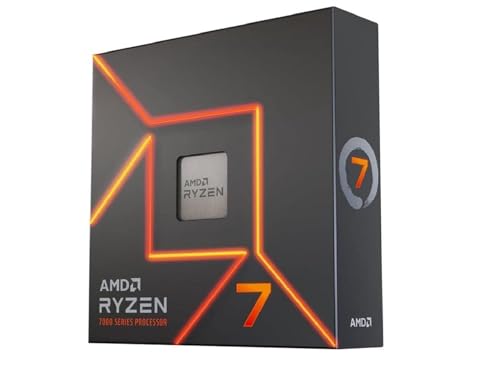
The Ryzen 7 7700X was the go-to mid-range AM5 processor during the Zen 4 generation, and it still holds up well for anyone who wants eight cores without stepping up to the Zen 5 platform. The 5.4 GHz boost clock is high enough that in many games, the 7700X keeps pace with the 9700X because the title is GPU-bound at higher resolutions. In productivity tasks that are not heavily IPC-dependent, the difference is noticeable but not dramatic.
What the 7700X does well is offer a known quantity. The Zen 4 ecosystem has been through multiple BIOS revisions, memory compatibility lists are mature, and you can drop the 7700X into almost any B650 or X670 board and expect it to work without tinkering. The 80 MB of total cache helps keep memory latency in check, and the DDR5-5200 support is sufficient for most workloads even if it is not the fastest on the market. The 7700X is the safe, reliable eight-core choice for someone who wants AM5 performance today without worrying about platform teething issues.

Pros
Cons
Best for: Users building an entry-level or mid-range AM5 system who want the efficiency of Zen 5 and plan to upgrade to a higher-core processor later on the same platform.
Check current price on Amazon →
The Ryzen 5 9600X is the most straightforward recommendation for someone building their first AM5 PC or upgrading from an older platform without spending on a high-core processor. Six Zen 5 cores at 5.4 GHz boost give you the same architectural advantages as the more expensive chips. General desktop responsiveness is excellent, and the 9600X handles modern games well, especially when paired with a mid-range GPU.
Where the six-core count shows its limits is in heavy multitasking and content creation. If you regularly compile code, render video, or run virtual machines, the eight-core and twelve-core chips will pull ahead. But for the majority of users who browse, stream, game, and do occasional productivity work, the 9600X provides a smooth experience. The 38 MB cache is adequate, but simulation games that rely on large L3 caches will perform better on the 7600X3D or the 7800X3D. The 9600X's real strength is platform value. It lets you get onto AM5 with the latest architecture now, and you can drop a future Zen 6 or higher-core Zen 5 chip into the same motherboard later. It is the smart long-term play.

Pros
Cons
Best for: Gamers who primarily play simulation, strategy, and open-world titles that benefit from large cache, and who do not need more than six cores for other workloads.
Check current price on Amazon →
The Ryzen 5 7600X3D is an interesting anomaly in the AM5 lineup. It takes the 96 MB of 3D V-Cache from the 7800X3D and pairs it with a six-core Zen 4 configuration that runs at a conservative 4.1 GHz base clock. In games that scale with cache, this chip punches far above its core count. Titles like Microsoft Flight Simulator, Factorio, and Civilization see a dramatic frame rate improvement compared to the standard 7600X, sometimes matching or exceeding the performance of much more expensive processors.
The trade-offs are real. The low base clock means that in lightly threaded applications and everyday desktop use, the 7600X3D can feel less responsive than the 9600X or even the standard 7600X. And six cores is a hard limit for productivity. If you try to run a heavy compile or a video render on this chip, it will fall behind the eight-core options. But for a dedicated gaming PC that focuses on the types of games that love large L3 caches, the 7600X3D is a unique and effective choice. Just pair it with a decent cooler and accept that it is a specialist tool, not a generalist.

Pros
Cons
Best for: Anyone building a foundational AM5 system on a sensible platform investment who wants a reliable, well-tested six-core processor that can be upgraded later.
Check current price on Amazon →
The Ryzen 5 7600X is the processor that launched the AM5 platform and it remains a perfectly capable entry point for anyone who wants to get onto the socket without spending on a higher-core or newer architecture chip. Six Zen 4 cores at 5.3 GHz boost handle modern games well, and the integrated graphics mean you can build a system and use it for basic tasks before adding a discrete GPU. The 5 nm process keeps power draw reasonable, and a modest air cooler is all you need.
The 7600X shows its age most clearly in single-threaded tasks, where the Zen 5 chips feel noticeably snappier. In gaming, it holds up well at higher resolutions where the GPU is the bottleneck, but at 1080p with a fast GPU, the 9600X or any X3D chip will pull ahead. The key reason to choose the 7600X in 2026 is platform value. It is a known, stable processor that gets you onto AM5 with DDR5 and PCIe 5.0 support, and you can upgrade to a Zen 5 or future processor on the same motherboard down the line. It is the no-frills starter chip that does its job without surprises.
Choosing the right AM5 processor means understanding how core count, architecture generation, and cache configuration interact with what you actually do on your PC. These four factors cover the most important decisions.
The number of cores directly determines how well a processor handles parallel workloads. Six cores handle gaming, web browsing, and office applications without breaking a sweat. Eight cores add headroom for streaming while gaming, light video editing, and compiling code. Twelve cores and above are for users who regularly run render tasks, virtual machines, or scientific simulations that scale across multiple threads. Gaming rarely uses more than eight cores effectively. If your machine is primarily a gaming PC, an eight-core chip with 3D V-Cache is a better use of the socket than a twelve-core chip without it. If you split your time equally between gaming and creation work, a twelve or sixteen-core Zen 5 processor gives you the best of both worlds.
AMD's Zen 5 architecture delivers a measurable IPC uplift over Zen 4. In practice, this means applications open faster, compilation times drop, and games that are CPU-bound see higher frame rates on Zen 5 at the same core count and clock speed. Zen 5 also supports DDR5-5600 memory natively, compared to DDR5-5200 for most Zen 4 chips. The catch is that Zen 4 processors are widely available and benefit from two years of BIOS maturity. If you want the absolute latest performance and are building a new system from scratch, Zen 5 is the clear choice. If you already have an AM5 motherboard or are looking for a proven platform with stable drivers, Zen 4 still delivers strong performance.
3D V-Cache stacks additional L3 cache on top of the processor die, giving the cores a larger pool of high-speed memory to draw from. Games that frequently access large datasets, like simulation titles, strategy games, and open-world RPGs, benefit enormously. The cache reduces the frequency of trips to main memory, lowering latency and smoothing out frame time spikes. X3D chips run at lower clock speeds than their non-X3D counterparts because the additional cache layer traps heat. The trade-off is that in tasks that are not cache-sensitive, the lower clock speed means the X3D chip can be slower. For a dedicated gaming PC that runs cache-heavy titles, an X3D processor is the right call. For a mixed-use machine, the higher clock speeds of a non-X3D chip may serve you better.
None of the AM5 processors reviewed here include a cooler in the box. This is a deliberate choice by AMD to let builders select a cooler that matches their thermal needs and noise preferences. A six-core chip like the 9600X or 7600X runs comfortably on a single-tower air cooler. Eight-core chips benefit from a dual-tower design or a 240 mm liquid cooler. The 9950X3D and 9900X, with their higher core counts and power draw, really need a 280 mm or 360 mm AIO to sustain all-core boosts without thermal throttling. Before buying, check that your cooler of choice includes an AM5 mounting bracket. Most modern coolers do, but some older models may require a separate bracket kit.
AM5 motherboards range from the entry-level A620 through the mid-range B650 and B850 to the feature-packed X670 and X870 chipsets. The chipset does not affect CPU performance directly, but it determines how many PCIe 5.0 lanes, USB ports, and M.2 slots you get. A B650 board is sufficient for most builders and supports overclocking. X670 and X870 boards offer more connectivity for multi-GPU setups or multiple high-speed SSDs. Every AM5 processor is compatible with every AM5 chipset, so you can pair a 9950X3D with a B650 board if you do not need the extra connectivity. Just make sure the motherboard BIOS is updated to support your chosen CPU. Zen 5 processors need a BIOS that was released after their launch date.
Most AM4 coolers work on AM5 motherboards because the socket mounting hole spacing is the same. Some older cooler models may need a separate AM5 mounting bracket, which manufacturers often provide as a free kit. Check your cooler's compatibility list before installing. The CPU dimensions are very similar, so the cooler contact surface is identical.
The Ryzen 7 9800X3D is the best gaming processor in the AM5 lineup. Its combination of eight Zen 5 cores and 96 MB of second-generation 3D V-Cache delivers the highest frame rates in cache-sensitive games and stays competitive in every other title. The Ryzen 7 7800X3D is a strong second choice if you are comfortable with Zen 4 architecture.
Many AM5 processors include an integrated Radeon Graphics controller that provides a basic display output for desktop use, video playback, and troubleshooting. This is not powerful enough for gaming. You need a discrete GPU for any modern game, creative application that uses GPU acceleration, or high-resolution display setup. The integrated graphics are a convenience feature, not a replacement for a dedicated card.
Zen 5 delivers higher instructions per clock than Zen 4, meaning the same core count and clock speed produce more work per cycle. Zen 5 also supports faster DDR5 memory natively and has improved power efficiency in lightly threaded workloads. The difference is noticeable in single-threaded applications and in games that are CPU-bound. In heavily multi-threaded tasks that scale with core count, the gap is smaller but still present.
Yes, provided your motherboard manufacturer has released a BIOS update that supports Zen 5 processors. Most B650, X670, and X670E boards from major brands received these updates in 2024 and 2025. Check the support page for your specific motherboard model before buying a Zen 5 chip. A620 boards may also support Zen 5 depending on the manufacturer's BIOS release schedule.
3D V-Cache adds extra L3 cache directly on top of the processor die. Games that access large amounts of data repeatedly, such as simulation, strategy, and open-world titles, keep that data in the fast cache instead of fetching it from slower system memory. This reduces latency and smooths out frame time spikes. The improvement can be dramatic in the right games and negligible in titles that are not cache-sensitive.
Every AM5 processor has PCIe 5.0 lanes built into the silicon. Whether those lanes are usable depends on the motherboard. Some budget A620 boards do not route PCIe 5.0 to the primary GPU or M.2 slot. B650, B650E, X670, X670E, B850, and X870 boards provide PCIe 5.0 support on at least the primary GPU slot and often on one or more M.2 slots. The CPU itself supports it, but the motherboard must implement it.
The Ryzen 7 9800X3D is our top recommendation for anyone building a gaming PC on AM5 in 2026. It strikes the best balance of gaming performance, modern architecture, and thermal behavior. The Ryzen 9 9950X3D is the right choice if you need a single machine for both gaming and heavy creation work. For a sensible mid-range build, the Ryzen 7 9700X delivers Zen 5 performance without the complexity of X3D cooling requirements. And the Ryzen 5 9600X is the best entry point to the platform, giving you a modern processor today with a clear upgrade path for tomorrow.
The best AM5 CPUs in 2026 cover such a wide range of core counts, cache configurations, and price levels that the difficult part is not finding a good processor, it is deciding which strengths you actually need. Start with your most demanding workloads. If gaming is the priority, go X3D. If productivity drives the build, focus on core count and the latest architecture. The platform itself is strong enough that any of these ten chips will serve you well.
This article contains Amazon affiliate links. We may earn a small commission on qualifying purchases at no extra cost to you.


