Physical Address
304 North Cardinal St.
Dorchester Center, MA 02124
Physical Address
304 North Cardinal St.
Dorchester Center, MA 02124

We've found the 10 best rugged laptops in 2026 from Dell's Latitude lineup, from semi-rugged workhorses to fully extreme machines for hazardous environments.
A standard laptop is a fragile thing. One drop from a truck tailgate, a splash of hydraulic fluid, or a morning in a dusty warehouse and you're looking at a dead machine. That's the problem the best rugged laptops are built to solve. They are designed for people who work where computers have no business surviving: construction sites, oil rigs, military hangars, factory floors, and emergency response vehicles. The 10 rugged laptops we cover here are all from Dell's Latitude Rugged lineup, the dominant name in this category. They range from semi-rugged 14-inch workhorses that can take a three-foot drop to fully sealed extreme models that are certified for hazardous locations. Which one you need depends on how much punishment your workday dishes out.
If you're a field engineer who needs to run GIS software in a rainstorm, look at the fully sealed models. If you're a warehouse manager who just needs a laptop that can survive a bumpy forklift ride, a semi-rugged unit will do. For IT managers equipping a fleet, the sweet spot is often the 5420 or 5430 series, which balance modern processors with military-grade toughness. Whatever your role, there is a rugged Latitude here that will outlast your standard laptop by years.
TL;DR: The Dell Latitude Rugged 5430 Touch with Core i7 and 32GB of RAM is our top pick for most field professionals: it's fast, has ample memory, and survives drops and dust. The Dell Latitude Rugged Extreme 7330 is the one to buy if you work in hazardous or wet environments, thanks to its IP65 seal and HAZLOC certification. The Dell Latitude Rugged 5420 with touch and i5 is the best semi-rugged choice for a good balance of performance and durability.
| # | Product | Processor | RAM | Storage | Display | Best for |
|---|---|---|---|---|---|---|
| 1 | Dell Latitude Rugged 5430 Touch (2022) i7 | Core i7-1185G7 (4.8 GHz) | 32 GB | 1 TB SSD | 14" FHD Touch, 1100-nit outdoor | Field pros who need raw power, max RAM, and durability |
| 2 | Dell Latitude Rugged Extreme 7330 Touch (2022) i7 | Core i7-1185G7 (4.4 GHz) | 16 GB | 512 GB SSD | 13.3" FHD Touch | Hazardous locations, wet environments, extreme ruggedness |
| 3 | Dell Latitude Rugged 5430 (2022) i5 | Core i5-1145G7 (4.4 GHz) | 16 GB | 512 GB SSD | 14" FHD Non-Touch | All-round field use with modern CPU and good port selection |
| 4 | Dell Latitude 5420 Rugged Touch i7 | Core i7-8650U (4.2 GHz) | 32 GB | 1 TB SSD | 14" FHD Touch, Outdoor Readable | Users who need max RAM/storage on a semi-rugged platform |
| 5 | Dell Latitude Rugged 5420 Touch i5 | Core i5-8350U (3.6 GHz) | 16 GB | 512 GB SSD | 14" FHD Touch | Touchscreen fieldwork at a semi-rugged price point |
| 6 | Dell Latitude Rugged 5424 FHD i5 | Core i5-8350U (3.6 GHz) | 16 GB | 512 GB SSD | 14" FHD Non-Touch | Budget-conscious teams who still need FHD clarity |
| 7 | Dell Latitude Rugged 5420 i5 (256GB) | Core i5-8350U (3.6 GHz) | 16 GB | 256 GB SSD | 14" FHD Non-Touch | Basic rugged computing with less storage needed |
| 8 | Dell Latitude Rugged 5414 i5 (512GB) | Core i5-6300U (3.0 GHz) | 16 GB | 512 GB SSD | 14" HD (1366×768) | Legacy reliability at the lowest entry point |
| 9 | Dell Latitude Rugged 5414 i5 (256GB, Backlit) | Core i5-6300U (3.0 GHz) | 16 GB | 256 GB SSD | 14" HD (1366×768) | Low-light environments needing backlit keyboard and VGA |
| 10 | Dell Latitude Rugged Extreme 7404 i5 | Core i5-4310U (3.0 GHz) | 8 GB | 512 GB SSD | 14" HD Outdoor-Readable | Extreme toughness on a tight RAM budget |

Pros
Cons
Best for: Field professionals who need maximum performance, extensive RAM, and a bright touchscreen for outdoor data entry or GIS work.
Check current price on Amazon →
This is the one we would buy if we had to choose a single rugged laptop for the widest range of tasks. The 11th-gen Core i7-1185G7 is a huge step up from the older 8th-gen chips found in many semi-rugged machines. It handles virtual machines, large spreadsheets, and mapping software without hesitation. The 32GB of RAM means you can keep a dozen browser tabs, a database client, and a remote desktop session open at once. The 1TB SSD holds weeks of offline project files. The 1100-nit touchscreen is genuinely viewable under the midday sun, which is rare even among rugged laptops. The 5430 also has the best port selection in this lineup: Thunderbolt 4 for fast docking, a native serial port for industrial controllers, and an HDMI port for presentations. The IP53 rating is not waterproof, but it handles rain splashes and dust just fine. The biggest downside is the weight: at around 5 pounds, you feel it in a backpack. But that is the tradeoff for this much capability inside a rugged shell.

Pros
Cons
Best for: Workers in chemical plants, oil refineries, or any location where explosive gases or heavy water exposure are a daily reality.
Check current price on Amazon →
The Dell Latitude Rugged Extreme 7330 is in a different league of toughness. It is certified IP65, meaning it is sealed against dust ingress and can withstand water jets from any direction. It also carries Class I Division 2 approval, so you can safely use it around flammable gases. Those certifications are the main reason to choose this over the 5430 or 5420 series. The 13.3-inch touchscreen is smaller than the 14-inch panels on the other models, but it is still a bright 1080p display and works fine with gloves. The built-in 5G modem keeps you connected in the field without relying on a hotspot. The processor is the same Core i7-1185G7 as in the top pick, but paired with 16GB of RAM rather than 32GB. For most field tasks, 16GB is fine, but if you run heavy databases or multiple VMs, the 5430 with 32GB is a better call. The 7330 is also noticeably smaller and lighter than the 14-inch Extreme models, which helps if you have to carry it around a plant all day. Just know that you are paying a premium for the extreme sealing and certifications.
Pros
Cons
Best for: Field service technicians and site managers who want a modern, reliable rugged laptop without the cost of the extreme models.
Check current price on Amazon →
This one hits a very practical sweet spot. The 11th-gen Core i5 is fast enough for everything except heavy CAD or video work, and the Iris Xe integrated graphics are a big improvement over the older UHD Graphics. The 400-nit anti-glare display works well under covered outdoor conditions, though it is not as bright as the 1100-nit panel on the touch version. If you mostly work under a canopy or inside a vehicle, you will not miss the extra brightness. The 5430 chassis is the latest generation in Dell's semi-rugged line, and it shows in the port selection: Thunderbolt 4, USB-A, HDMI, and an RJ-45 Ethernet port. The lack of a serial port is annoying if you still connect to older industrial equipment, but a USB-to-serial adapter solves that. At three feet drop-tested and IP53 rated, this laptop can survive a fall off a workbench or a light rain. It is not as sealed as the Extreme models, but it is tough enough for most construction, warehouse, and field service roles.

Pros
Cons
Best for: Power users who need max RAM and storage on a semi-rugged platform and can live with an older CPU.
Check current price on Amazon →
The 5420 with the i7-8650U is a bit of a mixed bag. The processor is from 2017, and you can feel it compared to the 11th-gen chips in the 5430. But the 32GB of RAM and 1TB SSD are exactly what you get in the top pick, and that matters more for multitasking than raw CPU speed. The dedicated AMD Radeon RX 540 is a surprise: you can actually run basic 3D modeling or GIS rendering on this laptop, which most rugged machines cannot handle. The touchscreen is responsive and readable outdoors. The native serial port is a lifesaver if you program PLCs or configure serial consoles. The battery life is decent, but the older processor is less efficient. If you find this unit at a good price and need the extra memory and storage, it is a solid choice. Just be aware that the 5430 with the i5-1145G7 will feel faster in most day-to-day tasks.

Pros
Cons
Best for: Field workers who want a touchscreen for gloved or stylus input but do not need the latest CPU.
Check current price on Amazon →
If you are used to tapping and swiping on a tablet, the touchscreen on the 5420 is a natural fit. It works with the included stylus and with gloves, which is essential for cold weather or dirty hands. The i5-8350U is not a speed demon by 2026 standards, but it runs Office, browser-based tools, and light database work without complaint. The 512GB SSD is enough for a few years of field data. The ports are excellent: you get a native serial port, an RJ-45 jack, HDMI, and three USB-A ports. The USB-C port is USB 3.0 only, not Thunderbolt, so docking is slower. The build quality is solid, and the rubberized edges absorb bumps. The main reason to pick this over the non-touch 5424 is the touch screen; if you do not need it, the 5424 or the 5430 i5 are better buys.

Pros
Cons
Best for: Users who primarily work with keyboard and mouse and want the best screen clarity without paying for touch.
Check current price on Amazon →
The 5424 is essentially the same machine as the touch 5420 but without the touch layer. That saves a bit of weight and money. The FHD display is noticeably sharper than the HD screens on the 5414 models, and it makes a real difference when you are reading technical drawings or long spreadsheets. The i5-8350U handles multitasking well, and 16GB of RAM is enough for most users. If you rarely need to tap the screen, this is a more practical choice than the touch version. The port selection includes everything a field tech needs: serial, VGA (via adapter? actually this model has HDMI, no VGA), Ethernet, and USB-A. The main missing feature is USB-C with Power Delivery, which would let you charge from a portable battery. Still, for a pure keyboard-and-mouse workflow, this is a reliable and capable rugged laptop.
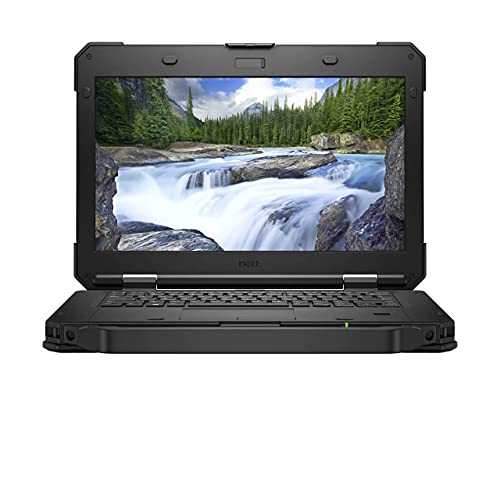
Pros
Cons
Best for: Field staff who mostly stream data from the cloud and need a lightweight, rugged machine for occasional offline work.
Check current price on Amazon →
This is the same laptop as the 5424 essentially, but with a smaller SSD. The 256GB drive is the main limitation. Once you install Windows 11 Pro and a few field applications, you will have maybe 150GB left. If you need to store large offline maps or databases, you will run out quickly. The machine itself is perfectly capable: the i5-8350U is paired with 16GB of RAM, so performance is identical to the 5424. The weight of 3.88 pounds makes it the lightest rugged laptop on this list, which is a real advantage if you carry it all day. The FHD screen is the same good panel. For a user who works mostly with cloud-based tools and only needs a local machine for email, browser, and basic forms, this is a fine choice. Just factor in the cost of a large external drive or upgrading the SSD later.

Pros
Cons
Best for: Organizations with existing 5414 fleets or users on a tight budget who need a proven, rugged machine for basic tasks.
Check current price on Amazon →
The 5414 is an older design, and it shows. The 6th-gen Core i5 is two generations behind the 8th-gen chips and four behind the 11th-gen. It still runs Windows 11 Pro and basic Office apps fine, but anything heavier will lag. The screen is 1366×768, which feels cramped and has poor viewing angles. The chassis is thick and the weight is around 6.5 pounds. On the plus side, this is the most proven rugged laptop in Dell's lineup, used by militaries and utilities for years. The 512GB SSD is generous for its class, and 16GB of RAM is enough. If your work is simple data entry, email, and web-based tools, and you need something that can take a drop without dying, the 5414 still works. But we would steer most buyers toward a newer model.

Pros
Cons
Best for: Users who work in dark conditions or need VGA connectivity and want maximum seal protection on a tight budget.
Check current price on Amazon →
This 5414 is very similar to the previous one, but with a backlit keyboard and VGA port. The backlight matters if you are working in a dim warehouse or a vehicle at night. The VGA port is a legacy connector that still shows up on many industrial displays and projectors; if you need it, this is one of the few laptops here that has it. The IP65 rating is actually better than the semi-rugged models (IP53), so this 5414 is more water-resistant than some newer machines. Performance is the same as the other 5414: usable but dated. The 256GB SSD is tight, so plan on using cloud storage or an external drive. Overall, this is a niche pick for specific environments where backlit keys and VGA are essential and speed is secondary.

Pros
Cons
Best for: Organizations with legacy software that only runs on older hardware, or as a cheap dedicated terminal for a single field application.
Check current price on Amazon →
The 7404 is a relic, but it is a fully rugged Extreme machine that can still be pressed into service. The 4th-gen i5 is from 2014, and it shows. Booting up, opening a browser, or switching between two apps will feel sluggish. The 8GB of RAM is the bare minimum for Windows 10, and you cannot upgrade beyond that on this model easily. The outdoor-readable screen is a nice feature, and the Extreme rating means it can survive a hose-down. If you have a single-dedicated application that runs fine on older hardware, like a terminal emulation program or a bar code scanner interface, this could work as a cheap second machine. But for almost any modern field computing need, you will be much happier with a newer semi-rugged model like the 5430.
The best rugged laptop for you depends on exactly where you work and what you do there. Here are the factors that separate a good choice from a bad one.
Not all rugged laptops are equally tough. The two key standards are MIL-STD-810 (for drops, vibration, temperature extremes, and humidity) and IP (Ingress Protection) for dust and water. MIL-STD-810G is the older version; MIL-STD-810H is the current one. The differences are small, but H is more stringent for some tests. For IP ratings, the first digit is dust protection (5 is dust-protected, 6 is dust-tight). The second digit is water (3 protects against sprays, 5 against jets). Semi-rugged laptops like the 5420 and 5430 are typically IP53: sealed against dust ingress and light spray. Extreme models like the 7330 and 7404 are IP65: fully dust-tight and can take a water jet. If you work in a clean warehouse, IP53 is enough. If you work in a wet environment or around explosive dust, look for IP65 and HAZLOC certification.
Older rugged laptops often come with 4th, 6th, or 8th-gen Core i5/i7 processors. The 11th-gen chips in the 5430 series represent a big leap in speed and power efficiency. If you run anything heavier than Office and a web browser, the newer CPUs make a real difference. For basic data entry and email, an 8th-gen i5 is still fine. The 6th-gen and especially the 4th-gen chips will feel painfully slow with Windows 10 or 11.
8GB is too little for Windows 11 and modern field applications. 16GB is the practical minimum for comfortable multitasking. 32GB is overkill for most people but invaluable if you run virtual machines, large databases, or GIS software. For storage, 256GB fills up fast. 512GB is the sweet spot for most users. 1TB is for those who keep everything offline.
Touchscreen is a real plus for gloved or stylus use in the field, but it adds weight and reduces battery life slightly. Non-touch models are lighter and cheaper. Brightness matters a lot outdoors: look for 400 nits or higher, and ideally 1000+ nits for full-sun readability. Resolution: avoid HD (1366×768) if you can; FHD (1920×1080) gives you much more screen real estate. Outdoor-readable finishes and anti-glare coatings are standard on most rugged models.
Field work often requires connecting to legacy equipment. A native serial (RS-232) port is still common in industrial settings. RJ-45 Ethernet is essential for secure network connections. HDMI is standard for presentations. USB-A ports are needed for peripherals. USB-C with Power Delivery is nice for charging from a portable battery. Thunderbolt 4 supports fast docking and external GPUs. Older models may have VGA, which is rare now but still needed for some projectors.
Rugged laptops are heavier than standard ones. A typical 14-inch semi-rugged model weighs 4.5 to 5 pounds. The Extreme models can be over 6 pounds. If you carry the laptop all day, weight matters. The lightest option on this list is the non-touch 5420 at 3.88 pounds. The heaviest are the 5414 models at around 6.5 pounds.
Semi-rugged laptops (like the Latitude 5420, 5424, and 5430) are tested to MIL-STD-810 standards for drops, vibration, and temperature, and have IP53 sealing against dust and light water splashes. Fully rugged or Extreme models (like the 7330 and 7404) have IP65 or higher sealing, are tested to more severe drops, and often carry HAZLOC certification for use in hazardous environments.
It depends on the IP rating. An IP53 laptop can handle light rain and splashes but should not be left in a downpour. An IP65-rated laptop can be sprayed with a hose and used in heavy rain. The Extreme models are designed for wet conditions.
With proper care, a rugged laptop can easily last 5 to 7 years or more. The main limitations are the processor and RAM becoming outdated. Many organizations still use Latitude 5414s that are a decade old, though performance is slow by modern standards.
Not necessarily. Touch is very helpful for field data entry with gloves or a stylus, but if you mostly work at a desk or use a mouse, a non-touch model is lighter and more reliable (one less layer to fail). The non-touch models also tend to have better battery life.
It is a U.S. military standard that tests equipment against environmental stressors: drops, vibration, humidity, salt fog, temperature extremes, and blowing rain. The suffix G or H indicates the revision. MIL-STD-810H is the current version. Laptops certified to this standard can survive a 3-foot drop onto concrete and operate in temperatures from -20F to 145F.
Yes. Most of the units listed here come with Windows 11 Pro preinstalled, even if they originally shipped with Windows 10. The exception is the Dell Latitude Extreme 7404, which comes with Windows 10 Pro and may not officially support Windows 11 due to its older processor.
A rugged laptop is always more reliable than a standard laptop in a case because the entire chassis is reinforced, the ports are sealed, and the screen is protected. A case adds bulk without preventing damage from drops or dust ingress. If you work in harsh conditions, a true rugged laptop is the right tool.
The best rugged laptop for most people is the Dell Latitude Rugged 5430 Touch with the Core i7 and 32GB of RAM. It combines a fast modern processor with abundant memory and a brilliant outdoor touchscreen, all in a MIL-STD-810H certified chassis. If you need the absolute maximum toughness for hazardous environments, the Dell Latitude Rugged Extreme 7330 is the one to get, with its IP65 seal and HAZLOC certification. For teams on a semi-rugged budget, the Dell Latitude Rugged 5430 with the i5 and 16GB of RAM hits the sweet spot of price, performance, and durability.
No matter which you choose, any of these 10 best rugged laptops will outlast a standard laptop in the field. Focus on the environment you work in, the performance you need, and the ports your equipment requires, and you will pick the right machine.
This article contains Amazon affiliate links. We may earn a small commission on qualifying purchases at no extra cost to you.


