Physical Address
304 North Cardinal St.
Dorchester Center, MA 02124
Physical Address
304 North Cardinal St.
Dorchester Center, MA 02124

We cover the 9 best mobile internet services in 2026, from no-contract hotspots to data-only SIMs. Find the right plan and device for your travel, home, or RV needs.
You park the RV at a remote campsite. The campground wi-fi is nonexistent. Or you land in a hotel with a network that drops every twenty minutes. Your phone hotspot works, but it drains the battery and chews through your plan's data cap. A dedicated mobile internet service can bail you out. The question is which one: a self-contained hotspot with prepaid data, a travel router that turns dubious wi-fi into a secure network, a data-only SIM for a device you already own, or even a VoIP home phone that bypasses the landline entirely.
We sorted through the options to find the best mobile internet services for 2026. The picks below range from plug-and-play hotspots to bare-bones SIM cards, covering travelers, RVers, remote workers, and anyone who wants an internet backup without a multiyear commitment. Each product here solves a specific problem. Some give you a complete service out of the box. Others expect you to supply the hardware. All of them sidestep traditional cable and DSL contracts.
TL;DR: The EIOTCLUB 4G LTE Portable WiFi Hotspot is the simplest way to get online without a contract: it arrives with trial data, an LCD screen for easy management, and a battery that lasts a full day. The RoamWiFi 4G LTE Hotspot is the global traveler's pick, with a built-in 50GB US plan plus 1GB for 170+ countries. The GL.iNet Beryl AX is the best travel router for anyone who needs VPN security on public networks. The Jolt Mobile Prepaid Data SIM is a no-fuss way to add 6GB of AT&T data to a GPS, tablet, or camera.
| # | Product | Type | Network | Max Devices | Best for |
|---|---|---|---|---|---|
| 1 | EIOTCLUB 4G LTE Portable WiFi Hotspot | Portable hotspot | 4G LTE | 10 | No-contract travel and backup internet |
| 2 | RoamWiFi 4G LTE WiFi Mobile Hotspot | Portable hotspot | 4G LTE (global) | 10 | International travel with built-in data |
| 3 | GL.iNet GL-MT3000 (Beryl AX) Travel Router | Travel router | WiFi 6 (needs source) | Unlimited (LAN/WiFi) | VPN security and custom network routing |
| 4 | TravlFi JourneyGo LTE RV WiFi Hotspot | RV hotspot | 4G LTE (multiple U.S. networks) | Multiple | RV, motorhome, and camper internet |
| 5 | EIOTCLUB 4G LTE USB WiFi 6 Dongle | USB dongle | 4G LTE | 10 | Laptop and car backup internet |
| 6 | Yoidesu 4G LTE USB Modem | USB modem | 4G LTE | 10 | Basic USB-powered hotspot |
| 7 | Ooma Telo VoIP Free Internet Home Phone Service | VoIP home phone | Broadband internet required | N/A | Landline replacement with free nationwide calling |
| 8 | Jolt Mobile Prepaid Data SIM Card | Data SIM | 5G/4G LTE (AT&T) | 1 per device | Adding data to GPS, tablet, camera, or IoT |
| 9 | SpeedTalk Mobile Data Only SIM Card Kit | Data SIM | 5G/4G LTE (T-Mobile/unlocked) | 1 per device | Flexible pay-as-you-go data in any GSM device |

Pros
Cons
Best for: Anyone who wants a standalone mobile internet service that works right out of the box, with no setup and no ongoing commitment.
Check current price on Amazon →
This is the easiest recommendation on the list. The EIOTCLUB portable hotspot arrives with a pre-installed SIM and a full gigabyte of data ready to go. You press the power button, wait a few seconds, and you are online. No website visits, no account creation, no card on file.
The 1.7-inch LCD screen sets it apart from nearly every other hotspot at this level. It shows the name of the carrier, how many devices are connected, and a QR code that takes you straight to a data top-up page when the trial runs low. That sounds minor, but when you are in a car or at a campsite and need to add data fast, not having to dig out a phone or remember a URL saves real time. The battery lives up to the twelve-hour claim in real use, and the smart sleep mode means you do not have to remember to turn it off to conserve power.
The catch is that this hotspot is US-only, and the EIOTCLUB SIM cannot be replaced with a different carrier's SIM. That is fine for domestic road trips and backup home internet, but it rules out this device for anyone crossing the border into Canada or Mexico.

Pros
Cons
Best for: Frequent international travelers who need a single device that works across multiple continents without swapping SIMs.
Check current price on Amazon →
The RoamWiFi hotpot is the opposite of the EIOTCLUB in philosophy. Instead of a locked SIM and a pay-as-you-go menu, it bakes the data plan into the hardware. The device you buy arrives with 50GB of North America data and 1GB of global data already loaded, good for two months after activation. You turn it on, and it connects. That is the entire setup.
RoamWiFi uses eSIM technology to link to local carriers in over 170 countries. The hotspot automatically picks the strongest signal, so you do not hunt for networks or buy local SIMs at every stop. It supports ten devices, which means the whole family or a small work group can share the connection. The battery life is respectable, though heavy streaming will drain it faster than the twelve-hour claims some competitors make.
The trade-off is that you are locked into RoamWiFi's data ecosystem once the initial allocation runs out. You cannot drop in a third-party SIM. If you travel only inside the US, the EIOTCLUB hotspot offers more flexible top-ups. But if your itinerary crosses borders every few weeks, the RoamWiFi's all-in-one package saves a lot of hassle.

Pros
Cons
Best for: Travelers who want to secure their traffic on public networks and need the flexibility to route devices through a VPN.
Check current price on Amazon →
The Beryl AX is not a mobile internet service in the traditional sense. It does not include its own data connection. What it does is take an existing internet source, hotel wi-fi, a wired ethernet jack, or even a phone tethered over USB, and turn it into a secure, customizable network. For anyone who regularly uses public wi-fi, that makes it one of the most practical tools on the list.
The router runs OpenWrt, which means you can install everything from a VPN client to a full ad blocker. The default admin panel makes common tasks, like connecting to WireGuard or OpenVPN, relatively painless. The physical toggle switch can be programmed to enable your VPN instantly, so you are not digging through menus every time you check into a new hotel. WiFi 6 performance is excellent for a device this small; streaming and video calls hold up well even when the source connection is marginal.
The obvious caveat is that the Beryl AX is worthless without an internet source. It pairs best with a separate cellular hotspot or a phone's tethering feature. If your hotel wi-fi is strong, the Beryl AX alone gives you a secure network. If the room only has ethernet, the 2.5G WAN port handles that too. It is a specialist tool, but for its niche, it has no equal on this list.

Pros
Cons
Best for: RV owners and campers who need connectivity in areas where a single carrier's coverage is unreliable.
Check current price on Amazon →
The TravlFi JourneyGo is built for the RV lifestyle, where you might be in a different county every week and cannot count on any single carrier's tower reaching your campsite. It uses eSIM profiles to roam across multiple networks without you having to swap physical cards. The device selects the strongest signal automatically, which in testing translates to fewer dead spots than a hotspot locked to a single network.
Data plans range from small 2GB add-ons to unlimited options, all prepaid and month to month. There is no contract, so you can pause service in months you are not traveling. The activation process requires a credit card, but once set up, buying a new plan takes a couple of taps in the TravlFi app.
The hardware itself is nothing flashy. It is a compact puck with a single button and a few indicator lights. Battery capacity is not advertised, so for sustained use in the RV, you will likely keep it plugged into a USB port. The selling point is the multi-network switching, which is genuinely useful for anyone who spends time off the interstate. If you stick to well-covered metro areas, a simpler hotspot will do the same job for less investment.
Pros
Cons
Best for: Laptop users who want a backup internet connection that can also share a wi-fi network for other devices.
Check current price on Amazon →
The USB dongle version of the EIOTCLUB offering strips away the battery and LCD screen to create a more portable, always-powered solution. It is literally a small stick that you plug into any USB port, laptop, power bank, car USB socket, and it creates a wi-fi network. The same EIOTCLUB SIM and pay-as-you-go plans apply, with the same 1GB trial to start.
The lack of a battery is both a limitation and a feature. You never have to charge it, and it never runs out. But you also cannot use it unless something is feeding it power. For a laptop bag or a car glovebox, that is fine. For a day hike where you might stop for lunch and need wi-fi, you would need a power bank anyway.
WiFi 6 support is a nice bonus at this size, though the real-world bottleneck is the 4G LTE cellular connection. The dongle handles up to ten simultaneous clients, which is generous for such a small device. If you already own the EIOTCLUB portable hotspot, this dongle is redundant. If you live out of a laptop and want the smallest possible backup internet option, this is it.

Pros
Cons
Best for: Users who already have a data-only SIM and want a cheap, portable router to share it.
Check current price on Amazon →
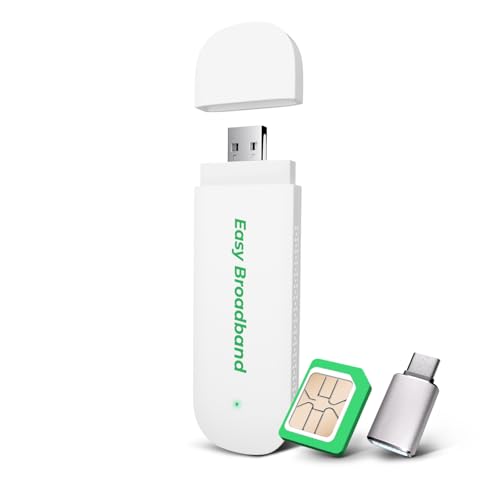
The Yoidesu is a bare-bones device. It is a USB stick with a SIM card slot and a wi-fi radio. You provide the SIM and the power source, and it creates a hotspot for up to ten gadgets. There is no trial data, no included plan, and no LCD screen. It is a utility tool for people who already have a data SIM from a provider like Jolt or SpeedTalk and just need a way to broadcast it.
The build quality feels functional rather than premium. The plastic body is light and the white finish picks up scuffs. But for something that will live in a car's USB port or a drawer with a power bank, that does not matter much. The key spec is the device limit: ten users is a lot for a dongle at this level.
The main drawback is that setup is not always automatic. Some SIMs require you to enter APN settings before they will route data. If you are comfortable poking around a 192.168.x.x admin page, that is a minor inconvenience. If you want zero hassle, the EIOTCLUB dongle is the better choice because everything is preconfigured.
Pros
Cons
Best for: Households that want to keep a landline number and experience without the monthly landline bill.
Check current price on Amazon →
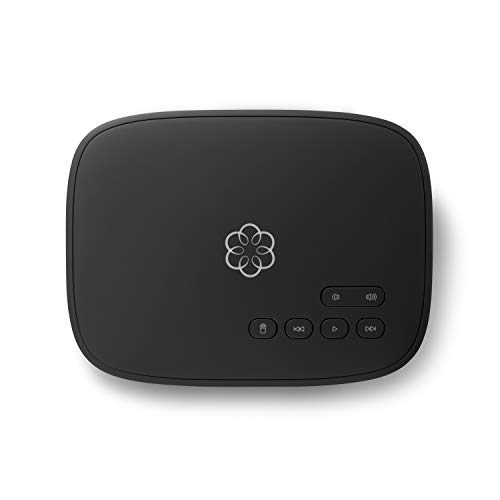
The Ooma Telo is the odd one out on this list because it does not provide internet access. It uses your existing internet connection to deliver free domestic phone calls over VoIP. You plug the Telo base into your router, connect a standard phone, and you have a landline that costs only the regulatory fees each month. No per-minute charges, no long distance add-ons.
Call quality is noticeably better than most cable company VoIP offerings. Ooma uses a proprietary HD codec, and in practice calls sound closer to a cell phone than a traditional landline. The included features, voicemail forwarded to email, call forwarding, and 911, cover everything a typical household needs. The Premier upgrade adds robocall filtering, a second line, and Amazon Alexa integration, but the free tier is already generous.
This service is not for everyone. If you never use a home phone, skip it. But for the many households that want a wired phone for emergencies or because relatives still call the landline number, the Telo is the cheapest way to keep that connection active. It integrates with optional security sensors, too, so it can double as a basic home monitoring hub.
Pros
Cons
Best for: Adding mobile data to a GPS tracker, tablet, smartwatch, camera, or IoT device that uses AT&T's network.
Check current price on Amazon →
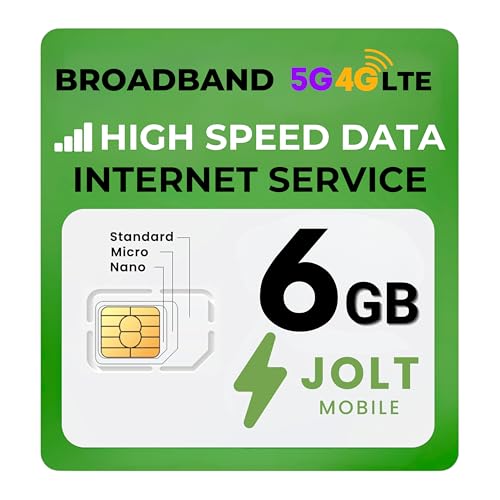
The Jolt SIM is a straightforward way to add data to a device that does not have its own cellular plan. It works on the AT&T network, which covers most of the United States and offers solid rural penetration for a GSM carrier. The 6GB plan is a good middle ground, enough for regular use on a tablet or a data-heavy IoT gadget but not so much that you are paying for unused gigabytes.
Activation is simple: insert the SIM, visit the Jolt website, register with a credit card, and pick a plan. The service is month to month with no contract. The 3-in-1 punch-out SIM means it fits everything from a full-size hotspot router to a nano SIM slot in a smartwatch.
The limitation is that this is a data-only SIM. It does not include voice or text. If your device needs to make calls, look elsewhere. Also, tethering depends entirely on the device's capability. In a tablet, Jolt data will work for the tablet itself. If you want to share that connection with other gadgets, you need a device that has hotspot functionality built in.

Pros
Cons
Best for: Users who want a low-cost data SIM for a spare phone, hotspot device, or tablet, with the freedom to cancel any month.
Check current price on Amazon →
SpeedTalk rounds out the list with a no-frills data SIM that leans on T-Mobile's network and compatible AT&T unlocked devices. The kit itself is cheap and includes 1GB of data to get you started. After that, you pay a monthly subscription for additional data, starting at a small amount per gigabyte. There is no contract, so you can let the plan lapse for a few months and reactivate later.
The card works in any GSM device that supports the required bands: smartphones, tablets, hotspots, routers, even some cameras and IoT modules. The triple-cut design means you can transfer it between devices without buying a new SIM. SpeedTalk offers live customer support seven days a week, which is rare for a discount carrier.
The catch is that T-Mobile coverage is not as broad as AT&T's in rural and mountain regions. If you spend most of your time in cities and suburbs, you will not notice a difference. If you are deep in the backcountry, the Jolt SIM on AT&T is the safer pick. SpeedTalk also offers international roaming, but the rates are usage based and can climb fast, so it is best treated as a domestic-only card.
The mobile internet service landscape is split into hardware bundles and SIM-only plans. The right choice depends on where you need coverage, how many devices you want to connect, and whether you prefer to own the equipment or use what you already have.
The most important factor is whether the service ties you to a contract. The strongest offerings on this list are all no-contract or pay-as-you-go. You buy the hardware once and then purchase data in increments that match your usage. This avoids the frustration of paying for gigs you never use and lets you pause service during months you stay home. Avoid any service that demands a 12- or 24-month commitment for mobile data; the market is flexible enough that there is no reason to accept one.
A hotspot is useless if it cannot find a signal. Look at which underlying carrier the service uses. AT&T and T-Mobile have the largest GSM networks in the US. Some services, like TravlFi and RoamWiFi, switch between multiple carriers automatically, which is a major advantage in rural or mountainous areas. If you travel internationally, confirm that the device works in the countries you visit. Most US-only hotspots are locked to domestic bands and will not connect abroad, even with a local SIM.
Hardware with built-in data, like the RoamWiFi or EIOTCLUB hotspots, is convenient because you do not have to buy a separate SIM. But the flexibility of those plans varies. The EIOTCLUB allows small incremental top-ups via QR code. The RoamWiFi expects you to buy larger data packs through its app. SIM-only services like Jolt and SpeedTalk let you choose how much data each month, and you can often drop down to a smaller plan if your usage shrinks.
If you want a dedicated hotspot, compatibility is straightforward: it works with any wifi device. If you are buying a data SIM for an existing piece of hardware, check that the SIM form factor (nano, micro, standard) fits, and confirm the device's LTE band support matches the carrier. Many tablets, GPS trackers, and IoT devices have limited band support, so a SIM that works in a phone may not work in a camera or a smartwatch.
Hotspots with internal batteries offer the most freedom. You can take them anywhere, and they last from a few hours to a full day on a charge. USB-powered dongles and modems are cheaper and never need charging, but they tie you to a power source. For a car or a desktop setup, USB power is fine. For hiking, camping, or any scenario where you might be away from a USB port, a battery-powered hotspot is non-negotiable.
An LCD screen that shows your data balance and connection status saves time and frustration. A physical VPN toggle on a travel router makes one-tap encryption possible. Robocall blocking on a VoIP home phone can cut nuisance calls drastically. These are not essential for everyone, but when they match your use case, they turn a good service into a great one.
No. All of the products in this roundup offer no-contract, prepaid, or pay-as-you-go plans. You pay for data as you use it, and you can stop anytime without penalties.
Most tablets and hotspots with a SIM card slot accept standard GSM data SIMs, but you need to check the device's LTE band compatibility with the carrier. A SIM that runs on AT&T may not work well in a device designed for T-Mobile's bands.
A portable hotspot has its own cellular modem and creates a wifi network from a cellular signal. A travel router does not have a cellular modem; it connects to an existing wifi or ethernet source and rebroadcasts it, often with added security features like a VPN.
Most consumer hotspots support 5 to 10 devices simultaneously. The exact number is usually listed in the product specs. Connecting more devices than the limit will degrade performance for all users.
Yes. 4G LTE can handle HD video streaming, video calls, and most online games. The real bottleneck is network congestion. During peak hours in crowded areas, speeds may drop enough to buffer, but for typical use LTE is adequate.
VoIP (Voice over Internet Protocol) uses your broadband internet connection to make calls instead of traditional copper phone lines. It offers the same features (911, voicemail, caller ID) but at a lower cost, and it can be used with a standard home phone.
Yes. You can connect a travel router to a mobile hotspot's wifi to extend its range and add VPN protection. This is a common setup for securing hotel connections where the hotspot acts as the internet source and the travel router handles encryption.
The EIOTCLUB 4G LTE Portable WiFi Hotspot is the pick for most people. It combines a long-lasting battery, a helpful display, and simple pay-as-you-go data in a device that works the second you turn it on. For international travelers, the RoamWiFi 4G LTE Hotspot eliminates the hassle of buying local SIMs in every country. The GL.iNet Beryl AX is the specialist you want if you care about privacy and VPN routing on public networks.
If you already own a compatible device, the Jolt Mobile SIM or SpeedTalk SIM are the leanest ways to add data. And if you are looking to drop a landline bill, the Ooma Telo is a proven solution that pays for itself after a few months. No single mobile internet service fits every scenario, but the nine options above cover the full range from a weekend camping trip to a full-time RV life.
This article contains Amazon affiliate links. We may earn a small commission on qualifying purchases at no extra cost to you.


