Physical Address
304 North Cardinal St.
Dorchester Center, MA 02124
Physical Address
304 North Cardinal St.
Dorchester Center, MA 02124

We've selected the 8 best ITX motherboards for 2026: budget AM4 options, feature-rich AM5 boards with PCIe 5.0, WiFi 7, and DDR5 support for any compact build
You’ve picked a small form factor case, you’ve measured clearances, and you’re ready to build something tight and powerful. But the ITX motherboard is the hardest part of any compact build. It dictates what CPU you can run, how many drives you can install, which cooler fits, and which ports live at your desk for the next three or four years. Get it wrong and you’re either swapping boards or living with compromises you didn’t account for.
The best ITX motherboards in 2026 span a huge range. Some are entry-level AM5 boards that get you onto DDR5 without a massive investment. Others are last-generation AM4 workhorses that still make great sense for a media server or budget gaming rig. A few are Intel-based boards with unique features like built-in eDP display connectors. And then there are the flagships: X870 and B850 boards with PCIe 5.0, WiFi 7, and power delivery that can handle even the most demanding AMD Ryzen 9000 chips. Whatever your budget or build philosophy, one of these eight boards will fit.
TL;DR: The ASUS ROG Strix B850-I is the one most people should buy: modern AM5 platform with great VRMs and PCIe 5.0 at a sensible spec. The GIGABYTE B550I AORUS PRO AX is the pick for a proven AM4 build. The ASUS ROG STRIX X870-I is for power users who want the absolute best AM5 ITX board today.
| # | Product | Chipset / Socket | RAM Type | Key Features | Best for |
|---|---|---|---|---|---|
| 1 | ASUS ROG STRIX X870-I Gaming WiFi | AMD X870 / AM5 | DDR5 | USB4, PCIe 5.0, 10+2+1 110A VRMs, Dynamic OC Switcher, WiFi 7, 2x M.2 | Enthusiasts who want the best AM5 ITX board money can buy |
| 2 | GIGABYTE X870I AORUS PRO ICE | AMD X870 / AM5 | DDR5 | White PCB, PCIe 5.0, 2x M.2, WiFi 7, 2.5GbE, 8+2+1 110A VRMs, 5‑year warranty | White‑build fans and users who want a clean, high‑end AM5 board |
| 3 | ASUS ROG Strix B850-I Gaming WiFi | AMD B850 / AM5 | DDR5 | PCIe 5.0 M.2, 10+2+1 70A VRMs, AI Overclocking, WiFi 7, USB 20Gbps Type‑C | The all‑around AM5 choice for most builders |
| 4 | GIGABYTE A620I AX | AMD A620 / AM5 | DDR5 | DDR5 support, Wi‑Fi 6E, 2.5GbE, EZ‑Latch PCIe, 5‑year warranty, Q‑Flash Plus | Budget entry to AM5 with DDR5 and solid networking |
| 5 | GIGABYTE B550I AORUS PRO AX | AMD B550 / AM4 | DDR4 | 2x M.2 (one PCIe 4.0), 2.5GbE, WiFi 6, USB‑C, reinforced PCIe slot, 8‑layer PCB | A proven AM4 platform for Ryzen 5000/4000 builds |
| 6 | Gigabyte A520I AC | AMD A520 / AM4 | DDR4 | Intel WiFi+BT, 3 display outputs, Q‑Flash Plus, 6‑phase 55A DrMOS | A rock‑solid budget AM4 board for servers or basic PCs |
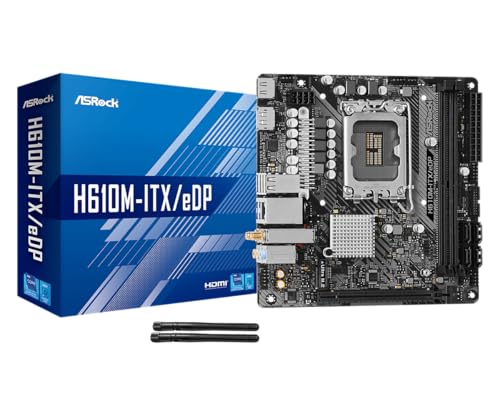
| 7 | ASRock H610M‑ITX/eDP | Intel H610 / LGA1700 | DDR4 | Unique eDP connector, Dr.MOS, HDMI 2.1, DP 1.4, Intel Gigabit LAN, Wi‑Fi 5 | All‑in‑one builds or digital signage needing an eDP display output |
| 8 | ASUS PRIME H610I‑PLUS D4 | Intel H610 / LGA1700 | DDR4 | PCIe 4.0, Q‑LED, SPI TPM header, mono‑out header with amp IC, 1Gb LAN | Straightforward Intel 12th‑Gen build with no frills |

Pros
Cons
Best for: Serious overclockers and PC enthusiasts who want the fastest AM5 ITX board with USB4 and the fullest set of tuning tools.
Check current price on Amazon →
This is the board you pick when you want to run a Ryzen 9 9950X at its absolute limit in a Formd T1 or Fractal Terra. The ASUS ROG STRIX X870-I packs the same 10+2+1 power stage design found on full‑size X870 boards, each rated for 110A, and backs it with a chunky VRM heatsink that has real thermal mass. It also carries an active VRM fan, which some purists will dislike, but in a sandwich‑layout case with no direct airflow over the motherboard, that tiny fan is what keeps the VRM from throttling.
Beyond raw power, the X870-I is the only ITX board in this roundup with native USB4. That means 40Gbps over Type‑C for external SSDs or a second display. Combined with WiFi 7, 2.5GbE, and two PCIe 5.0 M.2 slots, the connectivity is future‑proof. The Dynamic OC Switcher is a genuine trick: it lets the board run cores at stock frequencies for everyday tasks but automatically switch to a higher all‑core overclock under full load. You don’t have to compromise stability for single‑threaded speed. The tradeoff is price – you are paying for the top‑tier VRM and USB4, so if you don’t need either, you could put that money toward a better GPU. But for the person who wants zero compromises in an ITX build, this is the one.

Pros
Cons
Best for: Anyone building an all‑white or silver ITX system who wants a high‑end AM5 board without paying the ROG tax.
Check current price on Amazon →
The GIGABYTE X870I AORUS PRO ICE is the answer to a very specific question: how do I get a white motherboard with modern specs that doesn’t require a second mortgage? The all‑white PCB extends to the M.2 heatsink, the chipset cover, and even the rear I/O shroud. It looks fantastic in a white NR200 or a Fractal Terra in Jade with white accents. Build quality is high – the board is dense, and the VRM heatsink has a lot of surface area despite the confined ITX space.
Performance‑wise, you get enough power delivery to run a Ryzen 9 9950X at stock or a mild PBO overclock, though the 8+2+1 phase design isn’t as brute‑force as the 10+2+1 on the ASUS X870-I. The real standout is the five‑year warranty, which is twice the industry standard. That tells you GIGABYTE trusts the build quality. The board lacks USB4, but you do get a front and rear USB‑C at 10Gbps, WiFi 7, and 2.5GbE. If you’re not connecting multiple external SSDs at full speed, the AORUS PRO ICE is the more sensible flagship pick.

Pros
Cons
Best for: The majority of builders who want a modern AM5 ITX board with PCIe 5.0, great VRMs, and sensible features – the one to buy unless you need USB4 or the absolute highest overclocking ceiling.
Check current price on Amazon →
The ASUS ROG Strix B850-I sits right in the sweet spot of the AM5 ITX market. It uses the B850 chipset, which trades a few PCIe lanes from the chipset for a lower platform cost, but keeps all the CPU‑connected PCIe 5.0 lanes intact. That means you get a full PCIe 5.0 x16 slot for your graphics card and both M.2 slots running PCIe 5.0. The VRM is a 10+2+1 design with 70A stages – overkill for a Ryzen 5, ample for a Ryzen 7, and comfortable for a Ryzen 9 under all but the heaviest sustained workloads.
What stands out is the AI Overclocking. It’s not a gimmick. The board profiles your CPU during the first boot and applies a multi‑core OC and single‑core boost that often matches a manual tune. You can then use AI Networking II to automatically prioritise gaming traffic. The USB 20Gbps Type‑C is fast enough for external SSDs, and WiFi 7 means you’re ready for tomorrow’s routers. The only real omission is USB4, which only the X870 boards offer. For almost everyone, this board delivers everything needed in a compact AM5 build without the premium for features you’d rarely use.

Pros
Cons
Best for: A Ryzen 5 or Ryzen 7 build on a smaller budget where DDR5 and modern networking matter more than multiple fast SSDs.
Check current price on Amazon →
The GIGABYTE A620I AX is the board that gets you onto AM5 without forcing you to spend flagship money. It supports DDR5 (two DIMMs with EXPO and XMP), includes Wi‑Fi 6E and 2.5GbE, and has a simple but effective VRM heatsink. For a Ryzen 5 7600 or Ryzen 7 8700G APU build, the VRM runs cool and quiet. Pair it with a Ryzen 9 7950X and you will see throttling under sustained all‑core loads, but that’s not the use case here.
The biggest limitation is the single M.2 slot. With no second slot, you’re limited to one SSD unless you use a SATA drive. That’s fine for a general‑use PC or a light gaming machine, but anyone building a workstation with multiple fast drives should look at the B850 or X870 options. The A620I also lacks PCIe 5.0 on the x16 slot, but the majority of current GPUs don’t saturate PCIe 4.0 x16 anyway. For a sensible, quiet SFF build that gets you on DDR5 with modern networking, this board does exactly what it needs to.

Pros
Cons
Best for: Anyone with a Ryzen 5000 series CPU who wants a reliable, feature‑packed AM4 board that will last years.
Check current price on Amazon →
The GIGABYTE B550I AORUS PRO AX has been a favourite in the SFF community since its launch, and for good reason. It was one of the first ITX boards to offer two M.2 slots on AM4 (one PCIe 4.0, one PCIe 3.0), and it pairs that with excellent networking: Intel 2.5GbE and Intel WiFi 6. The VRM is a 6+2 digital phase design with an 8‑layer PCB, and while it’s not as muscular as modern AM5 boards, it handles a Ryzen 7 5800X3D without breaking a sweat. The integrated aluminium backplate helps dissipate heat from the backside of the VRM and gives the board a rigid feel.
The downside is that this is a DDR4 platform. If you already have good DDR4 RAM, the B550I is a fantastic choice for a high‑performance AM4 ITX build. But if you’re building from scratch, investing in DDR4 instead of DDR5 might feel like a dead end. Still, the B550I supports PCIe 4.0 for the GPU and one M.2, and with a 5800X3D it’s still a beast of a gaming machine. For SFF builders on a mature platform, this remains the gold standard.

Pros
Cons
Best for: A budget home server, media centre, or secondary office PC that doesn’t need high‑end graphics or storage speed.
Check current price on Amazon →
The Gigabyte A520I AC is the board you buy when you need a compact motherboard that simply works. It supports 3rd Gen Ryzen CPUs (including the excellent Ryzen 5 5600G APU), has Intel WiFi and Bluetooth out of the box, and includes triple display outputs for multi‑monitor setups. The VRM is basic but adequate for chips up to a Ryzen 7 5700X, and the 55A DrMOS phases are a step above the cheapest discrete MOSFET designs.
What you give up is speed. The PCIe 3.0 x16 slot is fine for a GPU like an RX 6600 or GTX 1660, and the single M.2 slot at PCIe 3.0 x4 is still fast enough for daily use. But if you want PCIe 4.0 support or more than one M.2 drive, you need to step up to the B550 board above. The A520I also lacks USB‑C on the rear I/O, which is annoying for connecting modern peripherals. Still, for the price, this board is a solid foundation for a budget‑minded SFF build.
Pros
Cons
Best for: Industrial panel PCs, digital signage, custom all‑in‑one builds, or anyone who needs an eDP output from a Mini‑ITX board.
Check current price on Amazon →
The ASRock H610M‑ITX/eDP stands out because of its eDP (embedded DisplayPort) connector. This is a 4‑lane eDP 1.4 signal that lets you connect a laptop‑style display directly to the motherboard, which is a rare feature on a consumer ITX board. It opens up projects like a custom all‑in‑one PC or a compact digital signage unit. The board also includes HDMI 2.1 and DisplayPort 1.4 for external monitors, giving you three display outputs from a single chip.
For a more conventional build, the H610M‑ITX/eDP is a competent Intel LGA1700 board. It runs DDR4, has Dr.MOS power delivery rated at 50A per phase, and includes a single PCIe 4.0 x16 slot for a GPU. The M.2 slot is only PCIe 3.0, but it supports both NVMe and SATA SSDs. The integrated WiFi is 802.11ac, which is fine for everyday browsing but not ideal for high‑bandwidth streaming or large file transfers. This board is a niche pick, but for that niche it’s the only one of its kind in this roundup.

Pros
Cons
Best for: A dependable, inexpensive Intel build with PCIe 4.0 for a GPU, especially if you already have DDR4 and want to re‑use it.
Check current price on Amazon →
The ASUS PRIME H610I‑PLUS D4 is straightforward: it’s the Intel version of the budget A520 board. It fits 12th Gen processors (and later with a BIOS update), has a PCIe 4.0 x16 slot, and includes a single M.2 slot operating at PCIe 4.0 x4 with speeds up to 32Gbps. The board is built around the H610 chipset, which means you don’t get CPU overclocking, but you do get a stable platform for Intel non‑K chips.
What sets this board apart is the inclusion of a soldered stereo audio amplifier on the mono‑out header, which is designed for front‑panel audio in a case. It also has a dedicated SPI TPM header for enterprise deployments. Most home builders will ignore those, but they signal that ASUS designed this board for both consumer and business use. The lack of onboard WiFi is a letdown for an ITX board – you have to buy a separate module – but the V‑M.2 Key E slot makes that easy. If you want a cheap, reliable Intel ITX board that works out of the box, this is it.
The hardest part of building a small form factor PC is picking the motherboard. Every choice you make here constrains the rest of the build: the CPU, the cooler, the number of drives, and even which case you can use. Here are the factors that separate a good ITX motherboard from one that will cause headaches.
The socket determines which CPUs you can install. For AMD, AM5 is the current generation (Ryzen 7000/8000/9000) and AM4 is the previous generation (Ryzen 5000/3000). AM5 boards require DDR5 RAM, while AM4 boards use DDR4. For Intel, LGA1700 supports 12th, 13th, and 14th Gen Core processors. The chipset (the letters like B550, X870, H610) determines PCIe generation, overclocking support, USB port allocation, and how many M.2 slots you can run. Generally, X series chipsets (X870, X670, X570) offer the most lanes and features, B series (B850, B550) offer a good balance, and A/H series (A620, H610) are the budget options with fewer lanes and no overclocking. Choose your CPU first, then pick a chipset that matches its capabilities – don’t pair a high‑end CPU with an entry‑level chipset.
ITX boards have the smallest VRM area of any motherboard. Look for DrMOS power stages with a reasonable phase count: 6 or more phases for mid‑range CPUs, 8 or more for high‑end processors. The heatsink design matters just as much. A board with a small, finless heatsink will run hot and throttle under sustained load in a small case with little airflow. Boards that include an active VRM fan (like the ASUS X870-I) can handle more heat but add a potential noise source. If you’re building in a case with no direct airflow over the motherboard, prioritise boards with large heatsinks or active cooling.
Every ITX motherboard has exactly two DIMM slots and typically one or two M.2 slots. That’s a hard limit. If you need two fast M.2 SSDs, you need a board with two M.2 slots that both run at PCIe 4.0 or better. Some budget boards have only one M.2 slot, forcing you to use a SATA SSD for a second drive. Also check whether the second M.2 slot disables any SATA ports – this is common on B550 and X870 boards. For most SFF builds, one 2TB NVMe is enough, but content creators and packrats should plan for at least two M.2 slots.
Because ITX boards don’t allow expansion cards easily, integrated Wi‑Fi and Bluetooth are nearly essential for a clean build. Look for Wi‑Fi 6 or 6E at minimum – Wi‑Fi 5 (802.11ac) is starting to show its age. For wired networking, 2.5GbE LAN is becoming the standard, though many budget boards still use 1GbE. On the rear I/O, USB‑C with 10Gbps or 20Gbps speed is a big convenience for connecting modern external drives or a USB‑C monitor. Some flagship boards include USB4 (40Gbps), but that’s overkill for most users.
Mini‑ITX measures exactly 6.7″ x 6.7″. The board must fit your case, but also consider cooler clearance. Some boards have tall VRM heatsinks or chipset coolers that can conflict with large air coolers or certain low‑profile coolers in sandwich‑layout cases. Boards with integrated I/O shields save a step during installation. Features like Q‑Flash Plus (BIOS update without a CPU), PCIe EZ‑Latch (tool‑free GPU removal), and a clear CMOS button make building in tight spaces much less frustrating. A board that lacks these isn’t a deal‑breaker, but the extra convenience is worth noting.
Yes. ITX motherboards use the same mounting holes as the top portion of an ATX case. You’ll have a lot of empty space below the board, but it will work fine. Some cases even include extra standoffs for ITX boards.
Mini‑ITX is smaller (6.7″ x 6.7″) than Micro‑ATX (9.6″ x 9.6″) and has only one expansion slot. Micro‑ATX can have up to four slots and often four DIMM slots. ITX is best for extremely compact builds where space is the top priority.
It depends on the chipset. AMD X870, X670, B850, B650, and B550 chipsets support CPU overclocking. Intel Z690, Z790, and B660/B760 chipsets support it. H610 and A620 chipsets do not. The power delivery on some ITX boards is also limited, so heavy overclocking may be thermally constrained.
All standard ITX motherboards have two RAM slots. There are no exceptions. That means you should choose a 2‑stick kit (e.g., 2×16GB or 2×32GB) rather than a 4‑stick kit.
DDR5 offers higher bandwidth and better performance in memory‑intensive tasks, and it’s the only option for AMD AM5 and Intel 13th/14th Gen. If you’re building new, go with DDR5. If you already have DDR4 and want to save money, a DDR4 ITX board is still a good choice for an AM4 or Intel 12th‑13th Gen build.
No. The socket and chipset are physically and electrically incompatible. You must match the CPU generation to the correct socket.
Most ITX motherboards use standard LGA1700 or AM5/AM4 mounting holes. Low‑profile air coolers, 120mm AIOs, and custom water blocks all work. The main restriction is the case height clearance, not the motherboard. However, some boards with very tall VRM heatsinks can limit the width of a tower cooler.
The ASUS ROG Strix B850-I is our top recommendation for the best ITX motherboard in 2026. It offers a powerful VRM, two PCIe 5.0 M.2 slots, WiFi 7, and solid AI tuning features – all without the price of a flagship X870 board. For AM4 holdouts, the GIGABYTE B550I AORUS PRO AX remains the benchmark with its dual M.2, stellar networking, and proven stability. And if you need the absolute highest overclocking headroom and USB4 connectivity, the ASUS ROG STRIX X870-I is the board to buy.
If you’re still unsure, think about your CPU first. A Ryzen 5 or Ryzen 7 on AM5 belongs on the B850-I. A Ryzen 9 overclocker goes on the X870-I. A budget AM4 media server works well on the A520I. An Intel 12th‑Gen office build pairs naturally with the ASUS PRIME H610I‑PLUS. The rest of this list handles the smaller niches. Pick the board that matches your CPU’s needs and your case’s limitations, and you’ll have a foundation that serves you well for years.
This article contains Amazon affiliate links. We may earn a small commission on qualifying purchases at no extra cost to you.


