Physical Address
304 North Cardinal St.
Dorchester Center, MA 02124
Physical Address
304 North Cardinal St.
Dorchester Center, MA 02124

We picked the 10 best OLED monitors in 2026, from 27-inch QHD to 32-inch 4K and super ultrawide, with pros, cons, and buying advice for every gamer.
You know that moment when you step up from a good IPS monitor to an OLED, and suddenly every game looks like a different world. The blacks are truly black. The highlights punch. Motion is so clean you forget you're looking at a screen. But here's the problem: the best OLED monitors come in so many sizes, resolutions, and refresh rates that picking the right one can be paralyzing. Do you want 27-inch QHD with 500Hz, or 32-inch 4K? Should you go glossy or matte? Is the super ultrawide worth the desk space?
We sorted through the current landscape to find the 10 best OLED monitors worth your attention in 2026. This roundup covers everything from the fastest competitive panels to the most immersive HDR powerhouses, with picks from Samsung, LG, ASUS, AOC, and Acer. Whether you're a high-sensitivity esports player, a single-player immersion seeker, or a creator who needs color accuracy, there's an OLED here that fits.
TL;DR: The ASUS ROG Swift PG32UCDM is our top pick for anyone who wants the best overall image quality in 4K. The Samsung Odyssey OLED G6 is the speed king for competitive gamers. The LG 27GX704A is the glossy 27-inch QHD sweet spot that works for both gaming and work. The Samsung Odyssey OLED G9 is the super ultrawide immersion specialist. And the AOC Q27GAZDV is a surprisingly well-equipped option for those who want a fully adjustable stand without spending more.
| # | Product | Resolution | Size | Refresh Rate | Panel Type | Best for |
|---|---|---|---|---|---|---|
| 1 | ASUS ROG Swift PG32UCDM | 4K UHD (3840×2160) | 32" | 240Hz | QD-OLED | The best overall: 4K size with top-tier burn-in protection and HDR |
| 2 | Samsung Odyssey OLED G6 G60SF | QHD (2560×1440) | 27" | 500Hz | QD-OLED | Competitive esports: unmatched speed at QHD |
| 3 | LG 27GX704A-B | QHD (2560×1440) | 27" | 240Hz | OLED (glossy) | The all-rounder glossy QHD, great for mixed use |
| 4 | ASUS ROG Strix XG27AQDMG | QHD (2560×1440) | 27" | 240Hz | Glossy WOLED | Pure contrast and color with anti-flicker tech |
| 5 | Samsung Odyssey OLED G9 G91SD | Dual QHD (5120×1440) | 49" curved | 144Hz | QD-OLED | Immersive ultrawide gaming and multitasking |
| 6 | LG 27GS93QE | QHD (2560×1440) | 27" | 240Hz | OLED (anti-glare) | Budget-conscious glossy OLED with good warranty |
| 7 | Acer Predator X27U W1bmiipprx | QHD (2560×1440) | 26.5" | 240Hz | QD-OLED | Zero-frame design with full ergonomic stand |
| 8 | Samsung Odyssey OLED G5 G50SF | QHD (2560×1440) | 27" | 180Hz | QD-OLED | Entry-level QD-OLED with solid features |
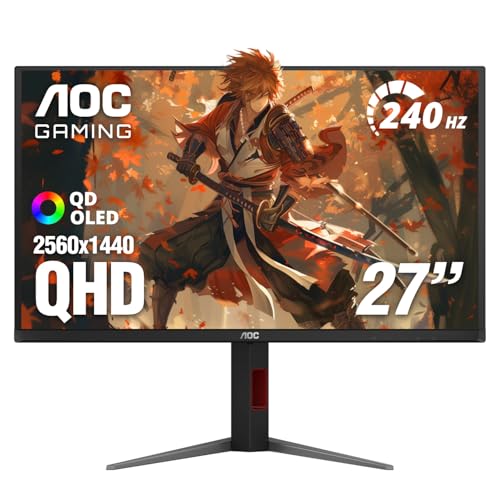
| 9 | AOC Q27GAZDV | QHD (2560×1440) | 27" | 240Hz | QD-OLED | Height adjustable and USB hub at a sharp price |
| 10 | AOC Q27GAZD | QHD (2560×1440) | 27" | 240Hz | QD-OLED | VESA mountable option for custom setups |
We focused on what actually matters when buying an OLED monitor today, without getting lost in spec sheet noise.

Pros
Cons
Best for: Gamers and creators who want a single monitor that excels at both immersive single-player games and color-critical work, and don't mind spending for the best.
Check current price on Amazon →
The PG32UCDM is the monitor that makes you stop and just stare at a desktop wallpaper. The 32-inch QD-OLED panel with 4K resolution is sharp enough to sit close, yet large enough to feel truly cinematic. At 240Hz, it's not the fastest in this roundup, but for almost every game except competitive shooters where every millisecond counts, it's more than enough. The HDR performance is best in class among these picks: VESA DisplayHDR 400 True Black delivers deep blacks that still reveal shadow detail, and peak highlights are genuinely punchy. ASUS's thermal management is among the most thorough we've seen, with a custom heatsink and graphene film that help the panel run cooler and resist burn-in. The inclusion of a 90W USB-C port means you can plug in a modern laptop and have both display and charging over a single cable. The monitor ships with a 3-year warranty that explicitly covers burn-in, which removes the biggest anxiety about buying OLED for mixed use. The only real complaint is the stand's footprint, but that's a minor issue when the image quality is this good.

Pros
Cons
Best for: Competitive gamers who prioritize absolute motion clarity and want the fastest OLED available at QHD.
Check current price on Amazon →
The G60SF is a statement piece. Samsung crammed a 500Hz refresh rate into a 27-inch QD-OLED panel, and it feels like witchcraft. In games like Valorant, Counter-Strike, or Overwatch, the motion is so clean that tracking targets becomes effortless. The 0.03ms response time means there's zero ghosting even at this absurd refresh rate. But here's the catch: 500Hz only matters if you're playing at framerates that high, and even a top-tier GPU will struggle to push 500 fps in most modern shooters at QHD. For players who play at lower settings or older competitive titles, it's genuinely transformative. Outside gaming, the panel is a pleasure for media consumption, with HDR TrueBlack 500 delivering excellent contrast. Samsung's Glare Free technology does a solid job cutting reflections, though it's not as deep-black as a glossy panel in a dark room. The included stand is fully adjustable, and the three-year warranty adds peace of mind. If you're serious about competitive gaming and want the fastest OLED money can buy, this is it.

Pros
Cons
Best for: Anyone who games in a controlled lighting environment and wants the purest OLED experience with excellent build quality and a full feature set.
Check current price on Amazon →
The 27GX704A is the monitor that reminds you why OLED became legendary in the first place. Its glossy WOLED panel delivers blacks so deep they seem to go on forever, and colors pop without the slight haze that even the best matte coatings introduce. LG's new anti-glare glossy coating does help reduce harsh reflections, but you still won't want it facing a sunny window. The 240Hz refresh rate and 0.03ms response time are standard for this class, but the motion clarity here feels especially clean thanks to the lack of a matte layer. HDR performance is excellent with VESA DisplayHDR True Black 400 and up to 1300 nits peak brightness for highlights. The build quality is premium, with a sturdy stand that offers full ergonomic adjustment and subtle Hexagon lighting on the back. LG's OLED Care suite includes automatic pixel cleaning during standby, brightness limiting for static content, and an easy-to-use menu. This monitor is a fantastic choice for someone who wants the best possible image quality for both gaming and occasional productivity, as long as you can control the room's lighting.

Pros
Cons
Best for: Gamers who want a glossy 27-inch QHD panel with superior anti-flicker performance and a strong burn-in warranty.
Check current price on Amazon →
The XG27AQDMG is ASUS's answer to the LG glossy dilemma, and it's a strong competitor. It uses a third-generation WOLED panel that has noticeably better full-screen brightness than previous LG panels, making it feel more punchy in SDR. The anti-flicker technology is a genuine differentiator: during moments where the frame rate fluctuates (say, dropping from 240 to 180 in a busy scene), other OLEDs can show subtle flicker that this monitor suppresses almost entirely. Text clarity is also notably better than older WOLED panels, which makes this a more viable option for productivity than the 27GX704A. The custom heatsink design is borrowed from the larger PG32UCDM and does a great job keeping the panel cool during long sessions. The main downsides are the stand, which only adjusts height and tilt, and the lack of a USB-C port, which feels like an oversight in 2026. Still, for the image quality and the peace of mind that comes with a three-year burn-in warranty, this is a serious contender for the best 27-inch glossy OLED.

Pros
Cons
Best for: Sim racers, flight sim enthusiasts, and anyone who wants a single monitor that replaces two regular screens for immersive gaming and productivity.
Check current price on Amazon →
The G9 is a spectacle. Unfolding a 49-inch QD-OLED across your desk is the kind of experience that makes every game feel like a ride. The 1800R curve is aggressive enough to pull you in without distorting the image, and QD-OLED's color volume makes even older games look new. At 144Hz, it's the slowest refresh rate in this roundup, but the 0.03ms response time keeps motion crisp, and for most non-competitive genres, 144Hz is still excellent. Samsung's burn-in mitigation is robust: the Thermal Modulation System predicts surface temperature and adjusts brightness automatically, and logo detection dims static elements. The built-in Picture-in-Picture feature is genuinely useful for splitting the screen between your gaming PC and a work laptop. The biggest practical hurdle is the desk space. You need a deep desk or a sturdy monitor arm to accommodate this beast. If you have the room and the GPU to drive Dual QHD, the G9 is an unforgettable monitor that makes ultrawide fans out of everyone.

Pros
Cons
Best for: Budget-conscious buyers who still want a glossy OLED with full adjustability and a decent warranty.
Check current price on Amazon →
The 27GS93QE is very similar to the 27GX704A above, but it's a slightly older model (released in 2024) and usually found for a bit less. It uses the same WOLED panel and 240Hz spec, but the anti-glare coating is a bit different, leaning more toward reducing reflections than pure gloss. The result is a screen that still looks great in a dim room but reflects less in a moderately lit one. The color performance is excellent with up to 98.5% DCI-P3 coverage, and VESA DisplayHDR True Black 400 delivers convincing HDR. The stand is a highlight: it offers height, tilt, pivot, and swivel, which is better than some higher-priced competitors. The 2-year warranty is fine, but it's worth noting that LG's OLED Care software does a good job automating pixel cleaning. For someone who wants glossy OLED quality without paying a premium, this is a smart pick.

Pros
Cons
Best for: Gamers who want a QD-OLED with the most adjustable stand possible and a bezel-less design.
Check current price on Amazon →
Acer's Predator X27U is a 26.5-inch QD-OLED that feels slightly more compact than the typical 27-incher, but the difference is negligible in practice. The ZeroFrame design means the screen bezels are almost nonexistent, which is fantastic if you plan to use it in a multi-monitor array. The QD-OLED panel delivers vivid colors and deep blacks, and the 240Hz refresh rate is buttery smooth. The stand is one of the best in this roundup, offering height, tilt, pivot, and swivel, plus a small footprint. Connectivity is solid with two HDMI 2.1 and two DisplayPort 1.4 ports, allowing easy switching between PC and console. Acer includes an image retention refresh feature that helps prevent burn-in, but there's no dedicated heatsink like the ASUS models. The matte coating is a personal preference: it helps in bright rooms but loses some of the pop that glossy panels offer. If you don't mind the matte finish, this is a very complete package.

Pros
Cons
Best for: Gamers upgrading from 60Hz or 144Hz who want the deep blacks of QD-OLED without breaking the bank, and who already have a monitor arm.
Check current price on Amazon →
The G50SF is Samsung's more accessible QD-OLED, and it hits a good balance for most people. The 180Hz refresh rate is a step down from the 240Hz and 500Hz panels in this list, but it still feels significantly smoother than the 144Hz IPS panel you're probably upgrading from. The QD-OLED panel is excellent, with vibrant colors and deep blacks, and Samsung's Glare Free coating minimizes reflections without crushing contrast. The OLED Safeguard system uses a thermal modulation algorithm to keep the screen cool and prevent burn-in, which is reassuring. The biggest compromises are on ergonomics and connectivity: the stand only tilts, and there's only one HDMI and one DisplayPort. But if you plan to mount it on an arm and only use one source, these are non-issues. This is a solid entry point into OLED gaming for someone who wants the core technology without paying for extras they won't use.
Pros
Cons
Best for: Gamers who want a QD-OLED with a fully adjustable stand and USB hub at a sensible price, without sacrificing performance.
Check current price on Amazon →
The Q27GAZDV is essentially a more complete version of the AOC below, adding a height-adjustable stand and a USB 3.2 hub. The QD-OLED panel is identical to the Q27GAZD in terms of color gamut (147% sRGB, 110% DCI-P3) and speed (240Hz, 0.03ms). The difference is in the package: this one arrives ready for a multi-monitor setup out of the box, with full adjustability and a built-in hub that lets you plug in a mouse and keyboard without reaching for your PC. The HDR performance is described as "HDR True Black" but isn't VESA certified, which means you might not get the guaranteed brightness levels of certified panels. In practice, it still looks good with HDR content, but it's not as consistent as the LG or ASUS. If you're building a clean desk setup and want height adjustment from the start, this is the AOC to buy.

Pros
Cons
Best for: Users who plan to use a monitor arm or VESA mount from day one and want a high-performance QD-OLED without paying for a stand they'll replace.
Check current price on Amazon →
The Q27GAZD is the stripped-down version of the AOC above. It uses the same bright, colorful QD-OLED panel with 240Hz and HDR400 True Black certification, but it ships with a basic stand that offers no adjustment and only works if you place it on a desk. The monitor is VESA compatible, so anyone with a monitor arm can attach it easily. For that trade-off, you get the same core performance: fast motion, wide color, and deep blacks. This is a smart choice if you already own a monitor arm or plan to buy one, because you're not paying for a stand you'll never use. The only real downside is the lack of a USB hub, which the 'DV' model includes. But for pure gaming performance with a mount, this is a very attractive option.
Choosing the right OLED monitor means weighing a few key trade-offs that are specific to this technology. Here's what to look for.
All OLED monitors have near-instant 0.03ms response times, so motion clarity is already excellent at 144Hz. Higher refresh rates (240Hz, 360Hz, even 500Hz) reduce motion blur further and make games feel more responsive, but the benefit diminishes as you go up. If you play competitive shooters, 240Hz is a solid baseline, and 360Hz or 500Hz gives a real edge. For single-player games and productivity, 144Hz or 180Hz is plenty. The important thing is that your GPU can actually hit those frame rates.
The most common sweet spot is 27-inch QHD (2560×1440). It offers sharp enough pixels for most people and doesn't require a flagship GPU to drive. 32-inch 4K is the premium choice for immersion and detail, but needs a powerful card to push 240Hz at 4K. The super ultrawide 49-inch Dual QHD (5120×1440) gives you two 27-inch QHD screens side by side without a bezel, but game support for 32:9 can be hit or miss, and the 144Hz refresh rate is lower than other options.
Look for VESA DisplayHDR True Black certification (400 or 500). This standard specifically measures OLED performance and guarantees deep blacks and bright highlights. The best OLED monitors also cover 99% DCI-P3 or more, which means HDR content looks vibrant and accurate. If you do photo or video work, Delta E < 2 color accuracy is a useful spec to look for.
All modern OLED monitors include some form of burn-in mitigation, but they vary in sophistication. Features to look for: pixel refresh cycles during standby, automatic brightness limiting (ABL) for static content, logo detection that dims stationary elements, and thermal management (heatsinks, graphene, or fan cooling). ASUS and Samsung are leaders here, with custom heatsinks and dedicated algorithms. A warranty that explicitly covers burn-in (like the 3-year from ASUS and Samsung) is worth a lot of peace of mind.
This is the most personal choice. Glossy screens deliver the highest contrast and color saturation, making blacks look truly infinite. They work best in dark rooms. Matte (or anti-glare) coatings cut reflections and work better in brightly lit offices, but they slightly reduce perceived contrast and can soften fine text. Some new glossy coatings (like LG's) try to reduce reflections while preserving the glossy look, but they're not as effective as a proper matte coating.
For modern consoles and PCs, HDMI 2.1 is important for hitting 4K at 120Hz or QHD at 240Hz. DisplayPort 1.4 is the standard for PC. USB-C with power delivery is a bonus for laptop users. A good ergonomic stand (height, tilt, pivot, swivel) is worth it if you do any desk work, but many monitors now use VESA mounts, so you can always add an aftermarket arm.
Matte or anti-glare OLEDs are better in bright rooms because they diffuse reflections. Glossy screens look punchier in controlled lighting but become hard to use with windows behind you. If you can't control your lighting, look for matte or "glare free" coatings.
Yes, with caution. Modern OLED monitors have pixel refresh, logo detection, and brightness limiting. Avoid leaving static UI elements (like a taskbar or document) on for hours without moving them. Using the uniform brightness mode helps. Many manufacturers now offer burn-in warranties, which makes it safer.
QD-OLED (Quantum Dot OLED) uses an OLED panel with a quantum dot layer to produce brighter colors, especially in highlights, compared to standard WOLED. It generally achieves higher color volume and peak brightness, which makes HDR more impactful. Most high-end OLED monitors in 2026 use QD-OLED.
For PC use, DisplayPort 1.4 can handle QHD at 240Hz. HDMI 2.1 is mainly useful for connecting to a PS5 or Xbox Series X, which can output up to 4K at 120Hz or QHD at 240Hz. If you only use a PC, DisplayPort is sufficient.
Probably not. The difference between 240Hz and 500Hz is mostly noticeable in fast-paced competitive games where you track moving targets. For single-player games, 240Hz already looks incredibly smooth. You'd be paying a premium for a feature you won't fully use.
OLED panels are rated for about 30,000 to 60,000 hours before noticeable brightness degradation. At 8 hours per day, that's 10 to 20 years. Burn-in is the bigger concern, but modern mitigation techniques and warranties make it manageable for most users.
For mixed use, 27-inch QHD is the sweet spot. It's large enough for immersive gaming and multitasking, but not so large that you have to move your head. 32-inch 4K is great for productivity and cinematic games, but scaling can be an issue with some older software. If you have a very deep desk and play sims, 49-inch super ultrawide is fantastic.
The ASUS ROG Swift PG32UCDM remains our top pick for anyone who wants the absolute best image quality in the best OLED monitors category. Its 32-inch 4K QD-OLED panel, 240Hz refresh rate, comprehensive burn-in protection, and 3-year warranty make it a no-compromise choice for both gaming and creative work. If you're a competitive esports player, the Samsung Odyssey OLED G6 with its world-first 500Hz refresh rate gives you an edge that no other panel can match. For the best all-around value in a 27-inch QHD glossy monitor, the LG 27GX704A-B delivers stunning visuals, a fully adjustable stand, and excellent eye comfort certifications. And for the ultimate immersion in a single screen, the Samsung Odyssey OLED G9's 49-inch curved QD-OLED is breathtaking. Whichever you choose, the leap to OLED is one you'll appreciate every time you power on your computer.
This article contains Amazon affiliate links. We may earn a small commission on qualifying purchases at no extra cost to you.


