Physical Address
304 North Cardinal St.
Dorchester Center, MA 02124
Physical Address
304 North Cardinal St.
Dorchester Center, MA 02124

Looking for the best fiber optic modems in 2026? We cover 10 picks across fiber gateways, media converters, and multi-gig cable modems with companion routers.
Buying a modem for a high-speed internet connection is more complicated than it used to be. True fiber internet (like CenturyLink Fiber) requires a dedicated fiber gateway, not a cable modem. Cable internet subscribers chasing gigabit-plus speeds need a DOCSIS 3.1 device. And some fiber ONT setups still need a media converter to bridge fiber to Ethernet. Most buyers get this wrong, pay for the wrong box, and return it.
This guide covers all three scenarios. The picks here range from a true fiber gateway that works with CenturyLink to plug-and-play SFP media converters to the top DOCSIS 3.1 cable modems for multi-gig cable plans, plus the routers worth pairing with any of them. Finding the best fiber optic modem for your setup starts with knowing which category you actually need.
TL;DR: The ZYXEL C3510XZ is the go-to for CenturyLink fiber subscribers. The TP-Link MC220L is the most reliable fiber media converter on the market. For cable internet, the Hitron CODA56 leads the category. The NETGEAR Nighthawk CAX30 saves desk space by combining cable modem and WiFi 6 router in one unit.
| # | Product | Type | Key Spec | Price | Best for |
|---|---|---|---|---|---|
| 1 | ZYXEL C3510XZ | Fiber Gateway | WiFi 6, 6x GbE | $97.96 | CenturyLink fiber subscribers |
| 2 | TP-Link MC220L | Fiber Media Converter | SFP to RJ45, 1 Gbps | $20.99 | Fiber-to-Ethernet bridging |
| 3 | BMKZAYR SFP to RJ45 | Fiber Media Converter | 1.25G, single-mode | $9.99 | Budget fiber conversion |
| 4 | Hitron CODA56 | Cable Modem | DOCSIS 3.1, 2.5 Gbps | $159.99 | Xfinity/Spectrum/Cox multi-gig |
| 5 | ARRIS SURFboard SB8200 | Cable Modem | DOCSIS 3.1, dual 1 GbE | $137.99 | Xfinity/Cox/Spectrum up to 2 Gbps |
| 6 | NETGEAR Nighthawk CM3000 | Cable Modem | DOCSIS 3.1, mid/high-split | $299.99 | Top-tier upload speeds on cable |
| 7 | NETGEAR Nighthawk CAX30 | Cable Modem + Router | DOCSIS 3.1, WiFi 6, AX2700 | $295.00 | One-box cable + WiFi setup |
| 8 | TP-Link Archer AX55 | WiFi 6 Router | AX3000, 4 antennas | $79.98 | Pairing with any fiber gateway |
| 9 | TP-Link Archer AX21 | WiFi 6 Router | AX1800, dual-band | $52.07 | Budget router for fiber setups |
| 10 | TP-Link Archer AXE75 | WiFi 6E Router | AXE5400, 6 GHz band | $119.99 | Future-ready tri-band performance |
Prices fluctuate. Check the links for current Amazon pricing.

If you have CenturyLink fiber internet, this is the hardware that actually belongs on your network. The ZYXEL C3510XZ is a combined fiber gateway and router, with six Gigabit Ethernet ports and dual-band WiFi 6 (2.4 GHz and 5 GHz) built in. It handles up to four separate wireless networks, supports WPA2-PSK security, and is fully IPv6 compliant. Unlike the cable modems elsewhere on this list, the C3510XZ works exclusively with fiber and will not operate on DSL, making it the right tool for a specific job rather than a general-purpose device.
Pros:
Cons:
Best for: CenturyLink fiber subscribers who want an all-in-one gateway without renting ISP equipment.
Check current price on Amazon →

The TP-Link MC220L solves a specific problem: your fiber ISP delivers a signal through an SFP optical port, and your router only speaks Ethernet. This converter bridges that gap cleanly, supporting both single-mode and multi-mode fiber SFP modules with no software to install. Single-mode runs extend up to 12.4 miles; multi-mode tops out around 550 meters. The metal casing is meaningfully more durable than the plastic on the BMKZAYR below, and TP-Link's track record on this device category is long enough to trust.
Pros:
Cons:
Best for: Anyone needing to convert a fiber ONT's SFP output to standard Ethernet for their router.
Check current price on Amazon →
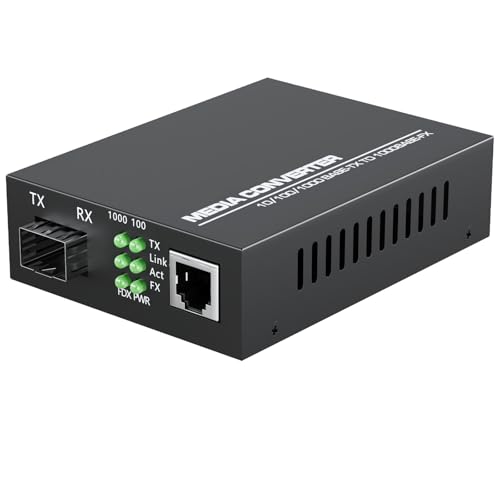
At under ten dollars, the BMKZAYR converter does the same basic job as the TP-Link MC220L for a fraction of the price. It handles 1.25 Gbps throughput, supports auto-negotiation on the RJ45 side, and includes LED indicators for monitoring link status. Single-mode fiber reaches up to 30 km; multi-mode handles around 550 meters. The catch is brand longevity: this is a newer entrant versus TP-Link's established presence, and the build quality reflects the price. For a temporary fix or a low-stakes secondary setup, it works. For a primary home connection, the MC220L's extra durability is worth paying for.
Pros:
Cons:
Best for: Budget-conscious buyers or secondary locations where fiber conversion is needed without the premium price.
Check current price on Amazon →

For cable internet subscribers, this is the one to buy. The Hitron CODA56 is the top-ranked cable modem in its category, built around DOCSIS 3.1 with a 2.5 Gbps Ethernet port ready for multi-gig cable plans from Xfinity (up to 2.33 Gbps), Spectrum (1 Gbps), and Cox (2 Gbps). One important caveat printed right on the box: this does not work with fiber, DSL, or satellite internet. If you have cable, it's the right call; if you have anything else, look at the ZYXEL or the media converters above. A separate router is required, which adds cost but keeps you free to pick your own WiFi hardware.
Pros:
Cons:
Best for: Cable internet subscribers on gigabit-plus plans who want to stop paying modem rental fees.
Check current price on Amazon →

The ARRIS SURFboard SB8200 has been in the market long enough to be the default recommendation for most cable subscribers, and it still earns that spot. It offers two 1 Gbps Ethernet ports (versus the CODA56's single 2.5 GbE port), which lets you connect a router that supports link aggregation for up to 2 Gbps throughput. The compact vertical design and discreet LED indicators make it easy to tuck away. It tops out at 2 Gbps on supported plans, where the Hitron pushes to 2.5 Gbps, so power users with the latest Xfinity or Cox tiers will want the CODA56 instead.
Pros:
Cons:
Best for: Cable subscribers who already own a router with link aggregation support and want a reliable DOCSIS 3.1 modem.
Check current price on Amazon →

The NETGEAR Nighthawk CM3000 is built for a specific problem most cable modem buyers don't know exists: upload speeds. Standard DOCSIS 3.1 hardware caps upload bandwidth far below download. The CM3000 uses mid/high-split technology, which expands the upstream channel so it can reach up to 1 Gbps upload on supported cable plans (like Xfinity's latest). It also packs a 2.5 GbE port plus two 1 Gbps ports for flexible router connection. The price reflects the premium tech. If you're uploading large files constantly, video conferencing with multiple family members, or running a home NAS accessible remotely, that upload headroom is genuinely useful. For everyone else, the Hitron or ARRIS is the better value.
Pros:
Cons:
Best for: Remote workers, streamers, and power users on Xfinity who need serious upload performance.
Check current price on Amazon →

The NETGEAR Nighthawk CAX30 eliminates the separate modem-and-router setup entirely. It combines a DOCSIS 3.1 cable modem with a WiFi 6 (AX2700) router in a single unit, covering up to 2,000 square feet and handling 25 concurrent devices. Four 1 Gbps Ethernet ports cover wired connections, and there's a USB 3.0 port for shared storage. The tradeoff versus buying separately is flexibility: when the cable ISP upgrades their standards or you want a faster WiFi standard, you replace the whole unit. For renters or anyone who wants fewer boxes on the shelf, the CAX30 makes a strong case.
Pros:
Cons:
Best for: Cable subscribers who want one box instead of two and don't mind upgrading the whole unit in a few years.
Check current price on Amazon →

If you have a fiber gateway like the ZYXEL C3510XZ and want to add a dedicated router for more control, the TP-Link Archer AX55 is the straightforward choice. It pushes 2402 Mbps on 5 GHz and 574 Mbps on 2.4 GHz, handles OFDMA for lower latency across multiple simultaneous devices, and supports both VPN server and client modes. The four high-gain antennas and beamforming reach comfortably across a mid-size home. TP-Link's HomeShield security layer adds parental controls and IoT device identification at no extra cost. It's a step up from the AX21 without the price jump of the AXE75.
Pros:
Cons:
Best for: Fiber subscribers pairing a standalone gateway with a capable mid-range router for whole-home coverage.
Check current price on Amazon →

The TP-Link Archer AX21 is the router to grab when the budget is tight but WiFi 6 still matters. At its price point, there's no real competition: dual-band WiFi 6 (1200 Mbps on 5 GHz, 574 Mbps on 2.4 GHz), beamforming with four high-gain antennas, and Works with Alexa certification. It's leaner than the AX55 (no USB port, simpler chipset), but for a small apartment or a secondary access point, it performs well above its price. Worth noting: it's a Certified for Humans device, meaning setup is designed to be genuinely painless.
Pros:
Cons:
Best for: Budget-conscious buyers who want WiFi 6 without paying for features they won't use.
Check current price on Amazon →

The TP-Link Archer AXE75 earned PCMag's Editors' Choice in 2025 for good reason: tri-band WiFi 6E adds a 6 GHz band that's free of the congestion plaguing 2.4 GHz and 5 GHz in dense living environments. Speeds top out at 5400 Mbps combined (2402 Mbps on each of the two 5 GHz bands, 574 Mbps on 2.4 GHz), and a 1.7 GHz quad-core processor with 512 MB of RAM keeps things stable under heavy load. It's significantly more expensive than the AX55, and the 6 GHz band only benefits devices that support WiFi 6E. If you're running older devices, the AX55 is the smarter buy.
Pros:
Cons:
Best for: Households with WiFi 6E devices who want the cleanest possible wireless connection to a fiber or multi-gig cable setup.
Check current price on Amazon →
Start with your ISP's technology. If you have fiber internet through a provider like CenturyLink, you need a fiber gateway (the ZYXEL above) or a media converter that bridges the fiber ONT to your existing router. If you have cable internet from Xfinity, Spectrum, or Cox, you need a DOCSIS 3.1 cable modem, not a fiber device. The cable modems in this guide explicitly do not work on fiber connections, and buying the wrong type means a guaranteed return trip.
A DOCSIS 3.1 modem can theoretically handle 2 to 2.5 Gbps downstream, but your plan, your ISP's network infrastructure, and your router all cap what you actually get. A modem with a 2.5 GbE port is only useful if your router also has a 2.5 GbE port (or you use link aggregation on dual-port modems like the ARRIS SB8200). For most gigabit cable plans, any of the DOCSIS 3.1 modems here with a WiFi 6 router like the AX55 or AX21 will max out the plan without bottlenecks.
A fiber optic modem (often called a fiber gateway or ONT) converts the light-based signal from a fiber optic line into an Ethernet signal your router can use. A cable modem does the same job for coaxial cable lines using DOCSIS technology. They are not interchangeable: fiber hardware won't work on cable, and cable modems explicitly do not support fiber, DSL, or satellite connections.
It depends on the provider. Most fiber ISPs (like Verizon FiOS or AT&T Fiber) require their own ONT hardware and don't allow third-party replacements at the fiber terminal. CenturyLink Fiber is more flexible, which is why the ZYXEL C3510XZ supports it. Cable ISPs like Xfinity, Spectrum, and Cox actively support customer-owned modems, which is where the savings from avoiding rental fees add up fastest.
Yes, unless you buy a modem-router combo like the NETGEAR CAX30. A standalone cable modem provides a single Ethernet connection. To distribute that connection wirelessly to multiple devices, you need a separate WiFi router. The best fiber optic modem setups pair a modem with a dedicated router so each can be upgraded independently.
Not universally. Each DOCSIS modem must be certified by your specific ISP. The Hitron CODA56, ARRIS SB8200, and NETGEAR CM3000 are all certified for Xfinity, Spectrum, and Cox, but they won't work with Verizon FiOS, AT&T Fiber, DSL providers, or satellite services. Always verify certification with your provider before purchasing.
The best fiber optic modem for most people depends entirely on their connection type. CenturyLink fiber subscribers should go straight to the ZYXEL C3510XZ. If you need to bridge a fiber ONT's SFP port to Ethernet, the TP-Link MC220L is the reliable, proven choice. Cable internet subscribers on multi-gig plans will find the Hitron CODA56 covers nearly every scenario, and the NETGEAR CM3000 is worth the premium only if upload speed is a genuine daily bottleneck. If you're still not sure which category you fall into, call your ISP and ask whether your connection is fiber, cable (coaxial), or DSL before buying anything.
This article contains Amazon affiliate links. We may earn a small commission on qualifying purchases at no extra cost to you.


