Physical Address
304 North Cardinal St.
Dorchester Center, MA 02124
Physical Address
304 North Cardinal St.
Dorchester Center, MA 02124

Our picks for the 10 best 120 Hz monitors in 2026 cover every budget and use case, from compact 22-inch office screens to immersive 27-inch curved gaming displays.
You know that stutter when you drag a window across the desktop? The ghosting when a character spins around in a game? That is a 60 Hz monitor showing its age. A 120 Hz screen changes not just how games look, but how the entire operating system feels. Cursor movement becomes fluid, scrolling turns silky, and even productivity apps feel snappier. We have rounded up the 10 best 120 Hz monitors you can buy right now, with picks from compact 22‑inch models for tight budgets to 27‑inch curved panels that make gaming truly immersive.
This category has exploded with affordable options, many of them cheaper than a decent keyboard. The challenge is sorting the good from the not‑so‑good. We break down each monitor by what it does best, how it compares to the others on this list, and exactly who should buy it. Whether you need a secondary screen for coding, a primary gaming monitor on a student budget, or a workhorse for your home office, one of these is the right pick.
TL;DR: The Acer KB272 is the most versatile all‑rounder with a bright 27‑inch IPS panel and smooth 120 Hz motion. The Philips 22E2N1100 is the best choice for office work and light gaming thanks to its strong warranty and eye comfort features. The Sceptre 22 is the budget king with built‑in speakers. The SANSUI 27 Curved offers the deepest immersion for gamers who want a curved screen and a higher 160 Hz ceiling.
| # | Product | Size | Panel | Max Refresh Rate | Price | Best For |
|---|---|---|---|---|---|---|
| 1 | Acer KB272 G0bi 27‑Inch | 27" | IPS | 120 Hz | $149.99 | All‑round work and gaming |
| 2 | Philips 22E2N1100 22‑Inch | 22" | IPS | 120 Hz | $69.99 | Office and casual gaming |
| 3 | Acer KB242Y 23.8‑Inch | 23.8" | IPS | 120 Hz | $129.99 | Larger budget office screen |
| 4 | MSI PRO MP225 E12VL 22‑Inch | 21.45" | VA | 120 Hz | $69.99 | Deep contrast for media |
| 5 | Sceptre E225W‑FW144 22‑Inch | 22" | — | 144 Hz | $67.97 | Budget gaming with speakers |
| 6 | AOC 22B35HM23 22‑Inch | 22" | — | 120 Hz | $68.99 | Eco‑friendly budget pick |
| 7 | SANSUI 27‑Inch Curved | 27" | VA | 160 Hz | $104.48 | Immersive gaming |
| 8 | SANSUI 24‑Inch Curved | 24" | VA | 160 Hz | $92.99 | Compact curved gaming |
| 9 | ArcticPro 24‑Inch IPS | 24" | IPS | 120 Hz | $74.99 | Frameless multi‑monitor |
| 10 | ArcticPro 22‑Inch VA | 22" | VA | 120 Hz | $67.99 | Ultra‑budget with VESA |
Prices are accurate as of writing but change frequently.
Refresh rate and motion handling. Not all 120 Hz panels are created equal. Some monitors use overdrive tricks or motion blur reduction to clean up fast movement. We prioritized models that actually hit their refresh rate over HDMI without stuttering or frame skipping. Adaptive‑Sync (FreeSync compatible) makes a real difference in smoothness, and we favored monitors that support it.
Panel type and color accuracy. IPS panels offer wider viewing angles and better color consistency, making them ideal if you share your screen or do any photo editing. VA panels deliver deeper black levels and higher contrast, which helps in dim rooms and for watching movies. We included both and note which is which so you can match the panel to your priorities.
Screen size and desk fit. A 27‑inch 1080p monitor gives you a big image but lower pixel density; text can look a little soft. Small 22‑inch screens are sharper but limit workspace. We chose a range from 21.45 to 27 inches to suit different desk depths and eyesight preferences.
Connectivity options. HDMI is standard, but some monitors only run 120 Hz over HDMI, while others require DisplayPort. We checked that each monitor can actually reach its rated refresh rate with the cables included and the ports available. VGA still appears on many budget models, which matters if you have an older PC.
Ergonomic adjustments and warranty. Tilt‑only stands dominate this price bracket, but a few monitors include VESA mount compatibility so you can attach your own arm. The length and type of warranty (standard one‑year vs. advance replacement) also influences long‑term satisfaction.
Build quality and reliability. At these price points, plastic builds are the norm, but some monitors feel flimsier than others. We looked at stand stiffness, bezel construction, and brand reputation to separate the ones that will survive a desk move from those that won’t.

The 27‑inch KB272 is the monitor most people should buy unless they specifically need something smaller. Its IPS panel delivers wide 178‑degree viewing angles, so colors don’t wash out when you lean back or share your screen with a coworker. Acer rates it at 99 percent sRGB, which is rare at this price and gives your photos and videos a more accurate look than almost any other monitor in the roundup.
The 120 Hz refresh rate works with Adaptive‑Sync (FreeSync compatible) to eliminate tearing in games. The 1 ms VRB (visual response boost) mode sharpens motion further, though it slightly dims the backlight. You get the benefit of a large canvas for spreadsheets and web browsing alongside the fluidity needed for Overwatch or Fortnite. The stand only tilts, but the VESA 100×100mm pattern lets you attach an arm. At 250 nits brightness is fine for indoor use, though a bright window might wash it out.
Pros: true 99% sRGB, 27 inches for immersive desktop work, Adaptive‑Sync support, VESA mountable, good out‑of‑box color.
Cons: only tilt adjustment, no DisplayPort or USB ports, 250 nits is average brightness.
Best for: The person who wants a single monitor that handles both productivity and gaming equally well, and has the desk space for a 27‑inch panel.
Check current price on Amazon →
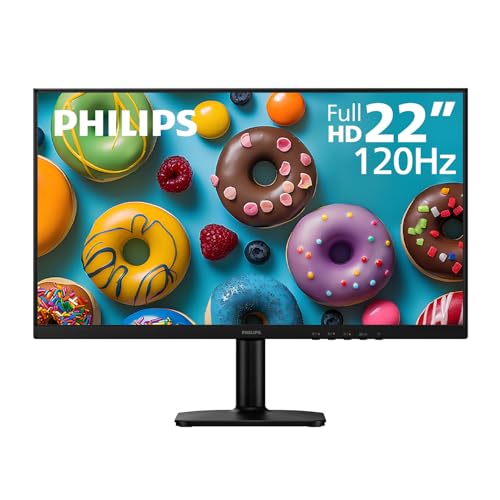
Philips packs everything you need for a long day at the computer into this compact 22‑inch monitor. The IPS panel gives you accurate colors from any angle, and the 120 Hz refresh rate makes the mouse cursor feel alive. Adaptive‑Sync handles the occasional game, but this monitor truly shines in its eye‑care features. LowBlue Mode and Flicker‑Free technology reduce strain, and the EasyRead mode turns the screen into a paper‑like grayscale view for reading long documents.
The stand does not adjust height, but it tilts and supports VESA 100×100mm mounting. The best part of this monitor is the 4‑year advance replacement warranty. If something goes wrong, Philips sends you a new unit before you return the old one. That kind of coverage at $70 is almost unheard of and makes this the safest long‑term investment in the budget category.
Pros: 4‑year advance replacement warranty, IPS with wide viewing angles, LowBlue and flicker‑free, slim bezels for multi‑monitor, low power consumption.
Cons: 22 inches feels small if you are used to larger screens, no DisplayPort, stand is tilt only.
Best for: Office workers, students, or anyone who spends hours reading or coding and wants a rock‑solid warranty.
Check current price on Amazon →

If 27 inches is too big for your desk but 22 inches feels cramped, the KB242Y splits the difference at 23.8 inches. It uses the same IPS panel technology as its bigger brother with 99 percent sRGB and 120 Hz refresh rate. The zero‑frame design means the bezels are almost invisible when you pair two of these side by side.
Acer rates this at 1 ms VRB for motion clarity, and the Adaptive‑Sync support keeps frame pacing smooth. The 250 nits brightness is standard, and the included HDMI and VGA ports cover both modern and legacy computers. At this price point, it competes directly with the Philips 22 but gives you nearly two more inches of diagonal space. The stand only tilts, but like the KB272, it has a VESA mount behind the cover.
Pros: 23.8 inches is a size many find ideal for 1080p, IPS with good color, zero‑frame bezels, VESA compatible.
Cons: More expensive than 22‑inch alternatives, no height adjustment, only two inputs.
Best for: Anyone who finds 27 inches too large but wants more screen real estate than a typical 22‑inch monitor.
Check current price on Amazon →

At 21.45 inches, the MSI PRO MP225 is technically a 22‑inch class monitor, and its VA panel sets it apart from the IPS competition. The 4000:1 contrast ratio produces blacks that look truly dark, which makes movies and atmospheric games pop far more than on the IPS monitors in this list. The 120 Hz refresh rate feels smooth, and Adaptive‑Sync works over HDMI.
MSI includes a built‑in accessory slot for mounting compatible peripherals, a nice touch for cable management. The stand tilts, and the VESA 100×100mm pattern is present. The product features list mentions an Eye‑Q Check tool, a vision assessment utility that adjusts settings for long sessions. The included D‑Sub (VGA) port means you can connect older PCs without an adapter. At $70, it is a strong value if you prize deep blacks over wide viewing angles.
Pros: Excellent 4000:1 contrast, 120 Hz with Adaptive‑Sync, accessory slot for add‑ons, VESA mountable, VGA port for old hardware.
Cons: VA panel has narrower viewing angles than IPS, small physical size, no built‑in speakers.
Best for: Media viewers and gamers who want the best contrast and black levels on a tight budget.
Check current price on Amazon →

Sceptre’s 22‑inch monitor runs at 144 Hz, not just 120 Hz, which makes it one of the smoothest options on this list. The slight extra overhead means you can run at 120 Hz with plenty of headroom for frame spikes. The built‑in speakers are a real differentiator at this price; almost every other monitor here forces you to use external speakers or headphones.
The Blue‑Light Shift feature reduces eye strain during long sessions. The bezels are slim on three sides, which helps if you place two side by side. The trade‑off is a panel that does not match the color accuracy of the Acer or Philips IPS units, and the stand is tilt‑only with no VESA mount detailed. But for under $70, this is the cheapest way to get both high refresh and audio in a single box.
Pros: 144 Hz ceiling for extra smoothness, built‑in speakers, very low price, slim bezels.
Cons: Color accuracy takes a back seat, no VESA mount mentioned, stand is basic.
Best for: The gamer on a tight budget who needs speakers and wants the highest possible refresh rate in this price range.
Check current price on Amazon →

AOC has long been a reliable name in budget monitors, and the 22B35HM23 continues that reputation. It runs 120 Hz over HDMI with Adaptive‑Sync, and the 4 ms response time is adequate for casual gaming. The standout feature is its eco‑mode power consumption, which drops to just 13 watts. That makes it one of the most efficient monitors on the list.
The monitor is HDR Ready, though do not expect true HDR performance at this price; it accepts the signal and boosts contrast slightly. AOC includes i‑Menu and eSaver software for adjusting settings and scheduling power saving from your PC. The 100.1% sRGB coverage is decent, and the tilt stand and VESA mount provide flexibility. If you care about energy bills and want a brand with good support, this is a solid choice.
Pros: Extremely low power consumption, 100% sRGB, Adaptive‑Sync, VESA mount compatible, OSD software included.
Cons: 4 ms response time is slower than 1 ms competitors, no built‑in speakers, only two inputs.
Best for: The environmentally minded buyer who wants a low‑power secondary monitor for office tasks and light gaming.
Check current price on Amazon →

The SANSUI 27‑inch curved monitor brings a 1500R curve and a 160 Hz refresh rate to a price that usually lands around $100. The VA panel delivers a 4000:1 contrast ratio, which means deep blacks and impressive immersion in games like Cyberpunk 2077 or racing sims. The curve wraps around your peripheral vision in a way that flat screens cannot match at this price.
The monitor includes game‑centric features like shadow booster, crosshair overlays, and an on‑screen timer. It supports FreeSync for tear‑free play, and the HDMI 2.0 and DP 1.4 ports can push the full 160 Hz. There are no built‑in speakers, and the stand only tilts, but VESA 100×100mm mounting is available. The biggest weakness is that the VA panel loses color and contrast when you are not sitting directly in front of it.
Pros: 1500R curve at a low price, 160 Hz with FreeSync, excellent contrast, game assistant functions.
Cons: Narrow viewing angles off‑center, no speakers, stand lacks height adjustment.
Best for: Gamers who want a curved display for immersive single‑player titles and have the desk depth to accommodate 27 inches.
Check current price on Amazon →

If the 27‑inch SANSUI is too large for your desk, the 24‑inch version offers the same 1500R curve and 160 Hz refresh rate in a more compact frame. The contrast ratio is rated at 3000:1 instead of 4000:1, but it still delivers noticeably deeper blacks than any IPS panel. The VA panel handles dark scenes well.
The feature set mirrors its larger sibling: FreeSync compatibility, game modes (FPS, RTS, Movie), and a 1 ms MPRT response time. It uses HDMI 2.0 and DP 1.4 to reach 160 Hz. The stand is tilt‑only, and VESA 75×75mm is supported. The 24‑inch size keeps the pixel density higher than the 27‑inch, making text appear slightly sharper. For under $100, it is one of the cheapest curved gaming monitors available.
Pros: Compact curved form, high 160 Hz refresh rate, good contrast, VESA mountable.
Cons: Lower contrast than the 27‑inch version, small on‑screen text if you prefer large fonts, no speakers.
Best for: Gamers with limited desk space who still want a curved, high‑refresh monitor.
Check current price on Amazon →
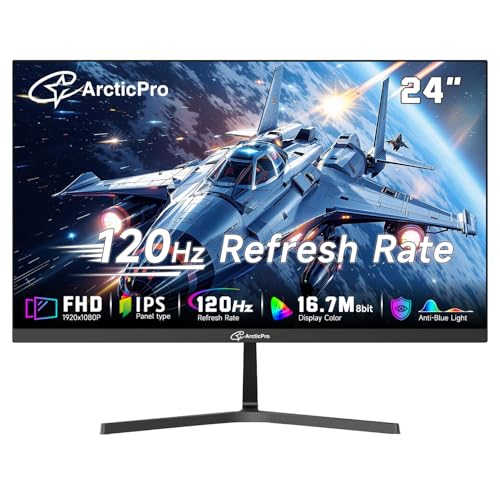
The ArcticPro 24 stands out with its three‑sided frameless design, which makes it an excellent choice for people building a multi‑monitor array. The bezels are extremely thin on the top and sides, so the gap between two units is minimal. The IPS panel covers 99 percent sRGB and offers wide viewing angles, making it a good fit for any desk position.
The 120 Hz refresh rate and Adaptive‑Sync keep motion smooth, and the 1 ms response time is competitive. The monitor includes both HDMI and VGA inputs, and VESA 75×75mm mounts rear. The tilt stand is basic, but the slim profile reduces the overall footprint. At 250 nits brightness, it is similar to the Acer panels. The anti‑blue light design and 178‑degree viewing angles work well for long sessions.
Pros: Frameless design ideal for multi‑monitor, IPS with 99% sRGB, 1 ms response, VESA mountable.
Cons: No DisplayPort, no speakers, stand only tilts.
Best for: Anyone setting up two or three monitors side by side for productivity or flight simulators.
Check current price on Amazon →

The 22‑inch ArcticPro rounds out the list with the lowest price and a VA panel that delivers a 4000:1 contrast ratio. That is the same excellent black level as the more expensive MSI and SANSUI VA monitors. At under $70, it is one of the cheapest ways to get a high‑contrast, 120 Hz display.
The stand tilts, and the VESA 75×75mm mount allows arm or wall mounting. It includes HDMI and VGA inputs, and the anti‑blue light feature is present. The 178‑degree viewing angles are wider than typical VA panels, though still not as good as IPS. The bezels are three‑sided frameless, making it a decent second monitor for a multi‑screen setup. The biggest compromises are the lack of DisplayPort and the fact that the refresh rate tops at 120 Hz, unlike the budget Sceptre that offers 144 Hz for the same money.
Pros: Excellent 4000:1 contrast at the lowest price, VESA mountable, slim bezels.
Cons: Below‑average off‑angle color shift, no DisplayPort, 120 Hz versus 144 Hz on competitors at the same price.
Best for: The most price‑sensitive buyer who prioritizes deep black levels for movie watching and basic desktop use.
Check current price on Amazon →
Before you buy a 120 Hz monitor, you should understand a few key factors that separate a great experience from a mediocre one.
A 120 Hz monitor displays 120 frames per second, exactly twice as many as a standard 60 Hz screen. The benefit is most obvious when moving the mouse, scrolling web pages, or playing fast‑paced games. But the actual smoothness depends on your PC being able to deliver 120 frames per second in the games you play. If your graphics card can only hit 60 fps, the monitor will still look good, but you will not get the full benefit. Make sure your GPU is capable before you spend extra on a 120 Hz model.
IPS panels offer consistent color and brightness from almost any angle. They are better for shared screens, creative work, and bright rooms. VA panels have higher contrast ratios, typically 3000:1 to 4000:1, making blacks look truly black. That is better for dark rooms and media consumption. The trade‑off is that VA panels lose contrast when viewed from an angle; colors shift as you move your head. Most people will prefer IPS for general use unless they care about movie black levels.
All the monitors in this roundup are 1920×1080 Full HD. At 22 inches, the pixel density is about 100 PPI, which looks reasonably sharp for text. At 27 inches, the same resolution drops to 81 PPI, making individual pixels visible and text slightly softer. If you work with text all day, a 22‑ or 24‑inch monitor is more comfortable. If you prioritize game immersion and sitting farther back, a 27‑inch screen is fine.
HDMI 1.4 can carry 1080p at 120 Hz, but HDMI 2.0 is needed for anything above that. DisplayPort is preferred because it natively supports higher refresh rates and Adaptive‑Sync without bandwidth issues. Always check which cable is included and whether your video card has the matching port. VGA is still present on many budget monitors for older computers, but it cannot carry 120 Hz signals.
At these prices, almost none of the monitors have height‑adjustable stands. Most tilt forward and backward. If you want to raise the screen to eye level, you need a VESA‑compatible monitor and a separate monitor arm. Check that the VESA pattern (100×100mm or 75×75mm) matches your arm. A good arm costs about $25 and transforms the ergonomics of any budget monitor.
Most budget monitors come with a one‑year limited warranty. The Philips 22E2N1100 is an outlier with a 4‑year advance replacement plan. That is a significant advantage if you want peace of mind. Other brands like Acer and MSI offer standard one‑year terms. Extended warranties are rarely worth it for monitors under $100, but a longer included warranty is a real benefit.
Yes, as long as the cable is HDMI 1.4 or higher and the monitor and GPU both support 120 Hz at 1080p. Most budget monitors include an HDMI cable that can handle it. If you experience flickering or black screens, try using the DisplayPort connection if available.
No, any modern graphics card that outputs 1080p over HDMI or DisplayPort can drive a 120 Hz display. For 120 Hz in games, you need a GPU capable of producing 120 frames per second in the titles you play. Integrated graphics can handle 120 Hz for desktop use and older games, but not for modern AAA titles.
120 Hz and 144 Hz are both high refresh rates, and the difference is subtle. Most people cannot tell them apart without side‑by‑side testing. A 144 Hz monitor gives you a small extra headroom for frame dips below 120. The monitors in this guide that are labeled 144 Hz or 160 Hz can still be used at 120 Hz if your GPU prefers that.
A curved screen can reduce eye strain by making the edges of the screen equidistant from your eyes. However, the 1500R curve found on the SANSUI monitors is designed for gaming immersion and can distort straight lines in spreadsheets or design software. For office work, a flat IPS panel is usually better.
Yes, if the console outputs 120 Hz over HDMI. The PlayStation 5 and Xbox Series X support 120 Hz at 1080p. The monitors here with HDMI 2.0 will work, but you need to change the console’s video output settings. Budget monitors may require you to enable 120 Hz through the on‑screen display.
No, but all the monitors in this roundup support Adaptive‑Sync, which is the open standard for variable refresh rates. FreeSync is AMD’s version and works over DisplayPort and HDMI. NVIDIA’s G‑Sync is proprietary and only found on more expensive monitors. The Adaptive‑Sync here is FreeSync compatible.
Response time measures how quickly a pixel changes color. A 1 ms MPRT (motion picture response time) or 1 ms VRB (visual response boost) helps reduce ghosting in fast games. Budget monitors often quote these numbers with overdrive enabled, which can cause overshoot (white trails behind objects). For most users, 4 ms is acceptable for 120 Hz gaming.
The Acer KB272 27‑inch is our overall top pick because it combines a generous screen size, accurate IPS color, and reliable 120 Hz performance at a price that undercuts many 24‑inch competitors. If you need something smaller for an office or a tight desk, the Philips 22E2N1100 offers the best warranty and eye‑care features in a compact package. For pure gaming on a budget, the SANSUI 27 Curved gives you an immersive curved panel and 160 Hz headroom for less than $110. And if the absolute lowest price is your priority, the Sceptre E225W‑FW144 includes speakers and a 144 Hz refresh rate for under $70.
No single monitor is perfect for everyone, but this list covers the three or four most common buyer profiles. Think about your desk size, your primary use case, and whether you value color accuracy or deep blacks. One of these monitors will match that profile and make your desktop feel dramatically smoother for years to come.
This article contains Amazon affiliate links. We may earn a small commission on qualifying purchases at no extra cost to you.


