Physical Address
304 North Cardinal St.
Dorchester Center, MA 02124
Physical Address
304 North Cardinal St.
Dorchester Center, MA 02124

From the high-speed Kobra X to the 14K Photon Mono M7 Pro, these 10 best Anycubic 3D printers cover every need, from beginner to professional maker.
You’ve decided you want a 3D printer. But then you hit Anycubic’s lineup – and there are a dozen models with names like Kobra S1, Photon Mono, and ACE Pro, and you have no idea which one is for you. Do you need a core-XY frame or a bed-slinger? Resin or filament? Four colors or eight? The choice can stall you for days.
We’ve sorted through every current Anycubic model to help you find your match. These 10 best Anycubic 3D printers range from a $189 resin starter that delivers shockingly good detail to a fully enclosed multi-color FDM workhorse you can monitor from your phone. Whether you’re printing your first calibration cube or running a small production run of custom parts, one of these will fit.
TL;DR: The Anycubic Kobra X Multicolor with AI Camera is our top pick for most people: fast, quiet, and expandable to 19 colors. The Photon Mono 4 is the resin printer to start with: cheap, simple, and crisp. The Anycubic Kobra S1C is the enclosed CoreXY machine for serious makers who want active filament drying. And the Photon Mono M7 Pro delivers 14K resin prints at a speed that rivals industrial machines.
| # | Product | Technology | Build Volume | Key Feature | Best For |
|---|---|---|---|---|---|
| 1 | Anycubic Kobra X Multicolor (AI) | FDM (Bowden) | 260×260×260 mm | Built-in 4-color, expandable to 19, AI camera, 45 dB | Beginners and families who want effortless multi-color |
| 2 | Anycubic Kobra X Multicolor (2X Faster) | FDM (Bowden) | 260×260×260 mm | 600 mm/s, LeviQ 3.0 auto-leveling, AI monitoring | Users who prioritize speed and one-click printing |
| 3 | Anycubic Kobra S1C Multi-Color | FDM (CoreXY) | 250×250×250 mm | Active filament drying, fully enclosed, 600 mm/s | Makers who print with hygroscopic materials like ABS |
| 4 | Anycubic Kobra S1 Combo (Sealed) | FDM (CoreXY) | 250×250×250 mm | Built-in filament dryer, 20,000 mm/s² acceleration | Precision-oriented users who want a sealed chamber |
| 5 | Anycubic Kobra S1 Combo with ACE PRO | FDM (CoreXY) | 250×250×250 mm | 8-color capable, 320°C hotend, 44 dB | Users wanting the full multi-color ecosystem with drying |
| 6 | Anycubic Kobra S1 Combo (600mm/s) | FDM (CoreXY) | 250×250×250 mm | ACE PRO dryer included, flow compensation | Those who want a complete bundle with app control |
| 7 | Anycubic Kobra X Combo with ACE 2 Pro | FDM (Bowden) | 260×260×260 mm | Native 7-color, expands to 19, 2X less waste | Hobbyists who want the broadest color palette |
| 8 | Anycubic Photon Mono 4 (10K) | MSLA (Resin) | 153×87×165 mm | 10K LCD, 17×17 μm pixels, 70 mm/h | Resin beginners and mini painters on a tight budget |
| 9 | Anycubic Photon Mono 4 (Upgraded Platform) | MSLA (Resin) | 153×87×165 mm | 10K LCD, LighTurbo Matrix, 1.5s exposure | Detail-oriented users who want the latest platform revision |
| 10 | Anycubic Photon Mono M7 Pro 14K | MSLA (Resin) | 223×126×230 mm | 14K (13312×5120), 170 mm/h, dynamic heating | Professionals needing ultra-high resolution and speed |

Families, educators, and makers who want a fuss-free multi-color printer with AI safety features.
Check current price on Amazon →
This is the model most people should buy. The Kobra X Multicolor delivers four colors built-in, and if you decide you want more, you can chain up to four ACE 2 Pro units for 19 colors – though you’ll need to commit to the new ACE 2 Pro ecosystem. The 720p camera does more than let you watch prints; it detects spaghetti failures and foreign objects, saving you from wasted filament and ruined jobs. The vibration compensation keeps layers clean even at 600 mm/s, and the 45 dB noise level means you can run it in a living room without driving anyone crazy.
The biggest trade-off is the open frame. For PLA and PETG it’s perfect, but if you want to print ABS, you’ll need to build an enclosure or look at the S1C. The 49-point leveling is genuinely set-and-forget – we’ve seen it handle slightly warped build plates without issue. The only setup headache is the spool holder: it sits on top, and some 1 kg spools wobble. A quick print of a side-mount bracket fixes that.

Users who value speed and want one-click printing but don’t need the full AI camera suite (though this model does include AI monitoring).
Check current price on Amazon →
Wait – the features for this model do mention a “720P camera with real-time monitoring.” So it’s nearly identical to the first pick. The difference is subtle: this one emphasizes “2X Faster” in the title, and the feature list highlights the adaptive extrusion force compensator for handling soft filaments like TPU without manual adjustments. If you plan to print flexible materials, this version may be slightly better tuned for that. Otherwise, the two Kobra X Multicolor printers are very similar – think of this as the same chassis with a different marketing angle. The build volume, speed, and leveling are identical. Pick this one if you find it at a better deal, or if the TPU-friendly extrusion system matters to you.

Makers who print engineering-grade materials (ABS, ASA, nylon) and want a reliable enclosed printer with active drying.
Check current price on Amazon →
The S1C is the machine you buy when you’re tired of failed prints from wet filament. Its built-in dryer keeps spools at optimal humidity even during multi-day prints, and the CoreXY gantry is stiffer than a moving bed, giving you crisper corners at speed. The enclosure makes a real difference with ABS; you can walk away from a 12-hour print without worrying about warping. The quick-swap nozzle is a nice touch – you can go from a 0.4 mm to a 0.8 mm in under a minute. That said, 56 pounds means it lives where you put it, and the 250 mm build volume feels a bit cramped compared to the Kobra X’s extra 10 mm on each axis. If you mostly print functional parts in PETG or PLA, the open-frame Kobra X will serve you as well – but for ABS, there’s no comparison.

Users who want the speed of CoreXY with active drying but don’t need a full enclosure.
Check current price on Amazon →
This model is essentially the CoreXY version of the Kobra X concept – open frame, multi-color, but with a stiffer gantry and higher acceleration. The ACE PRO unit actively dries your filament 24/7, even while printing, which is a massive upgrade for anyone who lives in a humid climate. The flow correction in the Kobra OS is noticeable: corners come out sharper, and there’s less oozing between color changes. But you don’t get a camera, so you’ll be relying on the app for status rather than visual confirmation. It’s a good middle ground between the simpler Kobra X and the fully enclosed S1C – same speed, better drying, no chamber.

Serious hobbyists who want the full Anycubic multi-color experience with drying, high-temp materials, and quiet operation.
Check current price on Amazon →
This is the most feature-complete of the S1 Combo variants. You get the 320°C hotend, which unlocks materials like polycarbonate and high-temp PLA, and the belt tension monitoring adds peace of mind for long prints. The 44 dB noise level is quieter than the Kobra X – remarkable for a CoreXY machine. The built-in camera enables AI monitoring, though we’d have liked a higher resolution. The main drawback is that the ACE PRO unit, while excellent for drying, takes up real estate next to the printer. If you have a dedicated workbench, it’s fine; if space is tight, consider the S1C which integrates drying into a single footprint.

Users who want the fastest possible CoreXY printing with app control and don’t need on-board monitoring.
Check current price on Amazon →
This is essentially the same hardware as the previous S1 Combo but without the 320°C hotend and belt monitoring – and without a camera. It’s a stripped-down bundle that focuses on speed and the ACE PRO dryer. If you already have a webcam or don’t need remote visual monitoring, this saves a little. The app control works well: you can start a print from the couch or check progress. The multi-plate file parsing is handy for batch printing multiple models in one go. But honestly, if you’re considering this, the extra features of the fifth pick (item 5) are worth the small difference unless you’re strictly looking for the lowest entry into the S1 Combo ecosystem.

Artists, cosplayers, and anyone who wants the widest color palette in a consumer FDM printer.
Check current price on Amazon →
This is the multi-color champion. Seven colors natively is huge – you can print a full-color model without painting for most projects. The waste reduction is real: the internal path is shorter, so you purge less filament per color change. The ACE 2 Pro unit is more compact than the original ACE Pro and handles 7 colors from a single unit. If you’re planning complex multi-color projects (logos, toys, signage), this is the FDM printer to get. The downside is that the ACE 2 Pro line requires you to commit to the new standard; if you already own ACE Pro accessories, they won’t work. But for a fresh start, this is the most capable multi-color system Anycubic offers in 2026.

Beginners entering resin printing and miniature painters who want high detail without a huge investment.
Check current price on Amazon →
The Photon Mono 4 is the cheapest way to get into 10K resin printing. The pixel size of 17 microns means you can print eyelashes on a 28 mm miniature. The LighTurbo matrix light source is even across the build area, so you don’t get darker edges. The 4-point leveling is genuinely beginner-friendly: you level once, tighten the screws, and you’re done for dozens of prints. The downsides are the small volume – you won’t print any large helmets or props – and the lack of APP support means you need to be at the printer to start jobs. But for less than $200, it’s a remarkable entry point.

Detail enthusiasts who want the latest build platform revision for the best possible first-layer success.
Check current price on Amazon →
This is the same Photon Mono 4 hardware with an updated build platform and a slightly different feature emphasis. The laser engraving pattern on the platform is re-engineered to reduce lifting and warping – a genuine fix for the small lifting that sometimes happened with the original pattern. The pre-assembled calibration means you truly can unbox, level, and print in under 10 minutes. If you’re buying a Mono 4 today, get this revision over the one in the previous slot unless the other is significantly cheaper. In practice, they’re interchangeable, but the improved platform makes a small but real difference in success rate.
Professional users, dental labs, and jewelry makers who need ultra-high resolution and speed.
Check current price on Amazon →
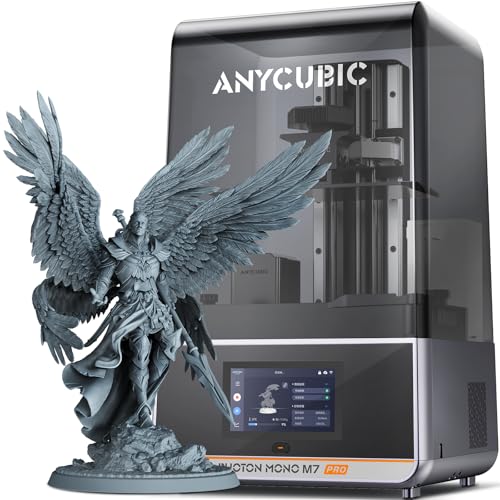
The M7 Pro is a beast. It prints at 170 mm/h in 0.1 mm layers using high-speed resin – that’s more than double the speed of the Mono 4. The 14K screen resolves 0.3 mm holes, which matters for engineering parts and micro-mechanics. The dynamic heating is a clever touch: resin viscosity changes with temperature, and the vat heater keeps it at the sweet spot for consistent curing. The auto-fill and one-key recycling reduce the messy manual handling that turns many people off resin printing. If you’re running a small production, the M7 Pro will pay for itself in time saved. But for a hobbyist painting miniatures once a month, the Mono 4 is plenty.
The hardest part of buying a 3D printer is deciding which technology fits your workflow. Anycubic offers two main lines: the Kobra series (FDM, filament-based) and the Photon series (resin-based). They serve completely different purposes.
FDM printers melt a plastic filament and lay it down in layers. They are best for functional parts, large prints, and materials like PLA, PETG, and TPU. The parts are strong but have visible layer lines. Resin printers use UV light to cure liquid resin layer by layer. They produce smooth, detailed prints with almost no layer lines, but the parts are more brittle, and post-processing (washing and curing) is required. If you’re printing robot parts or cosplay armor, go FDM. If you’re printing tabletop miniatures or jewelry masters, go resin.
A 260 mm cube is enough for most practical objects: phone cases, brackets, small vases. If you need to print a full helmet, you’ll need a larger machine or to split the model. Speed now matters: 600 mm/s FDM printers finish a standard Benchy in about 14 minutes, while older 150 mm/s machines take an hour. For resin, 170 mm/h (like the M7 Pro) versus 70 mm/h (like the Mono 4) adds up quickly when you’re printing multiple parts.
If you want prints with multiple colors without painting, look for support for the ACE Pro or ACE 2 Pro ecosystem. The ACE 2 Pro natively handles 7 colors; the original ACE Pro handles 4. Both include active drying, which is a huge advantage for materials like PETG and TPU that absorb moisture from the air. A dryer keeps filament at peak performance and prevents bubbles and clogs during long prints.
LeviQ 3.0 auto-leveling (49-point) is a standout feature across the Kobra line. It eliminates the most common failure point for beginners. The S1C and S1 Combo also offer full auto-calibration including vibration compensation and flow rate tuning. If you want a machine that just works from day one, prioritize these features. The Photon resin printers use a 4-point leveling system that you set once and rarely need to adjust.
An enclosed printer (like the S1C) lets you print ABS, ASA, and nylon without warping. Open-frame printers are fine for PLA and PETG but will struggle with high-temp materials. If you’re only printing PLA, save the money and skip the enclosure. If you plan to print engineering materials later, buy an enclosed model now.
Yes, especially the Kobra X series with LeviQ 3.0 auto-leveling and the Photon Mono 4 with 4-point leveling. Both are set up to require minimal manual adjustment. The Anycubic app also simplifies remote control for FDM models.
Most Kobra FDM printers support TPU, but not all handle it equally. The Kobra X Multicolor (2X Faster version) mentions an adaptive extrusion force compensator specifically for flexible filaments. For the best results, use a direct-drive extruder – check the product specs for filament path.
The ACE Pro is the original multi-color unit supporting up to 4 colors per unit, with active drying. The ACE 2 Pro is the newer model that supports 7 colors natively and claims 50% less filament waste. They are not cross-compatible – choose one ecosystem and stick with it.
Yes, for any resin printer. Resin prints come out sticky and need to be washed in isopropyl alcohol (or a cleaning solution) and then cured under UV light. Anycubic sells separate wash and cure stations that make the process much cleaner.
FDM models with LeviQ 3.0 can be ready to print in about 15 minutes. Resin printers require leveling (10 minutes) and then a quick test print. The Photon Mono 4 claims it’s pre-assembled and calibrated, so your first print can start within 30 minutes of unboxing.
The S1C’s enclosure and active drying make it compatible with PLA, PETG, TPU, PVA, ASA, and even some nylon and polycarbonate filaments, thanks to its 320°C hotend. The heated bed goes up to 120°C, which is sufficient for most engineering materials.
If you print high volumes of detailed parts – for example, jewelry molds, dental models, or small production runs – the 170 mm/h speed and 14K resolution justify the cost. For occasional hobby printing, the Mono 4 is more than enough.
The Anycubic Kobra X Multicolor with AI Camera is the pick for most people: it combines ease of use, multi-color capability, and AI safety features in a fast, quiet package. If you need to print engineering materials or want the reliability of an enclosure, the Anycubic Kobra S1C is your machine. For resin enthusiasts, the Photon Mono 4 offers incredible detail at a low entry point, while the Photon Mono M7 Pro is the speed and resolution king for professionals.
If you’re still on the fence, think about the first object you want to print. A functional part like a bracket or a phone stand points you to an FDM Kobra. A detailed figure or piece of jewelry points you to a Photon. Either way, Anycubic’s 2026 lineup gives you a clear path. The best Anycubic 3D printer for you is the one that matches your material needs and your patience for post-processing – and now you know exactly which one that is.
This article contains Amazon affiliate links. We may earn a small commission on qualifying purchases at no extra cost to you.


