Physical Address
304 North Cardinal St.
Dorchester Center, MA 02124
Physical Address
304 North Cardinal St.
Dorchester Center, MA 02124

From LCD touchscreens to modular showpieces, these are the 10 best custom PC cases in 2026 for builders who want style, airflow, and room to grow.
You have the motherboard picked, the GPU chosen, and the cooling loop planned. But the case is the one component you have to live with every day. It determines how easy the build is, how clean the cable routing looks, and whether your expensive hardware suffocates or breathes. The wrong case turns a fun project into a frustrating one. The right case makes you want to open the side panel just to look at it.
The custom PC case market in 2026 is more varied than ever. You can now buy a case with a built-in 14.9-inch 2.5K touchscreen, an open-frame design that doubles as a display stage, or a compact mid-tower that supports back-connect motherboards for a cable-free front. Whether you are building a showpiece for a LAN party, a silent workstation, or a gaming rig that stays cool under load, the best custom PC cases this year cover every use case. We have sorted through the current lineup to find the ten that deserve your attention, from the LCD-packing flagship to the affordable fan-stuffed starter.
TL;DR: The HYTE Y70 Touch Infinite is the one to buy if you want a jaw-dropping visual centerpiece with a huge integrated LCD. The Cooler Master MasterFrame 360 Stage LCD is for builders who want an open-stage show chassis with a front display. The Corsair 4000D RS ARGB Frame is the modular mainstream pick that adapts to your needs over time. The Geometric Future M5 delivers five pre-installed 140mm fans and a unique black/green colorway.
| # | Product | Form Factor | Radiator Support | Max GPU Length | Pre-Installed Fans | Best For |
|---|---|---|---|---|---|---|
| 1 | HYTE Y70 Touch Infinite | Mid-Tower (Dual Chamber) | Side up to 360mm, top adjustable | Supports vertical GPU (4 slots) | None (10 fan capacity) | Building a visual showpiece with the biggest built-in touchscreen |
| 2 | Cooler Master MasterFrame 360 Stage LCD | Mid-Tower (Open Frame) | 360mm top/bottom | 430mm | None (up to 12x120mm) | Open-stage showcase builds and LCD content creators |
| 3 | Corsair 4000D RS ARGB Frame | Mid-Tower | Front up to 200mm fan, roof up to 140mm | Not specified | 3x CORSAIR RS ARGB PWM | Builders who want a modular case they can upgrade piece by piece |
| 4 | Geometric Future M5 | Mid-Tower | Up to 420mm front, 360mm top | 460mm | 5x 140mm ARGB PWM | Enthusiasts who want maximum fan count and a unique look right out of the box |
| 5 | Thermaltake Tower 600 | Mid-Tower (Vertical) | Up to 420mm | Not specified | None (supports 9 fans) | Builders who want an octagonal tower with three glass panels and hidden-connector support |
| 6 | JONSBO X400 Gray | Mid-Tower | Top 360mm, side 360mm | 427mm | None (13 fan positions) | Back-connect motherboard users and anyone wanting a mecha-inspired, high-airflow chassis |
| 7 | MUSETEX K2 | Mid-Tower | Top 360mm | 400mm | 7x PWM ARGB | Builders who want a panoramic glass case with lots of fans included |
| 8 | KEDIERS P4 Infinity Mirror | Mid-Tower | Up to 360mm | 440mm | 7x 120mm Infinity Mirror ARGB | Gamers who want an infinity-mirror fan effect and a 270-degree glass view |
| 9 | RUIX OV303 | Mid-Tower | 360mm top | 420mm | 4x 120mm Prism ARGB | First-time builders who need a GPU support bracket and USB-C on the front |
| 10 | META PCS Night Reaper (Lian Li O11 Dynamic EVO RGB) | Full Tower | Supports multiple radiators (custom loop ready) | Not specified | None (RGB lighting built in) | Builders who want the iconic Lian Li O11 layout with customizable RGB and modular interior |
Form factor and motherboard compatibility. The case must support the motherboard you already have or plan to buy. Full towers fit EATX and give you the most room for radiators, but mid-towers are easier to place on a desk. We looked for cases that handle ATX as a baseline and accommodate back-connect (BTF) boards where available.
Cooling capacity and radiator support. A case that traps heat is a case you will regret. We prioritized designs that can fit at least a 360mm radiator in the top or front, along with enough fan mounts to create positive pressure. The ability to mount thick radiators (125mm in the side, for example) matters for custom loops.
GPU and CPU cooler clearance. Modern graphics cards are enormous, and tower air coolers keep growing. We favored cases that accept GPUs over 380mm and CPU coolers over 165mm. A built-in GPU support bracket is a nice touch for heavy cards.
Aesthetics and build quality. Steel gauge, glass thickness, paint finish, and dust filtering all separate a premium case from a flimsy one. We looked for tool-less panels, clean cable routing channels, and thoughtful touches like color-matched riser cables or PSU shrouds with display windows.
Pre-installed fans and I/O. Cases that come with good fans save you money and effort. We noted models with PWM and ARGB fans pre-fitted. Front I/O with USB-C is now standard on any worthwhile case, and we expect at least one USB-C 3.2 Gen 2 port.
Innovative features. The best custom PC cases in 2026 push beyond the box: integrated LCD touchscreens, modular FRAME systems that let you swap motherboard trays, and rotational PCIe slots for flexible GPU mounting. These features justify the premium for builders who want something special.

Pros
Cons
Best for anyone who wants the biggest, brightest integrated case display on the market and is willing to pay for the wow factor.
Check current price on Amazon →
The HYTE Y70 Touch Infinite is the most visually distinctive case on this list. The highlight is that integrated 14.9-inch touchscreen, which operates as a secondary monitor at 682×2560 resolution. You can display system stats, a custom GIF, or even a live video feed. The 10-point multitouch means you can interact with widgets directly, and the panel is genuinely bright enough to see in a well-lit room.
The interior is a dual-chamber layout with a 4-slot vertical GPU mount. The included PCIe 4.0 riser cable has a color-matched canopy (Snow White in this version) that keeps the look clean. Cooling capacity is generous: you can fit a 360mm radiator on the side (up to 125mm thick) and another adjustable one on top. The cold floor supports three 120mm or two 140mm fans. But you will need to buy all those fans yourself. Assembly is straightforward thanks to the spacious rear chamber, though the sheer size (20.5 inches tall and wide) means this case demands a large desk or floor placement. The panoramic glass panels come off with a few screws, but you would be smart to have a helper when handling them.
For builders who want the ultimate conversation piece, the Y70 Touch Infinite delivers. The LCD screen is not a gimmick; it is genuinely useful for monitoring without third-party hardware. Just be ready for the weight and the extra fan investment.

Pros
Cons
Best for modders, content creators, and anyone building a showcase rig that lives on top of a desk.
Check current price on Amazon →
The MasterFrame 360 Stage LCD rethinks the case as a diorama. The front houses a Stage LCD display that can mirror your desktop or play custom animations from a MicroSD card. The rest of the chassis is an open steel frame with tempered glass panels that let you see every component from almost any angle. Cooler Master designed this for builders who want to show off their GPU, custom water loops, and even action figures inside the case.
The cooling potential is absurd: you can mount up to twelve 120mm fans, or go with 200mm fans for quieter operation. Radiators can go top or bottom up to 360mm. The open layout means air flows freely, but it also means dust settles on everything. You will want compressed air nearby.
Cable management is a highlight. The 110mm of space behind the motherboard tray is the most generous I have seen, making it easy to tuck away even thick bundles. The case supports Mini-ITX through ATX motherboards, including back-connect models from Asus and Gigabyte. GPU clearance is 430mm, so even the biggest RTX 5090 will fit.
This is not a case for everyone. It is big, open, and demands a clean desk. But for a build that doubles as art, it is hard to beat.
Pros
Cons
Best for builders who want a case that can evolve with their hardware and taste over time.
Check current price on Amazon →
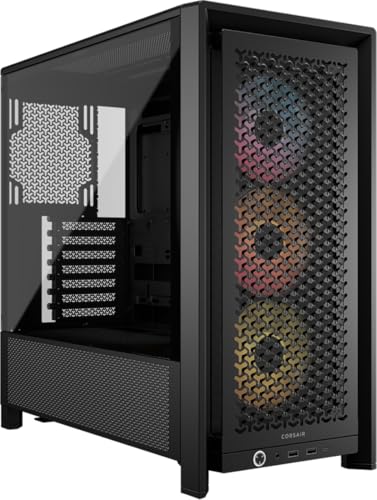
Corsair’s 4000D RS represents a new way of thinking about case longevity. The FRAME modular system means you can later upgrade the motherboard tray to billet aluminum, or swap the front I/O for a hub with more USB ports. The case ships with a standard layout, but you can reconfigure it as your needs change.
The InfiniRail mounting system is a practical touch: the front and roof fan rails slide to any position, letting you align fans exactly where you want them. The front panel uses a 3D Y-pattern perforation that allows good airflow while maintaining structural rigidity. The three included RS fans are solid performers, and they connect via daisy-chainable PWM and ARGB headers.
A smart design element is the internal side panel near the motherboard tray. You can use it as a cosmetic cable cover, or remove it entirely to mount up to two 120mm fans directly on the side for additional GPU cooling. That flexibility is rare in a mid-tower.
The 4000D RS supports ASUS BTF, MSI Zero, and Gigabyte Stealth back-connect motherboards, keeping the front clean. Build quality is typical Corsair: everything fits precisely, and the steel feels dense. If you want a case that you can still be happy with in five years because you swapped out the front I/O and motherboard tray, this is the one.

Pros
Cons
Best for enthusiasts who want maximum factory fan power and the ability to run the biggest radiators without aftermarket upgrades.
Check current price on Amazon →
The Geometric Future M5 comes out of the box ready to cool almost any system. The five 140mm ARGB fans move a lot of air at low noise, and they are PWM controlled, so you can fine-tune the curve. The case fits E-ATX motherboards and GPUs up to 460mm, which is enough for even the longest cards on the market.
The steel frame is noticeably thicker than many rivals. Geometric Future uses 0.8–1.2mm steel, which makes the case rigid and reduces vibration. The tool-free tempered glass panels on both sides give a complete view of your hardware, and the front intake area is filtered.
The standout feature is the PSU shroud window. It lets you display your power supply’s label or custom cables without blocking airflow. It is a small touch, but it shows the design team considered how the case will look from every angle.
Cooling support is top-tier: a 420mm radiator fits in the front, and you can also mount a 360mm in the top. The case can hold up to ten 120mm fans total, but with five 140mm already installed, most builders will only need to add a rear exhaust. The M5 is a straightforward, high-quality case for anyone who prioritizes airflow and does not want to buy extra fans.

Pros
Cons
Best for builders who want a case that stands out visually and offers multiple GPU installation methods.
Check current price on Amazon →
Thermaltake’s Tower 600 breaks the rectangle mold. The octagonal profile and three glass panels give it a futuristic look that works especially well with RGB components. The case supports three-way GPU installations: traditional horizontal, vertical using a riser, or a floating mount that suspends the card in the middle of the case. The rotational PCIe slots make these transitions straightforward.
The interior is roomy. It fits up to nine fans (though none are included) and radiators up to 420mm. The hidden-connector motherboard support is a big plus for clean aesthetics: cables exit at the back of the board and are hidden behind the tray. The case comes with tool-less glass panel removal, so swapping components is easy.
One downside is the footprint. At 21.65 inches tall and 16.54 inches wide, the Tower 600 sits vertically on your desk and demands a lot of depth. If floor space is tight, you can buy the optional horizontal stand to lay it on its side, but that is an extra expense. The build quality is solid, with a thick steel frame and tempered glass panels that fit precisely.
For those who want a case that does not look like every other black box, the Tower 600 delivers presence. Just plan your desk layout carefully.

Pros
Cons
Best for builders who want a back-connect motherboard and a case with more fan positions than any other standard mid-tower.
Check current price on Amazon →
The JONSBO X400 is a mid-tower that thinks like a full tower. The 3D skeletal frame design gives it an industrial, almost mecha look that JONSBO leans into with ARGB lighting on the front I/O strip. But the real innovation is the motherboard auxiliary fan system: you can install a 120mm fan at the rear that blows directly into the motherboard compartment, cooling the VRMs and M.2 drives. It is a thoughtful addition for high-end builds.
Fan support is enormous for a mid-tower: 13 positions in total. You can put 120mm fans in the top (3), back (2), side (3), rear (2), and bottom (3). Radiator support includes dual 360mm (top and side). With these options, you could build a custom loop with two 360mm radiators without any compromise.
The case is designed for back-connect ATX motherboards (Asus BTF, etc.), but it also works with standard motherboards. The tool-free snap-on panels make access easy. GPU clearance is 427mm, and CPU cooler height is 176mm, so most large components fit. The PSU length limit is 180mm, which is fine for standard ATX units but may be tight for extended-length 1600W power supplies.
The X400 requires you to supply your own fans, but the sheer flexibility means you can customize the airflow exactly how you want. For builders who value cooling adaptability and want to jump on the back-connect trend, this is a strong contender.
Pros
Cons
Best for budget-conscious builders who want a glass-heavy case with plenty of RGB fans out of the box.
Check current price on Amazon →
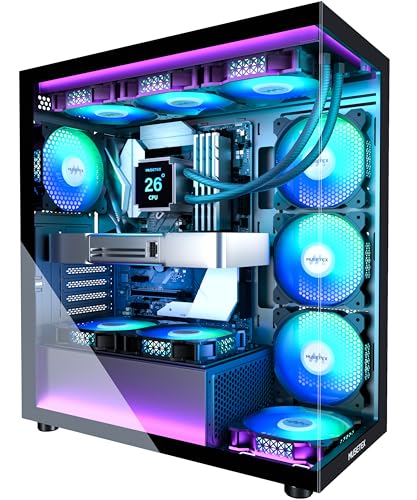
MUSETEX has carved a niche by offering cases that look more expensive than they are. The K2 continues that trend with a 270-degree glass view that shows off the entire interior. The seven fans come in a mix of reverse-blade (side intakes) and standard-blade (top and rear exhaust) configurations, so you get positive pressure without ugly fan frame backs on display.
The GPU support bracket is a welcome inclusion. Many cases expect you to use a vertical mount or a third-party brace, but the K2 has an integrated arm that slots under the graphics card. It works well and is adjustable.
Internal layout is straightforward. The K2 supports GPUs up to 400mm, CPU coolers up to 165mm, and top-mounted 360mm radiators. The PSU bay is separated by a shroud with a cutout for cable routing. The front I/O panel sits on top with a Type-C port, which is rare at this level.
Build quality is acceptable for the segment. The steel frame feels solid, and the glass panels attach with thumbscrews. The included fans are not silent at full speed, but they are PWM, so you can dial them down. For a first build or a living room gaming PC, the K2 gives you a lot of visual impact for not much effort.

Pros
Cons
Best for gamers who prioritize visual flair and want a case that looks like a futuristic display piece without modding.
Check current price on Amazon →
The KEDIERS P4 (model P4) is built around one thing: the infinity mirror fan effect. Each of the seven 120mm fans has a mirrored center that creates the illusion of infinite depth when the ARGB LEDs are lit. The effect is dramatic, especially in a dimly lit room. The case itself is a mid-tower with tempered glass on the front and side, giving a 270-degree view.
Fan arrangement is aggressive: three side intake, three top exhaust, and one rear exhaust. All are PWM, so you can adjust speeds. The case supports up to nine fans total, so you could add two more bottom intakes. Radiator support goes up to 360mm in the top.
The inclusion of a Type-C port on the front I/O is appreciated. The case also supports back-connect motherboards, which is a forward-looking feature at this level. GPU clearance is 440mm, enough for the longest cards. CPU cooler height is 180mm, covering virtually all air coolers.
Where the P4 falls short is storage. There is only one dedicated 3.5-inch drive bay, plus spots for SSDs. If you need multiple hard drives for media storage, look elsewhere. Also, the pre-installed fans are more for show than raw airflow; if you are running a high-wattage CPU and GPU, you might want to replace them with higher-static-pressure models. But for a visually striking build that turns heads, the KEDIERS P4 delivers.

Pros
Cons
Best for builders on a tighter budget who still want a glass-heavy case with a GPU support bracket and modern I/O.
Check current price on Amazon →
The RUIX OV303 is a straightforward, no-nonsense case that hits the key checkboxes for a first-time builder. The panoramic glass panels give a clear view of the interior, and the four pre-installed Prism ARGB fans provide adequate airflow and lighting. The fans are PWM, so you can tune the speed curve.
The standout feature for the money is the integrated GPU support bracket. Modern graphics cards are heavy, and the bracket takes the weight off the PCIe slot and motherboard traces. It is adjustable and does not obstruct fan airflow.
The OV303 supports GPUs up to 420mm, so you will not have to worry about length. The top can fit a 360mm radiator, and the case can hold up to ten fans total if you add more. The front I/O is well equipped with a USB-C port, one USB 3.0, and audio jacks. Dust filters on the top and bottom keep things clean.
Where the OV303 cuts corners is the overall build density. The steel panels are not as thick as those on the JONSBO or Corsair cases, and the fan quality is average. But for a case that costs less than many single components, it delivers a solid foundation for a build that looks good and stays cool. The RUIX is a smart choice if your budget needs to stretch further.

Pros
Cons
Best for loyalists of the O11 Dynamic layout who want a ready-made package with RGB and modularity, without buying a bare Lian Li case.
Check current price on Amazon →
The Lian Li O11 Dynamic EVO is one of the most popular PC case platforms ever, and the Night Reaper is a custom variant sold by META PCs that comes with the same dual-chamber layout and tempered glass design. The modular interior lets you reposition the motherboard tray and PSU shroud to accommodate different cooling setups. It is a full tower, so you get plenty of room for radiators, reservoir pumps, and long GPUs.
The case has built-in RGB lighting that syncs with your motherboard software. The three glass panels show off the interior from the front and side. Cable management is straightforward thanks to the split chamber, which hides the PSU and drives behind the motherboard tray.
One major caveat is that no fans or radiators are included. At this level, that is common (the HYTE Y70 and Cooler Master MasterFrame also ship fanless), but it means you need to budget for a full set of fans and potentially a fan hub. The Night Reaper is designed for custom water loops, and it supports multiple radiators without compromise.
The price is high, partly because it is a boutique variant. If you want the O11 Dynamic EVO experience with a touch of pre-applied RGB and a ready-to-go package, the Night Reaper is a convenient choice. But you could also buy the bare Lian Li case and build it yourself for less. For the enthusiast who wants a turnkey premium chassis, though, it delivers.
Picking a case is about matching your hardware list and your expectations for aesthetics and cooling. Here are the factors you should weigh before buying.
The case form factor determines how large a motherboard you can install. Full towers accept E-ATX (up to 12×13 inches) and offer the most internal volume for radiators and storage. Mid-towers, which are the most common, fit ATX and smaller boards. If you are building a dual-system workstation or a custom loop with a thick 420mm radiator, a full tower like the META PCS Night Reaper is the way to go. For most gaming builds, a mid-tower (Corsair 4000D, JONSBO X400) is perfectly adequate and easier to place on a desk.
Also consider back-connect motherboards (Asus BTF, MSI Project Zero). These boards route all cables to the rear, leaving the front of the motherboard clean. Cases like the JONSBO X400 and Thermaltake Tower 600 explicitly support this layout. If you plan a clean build, look for a case with a dedicated cutout for rear cable routing.
The radiator support is the most important spec for anyone building a water-cooled system. Look for two numbers: the maximum radiator length (e.g., 360mm) and the thickness clearance. The HYTE Y70 allows 125mm thick radiators on the side, which is enough for a thick radiator with push-pull fans. The Geometric Future M5 supports a 420mm radiator in the front, which is the biggest you can get without going to a super-tower.
If you plan to use air cooling, ensure the CPU cooler height clearance exceeds your cooler's height (most tower coolers are 150-165mm). The KEDIERS P4 offers 180mm, which covers almost everything. Also check the number of fan mounts and their sizes. A case that fits 140mm fans will move more air at lower noise than one limited to 120mm.
Modern GPUs can exceed 350mm in length, and some cases do not accommodate them. The cases here mostly support 400mm or more, but always double-check. The RUIX OV303 supports 420mm, the Geometric Future M5 supports 460mm. For PSUs, standard ATX units are 140-150mm. If you are using a 1600W unit that is longer than 180mm, the JONSBO X400 may not fit it without removing the hard drive cage.
Steel gauge matters. Cases like the Geometric Future M5 use 1.2mm steel in places, which feels rock-solid and reduces vibration. Thinner steel (0.6-0.8mm) is lighter but can flex. Tempered glass panels are standard now, but look for ones that are fully framed or have reinforced mounting points. The HYTE Y70 uses three pieces of panoramic glass that attach without visible screws at the front, giving a cleaner look.
Pre-installed fans save money, but not all pre-installed fans are equal. The MUSETEX K2 and KEDIERS P4 include seven fans each, which is generous. The Geometric Future M5 includes five high-quality 140mm fans. Cases like the HYTE Y70 and Cooler Master MasterFrame include none, so you need to factor that into your budget.
USB-C on the front panel is now a basic expectation. Almost every case here has at least one Type-C port. If you frequently transfer files or connect peripherals, look for a case with two USB 3.0 Type-A ports plus Type-C. The MUSETEX K2 and RUIX OV303 both offer that combination. The Corsair 4000D RS is modular, so you can upgrade the front I/O later if needed.
Some cases go beyond the basics. The HYTE Y70's integrated LCD touchscreen is a genuine productivity tool for monitoring system stats. The Cooler Master MasterFrame's open-frame design allows for creative component display. The Thermaltake Tower 600's rotational PCIe slots let you mount the GPU in three different orientations. And the Corsair 4000D RS's FRAME system is the first truly modular case where you can swap core structural parts. If you value uniqueness or adaptability, these features can justify a higher investment.
A "custom PC case" usually refers to a case that offers more flexibility than an off-the-shelf OEM tower. Custom cases often feature tool-less access, modular interiors, high-end cooling support, and aesthetic options like tempered glass or RGB lighting. This category includes everything from the HYTE Y70 with its integrated touchscreen to the more traditional but premium Corsair 4000D.
Full towers are necessary only if you are building a custom water loop with multiple thick radiators, running an E-ATX workstation motherboard, or need space for many hard drives. For a typical gaming PC with one or two GPUs and an AIO cooler, a mid-tower is lighter, easier to move, and fits on a desk. Most of the cases in this guide are mid-towers.
Back-connect motherboards (Asus BTF, MSI Project Zero, Gigabyte Stealth) move all power and data connectors to the back of the board. This leaves the front of the motherboard completely clean, with no cables visible. To use one, you need a case with a large cutout behind the motherboard tray and clearance for connectors. Cases like the JONSBO X400 and Thermaltake Tower 600 support this layout.
For a mid-range build, three fans (two intakes, one exhaust) is sufficient. For a high-end gaming PC, five to seven fans let you maintain positive pressure and keep temperatures low. Cases like the Geometric Future M5 (five 140mm) or the KEDIERS P4 (seven 120mm) come ready for demanding hardware. If you buy a case without fans, plan to purchase at least three to start.
Not all mid-towers fit a 360mm radiator. Check the specs for top or front support. The Corsair 4000D RS, for example, supports up to 360mm in the top. The JONSBO X400 supports two 360mm radiators simultaneously. The RUIX OV303 fits a 360mm in the top. Always measure radiator thickness with fan clearance before buying.
A panoramic glass case uses two or three tempered glass panels to create a nearly unobstructed view of the interior, often wrapping around the front and one side. The MUSETEX K2 and KEDIERS P4 both have 270-degree panoramic glass. The HYTE Y70 has a three-piece panoramic design. These cases are ideal for showing off RGB lighting and custom cooling loops.
A vertical GPU mount is not necessary, but it displays your graphics card face-on, which is often more visually interesting than a standard horizontal mount. Many cases (HYTE Y70, Thermaltake Tower 600) support vertical mounting either natively or with a riser cable. The JONSBO X400 supports vertical mounting but requires a separate bracket and PCIe riser.
The best custom PC case for you depends on what you value most in a build. If you want the absolute most visually impressive case on the market and are prepared to handle its size and weight, the HYTE Y70 Touch Infinite is our top pick. Its 14.9-inch touchscreen is unlike anything else, and the dual-chamber layout keeps the build clean.
For builders who want a showcase that feels like a stage, the Cooler Master MasterFrame 360 Stage LCD offers incredible flexibility and a front-facing display that makes your PC a living piece of art. It is not a dust-ignoring case for everyday use, but for a show rig it has no equal.
The Corsair 4000D RS ARGB Frame is the smartest choice for most builders. It is not the flashiest, but its modular system means you can upgrade it over time, and the build quality is excellent. It is a case that will age gracefully.
If you want maximum fan power out of the box, the Geometric Future M5 is a stellar deal with five 140mm fans and support for the biggest radiators. And if you are on a budget but still want a glass-heavy look with plenty of fans, the MUSETEX K2 or RUIX OV303 will serve you well.
For the undecided builder: think about where your PC will live and how much you want to tinker. If it sits on a desk and you enjoy modding, the HYTE or Cooler Master will reward you. If it lives under a desk and you just want great cooling and easy assembly, the Corsair 4000D RS is the safest bet.
This article contains Amazon affiliate links. We may earn a small commission on qualifying purchases at no extra cost to you.


[…] models here are built around SFX use. Case layout also affects how much room remains for wiring; how much space a custom chassis leaves for cable routing can matter as much as the PSU’s outer […]