Physical Address
304 North Cardinal St.
Dorchester Center, MA 02124
Physical Address
304 North Cardinal St.
Dorchester Center, MA 02124

Looking for the best Dell gaming monitors? We picked 9 top options across every budget and use case, from 240Hz budget panels to 4K ultrawide displays.
Dell sells more gaming monitors than most people realize, and the lineup has gotten genuinely good in the last couple of years. The problem is that the model numbers blur together fast: SE2426H, SE2726HG, S2725QS, S2725QC. Figuring out which one actually makes sense for how you game is where most buyers get stuck.
This guide cuts through that. The best Dell gaming monitors range from a sub-$100 24-inch IPS that punches well above its price to a 34-inch curved ultrawide that costs north of $400 and earns every dollar. We have included Alienware here too, since Dell owns the brand and the two lineups share a lot of technology.
The picks below cover competitive FHD gaming (where refresh rate and response time are everything), productivity-first 4K displays that are also capable gaming monitors, and ultrawide curved panels for immersive single-player experiences. There is something in here whether you are building a first setup on a tight budget or upgrading a rig that can actually push 180fps.
TL;DR: The Dell 24 Monitor SE2426H is the best starting point for most gamers: 144Hz IPS at under $100 is nearly impossible to beat. The Dell 27 Plus 4K S2725QS is the go-to step-up if you want 4K visuals without a complicated cable setup. The Dell 27 240Hz SE2726HG is the pick for competitive players who want the fastest panel in the lineup. The Alienware 34 AW3425DWM is the ultrawide to get if curved gaming is your goal.
| # | Product | Panel / Size | Refresh Rate | Price | Best For |
|---|---|---|---|---|---|
| 1 | Dell 24 Monitor SE2426H | IPS / 23.8" FHD | 144Hz | $99.99 | Budget first gaming monitor |
| 2 | Dell 27 Plus 4K S2725QS | IPS / 27" 4K | 120Hz | $279.99 | 4K gaming and creative work |
| 3 | Dell 27 240Hz SE2726HG | IPS / 27" FHD | 240Hz | $129.99 | Competitive multiplayer |
| 4 | Dell 27 Plus 4K USB-C S2725QC | IPS / 27" 4K | 120Hz | $279.99 | Laptop gamers and hybrid workers |
| 5 | Dell 27 Plus Monitor S2725HSM | IPS / 27" FHD | 144Hz | $174.99 | Desk setup with built-in audio |
| 6 | Dell 27 Plus QHD S2725DSM | IPS / 27" QHD | 144Hz | $189.99 | QHD gaming with ergonomic stand |
| 7 | Dell 24 240Hz SE2426HG | IPS / 23.8" FHD | 240Hz | $99.99 | Budget 240Hz competitive gaming |
| 8 | Alienware 34 Curved AW3425DWM | VA / 34" WQHD | 180Hz | $349.99 | Immersive ultrawide gaming |
| 9 | Dell 34 Plus USB-C Curved S3425DW | VA / 34" WQHD | 120Hz | $419.99 | Ultrawide gaming with USB-C hub |
Prices fluctuate. Check each product page for the current figure before buying.
Narrowing down the best Dell gaming monitors required weighing several factors that really separate a useful panel from one that collects dust after a few weeks:
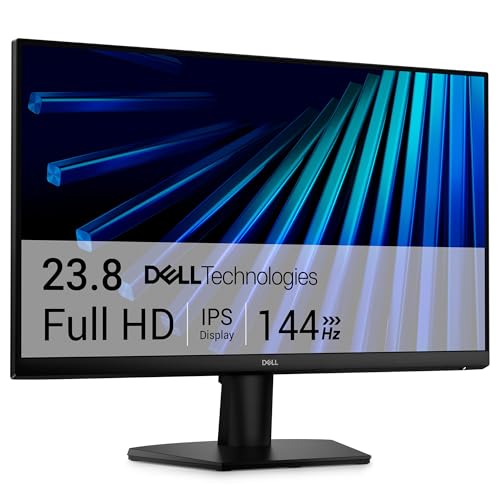
The Dell SE2426H is probably the most straightforward recommendation in this entire roundup. A 144Hz IPS panel at 23.8 inches for $99.99 is the kind of deal that makes you double-check the specs. The IPS technology here is real: 178-degree viewing angles in both directions, consistent color across the screen, and none of the severe color shift that plagues VA panels when you tilt even slightly off-axis.
The 1ms MPRT response time keeps motion clean during fast-paced sequences, and AMD FreeSync support means screen tearing is a non-issue whether you are on an AMD GPU or a compatible Nvidia card. TUV Rheinland 3-star certification handles the blue light situation without introducing the yellow tint that cheaper blue-light filters add. For a monitor you might spend six or eight hours in front of on a weekend, that matters more than most people account for when they are buying.
The weakest point is the stand: tilt-only adjustment is limiting, and the ultra-thin bezels look good in photos but the build quality around the base is utilitarian. If you want to mount it on an arm, the VESA compatibility opens up your options considerably. As a first gaming upgrade from a 60Hz panel, though, the SE2426H is hard to argue with.
Pros:
Cons:
Best for: Anyone building their first gaming setup or upgrading from a 60Hz monitor and wants a no-nonsense IPS panel without spending more than $100.
Check current price on Amazon →

The Dell S2725QS is the kind of monitor that makes sense once you realize the 27-inch FHD panels are just not that sharp anymore. At 3840×2160 on a 27-inch IPS panel, pixel density climbs to around 163 PPI, which is the point where text becomes genuinely clean and game environments stop looking slightly soft.
The 120Hz refresh rate is a real concession compared to the 240Hz options lower in this list, but 120Hz at 4K requires significantly less GPU horsepower than 240Hz at 1080p (they are not equivalent demands). For anyone gaming on a midrange card, locking 4K at 90 to 100fps with FreeSync keeping it tear-free is a better experience than chasing 240Hz at 1080p. The IPS panel with 99% sRGB and 1500:1 contrast ratio handles HDR content with genuine depth, and the ComfortView Plus blue light reduction at 35% or below is one of the better hardware-level implementations Dell has put into this price tier.
The integrated speakers are a step above the usual monitor speaker afterthought. They will not replace a dedicated audio setup, but they are usable for casual sessions. The ash white finish is either a selling point or a dealbreaker depending on your desk setup. This specific model is the DisplayPort/HDMI variant; if you need USB-C, that is the S2725QC covered below.
Pros:
Cons:
Best for: PC gamers on a capable rig who want 4K sharpness and do most of their gaming at a relaxed pace rather than in competitive shooters.
Check current price on Amazon →

If your main concern is reaction time and frame cadence in competitive shooters, the Dell SE2726HG is the pick. The combination of a 240Hz refresh rate and a 0.5ms response time is genuinely fast. The difference between 144Hz and 240Hz is smaller than the jump from 60Hz to 144Hz, but it is not imaginary: motion clarity in fast pans is noticeably cleaner, and input lag is measurably lower.
What makes this more interesting than a typical 240Hz FHD budget panel is the IPS technology. Most monitors at this refresh rate and price point use TN panels, which sacrifice color and viewing angles for speed. Dell managed to fit IPS here without inflating the price past the $130 range, which is a notable engineering choice. The 99% sRGB color coverage and wide 178-degree angles mean this monitor is usable for non-gaming hours without the washed-out look you get from TN at off-axis positions.
FreeSync Premium is the key sync feature, and HDMI VRR support extends that to PS5 and Xbox Series X users who want to drop the console into a 120Hz or higher mode. The step-up from the 24-inch SE2426HG is the extra screen real estate at the same 1080p resolution; whether the lower pixel density that comes with scaling to 27 inches bothers you is a personal call.
Pros:
Cons:
Best for: Competitive multiplayer players, particularly FPS and battle royale, who want maximum refresh rate without paying 4K panel prices.
Check current price on Amazon →

The Dell S2725QC is the same 27-inch 4K IPS panel as the S2725QS above, with one addition that changes who should buy it: USB-C with up to 65W power delivery. For anyone gaming on a laptop, this single cable runs video, connects peripherals, and charges the machine simultaneously. That reduces a multi-cable desk tangle to one connection, which sounds small until you have actually lived with it.
The specs underneath the USB-C capability are identical to the S2725QS: 3840×2160 at 120Hz, AMD FreeSync Premium, 99% sRGB, 1500:1 contrast ratio, ComfortView Plus, and integrated speakers with improved audio output over the previous generation. The ash white finish is the same. The weight difference (14.79 lbs vs. 14.26 lbs for the QS) is irrelevant.
The reason to choose the S2725QC over the QS is specifically USB-C. If you are running a desktop PC with a discrete GPU via DisplayPort, the S2725QS is the same monitor without the premium. But for a MacBook, a gaming laptop, or a thin-and-light that you dock at a desk, the single-cable workflow is genuinely better than managing separate power and video connections.
Pros:
Cons:
Best for: Laptop gamers and hybrid work-from-home setups where a single USB-C cable to the desk is the priority.
Check current price on Amazon →

The Dell S2725HSM is harder to pigeonhole than the other panels here, and that is actually the point. It is a 27-inch FHD IPS running at 144Hz with a 1ms MPRT response time, which makes it capable for gaming. But the full height, tilt, pivot, and swivel stand, the 4-star TUV eye comfort certification, the dual 3W integrated speakers, and the 1500:1 contrast ratio all push it toward someone who games but also uses the monitor heavily for work.
The ergonomic stand is the strongest differentiator from the SE-series panels lower in this list. Being able to raise the screen to eye level without buying a separate arm or stacking the monitor on books is not glamorous, but it matters for anyone spending 8-plus hours at a desk. The pivot capability (rotating to portrait mode) is useful for coding or document-heavy workflows. Dell's Display and Peripheral Manager software adds application layout management that is more polished than Windows Snap.
Where it gives something up is pixel density. FHD at 27 inches (82 PPI) looks soft next to the QHD and 4K options above, particularly if you spend time reading small text. For gaming, it is fine. For side-by-side document editing, you will notice.
Pros:
Cons:
Best for: Gamers who also work from the same desk and want ergonomics and eye comfort without stepping up to QHD or 4K pricing.
Check current price on Amazon →

The Dell S2725DSM is the monitor for buyers who have been told that 1080p at 27 inches looks soft (it does) but are not ready to fund a 4K GPU to go with the S2725QS. QHD (2560×1440) at 27 inches hits the sweet spot that a lot of panel manufacturers have moved toward: sharp enough that individual pixels are not visible at normal viewing distances, but demanding enough on the GPU that it is honest about requiring a decent card.
The 144Hz refresh rate and 1ms MPRT handling match the S2725HSM's gaming credentials, with AMD FreeSync keeping everything tear-free. The 1500:1 contrast ratio is the same spec as the S2725QS; you are getting genuinely deep blacks and bright highlights relative to what the IPS panel type usually delivers. The QHD resolution makes colors in open-world games noticeably richer because the extra pixels let the renderer resolve more fine detail in textures and foliage.
The stand is identical to the S2725HSM: full height, tilt, pivot, and swivel. The dual 3W speakers are the same. The jump from the S2725HSM to this one is purely about resolution, and it costs about $15 more. For most buyers, that delta is an easy call.
Pros:
Cons:
Best for: Gamers who want sharper-than-FHD visuals without committing to 4K GPU requirements, especially those who also use the monitor for productivity.
Check current price on Amazon →

The Dell SE2426HG does something that would have been remarkable two years ago: 240Hz IPS at $99.99. The same caveat applies here as to the SE2726HG above, the larger sibling: the IPS technology is the key differentiator against competing budget 240Hz panels that use TN. You get real viewing angles and actual color at the 240Hz tier, rather than having to choose between fast and visually acceptable.
The specs are essentially identical to the SE2726HG, scaled to 23.8 inches: FHD 1920×1080, 0.5ms response time, AMD FreeSync Premium with HDMI VRR, 99% sRGB, TUV Rheinland 3-star certification. The tilt-only stand is the same limitation. The difference is physical size and the pixel density that comes with it: 93 PPI at 23.8 inches versus 82 PPI at 27 inches, so individual pixels are tighter and text is meaningfully sharper at the same resolution.
If desk space is limited or you sit close to your monitor, the 24-inch size is genuinely preferable to a 27-inch panel. This also represents the lowest price entry point to 240Hz IPS gaming, which makes it a strong recommendation for anyone on a tight build budget who still wants competitive-grade refresh rates.
Pros:
Cons:
Best for: Budget-focused competitive gamers who want 240Hz IPS performance in a compact footprint without spending more than $100.
Check current price on Amazon →

The Alienware AW3425DWM is a different kind of monitor from everything else on this list. The 34-inch 3440×1440 WQHD ultrawide panel with a 1500R curve is built for single-player games, racing titles, flight simulators, and open-world RPGs where peripheral vision is part of the experience. Playing something like Cyberpunk 2077 or Elden Ring on a curved ultrawide and then switching back to a 16:9 monitor feels like going from a window to a porthole.
The panel itself is genuinely fast by ultrawide standards: 180Hz is one of the highest refresh rates available at this size and resolution, and the 1ms gray-to-gray response time keeps motion clean during fast action. AMD FreeSync Premium and VESA AdaptiveSync together give it broad GPU compatibility. The DCI-P3 95% color coverage and VESA DisplayHDR 400 certification are honest specs: HDR content has real impact on this panel, not the washed-out HDR simulation that lower-spec monitors produce.
The hardware-level low blue light solution (not a software filter) is the right call for marathon gaming sessions where you might spend four to six hours in a game. A dedicated console mode rounds out the feature set for players who connect both a PC and a console. The 1500R curvature is aggressive enough to actually wrap your field of view at typical desk distances, rather than being a gentle curve that barely registers.
Pros:
Cons:
Best for: Single-player and simulation gamers who want an immersive curved ultrawide with a fast refresh rate and do not need speakers built in.
Check current price on Amazon →

The Dell S3425DW is the ultrawide for someone who works at a desk during the day and games at night. The 34-inch 3440×1440 VA panel with a curved screen gives the same immersive width as the Alienware above, but the USB-C with 65W power delivery changes the use case. Connect a laptop via USB-C and you have a wide ultrawide display with speakers and a charging connection all in one cable.
The VA panel here is notable: the 3000:1 contrast ratio is significantly deeper than the IPS options elsewhere in this list. VA panels render dark game environments with more shadow detail and true blacks rather than IPS's grayish dark tones. The trade-off is that VA can show ghosting in fast motion at lower refresh rates. Dell addresses this with FreeSync Premium at up to 120Hz and a 0.03ms response time, which largely keeps motion clean in practice.
At $419.99 this is the most expensive panel in the roundup, and the 120Hz ceiling is lower than the Alienware's 180Hz. The integrated speakers here are better than on the smaller panels, with re-engineered audio that delivers more decibel range and deeper bass response than the previous-generation Dell ultrawides. If you are choosing between this and the AW3425DWM, the decision mostly comes down to whether USB-C and speakers matter more than 60 extra Hz of refresh rate.
Pros:
Cons:
Best for: Ultrawide users who want a monitor that does dual duty as a productivity hub and gaming display, particularly laptop users who need USB-C docking.
Check current price on Amazon →
The right Dell gaming monitor depends on three things more than any other: what you play, what GPU you are running, and how you use the desk outside of gaming hours.
240Hz is not always better than 144Hz in any practical sense. The gains from 240Hz over 144Hz are real but incremental. If you spend most of your time in competitive shooters like Valorant, CS2, or Apex Legends and your GPU can sustain framerates above 144fps, the jump to 240Hz is worth it. If you mostly play RPGs, strategy games, or single-player titles where framerates hover between 60 and 100fps, a 240Hz panel gives you nothing that a 144Hz panel would not also deliver.
The bigger jump, the one nearly everyone notices immediately, is from 60Hz to 144Hz. If you are on a 60Hz monitor right now, any of the 144Hz or 240Hz options in this list will feel transformative.
This is where most buyers make the mistake that costs them the most. A 4K monitor at 120Hz needs a significantly more powerful GPU than a 1080p monitor at 240Hz. Before choosing a resolution, check whether your graphics card can sustain the framerate you want at that resolution in the games you play.
A general reference point:
Buying a 4K monitor with a midrange GPU means running your games at 60 to 80fps in demanding titles. That is not necessarily bad, but it should be a deliberate choice, not an accidental one.
Dell's gaming lineup uses IPS everywhere except the curved ultrawides, which use VA. The practical difference matters depending on what you play.
IPS panels handle fast motion well, maintain color accuracy at off-axis viewing angles, and produce consistent image quality across the screen. Their weakness is contrast: the black levels on an IPS panel look gray in a dark room compared to VA.
VA panels produce much deeper blacks and the 3000:1 contrast on the S3425DW is not marketing hyperbole. In dark games with a lot of shadow and atmospheric lighting, VA looks better than IPS. The downside is potential ghosting on fast-moving objects, particularly in games with high-contrast motion like racing titles.
For competitive multiplayer, IPS. For atmospheric single-player and cinematic content, VA's contrast advantage shows.
The SE-series panels in this list (SE2426H, SE2726HG, SE2426HG) are tilt-only. The S-series panels (S2725HSM, S2725DSM, S2725QS, S2725QC, S3425DW) include height, tilt, pivot, and swivel adjustability.
If you game for more than two hours at a time, the inability to raise the monitor to eye level will eventually cause neck and shoulder discomfort. The fix is either buying the adjustable-stand version or adding a monitor arm, which costs about $30 to $60 extra. Factor that in when comparing the SE-series price to the S-series.
A 34-inch curved ultrawide takes up significantly more horizontal desk space than a standard 27-inch monitor. Measure your desk before buying. The actual screen width on a 34-inch ultrawide is roughly 32 inches; paired with a full-height adjustable stand, you need about 36 to 38 inches of clear horizontal space.
Ultrawides also affect gaming compatibility. Most single-player titles support 21:9 aspect ratio natively. Many competitive multiplayer titles cap field of view at 16:9, which means you either game in a window with black bars on each side or use a custom aspect ratio setting. Check whether your primary games support 21:9 before committing to an ultrawide.
The Dell SE2726HG at 27 inches or the Dell SE2426HG at 24 inches are the strongest competitive gaming choices in Dell's current lineup. Both run at 240Hz with 0.5ms response time on IPS panels, which is a combination you would not have found at this price tier two years ago. The 27-inch version gives more screen real estate; the 24-inch version is sharper (more pixels per inch at the same resolution) and typically sits closer to eye level on a standard desk.
For fast-paced gaming, 1080p at 27 inches is perfectly functional. The concern is pixel density: at 82 PPI, text and fine detail in UI elements look softer than at higher resolutions. If you also use the monitor for productivity work, reading documents, or browsing, stepping up to QHD (the S2725DSM) or 4K (the S2725QS or S2725QC) will be noticeably better. If the monitor is almost exclusively for gaming and you want the fastest refresh rate possible, 1080p at 240Hz is the right call.
Yes. Several panels in this lineup include HDMI VRR, which is the key compatibility feature for modern consoles. The SE2426H, SE2726HG, SE2426HG, and the 4K S-series panels all support HDMI VRR, which enables variable refresh rate gaming on PS5 and Xbox Series X when connected via HDMI 2.1 or a compatible HDMI port. Console players should confirm they are connecting through the monitor's HDMI port and that VRR is enabled in the console settings.
They are the same 27-inch 4K IPS panel with the same specs: 120Hz, AMD FreeSync Premium, 99% sRGB, 1500:1 contrast, integrated speakers, ComfortView Plus. The single difference is connectivity. The S2725QC adds a USB-C port with 65W power delivery, which lets laptop users connect power and video through one cable. The S2725QS has only DisplayPort and HDMI. Both are priced identically. Choose the QC if you use a laptop at the desk; choose the QS if you are on a desktop PC.
Alienware is Dell's premium gaming sub-brand, and the build quality and feature set reflect that positioning. The Alienware AW3425DWM reaches 180Hz at 3440×1440, which is faster than the Dell S3425DW's 120Hz ceiling. Alienware panels also tend to prioritize gaming-specific features (dedicated console mode, hardware low blue light, aggressive curvature) while Dell's S-series balances gaming with productivity and ergonomics. For pure gaming performance, Alienware has the edge. For a monitor that pulls double duty in a work-from-home context, the Dell panels with ergonomic stands and USB-C are often the better fit.
For the right use cases, yes. Ultrawide monitors shine in single-player open-world games, racing simulations, strategy games, and productivity workflows where you want multiple windows open side by side without a monitor bezel down the center. For competitive multiplayer gaming, the ultrawide format is often a disadvantage: many titles limit the horizontal field of view in competitive modes, and the wider panel does not help when you are tracking targets in the center of the screen. If your gaming skews toward Elden Ring, Microsoft Flight Simulator, or Civilization rather than Valorant or Counter-Strike, the ultrawide is a substantial upgrade in immersion.
The best Dell gaming monitors span a wide range, and which one to buy depends almost entirely on what you play and what GPU you are running. For the majority of gamers, the Dell SE2426H at $99.99 is the pick to start with: 144Hz IPS at under $100 is the clearest value in the entire lineup, and it works equally well on PC and modern consoles. If budget allows and you want sharper visuals, the Dell S2725QS at 27 inches and 4K is the most impressive panel in the set, with the S2725QC as the obvious choice if you need USB-C.
For competitive play specifically, the SE2726HG at 240Hz is the right call, offering the fastest refresh rate in the lineup on a genuine IPS panel at a price that does not require justification. The ultrawide options, both the Alienware AW3425DWM and the Dell S3425DW, serve a specific kind of gamer: someone who plays immersive single-player titles and is willing to invest in the screen real estate and the GPU horsepower to drive it.
If you are still undecided, start with what you play most. Competitive multiplayer points toward 240Hz and FHD. Story-driven single-player games benefit more from resolution and screen size. The best Dell gaming monitor is the one that matches both your games and your GPU, and there is a clear option in this list for every combination of those two factors.
This article contains Amazon affiliate links. We may earn a small commission on qualifying purchases at no extra cost to you.


