Physical Address
304 North Cardinal St.
Dorchester Center, MA 02124
Physical Address
304 North Cardinal St.
Dorchester Center, MA 02124

The 10 best Dell monitors of 2026 reviewed: budget 24-inch picks, 4K workhorses, ultrawide curved screens, and a 240Hz gaming panel worth buying.
Choosing a monitor sounds simple until you're staring at a wall of model numbers wondering why two displays that look identical on the spec sheet cost $100 apart. Dell doesn't make it easier. The lineup spans bare-bones 24-inch office panels, fully ergonomic workstation displays, a 240Hz gaming screen, 4K panels with USB-C docking built in, and a 34-inch curved ultrawide. Each competes on different terms.
The good news is that Dell's current generation represents some of the most coherent value the brand has offered in years. The best Dell monitors right now deliver IPS panels with real ergonomic stands at prices where competitors were still shipping VA panels with tilt-only bases. This guide covers all 10 of the most relevant options, ranked from the ones most people should buy down to the specialty cases where spending more (or less) genuinely makes sense.
The picks here cover every buyer: someone who wants an honest budget screen under $120, someone building a productivity setup and needs a proper ergonomic stand, someone eyeing 4K for creative work, and someone who wants the widest Dell ultrawide available right now. There is something here for each of them.
TL;DR: The Dell 27 Plus 4K Monitor (S2725QS) is the one most people looking to step up should buy: true 4K clarity with built-in speakers and a full ergonomic stand at a price that undercuts most competitors. The Dell SE2426H is the right call for anyone who just needs a sharp, fast 24-inch screen on a tight budget. The Dell SE2726HG is the gaming pick for 240Hz at a price that still feels like a bargain. The Dell S3425DW is the ultrawide to get if you want the full curved 34-inch experience with USB-C docking included.
| # | Product | Size | Resolution | Refresh Rate | Price | Best For |
|---|---|---|---|---|---|---|
| 1 | Dell 27 Plus 4K Monitor (S2725QS) | 27" | 4K (3840×2160) | 120Hz | $279.99 | Best overall |
| 2 | Dell 27 Plus 4K USB-C Monitor (S2725QC) | 27" | 4K (3840×2160) | 120Hz | $279.99 | USB-C single-cable setups |
| 3 | Dell 24 Monitor (SE2426H) | 24" | FHD (1920×1080) | 144Hz | $99.99 | Best budget pick |
| 4 | Dell 27 Monitor (SE2726H) | 27" | FHD (1920×1080) | 144Hz | $119.99 | Best 27-inch value |
| 5 | Dell 27 240Hz Gaming Monitor (SE2726HG) | 27" | FHD (1920×1080) | 240Hz | $129.99 | Competitive gaming |
| 6 | Dell 24 Plus Monitor (S2425HSM) | 24" | FHD (1920×1080) | 144Hz | $149.99 | Ergonomic 24-inch daily driver |
| 7 | Dell 27 Plus Monitor (S2725HSM) | 27" | FHD (1920×1080) | 144Hz | $174.99 | Ergonomic 27-inch FHD |
| 8 | Dell 27 Plus QHD Monitor (S2725DSM) | 27" | QHD (2560×1440) | 144Hz | $189.99 | QHD step-up pick |
| 9 | Dell 34 Plus USB-C Curved Monitor (S3425DW) | 34" | UWQHD (3440×1440) | 120Hz | $419.99 | Ultrawide curved productivity |
| 10 | Dell P2425H | 24" | FHD (1920×1080) | 60Hz | $164.98 | Office and professional use |
Prices change in real time. Check Amazon for the latest.
Every pick on this list was evaluated against the criteria that actually determine whether a monitor works well day-to-day:

The S2725QS hits the rare intersection of genuinely useful features and a price that doesn't force painful trade-offs. At 27 inches with a 3840×2160 panel, pixel density is high enough that UI text and document type look sharp without needing to squint at a 24-inch screen. This is where text rendering noticeably improves over FHD, particularly at standard 100% scaling.
The IPS panel covers 99% sRGB and is HDR-ready. Dell's ComfortView Plus technology reduces blue light emissions to 35% or below, which is a hardware-level adjustment rather than a color filter hack, so colors stay accurate rather than drifting yellow. The 4-star TUV certification here is a step above what the budget SE series carries. Refresh tops out at 120Hz with AMD FreeSync Premium active, which isn't the ceiling for pure gaming but is plenty for creative and productivity work, and occasional gaming. The 0.03ms response time spec is genuinely fast.
The built-in dual speakers are a real differentiator at this price. They won't replace dedicated audio, but they eliminate the need for a separate speaker bar on a clean desk setup. The full ergonomic stand handles height, tilt, pivot, and swivel. When a Dell Plus monitor has "Plus" in the name, the stand is the main thing you're paying for over the bare SE-series equivalents, and it's worth it for anyone who spends long hours at a desk.
The only credible knock is the 120Hz ceiling. If you game seriously on this display and your GPU regularly exceeds 120 frames per second, you'll feel the cap. For everyone else, this is the most well-rounded 27-inch Dell available.
Pros:
Cons:
Best for: Home office and hybrid workers who want a sharp, easy-on-the-eyes 4K screen with a proper stand and no need for a separate USB-C hub.
Check current price on Amazon →

The S2725QC and the S2725QS share the same 27-inch 4K IPS panel, the same ergonomic stand, the same TUV 4-star eye comfort certification, and the same dual speakers. The single meaningful difference: this model adds USB-C connectivity that delivers up to 65W of power delivery alongside video and data over one cable.
For laptop users, that 65W matters. It means you can plug a single USB-C cable into your MacBook or a Windows laptop, charge it at a reasonable rate, see a full 4K signal, and route audio to the monitor's speakers, all simultaneously. That's a genuinely cleaner desk than any HDMI setup achieves. The 65W output won't fast-charge every laptop at full performance load, but it covers most ultrabooks comfortably.
Everything else about the display is identical to the S2725QS, so there's no point repeating the panel analysis. The real question is whether you need USB-C docking. If your laptop has USB-C and you plug it into a monitor frequently, yes. If you're using a desktop with a discrete GPU over HDMI or DisplayPort, the S2725QC costs the same but the USB-C port goes unused.
Pros:
Cons:
Best for: Laptop users who want to dock with a single cable and get 4K, power, and audio through one connection.
Check current price on Amazon →
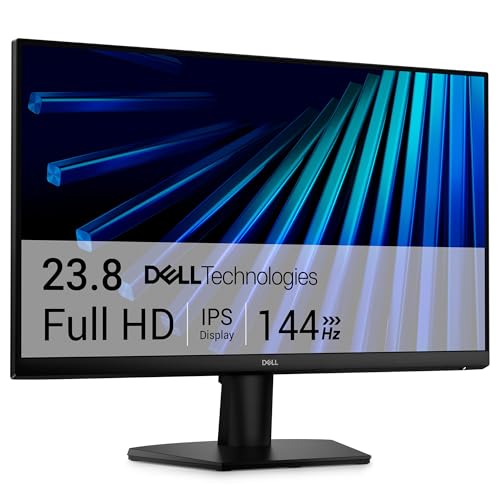
The SE2426H is consistently one of the best-selling monitors Dell makes, and the pricing explains why. Under $100 for a 23.8-inch IPS panel running 144Hz at 1920×1080 is a deal the budget end of this category rarely produces with genuine panel quality behind it.
The 144Hz refresh rate at this price is the key selling point. Competing monitors at similar price points tend to ship VA panels at 75Hz or IPS at 100Hz. The SE2426H gives you real 144Hz IPS with AMD FreeSync, which means smoother motion in everything from document scrolling to casual gaming. The 1ms MPRT response time keeps fast-moving content clean. A 178-degree horizontal and vertical viewing angle is the fundamental IPS advantage over VA: you can shift positions at your desk or have someone sit alongside you without colors inverting.
TUV Rheinland 3-star eye comfort certification at this price is a genuine feature, not marketing fluff. The 3-star standard requires measured low blue light output across tested conditions. The ultra-thin bezels make it a clean pairing for a two-monitor setup without an ugly dead strip between screens.
The stand is tilt-only. For casual and gaming use that's often fine, but anyone who has spent time with a height-adjustable monitor will notice the lack. Connectivity is dual HDMI only, with no DisplayPort. Both are acceptable concessions at this price, but worth knowing before you buy.
Pros:
Cons:
Best for: First-time monitor buyers, budget-conscious students, and casual gamers who want smooth visuals without compromising on IPS quality.
Check current price on Amazon →

The SE2726H is the SE2426H scaled up to 27 inches for an extra $20, and that size jump is where the math gets interesting. At 1920×1080 across 27 inches, pixel density is lower than the 24-inch version. Text looks slightly softer at a normal viewing distance. Whether that bothers you depends entirely on how close you sit and how much time you spend reading.
For movie-watching, streaming, casual gaming, or any task where you're looking at the full screen rather than individual characters, the lower pixel density is invisible. The 144Hz IPS panel, AMD FreeSync, TUV 3-star certification, and thin bezels carry over from the 24-inch model identically. The stand is still tilt-only, connectivity is still dual HDMI.
The SE2726H makes the most sense as a media and gaming panel rather than a pure productivity screen. At 27 inches, video content looks considerably more immersive than it does on a 24-inch display, and games benefit from the larger field of view. If you're editing documents and spreadsheets all day at close range, the QHD models below are a more defensible choice. If you're watching, gaming, or using it from a more comfortable leaned-back distance, this is straightforward value.
Pros:
Cons:
Best for: Casual gamers and media watchers who want a larger screen without paying for QHD.
Check current price on Amazon →

The SE2726HG is a different machine from the standard SE2726H despite the shared naming pattern. The refresh rate climbs to 240Hz and the response spec drops to 0.5ms. That's not incremental improvement over 144Hz: at 240Hz, the visual gap between frames is roughly 4ms. Fast-twitch competitive games (Counter-Strike, Valorant, Apex) feel physically different at 240Hz compared to 144Hz when your GPU can keep up. Target acquisition is more precise, recoil patterns are easier to track, and kills register in a way that feels more responsive.
Dell's "Fast IPS" designation here is accurate. The panel maintains the color consistency IPS is known for while achieving the speed typically associated with TN panels. AMD FreeSync Premium covers variable refresh across the range, and HDMI VRR extends that to console users on PS5 and Xbox Series X, which is unusual at this price point. The 99% sRGB coverage is solid for a gaming monitor that's not making creative workflow claims.
The trade-offs are predictable for an SE-series panel: tilt-only stand, no DisplayPort 2.0, no USB-C, no speakers. But at the price, none of that is surprising. This is a purpose-built gaming panel, and it competes well against anything in the 240Hz 27-inch IPS space.
Pros:
Cons:
Best for: PC and console gamers who prioritize frame rate and response time above all else and have a GPU that can actually feed 240fps.
Check current price on Amazon →

Where the SE2426H trades ergonomics for price, the S2425HSM inverts that priority. The panel specs are comparable: 23.8-inch FHD at 144Hz, IPS technology, AMD FreeSync. The stand is where the money goes. Full height, tilt, pivot, and swivel adjustment puts this in the category of monitors that accommodate different desks, different chairs, and people who move around during the day. The SE2426H's fixed-height stand makes you adjust your posture to the screen; this one adjusts the screen to your posture.
The 4-star TUV eye comfort certification (versus 3-star on the SE series) represents stricter testing criteria, which matters for people who are sensitive to display fatigue. Built-in dual 3W speakers are included, which at 24-inch monitor prices is still relatively uncommon. The 1500:1 contrast ratio is higher than IPS typically achieves and makes a visible difference for dark-scene content.
The S2425HSM's ash white colorway is a legitimate differentiator for minimalist desk setups where a black monitor stands out awkwardly against lighter surroundings. It ships in a profile that photographs well and doesn't demand the same dominant visual presence a black panel does.
The premium over the SE2426H is real. Whether it's justified depends entirely on how many hours you sit in front of this thing. For a full-time home office setup used 8-plus hours daily, the ergonomic stand pays for itself quickly in comfort. For casual use, the cheaper model suffices.
Pros:
Cons:
Best for: Remote workers and home office setups where all-day comfort matters more than cutting every possible dollar from the price.
Check current price on Amazon →

The S2725HSM is the 27-inch version of the S2425HSM, applying the same full ergonomic stand and dual speaker package to a larger panel. The pixel density argument from the SE2726H applies here too: 1920×1080 at 27 inches is softer than its 24-inch equivalent. The S2725HSM is best assessed against the S2725DSM (the QHD version that follows) rather than on absolute terms.
What the S2725HSM offers is the same ergonomics and eye comfort of the S2725DSM at a price that undercuts it by about $15. The trade-off is pixel count. At a reading-distance desk, the difference between 1080p and 1440p at 27 inches is visible in text rendering, particularly at smaller font sizes. For media consumption, gaming with AMD FreeSync active, and mixed-use productivity where you spend more time in applications than documents, the FHD version is a defensible choice.
The built-in speakers, 4-star TUV rating, and Dell Display and Peripheral Manager software apply across both. DPMM is one of Dell's underrated advantages: it gives you proper window management tools, auto-reconnect profiles for multi-monitor setups, and a unified control surface for all Dell peripherals without third-party software.
Pros:
Cons:
Best for: Buyers who want the ergonomic stand advantage at 27 inches and don't require QHD resolution for their primary work.
Check current price on Amazon →

The S2725DSM is where the resolution conversation shifts in Dell's 27-inch lineup. QHD at 2560×1440 gives 27 inches the pixel density it deserves. Text at default scaling is sharp, spreadsheets display more columns without horizontal scrolling, and the added screen real estate makes multitasking with two application windows genuinely useful rather than cramped.
The 144Hz refresh rate and 1ms MPRT carry over from the other Plus-series panels. The full ergonomic stand is here, as are the dual 3W speakers and 4-star TUV eye comfort certification. The 1500:1 contrast ratio helps with darker content more than a standard IPS would. DisplayPort 1.4 is included alongside HDMI, which opens up the 144Hz QHD mode to systems that need it (some graphics cards won't push 144Hz QHD cleanly over HDMI).
The pricing sits between the FHD Plus models and the 4K panels. At that position, the value case is strongest for users who do detailed work (design, coding, writing) at 27 inches and want the resolution bump without paying for 4K and a new GPU to drive it. QHD sits in a comfortable place where most mid-range GPUs handle the pixel count without strain.
Pros:
Cons:
Best for: Productivity users who want sharp text and real screen real estate at 27 inches without going all the way to 4K.
Check current price on Amazon →

The S3425DW is the largest and most expensive pick here, and it occupies its own category. The 34-inch curved VA panel at 3440×1440 in a 21:9 aspect ratio doesn't just give you more pixels; it gives you a fundamentally different way of working. Two windows at native 1:1 pixel ratio sit comfortably side by side on a 34-inch ultrawide in a way that 27-inch monitors can't replicate. The curved VA panel's 3000:1 contrast ratio produces noticeably deeper blacks than any IPS in this roundup, which makes the ultrawide particularly effective for video editing, content creation, and media consumption.
The 99% sRGB and 95% DCI-P3 color coverage is the broadest gamut on this list, placing it well into creative professional territory. For video work or photography where color volume matters, that DCI-P3 coverage is meaningful in practice. The VA panel's wider color gamut and higher contrast ratio make this a different value proposition than the IPS 4K picks.
USB-C with 65W power delivery is included, which at this size and price is expected. The re-engineered speakers are Dell's claim to improved audio output compared to previous-generation Plus monitors. AMD FreeSync Premium and a 120Hz ceiling means gaming is supported but not the primary use case. The monitor is heavy at over 20 pounds, and the 31.78-inch footprint requires a desk that can accommodate it.
ComfortView Plus is active here, which is meaningful on a panel you're likely to sit in front of for long stretches. Eye fatigue on a wide panel used for immersive work sessions is a real concern, and hardware-level blue light reduction without color distortion helps.
Pros:
Cons:
Best for: Creative professionals and power users who want maximum screen real estate, strong color volume, and a USB-C docking hub in a single ultrawide panel.
Check current price on Amazon →

The P2425H is a legacy professional panel in a lineup that has largely moved past it. Its core specifications are a 24-inch FHD LED display with a 1500:1 contrast ratio and a full ergonomic stand covering height, tilt, pivot, and swivel. The panel adjustability is genuinely good: the full range of ergonomic positioning puts it above the bare SE series.
The P2425H's main limitation in 2026 is the 60Hz refresh rate. Every other monitor on this list ships at 144Hz or faster. At 60Hz, mouse cursors, document scrolling, and video content feel noticeably less fluid by direct comparison. This isn't a problem if you're coming from an older office setup, but it will be immediately apparent next to any modern gaming or consumer display.
The silver colorway suits traditional office environments where uniform beige-and-silver aesthetics still dominate. Institutional buyers, corporate IT deployments, and office managers standardizing across desks may find the P2425H's compatibility with Dell's commercial monitor lineup relevant. For any individual buyer choosing between this and the S2425HSM, the Plus model delivers a faster panel with built-in speakers at a lower or comparable price.
Pros:
Cons:
Best for: Corporate IT buyers and office managers who need a professional-grade Dell monitor with ergonomic positioning and a commercial-compatible aesthetic.
Check current price on Amazon →
The right Dell monitor depends on getting screen size, resolution, refresh rate, and stand quality in the right combination for your specific use. Overinvesting in one dimension while underinvesting in another is the most common way to end up with a panel that frustrates you six months later.
Size and resolution are interdependent. A 24-inch panel at 1920×1080 has a pixel density of roughly 93 pixels per inch, which is crisp at arm's length. At 27 inches with the same resolution, density drops to about 82 ppi, and the softness becomes apparent when reading small text. The practical takeaway: if you want a 27-inch monitor for document-heavy work, budget for QHD (2560×1440) at minimum. At 27 inches QHD delivers roughly 109 ppi, which matches what you'd expect from a quality display. A 34-inch ultrawide at 3440×1440 lands around 109 ppi as well.
A 4K (3840×2160) panel at 27 inches reaches 163 ppi, which is exceptional and genuinely better than standard consumer displays for text-heavy work. The cost is GPU demand. Driving 4K at 120Hz for productivity tasks is well within reach of any modern GPU. Driving 4K at high frame rates in demanding games requires substantially more hardware.
The jump from 60Hz to 144Hz is significant for virtually everyone. Scrolling is smoother, cursor movement looks less stuttery, and fast-motion video benefits visibly. This upgrade costs almost nothing on current panels. The jump from 144Hz to 240Hz is meaningful for competitive gaming when your GPU can sustain that frame rate. It is not meaningfully different for productivity, media, or casual gaming.
If your graphics card regularly achieves 200+ fps in the games you play, the 240Hz SE2726HG earns its position. If you're primarily working and occasionally gaming at 60 to 120 fps, 144Hz is the ceiling you need.
Dell's lineup splits cleanly here. The SE-series monitors (SE2426H, SE2726H, SE2726HG) ship with tilt-only stands. The Plus-series monitors (S2425HSM, S2725HSM, S2725DSM, S2725QS, S2725QC, S3425DW) ship with full height, swivel, pivot, and tilt adjustment.
Tilt-only stands force you to adjust your chair or sitting position to place the screen at the right eye level. For casual use, this is rarely a problem. For anyone using a monitor as a primary work display for 6-plus hours daily, the inability to raise or lower the screen independent of the desk becomes a real ergonomic problem. The Plus-series premium is often justified entirely by the stand quality alone, separate from any other feature difference.
Most Dell monitors on this list use IPS panels. The SE2726HG is listed as "Fast IPS," and the S3425DW uses a VA panel. IPS delivers consistent color accuracy across wide viewing angles (178 degrees both ways). VA panels deliver higher contrast ratios (3000:1 on the S3425DW versus 1000:1 to 1500:1 on IPS models) at the cost of slower pixel response.
For office and creative work where color accuracy at off-axis angles matters, IPS is the right call. For media consumption or content where deep blacks and high contrast improve the experience, the VA panel in the S3425DW is a genuine advantage. VA panels can show ghosting or smearing in fast-motion gaming content due to slower response times; the S3425DW's 0.03ms spec mitigates this but doesn't eliminate it entirely.
For desktop PC users with a discrete GPU, dual HDMI is usually sufficient. The SE-series panels cover this. For laptop users who want a clean dock-style connection, USB-C with power delivery changes the desk entirely. The S2725QC and S3425DW both support this with 65W output. Sixty-five watts charges most ultrabooks and thin-and-light laptops adequately during normal use; it may not keep a high-performance gaming laptop topped up under heavy load.
DisplayPort 1.4 (present on the S2725DSM) matters primarily for high-bandwidth QHD at 144Hz. Some mid-range GPUs will not push QHD 144Hz cleanly over HDMI 2.0; DisplayPort 1.4 removes that bottleneck.
The Dell S2725QS (27-inch 4K) is the strongest home office pick for most people. It delivers sharp 4K resolution for detailed document and spreadsheet work, a full ergonomic stand for all-day comfort, built-in speakers that remove the need for a separate audio solution, and TUV 4-star eye comfort certification. If your budget is tighter, the S2425HSM offers all the ergonomic stand advantages at 24-inch FHD for substantially less.
Yes, depending on the model. The SE2726HG at 240Hz and 0.5ms response is a legitimate competitive gaming panel. The 4K models (S2725QS and S2725QC) support AMD FreeSync Premium at 120Hz, which suits most gaming scenarios well. The S3425DW ultrawide works for immersive gaming but the VA panel shows motion artifacts in very fast content that IPS panels handle more cleanly.
The naming convention is consistent across Dell's lineup. SE-series monitors (SE2426H, SE2726H, SE2726HG) are the budget tier: good panels, basic tilt-only stands, HDMI connectivity, no built-in speakers. The S Plus-series monitors add full ergonomic stands with height and swivel adjustment, built-in speakers, 4-star TUV eye comfort ratings, Dell Display and Peripheral Manager support, and generally a more premium build quality. The price difference reflects the stand quality more than the panel itself.
It depends on what you're doing. For gaming, streaming, and casual work, 1080p at 27 inches is acceptable and the lower pixel demand means your GPU can push higher frame rates. For reading dense documents, coding at small font sizes, or any work requiring sharp text rendering, QHD is noticeably better. The S2725DSM QHD costs relatively little more than the FHD S2725HSM and the sharpness improvement is immediate for text-heavy tasks.
Yes. All the HDMI-equipped models connect to Macs with Apple Silicon using a USB-C to HDMI adapter or cable. The USB-C models (S2725QC and S3425DW) connect directly via USB-C with no adapter needed. MacOS handles the 4K resolution of the S2725QS natively with HiDPI scaling options. Dell Display and Peripheral Manager is Windows-only software, so Mac users lose that feature, but core display function is unaffected.
ComfortView Plus is Dell's hardware-level low blue light implementation. Rather than applying a software color filter that shifts the screen's white balance toward yellow (a common approach on cheaper panels), ComfortView Plus reduces blue light emissions at the panel level to 35% or below while maintaining accurate color calibration. The result is measurably less blue light exposure without the color distortion common on software-filtered panels. It's present on the S-series Plus monitors and the S3425DW.
At their current prices, the gap is modest and the 4K model wins for most buyers. The S2725QS delivers substantially higher pixel density that is immediately visible in text rendering and fine detail. The GPU overhead difference between 4K at 120Hz (for productivity) and QHD at 144Hz is minimal for typical workloads. If you are primarily gaming and want the full 144Hz frame rate at 27 inches, QHD is a better match. For everything else, 4K is the more future-proof choice.
The best Dell monitors in 2026 are a coherent lineup more than a collection of disconnected panels. The Dell S2725QS is the pick most people should land on: 4K sharpness, a proper ergonomic stand, built-in speakers, and TUV-certified eye comfort at a price that undercuts category competitors without cutting the things that actually matter. If USB-C docking is a priority, the S2725QC delivers the identical display with that capability added for no extra cost.
For budget buyers, the SE2426H remains remarkable value. A 144Hz IPS panel under $100 is still genuinely hard to beat in the market for best Dell monitors at the entry level. Gamers who need frames-per-second performance have a clear path to the SE2726HG at 240Hz. Users who need the most screen real estate and strong color volume for creative work should put the S3425DW on the shortlist despite the higher price.
If you cannot decide, buy the S2725QS. It is the one pick that ages well across different work patterns and demands very few compromises.
This article contains Amazon affiliate links. We may earn a small commission on qualifying purchases at no extra cost to you.


