Physical Address
304 North Cardinal St.
Dorchester Center, MA 02124
Physical Address
304 North Cardinal St.
Dorchester Center, MA 02124

Shopping for the best dual screen laptops? We compare 6 top picks across every budget, from a $50 portable add-on to an RTX 5070 Ti gaming beast.
Two screens on one laptop sounds like a spec-sheet novelty until you actually try to code while referencing documentation, or run a stream overlay while gaming. The context switching between a browser and an IDE is real friction, and a built-in second display solves it without a desk setup.
The best dual screen laptops range from purpose-built machines with two matching OLED panels to budget options that bolt a touchscreen onto the side of a standard chassis. This guide covers 6 picks across a wide price spread, including one portable monitor that turns any compatible laptop into a dual-screen workstation for under $50.
TL;DR: The ASUS Zenbook Duo AI is the best dual screen laptop for most people: fast processor, two sharp 14" OLED panels, and genuine 2-in-1 versatility. The ASUS ROG Zephyrus Duo is the choice for serious gamers who need an RTX 5070 Ti behind their dual screens. Budget shoppers can try the ZWYING 15.6" for under $500, or pair any laptop with the MNN Portable Monitor for the lowest-cost entry into a dual-screen setup.
| # | Product | Screen Setup | RAM / Storage | Price | Best For |
|---|---|---|---|---|---|
| 1 | ASUS Zenbook Duo AI | Dual 14" OLED Touch | 32GB / 2TB | $2,109.99 | Best overall |
| 2 | ASUS ROG Zephyrus Duo | Dual 16" OLED 3K 120Hz | 32GB / 1TB | $4,499.99 | Serious gaming |
| 3 | ASUS Zenbook Duo | Dual 14" OLED Touch | 32GB / 2TB | $2,099.99 | Premium versatility |
| 4 | Lenovo Yoga Book 9i | Dual 13.3" 2.8K OLED | 16GB / 1TB | $1,799.00 | Unique form factor |
| 5 | ZWYING 15.6" Dual Screen | 15.6" FHD + 7" Touch | 16GB / 1TB | $499.90 | Budget dual screen |
| 6 | MNN 15.6" Portable Monitor | 15.6" FHD IPS (add-on) | N/A | $49.99 | Cheapest second screen |
Prices change in real time. Always check Amazon for the current price before buying.

The Zenbook Duo AI is the clearest answer to "just give me two real screens in one laptop." Both panels are 14" OLED touchscreens at 1920×1200, and the Intel Ultra 9-285H processor handles the load without throttling when both displays are running simultaneously. The detachable magnetic keyboard is a clever addition: it lets you prop the machine up in desktop mode, work flat as a dual-screen tablet, or use it in a conventional laptop configuration. This variant ships with a USB hub in the box, which matters given that thin machines like this tend to be stingy on ports. Compared to the ASUS Zenbook Duo (B0H28PTZRG) a few spots down the list, the AI bundle adds the hub accessory and expedited shipping without meaningfully changing the hardware underneath.
Pros:
Cons:
Best for: Professionals who need two proper working screens on the road and do not want to carry an external monitor.
Check current price on Amazon →

Two 16" 3K OLED panels at 120Hz with 0.2ms response, an RTX 5070 Ti Laptop GPU, and an Intel Core Ultra 9 386H with a 50+ TOPs NPU: the Zephyrus Duo is what happens when ROG decides to build the most powerful dual-screen gaming laptop they can. The CNC-milled aluminum chassis is carved from a single piece of metal and holds up to real use. The vapor chamber cooling keeps temperatures honest even when both screens are active and the GPU is under load. The kickstand-assisted second screen works well for stream overlays, chat, or a reference browser tab, so you get the dual-screen advantage without alt-tabbing mid-game. At this price point it is unambiguously a luxury purchase, but nothing else in this category combines this display setup with a discrete GPU at this tier.
Pros:
Cons:
Best for: Streamers and competitive gamers who want a second screen built in and the GPU headroom to back it up.
Check current price on Amazon →
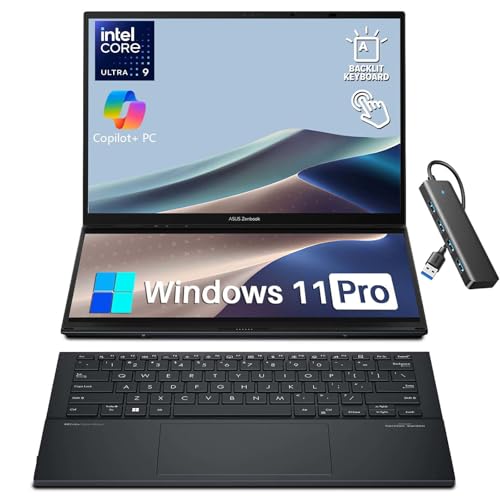
The standard Zenbook Duo runs the same Intel Ultra 9 285H processor and the same dual 14" OLED setup as the AI bundle variant above. In practice, the two machines are nearly identical: 32GB LPDDR5X, 2TB SSD, the same detachable keyboard and kickstand, WiFi 7, Bluetooth 5.4, and MIL-STD-810H certification. The difference comes down to the included accessories. If you already own a USB hub or don't want to pay the bundle premium, this is the one to buy. Battery life is rated at up to 18 hours in single-screen laptop mode, dropping to around 10 hours with both OLED panels active, which is respectable given dual-screen power draw. The 0.57" profile is also the slimmest of all the laptops in this round-up.
Pros:
Cons:
Best for: Buyers who want the core Zenbook Duo experience and already own the accessories.
Check current price on Amazon →

Every other machine in this list uses one main screen plus a secondary display. The Yoga Book 9i uses two identical 13.3" 2.8K PureSight OLED panels, which means you get two equal workspaces rather than a primary display with a supporting cast. The detachable Bluetooth keyboard, stylus pen, and folio stand are all included, and the 0.63" profile keeps the whole package remarkably thin. Intel's 13th Gen Core i7-1355U is more conservative on power than the Ultra 9 chips above, which is part of why the form factor works. One important note: the listing on Amazon is sold as used condition, so read the condition details carefully before purchasing. For anyone who finds the Zenbook Duo formula too conventional, this is the most interesting machine in the category.
Pros:
Cons:
Best for: Design-focused users who want the most elegant dual-OLED form factor and have vetted the used-condition listing.
Check current price on Amazon →

The ZWYING does something none of the premium options here do: pair a full 15.6" FHD main display with a separate 7" 1200×1920 portrait touchscreen positioned where you would expect a trackpad. That secondary panel runs apps independently, so you can keep a reference document, YouTube video, or notes app open while working on the main screen. The N95 Alder Lake processor and 16GB DDR4 RAM are modest by 2026 standards but perfectly adequate for document work, light coding, and web research. The pluggable 2MP camera with a detachable design is a thoughtful privacy feature. At 3.8 lbs and 0.67" thick, it carries well enough. The machine has real limitations, but it does not feel like it cuts corners in ways that matter for the daily work it is designed for.
Pros:
Cons:
Best for: Students and remote workers who want a genuine dual-screen experience at the budget end of this category.
Check current price on Amazon →

If you already own a laptop you like and just need a second screen for travel, the MNN 15.6" solves the problem without replacing your main machine. A single USB-C cable handles both power and signal (HDMI is also available), and the PU leather smart cover doubles as a kickstand. The 1080p IPS panel delivers accurate color at a full 178-degree viewing angle, and the 1.53 lb weight folds flat to 0.3 inches. This is not a dual screen laptop in the traditional sense. It is a portable monitor that turns any compatible laptop into one. Display quality is honest for the price tier, not remarkable. The important caveat is that your existing laptop needs USB-C DisplayPort Alt Mode support to use it via the single-cable connection.
Pros:
Cons:
Best for: Travelers who want a second screen on the road without replacing their current laptop, provided the existing machine is USB-C compatible.
Check current price on Amazon →
The core question is not "how many screens?" but "what kind of second screen, and what will you run on it?" Here is what separates a useful dual-screen setup from an expensive gimmick.
The Lenovo Yoga Book 9i uses two identical full-size displays. The ASUS Zenbook Duo and ROG Zephyrus Duo use a primary display with a secondary panel that, while capable, serves a different role. The ZWYING uses a small 7" portrait panel. Symmetric designs give you two genuinely equal workspaces, which suits side-by-side app work. A utility panel approach works better for reference content, stream overlays, or persistent dashboards. Neither is wrong; pick based on whether you want two offices or one office with a sidebar.
At $2,000 and above, expect OLED with wide color gamuts (100% DCI-P3 is the standard here), 1920×1200 or better resolution on both panels, and touch support. The two Zenbook Duo variants and the Yoga Book 9i all clear that bar. Below $1,000, panels step down to IPS LCD with narrower gamuts. The ZWYING's 7" secondary screen is a real touch panel and genuinely useful, but its resolution differs from the main 1080p display, which is noticeable if you run text-heavy apps on both at once.
Running two displays takes real CPU and integrated GPU resources. The N95 chip in the ZWYING handles office work comfortably but will stutter under anything GPU-intensive across both screens simultaneously. The Intel Ultra 9 285H machines handle split workloads without issue. The ROG Zephyrus Duo's discrete RTX 5070 Ti removes this consideration entirely for gaming. If your workflow involves video rendering, 3D work, or running multiple VMs, budget for at least a mid-range Intel Ultra processor.
More screens means more heat and more battery drain. The Zenbook Duo at 3.64 lbs is the most practical daily carry in this round-up. The ROG Zephyrus Duo is a desktop replacement that happens to have a handle. The Yoga Book 9i's lower-power CPU keeps thermals flat but caps performance. For the portable monitor approach, add the MNN's 1.53 lbs to your existing laptop's weight: the combined carry load is what you will feel in your bag at the end of the day.
A dual screen laptop integrates two built-in displays instead of one. The second screen can be a full-size panel matching the primary (as in the Lenovo Yoga Book 9i and ASUS Zenbook Duo) or a smaller secondary panel positioned below or beside the main display. The goal is to reduce reliance on an external monitor when working or gaming away from a desk.
For anyone who regularly switches between several apps at once, yes. The best dual screen laptops in 2026 use OLED panels on both screens, eliminating the quality mismatch that made earlier designs feel compromised. The main limitation is price: capable options start at roughly $1,800 for new machines unless you opt for a budget machine like the ZWYING or take the portable monitor approach with the MNN.
Yes, with a portable monitor. The MNN 15.6" connects via USB-C and adds a full 1080p screen to any compatible laptop. Your machine needs to support USB-C DisplayPort Alt Mode, which most modern USB-C ports do, and you will need enough processor headroom to drive both displays. This is the lowest-cost path into a dual-screen workflow without buying a new laptop.
Noticeably. The ASUS Zenbook Duo rates at up to 18 hours in single-screen laptop mode and around 10 hours with both OLED panels active. Expect roughly 40 to 50 percent shorter runtime whenever both displays are on, regardless of the machine. The ROG Zephyrus Duo draws significantly more power due to its gaming GPU, so treat battery life on that machine as a secondary consideration rather than a selling point.
The best dual screen laptops for most buyers come down to three clear picks. The ASUS Zenbook Duo AI is the top overall recommendation: two genuine 14" OLED workspaces, a flagship processor, WiFi 7, and a chassis you can carry daily without complaint. If gaming is the priority, nothing in this category matches the ASUS ROG Zephyrus Duo for raw dual-screen performance, and the RTX 5070 Ti makes the premium justifiable for the right buyer. Shoppers who need two screens under $500 should look seriously at the ZWYING 15.6", with the clear understanding that the modest chip limits how heavy the workloads can get on both panels at once. If you are still undecided, the clearest tie-breaker is simple: if you work primarily on battery away from a desk, get the Zenbook Duo AI. If you are mostly plugged in and gaming, the Zephyrus Duo is worth every dollar.
This article contains Amazon affiliate links. We may earn a small commission on qualifying purchases at no extra cost to you.


