Physical Address
304 North Cardinal St.
Dorchester Center, MA 02124
Physical Address
304 North Cardinal St.
Dorchester Center, MA 02124

The 10 best gaming PC builds in 2026 for every budget and use case, from entry-level rigs to enthusiast towers with RTX 5070 Ti and Ryzen X3D chips
Building a gaming PC from scratch can be a rewarding weekend project, but it's also a logistical tangle of socket compatibility, BIOS updates, and cable management that not everyone has time for. Prebuilt gaming PCs have closed the gap in recent years: you get the same off-the-shelf components, a proper warranty, and a system that works the moment you plug it in. The challenge now is sorting through dozens of configurations that look similar on paper but differ sharply in real-world performance and upgradeability.
The best gaming PC builds in 2026 span an enormous range. Some pack the new Blackwell RTX 5070 series with enough VRAM for 1440p ray tracing, others rely on older but still capable DDR4 platforms to keep entry costs down, and a couple aim squarely at 4K with the new Ryzen 9850X3D processor. We looked at ten prebuilts that cover the full spectrum. Here is the short version of who each is for, followed by the detailed breakdown.
TL;DR: The Skytech Gaming O11 Vision with Ryzen 7 9850X3D and RTX 5070 Ti is the enthusiast pick for maxed-out 4K. The MSI Codex Z2 is the most balanced all-rounder for high-refresh 1440p. The KOTIN G60B is the feature-rich choice with a huge smart display and excellent cooling. The YAWYORE R5 5600GT build is the sensible entry-level rig for 1080p.
| # | Product | Key Specs | Best for |
|---|---|---|---|
| 1 | Skytech Gaming O11 Vision | Ryzen 7 9850X3D, RTX 5070 Ti 16GB, 32GB DDR5, 2TB Gen4 SSD, 360mm AIO | Gamers who want maximum frame rates at 4K and the latest X3D cache |
| 2 | Alienware Aurora ACT1250 | Intel Core Ultra 7 265F, RTX 5070 12GB, 32GB DDR5, 1TB SSD, 1000W Platinum PSU | Buyers who want a known brand with onsite service and a sleek, compact chassis |
| 3 | Skytech Gaming Azure 3 | Ryzen 7 7700X, RTX 5070 12GB, 32GB DDR5 6000, 1TB Gen4 SSD, 360mm AIO | 1440p gamers who want a white-themed build with liquid cooling and minimal bloatware |
| 4 | MSI Codex Z2 | Ryzen 7 8700F, RTX 5070 12GB, 32GB DDR5, 2TB M.2 SSD | Best balance of gaming and streaming performance with a huge SSD out of the box |
| 5 | KOTIN G60B | Ryzen 7 9700X, RTX 5070 12GB, 32GB DDR5 6000, 1TB PCIe 4.0 SSD, 11.3-inch smart display | Users who want a standout showpiece desktop with real-time system monitoring |
| 6 | CyberPowerPC Gamer Master | Ryzen 7 8700F, RTX 5060 Ti 8GB, 16GB DDR5, 1TB PCIe 4.0 SSD | Entry-level 1440p gamers who want a solid upgrade path and an established builder |
| 7 | YAWYORE Ryzen 7 5700X | Ryzen 7 5700X, RTX 5060 8GB, 32GB DDR4, 1TB M.2 SSD | Budget-conscious buyers who want extra DDR4 RAM capacity and a mature platform |
| 8 | KOTIN Ryzen 5 9600X | Ryzen 5 9600X, RTX 5060 Ti 8GB, 16GB DDR5 6000, 1TB PCIe 4.0 SSD, WiFi 7 | Modern mid-range with the latest Zen 5 CPU and future upgrade options via AM5 |
| 9 | Evounic Gaming Desktop | Intel Xeon 12-core, RTX 4060 8GB, 64GB RAM, 512GB NVMe + 1TB HDD | Gamers who need massive RAM for multitasking and don't mind a unique CPU choice |
| 10 | YAWYORE R5 5600GT | Ryzen 5 5600GT (integrated Vega), 16GB DDR4, 1TB NVMe SSD | The purest entry point for 1080p gaming on a tight budget, with integrated graphics that actually work |

Pros
Cons
Best for: Gamers who want a no-compromises 4K machine with the fastest gaming CPU available and are comfortable with a large, high-end chassis.
Check current price on Amazon →
The O11 Vision sits at the top of this list for a simple reason: the Ryzen 7 9850X3D and RTX 5070 Ti combination is the most powerful pairing you can buy in a prebuilt right now. The X3D chip's extra L3 cache makes a huge difference in games like Baldur's Gate 3, Cyberpunk 2077, and Total War: Warhammer III, where frame rates in dense scenes stay high when other processors start to stutter.
Skytech chose the Lian Li PC-O11 Dynamic Vision case, which is a favorite among custom PC builders for a reason. The dual-chamber design separates the power supply and cable clutter from the main compartment, so the interior looks clean through the tempered glass panels. Cooling is also exceptional: the 360 mm AIO handles the 9850X3D's heat output without issue, and the case supports bottom and side intake fans for the GPU. The one odd omission is Wi-Fi 5 instead of 6 or 6E, but for a system that will mostly sit next to a wired router, it is a minor annoyance rather than a dealbreaker.
The 2 TB SSD is generous, and the 850W ATX 3.0 power supply is built for the transient power spikes that modern GPUs demand. If you want the best gaming PC build on paper and you have the space for a full-tower chassis, this is it.
Pros
Cons
Best for: Gamers who want a polished, support-backed experience from a major brand and value service convenience over DIY upgradeability.
Check current price on Amazon →
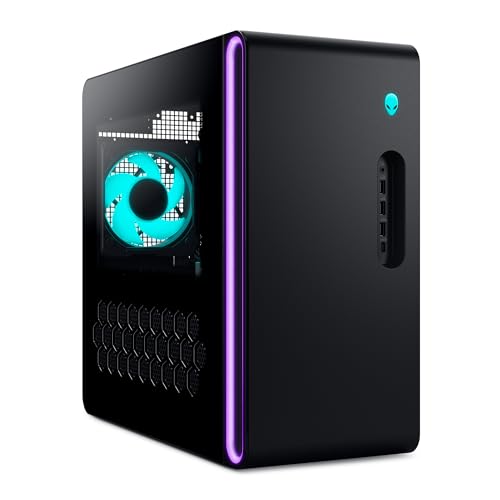
The Aurora line has been Alienware's gaming tower for years, and the ACT1250 refines the formula. The Intel Core Ultra 7 265F is a solid processor that competes well with the Ryzen 7 8700F in the Codex Z2, and the RTX 5070 12 GB handles 1440p ultra settings with ray tracing enabled without breaking a sweat. The real story here is the build integration: Alienware uses a custom motherboard and a compact power supply layout to keep the case smaller than most full-tower options.
The clear side panel and customizable AlienFX stadium lighting look striking, but the trade-off is that you cannot swap the motherboard for a standard ATX board later. If you are the type of person who buys a PC and uses it for three to five years before replacing the whole thing, this is less of a concern. The 1000W Platinum PSU is actually a forward-looking choice, because future GPU upgrades will need the power.
Dell's onsite service sets this apart from the rest of the list. If a component fails and remote troubleshooting does not fix it, a technician comes to your home. That peace of mind is worth something when you are spending at this level. The single 1 TB SSD is the main weakness, but you can add a second M.2 drive easily enough.

Pros
Cons
Best for: Gamers who want a beautiful white-themed rig that delivers smooth 1440p gaming with high refresh rates and don't mind the storage limitation.
Check current price on Amazon →
The Azure 3 is Skytech's mid-range contender, and it occupies a smart spot in the lineup. The Ryzen 7 7700X is a Zen 4 processor that still holds its own against newer chips, especially in gaming where single-threaded performance matters most. Combined with the RTX 5070 12 GB, this PC runs nearly every game at 1440p with maxed settings and sees 60 to 100 fps depending on title.
What makes the Azure 3 stand out is the cooling package. The 360 mm AIO is overkill for a 7700X, but that means the CPU stays around 70 degrees under sustained loads, which lets the boost algorithm stay at higher clocks. The ARGB fans in the front and on the radiator create a pleasing light show that can be controlled through the motherboard software. The case itself is a Skytech-branded tower with a tempered glass side panel and good airflow.
The main catch is the 1 TB SSD. Modern games regularly exceed 100 GB each, so you will be managing installations before long. Adding a second M.2 drive is straightforward, and the 850W Gold power supply has enough capacity for future upgrades. If white builds are your thing, this is the prettiest RTX 5070 machine on the list.
Pros
Cons
Best for: Gamers who want the most storage for their money and a reliable, no-nonsense configuration that just works.
Check current price on Amazon →
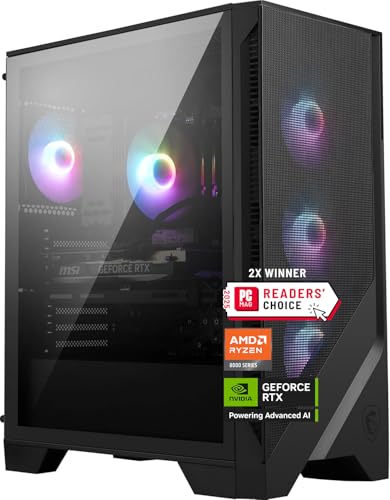
The MSI Codex Z2 is the kind of PC that does not call attention to itself but wins you over with thoughtful decisions. The 2 TB SSD is the headline feature here, because most prebuilts at this performance tier stop at 1 TB. Having that extra space means you can install the entirety of a Steam backlog without playing the uninstall-and-redownload game.
MSI paired the Ryzen 7 8700F with the RTX 5070, and that combination is well matched for 1440p high-refresh gaming. The 8700F is an 8-core chip built on the Zen 4 architecture, so it has enough horsepower to keep frame times consistent even when you are streaming to Discord or running OBS in the background. The air cooler is the only compromise: it keeps the CPU within spec, but it runs louder and hotter than the AIO coolers on the Skytech Azure or the KOTIN G60B.
The case is a standard mid-tower with a mesh front and a subtle ARGB strip. It is not flashy, but the build quality is solid, and the cable management inside is tidy. MSI also included an LED button on top to cycle through lighting presets without needing software. If you want a straightforward, well-balanced gaming PC that skips the gimmicks and gives you double the storage, this is the pick.

Pros
Cons
Best for: Gamers who want a conversation-starting PC with built-in system monitoring and are willing to trade some subtlety for a large, functional screen.
Check current price on Amazon →
The KOTIN G60B is the most visually distinctive PC in this roundup. The entire front panel is dominated by an 11.3-inch LCD screen that can display animated themes, system stats, or even custom GIFs. It is not just a gimmick, either: being able to glance at CPU temperature, GPU load, and clock speeds while gaming is genuinely convenient, especially when you are tuning settings for a new title.
Under the screen, the hardware is equally impressive. The Ryzen 7 9700X is a Zen 5 chip that boosts to 5.5 GHz, giving it a clear edge in single-threaded workloads over the 8700F in the Codex Z2 and the 7700X in the Azure 3. The RTX 5070 12 GB is the same GPU found in those machines, so the gaming performance difference will come down to CPU-bound scenarios. The 360 mm AIO is installed on the top of the case, and the pump head has its own digital display showing real-time coolant temperature.
KOTIN assembled this PC in California, which means the GPU is pre-installed and you just need to remove the internal foam before powering it on. The 850W Gold power supply leaves room for a future GPU upgrade, and the three M.2 slots mean you can add more storage without replacing the existing drive. Keep in mind that the case is on the larger side at 16.8 inches deep, so measure your desk space.

Pros
Cons
Best for: Gamers who want a modern platform (AM5, DDR5, PCIe 5.0) at a reasonable entry point and are comfortable adding more RAM later.
Check current price on Amazon →
CyberPowerPC has been in the prebuilt game for a long time, and the Gamer Master GMA2900A3 shows why they remain a popular choice. It uses standard off-the-shelf components, so upgrading later is as simple as it would be with a DIY build. The B850 motherboard supports PCIe 5.0 for both graphics and storage, which means you can drop in a future RTX 60-series card or a Gen5 SSD without replacing the entire system.
The RTX 5060 Ti is the entry point to Nvidia's Blackwell lineup, and it delivers solid 1080p ultra performance. At 1440p you will need to lean on DLSS 4's Multi Frame Generation to keep frame rates high in demanding titles, but that is a fair trade at this tier. The 8 GB VRAM is fine for now, but heavier texture packs in upcoming releases may push against that limit.
The biggest shortcoming is the 16 GB RAM configuration. For a system built around an 8-core CPU and a modern GPU, 32 GB would have been more appropriate. The good news is that the motherboard has two empty DIMM slots, so you can add another 16 GB kit later. If you are on a tighter upfront budget and do not mind a small RAM upgrade down the road, this is a well-balanced foundation.

Pros
Cons
Best for: Gamers who prioritize maximum RAM capacity and core count on a DDR4 budget and want a proven, stable platform.
Check current price on Amazon →
YAWYORE takes a different approach here: instead of chasing the latest AM5 platform, they built this PC around the Ryzen 7 5700X and an MSI B550 motherboard. That means DDR4 RAM at 3200 MHz, which is slower than DDR5 but still plenty for gaming. The trade-off is that you get 32 GB of RAM for less than what a 16 GB DDR5 kit costs, and the 5700X is no slouch.
The RTX 5060 with 8 GB GDDR7 is the same generation of graphics as the 5060 Ti found in the CyberPowerPC, but with slightly fewer CUDA cores and lower clock speeds. For 1080p ultra settings, it is more than enough. At 1440p you will need to adjust settings in heavier titles, but it remains playable. The GPU brand may vary, but performance across different MSI, Gigabyte, or other partner cards is close enough to be irrelevant.
The 650W Bronze PSU is the weakest link for future upgrades, but it handles the current load without issue. YAWYORE also packs the system with protective foam for shipping, which is reassuring. If you want a system that prioritizes RAM capacity and a proven CPU platform over DDR5 speed, this is a smart choice.

Pros
Cons
Best for: Gamers who want the latest Zen 5 CPU and RTX 5060 Ti in a well-cooled package with modern connectivity, and are okay with 16 GB of RAM.
Check current price on Amazon →
KOTIN's second entry on this list trades the big display of the G60B for a more straightforward build centered around the Zen 5 platform. The Ryzen 5 9600X is a 6-core processor that punches above its weight in games thanks to high clocks and architectural improvements. In titles like Valorant, CS2, and Fortnite, it can push well beyond 200 fps without breaking a sweat.
The RTX 5060 Ti is a step up from the standard 5060, with 8 GB of GDDR7 and a wider memory bus. For 1440p medium to high settings, it delivers smooth performance. The 650W Gold PSU is adequate for this configuration, and the five ARGB fans plus the digital-display air cooler do a good job managing heat. The case has a tempered glass side panel, and cable management is tidy enough for a prebuilt.
The 16 GB of DDR5-6000 is the main area where KOTIN trimmed costs. With two DIMM slots occupied, upgrading to 32 GB would mean replacing the existing sticks rather than adding more. Still, for a system at this level, 16 GB is workable for the vast majority of current games. The inclusion of WiFi 7 is a nice bonus that most competitors at this level do not offer.

Pros
Cons
Best for: Users who need enormous RAM capacity for productivity or streaming and want a budget-friendly gaming system that can handle moderate gaming.
Check current price on Amazon →
The Evounic desktop is the wildcard of this roundup. Instead of a standard Ryzen or Intel Core processor, it uses a 12-core Xeon chip that is essentially an older Intel workstation CPU. That means it has plenty of cores for multithreaded tasks like video encoding, compiling, or running multiple virtual machines, but its per-core speed is lower than a modern Ryzen 5. In games that rely on strong single-threaded performance, this PC will fall behind the others.
The RTX 4060 is still a capable 1080p card, and it handles most games at high settings without issue. But it is a generation behind the 5060 series, so you miss out on DLSS 4 and the improved ray tracing performance of Blackwell. The 8 GB VRAM is the same as the 5060, but the underlying architecture is older.
Where this system shines is RAM and storage. 64 GB is overkill for gaming today, but if you stream, run a Minecraft server in the background, or do light video editing while playing, it eliminates any memory bottlenecks. The 512 GB SSD for your operating system and a few active games, paired with a 1 TB HDD for the rest of your library, is a practical setup. The white case with seven ARGB fans is also visually striking. This is a niche pick, but it has its place.

Pros
Cons
Best for: First-time gamers or light users who want a functioning desktop now and plan to add a dedicated GPU later when their budget allows.
Check current price on Amazon →
The YAWYORE R5 5600GT is the most affordable entry point on this list, and it makes a specific compromise: it uses the CPU's integrated graphics instead of a dedicated GPU. The Ryzen 5 5600GT features AMD Radeon Vega graphics that are surprisingly capable for an iGPU. You can play games like Fortnite at 1080p low, Rocket League at high settings, and older titles like Minecraft or CS:GO smoothly. It will not run Cyberpunk 2077 or Alan Wake 2, but it does not pretend to be capable of that.
What you get instead is a full desktop with a fast 1 TB NVMe SSD, 16 GB of RAM, and a clean case with ARGB fans. The motherboard (MSI A520M-A PRO) has a PCIe x16 slot ready and waiting for a GPU. When you save enough for an RTX 4060 or a used RX 6600, you can drop it in and instantly have a solid 1080p gaming rig. The 550W PSU is borderline for a mid-range GPU, so factor in a replacement if you step up to an RTX 5070 later.
For a student, a child's first PC, or anyone who needs a functional computer today with gaming as a future upgrade, this is a smart starting point.
If you are buying a prebuilt gaming PC, you are making a decision about which parts someone else put together. The key is understanding which specifications matter most for the games you play and how much future headroom you need.
The graphics card determines your resolution, refresh rate, and ray tracing capability more than any other component. Nvidia's RTX 50-series (Blackwell) is the current generation, bringing DLSS 4 with Multi Frame Generation, improved ray tracing cores, and GDDR7 memory. The RTX 5060 and 5060 Ti target 1080p and entry-level 1440p, the RTX 5070 handles 1440p ultra with ray tracing, and the RTX 5070 Ti pushes into 4K territory. VRAM is critical: 8 GB is enough for 1080p, but 12 GB or 16 GB provides breathing room for high-resolution texture packs and future titles. If you play games like Cyberpunk 2077 with ray tracing at 1440p, aim for at least 12 GB.
For gaming, single-threaded clock speed and cache size matter more than raw core count. AMD's Ryzen 7000-series (Zen 4) and 9000-series (Zen 5) are the top performers, with X3D variants adding extra L3 cache that benefits simulation, strategy, and open-world games. Intel's Core Ultra 200-series offers strong multi-core performance but lags slightly in pure gaming IPC. Six cores is the practical minimum; eight cores provides headroom for streaming and background tasks. Avoid older architectures like Intel 12th-gen or AMD Ryzen 5000-series unless the price difference is substantial.
Most modern games run well with 16 GB of DDR5, but 32 GB is becoming the recommended standard for new AAA releases, especially if you keep Discord, a browser, and other apps open. DDR5 memory at 5600 MT/s or faster offers a meaningful performance uplift over DDR4 in CPU-bound scenes. Pay attention to whether the PC has two or four DIMM slots: systems with two slots occupied by 16 GB sticks (2×8 GB) are harder to upgrade to 32 GB than those with 32 GB in two sticks (2×16 GB) that leave slots free.
High-performance components generate significant heat. A 240 mm or larger AIO liquid cooler is preferable for any 8-core or X3D processor, because it keeps temperatures low enough to maintain boost clocks under sustained loads. Stock air coolers work but often run louder and allow the CPU to throttle back earlier. GPU cooling is handled by the graphics card itself, but case airflow matters: look for systems with at least two intake fans and one exhaust fan. A well-ventilated case with mesh front panels is better than a sealed glass front.
A prebuilt that uses a standard ATX motherboard, a standard power supply, and a case with room for a full-size GPU is easier to upgrade later. Proprietary components (common in Alienware and some major brands) limit your options to what the manufacturer supports. AM5 motherboards from AMD offer the longest potential upgrade path, with support for multiple future CPU generations. Intel's LGA1851 socket is newer and less proven. Also consider the power supply wattage and efficiency rating: an 850W Gold PSU gives you room for a future GPU upgrade, while a 650W Bronze unit may need to be swapped.
16 GB is the minimum for modern games, but 32 GB is strongly recommended. Several 2025 and 2026 AAA titles show noticeable frame-time improvements with 32 GB, especially when running background applications. If you plan to keep the PC for three to four years, start with 32 GB.
The RTX 5070 has roughly 30 to 40 percent more CUDA cores, 12 GB of VRAM versus 8 GB, and significantly higher bandwidth. At 1440p, the 5070 can maintain high frame rates with ray tracing enabled, while the 5060 often requires DLSS upscaling to stay smooth. The 5070 Ti adds another jump with 16 GB VRAM and a wider memory bus for 4K.
Liquid cooling is preferred for processors with eight or more cores, especially Ryzen 7 and X3D chips that boost aggressively when cool. It runs quieter under load and maintains lower temperatures. Air cooling is sufficient for six-core processors and offers lower cost and zero risk of pump failure. For a prebuilt, a 240 mm or 360 mm AIO is a clear sign the manufacturer has invested in cooling.
Yes, most prebuilts that use standard components allow you to swap the GPU, add RAM, and replace the CPU within the same socket generation. The main limitations come from proprietary motherboards, non-standard power supplies, and cramped cases. Check whether the motherboard uses a standard form factor (ATX, Micro-ATX) and whether the PSU is a standard ATX unit.
Wi-Fi 5 is sufficient for stable online gaming if you have a good router, but Wi-Fi 6 and 6E reduce latency and handle interference better in crowded network environments. Wi-Fi 7 is overkill for current internet speeds but future-proofs the system for faster home connections. If you are using Ethernet anyway, it matters less.
It means the manufacturer used whichever partner card (MSI, Gigabyte, ASUS, etc.) was available at the time of assembly. The core GPU chip is identical, so gaming performance is practically the same across brands. The cooling solution and factory overclock may differ slightly, but the differences are minor.
A 1 TB SSD is the practical minimum. Modern games often occupy 80 to 150 GB each, so a 1 TB drive holds roughly eight to twelve games. A 2 TB SSD is more comfortable if you play several large titles simultaneously. Avoid relying on an HDD for game storage, because load times are much slower.
The best gaming PC build for you depends on what you want to play and your future upgrade plans. For pure 4K gaming with the fastest processor available, the Skytech Gaming O11 Vision with the Ryzen 7 9850X3D and RTX 5070 Ti is unbeatable among prebuilts right now. If you want a more balanced machine that excels at 1440p without overspending, the MSI Codex Z2 gives you the same GPU as pricier options with double the storage of most competitors. The KOTIN G60B earns its place for anyone who values a striking design and real-time system monitoring built into the case.
For those on a tighter budget, the YAWYORE R5 5600GT is a smart entry point that lets you add a GPU later, and the CyberPowerPC Gamer Master offers a modern AM5 platform with PCIe 5.0 support for future upgrades. Whichever you choose, focus on the GPU and VRAM configuration first, because that is what will determine how well your favorite games run now and for the next few years.
This article contains Amazon affiliate links. We may earn a small commission on qualifying purchases at no extra cost to you.


