Physical Address
304 North Cardinal St.
Dorchester Center, MA 02124
Physical Address
304 North Cardinal St.
Dorchester Center, MA 02124

We found the 10 best LaserJet printers in 2026 for every office setup. From compact mono to full-color all-in-ones, find your match.
You need a printer that works. Not one that guzzles ink, drops off Wi‑Fi mid-job, or forces you to dig through menus for a duplex setting. A laser printer is the sensible choice: fast, crisp text, and toner that doesn't dry out if you go a week without printing. But the category has split into dozens of variations — wired only, wireless, all-in-one, color, compact, security-focused — and picking the wrong one means living with a machine that fights you instead of helping.
We've sorted through the current crop of LaserJet and comparable laser printers to find the 10 best LaserJet printers in 2026. The picks cover true single-function units that sit on a shelf and never ask for attention, full multifunction workhorses with automatic document feeders and fax lines, and one color printer that finally makes office color affordable to run. Some are small enough to live beside a laptop on a kitchen counter. Others belong in a dedicated office corner with a network cable and a steady diet of letterhead. Every one of them does what laser printers do best: they print reliably, page after page, without drama.
TL;DR: The Brother DCP-L2640DW is the best all-around monochrome laser printer for small teams and home offices: fast, duplex, scan, and reliable. The HP LaserJet Pro MFP 3101fdw is the full-office pick with fax and the fastest print speed here. The HP Color LaserJet Pro MFP 3301sdw is the only color printer on the list and a strong choice if you need occasional color in a business setting. The Brother HL-L2405W is the no-frills mono print-only winner for budget-conscious home offices.
| # | Product | Type | Connectivity | Multifunction | Best For |
|---|---|---|---|---|---|
| 1 | Brother DCP-L2640DW | Monochrome | Dual-band Wi‑Fi, Ethernet, USB | Print, scan, copy, ADF, duplex | Small teams wanting a fast, full-featured mono all-in-one |
| 2 | Brother HL-L2405W | Monochrome | Dual-band Wi‑Fi, USB | Print only | Home offices that only print and want a compact, fuss-free machine |
| 3 | HP LaserJet MFP M140w | Monochrome | Wi‑Fi, USB | Print, scan, copy | Tight spaces where the smallest possible footprint matters |
| 4 | HP LaserJet M209d | Monochrome | USB (wired only) | Print, duplex | A dedicated wired printer for a single desk, no network fuss |
| 5 | HP LaserJet M209dw | Monochrome | Dual-band Wi‑Fi, USB | Print, duplex | Small teams needing wireless and fast two-sided printing |
| 6 | HP LaserJet Pro 3001dw | Monochrome | Intelligent Wi‑Fi, Ethernet, Bluetooth, USB | Print, duplex | Workgroups of up to 7 who need the fastest mono print speed |
| 7 | HP LaserJet MFP M234sdw | Monochrome | Dual-band Wi‑Fi, Ethernet, USB | Print, scan, copy, ADF, duplex | Teams that want scan-to-email and an automatic document feeder |
| 8 | HP LaserJet Pro MFP 3101fdw | Monochrome | Intelligent Wi‑Fi, Ethernet, Bluetooth, USB | Print, scan, copy, fax, ADF, duplex | Busy offices that need fax, fast scans, and high-volume printing |
| 9 | HP LaserJet M110w | Monochrome | Wi‑Fi, USB | Print only | Minimalists who want the world's smallest laser printer |
| 10 | HP Color LaserJet Pro MFP 3301sdw | Color | Wi‑Fi, Ethernet, USB | Print, scan, copy, ADF, duplex | Offices that need occasional color documents with laser speed |
Pros
Cons
Best for: Small businesses and home offices that need a fast, reliable mono workhorse with scanning and copying, and don't want to mess with subscription ink.
Check current price on Amazon →
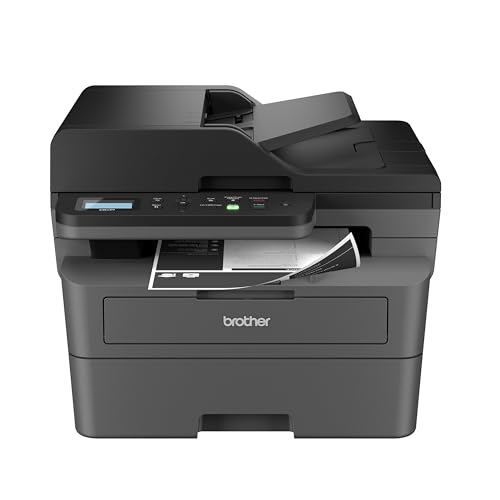
The Brother DCP-L2640DW is the printer most people in this category should buy. It prints at 36 pages per minute, which is genuinely fast — it spits out a five‑page document before you've finished walking back to your desk. Automatic duplex is standard, and the 50‑page automatic document feeder means you can load a stack of double‑sided originals and walk away. The scanner hits 23.6 images per minute in black‑and‑white mode, which is quick for a sub‑$250‑class machine.
Brother's build quality is legendary for a reason. The paper path is straight and rarely jams. The toner — TN830 or the high‑yield TN830XL — is easy to replace and widely available. The Connect app lets you scan to cloud storage from your phone. It also works with Amazon Alexa for voice‑activated printing, a gimmick that becomes genuinely useful when your hands are full. The only real omission is fax, which matters if you're in a medical or legal office. If you need fax, look at pick 8. Otherwise, this is the one.

Pros
Cons
Best for: A home office or student desk where you only need black‑and‑white prints, no scanning, and you're happy to handle duplexing manually.
Check current price on Amazon →
If you don't need to scan or copy, the HL-L2405W is the simplest laser printer Brother makes, and that's a compliment. It's small enough to live on a corner of a desk without dominating it. Setup is genuinely painless: plug in, connect to Wi‑Fi through the Brother Mobile Connect app, and you're printing in under five minutes. The 30‑page‑per‑minute engine is more than enough for personal use, and the manual feed slot on the front lets you print envelopes without swapping trays.
The big omission is duplex. You can print two‑sided by manually reinserting pages, but that gets old fast if you print many multi‑page documents. For that, the DCP‑L2640DW is worth the step up. But if your printing is mostly one‑sided forms, shipping labels, and the occasional report, the HL‑L2405W will serve you faithfully for years. Brother backs it with a one‑year warranty and free lifetime phone support, which matters when something goes wrong at 9pm on a Sunday.

Pros
Cons
Best for: A micro‑office, retail counter, or home desk where square inches are precious and you need basic scanning without a footprint.
Check current price on Amazon →
The M140w is remarkable for its size. HP claims it's the world's smallest laser printer in its class, and standing next to a typical all-in-one, the difference is striking. It's barely taller than a ream of paper. The trade‑off is that everything is scaled down: the input tray holds only 150 sheets, there's no ADF, and the print speed taps out at 21 pages per minute. That's fine for a one‑person office, but it will feel slow in a busy team.
The ID card copy feature is a nice touch for a front‑desk scenario: place an ID on the flatbed, press a button, and it copies both sides onto one page. The flatbed scanner also does decent job with thick books or receipts. Just don't expect to run a stack of 20 pages through it — that requires the larger model. For a secondary printer in a small side office or for someone who prints a few pages a day and needs to occasionally scan, this is the most space‑efficient way to get it.

Pros
Cons
Best for: A single user who wants a dedicated, fast duplex printer connected directly to a desktop, with zero networking hassle.
Check current price on Amazon →
The M209d is intentionally simple. You connect it via USB, install the driver, and it just works. There's no Wi‑Fi to configure, no password to forget, no firmware update nag. For anyone who has been burned by a printer dropping off a home network, this is a relief. And it's fast: 30 pages per minute one‑sided, and 19 images per minute two‑sided. The duplex engine is one of the quickest in its class, so a 20‑page double‑sided document finishes in about a minute.
The lack of wireless is a dealbreaker for many, but if your desk is within cable reach of your computer, the M209d is rock‑solid. It also uses HP's traditional cartridge setup (HP 14A/14X toner), which is widely available and reasonably high‑yield. The 150‑sheet tray is small, but for a single user who doesn't run marathon print jobs, it's sufficient. If you need wireless and duplex, see the M209dw next. If you don't need a network at all, this is the most straightforward printer on the list.

Pros
Cons
Best for: Small teams of up to five who need a fast, wireless monochrome printer with automatic two‑sided printing and strong security.
Check current price on Amazon →
The M209dw is the wireless sibling of the M209d, inheriting the same fast duplex engine and adding dual‑band Wi‑Fi with HP's self‑reset feature, which automatically detects and re‑establishes a dropped connection. That's a genuinely useful safety net in a shared office where the router might get rebooted or the signal fluctuates. It also includes basic security features that prevent unauthenticated access, important for a device on a business network.
The HP Smart app works well for mobile printing and scanning (scanning requires separate steps, as this is a print‑only unit). The 150‑sheet input tray is the biggest limitation — if your team runs multi‑page jobs daily, you'll be refilling often. But for a desk‑side printer for 2‑5 people, the M209dw hits a sweet spot between speed, connectivity, and footprint. It's also eligible for HP Instant Ink, which can be convenient if you want toner delivered automatically, though it locks you into HP's subscription model.

Pros
Cons
Best for: Workgroups of up to seven that need high‑volume, fast monochrome printing with strong network security.
Check current price on Amazon →
The 3001dw is aimed squarely at a busy office. Its 35‑page‑per‑minute engine is noticeably faster than the 30‑ppm runners on this list, and it includes Ethernet alongside Wi‑Fi and Bluetooth, giving you the option of a wired backbone for reliability. HP Wolf Pro Security is a standout feature for businesses that handle sensitive information: it lets IT set policies for printer access, firmware updates, and data encryption.
The 3001dw is a pure printer — no flatbed, no ADF. If you need scanning, the 3101fdw (pick 8) is the same engine with a scanner added. The paper tray holds 250 sheets, which is standard for this class, but the lack of a second tray means you'll be swapping paper types manually. For an office that churns through a ream of letterhead a day and wants a fast, secure printer without the complexity of a multifunction device, the 3001dw is the pick.

Pros
Cons
Best for: Small teams that need to scan and copy stacks of documents, but don't need fax.
Check current price on Amazon →
The M234sdw sits in the middle of HP's all-in-one lineup. It gives you a flatbed scanner, automatic document feeder (ADF), automatic duplex printing, and wireless — all in a chassis that's only slightly larger than the print‑only M209dw. The ADF can handle multi‑page documents, which is a huge time saver compared to lifting the lid for every page. Print speed is 30 pages per minute, and duplex matches the M209dw at 19 ipm.
The 150‑sheet tray is the biggest compromise. On an all-in-one that's meant to serve a small team, you'll find yourself adding paper more often than you'd like. The M234sdw doesn't have a high‑yield tray option, so if volume is a concern, consider the Brother DCP‑L2640DW with its 250‑sheet tray. For a team of three to five that scans occasionally but prints mostly one‑sided, the M234sdw is a solid, well‑connected choice.

Pros
Cons
Best for: A busy office of up to seven that needs a central device for printing, scanning, copying, and faxing, with top speed and security.
Check current price on Amazon →
The 3101fdw is the most capable single printer on this list. It does everything: prints at 35 ppm, copies at the same speed, scans with a 50‑page ADF, and even faxes. The ADF supports duplex scanning, so you can load a stack of two‑sided originals and have multi‑page PDFs created automatically. The network connectivity is comprehensive — you can run it wired, wireless, or via Bluetooth — and the intelligent Wi‑Fi feature scans for the best channel to avoid interference.
HP Wolf Pro Security is the real differentiator for businesses that handle sensitive client data. It allows IT administrators to set policies for USB ports, firmware updates, and access controls. The printer is also large and heavy; it needs its own shelf or table. For an office that prints a ream of paper a day and faxes contracts, the 3101fdw is the one‑stop shop that doesn't compromise on speed.

Pros
Cons
Best for: A minimalist home office, a dorm room, or anyone who needs occasional black‑and‑white prints and values desk space above all else.
Check current price on Amazon →
The M110w is impressively small. At 9 pounds, it's the lightest printer in this roundup by a wide margin, and its footprint is barely larger than a sheet of paper. It's the printer you slide into a drawer when not in use. That convenience comes with compromises: 21 ppm is fine for personal use but feels slow if you're used to the 35‑ppm speed of the Pro series. There's no duplex, so you flip pages manually. And it's print‑only — no scanner.
The M110w uses the same toner cartridge as the M140w (HP 14A), so consumables are standard and easy to find. For someone who prints a dozen pages a week — class handouts, recipes, packing slips — the M110w does the job without taking over your desk. It's also the most affordable laser printer on this list by a clear margin, which makes it an easy entry point for anyone trying laser for the first time.

Pros
Cons
Best for: Small offices that need professional‑looking color documents (presentations, proposals, brochures) but still want laser speed and reliability.
Check current price on Amazon →
The 3301sdw is an unusual sight on a list dominated by mono machines, but it earns its place because it solves a real problem: how to get decent color without running an inkjet that clogs. HP's TerraJet toner, introduced with this generation, delivers noticeably more vivid colors than earlier HP color lasers. Skin tones in a presentation slide look natural, and chart graphics pop without being oversaturated. The printer prints both sides in color automatically, and the 50‑page ADF can scan a stack of color originals.
The trade‑off is speed: 26 pages per minute in both black and color is half a second per page slower than the top mono machines. The printer is also large and heavy; it needs a dedicated stand or a sturdy desk. Running costs are higher than mono — color toner is more expensive per page — but HP offers high‑yield 218X cartridges that help bring the cost down. For an office that prints monthly reports with color graphs, client proposals, and the occasional flyer, the 3301sdw is the only laser‑class option that does it all without switching to ink.
Before you buy, think about what you actually need the printer to do. The biggest mistake people make is buying a machine that looks good on paper but doesn't match their daily workflow. Here are the real factors to weigh.
Print speed is measured in pages per minute (ppm). For a home office or light use, 20–25 ppm is fine. For a small team sharing a printer, 30+ ppm prevents a bottleneck. Automatic duplex (two‑sided printing) is the single most convenient feature a laser printer can have. It saves paper, looks professional, and doubles your effective page capacity before you have to refill the tray. If you print multi‑page documents regularly, don't buy a printer without it.
The input tray holds paper ready to print. A 150‑sheet tray requires refilling after a few small jobs; a 250‑sheet tray gets you through a busy day. If you print on letterhead, envelopes, or cardstock, look for a manual feed slot that lets you load a single sheet without emptying the main tray. An automatic document feeder (ADF) on an all-in-one lets you scan or copy a stack of pages while you work on something else. A 50‑page ADF is standard; some can scan both sides in one pass (duplex ADF), which is faster than flipping pages manually.
Wireless is convenient but can be flaky. The best wireless printers use dual‑band (2.4GHz and 5GHz) radios and have a self‑reset feature that reconnects automatically if the signal drops. Ethernet is the most reliable connection — if you can run a cable to the printer, you'll never have a dropped job. Bluetooth is useful for quick one‑off print from a phone, but it's slow for large documents. USB is the simplest: plug in and it works, no network configuration needed.
A print‑only laser printer is smaller, cheaper, and simpler. If you never scan or copy, buy one. But if you need to scan occasionally, a flatbed scanner is useful. If you scan regularly, an ADF is essential. Copier function on a laser printer is usually a software copy — it scans and prints in one step; it works fine for text. Fax is a dying technology, but if your industry still uses it (legal, medical, government), you need a printer with a dedicated fax line.
Monochrome (black‑and‑white) laser printers are much cheaper per page, and the print quality on text is excellent. If color is a "nice to have" but not a necessity, stick with mono. Color laser printing has improved dramatically: modern toner and printers produce vibrant charts, logos, and even photos. But color toner costs more, and color printers are larger. Only buy a color laser if you know you will use it for mixed‑color documents at least a few times a month.
If the printer is on a business network, security matters. Features like secure printing (print is held until a PIN is entered at the device), encrypted communication, and role‑based access are available on Pro‑series printers. HP's Wolf Pro Security is a full suite that lets IT control firmware updates and block unauthorized access. For a home printer, these are overkill. For an office with 5+ people, they're a wise precaution.
"LaserJet" is HP's brand name for its line of laser printers. In practice, the term is often used generically to mean any laser printer that uses similar toner and drum technology. All the printers on this list are laser printers, whether they say LaserJet or Brother. The core technology is the same: a laser beam charges a drum, which picks up toner and fuses it to paper with heat.
Standard‑yield toner cartridges for monochrome laser printers typically print 1,000 to 1,500 pages. High‑yield cartridges can print 2,500 to 3,000 pages. Color printers have four cartridges (cyan, magenta, yellow, black), and page yield is often listed as a blended average. Actual yield depends on what you print: text uses less toner than a full‑page photo. Look for printers that offer high‑yield cartridge options if you print more than 500 pages a month.
Many HP LaserJet printers are designed to block non‑HP cartridges. The printer's firmware periodically checks for original HP chips, and if it detects third‑party chips, the printer may refuse to print or show an error. This is a controversial policy, but it is a reality with current HP models. Brother printers are generally more accepting of third‑party toner, though Brother also recommends genuine supplies for best quality and reliability.
If you scan or copy more than a few pages at a time, yes. An ADF lets you stack up to 50 pages and walks through them automatically. Without an ADF, you have to lift the lid, place each page manually, press scan, and repeat. For occasional single‑page scans, an ADF isn't necessary. For any regular scanning, it becomes a major time saver.
Wireless printing on the models listed is generally reliable if the printer is within range of a decent router. Dual‑band Wi‑Fi reduces interference. HP's self‑reset feature automatically reconnects the printer after a network hiccup. Brother also has reliable wireless with the same dual‑band support. If possible, use the 5GHz band for less congestion from other household devices. If you have persistent issues, Ethernet is the bulletproof alternative.
For a home office with low volume (under 200 pages per month), 20 to 25 ppm is fine. You might wait an extra 10 seconds for a five‑page document. For a shared office or high volume, 30 to 35 ppm avoids queue buildup. Duplex speed matters too: some printers slow down significantly when printing two‑sided. The fastest duplex printers on this list manage about 19 images per minute in duplex mode, which means a 10‑page document finishes in about 30 seconds.
All the printers here support wireless printing from mobile devices. They work with Apple AirPrint, Android default printing, and many also work with Chromebooks via the built‑in print dialog. The HP printers can be controlled through the HP Smart app, which also allows scanning from a phone. Brother uses the Brother Mobile Connect app. Both apps are free and handle printing from Google Drive, Dropbox, and photo galleries.
The Brother DCP-L2640DW is the printer we'd pick for most people. It's fast, has a generous 250‑sheet tray, duplex, and a 50‑page ADF for scanning and copying. Brother's reputation for reliability is well earned, and the printer works without forcing you into a toner subscription. If you need fax, the HP LaserJet Pro MFP 3101fdw is the best full‑office choice, with the fastest print speed and business‑grade security. For those who need color, the HP Color LaserJet Pro MFP 3301sdw is the only laser that does color well without the headaches of inkjet.
If you're still unsure, ask yourself one question: do you scan more than once a week? If yes, buy an all-in-one with an ADF (Brother DCP‑L2640DW or HP MFP 3101fdw). If no, a print‑only model like the Brother HL-L2405W or HP LaserJet M209dw will save you space and money while delivering laser‑sharp text for years to come. The 10 best LaserJet printers in 2026 cover every scenario from a cramped dorm desk to a busy legal office, and any one of them will outperform a cheap inkjet on the first day and every day after.
This article contains Amazon affiliate links. We may earn a small commission on qualifying purchases at no extra cost to you.


