Physical Address
304 North Cardinal St.
Dorchester Center, MA 02124
Physical Address
304 North Cardinal St.
Dorchester Center, MA 02124

Looking for the best mini laptops in 2026? Our roundup covers 8 top picks across every budget, from $72 Chromebooks to the new MacBook Air M5.
Portability has a way of exposing trade-offs that full-size laptops hide. A 15-inch machine that feels fine on a desk becomes a burden on a commute, and a cheap tablet that seemed like a reasonable compromise turns out not to run the software you actually need. The best mini laptops thread that needle: real operating systems, real keyboards, and enough power to handle day-to-day work, all in a package that actually fits in a bag.
This roundup covers 8 picks for 2026, ranging from sub-$100 renewed Chromebooks for kids and light web use to the MacBook Air M5 for anyone who wants the most capable compact machine money can buy. Across those picks you'll find ChromeOS and Windows options, screen sizes from 5.7 to 14 inches, and use cases from student note-taking to pocket-sized IT work.
TL;DR: The Apple MacBook Air M5 is the best mini laptop for almost anyone who can stretch the budget. The Samsung Galaxy Chromebook Go is the smartest student buy under $200. The Dell Chromebook 11 3100 is the one to grab if you just need something cheap, reliable, and browser-ready.
| # | Product | Screen | RAM / Storage | Price | Best for |
|---|---|---|---|---|---|
| 1 | Apple 2026 MacBook Air 13" M5 | 13.6" Liquid Retina | 16GB / 512GB SSD | $949.99 | Best overall |
| 2 | Samsung Galaxy Chromebook Go 14" | 14" | 4GB / 64GB | $176.00 | Students, ChromeOS users |
| 3 | Dell Chromebook 11 3100 (Renewed) | 11.6" | 4GB / 16GB | $72.00 | Tightest budget |
| 4 | Dell Latitude 3190 2-in-1 (Renewed) | 11.6" touchscreen | 4GB / 128GB SSD | $189.99 | Budget Windows touchscreen |
| 5 | CHUWI MiniBook X 10.51" | 10.51" 2K IPS | 16GB / 512GB SSD | $389.99 | Compact 2-in-1 power users |
| 6 | HBESTORE 10.1" Mini Laptop | 10.1" IPS | 8GB / 128GB SSD | $199.99 | Affordable Windows mini |
| 7 | KOOTIGERS 8" 2-in-1 Mini Laptop | 8" HD touchscreen | 12GB / 512GB SSD | $439.99 | Smallest true Windows laptop |
| 8 | Tylvx 5.7" Handheld Mini PC | 5.7" touchscreen | 16GB / 512GB SSD | $489.66 | Pocket-sized Windows PC |
Prices update in real time. Check Amazon for the current figure before buying.

The M5 MacBook Air is the most capable compact laptop available right now, and nothing else on this list comes close in pure performance. At 2.7 pounds and 0.44 inches thick, it disappears in a bag, yet the M5 chip handles video editing, AI workloads, and heavy multitasking without breaking a sweat. The 16GB unified memory baseline (paired with a 512GB SSD) means you won't be RAM-starved the moment you open more than a few browser tabs alongside a spreadsheet, a problem that quietly ruins every other pick below the $400 mark. Battery holds up to 18 hours, the Liquid Retina display supports 1 billion colors, and the 12MP Center Stage camera makes video calls look genuinely good. If you're in the Apple ecosystem already, iPhone Mirroring and Wi-Fi 7 push it further ahead of the competition.
Pros:
Cons:
Best for: Professionals and creatives who want the best mini laptop experience and can justify the cost.
Check current price on Amazon →

The Samsung Galaxy Chromebook Go is the Chromebook most students should actually buy. It's larger than the Dell 11 below (14 inches versus 11.6), which makes the keyboard and screen genuinely comfortable for writing sessions that run longer than an hour. At 3.2 pounds and 0.63 inches thick, it travels well without feeling fragile; Samsung built it to handle the occasional knock or drop. The 12-hour battery holds through a school day, and the Wi-Fi is three generations newer than the aging Dell Chromebook on this list. The 4GB RAM and 64GB storage are limiting on any OS, but ChromeOS manages both constraints far better than Windows would. Google's included AI Pro trial and tight Android phone integration make this a natural pick for anyone already living in Google's ecosystem.
Pros:
Cons:
Best for: High school or college students who spend most of their day in Google Docs, YouTube, and a browser.
Check current price on Amazon →

The cheapest option on this list by a wide margin, and for specific use cases, the right call. The 11.6-inch form factor is compact without being cramped for a child's hands, ChromeOS is locked-down and secure, and the refurbished unit has been through an inspection process. That said, 16GB of flash storage is genuinely punishing, even for ChromeOS. Don't confuse this machine with the Samsung above: it's a stopgap or secondary device, not a primary computer for anyone doing serious work. Pick it for a kid's first laptop or a situation where cheap, controlled web access is the entire job description.
Pros:
Cons:
Best for: Kids learning on their first laptop, or anyone who needs cheap, managed internet access and nothing more.
Check current price on Amazon →

If the requirement is a touchscreen Windows machine on a tight budget, this renewed Latitude delivers. The N5030 Celeron is a step up from the N4020 in the Dell Chromebook, and 128GB SSD storage means Windows 11 Pro actually has room to breathe, which matters more than the processor bump. The 2-in-1 form factor (fold flat to tablet mode) suits reading and presentations, and the touch layer is responsive enough for note-taking. The Windows 11 Pro license is the sleeper value here; most budget laptops at this price ship with Home. Expect performance ceilings on demanding tasks, but document editing and video calls work fine.
Pros:
Cons:
Best for: Budget-conscious buyers who need full Windows software compatibility in a compact, touchscreen form factor.
Check current price on Amazon →

The CHUWI MiniBook X is the most genuinely interesting compact on this list for power users who want something pocket-adjacent without sacrificing specs. Under 2 pounds and 0.31 inches at its thinnest, it's lighter than the Dell Chromebook 11 but arrives with 16GB LPDDR5 RAM, a 512GB SSD expandable to 2TB via M.2, an Intel N150 chip running up to 3.6GHz, and a 2K IPS touchscreen at 1920×1200. The 360-degree hinge converts it into a tablet for reading or sketching. Pre-installed Microsoft Office 2024 and Windows 11 Pro mean it works out of the box. The 10.51-inch size is noticeably cramped compared to the Samsung Chromebook Go, but that's the trade for something this light and this capable in the Windows ecosystem.
Pros:
Cons:
Best for: Frequent travelers who need a capable Windows machine they can carry everywhere, including into overhead bins and small bags.
Check current price on Amazon →
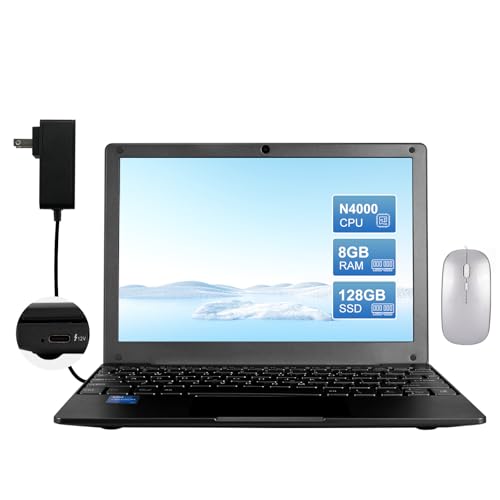
For around $200, you get a Windows 11 machine with 8GB RAM and 128GB SSD, plus a mouse, bag, and charger thrown in. The Celeron N4000 tops out at 2.6GHz and is measurably slower than the N150 in the CHUWI and KOOTIGERS, so anyone tempted by the price needs to be honest about their workload. Light browsing, document editing, and video calls are fine. Anything heavier will test your patience. The 10.1-inch IPS panel is a notch above budget TN displays. At 3.1 pounds it's heavier than it looks for something this small, which matters if you're comparing it against the CHUWI's under-2-pound frame.
Pros:
Cons:
Best for: Anyone who needs Windows on a compact screen and can't stretch past $200.
Check current price on Amazon →

An 8-inch Windows laptop weighing 1.72 pounds is a genuinely unusual product category. The KOOTIGERS runs on the same N150 chip as the CHUWI, with 12GB LPDDR5 RAM and 512GB SSD, so the specs are respectable. The fanless design keeps it silent. At this screen size, you're trading typing comfort for extreme portability; the keyboard works but won't replace a full-sized one for long writing sessions. The metal casing holds up better than plastic competitors, and the anti-glare touchscreen is a practical choice for outdoor use. Battery runs 4 to 6 hours, shorter than both the MacBook Air and the CHUWI.
Pros:
Cons:
Best for: Ultra-mobile users who need a full Windows PC in the smallest possible package and can live with a small screen.
Check current price on Amazon →

The Tylvx occupies a completely different category from everything else here. A 5.7-inch touchscreen with a full QWERTY backlit keyboard that fits in a jacket pocket is remarkable, and it runs genuine Windows 11 on an N150 chip with 16GB RAM and 512GB SSD. The connectivity package is surprisingly robust: HDMI 2.1, DisplayPort 1.2, dual USB-C, and Gigabit Ethernet mean it docks into a full workstation in seconds. The 16.34Wh battery is small by necessity, and typing at 5.7 inches is an acquired skill. This is a niche pick for developers doing remote server work, IT professionals who need Windows access anywhere, or anyone whose non-negotiable requirement is "fits in a pocket."
Pros:
Cons:
Best for: IT professionals and developers who need genuine Windows access anywhere, with optional docking for serious desk work.
Check current price on Amazon →
The single biggest mistake people make buying a mini laptop is treating "small" as the only variable. Screen size, processor generation, RAM, and operating system all matter more than the physical footprint.
There's a practical floor. Below 10 inches, keyboard keys shrink enough that sustained typing becomes uncomfortable for most adults. The 10 to 11.6-inch range is the sweet spot: portable without sacrificing usability for writing. Go below 8 inches only if your use case is truly mobile access to a Windows environment, not extended document work.
The gap between a Celeron N4000 (HBESTORE) and an Intel N150 (CHUWI, KOOTIGERS, Tylvx) is larger than the model numbers suggest. The N150 handles 1080p video, a dozen browser tabs, and light creative work. The N4000 stalls on most of that. The M5 chip in the MacBook Air leaves both behind. Budget accordingly: the $72 Dell Chromebook is not in the same conversation as the $389 CHUWI, and pretending otherwise will lead to a frustrating purchase.
On Windows in 2026, 4GB RAM is not enough. Pages lock up, app switching stalls, and Windows Update will eat your afternoon at the worst moment. Eight gigabytes is workable; 12 to 16GB is comfortable. For storage, 128GB is the minimum on any Windows machine you plan to use regularly. ChromeOS is far less demanding, so 4GB RAM and 64GB storage are genuinely adequate on the Samsung or Dell Chromebooks for browser-based work.
ChromeOS is not a compromise if your work lives in a browser. It boots faster, stays more secure by default, and the Chromebooks on this list are significantly cheaper as a result. If you need Microsoft Office locally, specialist software, or gaming clients, Windows is the only option. If your workflow is Google Docs, video calls, and streaming, ChromeOS is often the smarter choice and the cheaper one.
The Apple MacBook Air M5 is the top pick for everyday use, combining serious processing power with all-day battery life in a 2.7-pound frame. For anyone on a tighter budget, the Samsung Galaxy Chromebook Go covers most everyday tasks well under $200.
They're a strong fit for students who spend most of their time writing papers and attending online lectures. The Samsung Galaxy Chromebook Go is the top student pick on this list: durable, light, and comfortable for typing. Avoid the sub-10-inch Windows options if note-taking for hours at a stretch is the primary use case.
A mini laptop can run any operating system, including Windows or macOS. A Chromebook is a mini laptop that specifically runs ChromeOS. Chromebooks are generally cheaper, more secure, and better suited to cloud-based work. Windows mini laptops offer full software compatibility at higher cost.
For ChromeOS, 4GB handles most users comfortably. For Windows, treat 8GB as the practical minimum for day-to-day use in 2026, and budget for 12 to 16GB if you plan to multitask or work with larger files. The difference shows up quickly once you start juggling more than two or three open applications.
The best mini laptops in 2026 cover more ground than ever, from genuine pocket computers to ultralight machines that rival full-size notebooks. The Apple MacBook Air M5 is the clear best overall: nothing else matches its combination of speed, battery life, and build quality at this size. For students, the Samsung Galaxy Chromebook Go is the value winner. And for travelers who want compact Windows capability without the MacBook price, the CHUWI MiniBook X packs serious specs into under 2 pounds. Still deciding? Ask yourself one question first: do you need specific Windows software? If not, save money with a Chromebook and spend it somewhere else.
This article contains Amazon affiliate links. We may earn a small commission on qualifying purchases at no extra cost to you.


